304575 - Webcam Aplic - Free user manual and instructions
Find the device manual for free 304575 Aplic in PDF.



| Product type | Webcam |
| Brand | Aplic |
| Model | 304575 |
| Connection | USB |
| Maximum resolution | 1080p at 25 fps |
| Built-in microphone | Yes |
| Focus | Manual (focus ring) |
| Operation indicator | Blue LED |
| Recording light | Yes, with ON/OFF switch |
| Mounting | Clip for monitor or tripod thread |
| Installation | Plug and Play, driverless |
| Package contents | Webcam, instruction manual |
| Power supply | Via USB port |
| Dimensions (approx.) | 9.5 × 4 × 4 cm |
| Weight (approx.) | 100 g |
| Maintenance and cleaning | Clean with a soft, dry cloth |
| Safety instructions | Do not open, avoid water, do not use if damaged |
| Operating temperature | Room temperature, avoid thermal shock |
| Compatibility | Windows, Mac OS, Linux (Plug and Play) |
| Warranty | Statutory warranty of conformity |
| Recycling | WEEE compliant, do not dispose of in household waste |
Frequently Asked Questions - 304575 Aplic
User questions about 304575 Aplic
0 question about this device. Answer the ones you know or ask your own.
Ask a new question about this device
Download the instructions for your Webcam in PDF format for free! Find your manual 304575 - Aplic and take your electronic device back in hand. On this page are published all the documents necessary for the use of your device. 304575 by Aplic.
USER MANUAL 304575 Aplic
Thank you for choosing an aplic product. Please read the following user manual carefully so as to get the most from the product you have purchased.
1. Scope of delivery
- Webcam
- User manual
2. Technical data
| Port USB | |
| Resolution maximum 1080p@25fps | |
| Features • built-in microphone | • Manual focus • Power indicator (blue LED) • Scene light |
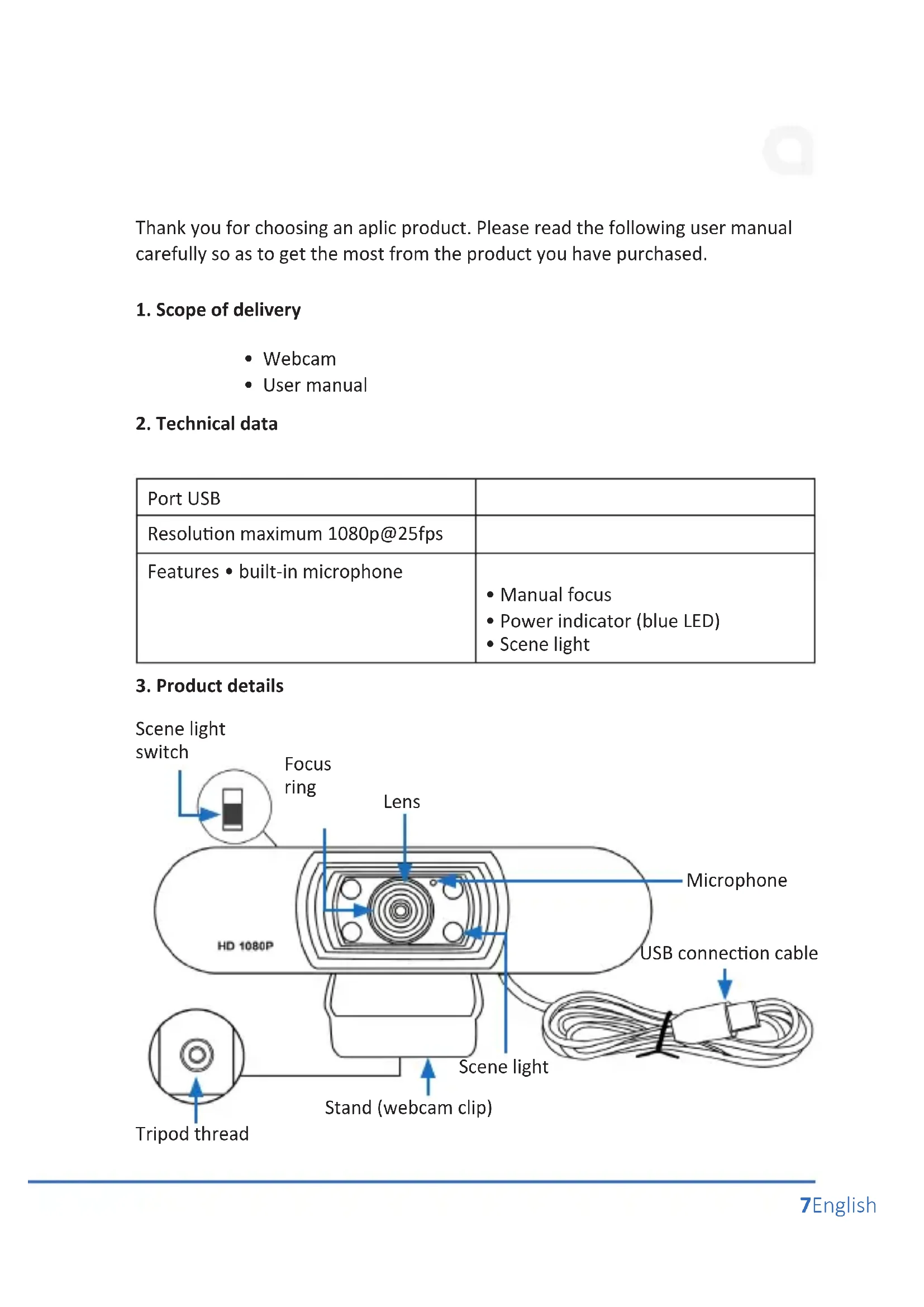
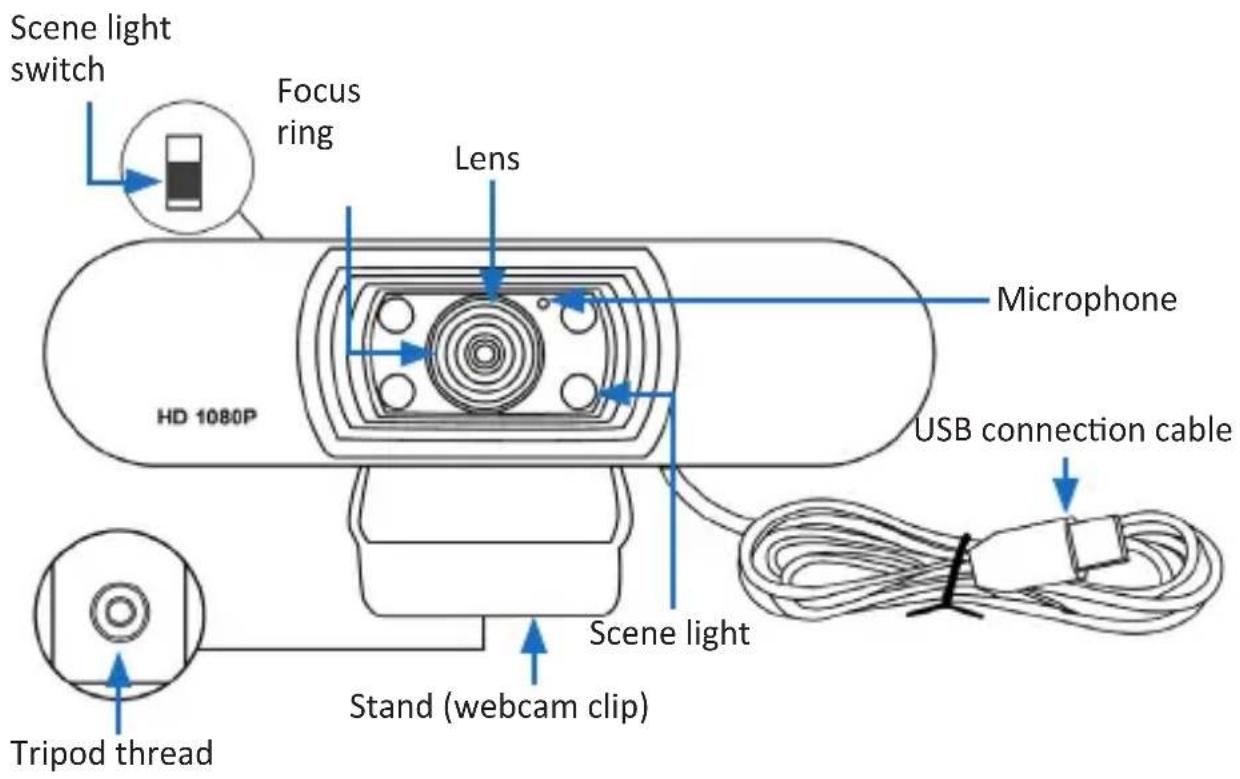
3. Product details
4. Initial use
Take the device out of the package and remove all the packaging material. Place the camera at your desired location. You have the option of fixing the camera to your monitor. Open the webcam clip (stand) and follow the method shown in the figure to fix the webcam to the top of the monitor. Make sure that the clip (stand) is firmly attached and that camera cannot fall down.
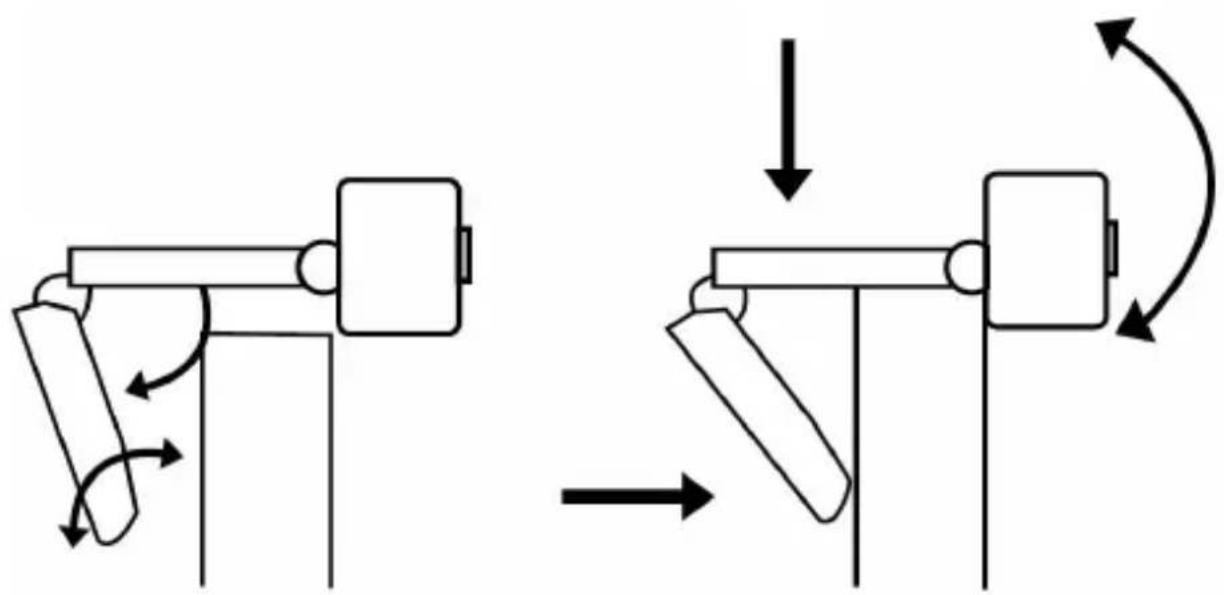
Optionally, a thread is provided at the bottom of the stand using which the camera can be fixed to a tripod.
Connect the USB connection cable to a free USB port of your computer. The device is automatically installed via Plug&Play and is then ready for use.
Note: A switch is provided at the back to turn on the scene light. You can position the switch to "ON" to turn on the scene light, or to "OFF" to turn it off again.
5. Focussing
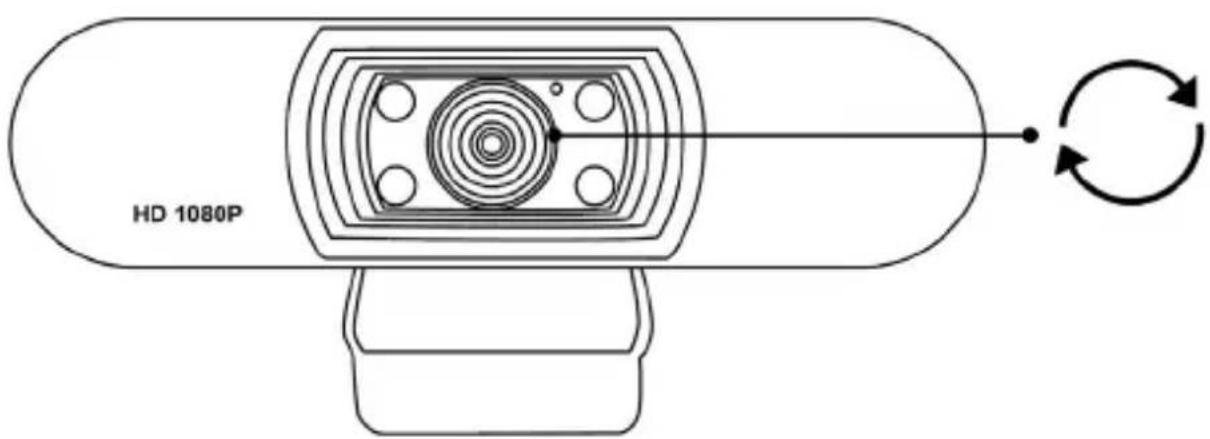
The camera can be focused manually. To do this, rotate the focus ring next to the lens and adjust the desired focus.
6. Safety instructions and disclaimer
Never try to open the device to repair or make modifications. Avoid contact with the mains voltage. Do not short-circuit the product. The device is not waterproof, hence please use it only in dry surroundings. Protect it from high humidity, water and snow.
Keep the device away from high temperatures. Do not expose the device to sudden changes in temperature or strong vibrations, as this could damage the electronic components. Check the device for any damage before using it. The device should not be used if it was subject to impact or has been damaged in some other manner. Please comply with the local regulations and restrictions. Do not use the device for purposes other than those described in the user manual. This product is not a toy. Keep it out of the reach of children or mentally disabled persons. Any repair or modification to the device, which is not carried out by the original supplier, will void any warranty and guarantee claims. The device should only be used by those who have read and understood this user manual. The specifications of the device may be changed without any special prior notification.
7. Disposal instructions
In line with the European WEEE directive, electrical and electronic devices should not be disposed of along with domestic waste. Their components have to be sent separately for recycling or disposal, as improper disposal of toxic and dangerous components may permanently damage the environment. According to the electrical and electronic equipment act (ElektroG), you are obliged (as a consumer) to return (free of charge) electrical and electronic devices to the manufacturer, the point of sale or public collection points at the end of their service life. The relevant local laws regulate the details in this regard. The symbol displayed on the product, in the user manual or/and on the packaging refers to these regulations. With this manner of sorting, recycling and disposal of used devices, you make an important contribution towards protecting our environment.

WEEE directive 2012/19/EU
WEEE Register no.: DE 67896761
The company WD Plus GmbH hereby certifies that the device
304575/20200515SZ276 complies with the fundamental requirements and all other relevant stipulations. A complete conformity statement can be obtained from:
Brand : Aplic
Model : 304575
Category : Webcam