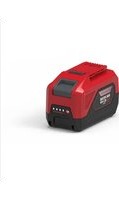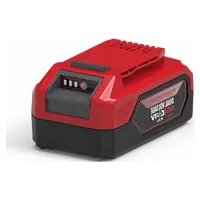
P2448B2 - Battery Powerworks - Free user manual and instructions
Find the device manual for free P2448B2 Powerworks in PDF.


| Technical Specifications | 48V Lithium-ion battery, 2.4Ah capacity |
|---|---|
| Usage | Designed to power compatible gardening tools and electrical equipment |
| Maintenance | Store in a cool, dry place; avoid regular full discharges |
| Safety | Do not expose to extreme temperatures; avoid short circuits |
| General Information | Compatible with the Powerworks range, limited 2-year warranty |
Frequently Asked Questions - P2448B2 Powerworks
User questions about P2448B2 Powerworks
0 question about this device. Answer the ones you know or ask your own.
Ask a new question about this device
Download the instructions for your Battery in PDF format for free! Find your manual P2448B2 - Powerworks and take your electronic device back in hand. On this page are published all the documents necessary for the use of your device. P2448B2 by Powerworks.
USER MANUAL P2448B2 Powerworks
natural_image
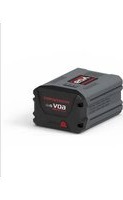
Three identical gray cylindrical batteries with visible charging ports and branding (no text or symbols on body)CE
BAM709/BAM701/BAM710/BAM711
Original Instructions / Übersetzung der Originalanweisungen / Traducción de las instrucciones originales / Traduzione delle istruzioni originali / Traduction des instructions d'origine / Vertaling van de originele gebruiksaanwijzing / Alkuperäisten ohjeiden käännös / Översättning av original instruktionerna / Produsentens instruksjoner / Oversættelse af de originale vejledninger / Překlad originálního návodu / Preklad originálneho návodu / Prevod originalnih navodil / Prijevod izvornih uputa / Az eredeti utasítás fordítása / Превод на оригинаналните инструкции / Orijinal Talimatlarn Tercümesi / Originaalkasutusjuhendi tõlge
DE The POWERWORKS dual voltage 24V/48V battery automatically adjust the required voltage - 24V or 48V * depending on the POWERWORKS dual voltage device used. * Only usable within the POWERWORKS dual voltage 24/48V series.
natural_image
Pure electrical connector diagram without any text or symbolsnatural_image
Pure electrical connector diagram without any text or symbolsnatural_image
Pure electrical connector diagram without any text or symbols1 Important Safety Instructions.....16
2 Safety notes and precautions .....16
3 Environmentally safe battery disposal.... 16
4 Operation....17
4.1 Check battery capacity.... 17
5 Technical data.... 17
6 Warranty....17
EN
English
1 IMPORTANT SAFETY INSTRUCTIONS
For the proper use, maintenance and storage of this battery, it is crucially important that you read and understand the instructions given in this manual.
To avoid serious injury, risk of fire, explosion and danger of electric shock or electrocution:
- If the battery pack case is cracked or damaged, DO NOT insert into the charger. Replace with a new battery pack.
- Charge the battery pack only with the recommended charger.
- DO NOT try to short circuit any terminals of battery pack.
WARNING
If the battery fluid gets in your eyes, flush immediately with clean water for at least 15 minutes. Get immediate medical attention. Do not charge the battery pack in rain or in wet conditions. Do not immerse the tool, battery pack, or charger in water or other liquid.
- Do not allow the battery pack or charger to overheat. If they are warm, allow them to cool down. Recharge only at room temperature.
- Do not place the battery pack in the sun or in a warm environment. Keep at normal room temperature.
- Keep in shady, cool and dry condition, if the battery is not charged for a long time; charge the battery for 2 hours every 2 months.
- The battery pack cells may develop a small leak under extreme usage or temperature conditions. If the outer seal is broken and the leakage gets on your skin:
- Use soap and water to wash immediately.
- Neutralize with lemon juice, vinegar, or other mild acid.
- If leakage gets in your eyes, follow instructions above and seek medical attention.
- Please check prior use, if output voltage and current of the battery charger is suitable for the charging battery pack.
- During transporting, the battery pack needs protective packaging.
- Handle with care.
- Keep away from humidity and fire.
2 SAFETY NOTES AND PRECAUTIONS
- Do not disassemble the battery.
-
Keep away from the children.
-
Do not expose the battery to water or salt water, battery should be stored in a cool and dry location and should place the battery in cool and dry environment.
- Do not place the battery in high-temperature locations, such as near a fire, heater, etc.
- Do not reverse the positive terminal and the negative terminal of the battery.
- Do not connect the positive terminal and the negative terminal of the battery to each other with any metal objects.
- Do not knock, strike or step on the battery.
- Do not solder directly onto the battery and pierce the battery with nails or other edge tools.
- In the event that the battery leaks and the fluid gets into one's eye, do not rub the eye. Rinse well with water.
- Immediately discontinue use of the battery, if, while using the battery emits an unusual smell, feels hot, changes color, changes shape, or appears abnormal in any other way.
3 ENVIRONMENTALLY SAFE BATTERY DISPOSAL

WARNING
If the battery pack cracks or breaks, with or without leaks, do not recharge it and do not use. Dispose of the battery and replace with a new battery pack. DO NOT ATTEMPT TO REPAIR IT! To avoid injury and risk of fire, explosion, or electric shock, and to avoid damage to the environment:
- Cover the battery's terminals with heavy-duty adhesive tape.
- DO NOT attempt to remove or destroy any of the battery pack components.
- DO NOT attempt to open the battery pack.
- If a leak develops, the released electrolytes are corrosive and toxic. DO NOT get the solution in the eyes or on skin, and do not swallow it.
- DO NOT place these batteries in your regular household trash.
- DO NOT incinerate.
- DO NOT place them where they will become part of any waste landfill or municipal solid waste stream.
• Take them to a certified recycling or disposal centre.
English
4 OPERATION
4.1 CHECK BATTERY CAPACITY
Press the battery capacity indicator (BCI) button. The lights will illuminate according to the batteries capacity level. See chart below:
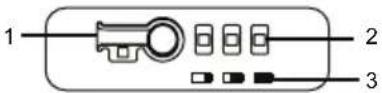
| Lights Capacity | |
| 3 Green Lights The battery is at 80-100% capacity. | |
| 2 Green Lights The battery is at 50-80% capacity. | |
| 1 Solid Green Light | The battery is at 20-50% capacity. |
| 1 Blinking Green Light | The battery is at 10-20% capacity. |
| Lights go out | The battery is under 10% capacity and requires charging immediately |
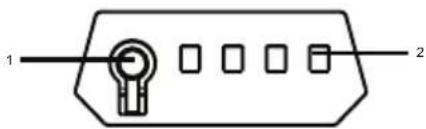
natural_image
Pure electrical connector diagram without any text or symbols| Lights Capacity | |
| 3 Green Lights The battery is at 80-100% capacity. | |
| 2 Green Lights The battery is at 50-80% capacity. | |
| 1 Solid Green Light | The battery is at 20-50% capacity. |
| 1 Blinking Green Light | The battery is at 10-20% capacity. |
| Lights go out | The battery is under 10% capacity and requires charging immediately |
* 1. BATTERY CAPACITY INDICATOR (BCI) BUTTON
-
LIGHT METRE
-
BATTERY METRE
BATTERY PROTECTION FEATURES
This lithium-ion battery packs are designed with features that protect the lithium-ion cells and maximize battery life.
If the tool stops during use, release the trigger to reset and resume operation. If the tool still does not work, the battery needs to be recharged.
The lithium-ion battery pack can be used in temperatures down to -14^ ( 6.8^ ). Put the battery pack on a tool and use the tool in a light duty application. After about a minute, the pack will warm up and begin operating normally.
5 TECHNICAL DATA
| Model P24B2 | |
| Battery 21.6V 2.0 | AH, 43.2Wh 24V MAX |
| Voltage per cell 3 | 6V |
| Cell number 6 | |
| Charge time | 60min. (use CAM805 Charger) |
| 30min. (use CAM806 Charger) |
| Model P2448B2 | |
| Battery 21.6V 4.0 | AH, 86.4Wh 24V MAX |
| 43.2V=2.0AH, 86.4Wh 48V MAX | |
| Voltage per cell 3 | 6V |
| Cell number 12 | |
| Charge time | 120min. (use CAM805 Charger) |
| 60min. (use CAM806 Charger) |
| Model P2448B4 | |
| Battery 21.6V 8.0 | AH, 172.8Wh 24V MAX |
| 43.2V=4.0AH, 172.8Wh 48V MAX | |
| Voltage per cell 3.6V | |
| Cell number 24 | |
| Charge time | 240min. (use CAM805 Charger) |
| 120min. (use CAM806 Charger) | |
| Model P2448B6 | |
| Battery | 21.6V=42.0AH, 259.2Wh 24V MAX |
| 43.2V=6.0AH, 259.2Wh 48V MAX | |
| Voltage per cell 3 | 6V |
| Cell number | 24 |
| Charge time | 360min. (use CAM805 Charger) |
| 180min. (use CAM806 Charger) |
6 WARRANTY
(The full warranty terms and conditions can be found on POWERWORKS webpage)
English
The POWERWORKS warranty is 3 years on the product, and 2 years on batteries (consumer/private usage) from the date of purchase. This warranty covers manufacturing faults. A faulty product under warranty might be either repaired or replaced. A unit that has been misused or used in other ways then described in the owner's manual might be rejected for warranty. Normal wear, and wear parts are not considered as warranty. The original manufacturer warranty is not affected by any additional warranty offered by a dealer or retailer.
A faulty product must be returned to the point of purchase in order to claim for warranty, together with the proof of purchase (receipt).
EN
natural_image
Pure electrical connector diagram without any text or symbols| Model P2448B2 | |
| Accu 21,6V 4.0AH | 86.4Wh 24V MAX |
| 43,2V=2.0AH, 86.4Wh 48V MAX |
Nederlands
natural_image
Pure electrical connector diagram without any text or symbolsnatural_image
Pure electrical connector diagram without any text or symbols1 DÔLEŽITÉ BEZPEČNOSTNÉ POKYNY
natural_image
Pure electrical connector diagram without any text or symbols| Kontrolky Kapacita | |
| 3 zelené kontrol-ky | Batéria má kapacitu 80-100 %. |
| 2 zelené kontrol-ky | Batéria má kapacitu 50-80 %. |
| 1 zelená kontrol-ka | Batéria má kapacitu 20-50 %. |
| 1 blikajúca zele-ná kontrolka Kontrolka | Batéria má kapacitu 10-20 %. |
| Kontrolky nes-vietia | Batéria je nabitá na menej než 10 % kapacity a vyžaduje okamžité na-bitie |
* 1. TLAČIDLO INDIKÁTORA KAPACITY BATÉRIE (BCI)
2. STAVOVÉ KONTROLKY
3. STAV BATÉRIE
FUNKCIA OCHRANY BATÉRIE
natural_image
Pure electrical connector diagram without any text or symbols| Lučke Napoljnenost | |
| 3 zelene lučke Baterija je 80–100-% napolnjena. | |
| 2 zeleni lučki Baterija je 50–80-% napolnjena. | |
| 1 svetleča zele-na lučka | Baterija je 20–50-% napolnjena. |
| 1 utripajoča zele-na lučka | Baterija je 10–20-% napolnjena. |
| Lučke ugasnejo | Baterija je napolnjena manj kot 10 % in jo je treba takoj napolniti |
* 1. GUMB INDIKATORJA NAPOLNJENOSTI BATERIJE (BCI)
-
SVETLOBNA LESTVICA
-
BATERIJSKA LESTVICA
LASTNOSTI ZAŠČITE BATERIJE
natural_image
Pure electrical connector diagram without any text or symbolsnatural_image
Pure electrical connector diagram without any text or symbolsnatural_image
Pure electrical connector diagram without any text or symbolsnatural_image
Pure electrical connector diagram without any text or symbolsnatural_image
Pure electrical connector diagram without any text or symbolsnatural_image
Pure electrical connector diagram without any text or symbols| Lys Ladenivå | |
| 3 grønne lys Batteriets ladenivå er på 80–100 %. | |
| 2 grønne lys Batteriets ladenivå er på 50–80 %. | |
| 1 grønt lys Batteriets ladenivå er på 20–50 %. | |
| 1 blinkende grønt lys | Batteriets ladenivå er på 10–20 %. |
| Lysene slukkes | Batteriets ladenivå er på under 10 %, krever umiddelbar lading |
* 1. BATTERIINDIKATOR-KNAPP (BCI)
-
LYS MÅLER
-
BATTERI MÅLER
FUNKSJONER FOR BATTERIBESKYTTELSE
natural_image
Pure electrical connector diagram without any text or symbolsnatural_image
Pure electrical connector diagram without any text or symbols-
VALO- MITTARI
-
AKKU- MITTARI