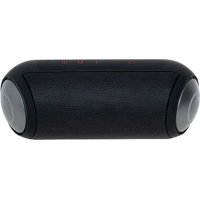
CR 1901 - Loudspeaker CAMRY - Free user manual and instructions
Find the device manual for free CR 1901 CAMRY in PDF.



| Product Type | Bluetooth Speaker |
| Brand | Camry |
| Model | CR 1901 |
| Power Supply | 5V ─ 2A (via USB) |
| Battery Capacity | 2000 mAh |
| Charging Time | 3.5 hours |
| Music Playback Time (at 50% volume) | Approximately 8 hours |
| Bluetooth Version | 5.0 |
| Bluetooth Range | Approximately 10 m (not specified, standard estimate) |
| Connectivity | Bluetooth, USB, SD/TF card, AUX input |
| Main Functions | Play/Pause, volume control, track change, TWS mode, call answering, Siri activation |
| Playback Modes | Standard, Outdoor (more bass) |
| Lighting | Synchronized RGB, Breathing RGB, Off |
| Safety | Do not expose to water or moisture, do not use with damaged cable, disconnect after use |
| Maintenance and Cleaning | Clean with a soft dry cloth, do not immerse |
| Repairability | Repairs by authorized professional only |
| Usage | Indoor use only, room temperature, protect from direct sunlight |
| Package Contents | Speaker, USB cable (not specified, estimate), manual |
| Weight (estimated) | Approximately 500-800 g (estimate based on battery) |
| Warranty | Warranty according to conditions, different for commercial use |
Frequently Asked Questions - CR 1901 CAMRY
User questions about CR 1901 CAMRY
0 question about this device. Answer the ones you know or ask your own.
Ask a new question about this device
Download the instructions for your Loudspeaker in PDF format for free! Find your manual CR 1901 - CAMRY and take your electronic device back in hand. On this page are published all the documents necessary for the use of your device. CR 1901 by CAMRY.
USER MANUAL CR 1901 CAMRY
SAFETY CONDITIONS IMPORTANT INSTRUCTIONS ON SAFETY OF USE PLEASE READ CAREFULLY AND KEEP FOR FUTURE REFERENCE
The warranty conditions are different, if the device is used for commercial purpose.
- Before using the product please read carefully and always comply with the following instructions. The manufacturer is not responsible for any damages due to any misuse.
- The product is only to be used indoors. Do not use the product for any purpose that is not compatible with its application.
- The applicable voltage is 5V = 1A . For safety reasons it is not appropriate to connect multiple devices to one power outlet.
- Please be cautious when using around children. Do not let the children to play with the product. Do not let children or people who do not know the device to use it without supervision.
- WARNING: This device may be used by children over 8 years of age and persons with reduced physical, sensory or mental capabilities, or persons without experience or knowledge of the device, only under the supervision of a person responsible for their safety, or if they were instructed on the safe use of the device and are aware of the dangers associated with its operation. Children should not play with the device. Cleaning and maintenance of the device should not be carried out by children, unless they are over 8 years of age and these activities are carried out under supervision.
- After you are finished using the product always remember to gently remove the plug from the power outlet holding the outlet with your hand. Never pull the power cable!!!
- Never put the power cable, the plug or the whole device into the water. Never expose the product to the atmospheric conditions such as direct sun light or rain, etc.. Never use the product in humid conditions.
8.Periodically check the power cable condition. If the power cable is damaged the product should be turned to a professional service location to be replaced in order to avoid hazardous situations. - Never use the product with a damaged power cable or if it was dropped or damaged in any other way or if it does not work properly. Do not try to repair the defected product yourself because it can lead to electric shock. Always turn the damaged device to a professional service location in order to repair it. All
the repairs can be done only by authorized service professionals. The repair that was done incorrectly can cause hazardous situations for the user.
- Never put the product on or close to the hot or warm surfaces or the kitchen appliances like the electric oven or gas burner.
11.Never use the product close to combustibles.
12.Do not let cord hang over edge of counter or touch hot surfaces.
13.Never leave the product connected to the power source without supervision. Even when use is interrupted for a short time, turn it off from the network, unplug the power. - In order to provide additional protection, it is recommended to install residue current device (RCD) in the power circuit, with residual current rating not more than 30mA . Contact professional electrician in this matter.
Device description Bluetooth speaker:
Control Panel:
A1. On / Off button A2. Minus button A3. Plus button A4. Mode button
A5. Settings button A6. Control light
Back Panel:
B1.AUX input B2. SD / TF card slot B3. USB port
First use:
- Remove all packing material from device
- Turn on the device by pressing and holding the On / OFF button for 3 seconds (A1)
- Once the device is turned on it will emit a sound and the control light (A6) will turn on and start blinking.
- Open your transmitting device (Smartphone, tablet etc.) find the device CR 1901 and pair with the device.
- The control light (A6) will stop blinking and will constantly shine.
- You can now use the device.
Button use and description:
On/Off button (A1):
Long press: Turn the device on or off.
Single press for TWS connection or TWS disconnection.
Double short press: Rouse / Wake up Siri
Minus Button (A2):
Short press: Volume down
Long press: Previous track
Plus Button (A3):
Short press: Volume up
Long press: Next track
Mode button (A4):
When connected to Bluetooth/sd card:
Short press: Play / Pause
When someone is calling you:
Short press: to answer call
Double short press: hang up on call
Long press: Reject call
If the Bluetooth is disconnected and the SD card / AUX is inserted:
Long press: change from Bluetooth playback to SD card /AUX playback
Settings button (A5):
Short press: Change between Standard playback mode and outdoor playback mode. Less Bass or More Bass.
Long press: Change the lighting setting of the device: Synchronized RGB, Breathing RGB, Turn off lights.
Technical details:
Input power: 5V = 2A
Battery capacity: 2000 mAh
Charging time: 3,5 Hours
Music playback time (50% volume): Around 8 Hours
Bluetooth: V 5.0
To protect your environment: please separate carton boxes and plastic bags and dispose them in corresponding waste bins. Used appliance should be delivered to the dedicated collecting points due to hazardous components, which may effect the environment. Electrical appliance must be returned in order to reduce its reuse and utilization. If the device contains batteries they should be delivered to dedicated points
DEUTSCH
Ecnn Bluetooth OTKnHcH N BCtAblHe SA-D-KapTa / AUX:
IINTeJIbHoe HaxaTHe: nepexoD OT BocnpOn3BeDeHnBlae Bluetooth K BocnpOn3BeDeHnO c SD-kapTb/ AUX.
Khonnka Hactpoek (A5):
Kopotkoe Haxatne: nepeknIOueHne MExdy cTaHapTHbIM peXMMOM BOCpON3BeDeHnI n peXMMOM BOCpON3BeDeHnI Ha OTkpblom Bo3dyxe. MeHbIe 6aca nn 60JIbIe 6aca.
Дителhoeнха.Te:ИЗMeHHeHnE HAcTpoE KOCBeIeHnYycTpOcTBa:CINxPoHn3NpOBaHHbR RGB,ДыхаHne RGB, BbIKJIOUeHnE CBETA.
TexHueeckne DetaJI:
BxOHaH MaHocTb:5B,2A
EMKOCb aKKyMylTopa: 2000 MAt
Bpem3apjdk:3,5yaca
Bpem Bocnpon3BeHnMy3bIKn (rpomKocTb 50%):okojo 8 yacob
Bluetooth: Bercsna 5,0
3a60Tc6b6 OkpykaHue Cpee..YnakOBky n3 KapToHa nepeaIte,NoKaNyIcTa,Ha MaKyNaTyPy. POni3TuNHeOBbIe MeUKN (PE) BbIKDaTb B pe3epByap dnn pnaTmacB. N3HOWeHoe yCTpoIcTB HApO nepeaTb COOTBeTcByIOuTOky XpaEHnA, TAK KAc HaxoJAAeCEBAyCTpoIcTBeONaChIbe CoCTABJIouIe MOrY ABJIbTaCByPO3OI DnA OKpykaHue Cpebl. 3JeKtpnuCeOE yCTpoIcTBo HApO nepeaTb TaKIM O6pa3OM, YTObI OrpAHmITb ERO NOBtOPHoE yNOTpe6JIeHne I NCpOJIb3OBAHHe.EcIn B yCTpoIcTBe HaxoJATcBAtapEn, IN HoBOBITMy NEpeaTb B TOkY XpaEHnA OTdJIbHO. YCTpoIcTB He BbIKDaTb B pe3epByap dnn KOMMyHaJIbHix OTXoIDob!
(HR) HRVATSKI
SIGURNOSNI UVJETI VAZNE UPUTE Q SIGURNOJ UPORABI PAŽLJIVO PROCITAJE I SACUVAJTE ZA BUDUCU REFERENCU
A1. Paalle/pois-painike A2. Minuspainike A3. Plus-painike A4. Tilapainike
TpBaIe HaTnCKaHH: BiXInJeHH BKNKnky
JaKuO Bluetooth BID'eHaHo, a SD-kaPty / AUX BCTaBneHo:
TpBaJIe HATnCKaHHa: nepexiD i3 BiITbOpEHn Bluetooth Ha BiITbOpEHn 3 SD-kapTu / AUX
Khonka HanaaTyaHb (A5):
Kopotke HatnckaHH: nepemkaHH mix cTahdAPTHM peKMOM BiTBOpeHH Ta peKMOM BiTBOpeHH Ha Bynuci. MeHwe 6acib abo 6ilbwe 6acib.
TpBaJIe HaNTCKaHHa: 3MiHb HalaHTyBaHHaOCBITJeHHa npicTpO: CnHXpoHi3OBaHn RGB, DnxAIOuHn RGB, BmKHiB cBtNo.
Texhihi detani:
BxiHa noTyxHicThb:5V 2A
Emhictb akymyntopa: 2000 mAr
Yac 3apAkn:3,5 roDnHn
Yac BiTBopeHMy3n (50% rUyHoCTi): 6JIN3bKO 8rOHN
Bluetooth: V 5.0

Y iHTrepecax HABKOLINHbOTo CepeIOBnla.
Byb Iacka, BiDaaTe KapToHny ynaKOBky B Micce 360py MykyIaTpyn. PoiITnEHOBI MiIKN (PE) BkHyTN B CMTHNK dIy pIaCTKy. BiInpaOboAHm npIcTpi NOBHeh 6yTu BiInpaBneHn y BiIOBIDHY TOKy 36epirAHn, TOMy 1o B npIcTpoI e He6e3neHi IHpeDiEHTn, kI MOKYt CTAHOBTn 3arPo3y HABKOINHbOMy cepeOBOuY. ENeKTpuHm npIcTpi Notp6Ho NOBepHyTu TAK, 1o6 OMeKmTu NOro NOBTOpe BkOpNCtAHn. RaIoo y npIcTpoI e 6atepeKn, To notp6HO IX BNTrHyTu i BiDaTu Do BiIOBIDHO rHTky.
(IT)ITALIANO
CONDIZIONI DI SICUREZZA ISTRUZIONI IMPORTANTI SULLA SICUREZZA D'uso LEGGERE ATTENTAMENTE E CONSERVARE PER RIFERIMENTO FUTURO
A_ = 2
j 5V 1A.
121g 4
- 111111111111111111111111111
Jabla
8 5
g
g 121 g 1000 Lw n 1000000000000000000000000000000000000000
Jbblly 1y jy. aiee y buiy rall jbiy lpc g jglln jy
08 1g jglj 2y 4i i g jge jie jie jie jie jie jie jie jie jie jie jie jie
1
yI 6.
1111 1
121 7.
1 1
a
8.
aal gall 111111111111111
12 1 g 1 1 1 1 1 1 1 1 1 1 1 1 1 1 1 1 1 1 1 1 1 1 1 1 1 1 1 1 1 1 1 1 1 1 1 1
1 1
y. 100
y
i 1
10.
.
11.
12.
13.
aalblllglg a511nnae eae
RCD) 14.
30 2
j
S四边形 = S APQ + S_ AQP
jA4. jjA3. jA2.
KpaTKo HATnCKaHe: CmHa MeXy CTaHApTeH pEXkIM Ha Bb3Pon3BExkDaHe n pEXkIM Ha Bb3Pon3BExkDaHe Ha OTKPITTO.
Ito-maiko6acnJINIOBue6ac.
IpoIbJnKInTeJIHO HaTnCKaHe: IpOMEHeTe HAcTpOuKaTa 3a OCBetJIeHne Ha yCTpOuCTBOTo:CnHXPOHn3upaH RGB,INKIOUcHcE CBETJINHtE.
Texnueckn npdoepnoctn:
BxOJaMoHocT:5V-2A
KanaqtetHa6aTepyra:2000mAh
Bpeme 3a 3apekdahe:3,5 yaca
BpeMe 3a Bb3npoun3Bexdane Ha My3nka (50% o6em): OkoJIO 8 yaca
Bluetooth: V 5.0
3a Da 3aunHTte OKJHaTc cn CpeJa: MOJ, OTdJeTe KapTOHeHTe KytN HaJIOHOBITE TOp6uKn I n3XBpIeTe B CbOTBeTHnte KOUeta 3a OtnaDbu. N3noJ3BaHnT ypeT TpaBa Da 6bDe DoCTaBeH Do cNeuaHNTe pyHKToBe 3a Cb6puAHe, KOTo Moat Da nobJraT Ha OKJHaTa CpeJa. He n3XBpJrTe To3n ypeB B o6NKHOBEH KOW 3a OTnaDbu.
TÖHLÜKÖSIZLIK ŞÖRTLÖRİ ISTIFADÖ TÖHLÜKÖSIZLIĞI ÜZRÖ VACİB TÖLIMATLARI DIQQÖTLÖ OXUYUN VÖ GÖLÖCÖK ISTIFADÖ Üçün SAXLAYIN.

- SAFETY CONDITIONS IMPORTANT INSTRUCTIONS ON SAFETY OF USE PLEASE READ CAREFULLY AND KEEP FOR FUTURE REFERENCE
- DEUTSCH
- (HR) HRVATSKI
- SIGURNOSNI UVJETI VAZNE UPUTE Q SIGURNOJ UPORABI PAŽLJIVO PROCITAJE I SACUVAJTE ZA BUDUCU REFERENCU
- (IT)ITALIANO
- CONDIZIONI DI SICUREZZA ISTRUZIONI IMPORTANTI SULLA SICUREZZA D'uso LEGGERE ATTENTAMENTE E CONSERVARE PER RIFERIMENTO FUTURO
Brand : CAMRY
Model : CR 1901
Category : Loudspeaker