BN 7x50 DCM - Binoculars MINOX - Free user manual and instructions
Find the device manual for free BN 7x50 DCM MINOX in PDF.



| Product Type | Marine binoculars with integrated digital compass |
| Brand | Minox |
| Model | BN 7x50 DCM |
| Magnification | 7x |
| Objective Diameter | 50 mm |
| Prism System | Porro |
| Field of View at 1000 m | 126 m |
| Exit Pupil | 9 mm |
| Twilight Factor | 107 |
| Waterproof | Up to 5 m, floating |
| Power Supply | 1 CR2 lithium battery |
| Dimensions (L x W x H) | 160 x 195 x 72 mm |
| Weight | 1250 g |
| Digital Compass | Integrated, tilt compensation ±60° vertical, ±45° lateral |
| Inclinometer (Tilt) | Angle measurement ±60°, accuracy 1° |
| Barometer | Units: hPa, inHg, mmHg; graphical history 8h |
| Altimeter | 0-9000 m / 0-30000 ft, update 1s or 10s |
| Thermometer | -20°C to +55°C, units °C/°F, graphical history |
| Stopwatch | Up to 3 intermediate time memories |
| Clock | 0:00 to 23:59, adjustable |
| Diopter Adjustment | Individual per eyepiece, from -3 to +3 diopters |
| Eyepiece Cups | Screwable and foldable, interchangeable |
| Maintenance | Lens cleaning with optional MINOX cleaning kit No. 69731 |
| Warranty | 2 years (extendable upon registration) |
Frequently Asked Questions - BN 7x50 DCM MINOX
User questions about BN 7x50 DCM MINOX
0 question about this device. Answer the ones you know or ask your own.
Ask a new question about this device
Download the instructions for your Binoculars in PDF format for free! Find your manual BN 7x50 DCM - MINOX and take your electronic device back in hand. On this page are published all the documents necessary for the use of your device. BN 7x50 DCM by MINOX.
USER MANUAL BN 7x50 DCM MINOX
Nautic Binoculars with fully integrated digital compass
Getting to know your binoculars
Setting up your binoculars
-
Attaching the carrying strap 37
-
Attaching the eyepiece caps 37
-
Attaching the objective lens caps 38
-
Inserting and changing the battery 38
Binocular settings
-
Interpupillary distance adjustment 38
-
Focusing 39
-Diopterscale39
-
Use with and without eyeglasses 39
-
Changing the eyecups 39
-
Attaching a tripod 40
Digital compass
-
Turning the compass on 40
-
Calibrating the digital compass 40
-
Menu control and settings
-
Compass (CMP)
-
Measuring distance and/or height
using the graticule
35 -Display and record compass bearings 44
35 -Delete bearings 44
35 -Tilt function (TLT) 44
36 Measuring distance or height using the tilt angle 4
37 - Setting the brightness of the LCD display 45
Digital barometer with
recording functions (BAR) 45
-
Setting the barometer measuring units 46
-
Setting the sea level air pressure 46
38 - Altimeter (ALT) 46
-
Manual calibration of the altimeter 47
-
Thermometer (TEMP) 48
-
Selecting temperature history 48
-
Digital stopwatch (TIMER) 48
-Stopwatch settings 48
- Recording split times with the stopwatch 49
- Solving realistic questions 10
40 - 1986-1987
-Setting the time (WATCH) 49
General instructions: maintenance and care 50
1 Binoculars case 50
-
Cleaning your bioculars 50
-
Cleaning the objective and eyepiece lenses 50
42
Serial number
Further recommendations
Compass quick guide
Technical data
Warranty terms
MINOX customer
Scope of delivery
Binoculars
- Neoprene carrying strap
- Carrying case
Objective lens cap
Eyepiece cap
- Folding eyecups
Batteries
Operating elements
50 1. Twisting eyecups
51 2.Ocular ring
52 3. Navigation buttons Up / Down
58 4. Battery compartme
61 5. T-screw battery compartment cap
61 6. Tripod mounting thread
7. Tripod mounting thread cap
8. Memory button
9. Carrying strap bracket
10. On/Off button
11.Mode dial
12. Eyepiece cap
13. Carrying strain loop
14. Objective lens caps
15. Objective lens cap tongues
Optional accessories
Floatable neoprene carrying strap, order no. 69735
Tripod adapter, order no. 69727
Lens cleaning set, order no. 69731
Preface
Congratulations to the purchase of your MINOX BN 7x50 DCM nautic binoculars, with a fully integrated digital compact. As with all MINOX products, these innovative binoculars adhere to the old traditions of our establishment in combining high functionality, reliability and comfort with the outstanding quality of robust, dependable mechanics into the smallest amount of space.
The MINOX BN 7× 50 DCM was specially constructed for use in water sports and nautical activities. Not only for observation and navigation at sea, the MINOX BN 7× 50 DCM is a reliable and useful tool for any water sports enthusiast or even on land. The fully integrated digital compass allows for an especially ergonomic and intuitive operation.
These instructions should help you to appreciate the full range of functionality and to apply these to the fullest. Please take a moment to read the following safety and operational guidelines, and get to know your new MINOX BN 7x50 DCM binoculars before putting them to use.
Please note: Disposing of electrical and electronic devices
(valid in the EU, as well as other European countries with different waste collection systems)
This device contains electrical and electronic components and should not be disposed of in domestic waste. Instead, please bring this device to the local or community recycling center, usually set up for this express purpose and is usually free-of-charge. The device contains a changeable battery when the battery is empty, please remove it and dispose of according to regulations. You can find out more information about this topic at the local council, waste disposal firm or in the shop where you purchased these binoculars.
Getting to know your binoculars
Place my MINOX BN 7x50 DCM vertically on a flat surface in front of you, with the objective lenses down. The eyepieces with their twisting rubber eyecups (1) should be upward with the control buttons facing you. To the right, you will see the Up / Down navigation buttons (3). To the left, you will see the On / Off button (10) surrounded by the mode dial (11). Below that, you will
find the memory button (8) to save and confirm readings and settings. At the center of the two binocular halves, is the hinged construction to allow for an individual setting to compensate for the interpupillary differences between the user's eyes. To the right and left of the binoculars are the carrying strap brackets (9). At the bottom and between the objectives, you will find the tripod mounting thread (6) with its screw on cap (7). This thread, together with the MINOX tripod adapter, allows for the mounting of your MINOX BN 7x50 DCM to a tripod. To the right of the tripod thread, you will find the battery compartment (4) with its T-screw cap (5).
An overview of the product highlights:
- Binoculars with high grade porro prism system
- Fully integrated digital compass with many other features
- Precise, automated tilt compensation
- Exchangeable eyecups
- Single ocular focus adjustment
- Floatable and water tight down to 1 meter / 3.28 feet
- Non-fogging and filled with nitrogen gas
- Robust housing with non-slip rubber armoring
General instructions for BN7x50DCM
Attaching the carrying strap
A neoprene carrying strap is included in the delivery of your MINOX BN 7x50 DCM, which helps to keep your binoculars aloat in the case that they should fall into the water. To avoid loss or damage to the binoculars if they should fall, we suggest strongly to use the strap at all times when using your MINOX binoculars.
Thread the strap through one of the brackets (9) on your binoculars. Pull the end of the strap back towards the buckle and then through the bottom of the buckle. Repeat this procedure for the other side of your binoculars. After you have successfully attached the carrying strap, you can adjust it to your preferred length.
Attaching the eyepiece caps
Attach the eyepiece caps by threading the carrying strap through the loop (without slit) before the strap is attached to the binoculars. It is highly advisable to cover the eyepieces when the binoculars are not in use to protect the ocular lenses from foreign substances like rain, dust or sand. When using the binoculars, the caps will hang on your carrying strap to avoid loss and will not get in the way.
Attaching the objective lens caps
It is advisable to use the objective lens caps to further protect your BN 7x50 DCM from foreign bodies like rain, saltwater, dust or sand. These can be attached by simply pulling the tongues over the tripod mounting thread cap (7) and manoeering them until properly secured under the cap. When using your binoculars, the caps will now hang away from the objective lenses and not get in the way. If you would like to remove the lens caps from the binoculars, carefully pull the tongues out and over the tripod mounting thread and cap.
Inserting and changing the battery
Your MINOX BN 7x50 DCM possesses a digital compass which requires a CR2 lithium battery. To insert and change the battery, please follow the next steps:
-
Open the battery compartment lid (5) by turning it counter-clockwise.
-
Remove the battery from the battery compartment (4) and dispose of at the appropriate collection point for old batteries.
- Insert the new battery (CR2), taking the +/- poles into consideration: (+) towards the eyepieces.
- Close the battery compartment by turning the lid (5) clockwise. Make sure that the lid is firmly in place to ensure watertightness.
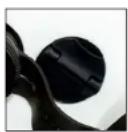
Fig.1 Fig.2
Important note: If the battery is removed or replaced, you will have to reset the various functions of your digital compass (watch, actual altitude, etc.).
Binocular settings
Before using your MINOX RN 7x50 DCM, the binoculars should be set in accordance to your personal needs. To do this, please follow the next steps carefully.
Interpupillary distance adjustment
Your MINOX BN 7x50 DCM binoculars are hinged in the middle to allow for an individual compensation of interpupillary distances. Your binoculars are adjusted
properly when you can see a large, round image with both eyes, without vignetting.
Focusing
Your MINOX BN 7 × 50 DCM is equipped with single ocular focusing. This has the advantage that anything viewed from 12 meters (39.37 feet) to infinity remains perfectly sharp and clear, without having to make any further adjustments. You can adjust your binoculars to distances less than 12 meters (39.37 feet) as well but for that, everything beyond 12 meters will remain out-of-focus. The adjustment range of the oculars lie between -3 and +3 diopters. To ensure an optimal visual performance from the outset, please follow the next steps: Look at an object about 50 meters (approx. 55 yards) away. Close your right eye and look through the binoculars with your left eye. Turn the ocular ring to the right or left until the viewed object is clearly focused. Now close your left eye and repeat this procedure with the right ocular. Your binoculars are now set to your individual visual performance requirements.
Diopter scale
Both oculars are equipped with a diopter scale. Make a note of your individual diopter setting and if desired, mark the position with a permanent marking pen. In
this way, you can find your settings quickly in the case that someone else used your binoculars and adjusted the oculars for their personal use.
Use with or without eyeglasses
Your MINOX BN 7x50 DCM is equipped with twisting eyecups to enable a quick adjustment of the eye relief, ie. the distance between the eye and the ocular lens, for those who do or do not wear glasses.
Users who do not wear glasses, turn the eyecups counterclockwise. This allows for a perfect distance between the eyes and the ocular lens and provides for a comfortable positioning of the binoculars, which also helps to reduce stray light. For those wearing eyeglasses, the eyecups must be turned clockwise all the way down to be able to see the entire field of view without vignetting.
Changing the eyecups
- Folding eyecups are included within the scope of delivery to meet the individual needs and requirements of MINOXO customers. The eyecups are equipped with a left-handed thread, to allow for a quick and simple exchange. To remove the eyecups, turn them to the right (clockwise) - to attach, turn to the left (counter-clockwise). Leave the eyecups extended for use without glasses. For those
wearing glasses, fold the rubber eyecups down to enable a maximum field of view, right into the edges.
Warning: Do not look into very bright light sources or the sun with your binoculars as this can cause irreparable damage to the eyes.
Attaching a tripod
To ensure tireless viewing with your MINOX BN 7x50 DCM, a tripod adapter can be mounted to the binoculars which can then be attached to nearly any tripod. For this, we recommend the optional MINOX tripod adapter (order nr. 69727). To attach the adapter, first remove the tripod mounting thread cap (7) and then turn the mounting screw on the adapter clockwise until tight. Keep the cap in a safe place and reattach after removing the tripod adapter.
Digital compass
General instructions for BN 7x50 DCM
Tip: It is recommended to leave the objective lens caps on to ease viewing during the following calibration and adjustment procedures.
Turning the compass on
To turn the compass in your MINOX BN 7x50 DCM on, press the On/Off button (10). When looking through the binoculars, you will now see a red LED display (CMP) in the center of the field of view. By pressing the On/Off-Button again for at least 2 seconds, the compass will be deactivated. If you do not make any other settings, the display will automatically turn itself off after approximately one minute. In this way, your view remains undisturbed and battery power can be saved.
Calibrating the digital compass
One of the main features of your MINOX BN X750 DCM is the fully integrated digital compass, which as opposed to analog compasses, can be calibrated at any time. This has the advantage that negative influences caused by nearby metal objects or electrostatically charged fields can easily be compensated for. Before using the compass for the first time, it must be calibrated in order to guarantee precise readings.
In contrast to analog compresses, the digital compass in your MINOX BN 7x50 DCM can be manually calibrated at any time. We suggest calibrating in regular intervals to ensure exact readings at all times, especially if you have used the binoculars near metal objects or electrostatically charged fields.
To do this, please carefully follow the next steps:
- Activate the compass by pressing the On / Off button (10). Look through the binoculars - you will see a red LED display - the compass is now activated. Slowly turn the binoculars in a continuous movement along their x -axis at least 3 times, as depicted in the illustration.
- Slowly turn the binoculars in a continuous movement along their y-axis at least 3 times, as depicted in the illustration.
- Lastly, turn the binoculars at least 3 times in a slow and continuous movement along their z-axis, as depicted in the illustration.
The compass is now calibrated.
Please note: Make sure that the calibration has been concluded before the compass turns itself off.
Digital compass:
Note: Please see the brief instructions on page 50. A chronological summary of the menu structure is illustrated to provide a quick reference guide to the functions and controls of the binoculars.
General instructions for the digital compass
By turning the mode dial clockwise or counter-clockwise, the various menu functions of the digital compass can be chosen and implemented. After activating the compass, you will see the following functions one after the other by turning the dial clockwise:
- Compass display (using the navigation buttons (3), you can choose):
a. Display 1: Center mark display (CMP) (fig.4) b. Display 2: Center mark display (CMP) (fig.5)
b. Display 2: horizontal gratique (fig. 5) 3. Title scale (Tt) - Hit angle (Y/Y)
-
Barometer status (BAR)
-
Recorded air pressure history
- Altimeter (ALT)
- Temperature (TEMP)
- Recorded temperature history
- Stopwatch (TIMER)
9.Time (WATCH)
Compass (CMP)
The digital compass displays the precise geographic direction and bearings in which you are looking through the binoculars. North is at 360^ , East at 90^ , South at 180^ and West at 270^ . The compass of your MINOX BN 7x50 DCM can alternatively display either the center mark (fig. 4) or the horizontal graticule (fig. 5). By pushing the navigation buttons (3), you can alternate between the two display options. For example, in the center mark mode, you can see the precise bearings in which you are looking between 0^ and 359^ as well as
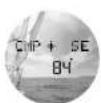
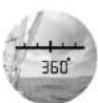
Fig.4 Fig.5
one of 8 geographic directions (cardinal points). Turning the binoculars to the right and in succession, these are North (N), North-East (NE), East (E), South-East (SE), South (S), South-West (SW), West, North-West (NW).
Example: In fig. 1 you can see the compass reading of South-East (SE) at precisely 84^ . In fig. 5, your precise bearing is at 184^ and with use of the horizontal graticule, you can mathematically determine the range to objects in the distance.
Using the horizontal graticule
The horizontal graticule as seen in figure 5, can be used to determine the approximate length of an object or the approximate distance to an object. Some factors must be known to use the following calculations, which are often indicated on navigational maps or can be determined using other devices or sources of information.
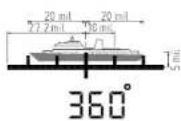
Fig. 6
Please note: When looking through your MINOX BN 7x50 DCM, you will see a horizontal graticule consisting of pixel dots. One pixel equals one mill. The distance from one vertical line to the next is approximately ten mil. The azimuth is the sum of all pixel dots along the graticule depicting the length of the object being viewed (fig. 6)
Determining length
The distance to an object must first be known:
Distance to object (m) x HA
1.000
= length of object (m)
In this example, the known distance is 1.100 meters. The horizontal angle is 40mil (each pixel is equivalent to approximately 1 mil). 1.100× 40 divided by 1.000 results in an object length of 44 meters.
Determining distance
The length of the object must first be known:
Length of object (m) x 1.000 HA distance to object (m)
In this example, the known length of the object is 44 meters and the horizontal angle is 40; 44 times 1.000 divided by 40 results in a distance of approx 1.100 meters to the object.
Horizontal angle (HA) = total sum of pixels along the length of the measured object
A reading can also be taken in the horizontal graticule compass mode (fig. 5) to make approximate object height calculations. The vertical line in the middle can be used to determine the approximate height of an object. Each pixel is equivalent to approximately 1mil . If necessary, the binoculars can be turned vertically to allow for more scope of measurement.
$$ \frac {\text {d i s t a n c e (m)} \times \mathrm {V A}}{1 . 0 0 0} = \text {h e i g h t (m)} $$
Vertical angle (VA) = total sum of pixels along the height of the measured object
Important note: the readings made with the horizontal graticule are meant only to be approximate. Various factors must be taken into consideration like atmospheric moisture (resulting in objects appearing
to be closer than they actually are), binocular movement etc. that will lead to inaccurate measurements.
Display and record compass bearings
The compass in your MINOX BN 7x50 DCM is capable of recording up to three compass bearings. To do this, activate the compass using the On / Off button (10). If you do not see the CMP display, turn the mode dial (11) until you see either the center mark or the hair-line graticule displayed (figs. 4 or 5).
You can alternate between the two display options by pressing the navigation buttons (3). To save a reading, simply push the memory button (8) while looking in the direction that you wish to record. You can save up to three readings, after which you will see "FULL" in the display after pressing the memory button for the fourth time. To record new bearings, you must first delete at least one of the previously saved values. To view the previously recorded bearings, press the On/Off button (10) while in the compass mode. You will now see either CMP-1, CMP-2 or CMP-3 and the recorded bearing. You can alternate from position to position by pushing the navigation buttons (3) up or down.
Delete readings
To delete the compass readings saved in the compass sub-menu, press the On / Off button (10) while in the compass mode. Choose the bearing you wish to delete by pushing the navigation buttons (3) up or down. By pushing the up and down buttons (3) simultaneously, the bearing will be deleted, which is verified when you see "DELETED" in the display. If necessary, repeat this procedure until all values are deleted. As soon as all
Fig. 7
values have been deleted, you will now see „EMPTY" in the display. By pushing the On / Off button (10), you will enter the main compass mode again. Turning the mode dial to the right will take you to the tilt function.
Tilt function (TLT)
Your MINOX BN 7x50 DCM is equipped with a precisely functioning tilt compensation sensor. This ensures an automatic compensation and correction of false compass readings caused if the binoculars are in a vertical or horizontal slant. The automatic tilt compensation
allows for a vertical tilt compensation of +J - 60^ and a horizontal tilt compensation of +J + 45^ .
Measuring distance or height using the tilt angle
At the same time, the tilt sensor can be used to measure the inclination angle in degrees. This can be used to calculate the approximate distance to remote objects or the approximate height of an object by using the rule of three calculation. Some factors must be known to use the following calculations which are often indicated on navigational maps or can be determined using other devices or sources of information.
Determining distance
The height of an object must first be known:
object height (m) x 100 = distance (m) inclination angle
Determining height
The distance to the object must first be known:
distance (m) x inclination angle height(m)
100
Setting the brightness of the LED display While in tilt mode (TLT), push the On / Off button once. You will now see, SET LED" in the display are 5 levels of brightness of which level 1 (1mA) darkest and level 5 (60mA) the brightest. By push the navigation button (3) up or down, you can set your desired level of brightness. Pushing the On button (10) once will save your setting and bring back to the tilt mode. Turning the mode dial to the will take you to the digital barometer.
Digital barometer with
record function (BAR)
Your MINOX BN 7x50 DCM is equipped with a digital barometer with a recording function. This includes the present air pressure reading as well as the readings within the previous 8 hours. Weather changes can thus
be detected early and predictions made accordingly. The measuring units of your digital barometer can be displayed either in hPa (Hectopascal = Millibar), inHg (inch of mercury) or in mmHg (Torr).
Setting the sea level air pressure
Before going to the next step, it is imperative to check the following setting. When in the barometer mode (BAR), press the On / Off button (10) once. You will now enter the sea level air pressure adjustment mode and should see , SET SLP 1013* in the display. This value is the standard air pressure in hPa at sea level. If this is not the value in the display, push the navigation buttons (3) up or down until 1013 is set. Push the On / Off button again to return to the barometer mode.
Please note: It is very important that this value is set properly. The altimeter calibrates itself in accordance with the air pressure at sea level. Incorrect data will lead to false altimeter readings.
Setting the barometer measuring units
In the display, you can see „BAR" and one of the three barometer measuring units in hPa, inHg or mmHg. By pushing the navigation buttons (3) up or down, you can
choose the desired unit. Turning the mode dial to the right will bring you to the barometer history. In the LCD display, you will see a bar diagram of the present (the bar at the far right) and the last four readings from right to left (fig. 3). Using the navigation buttons (3), you can read the temperatures recorded during the last 2, 4, 6 or 8 hours. Pressing the On / Off button (10) once will bring you to the _SET BARO* mode. This can be set by pushing the navigation buttons (3) up or down and the value saved by pushing the On / Off button again. The exact values for your location can usually be found in the internet.
Please note: The barometric pressure setting in the "SET BARO" mode must be set according to the current hPa reading at your location.
Altimeter (ALT)
By turning the mode dial to the right, you will now enter the ultimeter mode. This reading indicates the measured
FLT
ft.
Fig.9
1234
altitude above sea level and can be displayed in meters (m) or feet (ft) by pressing the navigation button (3) either up or down. The scope of altitude consists of 0 to 9,000 meters or 0 to 30,000 feet. The altimeter is automatically calibrated every 10 minutes. If however, the altitude increases at more than 1 meter / 3.28 feet per second, the calibration will occur every second. Before the automatic calibration can be effective, the altimeter must first be set manually.
Important note: The actual altitude must be manually set before the automatic calibration can be of any use. The automatic calibration is based on the current air pressure, the standard air pressure at sea level (1013 hPa) and the manually set altitude and does not set the actual altitude automatically. The actual altitude should not be ascertained via GPS devices or similar as the results can be inaccurate. The best sources to determine the correct altitude of your position can be found either in the internet or on known locations such as bridges etc., where the altitude is distinctly marked on their exterior. It is recommended to go to these locations if necessary, to set the altitude on-site before using the altimeter elsewhere. The MINOX BN 7x50 DCM cannot guarantee a 100% accurate altitude reading. The altimeter is designed
to provide a relative reading based on the current air pressure of the surroundings.
Please note: Being that the altimeter is barometric, the altitude reading may fluctuate depending on changing air pressure. It might be necessary to set the altitude manually at regular intervals if the air pressure changes frequently.
Manual calibration of the altimeter
When in the altimeter mode, press the On / Off button (10) once. You will now see „SET ALT" in the LCD display as well as the unit setting of meters (m). Set the altitude by pressing the navigation buttons (3) either up or down. Pushing the On / Off button (10) once will save your setting and bring you back to the altimeter mode. Your altimeter is now calibrated.
Please note: When determining the actual altitude, bear in mind that the altimeter can only be set in meters. This will be automatically calculated to feet when set accordingly in the altimeter mode.
TEMP
Fig.10
39C
1
2-32C
Thermometer (TEMP)
Turning the mode dial to the right will now bring you to the thermometer menu item. The readings of the thermometer in your MINOX BN 7× 50 DCM can be displayed either in Celsius (^) or Fahrenheit (^) . The temperature range in degrees is from -20^ to 55^ or 4^ to 131^ . Select the desired unit of measurement (^) or (^) by pressing the navigation buttons (3) either up or down.
Selecting temperature history
An automatic recording of the temperatures occurs every ten minutes but is displayed in units of two hours in the bar diagram. Turning the mode dial to the right will bring you to the temperature history reading. In the display, you will see a bar diagram of the present (the bar at the far right) and the last four readings from right to left of the previous 2, 4, 6 or 8 hours respectively. The temperature history in intervals can be viewed by pressing the navigation buttons (3) up or down.
ture changes over a period of the previous 8 hours.
Digital stopwatch (TIMER)
Turn the mode dial to the right to enter the stopwatch mode. Your MINOX BN 7x50 DCM is equipped with a digital stopwatch with a split time function. The hours, minutes, seconds and tenths of a second can be measured and saved in up to 3 split time memory slots.
Stopwatch settings: Start, stop, save and delete
In the stopwatch mode, you will see "TIMER 0.00.0.0" in the display. By pushing the Up button (3), the time
TIMER
Fig. 12
345088
measurement will begin. Pushing the Up button again will stop the time. To resume the time measurement, push the Up button yet again - this process can be repeated as often as necessary. To reset the stopwatch reading, push the Down button (3). You will see "RESET" to one second and the reading will be restored to "TIMER 0.00.00."
Recording split times with the stopwatch
As described above, the time can be stopped using the navigation buttons (3). If the memory button (8) is pressed during the time measurement, this value will be saved in one of the available memory slots. You will see "SAVED" for approximately one second after pressing the memory button. Your MINOX BN 7x50 DCM can save up to three split time values. If the memory is full, you will see "FULL" in the display after pressing the memory button for the fourth time. To save further time values, you will need to delete the recorded split time.
The recorded times can be viewed by pressing the On / Off button (10) once. You will see MEM-1, MEM-2 or MEM-3 and the respective split times in the display. To navigate between the recorded times, press the navigation buttons (3) either up or down. Press the On / Off button again to enter the stopwatch mode (fig. 12).
Deleting split times
While in the stopwatch mode (fig. 5), press the On / Off button (10) once. You will see MEM-1, MEM-2 or MEM-3 and the respective split times in the display. By pushing the Up and Down buttons (3) simultaneously, the value will be deleted - you will see ,DELETED in the display for about one second, after which you will see the next value. Repeating this process will delete all values until you see ,EMPTY in the display. If however, you wish to delete only one or two of these values, simply push the On / Off button (10) once to discontinue the deletion procedure. You are again now in the stopwatch mode (fig. 12).
Setting the time (WATCH)
Turning the mode dial to the right will bring you to the watch mode. The time in your MINOX BN 7x50 DCM is displayed in the 24 hour time format in hours and minutes. Pushing the On / Off button (10) once will bring you to the "SET TIME" mode. The hour will blink and can be set by pushing the navigation button (3) either up or down. To save this value, press the memory button (8) once and the minutes will begin to blink. Set the minutes by pushing the navigation button (3) either up or down and save by pressing the memory button (8) once. You can alternate between setting the hour or minutes by
pressing the memory button. When the time has been set, press the On/Off button (10) once and you will see "WATCH" and the time in the display. Turning the mode dial to the right will bring you to the initial "CMP" menu.
General instructions: Maintenance and care
Even though these binoculars are protected by a robust, weather-proof and non-slip rubber armoring, we recommend following these maintenance and care tips for you to enjoy as many years of unlimited viewing pleasure with your MINOX binoculars as possible.
Binoculars case (included in delivery)
To provide as much protection as possible for your MINOX BN 7x50 DCM, it is strongly recommended to use the neoprene case when storing your binoculars.
Cleaning your binoculars
Remove dirt and dust with a soft moist cloth. If your binoculars have been exposed to salt water, thoroughly rinse them off with warm water and dry carefully as salt-water can be aggressive to the lenses of your MINOX BN
7x50 DCM, detrimentally affecting their optical quality.
Cleaning the objective and ocular lenses
Contamination through foreign bodies (like sand or dust), grease, water drops or finger prints reduce the image quality (sharpness and contrast) of your MINOX binoculars. Foreign bodies should be carefully removed using a very soft brush before cleaning the lenses. To avoid damage to the lens surfaces, it is strongly advisable to use specially developed optical cleaning materials to remove fingerprints, grease etc. from the lenses. We recommend using our MINOX optical cleaning set (order nr. 69731).
Serial number
The serial number can be found on the underside of your MINOX binoculars. It is advisable to write this number in your instruction booklet or sales receipt for easy access in case your binoculars get lost or stolen.
Further recommendations
It is advisable to store your binoculars in a clean and dry place, and when possible, avoid exposing them to severe heat, which can cause damage to the armoring or eyecups. Especially avoid leaving your binoculars on the dashboard or rear panel of a car, especially in very hot climates. The effect of the sun can cause extreme temperatures inside the vehicle, which can cause irreparable damage to your binoculars. To avoid loss or damage caused by dropping your binoculars, use the carrying strap at all times. If your MINOX BN 7x50 DCM is mounted on a tripod, do not leave unattended. When storing your binoculars for a longer period of time, keep them in the neoprene case and store them in a clean dry place.
Compass quick guide
| Operational mode | Sub-menu | Operation | LED display | Comment |
| Compass with horizontal graticule | Graticule display Activate with On / Off button; turn mode dial to compass mode: change display using Up / Down buttons until graticule is visible | Horizontal graticule and bearing Display and save up to 3 bearings in memory CMP-1 to CMP-3 | ||
| Save bearing | Push memory button | For about one second: SAVED | SAVED will appear after every log; after fourth log, FULL will appear in the display | |
| Change to center mark display | Push the Up / Down buttons CMP, center mark, cardinal point, bearings | |||
| Delete values Simultaneously push the Up / Down buttons For about one second: DELETED. | After fourth time EMPTY | |||
| Compass with center mark | CMP display Activate with On / Off button; turn mode dial to compass mode: change display using Up / Down buttons until CMP is visible | CMP with cross mark, navigational direction and bearings | Display and save up to 3 bearings in memory CMP-1 to CMP-3 | |
| Save bearing | Push memory button | For about one second: SAVED | SAVED will appear after every log; after fourth log, FULL will appear in the display | |
| Change to horizontal graticule display | Push the Up / Down buttons Bearings and graticule | |||
| Delete values | Press Up and Down buttons simultaneously | For about one second: DELETED. After fourth time EMPTY | ||
| Tilt | TLT Display | Turn mode dial to TLT mode | TLT with center cross and inclination angle | |
| Set LED brightness Push On / Off button; with Up / Down buttons,choose brightness levels 1-5 | SET LED 1 to 5 The brightness of the display will change after eachlevel change | |||
| Barometer | Barometer display | Turn mode dial to barometer display in hPa | BAR and inHg, mmHg or hPa value | |
| Set measuring unit | Push Up / Down buttons to choose desired measuring unitin: inHg / mmHg / hPa | BAR and inHg, mmHg or hPa value | ||
| SLP setting Push On/Off to enter sea level air pressure mode andUp/Down to set = 1300 hPa | SET SLP | This value must be set to 1013 | ||
| Barometer history | Display barometerhistory | Turn mode dial to bar diagram display | Bar diagram and recorded air pressure values in hPa,inHg or mm Hg at intervals of 2, 4, 6 or 8 | |
| Read time interval forbarometer history | Set interval history reading with the Up / Downbuttons for every: 2, 4, 6 or 8 hours | Bar diagram and recorded air pressure values in hPa,inHg or mm Hg at intervals of 2, 4, 6 or 8 | ||
| Altimeter | Display | Turn mode dial to ALT mode | ALT and value | |
| Set measuring unit Push Up / Down buttons to set measuring unit inmeters (m) or feet (ft) | Value in meters (m) or feet (ft) | |||
| Manual calibration | Push On / Off button to enter SET ALT mode | SET ALT | ||
| Push Up / Down buttons to set altitude manually | Value in meters (m) or feet (ft) | |||
| Push On / Off button to save setting andenter ALT mode | Value in meters (m) or feet (ft) | |||
| Temperature | Display | Turn mode dial to TEMP mode | Measured temperature and unit in (C°) or (F°) | |
| Set measuring unit | Push Up / Down buttons to set temperature measuring unit in: Celsius (C°) or Fahrenheit (F°) | Measured temperature and unit in (C°) or (F°) | ||
| Temperature history | Display temperature history | Turn mode dial to bar diagram display Bar diagram and recorded temperatures at intervals of 2, 4, 6 or 8 | ||
| Display recorded values Push Up / Down buttons to view saved values Bar diagram and recorded temperatures at intervals of 2, 4, 6 or 8 | ||||
| Stopwatch | Display | Turn mode dial to TIMER | TIMER and 0.00.00.0 | |
| Start | Push Up button | Time count begins | ||
| Stop | Push Up button again | Time count stopped | ||
| Reset | Push Down button | RESET and then TIMER 0.00.00.0 | ||
| Saving split times | Push memory button to save split times in slots MEM 1-MEM 3 | SAVED | ||
| Reading split times | Push Up / Down buttons to read MEM 1-MEM 3 | MEM 1-MEM 3 and logged value | ||
| Deleting split times | Press Up and Down buttons simultaneously | DELETED | ||
| Watch | Display time | Turn mode dial to WATCH | WATCH and time | |
| Set time | Push On / Off button | SET TIME | ||
| Set time with Up / Down buttons; push memory button to switch from hours to minutes | Blinking hour or minutes | |||
| Push On / Off button to return to watch mode | WATCH and time | |||
Technical data
Binoculars
Magnification 7x
Prism system. . . . . . . . . . . . . . . . . . . . . . . . . . . . . . . . . . . . . . . . . . . . .
Objective diameter. 30 mm 71.97 in
Exit pui. 7 mm/28 m Field of view at 1,000m (1,000 wks) 126 m/326 m
Diopter adjustment 1+3 diopters
Eye relief 22 m
Twilight factor 18.7
Waterproofing temperature 140C to +30C/141 to 12217
Battery 1x CR2/3V
Compass
Compass digital, fully integrated
Unit of measurement. degrees
Display 8 geographic directions
Range 0° to 359°
Resolution value 10 Accuracy +-30 to -45
Tilt compensation +1 - 60^ inclination angle +1 - 45^ lateral angle
Tilt sensor
Unit of measurement degrees
Range +/- 60°
Resolution value
Barometer
Unit of measurement hPa (Hektopascal = Millibar), inHg (inch of mercury) or
mmHg (Torr)
Range 900-1100 hPa/26.60-32.49 inHg/676-825 mmHg
Resolution value. 1 hPa/0.01 inHg/1 mmHg
Parameter update . 6x per hour (indication update every sec.)
Graphic indicator. . current, last 2, 4, 6 and 8 hours as graphic bar diagram
Log indicator
Altimeter
Unit of measurement. meters (m) or feet (ft)
Range 0-9,000 m/0-30,000 ft
Resolution value: 1 m/3 ft
Parameter update 6x per hour (indication update every sec.)
Thermometer
Unit of measurement C or F
Temperature range -20°C-55°C/4°F-131°F
Resolution value 1° C/1° F
Parameter update . 6x per hour (indication update every sec.)*
Graphic indicator current, last 2, 4, 6 and 8 hours (adjustable)
as graphic bar diagram
Log indicator. last 2, 4, 6 or 8 hours
Digital stopwatch
Units of measurement hours, minutes, seconds, 10ths of seconds
Watch
Units of measurement hours, minutes (0:00 to 23:59)
Height x width x depth 160 x 195 x 72 mm / 6.3 x 7.6 x 2.8 in
Order numbers 62415 (white) / 62416 (black)
- Generally, the parameter update occurs every 10 seconds. If there is a change in altitude of more than
1 meter / 3.28 feet per second, the update will occur every second.
Extended MINOX Warranty Service
Take advantage of the extended MINOX product warranty and register your MINOX product.
Find out more at www.minox.com/service.
Conditions of warranty
With the purchase of this MINOX product you have acquired a product that has been manufactured and inspected in accordance with especially high quality standards. For this product we provide a legal warranty of 2 years, in accordance with the following regulations from the day of purchase at an authorised dealer:
1) During the warranty period we shall compensate complaints based on faulty manufacture with repair, replacement of defective parts or by replacement with an identical flawless product at our own discretion. Consequential claims, regardless of manner or legal argument in connection with this warranty, will not be accepted.
2) Claims under warranty are null and void if the defect has been caused by improper handling - which also can include the combined use of non-MINOX accessories - if the MINOX product is serviced by unauthorized persons or workshops, or if the serial number has been made unreadable.
3) Warranty claims can only be made by submission of the printed receipt as proof of purchase from an authorized dealer.
4) When submitting claims under warranty, please return the MINOX product together with the proof of purchase and a description of the complaint to MINOX GmbH in Germany, or the nearest MINOX dealer.
5) Tourists may, if necessary, make use of the MINOX dealer in the country in which they are travelling (within the warranty terms of MINOX GmbH) by presenting the printed proof of purchase.
MINOX GmbH
Walter-Zapp-Str.4
35578 Wetzlar
Germany
Phone:+49(0)6441/917-0
Fax:+49(0)6441/917-612
eMail: info@minox.com
Internet: www.minox.com
Table des matieres
Distance pupillaire 22 mm Index of pupillae 10.3
Distance pupillaire 22 mm
1inHg = 3386 Pascals), mmHg (Torr)
Domeine mesurable 900-1100 hPa/26.60-32.49 inHg, 676-825 mmHg
Définition 1 hPa/0.01 inHg/1 mmHg
Definition. 1^ / 1^
Valor de resolution. 1 m/3 ft
Design subject to alterations without notice.
MINOX is a registered trademark of MINOX GmbH, Wetzlar.
Sous reserve de modifications.
D-35578 Wetzlar, Germany
Tel.: +49 (0) 6441 / 917-0
Fax: +49 (0) 6441 / 917-612
e-mail: info@minox.com
www.minox.com
www.minox.com/facebook

www.youtube.com/minoxwebcasts

99489 05/18/wmd
- Scope of delivery
- Operating elements
- Optional accessories
- Preface
- Please note: Disposing of electrical and electronic devices
- Getting to know your binoculars
- An overview of the product highlights:
- General instructions for BN7x50DCM
- Attaching the carrying strap
- Attaching the eyepiece caps
- Attaching the objective lens caps
- Inserting and changing the battery
- Binocular settings
- Interpupillary distance adjustment
- Focusing
- Diopter scale
- Use with or without eyeglasses
- Changing the eyecups
- Attaching a tripod
- Digital compass
- Turning the compass on
- Calibrating the digital compass
- Digital compass:
- General instructions for the digital compass
- Compass (CMP)
- Using the horizontal graticule
- Determining length
- Determining distance
- Horizontal angle (HA) = total sum of pixels along the length of the measured object
- Vertical angle (VA) = total sum of pixels along the height of the measured object
- Display and record compass bearings
- Delete readings
- Tilt function (TLT)
- Measuring distance or height using the tilt angle
- Determining height
- Digital barometer with
- record function (BAR)
- Setting the sea level air pressure
- Setting the barometer measuring units
- Altimeter (ALT)
- Manual calibration of the altimeter
- Thermometer (TEMP)
- Selecting temperature history
- Digital stopwatch (TIMER)
- Recording split times with the stopwatch
- Deleting split times
- Setting the time (WATCH)
- General instructions: Maintenance and care
- Binoculars case (included in delivery)
- Cleaning your binoculars
- Cleaning the objective and ocular lenses
- Serial number
- Further recommendations
- Technical data
- Binoculars
- Compass
- Tilt sensor
- Barometer
- Altimeter
- Thermometer
- Digital stopwatch
- Watch
- Extended MINOX Warranty Service
- Conditions of warranty
- MINOX GmbH
- Table des matieres
Brand : MINOX
Model : BN 7x50 DCM
Category : Binoculars