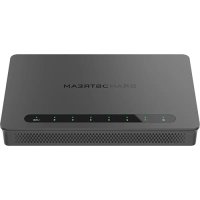
GWN700X - Network router GRANDSTREAM - Free user manual and instructions
Find the device manual for free GWN700X GRANDSTREAM in PDF.


| Brand | Grandstream |
| Model | GWN7001 / GWN7002 / GWN7003 |
| Product type | Gigabit Multi-WAN VPN Router with integrated firewall |
| Ethernet ports | GWN7001: 6 Gigabit ports; GWN7002: 4 Gigabit ports; GWN7003: 9 Gigabit ports |
| SFP ports | 2 x 2.5 Gigabit SFP (GWN7002/7003) |
| PoE ports | 2 PoE OUT ports and 1 PoE IN port (GWN7002/7003) |
| USB port | USB 2.0 |
| Power supply | GWN7001: 12V DC 1A; GWN7002/7003: 24V DC 1A; PoE IEEE 802.3af/at (GWN7002/7003) |
| Operating temperature | 0 °C to 40 °C |
| Storage temperature | -30 °C to 60 °C |
| Humidity | 10% to 90% RH (non-condensing) |
| VPN features | Integrated VPN support for secure connectivity |
| Firewall | Integrated with content security, filtering, threat detection, attack prevention |
| Access point management | Up to 150 Grandstream GWN access points (integrated controller) |
| Network management | Web interface, GWN Cloud, GWN Manager |
| Mounting | Wall mount (all models); 19" rack mount (GWN7003 only) |
| Grounding | GWN7003 only (ground terminal) |
| Reset button | Press for 5 seconds to restore factory settings |
| Default access | myrouter.grandstream.com or 192.168.80.1 |
| Certification | Compliant with Innovation, Science and Economic Development Canada (ISED) |
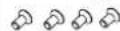
| Package contents | Router, power adapter, mounting brackets (GWN7003), screws (GWN7003) |
| Maintenance and cleaning | Clean with a soft, dry cloth. Do not use chemicals. |
| Safety | Do not open, disassemble, or modify. Avoid extreme temperatures and humidity. |
| Spare parts and repairability | No user-serviceable parts. Contact customer support. |
Frequently Asked Questions - GWN700X GRANDSTREAM
User questions about GWN700X GRANDSTREAM
0 question about this device. Answer the ones you know or ask your own.
Ask a new question about this device
Download the instructions for your Network router in PDF format for free! Find your manual GWN700X - GRANDSTREAM and take your electronic device back in hand. On this page are published all the documents necessary for the use of your device. GWN700X by GRANDSTREAM.
USER MANUAL GWN700X GRANDSTREAM
Grandstream Networks, Inc.
126 Brookline Ave, 3rd Floor
Boston, MA 02215. USA
Tel: +1 (617) 566-9300
www.grandsstream.com
EU Agent:
Picus Advisors Ltd
Taivalmaki 9F1-02200 Espoo, FINLAND
https://www.picus.fi
Note: For European Union only

GRANDSTREAM
CONNECTING THE WORLD


For Certification, Warranty and RMA information, please visit
www.grandstream.com
GWN7001 & GWN7002 & GWN7003
Multi-WAN Gigabit VPN Router
Quick Installation Guide
Content
English. 1
筒体中文 5
Espanol. 7
Francais. 11
Deutsch. 15
Italiano. 19
Pycckii. 23
Portugues. 25
Regulatory Information. 29

OVERVIEW
GWN7001/7002/7003 are Multi-WAN Gigabit VPN routers with built-in firewalls that allow businesses to build comprehensive wired, wireless and VPN networks for one or many locations. They offer high-performance routing and switching power along with built-in VPN support for secure in-office and inter-office connectivity. To provide enterprise-grade security protection and ensure stable network operation, the GWN 7001/7002/7003 features a built-in firewall with advanced content security, filtering, threat detection, attack prevention and more. To maximize network reliability, they support traffic load balancing, failover and bandwidth management capabilities. The GWN7001 includes 6 Gigabit ethernet ports. The GWN7002/7003 include 2.2.5 Gigabit SFP ports, 4/9 Gigabit ethernet ports, and 2 PoE output ports that allow them to provide power to other endpoints. These routers can manage themselves and up to 150 Grandstream GWN Series Wi-Fi APs thanks to an embedded controller located in the products' web user interface. These routers can also be managed with GWN Cloud and GWN Manager, Grandstream's free cloud and on-premise network management tools. By providing high-performance routing, VPN support, powerful security protection and easy-to-use network management tools, the GWN Gigabit VPN routers are ideal for a wide variety of deployments including small-to-medium businesses, retail, education, hospitality, healthcare and more.
PRECAUTIONS
- Do not attempt to open, disassemble, or modify the device.
- Do not expose this device to temperature outside range of 0°C to 40°C for operation and -30°C to 60°C for storage.
- Do not expose the device to environments outside of the following humidity range: 10 - 90% RH (non-condensing).
- Do not power cycle the device during system boot up or firmware upgrade. You may corrupt firmware images and cause the unit to malfunction.
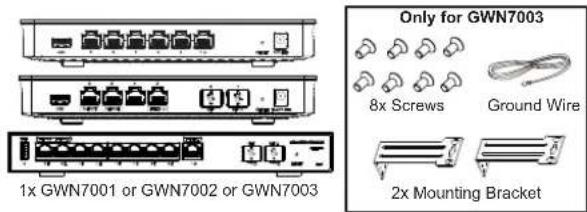
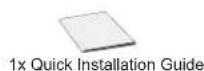
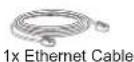
PACKAGE CONTENTS

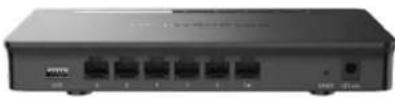
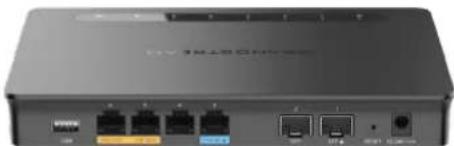
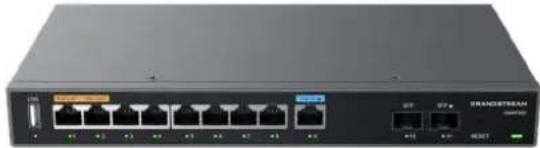
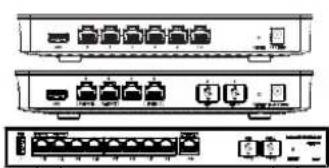
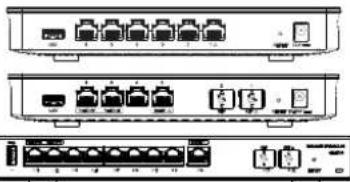
GWN7001/7002/7003 PORTS
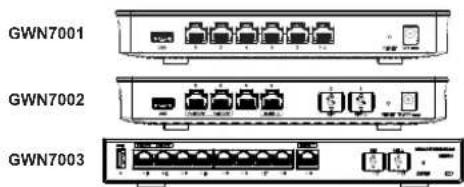
| No. | Port Description | on |
| 1 | PoEOUT PoE IN △ | GWN7001: 6x Gigabit Ethernet ports GWN7002: 4x Gigabit Ethernet ports GWN7003: 9x Gigabit Ethernet ports Note: All ports support WAN/LAN configurable. The Gigabit Ethernet ports include 2 x PoE OUT ports and 1 x PoE IN port (GWN7002/7003 only). |
| 2 | SFP △ | 2 x 2.5 Gigabit SFP ports (GWN7002/7003 only). |
| 3 | USB | USB 2.0 port |
| 4 | - | GWN7001: Power adapter connector (DC 12V, 1A) GWN7002: Power adapter connector (DC 24V, 1A) GWN7003: Power adapter connector (DC 24V, 1A) |
| 5 | Grounding terminal | (GWN7003 only). |
| 6 | RESET | Factory Reset pinhole. Press for 5 seconds to reset factor default settings |
Note: Ports with this symbol are configured to be used as a WAN port by default at the factory.
CONNECTING THE GWN7001/7002/7003
- Power the GWN7001/7002/7003
GWN7001/7002/7003 can be powered on using the right PSU or PoE (IEEE 802.3af/ at) only for GWN7002/7003.
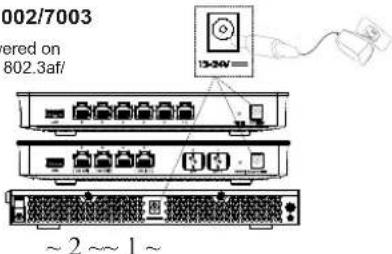
2. Connect to the Internet
Connect the LAN/WAN or SFP/WAN (GWN7002/7003 only) port to an optical fiber broadband modem, ADSL broadband modem or community broadband interface.
Internet
Optical Fiber
ADSL Modem
Community Broadband
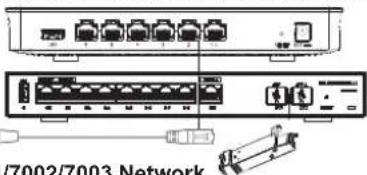
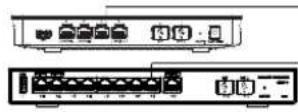
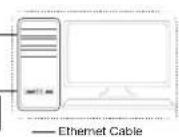
3. Connect to GWN7001/7002/7003 Network
Connect your computer to one of the LAN ports.
INSTALLATION
Mounting GWN7001/7002 to the Wall
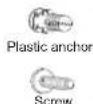
- Using a drill, make two holes in the wall with 135.0mm spacing, 6.0mm diameter. Put a plastic anchor and screw (not provided) on each hole.
- Mount the GWN7001/7002 router on the mounting screws.
Mounting GWN7003 to the Wall
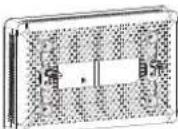
Bottom of the GWN7001/GWN7002 Router
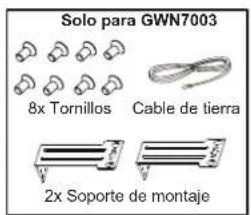
- Use the provided screws to fix the two L-shaped Mounting bracket (rotated 90° ) on both sides of the GWN7003 router.
- Stick the router port up and horizontally on the selected wall, mark the position of the screw hole on the L-shaped mounting brackets with a marker. Then, drill a hole at the marked position with an impact drill, and drill the plastic anchors (prepared by yourself) into the drilled hole in the wall.
- Use a screwdriver to tighten the screws (prepared by yourself) that have passed through the L-shaped mounting brackets to ensure that the GWN7003 router is firmly installed on the wall.
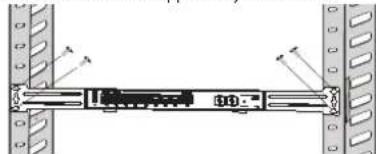
Install on a 19" Standard Rack (GWN7003 only)
- Check the grounding and stability of the rack.
- Install the two L-shaped rack-mounting in the accessories on both sides of the router, and fix them with the screws provided.
-
Place the router in a proper position in the rack and support it by the bracket.
-
Fix the L-shaped rackmounting to the guide grooves at both ends of the rack with screws(prepared by yourself) to ensure that the router is stably and horizontally installed on the rack.
Grounding GWN7003
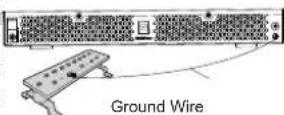
- Remove the ground screw from the back of the router, and connect one end of the ground cable to the wiring terminal of the router.
- Put the ground screw back into the screwhole, and tighten it with a screwdriver.
- Connect the other end of the ground cable to other device that has been grounded or directly to the terminal of the ground bar in the equipment room.
ACCESSING THE CONFIGURATION INTERFACE
Now that you are connected to the GWN7001/GWN7002/GWN7003's LAN port with network cable, you can access into its configuration interface with: myrouter.grandsstream.com or default IP address (192.168.80.1), then enter the password to login.
Note: GWN7001/GWN7002/GWN7003's default password information is printed on the MAC tag at the bottom of the unit.
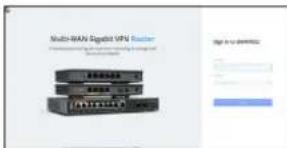
To manage GWN7001/GWN7002/GWN7003 over cloud, please refer to https://www.gwn. cloud.
The GNU GPL license terms are incorporated into the device firmware and an be accessed via the Web user interface of the device at my_device_ip/gpl licence. It can also be accessed here: https://www.grandsstream.com/legal/open-source-software To obtain a CD with GPL source code information please submit a written request to: info@grandsstream.com
Refer to online documents and FAQ for more detailed information: https://www.grandsstream.com/our-products
ZH概述
1x GWN7001 o GWN7002 o GWN7003
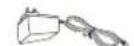
1x Adaptador de Alimentacion


PUERTOS GWN7001/7002/7003
GWN7001
GWN7002
GWN7003
The GNU GPL license terms are incorporated into the device firmware and an be accessed via the Web user interface of the device at my_device_ip/gpl licence. It can also be accessed here: https://www.grandsstream.com/legal/open-source-software To obtain a CD with GPL source code information please submit a written request to: info@grandsstream.com
Refer to online documents and FAQ for more detailed information: https://www.grandsstream.com/our-products
DEUBERSICHT
https://www.grandstream.com/our-products
PANORAMICA
MEPbI INPEDOCTOPOXHOCTN
He nItaTaeB oKpbIb,pa3o6paTb HnH NAmEHHTb yCtpoiCTBO.
He nopeaeTAE BoaTeBTHeTM Ee BHe DnAraOHa 0T 0°C do 40°C npH 3cknyataun 0t- 30°C do 60°C npxpaenHH
1301012378TDAHHOE YCTPOBTO B Cpe,Je 3A HENHEI BIAHXOHTB BIXOXDIT 38 DnAHAO:OTHCNOT. BIAHXOHTs 10% -90% (65 KOHEDCAHN).
He BkIOHObBHKIOHOy, yCTPOIcBO nPoIOeCE HauHJIHO 3aYyCKa CHCTeMl INn B IpoUeCE 0bOBoHEnHn POuIMKn. Bbl MokeTe TEM cAMMb IOBepeiTb 3abOckyo npouINbky CTOPTCbA N BuBecTe rno ETO CTPOR.
CODEPKHMOE YNAKOBKN



1x GWN7001 nn GWN7002 nn GWN7003
Tonko gnGWN7003

8xBnHTa

3aebmboa 1Ka6be


2x MoHTaxHbI KPOHHTeHH

1xBnOKnTuHaHn

1x PykoBocTBo no 6bIcTpO yTaHOBKe
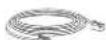
1x ka6enb Ethernet
NOPTbl GWN7001/7002/7003
GWN7001

GWN7002

GWN7003

| Hematique OIncanme | |
| 1 GWN7001 | Gigabit Ethernet GWN7002: 4x nopTa Gigabit Ethernet GWN7003: 9x nopTa Gigabit Ethernet Почемачи. Всо посы пождөгүхүakам有很大сяюк WAN/LAN. Пормы Gigabit Ethernet влочаяхотьnomа 2 nomа PoE OUT u 1 nopm PoE IN (monы GWN7002/T003). |
| 2 2 nopTa 2.5 Gigabit SFR | (Tолы GWN7002/7003). |
| 3 nopT USB USB | |
| 4 | GWN7001: Раъем.adапета ригань (24 B noctoryногу тoka, 1 A) GWN7002/7003: Раъем.adапета ригань (24 B noctoryногу тoka, 1 A) |
| 5 Klenmaа зеления (tolы GWN7003). | |
| 6 Khonika сбобра К дэдөдөдөдөдөдөдөдөдөдөдөдөдөдөдөдөдөдөдөдөдөдөдөдөдөдөдөдөдөдөдөдөдөдөдөдөдөдөдөдөдөдөдөдөдөдөдөдөдөдөд æнэдөдөдөдөдөдөдөдөдөдөдөдөдөдөдөдөдөдөдөдөдөдөдөдөдөдөдөдөдөдөдөдөдөдөдөдөдөдөдөдөдөдөдөдөдөдөдөдөдөфс. RESET | Hаст彦ам. Habжmitе ударшайтae 5 seskynd,чтбы сбposить заюckne Haст彦ки no уmonданio. |
PnmeuHne. Hc c 3mm CmBOMI HcnpoeHb HA uonanb06aue b kauceemepnma WAN noymuauHa zaoae.
PTRESUMO
CONECTE O GWN7001/7002/7003
1. Ligue o GWN7001/7002/7003
U.S. FCC Part 15 Regulatory Information
This device complies with part 15 of the FCC Rules. Operation is subject to the following two conditions: (1) this device may not cause harmful interference, and (2) this device must accept any interference received, including interference that may cause undesired operation.
Any Changes or modifications not expressly approved by the party responsible for compliance could void the user's authority to operate the equipment.
Note: This equipment has been tested and found to comply with the limits for a Class B digital device, pursuant to part 15 of the FCC Rules. These limits are designed to provide reasonable protection against harmful interference in a residential installation. This equipment generates, uses and can radiate radio frequency energy and, if not installed and used in accordance with the instructions, may cause harmful interference to radio communications. However, there is no guarantee that interference will not occur in a particular installation. If this equipment does cause harmful interference to radio or television reception, which can be determined by turning the equipment off and on, the user is encouraged to try to correct the interference by one or more of the following measures:
- Reorient or relocate the receiving antenna.
- Increase the separation between the equipment and receiver.
- Connect the equipment into an outlet on a circuit different from that to which the receiver is connected.
- Consult the dealer or an experienced radio/TV technician for help.
Canada Regulatory Information
CANICES-003(B)/NMB-003(B)
This product meets the applicable Innovation, Science and Economic Development Canada technical specifications.
- CONTENT
- OVERVIEW
- PRECAUTIONS
- GWN7001/7002/7003 PORTS
- CONNECTING THE GWN7001/7002/7003
- CONNECT TO THE INTERNET
- INTERNET
- CONNECT TO GWN7001/7002/7003 NETWORK
- INSTALLATION
- MOUNTING GWN7001/7002 TO THE WALL
- MOUNTING GWN7003 TO THE WALL
- INSTALL ON A 19" STANDARD RACK (GWN7003 ONLY)
- GROUNDING GWN7003
- ACCESSING THE CONFIGURATION INTERFACE
- ZH概述
- PUERTOS GWN7001/7002/7003
- DEUBERSICHT
- PANORAMICA
- MEPBI INPEDOCTOPOXHOCTN
- CODEPKHMOE YNAKOBKN
- TONKO GNGWN7003
- NOPTBL GWN7001/7002/7003
- PTRESUMO
- CONECTE O GWN7001/7002/7003
- LIGUE O GWN7001/7002/7003
- U.S. FCC PART 15 REGULATORY INFORMATION
- CANADA REGULATORY INFORMATION
Brand : GRANDSTREAM
Model : GWN700X
Category : Network router