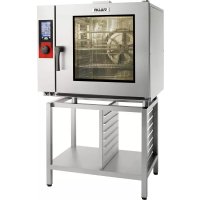
TCM61E - Oven Vulcan - Free user manual and instructions
Find the device manual for free TCM61E Vulcan in PDF.


| Features | Details |
|---|---|
| Product type | Oven |
| Capacity | Not specified |
| Power | Not specified |
| Cooking functions | Not specified |
| Dimensions | Not specified |
| Weight | Not specified |
| Materials | Not specified |
| Safety system | Not specified |
| Maintenance | Regular cleaning recommended |
| Warranty | Not specified |
| Included accessories | Not specified |
| Energy consumption | Not specified |
Frequently Asked Questions - TCM61E Vulcan
User questions about TCM61E Vulcan
0 question about this device. Answer the ones you know or ask your own.
Ask a new question about this device
Download the instructions for your Oven in PDF format for free! Find your manual TCM61E - Vulcan and take your electronic device back in hand. On this page are published all the documents necessary for the use of your device. TCM61E by Vulcan.
USER MANUAL TCM61E Vulcan
Attention: For your safety and that of the equipment always comply with these load limits.
| Modèle / Model | Quantité maxi / Maximum quantity | Support |
| 6 / 7 GN 1/1 | 24 Kg | Echelles / Runners |
| 10 GN 1/1 | 40 Kg | Echelles et chariots à glissières ou Banqueting / Runners and trollies with runners or for Banqueting |
| 10 GN 2/1 | 80 Kg | Echelles et chariots à glissières ou Banqueting / Runners and Banqueting or runners trolley |
To ensure the guarantee on this equipment, you should comply with the MANUFACTURER'S INSTRUCTIONS in this manual. However if you cannot undertake the required maintenance operations, our installation and service network is available to provide you with a personalized contract.
-WARNING -
The product delivered to you complies with current standards. If any modifications are made the manufacturer cannot accept any responsibility whatsoever. The manufacturer cannot be held responsible in the event of inappropriate use of the equipment.
-
This equipment is intended for use by suitably trained professionals.
-
Read all the documentation before user.
-
Keep your documents for future reference.
-
Translation of the original manual
1 GENERAL
The toughened glass control panel on your oven consists of:
- a coder knob:

Switches on the oven and its display screen.
Power on: press for 1 second
Switch off: press for 3 seconds
Allows parameters to be changed rapidly (Temperature, time ...) and validated by simply pressing the knob.
- a touch screen:

The control panel is operated via a serigraphic touch screen using your fingers. We recommend the exclusive use of your fingers and no other items such as knives, forks or spoons etc.
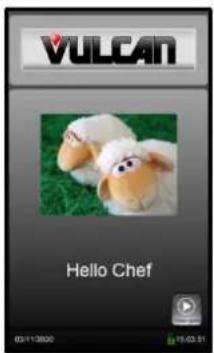
You need only touch the screen with your finger to access parameters and information.
The welcome menu is displayed briefly when the unit is switched on then replaced by the Manual menu.
1.1 SCREEN LOCKING
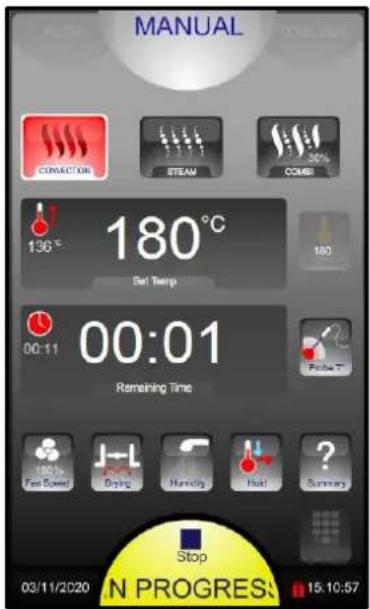
The screen automatically locks after a few seconds at the start of a cooking or cleaning cycle.
This function is disabled by default but may be activated within the client parameters
The "padlock" icon indicates whether the screen is locked or not.
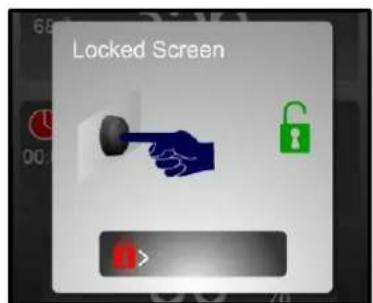
To unlock the screen press the coder or slide the padlock to the right
2 ABC MODE
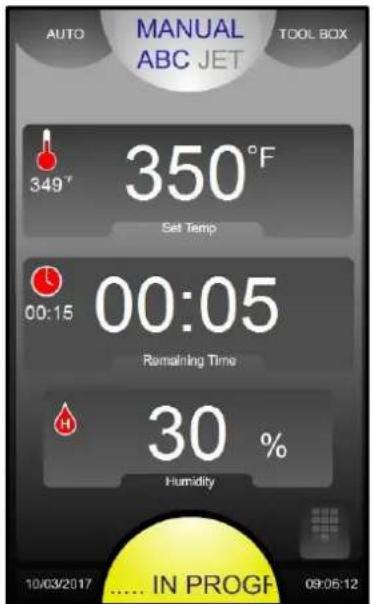
Display of actual and set temperature
Time display
Automatic Humidity adjustment based on temperature selection.
→ Manually change if desired. 0% is similar to convection setting with vent open, 100% is always adding humidity
Date and time
... In progress: cooking in progress II: Pause (door open)
3 JET MODE
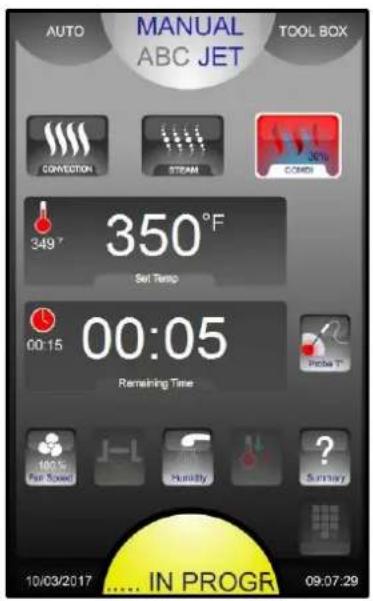
3 cooking modes: Convection, Steam and Combined (from 0 to 100%
Display of actual and set temperature
Time / Core temperature display
vent outlet Manual humidification Cooking details
In progress: cooking in progress II: Pause (door open)
4 MANUAL MENU
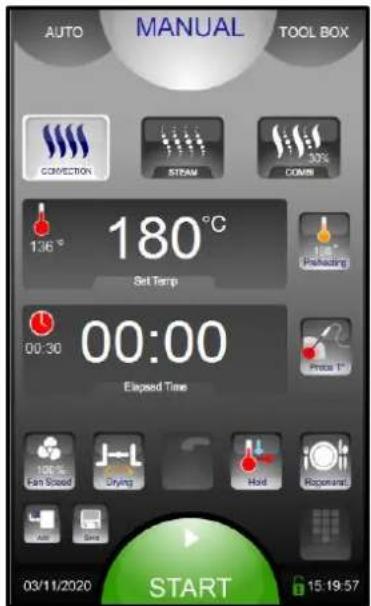
STOP / START cooking. Changes colour when:
Before cooking starts:
Coloured green
3 cooking modes: Convection, Steam and Combined (from 0 to 100%
Display of actual and set temperature
Selects preheating before cooking. To deactivate press for 3 seconds
Display of times / core temperature
Ventilation speed (1 to 100%)
Vent outlet
Manual humidification
Rapid cooling & Holding mode (hot cupboard)
Plated meal regeneration
Add a cooking phase
Quick save a recipe
Touch screen (alternative to using the select knob)
Date and time

Cooking :
Coloured yellow
Pause (door open):
Coloured yellow
Cooking finished :
Coloured red
Water hardness limitations for steam mode:
Depending on steam usage levels, action may be required to treat hard water to avoid a build-up of lime scale in the boiler and excessive consumption of descending product.
| Steam usage level | Water hardness | |
| GN 1/1 oven | GN 1/1 oven | |
| Medium(3 to 7 hours/day) | Max 40°f(28°e, 22°d, 400ppm) | Max 20°f(14°e, 11°d, 200ppm) |
| Intensive(>7 hours/day) | Max 20°f(14°e, 11°d, 200ppm) | Max 10°f(7°e, 6°d, 100ppm) |
4.1 DEFERRED START
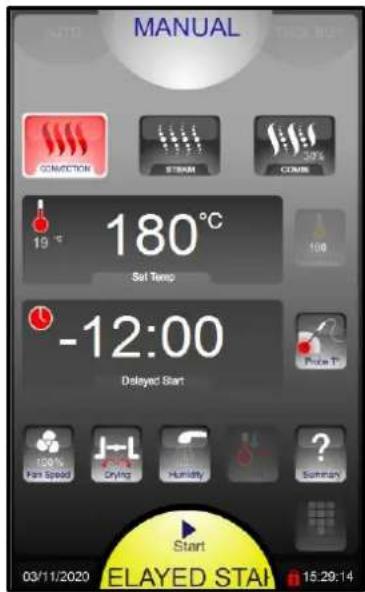
This function is only available in manual mode, not with a programmed menu.
At the start point for cooking press and hold START and turn the coder knob anti clockwise to programme a « negative time » corresponding to the delay before cooking starts.
The setting is validated after 5 seconds or by touching another zone/button
For example:
Display « -12:00 » : signifies that cooking will start in 12h and 00 minutes.
The cycle start button will flash in yellow and the countdown will run from « -12:00 »
to « 00:00 » until the selected cooking starts (this can still be changed).
NOTE: if an automatic wash cycle has been programmed this will not take place
5 AUTO MENU
5.1 AUTOMATIC / PROGRAMMED RECIPES
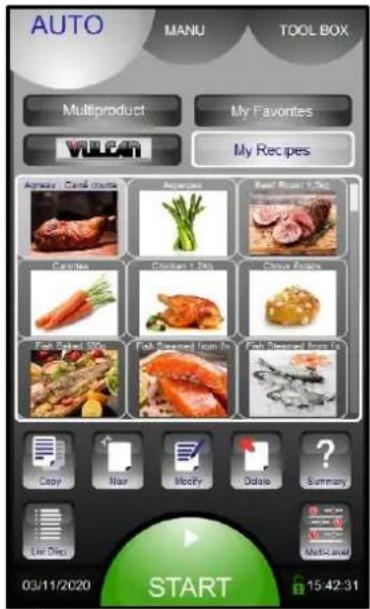
Recipe displayed by list or photos
Favourite recipes
Pre-programmed recipes (80 roughly)
Clients recipes (capacity of 100 recipes in total, each with 6 cycles)
6 Principle families with direct access to the recipe
Recipes can be edited
Copied
Created
Modified
Deleted
Detailed display
“Multi Level” programme: 10 independent timers
5.2 FAVOURITE RECIPE
To add a favourite recipe: select a recipe from the factory or clients list, then press a free space for 3 seconds
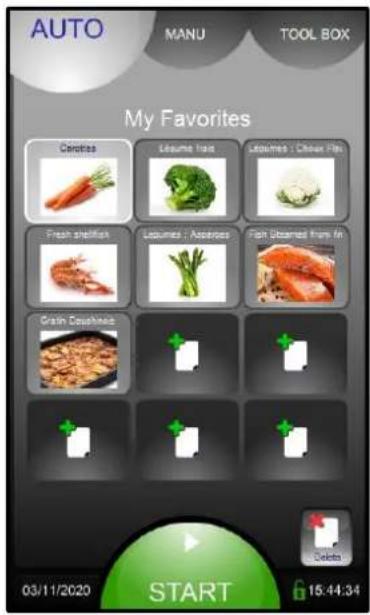
Free space
Delete a favourite recipe
5.3 MULTI-PRODUCTS SCREEN
To use this mode, recipes must have already been added to My Favourites.
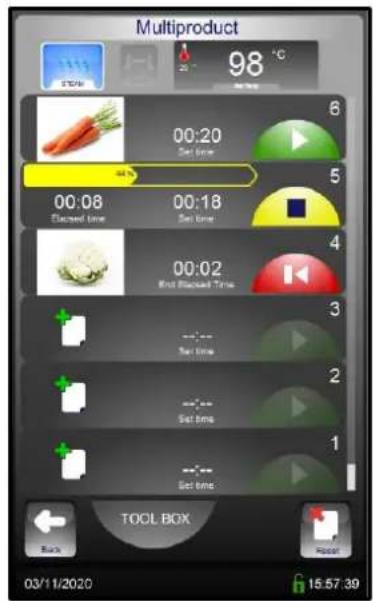
The first recipe selected determines the cooking mode and temperature
Example for selected recipes:

Level 6: Recipe selected but not started
Level 5: Cooking
Press the elapse time to display the identification image of the recipe for 5 seconds
Level 4: Recipe finished
Level free for a new recipe
Pressing the icon displays only recipes from My Favourites compatible with the
first recipe selected

Erases all the recipes that have finished or not yet started

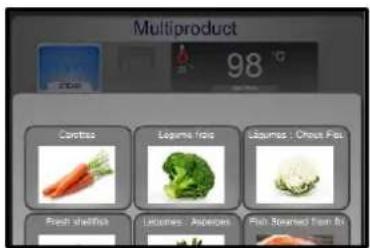
Display of the recipes from My Favourites which are compatible with Multiproduct mode
5.4 TYPE OF DISPLAY
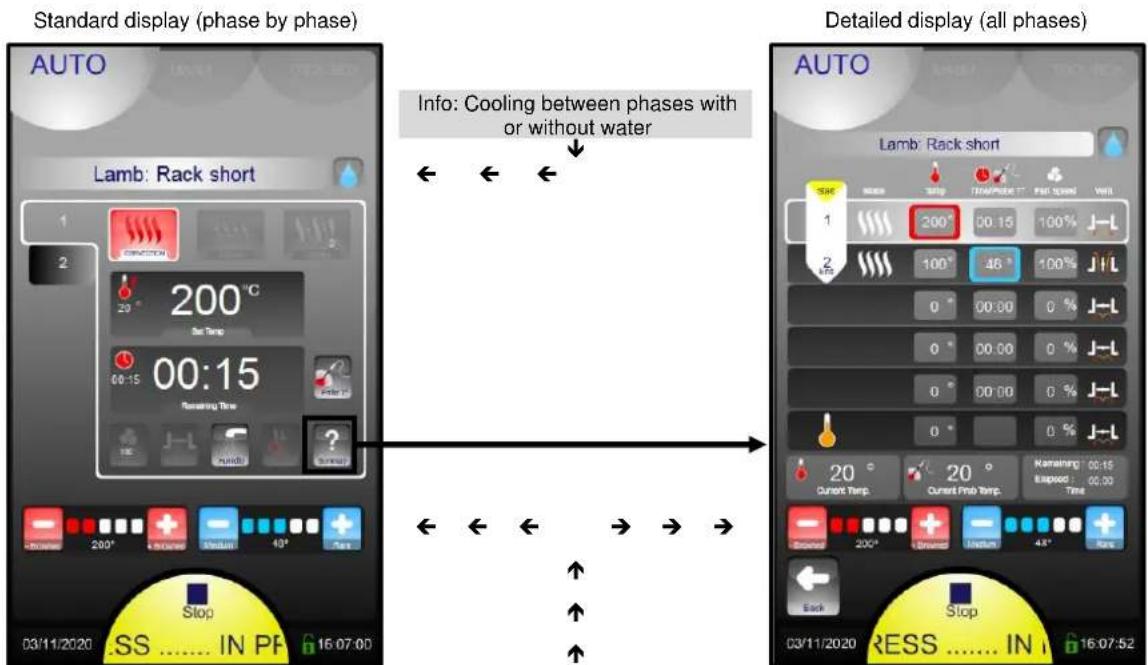
2 criteria allow the recipe to be adapted to the clients taste (e.g.: +/- browned, blue or well done) without the need to create a new recipe ... or to know what to modify (Time, Temperature, which phase ...) Only applicable for manufacturer recipes
5.5 LIST OF PRE-RECORDED PROGRAMMES
| Family | Photo | Recipe label | Mode | Temperature °F | Time (minutes) | Recipe in favourites |
| Meat | Roast beef 1.5 kg | Convection | 356 | 40 | Yes | |
| Preheating | 374 | |||||
| Meat | Chicken 1.2 kg | Combi 20% | 347 | 40 | Yes | |
| Preheating | 356 | |||||
| Meat | Leg of lamb | Combi 20% | 329 | 90 | Yes | |
| Preheating | 356 | |||||
| Fish | Fresh steamed fish | Steam | 208 | 8 | Yes | |
| Preheating | 212 | |||||
| Fish | Frozen steamed fish | Steam | 208 | 12 | Yes | |
| Preheating | 212 | |||||
| Fish | Roast fish 500g | Combi 20% | 329 | 10 | No | |
| Preheating | 338 | |||||
| Fish | Fresh seafood | Steam | 194 | 3 | Yes | |
| Preheating | 212 | |||||
| Vegetables | Potato gratin | Combi 20% | 347 | 45 | Yes | |
| Preheating | 356 | |||||
| Vegetables | Fresh vegetables | Steam | 208 | 10 | Yes | |
| Preheating | 212 | |||||
| Pastry | Choux and eclairs | Convection | 329 | 25 | Yes | |
| Preheating | 338 | |||||
| Pastry | Madeleines | Combi 20% | 329 | 25 | Yes | |
| Preheating | 338 | |||||
| Pastry | Frozen dainties | Convection | 347 | 25 | Yes | |
| Preheating | 356 | |||||
| Pastry | Frozen Viennese | Convection | 338 | 17 | Yes | |
| Preheating | 356 |
5.6 CREATING A RECIPE
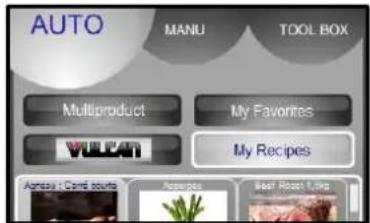
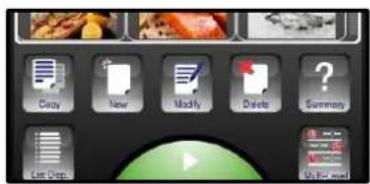
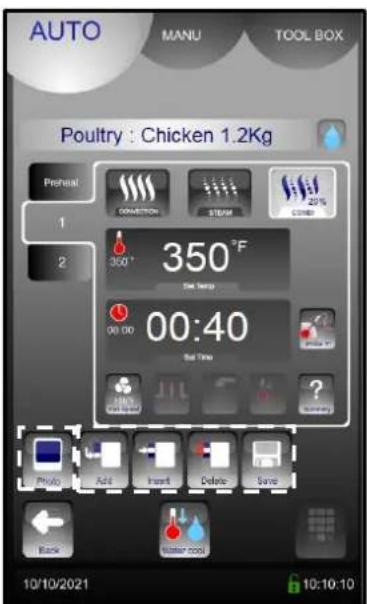
Select "My Recipes" (library capacity: maxi 100 recipes)
Select New icon
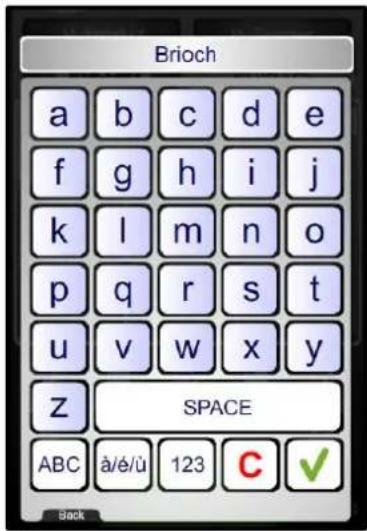
Enter the name of the recipe : The more precise your name, the easier it will be to find your recipe
Validate
Pressing the name zone allows you to modify the name and / or select the family of the recipe (Meat, Fish, Vegetables, Pastry, Various and Banquet)
The « water drop » icon indicate the choice waterless or without water for cooling between cycle
Create the cycle or cycles by adding the various cooking informations (cooking mode, temperature, time, ventilation speed, oura valve, etc.).
Possibility to add a photo from the « Photos library »
If necessary Add, Insert or Delete additional cooking cycles (capacity of 6 cycles maximum including preheating)
Save a recipe
To activate or disable the Cooling with Water
6 TOOL BOX MENU
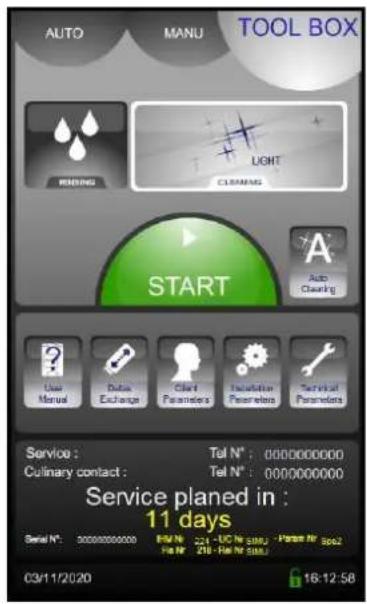
Rinse (between batches of cooking...) replaces the spray hose
Auto Cleaning
Programmable auto clean for every day of the week (Day / Time)
Operating mode
Data exchange (HACCP, Photos, Recipes, Manual, Consumption levels (Energy, water ...), Profiles)
Client settings (Adaptable)
Installation parameters
Technical / After sales
Maintenance information
6.1 PASSWORD
Allows the client access to:
- Data exchange
- Client parameters
- Change the Manual / Auto cleaning
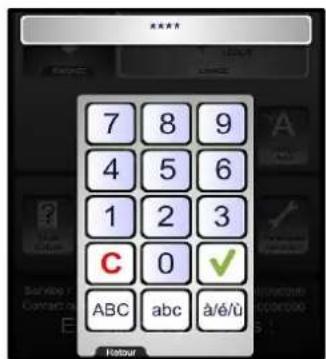
0000: Changeable PIN Code
CHEF: Password
(Upper or lower case)
For a personalised code in text format it is possible to switch the keypad to and from alpha numeric
6.2 DATA EXCHANGE
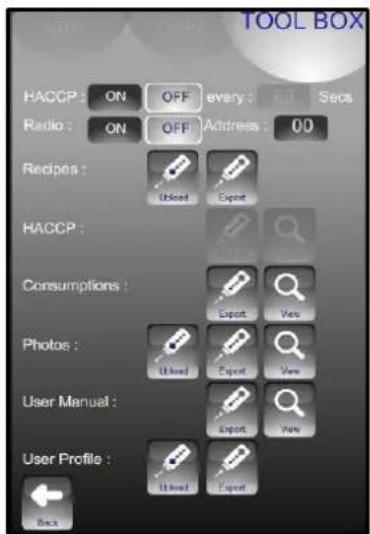
HACCP ON/OFF: Records HACCP data (for approx. 1 year) and frequency of data capture
Oven identifier: individual for each oven if there are several ovens on site.
USB (or Radio) information exchange viewable on the oven
Warning: A FastPAD USB stick should be used for data exchange consumptions, recipes, HACCP, photos or update... Using a USB stick that is not recognized can lead to crashes or bugs.
6.3 CLIENT PARAMETERS
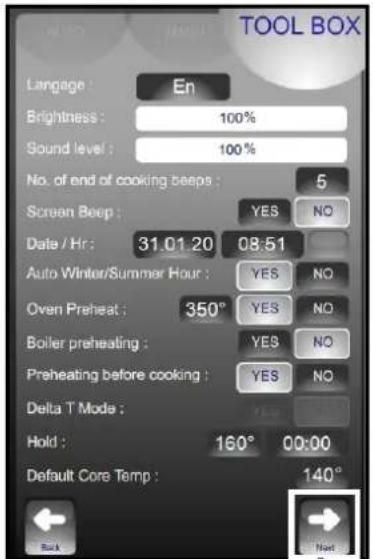
Adjust the screen brightness
Adjust the end of cycle buzzer volume
Activation and adjustment of the automatic pre-heat when the oven is switched on.
Activation of pre-heat function before cooking. Function only available in Eco mode. Not available in JET and ABC mode
Adjust the time and temperature in holding mode (operating as a hot cupboard in Manual mode)
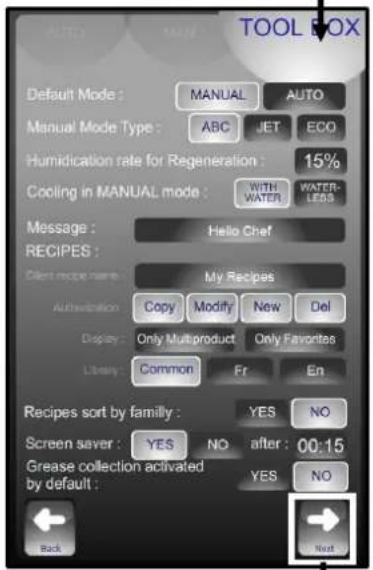
Choice of default mode displayed when first started
Choice of humidity level for food regeneration
Cooling the cooking cavity with or without water (by air)
Choice of manufacturer's recipes displays: Fr = French / En = English
Recipes displayed by family group (yes) or alphabetically (no)
Activate the screen saver (blacks out) after the selected time. Not when a cycle is running
Activate of grease collection option by default
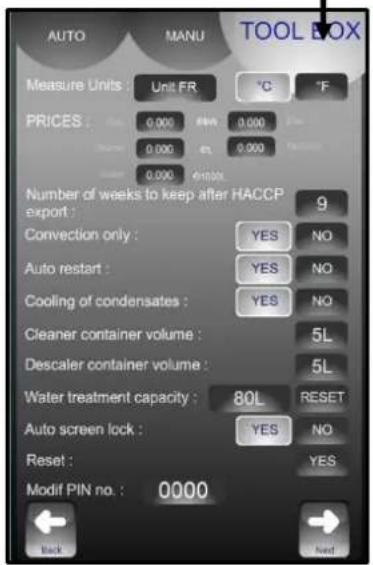
Choice of temperature display units
Enter the cost of energy, chemicals and water to calculate consumption costs. First press
activates the cost area. The value can be change slowly with the knob. Second press displays the keyboard to enter a value directly.
After being exported to USB stick HACCP data prior to this number of weeks is deleted.
Restarts a cycle automatically if the is a power cut 9if set to YES).
Option of cooling condensate
Default volume of cleaner and descaler product containers
The screen automatically locks after a few seconds at the start of a cooking or cleaning
cycle
Software reset (Attention: All recorded information is erased from memory: HACCP data...)
6.4 WATER TREATMENT
This message appears only when the capacity of the water treatment system is being approached (if the counter has been set in Client parameters). This counter is only used if the unit has two separated water supplies.
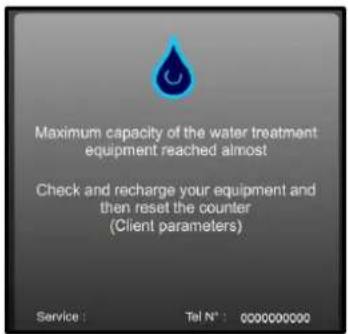

Warning message
This message appears every time the oven is switched on if the programmed water capacity is has reaching its limit.
After renewal of the system reset the counter as above.
WATER TREATMENT COUNTER
- Go into the "TOOL BOX" screen
- Select the "Client parameters" screen
- Enter the password "CHEF" Permanent password (Upper or lower case)
- Validate "V": if the code is correct the menu can be accessed if not return to inputting the PIN
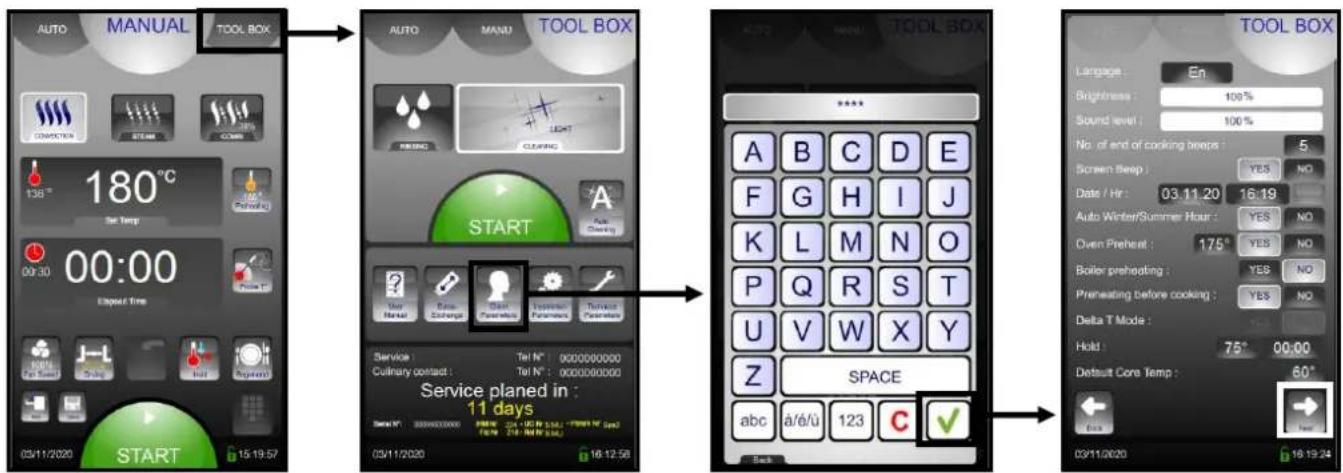
To modify or enter the value for the capacity of the water treatment system (in litres). Set to zero by default (if the oven does not have a dedicated water treatment system).
- Select the zone to be changed
-
Adjust with the coder knob.
-
After any regeneration of the water treatment, reset the counter as required.
-
Press « RESET »
- Confirm by pressing « YES »
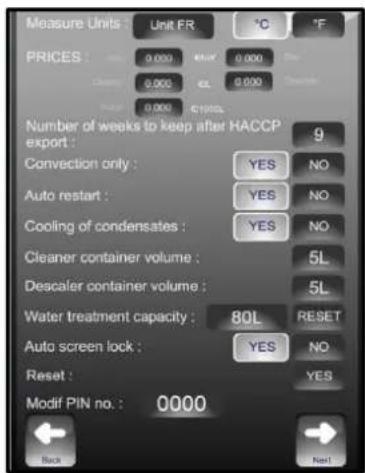

The water treatment system's capacity in litres. Reset. By default, set to zero (if there is no dedicated treated water supply to the oven)
6.5 PREVENTIVE MAINTENANCE
This message appears only when the oven preventive maintenance is required (if the counter has been set in Installation parameter). The customer will be automatically informed when service is needed. The service counter is a calculated function of the frequency of use and of the number of hours between 2 services.
These values must be entered by the technician when installing the oven and must be verified after every maintenance operation.
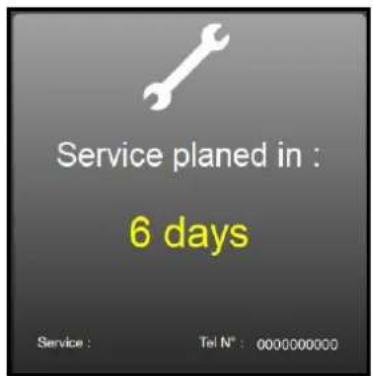
Warning message This message appears every time the oven is switched on if the use time programmed in the preventive maintenance counter is reached. Notify the maintenance department for an intervention as soon as possible If the number of days falls to 0 or below, the message will be displayed in red and indicates how many days past the scheduled maintenance date the oven is.
6.6 QUICK GUIDE
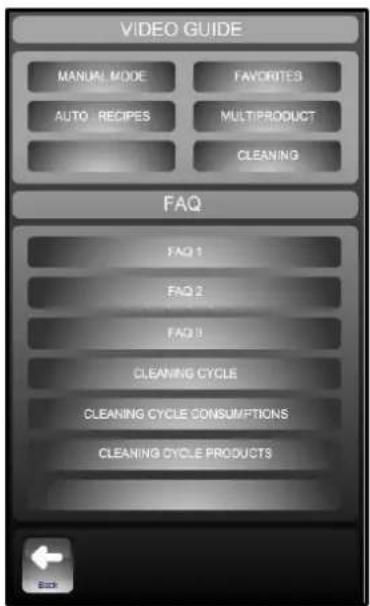
Graphic demonstration and or animated of the main menus
Information and « tips and advice » most used
7 CLEANING MENU
There are 2 possibilities:
- Manual cleaning (on demand)
- Auto cleaning (cleaning programmed every day of the week):

The cavity should never be cleaned with grills or containers in situ.
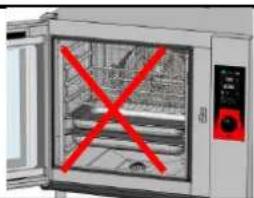
7.1 « MANUAL » CLEANING (on demand):
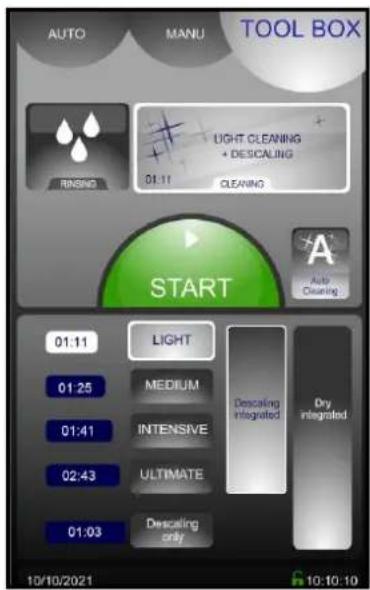
Intensity of the cleaning: Light / Medium / Intensive / Ultimate (The durations are shown on the left)
Descalining included: In addition to the cleaning cycle, a descaling cycle will be run if necessary, depending on the use and setting of the oven. (Measured by the frequency of use of the oven and the water hardness recorded in the parameters)
Integrated drying: drying of the cooking cham as well as the cleaning and/or descaling cycle if key is selected.
2 possible mode choices :
- Washing with descending activated as default: if this choice is un-ticked the cycle time is shortened to cleaning time only,
- Descaling only: allows enhanced descending cycle to be run.
Procedure:
Switch the oven on.
- Wait a few seconds until the start screen clears. If the preheat starts press STOP.
- Press the Service tab. The screen shows the last washing level used and whether a descending cycle will be run.

"Cleaning and descending (if necessary)"
- Press to select:

"Start" a cleaning cycle.
- The screen indicates the different phases selected for the cycle, the running time and remaining time. When the cleaning cycle has finished the "Service" screen is displayed again.
Note: The washing level / descaling / dry can be modified:
- Press to select:
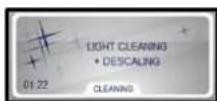

"Cleaning"
- Select the required level of cleaning depending on how dirty the oven is.
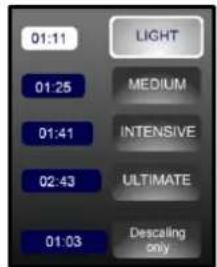

"Cleaning level" Light, medium, intensive or ultimate. The time for each is indicated in the box, shown in minutes.
- If you wish to skip the scheduled descending cycle, deactivate the button.


"Descending" pre-selected function
-
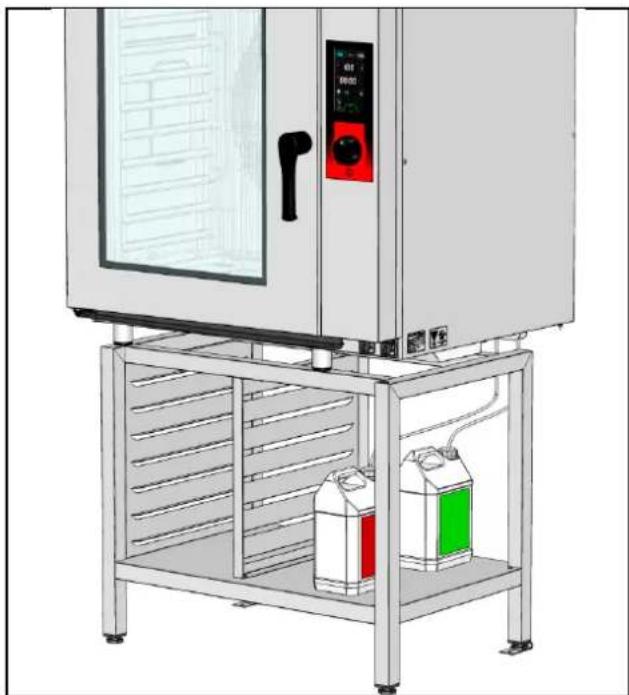
Check the pipes are connected to the chemical containers and that the quantities are sufficient. If not refer to the paragraph "Replacing the chemical containers"
-
Press the button if you wish to add integrated drying.


"Integrated drying" function to be selected (disactivated by default). The cycle time depends on the cleaning level selected
Light:3minutes
Medium:4 minutes
- Intensive : 4 minutes
- Integral : 4 minutes.
- then press to select:

"Start" a cleaning cycle.
- The screen indicates the different phases selected for the cycle, the running time and remaining time. When the cleaning cycle has finished the "Service" screen is displayed again.
Note: Dscaling can be performed alone without washing the oven. Repeat the above manual cleaning procedure in full by selecting this option :

"Descaling only" if you only wish to perform descaling.
7.2 "AUTO" CLEANING (cleaning programmed every day of the week):
Scheduled auto cleaning will only activate:
- if the door is closed and the oven is on
- if the interface has not been switched off by pressing the 3s button
- If no cycle is already in progress at the programmed auto cleaning start time. Cleaning will not automatically start at the end of the cooking cycle as there could still be products left inside.
- if the interface is not in ABC or JET mode (which are considered as permanent cycles ...)
The interface must therefore be in ECO / Manual or Auto mode, (with no cycle in progress, or the Service tab, inactive, power on etc.). Auto cleaning is activated in standby mode.
- Switch the oven on.
- Wait until the start up screen disappears. If preheating starts press STOP.
- Select the Service screen.
- Press to select:

"Auto cleaning"
- Put in your PIN code (0000 by default, select Client parameters in the service screen) then validate.
- The daily cleaning screen will appear.
- For each day select the level of clean required and the time by pressing the corresponding touch button then validate
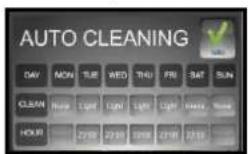

"Programming screen".
- The automatic cleaning programme is displayed. The cleaning cycle will start at the set hour each day and at the intensity selected. A descending cycle will be automatically integrated in necessary.
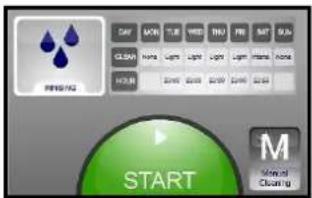
- To deactivate the automatic cleaning select Manual cleaning enter your PIN. The values programmed in will be remembered for the next time you select automatic cleaning.


"Manual cleaning"
7.3 CYCLES AND DURATIONS
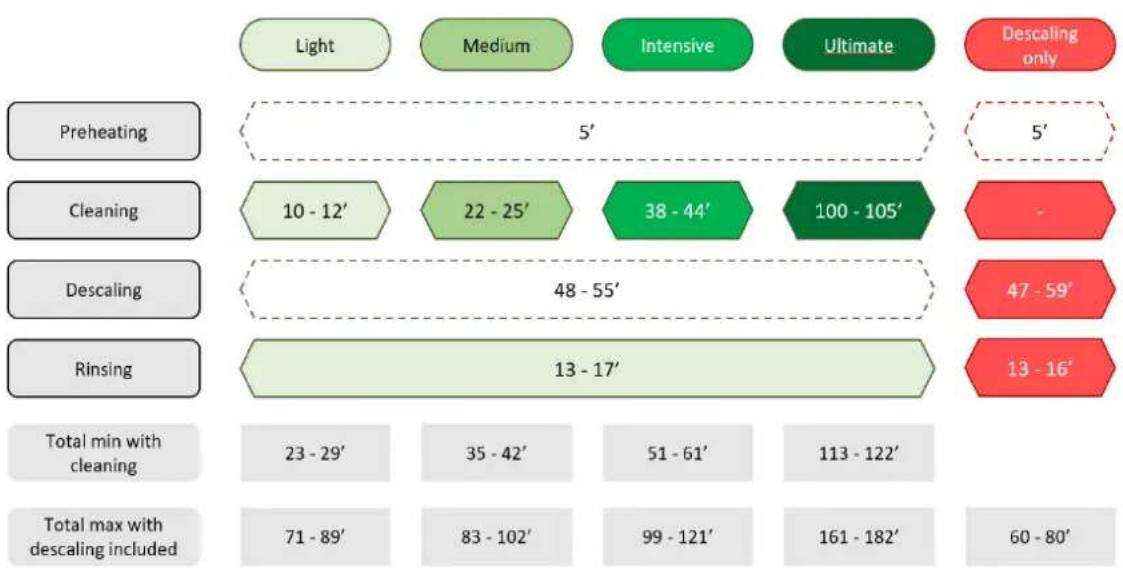
*Times in minutes
7.4 RAPID RINSING

Rapid rinse function using only water (no chemical) for example between two different types of cooking
7.5 EMPTY DETERGENT/DESCALER BOTTLE DETECTION
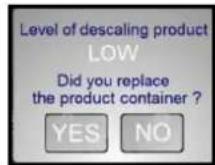

This message appears when the cleaning and/or descending product container is/are almost empty
Note: Refer to the "consumables" paragraph for the product consumption depending on the oven and its cleaning cycle
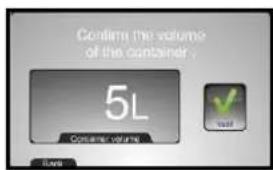

Validate or change the size of the container. Note the counter is calibrated against this volume.
7.6 REPLACEMENT OF THE CHEMICAL CONTAINERS:

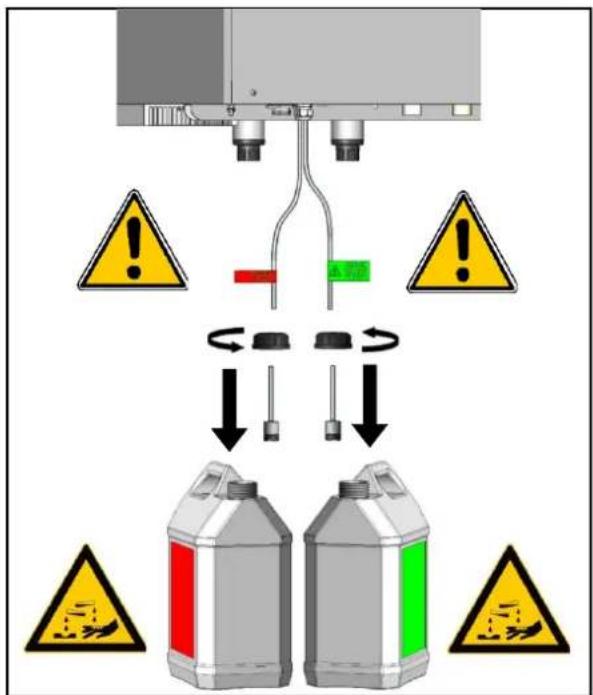
Never use descending product into the automatic cleaning system. This could seriously damage the ovens hydraulic circuits.
The suction pipes for washing products and descaling products are marked with labels and a coloured cap to position the pipe in the correct container: NEVER SWITCH THE PRODUCTS
Cleaning (coloured green)
Descending (coloured red)
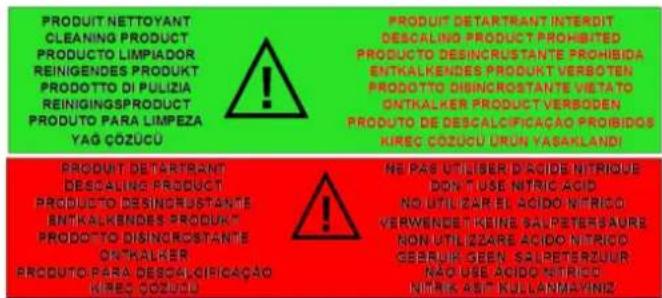

Note: Refer to the "Recommendations" chapter when handling or using these chemicals, if in any doubt refer to the products safety sheet
8 GREASE COLLECTION OPTION
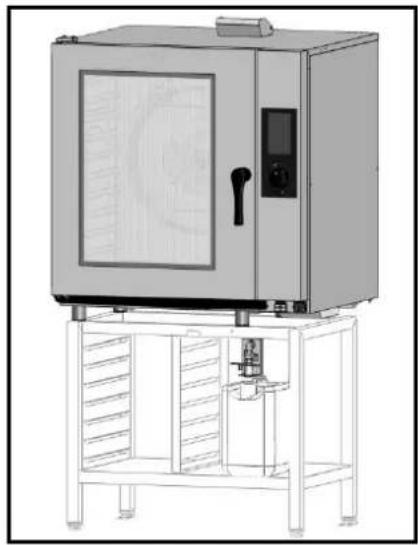
If your appliance is equipped with the optional grease trap system, grease will be collected during the cooking process and directed to a container external to the oven for safe handling and disposal.
An integrated shut-off valve makes it possible to replace the full grease container safely, even during cooking.
8.1 USE
- Installing the grease collection container
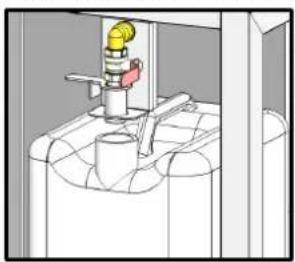
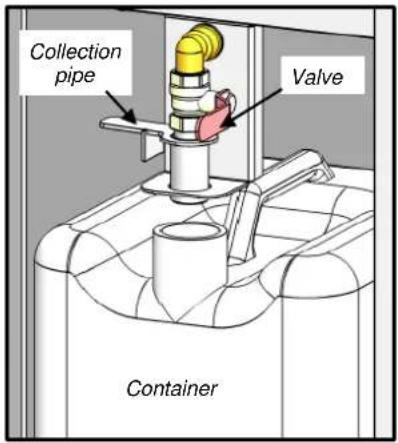
Ensure that the container is empty, or has sufficient space left in it, and that it is placed under the valve.
- Place the grease collection tube in the "drain" position


Lower the grease collection tube in to the container
- Open the valve
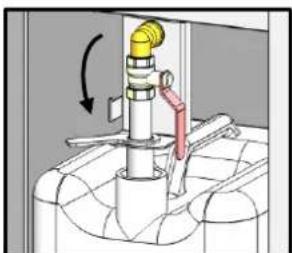

Valve in open position.
-
Program your cooking by entering the data in either the manual mode, or the automatic program mode.
-
Activate the grease collection option from manual or automatic mode
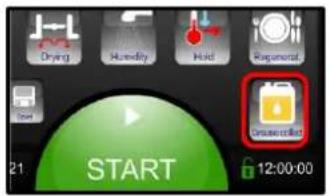

Grease collection activation tab.
- Then press...


"START" starts cooking.
- Then press...
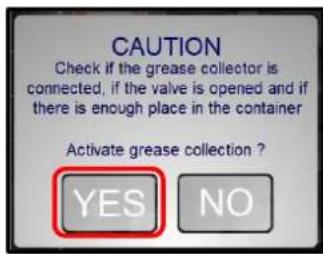

« YES » Activates grease collection during cooking
- Now the fats will automatically drain into the container throughout the cooking process.
- When cooking is complete, close the valve

CAUTION: The valve can be very hot.
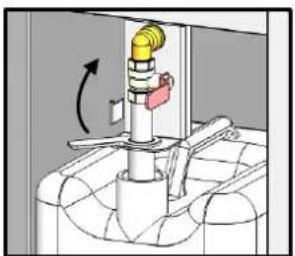

Valve in closed position.
- Place the grease collection tube in the "rest" position
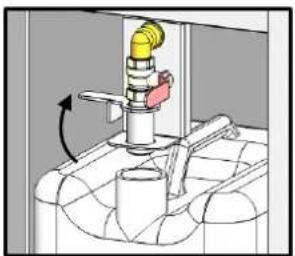

Raise the grease collection tube from the container.
- Close the container and remove it.
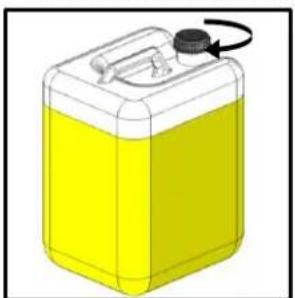

Screw on the cap supplied with the container
9 GUIDANCE AND INFO ABOUT THE CONTROL SCREEN
Why does the oven temperature drop so slowly?
In manual mode the change from a set temperature during a Convection or Combination cooking cycle doesn't activate a cooling cycle.
Why does my oven inject water in convection mode?
In manual mode starting a cycle when the actual temperature is already over the set temperature starts an automatic cooling phase with water injection (as per Client parameters).
Why does the oven cool down whilst cooking?
Whilst cooking moving from convection or combination to steam automatically starts a water injection cooling cycle until the set temperature is reached.
How do you create a waiting phase in a programme?
Inputting a cavity temperature of 80^ in convection mode creates a waiting phase or a phase where nothing happens (no heating, no ventilation)
How do you create a temperature holding phase?
In Auto mode, selecting a time of 99h00 is interpreted as a holding cycle (no cooking) in the mode and temperature selected.
How do you control various cooking times on several levels?
Programmes in the library named as « Multi level timing » allow you to set a specific time for each level with and end of cooking alarm.
How can you see the recorded or programmed recipe's cooking phases?
It is possible to see a summary of the phases by pressing detail «?».
How do you adjust the cooking in a manufacturer's recipe?
For manufacturers recipes it is possible to adjust the level of browning and cooking even after a cycle has started.
Can recipes have illustrations?
In the client library it is possible to link a photo to a recipe and display only the recipes that have a photo. (Auto / Modify / Photo)
Can recorded recipes be protected?
It is possible to block access to modify, erase and copy in «Clients» parameters.
How do you identify a copied recipe from the original?
A copied recipe has the symbols ^* before the name.
How do you change the name of a « client » recipe?
The names of « client » recipes can be personalised:
Modify /click on the zone name or family / Change the name or family.
Why can't I change my recipe in auto mode?
Because 化 Modify is deactivated in client parameters.
Can products be held at temperature after cooking?

HOLDING mode generates a cooling phase to the set temperature followed by holding at this temperature. This is like a hot cupboard without ventilation to avoid drying the products.
Can one activate a holding mode during the cooking process?
It is possible, the HOLDING button is activated and holding mode will begin after cooking has finished. If a core temperature has been selected holding will be at this temperature otherwise it will be at the temperature set in the « Client» parameters.
What are the parameters for temperature holding mode?
Temperature holding mode follows the parameters set in the client menu: temperature and time. (167°/time unlimited)
Can the automatic preheating be deactivated or the temperature changed?
The automatic initial preheat can be switched on or off, whilst the preheat temperature can be set in the « Client » parameters
Is it possible to programme cleaning on a regular basis?

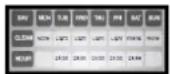
It is possible to programme an automatic cleaning cycle by day of the week and at a specific time with a greater or lesser degree of intensity.
How often does the oven need servicing?
A message indicating that a service is required 10 days before it is due.
How do I access client's parameters?

Access to « Client parameters» is by PIN code, default is « 0000 » this can be changed. DO NOT FORGET IT!
Why can't I access installer and technician parameters?
Access to certain parameters is restricted by a PIN and reserved for installation and service engineers.
Does the oven have a standby mode?
There is an automatic standby mode, timing is set in the « Client » parameters, this controls the ovens principle functions (blank screen, lighting).
Can the welcome message be personalised?
The welcome message can be changed in Client parameters. The message can be associated with a photo from the gallery or a welcome logo.
How do you retrieve HACCP data?

The Service/Exchange menu allows you to control HACCP data: start automatic recording, Viewable on screen or after exporting to USB stick in spreadsheet compatible format.
How do you complete the photo galley?
In the Service / Exchange data menu, it is possible to import photos ("FastPAD PC" software is required to do this)
Is there access to energy data, consumption costs...?
In the Service / Exchange data menu / consumption levels are displayed daily, by monthly and yearly intervals for, water, gas/electricity and detergent. Costs are also displayed if the actual costs have been put into the corresponding fields in Client parameters.
What is "Safe Mode"?
In the event of a fault in the electronics or the display it is still possible to start a Safe Mode cycle: convection at the temperature set for preheating 347^ by default. When operating in the mode any inputs from the control panel are ignored.
How do you start "Safe Mode"?
Switch the oven off and back on, then open and closed the door 3 times within 10 secs. The light will go off every time the door is opened and flash 3 times on the third closure to indicate the start of a Safe Mode cycle.
How do you stop "Safe Mode"?
To stop a Safe Mode cycle, switch the oven off.
10 USB PORT SOCKET/CORE PROBE SOCKET
The USB port and core probe sockets are fitted with silicone protective cover.
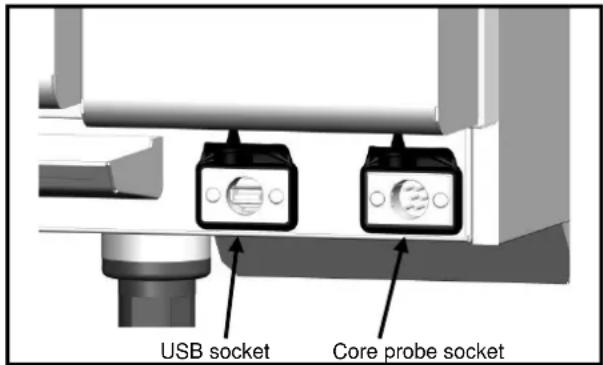

Warning!
Always put the protective cover in place (lowered to protect connections) whenever the socket is not in use.
Never "clean" connections with a water hose or a sponge. (If the silicone cover is used and put back in place after use, no maintenance is necessary).
The guarantee will not apply if these recommendations are not observed.
Note: To use the USB socket, refer to the "Data export" paragraph or to "FastPAD PC" software in the user manual
11 TOOLS FOR OPTIMAL COOKING
11.1 CORE PROBE
The core probe allows the perfect control of the level of your cooking which can be reproduced day after day whatever the size of the product. The core temperature to be reached will vary, of course, with the kind of product and the cooking level desired.
WARNING: The cooking of a product does not stop at once when removed from the oven.
As a matter of fact, after standstill, the core temperature continues rising to reach a temperature all the higher as the product has been cooked at a high temperature.
Example:
Beef roasted in combined mode at 392^ and removed from the oven at the time when its temperature reaches 104^ will see this later rise to about 135^ .
The same beef, steam-cooked at low temperature at 140^ (as a last phase) and removed from the oven at the time when its core temperature has reached 126^ , will evolve very little reaching 133^ .
| PRODUCTS | CORE TEMPERATURE TO BE REACHED | Core TEMPERATURE WHEN REMOVED FROM THE OVEN | |
| Classical cooking according to the chart annexed | Low temperature cooking | ||
| Red meats | |||
| Very rare | 130 | 99 | 122 |
| rare | 133 | 104 | 126 |
| Just done | 140 | 113 | 133 |
| Well done | 144 | 118 | 138 |
| White meat | |||
| Veal | 162 | 136 | 156 |
| Poultry | 171 | 145 | 167 |
| Fish | |||
| Salmon - Tuna | 167 | 167 | 167 |
| White fished fish | 176 | 176 | 176 |
| Pork preparations - terrines | 153 | 149 | 149 |
NOTE: Recommendation for controlling the core temperature (cooking degree):
To control properly the degree of cooking, the aspect and the weight loss, more especially in the case of red meats, we recommend finishing cooking with a low temperature steam phase. Adjust the temperature 46^ above the core temperature desired.
Example: Roasting beef:
1st phase:
Coloration
Dry air
410°F
for 15 minutes
2^nd phase:
Core cooking
Steam
140°F
Till core T^ = 126^
The cooking time increases to about 1 hour 25 minutes.
11.2 LOW TEMPERATURE COOKING
To optimise certain types of cooking, electronic regulation allows for long low temperature cooking. The set temperature corresponds to the core temperature which must be achieved.
Low temperature is indispensable for treating big pieces (sucking pig, leg of pork (ham), big fish), often treated in vacuum bags (sous vide).
This cooking mode is also worthwhile for perfectly controlling the cooking level (very rare, rare, well done...), for the aspect (external and sliced), for diminishing weight loss, but also for being safer from a hygienic point of view in the preparation of food products.
The quality of cooking is also much less sensitive to the size of the products treated, as well as to their quality.
The time necessary for cooking entirely conducted at low temperatures is of course longer.
| LOW TEMPERATURE | |||
| Products | Mode | Cooking T° | Approx. time |
| Red meats | Steam | 131°F | 6 h to 12 h |
| White meats | Steam | ||
| Veal | 162°F | ||
| Pork and poultry | 171°F | ||
| Pork preparations and terrines | Steam | 153°F | |
| Fish | 2 h to 4 h | ||
| Salmon - Tuna | Steam | 167°F | |
| White fish | Steam | 176°F | |
| Miscellaneous | 1 h to 1 h 30' | ||
| Farm produced foie gras | Steam | 158°F | |
| Fruit | Steam | 194°F | |
| Potatoes | Steam | 185°F | |
NOTE: Medium size pieces of meat (joints, leg of lamb...)
It is possible to diminish significantly the cooking times (2 or 3 times less), for medium sized pieces, and still partly keep the advantages above, by following:
| Products | 1stphase COLORATION | 2ndphase COOKING | 3rdphase COOKING |
| Blown air | Steam | Steam | |
| Red meats | 410°F For 15 min | 158°F till Core T° = 38°C | 140°F till Core T° = 52°C |
| White meats | 410°F For 15 min | 194°F to Core T° = 140°F | 185°F till Core T° = 163°F |
WARNING: Regular and thorough cleaning will ensure prolonged service life
UNDER NO CIRCUMSTANCES SHOULD CLEANING CHEMICALS BE USED ON SURFACES THAT ARE OVER 140^ . The result will be serious discolouration and damage to the surfaces.
Jet washers and hoses, high or low pressure should never be used for cleaning.
The warranty will not cover resulting damage if the following guidance is ignored.
The appliance must be isolated electrically during cleaning or maintenance and when replacing parts.
12.1 INFORMATION ABOUT STAINLESS STEELS
Stainless steel is a steel grade designed that a thin protective sheet is formed on the metallic surface, which protects it against corrosion (Oxide film resulting from the chemical reaction of oxygen on the metallic surface).
Anything hindering the formation of this sheet, or facilitating its partial destruction (Food residues, overflow of liquids, stagnant liquids...) reduces the resistance of stainless steel to corrosion.
Whilst the composition of stainless steel enables it to withstand some chemical aggression better than classical steels, you must not think that stainless steel is indestructible.
-
3 main factors contributing to corrosion should be watched for:
-
The chemical environment in general:
-
Different brines (Salt concentration, Sauerkraut...)
-
Chlorides contained in particular in:
-
cleaning products
-
bleach.
Any chemical environment is made considerably more aggressive to stainless steel as the temperature rises.
-
The temperature:
-
The duration:
The longer the contact time between stainless steel and the chemicals, the more noticeable the consequences of corrosion will be.
The combination of these three factors may lead to the eventual destruction of parts of the equipment, even if they have been made in very high quality stainless steel.
Note that when stainless steel becomes corroded, it is extremely rare that this is generated by the steel itself. Generally, cleaning products, which are not appropriate or are improperly used, lack of maintenance or extreme conditions of use are often found to be the cause of the damage.
WARNING!
The manufacturer will not be held responsible for cases of corrosion resulting from these conditions and the warranty will not apply.
A list of the most frequent causes follows, to allow you to better identify possible inappropriate use and to ensure the long service life of your equipment.
12.2 THE COMMONEST CAUSES OF CORROSION:
Floor cleaning
Floors are often cleaned with very aggressive products (prior to handover or during a kitchen deep clean). If the product is sprayed, without necessary precautions or suitable dilution, any splashes on the appliances may result in the corrosion of legs, bases and low level trims.
Worse still, if the area is not properly ventilated after application, the vapour from these products may settle on the equipment and result in corrosion spreading to the entire surfaces.
Inappropriate cleaning product (Bleach, Acids, Soda)
If inappropriate products, such as bleach, acid or soda dilutions, (all products which are not specifically designed for the maintenance of stainless steels) are used, irreversible etching of the stainless-steel surfaces can occur.
Cleaning product applied when the temperature is too high
All cleaning products are more aggressive at higher temperature. In principle the temperature of any surface must not exceed 140^ or permanent staining (blackening) of the stainless steel will result.
Inadequate rinsing after cleaning
After cleaning the surfaces should all be rinsed thoroughly to remove any chemical residues. If this is not done the residue will continue to act over time with the risk of starting the corrosive process.
Worse still, if the affected surface is submitted to temperatures over 140^ (inside of an oven, a tank or tank, ...), the impact will be greater and corrosion will almost inevitably occur.
Stagnation of cleaning products
In the same way, all the areas that can trap chemicals, especially the channels, gutters, drainage manifolds, traps etc. must be subject to careful and plentiful rinsing. (Use a nylon brush to reinforce the action of rinsing with clean water).
Salt concentration
Salt, much in use in kitchens, is often found to be the origin of pitting that can even penetrate the stainless steel. Spillages on any surface should be cleaned up at once.
Particular case of cooking in boiling salted water:
Salting water in a tank or tank presents a major risk: never put cooking salt into the tank before the water and remember that salt can concentrating on the base of the tank. Salt should be added to the water and stirred until it dissolves, the risk is reduced using table salt which dissolves faster.
Intensive use with brine
Crt t t t t t t t t t t t t t t t t t t t t t t t t t t t t t t t t t t t t t t t t t t t t t t t t t t t t t t e s specifically adapted to use in such an environment
Too much chlorine in the mains water supply
Sometimes certain networks supply water containing chlorine at above normal levels. In this event it is not unusual to be faced with problems of corrosion, pay particular attention to bain-marie, water baths, and equipment left to soak overnight etc.
Cleaning aluminium or aluminium coated items
The presence of aluminium or items that are aluminium coated in a chlorine solution is a particularly powerful catalyst for damaging stainless steel.
Do not leave fittings such as hood filters, aluminium trays or dishes soaking in tanks, tanks, pots, fryers etc. Just one night is sufficient to etch stainless steel at the point of contact with aluminium.
12.3 MAINTENANCE OF EXTERNAL SURFACES
It is necessary to clean the metal surface carefully so as to eliminate all dust, metal particles and deposits of any kind which could damage the protective layer mentioned above. For this purpose, it is sufficient to wash these surfaces with soapy water or any other neutral and non-abrasive cleaning product. RINSE CAREFULLY and wipe the surfaces. Never scrub stainless steel with metal wool, but if necessary, only with a "Scotch Brite" type pad or a similar product, by following the direction of polishing of the stainless-steel surface.
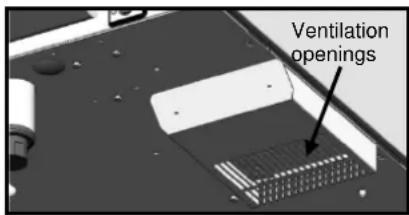
12.4 CLEANING THE ELECTRONIC COMPARTMENT VENTILATION OPENINGS
Cooling the electronic compartment is ensured by means of the ventilation apertures at the right front of the equipment (6 / 7 and 10 level). Once a week, check that the aeration grids are clean and not obstructed by dust by cleaning its surface with a dry cloth.
12.5 CLEANING THE CAVITY GASKET
In order to remove traces of grease or food scraps that can damage the gasket, regular and manual cleaning of the cavity gasket should be performed on the inner and outer faces.
Before cleaning, use water with soap or neutral and non-abrasive detergent with a sponge or a soft cloth to remove the grease from the cavity gasket.
12.6 CLEANING THE SELECTION KNOB
To clean the part behind the selection knob, remove it.

12.7 CLEANING BEHIND THE INNER DOOR
In order to keep optimum visibility of the cooking area, regularly clean the inner door and the door paneling with a suitable product and a soft cloth.
Opening the internal glass
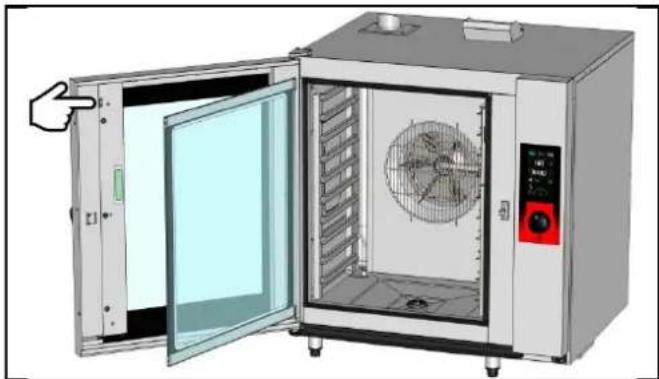
Open the door
To open the internal glass
- Press gently on the retaining clip to release the glass
Opening the door panelling
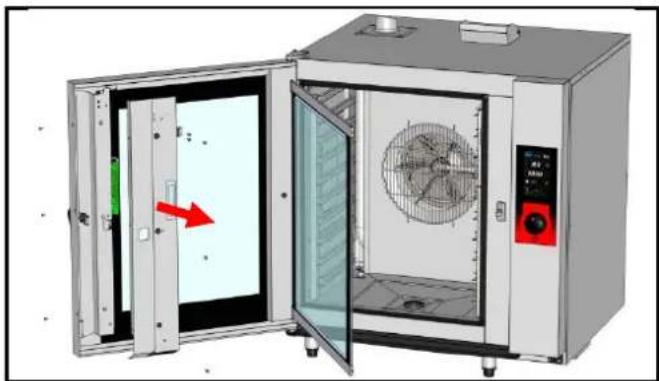
Open the door
To open the internal glass
- Press gently on the retaining clip to release the glass
Removing the door panelling
- Undo the 2 Phillips screws on the side of the door
- Undo the 3 Phillips screws holding the door panelling
- Remove the panelling and the internal glass retaining clips
12.8 MAINTENANCE OF INTERNAL SURFACES
The general principle consists in not letting the following settle in certain places:
- Substances likely to become concentrated and so become corrosive.
- Settling of different minerals contained in water and likely to generate corrosion (walls) performance and life-duration (fan balancing, exchanger dissipation, ...) problems.
CLEANING, DEGREASING: Once a day (see section « Cleaning menu »)
DESCALING: Every day if necessary.
If there are any mineral deposits (whitish specks) as a result of un-softened water in the cooking chamber this must be removed daily.

For maximum efficiency of the descending product without damaging the material and components of the oven, you should use an appropriate descaler. The use of certain acids has an irreversible destructive effect that may cause significant damage. The descending product must contain corrosion inhibitors to prevent metal attack. It must also comply with legal requirements, in particular for material intended to come into contact with foodstuffs.
Chemical products containing nitric acid are strictly prohibited. Recommended composition:
-
Phosphoric acid < 50%
-
Corrosion inhibitor
12.9 MATERIAL USED FOR COOKING CORROSIVE PRODUCTS (Sea fish, sauerkraut)
The materials used intensively and regularly for cooking corrosive products, such as sea fish, sauerkraut, ..., should be cleaned carefully and systematically after each use.
13 PREVENTATIVE MAINTENANCE
The appliance must be isolated electrically during cleaning or maintenance and when replacing parts.
| Subject | Daily | Weekly | Monthly | Every year(Or every 3000 h) | Recommendations |
| Cleaning the external surfaces | x | Use the correct dose of cleaning product; Do not use abrasive products. | |||
| Cleaning the cavity seal (all models) | x | Use the correct dose of cleaning product; Rinse thoroughly; Do not use abrasive products. | |||
| Visual inspection of cavity seal (all models) | x | In case of damage, alert the after-sales service | |||
| Cleaning and descaling of internal surfaces | x | Respect cleaning product dosage; Rinse thoroughly; Alert the after-sales service if any rust points appear. | |||
| Checking the amount of cleaning agent in the container | x | Replace the container as often as necessary | |||
| Checking the condition of the hose and of the base valve in the cleaning agent container | Check when replacing the container / Clean the base valve | ||||
| Checking the amount of descaling product in the container | x | Replace the container as often as necessary | |||
| Checking the condition of the hose and the base valve in the descaling agent container | Check when replacing the container / Clean the base valve | ||||
| Cleaning the electronic compartment ventilation openings | x | ||||
| Visual check of the presence of inner door stops | x | ||||
| Visual check of the condition of the lighting strip label | x | Clean if necessary, with a non-aggressive and non-abrasive degreaser. Rinse thoroughly. In case of damage, alert the after-sales service | |||
| Visual inspection of the core probe (tip, cable, passage through the bulkhead) | x | In case of damage, alert the after-sales service | |||
| Periodic maintenance by the after-sales service | x |
14 ERROR MESSAGES
| Message on the screen | Consequences | What to do? |
| i28: Core probe not connected | Cooking stops. | To continue cooking connect a probe or switch to timer mode. |
| E30: Electronics overheating | Control panel overheated | Clean the air inlet. |
| i31: Electronics overheating: Temperature reduced to 350°F | Cooking continues automatically at a temperature below 350°F | Clean the lower and rear air intakes. If the problem persists, call a service technician. |
| E32: Core probe with 2 points non functional | Cooking will continue | Consider changing the probe after cooking |
| i33: Core probe non function or not plugged | Cooking stops | To continue cooking connect a probe or switch to timer mode. |
| E46: Electronic communication fault (Bus RS485) | Cooking stops | Possible to launch safe mode: convection mode at 347°F (see guidance and info about the control screen). |
| E53: Motor short-circuit or ventilation non function | Cooking stops | Switch the oven off and call a service technician. |
| E61: Ambient probe short circuit | Cooking stops | Switch the oven off and call a service technician. |
| E62: Ambient probe non function | Cooking stops | Switch the oven off and call a service technician. |
| E67: Gas safety activated | Cooking stops | Check gas inlet. Switch the oven off and call a service technician. |
| E68: Cavity at + 554°F | Cooking stops | Switch the oven off and call a service technician. |
| E72: Electronics at over + 167°F | Cooking stops | Switch the oven off and call a service technician. |
| E73: Cleaning pump failure or running constantly | Cooking continues. | Arrange for a service technician |
| i81: Water flow problem | Reduced functionality or Pause the cleaning | Check the valve and water pressure. If the message appears during a cleaning cycle it is possible to stop the cycle if the cleaning chemicals have not yet been injected, by pressing stop. Check that the water has not been switched off to recommence the cycle automatically. If this is not the case the cycle is blocked. To force an end to the cycle:- press on « Tools/Cleaning »- enter the PIN code « RSTC » to exit- manually undertake a thorough rinse of the cooking cavity to eliminate all chemical residues before cooking- call a service technician |
| i81 LAV: Water flow too low during cleaning | Pause the cleaning cycle | Check the valve and the water pressure. Switch the oven off and call a service technician. |
| E82: Solenoid sticking | Cooking continues. | Switch the oven off and call a service technician. |
| i83: Maximum capacity of water treatment equipment reached | Cooking continues. | Check and recharge your equipment then reset the counter (client parameters) |
| i84: révision impérative | Cooking continues. | Call a service technician. |
| USB stick full | USB stick is full. | Clear the USB stick |
| USB missing | USB stick required | Connect a USB stick |
| Screen blocked or not working | Cooking continues in the previously configured mode. | Turn off the oven and restart it. If the problem persists, reset the interface: Open and close the door 6 times after switching on. |
15 LES CONSUMABLES
15.1 GENERAL
We recommend the use of products supplied by the manufacturer for cleaning your equipment and to guarantee effective results. Contact your distributor who can supply these detergent chemicals
15.2 CLEANING PRODUCT
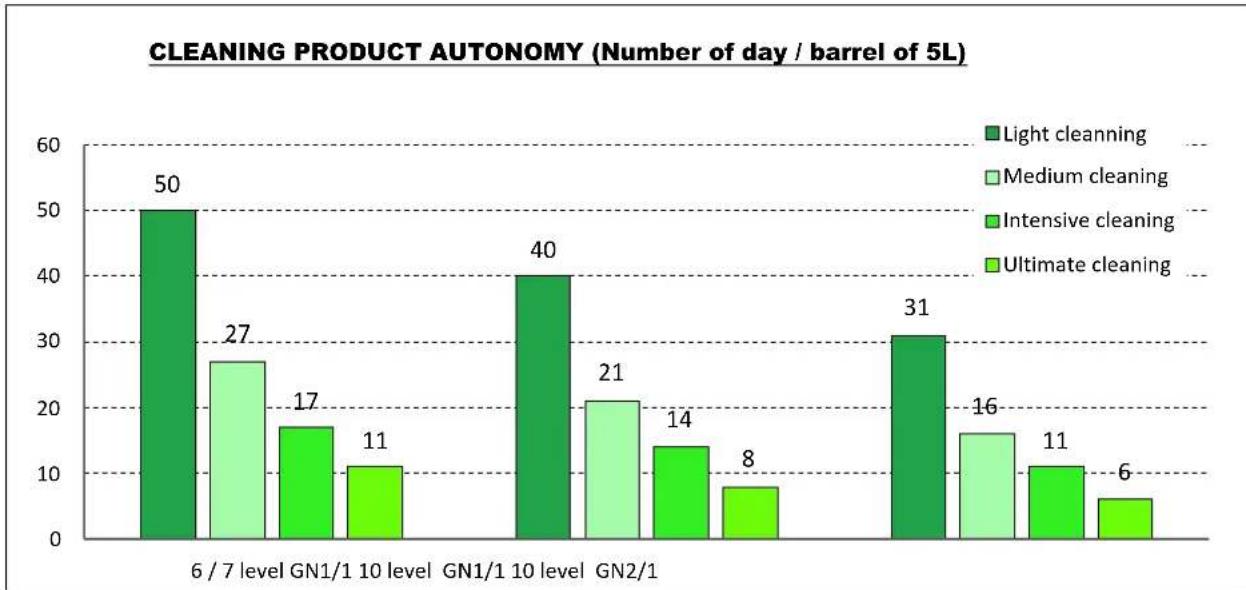
Consumptions based on 1 daily cleaning
15.3 DESCALER PRODUCT
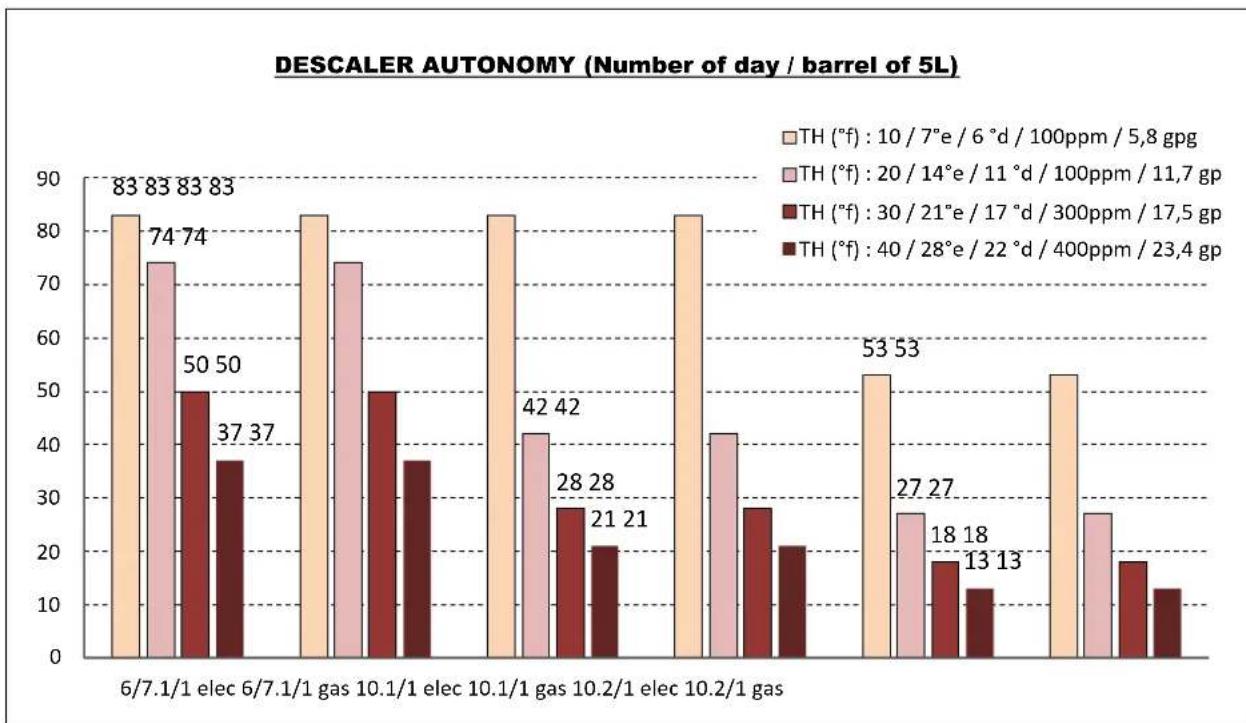
16 RECOMMENDED AND FRONT LINE SPARE PARTS
| Designation | Codes |
| Drive shaft gasket + wear ring | 145587 |
| 120W UL Motor service kit | 147147 |
| UL drainage valve | 147861 |
| Resistance service kit 11.43 KW 240V + gasket (outer flange) | 147960 |
| Resistance service kit 19.6 Kw 240V + gasket | 147961 |
| Resistance service kit 16.3kw 208V + gasket | 147962 |
| Regulation probe service kit 1PT100 | 148071 |
| 250W Motor service kit + ring + gasket | 148095 |
| Resistance service kit 11.43 Kw 240V + gasket | 148096 |
| Resistance service kit 22KW 277V + gasket | 148097 |
| Resistance service kit 11KW 277V | 148098 |
| 40 diameter burner service kit 15-24 kW | 148246 |
| 40 diameter burner service kit | 148247 |
| Gas fan service kit | 148257 |
| One-way UL solenoid valve 1 x 10L/min | 148597 |
| Two-way UL solenoid valve 2 x 10L/min | 148598 |
| After sales kit facia seal | 148755 |
| Motor relay with fixation bracket | 300282 |
| Reed switch | 300676 |
| Three-pole 25A 230V 50/60 Hz contactor | 300697 |
| Three-pole 50A 230V 50/60 Hz contactor | 300700 |
| Tree-pole 80A 230V 50/60 HZ contactor | 300702 |
| Anti-interference relay | 300769 |
| Ultra fast fuse 0.2A 250V 5 x 20 | 300787 |
| 10amp 5 x 20 fuse | 300788 |
| 5 x 20 fast fuse 1amp | 300789 |
| 600VAC fuse 10A 10.3 x 38.1 | 300793 |
| Contactor LC1D80P7 | 300798 |
| Glass fuse 4A | 300801 |
| Manual resetting 320°C thermostat + nut | 301066 |
| Peristaltic pump 3 litres/h | 304312 |
| Condenser 12.5μf | 304296 |
| Ventilation fan 120 x 120 x 38 230/50/60 UL | 304297 |
| 24V Motor/gearbox | 305110 |
| Switching regulator 15V 15W RS 15-15 | 308350 |
| Transformer 230V/24 UL | 308492 |
| 830 VA Transformer | 308498 |
| 415 VA Transformer | 308499 |
| Fuse 3.15 Amps | 309407 |
| Inter card cable | 309581 |
| Filter with connection for gas oven | 309608 |
| FastPAD 2 interface assembly | 309634 |
| LED strip | 309638 |
| VISIOPAD coder | 309644 |
| FastPAD 2 Screen | 309646 |
| FastPAD 2 Max UL relay connection | 309663 |
| Gas burner control card | 309704 |
| 848 Sigma 60Hz gas valve | 310355 |
| Security box | 310356 |
| LED strip label | 311356 |
| CP2A pump | 314379 |
| Base weight | 318060 |
| Heating element + immersion heater gasket | 366461 |
| 27 x 3 EPDM 70 shores O ring | 366485 |
| Capacity drainage gasket | 366556 |
| Capacity gasket for oven | 366561 |
| Capacity gasket to 1035 and 1056 | 366562 |
| Door stop | 366572 |
| 4 x 6 PVC hose per meter | 366601 |
| Inlet flange gasket exchanger | 366680 |
| Outlet seal exchanger 6/10 levels | 366683 |
| Heat exchanger inlet seal | 366684 |
| Gas fan gasket | 366685 |
| Door closure mechanism | 384187 |
| Anti-parasite module | 407002 |
| Gas ignition | 408402 |
| Arched ignition electrode | 468400 |
| Straight Ionisation electrode | 468401 |
17 RECOMMENDATIONS
These appliances are for professional use, only appropriately trained personnel should use them.
These appliances are intended to be used for commercial applications, for example in kitchens of restaurants, canteens, hospitals and in commercial enterprises such as bakeries, butcheries, etc., but not for continuous mass production of food.
These appliances must be installed with sufficient ventilation to prevent the formation of an excessive concentration of substances harmful for health within the premises in which they are installed.
- The rate of new air required for combustion is 2m3/h per kW of heating power.
Never block the condensate exhaust flue, because the pressure could rise in the appliance and pose a risk of explosion.
If an error message appears consult the list of error messages and follow the ADVICE given.
When cleaning high pressure jets or lances should never be used.
NEVER start the oven WITHOUT HAVING POSITIONED AND LOCKED the ventilation duct.
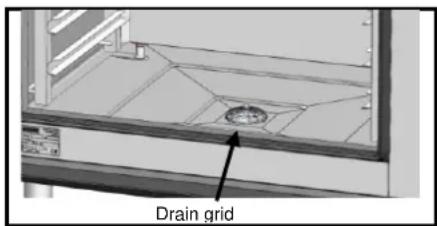
Do not remove the ventilation duct and the drain grid located in the oven. If this grid is missing do not start the oven.
Always use a qualified technician to install the equipment and if necessary change the oven from one gas to another.
IMPORTANT: Please be aware that when cooking dishes prepared with alcohol (coq au vin, pears in wine, etc....). Vapour saturated with alcohol may when heated cause an explosion in the oven and due to the sealed door, create a momentary overpressure which may cause an irreversible deformation of the panels. This risk is further increased when the user adds alcohol to the products near the end of the cooking cycle and closes the door to complete cooking.
The appliance must be isolated electrically during cleaning or maintenance and when replacing parts.
For long term reliability and safety it is advisable to have the unit serviced by suitably qualified technicians (Dismantling of burners, inspection and cleaning of venturis, cleaning jets, adjustment of air rings, cleaning vents, checking for possible leaks, checking control elements, regulating and safety accessories...).
The oven must be meticulously maintained on a DAILY basis (see the "Maintenance" chapter). In particular, the fans, heating elements and internal surfaces must be kept clean grease and mineral deposits must not be allowed to accumulate.
Never place the probe behind the ventilation duct (the probe may deteriorate in proximity to the elements or gas exchange).
NEVER APPLY ANY CLEANING PRODUCT WHEN THE OVEN IS HOT, AT ANYTHING OVER 140^ THE SURFACE WILL BE IRREPARABLY DAMAGED.
Do not open the oven door during a cleaning cycle.
Combination ovens should be cleaned with specific products which can resist temperature of up to 158^ . An inappropriate cleaning or descaling product may have a slightly corrosive effect.
The detergent chemical risk should not exceed 3 in accordance with EN 1717 (Toxicological information FDS: LD50 > 200mg/kg).
We strongly advise using cleaning products recommended by the manufacturer to ensure optimal cleaning and component life.
To guarantee optimal cleaning and avoid chemical damage, we recommend using suitable cleaning products. For cleaning products to be compatible with our ovens, they should:
- be composed of less than 25% potassium hydroxide WITHOUT sodium hydroxide
- be compatible with an operating temperature of 140^ .
- contain anti-corrosion agents
For maximum efficiency of the descending product without damaging the material and components of the oven, you should use an appropriate.
descaler. It must also comply with legal requirements, in particular for material intended to come into contact with foodstuffs. Chemical products containing nitric acid are strictly prohibited. Recommended composition:
Phosphoric acid < 50%
- Corrosion inhibitor
Under no circumstances should the oven be cleaned with grills or containers in situ.
- The core probe socket and USB port are fitted with silicone protective covers.
- Always put the protective cover in place (lowered to protect connections) whenever the socket is not in use.
- Never "clean" connections with a water hose or a sponge. (If the silicone cover is used and put back in place after use, no maintenance is necessary).
The manufacturer certifies that the packaging meets the provision 94/62/CE (relating to packaging and packaging waste of 20.12.94) and requests that the final installer (or user) observes the rules relating to the removal of the packaging (recycling or reuse).
« According to article 6 of the decree of 20 July 2005 a marking giving the identity of the manufacturer and the market release date must appear on equipment after 13 August 2005».
The warranty will not cover problems caused by failure to comply with these recommendations

Warning! Danger! Caution!
Cooking appliances may reach 482^. BE CAREFUL not to burn yourself when using or handling INNER ACCESSORIES (Plates, modules, filter, duct...).
The surface temperature of the door can exceed 140^ . BEWARE OF THE RISK OF BURNS.
Loading and unloading containers and ovenware: The height of the top shelf or runner can be 39.37". If unloading manually be careful. ATTENTION: splashes and spillages pose a risk of scalding.
When using the core probe be aware that it can be very hot, always use suitable protection to avoid burns
Remember the dangers identified on the safety data sheet for detergent and descaler
Harmful if swallowed.
- Can result in serious burns.
- Irritates the eyes.
- Irritates the respiratory tracts.
- Risk of serious eye lesions.
Danger of irritation to the skin and eyes or acid burns.
Detergents and descaler will cause irritation and possible burns if in direct contact with the skin or eyes.
- Do not inhale the mist or spray
- Avoid direct contact with these products
- Never open the oven door during the automatic cleaning cycle
- Wear protective clothing, gloves and hermetic protective goggles in accordance with the safety data sheet.
Remember the safety advice provided by the safety data sheet for each detergent and descaler
- Do not each or drink when using these products.
- Do not inhale their vapours.
- If case of contact with eyes rinse immediately with plenty of water and seek medical advice.
- Wear appropriate protective clothing, gloves and face and eye protective gear.
- In the event of an accident or sickness seek immediate medical attention
- Dispose of the product and its container as hazardous waste.
PROFESSIONAL KITCHEN EQUIPMENT END OF LIFE CYCLE
Instructions
Disse of this product according to the national legislation, or other rules in force in your country, regarding the safe disposal of used electrical and electronic equipment.
Note: To do this, contact an appropriate collection point for the recycling of electrical and electronic devises for treatment, recovery and recycling in accordance with national legislation.
18 GUARANTEE
PLEASE NOTE THAT NO GUARantee IS UNCONDITIONAL
Our guarantee applies only for normal use. That is, with the strict observance of the recommendations given in our instructions for use and maintenance.
It will only be valid on condition that the periodical maintenance recommended has been carried out by factory trained engineers.
All appliances are, subject to the above limitations, normally guaranteed for a period of one year, from the date invoice. In the event of a breakdown due to a visible or hidden defect, our equipment will be repaired at our expense, including parts and labour costs.
To benefit from our guarantee, our appliances must not have been modified in any way or repaired using parts which are not genuine and approved for such use or where repairs have been undertaken by personnel who are not qualified or factory trained.
In case of breakdown or failure we should be informed in writing at the earliest opportunity of the nature of the problem. In no circumstances should the defect be remedied by the user or a third party.
Regular service inspections and maintenance by our engineers are an essential condition for correct and reliable operation of our equipment. Such service and maintenance operations can and must only be carried out by our technicians, who are not only fully qualified but also trained to do so. They have the right tooling, original spare parts and are given regular training updates on the appliances. Periodic servicing is essential; it is carried out at a cost but guarantees reliable operation of our appliances
The timing of service and maintenance is relative to the conditions of use. In the event of heavy use certain operations will need to be carried out more frequently.
WARNING! Damage caused by connecting our appliances to a power supply which does not comply with the data plate (voltage, reversal of phase/neutral conductors ...) or where phase order cannot be checked (this is important for three-phase motors, fan direction, electric rams, ...) will under no circumstances be covered by warranty.
For this reason, we advise against connecting appliances until the electrical and gas supplies can be checked and compared with details on the data plate.
COMBI GAZ & ELECTRIQUES
COMPOSITION DES APPAREILS CONSEILS PRATIQUES D'UTILISATION
19 GENERALITES 2
20 MODE ABC. 3
21 MODE JET 3
22 MENU MANUEL 4
23 MENU AUTO: 5
24 MENU SERVICE 9
25 MENU NETTOYAGE 13
26 OPTION COLLECTION DE GRAISSE 17
27 TRUCS ET ASTUCES DE L'ECRAN DE COMMANDE 19
28 PRISE USB / PRISE SONDE A COEUR 21
29 LES OUTILS D'OPTIMISATION DE CUISSON 21
30ENTRETIEN DU FOUR 23
31 MAINTENANCE PREVENTIVE 26
32 DEFAULTS DE FONCTIONNEMENT 27
33 LES CONSOMMABLES 28
34 PIECES RECOMMANDEES ET DE PREMIERE URGENCE 29
35 RECOMMANDATIONS 30
36 GARANTIE 31
- GARANTIE -
Suppression (effacer)
e détaillé
23.3 ECRAN MULTI-PRODUITS
25.6 REMPLACEMENT DES BIDONS DE PRODUIT:
