 ManualGo.com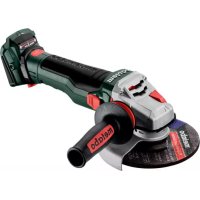
WB 18 LTX BL 15150 Quick - Grinder METABO - Free user manual and instructions
Find the device manual for free WB 18 LTX BL 15150 Quick METABO in PDF.



| Technical specifications | METABO WB 18 LTX BL 15150 Quick cordless grinder, brushless motor, 18V voltage, no-load speed 0-15000 rpm, grinding diameter 150 mm. |
|---|---|
| Usage | Ideal for grinding and polishing various materials, suitable for professional and amateur use. |
| Maintenance and repair | Regularly check the condition of grinding discs, clean the air filter, and ensure batteries are charged and in good condition. |
| Safety | Use safety glasses, gloves, and a dust mask. Do not use the device in damp environments. |
| General information | Lightweight for easy handling, 3-year tool warranty, compatible with other batteries from the METABO range. |
Frequently Asked Questions - WB 18 LTX BL 15150 Quick METABO
Download the instructions for your Grinder in PDF format for free! Find your manual WB 18 LTX BL 15150 Quick - METABO and take your electronic device back in hand. On this page are published all the documents necessary for the use of your device. WB 18 LTX BL 15150 Quick by METABO.
USER MANUAL WB 18 LTX BL 15150 Quick METABO
m kg (lbs) 2,5 (5.5)
Original instructions We, being solely responsible: Hereby declare that these angle grinders, identified by type and serial number *1), meet the requirements of all relevant directives *2) and standards *3). Technical documents for *4) - see page 3. The cordless angle grinders, when fitted with original Metabo accessories, are suitable for grinding, sanding, separating and wire brushing metal, concrete, stone and similar materials without the use of water. Machines with the designation WVB.. are particularly suited for working with wire brushes due to thumbwheel for speed selection. The user bears sole responsibility for any damage caused by inappropriate use. Generally accepted accident prevention regulations and the enclosed safety information must be observed. For your own protection and for the protection of your power tool, pay attention to all parts of the text that are marked with this symbol! WARNING – Read the operating instructions to reduce the risk of injury. WARNING – Read all safety warnings, instructions, illustrations and specifications provided with this power tool. Failure to follow all instructions listed below may result in electric shock, fire and/or serious injury. Keep all safety instructions and information for future reference. Always include these documents when passing on your power tool.
4.1 Safety Warnings Common for Grinding,
Sanding, Wire Brushing or Cutting-Off Operations: a) This power tool is intended to function as a grinder, sander, wire brush, hole cutter or cut- off tool. Read all safety warnings, instructions, illustrations and specifications provided with this power tool. Failure to follow all instructions listed below may result in electric shock, fire and/or serious injury. b) Operations such as polishing are not to be performed with this power tool. Operations for which the power tool was not designed may create a hazard and cause personal injury. c) Do not convert this power tool to operate in a way which is not specifically designed and specified by the tool manufacturer. Such a conversion may result in a loss of control and cause serious personal injury. d) The rated speed of the accessory must be at least equal to the maximum speed marked on the power tool. Accessories running faster than their rated speed can break and fly apart. e) The outside diameter and the thickness of your accessory must be within the capacity rating of your power tool. Incorrectly sized accessories cannot be adequately guarded or controlled. f) Threaded mounting of accessories must match the grinder spindle thread. For accessories mounted by flanges, the arbour hole of the accessory must fit the locating diameter of the flange. Accessories that do not match the mounting hardware of the power tool will run out of balance, vibrate excessively and may cause loss of control. g)The dimensions of the accessory mounting must fit the dimensions of the mounting hardware of the power tool. Accessories that do not match the mounting hardware of the power tool will run out of balance, vibrate excessively and may cause loss of control. h) Do not use a damaged accessory. Before each use inspect the accessory such as abrasive wheels for chips and cracks, backing pad for cracks, tear or excess wear, wire brush for loose or cracked wires. If the power tool or accessory is dropped, inspect for damage or install an undamaged accessory. After inspecting and installing an accessory, position yourself and bystanders away from the plane of the rotating accessory and run the power tool at maximum no-load speed for one minute. Damaged accessories will normally break apart during this test time.
i) Wear personal protective equipment.
Depending on application, use face shield, safety goggles or safety glasses. As appropriate, wear dust mask, hearing protectors, gloves and workshop apron capable of stopping small abrasive or workpiece fragments. The eye protection must be capable of stopping flying debris generated by various applications. The dust mask or respirator must be capable of filtrating particles generated by the particular application. Prolonged exposure to high intensity noise may cause hearing loss. j) Keep bystanders a safe distance away from the work area. Anyone entering the work area must wear personal protective equipment. Fragments of the workpiece or of a broken accessory may fly away and cause injury beyond immediate area of operation.
1. Declaration of Conformity
2. Specified Conditions of Use
k) Hold the power tool by insulated gripping surfaces only, when performing an operation where the cutting tool may contact hidden wiring. Contact with a "live" wire will also make exposed metal parts of the power tool "live" and could give the operator an electric shock. l) Position the cord clear of the spinning accessory. If you lose control, the cord may be cut or snagged and your hand or arm may be pulled into the spinning accessory. m) Never lay the power tool down until the accessory has come to a complete stop. The spinning accessory may grab the surface and pull the power tool out of your control. n) Do not run the power tool while carrying it at your side. Accidental contact with the spinning accessory could snag your clothing, pulling the accessory into your body. o) Regularly clean the power tool’s air vents. The motor’s fan will draw the dust inside the housing and excessive accumulation of powdered metal may cause electrical hazards. p) Do not operate the power tool near flammable materials. Sparks could ignite these materials. q) Do not use accessories that require liquid coolants. Using water or other liquid coolants may result in electrocution or shock.
4.2 Kickback and related warnings
Kickback is a sudden reaction to a pinched or snagged rotating wheel, backing pad. brush or any other accessory. Pinching or snagging causes rapid stalling of the rotating accessory, which in turn causes the uncontrolled power tool to be forced in the direction opposite of the accessory’s rotation at the point of the binding. For example, if an abrasive wheel is snagged or pinched by the workpiece, the edge of the wheel that is entering into the pinch point can dig into the surface of the material causing the wheel to climb out or kickback. The wheel may either jump toward or away from the operator, depending on direction of the wheel’s movement at the point of pinching. Abrasive wheels may also break under these conditions. Kickback is the result of power tool misuse and/or incorrect operating procedures or conditions and can be avoided by taking proper precautions as given below. a) Maintain a firm grip with both hands on the power tool and position your body and arms to allow you to resist kickback forces. Always use the auxiliary handle, if provided, for maximum control over kickback or torque reaction during start-up. The operator can control torque reactions or kickback forces, if proper precautions are taken. b) Never place your hand near the rotating accessory. Accessory may kickback over your hand. c) Do not position your body in the area where the power tool will move if kickback occurs. Kickback will propel the tool in direction opposite to the wheel’s movement at the point of snagging. d) Use special care when working corners, sharp edges etc. Avoid bouncing and snagging the accessory. Corners, sharp edges or bouncing have a tendency to snag the rotating accessory and cause loss of control or kickback. e) Do not attach a saw chain woodcarving blade, segmented diamond wheel with a peripheral gap greater than 10 mm or toothed saw blade. Such blades create frequent kickback and loss of control.
4.3 Safety warnings specific for grinding and
cutting-off operations: a) Use only wheel types that are specified for your power tool and the specific guard designed for the selected wheel. Wheels for which the power tool was not designed cannot be adequately guarded and are unsafe. b) The grinding surface of centre depressed wheels must be mounted below the plane of the guard lip. An improperly mounted wheel that projects through the plane of the guard lip cannot be adequately protected. c) The guard must be securely attached to the power tool and positioned for maximum safety, so the least amount of wheel is exposed towards the operator. The guard helps to protect the operator from broken wheel fragments, accidental contact with wheel and sparks that could ignite clothing. d) Wheels must be used only for specified applications. For example: do not grind with the side of cut-off wheel. Abrasive cut-off wheels are intended for peripheral grinding, side forces applied to these wheels may cause them to shatter. e) Always use undamaged wheel flanges that are of correct size and shape for your selected wheel. Proper wheel flanges support the wheel thus reducing the possibility of wheel breakage. Flanges for cut-off wheels may be different from grinding wheel flanges. f) Do not use worn down wheels from larger power tools. A wheel intended for larger power tools are not suitable for the higher speed of a smaller tool and may burst. g) When using dual purpose wheels always use the correct guard for the application being performed. Failure to use the correct guard may not provide the desired level of guarding, which could lead to serious injury.
4.4 Additional safety warnings specific for
cutting-off operations: a) Do not “jam” the cut-off wheel or apply excessive pressure. Do not attempt to make an excessively deep cut. Overstressing the wheel increases the loading and susceptibility to twisting or binding of the wheel in the cut and the possibility of kickback or wheel breakage. b) Do not position your body in line with and behind the rotating wheel. When the wheel, at theENGLISH en
point of operation, is moving away from your body, the possible kickback may propel the spinning wheel and the power tool directly at you. c) When the wheel is binding or when interrupting a cut for any reason, switch off the power tool and hold it motionless until the wheel comes to a complete stop. Never attempt to remove the cut-off wheel from the cut while the wheel is in motion otherwise kickback may occur. Investigate and take corrective action to eliminate the cause of wheel binding. d) Do not restart the cutting operation in the workpiece. Let the wheel reach full speed and carefully re-enter the cut. The wheel may bind, walk up or kickback if the power tool is restarted in the workpiece. e) Support panels or any oversized workpiece to minimize the risk of wheel pinching and kickback. Large workpieces tend to sag under their own weight. Supports must be placed under the workpiece near the line of cut and near the edge of the workpiece on both sides of the wheel. f) Use extra caution when making a “pocket cut” into existing walls or other blind areas. The protruding wheel may cut gas or water pipes, electrical wiring or objects that can cause kickback. g) Do not attempt to do curved cutting. Overstressing the wheel increases the loading and susceptibility to twisting or binding of the wheel in the cut and the possibility of kickback or wheel breakage, which can lead to serious injury.
4.5 Safety warnings specific for sanding
operations: a) Use proper sized sanding disc paper. Follow the manufacturer’s recommendations, when selecting sanding paper. Larger sanding paper extending too far beyond the sanding pad presents a laceration hazard and may cause snagging, tearing of the disc or kickback.
4.6 Safety warnings specific for wire
brushing operations: a) Be aware that wire bristles are thrown by the brush even during ordinary operation. Do not overstress the wires by applying excessive load to the brush. The wire bristles can easily penetrate light clothing and/or skin. b) If the use of a guard is specified for wire brushing, do not allow any interference of the wire wheel or brush with the guard. Wire wheel or brush may expand in diameter due to work load and centrifugal forces. WARNING – Always wear protective goggles. Wear ear protectors. WARNING – Always operate the power tool with two hands. Do not use the guard for cutting-off operations. When working with cut-off wheels, always use the parting safety guard for safety reasons. Do not use any segmented diamond cut-off wheels with segment slits >10 mm. Only negative segment cutting angles are permitted. Use bonded cut-off wheels only if these are reinforced. Use elastic cushioning layers if they have been supplied with the sanding media and if required. Observe the specifications of the tool or accessory manufacturer! Protect discs from grease or impact! Grinding wheels must be stored and handled with care in accordance with the manufacturer's instructions. Accessories must be stored and handled with care in accordance with the manufacturer's instructions. Never use cut-off wheels for roughing work or deburring! Do not apply pressure to the side of the cut-off wheels. The workpiece must lay flat and be secured against slipping, e.g. using clamps. Large workpieces must be sufficiently supported. If accessories with threaded inserts are used, the end of the spindle may not touch the base of the hole on the sanding tool. Make sure that the thread in the accessory is long enough to accommodate the full length of the spindle. The thread in the accessory must match the thread on the spindle. See page 2 and chapter 14. Technical Specifications for more information on the spindle length and thread. Use of a suitable fixed extractor system is recommended. Always install an RCD with a maximum trip current of 30 mA upstream. If the angle grinder is shut down via the GFCI, it must be checked and cleaned. See chapter 9. Cleaning. Damaged, eccentric or vibrating tools must not be used. Avoid damage to gas or water pipes, electrical cables and load-bearing walls (building structure). A damaged or cracked side handle must be replaced. Never operate the machine with a defective additional handle. A damaged or cracked safety guard must be replaced. Never operate a machine with a defective safety guard. Secure small workpieces, for example by clamping them in a vice. When using dual-purpose (combined grinding and cut-off wheels), only the following guard types must be used: type A, type C. See chapter 11. Using the correct guard: Using an incorrect guard can lead to loss of control and serious injuries. Examples for incorrect use: - when using a type A guard for lateral grinding, the guard may interfere with the workpiece causing poor control.ENGLISHen
- when using a type B guard for cutting-off operations with bonded Fcut-off wheels, there is an increased risk of exposure to emitted sparks and particles, as well as exposure to wheel fragments in the event of a wheel burst. - when using a type A, B, C guard for cutting-off operations or lateral grinding in concrete or masonry, there is an increased risk of exposure to dust and loss of control resulting in kickback. - when using a type A, B, C guard with a wheel-type wire brush with a thickness greater than the maximum permitted thickness, the wires may catch on the guard leading to breaking of the wires. Always use the matching guard for the accessory. See chapter 11. When working in dusty conditions, ensure that ventilation openings are not blocked. If it becomes necessary to remove dust, first remove the battery pack (use non-metallic objects) and avoid damaging internal components. Reducing dust exposure: WARNING - Some dust created by power sanding, sawing, grinding, drilling, and other construction activities contains chemicals known to cause cancer, birth defects or other reproductive harm. Some examples of these chemicals are: - Lead from lead-based paints, - crystalline silica from bricks and cement and other masonry products, and - arsenic and chromium from chemically treated lumber. Your risk from these exposures varies, depending on how often you do this type of work. To reduce your exposure to these chemicals,work in a well- ventilated area, and work with approved safety equipment, such as those dust masks that are specially designed to filter out microscopic particles. This also applies to dust from other materials, such as some timber types (like oak or beech dust), metals, asbestos. Other known diseases are e.g. allergic reactions, respiratory diseases. Do not let dust enter the body. Observe the relevant guidelines and national regulations for your material, staff, application and place of application (e.g. occupational health and safety regulations, disposal). Collect the particles generated at the source, avoid deposits in the surrounding area. Use suitable accessories for special work. In this way, fewer particles enter the environment in an uncontrolled manner. Use a suitable extraction unit. Observe the regulations of the suction device for using and connecting the extraction unit. Reduce dust exposure with the following measures: - do not direct the escaping particles and the exhaust air stream towards yourself or nearby persons or towards dust deposits, - use an extraction unit and/or an air purifier, - ensure good ventilation of the workplace and keep it clean using a vacuum cleaner. Sweeping or blowing stirs up dust. - Vacuum or wash protective clothing. Do not blow, beat or brush protective gear.
4.7 Safety instructions for battery packs:
Protect battery packs from water and moisture! Do not expose battery packs to fire! Do not use faulty or deformed battery packs! Do not open battery packs! Do not touch or short circuit battery pack contacts! A slightly acidic, flammable fluid may leak from defective Li-Ion battery packs! If battery fluid leaks out and comes into contact with your skin, rinse immediately with plenty of water. If battery fluid leaks out and comes into contact with your eyes, wash them with clean water and seek medical attention immediately! Remove the battery pack from the machine before making any adjustments, changing tools, maintaining or cleaning. Make sure that the tool is switched off before fitting the battery pack. Hold the machine when removing and inserting the battery pack so that the on/off switch cannot be unintentionally pressed. If the machine is defective, remove the battery pack from the machine. Transport of Li-Ion battery packs: The shipping of Li-Ion battery packs is subject to laws related to the carriage of hazardous goods (UN 3480 and UN 3481). Inform yourself of the currently valid specifications when shipping Li-Ion battery packs. If necessary, consult your freight forwarder. Certified packaging is available from Metabo. Only send the battery pack if the housing is intact and no fluid is leaking. Remove the battery pack from the machine for sending. Prevent the contacts from short-circuiting (e.g. by protecting them with adhesive tape). See page 2. 1 Quick clamping nut* 2 Support flange 3 Spindle 4 Autobalancer support flange * 5 Spindle locking button 6 Sliding on/off switch * 7 Handle 8 Fixture bores for tethering (for fall protection) 9 Battery pack release button 10 Battery pack* 11 Switch-on lock* 12 Trigger switch * 13 Dust filter* 14 Electronic signal indicator 15 Adjustment wheel*
16 Capacity indicator button 17 Capacity and signal indicator 18 Tethering bracket (for fall protection)* 19 Locking button 20 Side handle/Additional handle with vibration damping * 21 Safety cover 22 2-hole nut * 23 2-hole spanner * 24 Lever for safety guard attachment 25 Multi-position bracket* 26 Hand protection
- depending on equipment/not in scope of delivery
6.1 Attaching the additional handle
Always work with the additional handle (20) attached! Attach the additional handle on the left or right of the machine and secure.
6.2 Attach the safety guard
For safety reasons, only use the guard provided for the respective accessory! Using an incorrect guard can lead to loss of control and serious injuries. See also chapter 11. Accessories! See illustration J on page 2. - Push and hold the lever (24). Place the safety guard (21) in the position indicated. - Release the lever and turn the safety guard until the lever engages. - Push the lever and turn the safety guard until the closed section is facing the operator. - Make sure that the guard is attached securely: The lever must engage and you should not be able to turn the safety guard. Use only accessories that are covered by at least 3.4 mm by the safety guard. (Disassemble in reverse order.)
See illustration B on page 2. Always fit the dust filter (13) if the surroundings are heavily polluted. The machine heats up faster when the dust filter (13) is fitted. It is protected by the electronics system from overheating (see Section 10.). To fit: Fit the dust filter (13) as shown. Removal: Holding the dust filter (13) at the edges, raise it slightly and then pull it downwards and remove.
6.4 Rotating battery pack
See illustration D on page 2. The rear section of the machine can be rotated 270° in 3 stages, thus allowing the machine's shape to be adapted to the working conditions. Only operate the machine when it is in an engaged position. First press the locking button (19), rotate the rear part of the machine while keeping it pressed. Release the button while rotating the machine. The locking mechanism must engage with an audible “click”.
Charge the battery pack (10) before use. Recharge the battery pack if performance diminishes. Instructions on charging the battery pack can be found in the operating instructions of the Metabo charger. In case of Li-Ion battery packs with capacity and signal display (17) (equipment-specific): - Press the button (16), the LEDs indicate the charge level. - The battery pack is almost empty and must be recharged if one LED is flashing.
6.6 Removing and inserting the battery pack
Hold the machine when removing and inserting the battery pack so that the on/off switch cannot be unintentionally pressed. Removing: Press the battery pack release (9) button and remove the battery pack (10). Inserting: Slide in the battery pack (10) until it engages. Prior to any conversion work: remove battery pack from machine. The machine must be switched off and the spindle at a standstill. For reasons of safety, attach the cut-off grinding guard before performing cut-off grinding work (see Chapter 11. Accessories).
7.1 Locking the spindle
- Press in the spindle locking button (5) and turn the spindle (3) by hand until the spindle locking button engages.
7.2 Placing the grinding wheel in position
See illustration A on page 2. Fit the support flange (2) on the spindle. The flange should not turn on the spindle when properly attached. WPBA 18...: The Autobalancer support flange (4) is permanently fitted on the spindle. As is the case with most other angle grinders, a detachable support flange is not necessary. The contact surfaces of the Autobalancer support flange (4), grinding wheel and the "Quick" clamping nut (1) must be clean. Clean if necessary.
6. Initial Operation
7. Attaching the grinding wheelENGLISHen
Place the grinding wheel on the Autobalancer support flange (4). The grinding wheel must lie flat on the Autobalancer supporting flange.
7.3 Securing/Releasing the "Quick"
clamping nut (depending on features) Securing the "Quick" clamping nut (1): Only attach the "Quick" clamping nut (1) to tools with "Metabo Quick System". These tools can be identified by the red spindle lock button (5) with "M-Quick" logo Do not use the "Quick" clamping nut if the accessory has a clamping shank thicker than
7.1 mm! In this case, use the 2-hole nut (22) with 2-
hole spanner (23). - Lock the spindle (see chapter 7.1). - Position the "Quick" clamping nut (1) on the spindle (3) so that the 2 lugs engage in the 2 grooves on the spindle. See illustration on page 2. - Tighten the "Quick"clamping nut by turning clockwise by hand. - Turn the grinding wheel firmly clockwise to tighten the "Quick"clamping nut. Releasing the clamping nut (1): Only when the "Quick" clamping nut (1) is attached must the spindle be stopped using the red M-Quick spindle locking button (5)! - The machine continues to run after switching off. - Press in the M-Quick spindle locking button (5) just before the grinding disc stops. The "Quick" clamping nut (1) loosens itself by around half a turn and can be removed without additional effort or tools.
7.4 Securing/Releasing the 2-hole nut
(depending on features) When using the two-hole nut, the spindle locking button (5) when the spindle is at a standstill. Securing the 2-hole nut (22): The 2 sides of the two-hole nut are different. Screw the two-hole nut onto the spindle as follows: See page 2 - X) For thin grinding discs: The edge of the 2-hole nut (22) faces upwards so that the thin grinding disc can be attached securely. Y) For thick grinding discs: The edge of the two-hole nut (22) faces downwards so that the two-hole nut can be attached securely to the spindle. Releasing the 2-hole nut: - Lock the spindle (see chapter 7.1). Turn the two- hole nut (22) anti-clockwise using the two-hole spanner (23) to unscrew.
7.5 Tethering bracket (18) (for fall
protection) In order to protect the tool against falling, (8) a tethering bracket (fall protection) (18) can be fixed to the two fixture bores. The tethering bracket may only be used with machines with paddle switch (order no. 613059xx0, 601734xx0, 601745xx0, 601746xx0). When using the tethering bracket, pay attention to the operating instructions. Use the tethering bracket (18) only in connection with the following accessories: Tethering bracket (17): Order no.: 628967000 Battery packs: Order no.: 624990000 5.5 Ah (LiHD) Order no.: 624991000 10.0 Ah (LiHD) Metabo tool safety belt: Order no.: 628970000 Safety connection for battery packs: Order no.: 628965000
8.1 Adjusting the speed (depending on
features) Set the recommended speed using the thumbwheel (15). (Lower number = lower speed; higher number = higher speed) Cutting disc, roughing disc, cup wheel and diamond cutting disc: high speed Brush: medium speed Hook and loop backing pad (sanding pad): low to medium speed Note: We recommend using our angle polisher for polishing work.
8.2 Switching on and off
Always guide the machine with both hands. Switch on first, then guide the accessory towards the workpiece. In continuous operation, the machine continues running if it is forced out of your hands. Therefore, always hold the machine with both hands using the handles provided, stand securely and concentrate. Avoid the machine swirling up or taking in dust and chips. After switching off the machine, only place it down when the motor has come to a standstill. Machines with a slide switch:
Switching on: push the slide switch (6) forwards. For continuous operation, tilt it downwards until it engages. Switching off: press the rear end of the slide switch (6) and release it. Machines with paddle switch (with dead man function): Switching on: Slide the switch-on lock (11) in the direction of the arrow and press the trigger (12) . Switching off: Release the trigger switch (12).
8.3 Working Directions
Grinding and sanding operations: Press down the machine evenly on the surface and move it back and forth so that the surface of the workpiece does not become too hot. Rough grinding: position the machine at an angle of 30° - 40° for the best working results. Cut-off grinding: Always work against the run of the disc (see illustration). Otherwise the machine may kick back from the cut in an out of control manner. Guide the machine evenly at a speed suitable for the material being processed. Do not tilt, apply excessive force or sway from side to side. Wire brushing: Press down the machine evenly. Remove the battery pack from the machine before making any adjustments, changing tools, maintaining or cleaning. Clean the dust filter regularly: remove and clean with a jet of compressed air. Remove the battery pack periodically and wipe the contact area of the battery pack and machine with a dry cloth and remove deposits. If the battery pack cannot be removed: see the Repairs chapter. Particles may become deposited inside the power tool during operation. This impairs the cooling of the power tool. Conductive build-up can impair the protective insulation of the power tool and create an electrical hazard. The power tool should be cleaned regularly, often and thoroughly through all front and rear air vents using a vacuum cleaner or by blowing in dry air. Prior to this operation, separate the power tool from the power source and wear protective glasses and a suitable dust mask. Ensure appropriate suction is available when blowing out vents. The electronic signal display (13) flashes and the machine does not start. The battery pack is empty; the temperature is too high or the restart protection has triggered. Switch the machine off and back on again. The machine will not start if the battery pack is inserted while the machine is on. When using a battery pack that is not part of CAS, the machine will not start. The electronic signal display (13) is permanently on. There has been an overload while working, therefore the performance may be reduced temporarily. Reduce working pressure. Electronic safety shutdown: the machine has SHUT DOWN by itself. If the slew rate of the current is too high (for example, if the machine suddenly seizes or kickback occurs), the machine switches off. Switch off the machine. Switch it on again and continue to work as normal. Try to prevent the machine from seizing. See Section 4.2. Use only original Metabo or CAS (Cordless Alliance System) battery packs and accessories. Use only accessories that fulfil the requirements and specifications listed in these operating instructions. Application: 1 = surface grinding 2 = cut-off grinding 3 = drilling of holes 4 = wire brushes 5 = grinding with sanding paper Accessories:
1.1 = grinding wheel
1.2 = cup wheel (ceramic)
1.3 = diamond cup wheel “masonry/concrete”
2.1 = cut-off wheel “metal”
2.2 = cut-off wheel “masonry/concrete”
2.3 = diamond cutting disc “masonry/concrete”
2.4 = dual-purpose diamond cutting discs
(combined grinding and cutting disc)
3.1 = diamond drill bits
5.2 = backing pad for sanding sheets
prescribed guard: Type A = cutting guard / guard incl. cutting guard slip for cutting-off operations Type B = guard for grinding Type C = guard for grinding and cutting-off operations (combination) Type D = guard for cup wheel Type E = extraction guard for surface grinding Type F = extraction guard for cutting-off operations Other accessories: (see also www.metabo.com) - Quick clamping nut (tool-free) (1) - Dust filter (13)
The fine mesh filter prevents coarse particles from entering the motor housing. Remove regularly and clean. - Two hole nut (22) - Multi-position bar (25) for side handle Permits numerous handle positions. Order no.: 627362000 - Hand protection (26) Intended for work with backing pads, hook and loop packing pads (sanding pads), wire brushes and diamond drill bits for tiles. Install the hand guard under the additional side- mounted handle. Order no.: 630327000 - Battery packs: Order no.: 625368000 5.5 Ah (LiHD) Order no.: 625369000 8.0 Ah (LiHD) Order no.: 625549000 10.0 Ah (LiHD) etc. - Chargers: ASC 55, ASC 145, etc. Extraction guard for surface grinding may only be used in conjunction with the 2- hole nut For a complete range of accessories, see www.metabo.com or the catalogue. Repairs to electrical tools must ONLY be carried out by qualified electricians! Contact your local Metabo representative if you have Metabo power tools requiring repairs. For addresses see www.metabo.com. You can download a list of spare parts from www.metabo.com. The sanding dust generated may contain hazardous materials: do not dispose of dust with household waste, but at a special collection point for hazardous waste. Packaging materials must be disposed of according to their labelling in accordance with municipal guidelines. Further information can be found at www.metabo.com in the “Service” section. Observe national regulations on environmentally compatible disposal and on the recycling of disused machines, packaging and accessories. Battery packs must not be disposed of with regular waste! Please return faulty or used battery packs to your Metabo dealer! Do not throw battery packs into water. Only for EU countries: never dispose of power tools in your household waste! According to European Directive 2012/19/EU on Waste from Electric and Electronic Equipment and implementation in national law, used power tools must be collected separately and recycled in an environmentally-friendly manner. Discharge the battery pack in the power tool before disposal. Prevent the contacts from short-circuiting (e.g. by protecting them with adhesive tape). Explanatory notes on the specifications on page 2. Subject to change in accordance with technical progress. U =Voltage of battery pack
max =max. diameter of accessory
max,1 =max. permitted thickness of the clamping shank on accessory when using two-hole nut (22)
max 2 =max. permitted thickness of the clamping shank on accessory when using a quick clamping nut (1)
max,3 =roughing disc/cutting disc: max. permitted thickness of accessory
max,4 = max. permitted thickness of wheel- type wire brushes M =Spindle thread l =Length of the sanding spindle n =No-load speed (maximum speed)
=no-load speed (adjustable) m =Weight (with smallest battery pack) Measured values determined in conformity with EN 62841. direct current The technical specifications quoted are subject to tolerances (in compliance with relevant valid standards). The grinding of thinner metal sheets and other workpieces with large surfaces that easily vibrate can lead to a significantly higher overall sound emission (up to 15 dB) than the sound emission values specified. The sound radiation of such workpieces should be prevented to the greatest extent possible by means of suitable measures, such as fitting heavy, flexible damping mats. The increased sound emission must also be taken into account when assessing the risk of noise exposure and selecting suitable hearing protection. Emission values These values make it possible to assess the emissions from the power tool and to compare different power tools. The actual load may be higher or lower depending on operating conditions, the condition of the power tool or the accessories used. Please allow for breaks and periods when the load is lower for assessment purposes. Arrange protective measures for the user, such as organisational measures based on the adjusted estimates. Total vibration value (vector sum of three directions) determined in accordance with EN 62841:
h, DS = vibration emission value (sanding with hook and loop sanding pad)
h,SG/DS = Uncertainty (vibration) Typical A-effective perceived sound levels:
= sound pressure level
= acoustic power level
During operation the noise level can exceed 80 dB(A). Wear ear protectors!FRANÇAISfr