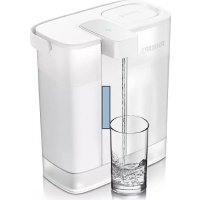
Micro XClean AWP2980 - Coffee maker PHILIPS - Free user manual and instructions
Find the device manual for free Micro XClean AWP2980 PHILIPS in PDF.


| Brand | Philips |
| Model | Micro XClean AWP2980 |
| Product type | Water filtration coffee maker |
| Power supply | Rechargeable battery, USB Type-C charging |
| Tank capacity | Approximately 1 L (maximum gauge) |
| Filter life | 100 L or 30 days |
| Light indicators | Blue (dispensing), red (charging/low battery), purple (filter replacement) |
| Recommended water temperature | 2-38 °C |
| Height | About 25 cm |
| Width | About 15 cm |
| Depth | About 10 cm |
| Weight | Approximately 0.5 kg |
| Material | BPA-free plastic |
| Filtration type | Activated carbon filter and ion exchange resin |
| Energy consumption | Rechargeable lithium-ion battery |
| Filter reset | Press and hold for 8 seconds |
| Maintenance | Clean the tank with a damp cloth, do not immerse |
| Safety | Do not expose to direct heat, do not freeze |
| Box contents | Device, USB Type-C cable, filter, quick start guide |
| Warranty | Philips after-sales service, www.philips.com/water |
Frequently Asked Questions - Micro XClean AWP2980 PHILIPS
User questions about Micro XClean AWP2980 PHILIPS
0 question about this device. Answer the ones you know or ask your own.
Ask a new question about this device
Download the instructions for your Coffee maker in PDF format for free! Find your manual Micro XClean AWP2980 - PHILIPS and take your electronic device back in hand. On this page are published all the documents necessary for the use of your device. Micro XClean AWP2980 by PHILIPS.
USER MANUAL Micro XClean AWP2980 PHILIPS
Next-generation instant water filter
2X more filtered water, enjoyed 4X faster
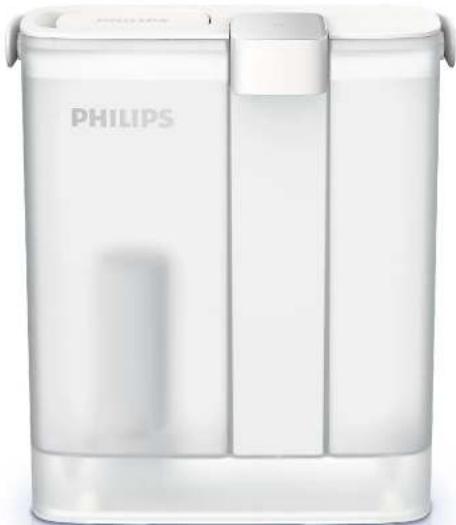
BG PboBOAcBo 3a ynotpe6a 02 IT Manuale utente 33
CZ Navod k pouziti 07 NL Handleiding 37
DE Benutzerhandbuch 12 PL Podrecznik uzytkownika 42
EN User Manual 18 PT Manual do usuario 47
ES Manual del usuario 23 RU PykoOAcTO NOAb3oBaTeA 52
FR Manuel d'utilisation 28 | SK Navod na pouzitie 57
CbAbPXAHNE
Baxkno 02
BHHMaHne 02
I3P0A3BaHe Ha ypeDa 03
Aucnne 04
HnKaun 3a XNBota Ha nntbpa H erOBata 3amHa 04
Iopdpbxxka 05
TapaHunuN noDApbXka 05
Onakobbyen cncsbK 05
BaXHo
MoA, npOeTe BnMaTeAHO Ta3N BaKHa nHOpMaunI pEa Da 3aIOuHHeTe Da N3IOA3BaTe ypea I a3aIa3eTe 3a 6bdei ci cPiabKn.
BHHMaHne
:ypebTe npedHa3aHcH e 3a npueCTBaHe cMo Ha YeMmHa B0da. He ro nbaHete C B0da, KOToE c HEn3BecTHo KaYeCTBO Hn KOrTo E MmKpO6HOAnrHOnHo Hecnrypha.
- YpeaBt e KOHcTpyupaHa 3a c HbTaPpHaHe bOda c TEmnepaTypaOT 2do 38oC (32 - 95F).
- He nouchtaBai Te ypeDa B CbAOMnHa MaunHa.
- He noaIaraiTe yPeDa Ha YAap HAI naHa, ToBa 6H MoTIO DA NOBAnRe BByxH OPMaHOTo My fYHKUHOHnpAe.
AkoOTyeWMATAteYeMbTHaBOa,H3TOeTeЯ3aH3BecTHoBpeMeIpeAdaHaHbAHHTpe3epBOap4aBOa,CTOBAIeOCnHypTeJHKIBotaHaHtbpa.
- Φιναβργον Μόμε Ας Ανλακηθη Ποραίη Θεπαργαβεθο Μα ΒΟδα Ατο ΣΜΟΑΤΑ, TOBA αυβαεΗν ε HOPMaHΟ Ὀ Εςαγα γισητρεδαΤΑ Μα ηρεδα.
3aMeHnTepeoBHO HATbpa B 3aBNCMOCT OT KaueCTBOTo HA BOdAa BB Baunr peHOn H dEnctTBteHaTa yNtPe6a Ha ypea.
He notanayteypeaBBB BOAa.
- Na3eTe ypeDa ot npaKa cAbHyeBa CBaTHaHa HAn APyr N3ToUHnK Ha TOnaHa. He ro n3AaraiTe Ha Blaara.
- He 3apekdauiypea a bIro BpeMe 3a Da He ce nobpeu Gatepura.
3apekdaetaeTo ypea 3a da ceocnpyn knbota Ha 6atepna Ta n da ce noAdbpka doctaTbHa moohocr.
ΦHnTpnpaHaTa BOa Tp86Ba Da ce KOHCympa B paMKte Ha 24 yaca.
He nocTabaTe ypeDa BBb 0pH3epa, TbB KaTO TOBa MoKe Da IpnHnN IOBpeDu No Hero.
H3noA3BaHe Ha ypeAa
HnCTpykun 3aNouchTaBeHa ypeDa npEnynpTe6a
01
OTctpaHETe BCnKn am6aAaHHMATEpHaN OTypea HOTnHtbpa.
02
POnHCTepe3epBoa43BaOdaCBoaAHN C 甲CTA BAAKHa Kpna.(3a6cAChKa:HEoTnAInTe YpeDaBbBOAa.)
03
3apeAe HnBbHO ypeA, AOKATO 6yTOHbCT CBTH NOCTOARHO B UpeBHeO.
04
Pnpbepete AaA NpBTHNtAAHnT npbCTeH BxpbyΦnATbpA eNoKBtA.HTnCTaAMnPAe ΦMnTpBa bype
05
HaHbAHETe pe3epBOaP a CEWIMHA BOA AO 06O3aHcHcHcTO 3a MaKCHMUM HATnCHcTe 6yToHa 3a Da HATEKaT 3 AHrBa BOA 3a NpBHOaHAnHO HnAkaHcHc Ha YpCa.
06
CTOBAypcAbTBeceCrotOB3aynotpe6a HacaaTeCCHaBkyCaHnPACHOΦMTPnPAHBOA.
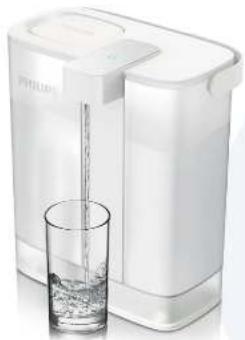
Ancpaen
C HATNCKAHeTo Ha 6yToHa 3aNoUbBa NDoABaHeTo Ha HtPnPaHbOa, C NOBtOpHO To HtNcKaHe Ha 6yToHa NoDABaHeTo Ha Boa cInpa. YpeAbT cInpa ABtOMaTHHO da NoDABa BOa CLEd 1 MmHyTa. Ako B pe3epBoapa Hma DoCTaBHo KOAnueCTBO Boa, ypeAbT He pearIPA dOpHn Ha HtNcKaHe Ha 6yToHa.

HrMa CBETAHNHAHHAKALMRAYPcABtCBPCKHM HrTOBHOCT

IOCTOARHCHMRCBETAMHA: ypcabTNOdaabaΦMHTpnpaHaT BODA

Mnraa chepebena cebTAAHn npn noDaahe: ypcabT TpBbA Da cc 3apean ckopo

IOCTOARHHe YepBHe cBETAHHe: ypcabTc HnbaHO aPacCH

MiraaA HABA CBETMAHn NODAHae:
mHaTbpy TpRbA Da CE 3AMCHN CKO

MiraaCpeyBaHeAABAHuePbeHa CBETAHN Hpi NOdaBaHe: Heo6xOaMa e 3aMaHa Ha mAtbpa H3apeKdAHC Ha yPeDa
HdNkaun 3a XNBota Ha cHNTbpa H erOBata 3amHa
HnHaTb, KOHTo CAnJnKHBota Ha HnATbpa B3 OCHOBa HA HerOBaTa yNtpe6a, CBETN NOCTOHHB ANAAB0 3a Da BN HAnOMHN, Ye e Heo6xOaHMa 3aMraHa Ha HnATbpa CAd NODaBaHeTo Ha 100 AHTpa BOda Hn HA BCEKn 30 dHn, KOETO OT ABete HactbHn No-paHo.
Korato KHBOTbHa 0nMaKo OT 3 Hn Hn octBaunr KaanuTet 3a 0nMaBk OT 6 Antpa, HAnKaTOpbT 3anoYBa Da Mrr A HAABO 3a Da Bn yBeDMH 3a Toba.
HyaHa Ha HbTaHa HbTaHa HbTaHa HbTaHa HbTaHa HbTaHa HbTaHa HbTaHa HbTaHa HbTaHa HbTaHa HbTaHa HbTaHa HbTaHa HbTaHa HbTaHa HbTaHa HbTaHa HbTaHa HbTaHa HbTaHa HbTaHa HbTaHa HbTaHa HbTaHa HbTaHbTaHa HbTaHa HbTaHa HbTaHa HbTaHa HbTaHa HbTaHa HbTaHa HbTaHa HbTaHa HbTaHa HbTaHa HbTaHa HbTaHa HbTaHa HbTaHa HbTaHa HbTaHa HbTaHa HbTaHa HbTaHa HbTaHa HbTaHa HbTaHa HbTaHa
3a da ce pneDoTbpatn 13cbXbaHTo fNtBpT He 6Ba Da ce octBa HEN3NoA3BaH 3a ABA FO BpeMe. Ako ouKaBaTe NpOdaXHTeAeH NpEOAaXHTeAeH NpEOAaYCK),
PnepOpbHNTeHaEO eAaH3BaHNTeΦHHTpa HcAe KaTO FO NOCTaBNTe B 3aNeuTaHa HauHOBA TopbHcKa Da fo CbXpaHbBaTe B XaAaHAnHka (He BBpH3epa).
Ako qnntbpt He e 6nn n3non3BaH noBce oT X dHn, n3toye 3 nItpa B0da 3 a nnnaKHeTe qnntpinaa cpe; aKO qnnTbpht He e 6nn n3non3BaH noBce ot
XDNH,HeoDxOIMa e HeROBaTa 3aMHa.
Ako npednonarate, ye 3a dblr nepnoD ot BpeMe Hma da noJI3BaTe ypeDa, CbxpaHbAaTe rO B HnBIOHO Cyxo CbCToHNHe.
NoAApbKka
Peobho n3mmbaTe n 3nlaakBaTe peepboapa 3a BOda. IpeHIOuHCTBaHeTO H3BaTe Te HATbpa H 3TOeTe BOdaTa OT pe3epboap. N36bpweTe KAnKa C BAAkHa Kbpna. IVIIOA3BaTe cAmO fH IN IOUcHbA, IpepapaT, HNKORA He n3IOA3BaTe pa3TBOPHTeAM HAN KOP03NBHN XHMNAAM. HNKORA He NOUHCTBaTe ypeDa c a6pa3HBn CpeACTBa.
TapaHcHn IpoAApbXkKa
Ako imate huyka ot nHfopmaun HA mte HraKabn np6aemn, moa nocetete ye6 ctpaHuaTa Ha Philips - www.philips.com/water man ce cbpxkete c "Lentbpa 3a o6caykbahe Ha kaneHTn Ha Philips" BbB baaata abpxkaba. Ako Hema "LcHtbp 3a obcaykbahe Ha kaneHTn Ha Philips" BbB baaata abpxkaba ce obphtete KbM mecTHna TbproeHa Philips.
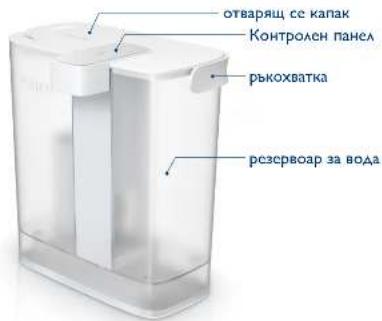
Onakobbueh cncsbK
YpeA X1
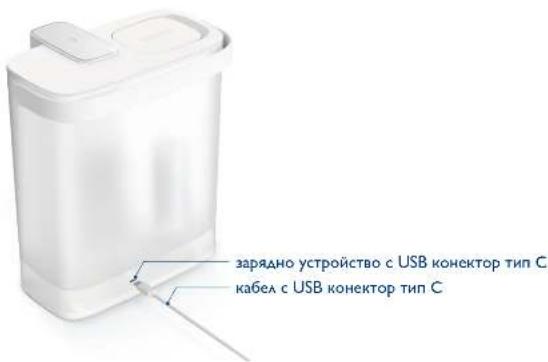
Ka6e c USB KOHeKTOp TnC X1
PbKOBOAcTBO 3a 6bp3 cTap
OBSAH
Important 18
Warning 18
Using the device 19
Display 20
Filter lifetime indication and replacement 20
Maintenance 21
Guarantee & Service 21
Packaging list 21
Important
Please read this important information carefully before you use the device and save it for future reference.
Warning
This device is intended to filter tap water only. Do not put water of unknown quality or that has been microbiologically unsafe into the device.
This device is designed to be used with water of temperature of 2 - 38^ / 32 - 95^
- Do not put the device in the dishwasher for cleaning.
- Do not subject the device to impact or fall so as not to affect its normal function.
If the tap water is turbid, please run the tap water for a while before filling in the water tank to ensure the filter lifetime.
The filter may be moist due to the evaporation of water from the resin, which is normal and does not affect the use.
- According to the water quality and actual usage in different regions, please replace the filter regularly.
- Please do not immerse the device in water.
- Keep the device from direct sunlight, or any other heat source. Do not expose the device to moisture.
- Do not charge this device for a long time to avoid damage to the battery.
To ensure the battery life, please charge it frequently to maintain sufficient power.
The filtered water should be consumed within 24 hours.
- Do not put this product in the freezer, as it may cause damage to the product.
Using the device
Cleaning instructions before use
01 Remove all packaging from the device and the filter.
04 Check if the sealing ring is intact on the filter. Install the filter in the device.
02 Clean the water tank with water or a clean damp cloth. (Note: Please do not immerse the device in water)
05 Fill the tank with tap water to the max line, and press the dispensing button to discard 3L of water to flush the device.
03 Fully charge the device until the button shows constant red light.
06 The device now is ready for use. Enjoy freshly filtered water.
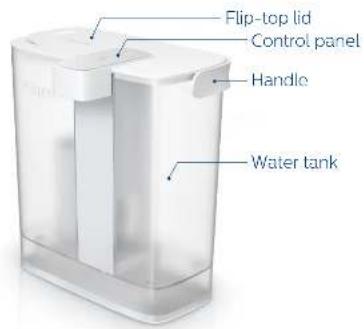
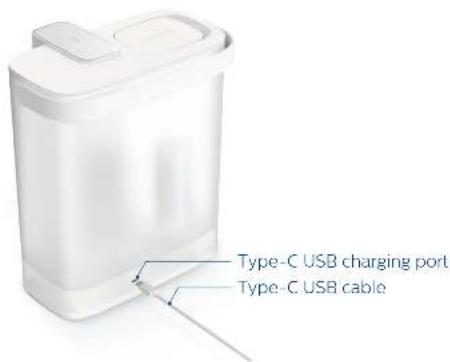
Display
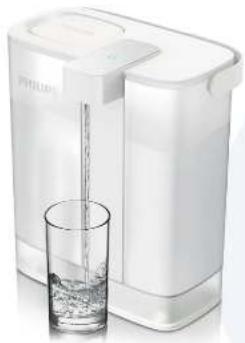
Press the button to start dispensing filtered water, and press it again to stop. The device will stop automatically in 1 minute. If the tank is in short of water, the device will not respond even if you press the button.

No light indication: the device is in standby mode

Constant blue light: the device is dispensing water

Flashing red light when dispensing: the device should be recharged soon

Constant red light: the device is fully charged

Flashing purple light when dispensing the filter should be replaced soon

Flashing purple light and red light alternatively when dispensing the filter should be replaced, and the device should be recharged
Filter lifetime indication and replacement
With a usage-based filter lifetime monitoring, the indicator will show constant purple light to remind you to replace the filter after 100L or every 30 days, whichever comes first.
- When the filter lifetime is less than 3 days or the remaining filtration capacity is less than 6L, the indicator will flash purple light to notify.
- Filter lifetime reset: press and hold the dispense button for 8 seconds. When the filter lifetime reset is completed, the indicator light will flash blue light 3 times.
To prevent the filter from drying out, it should not be left unused for long periods. If such an extended period is anticipated (such as a holiday), then it is recommended to remove the filter and store it in a sealed plastic bag before putting it in the refrigerator (not the freezer).
If the filter hasn't been used for more than X days, please discard 3L of water to flush the filter media; if it hasn't been used for more than X days, the filter should be replaced.
- Also please store the device completely dry when it is expected unused for a long period.
Maintenance
Wash and rinse the tank regularly. Remove the filter and discard all the water before cleaning. The lid should be wiped clean with a damp cloth.
Only use mild cleaning agents, never use solvents or corrosive chemicals. Never use abrasive pads on this device.
Guarantee & Service
If you need information or if you have any problems, please visit the Philips website at www.philips.com/water or contact the consumer care center in your country. If there is no consumer care center in your country, go to the local dealer.
Packaging list
Device x1
Filter x1
Type-C USB charging cable. x1
Quick start guide x1
TABLA DE CONTENIDO
No light indication: the device is in standby mode

Hdkauncaocka cayk6bI hnltpa n 3aMeHa
Ipn KOHtpoae cpoka cayk6bl fnhbtpa Ha ochOBe HcnoAo30BaHnHa HAnKaTOp 6yTe rOpeTb HepepeBIBHbIM hOAOteOBbIM CBeTom,TO6bl HaONMHb O Heo6xoAHOmocTH 3aMeHb fnhbtpa nocle 100 A nnupe3 KaKdble 30 dHei, B 3aBNCMOCTH OT TORO, TTO HAcTyNIT paHbwe.
Korda cpoK cayk6bl fHbtpa coCTaBHT Mehee 3 dHe HAn octabuaerca fHbtpyioa cnocoboctb coCTaBHT Mehee 6 A, HAnHKatop Hauhet MHRATb fHOAEtOBBM CBETOM, yTO6bl yBEADOMTb 06 ATOM.
C6poc cpoka cayk6bI hnahtpa: haxmnte n yepknaite KhoNky noaun BOaB B TeueHne 8 cekyHa. Korda c6poc cpoka cayk6bl fnahtpa 6ydtzabepweh, HnAikatop MHRHT CINHM CBETOM 3 paa.
To6bl npeAOBpATnTb BbcbIXaHHe ΦnAbTpTa, He OCTabAaTe erO 6e3 NcIOaB3OBaHnB TeueHne dAnTeaBHoro nepnoDa BpeMeHN. ECAH OXnIaETcra TAKOHdNTeABHbI 54
IepnoA (Haipnmep,OTnyck),TO peKomeHcyETc CHrTb fHbTp HxaHHTb eR BOpeT B XOAaHOBOM NaKeTe B XOAOaHbNKe (He B MOpO3NaHbHOJ KaMepe).
ECAHnAHTpe HcNIOAB3OBAaC6oAee X dHei, NOXaYnCTa, CaeIe 3 A BOaI, YTObI pPOMbITb fHnBTPyIOuH MaTePna; eCAH OH He NcNOA3OBaAC8 GoAee X dHei, hAtp CaEDyET zAMEHNb.
KpOme TOrO,IOXaAHyIcTa,XPaHHTe yCTPOHCTBO NOAHOCTbO CYHXM,ECAN OXHaAETC4,TO OHO HE 6yEt HcNOA3OBaTbC B TeYeHHe AANTAEbHrO TepNoDA BpeMeHH.
O6cayxkBaHne
BOypeAOnCTKo. KpIkiy CaeDyET nPoTepeTb YHCTOe BAAJHO TprIKo.HcNIOa3yIe ToAboK MrgKHe YHCTTBA, HNKoRda He NcNOa3yIte pactBOpINrAn Hn arpeCCHBhIE XmHueckne BeceCTBa. HNKoRda He NcNOa3yIte a6pa3NBHbe IpOKaAKn Ha 3OM yCTPOINCTBE.
TapaHTnI O6cAUXBaHHa
Eam Bam HyxHa HhOpMaun HA y Bac Bo3HkAM KaKHe- An6o np6aMbe, noKaaycta, nocette Be6- caHT Philips no aDpecy www.philips.com/water mAn o6paTntecb B LcHtp 0cbaymbanr KaMeHTOB Philips B BaSei cTpaHe. Ecam B BaSei cTpaHe Het LcHTpa 0cbaymbanr KaMeHTOB, o6paTntecb K MeCTHomy dAepy Philips.
YnakoBOUHbI ANCT
yctpoCTBO x1
USB-ka6eIbIyIaIpyIckType-C x1
KpaTKoe pykoBOcTBo nonb3ObaTeJIa
OBSAH
Dolezité upozornenie 57
Varovanie 57
Používanie zariadenia 58
Signalizacia 59
Ukazovatel' zivotnosti a vymeny filtra 59
Udrzba 60
Zaruka a servis 60
Obsah balenia 60
Dôležité upozornenie
Tieto dolezite informacia si pozorne precitajte pred pouzitim zariadenia a uschovajte ich pre priad buduceho pouzitia.
Varovanie
Zariadenie je urcené len na filtraciu vody z vodovodného kohútika. Nenalievajte do zariadenia vodu neznámej kvality alebo mikrobiologicky kontaminovanú vodu.
Voda použivaná v zariadení má mat teplotu 2-38°C/32-95°F.
Zariadenie sa nesmie cistit v umyvacke riadu.
- Chrante zariadenie pred nárazom alebo pádom, aby neprestalo normalne fungovaf.
Ak je voda z vodovodneho kohutika zakalená, pred napustem do nadobky zariadenia ju nechajte chvifu odtekaf, predlizite tak ziivotnost filtra.
- Filter moze byt vhlk y dovodu odparovania vody zo zivce. To je normalny jav, ktory nema negativny vplyv na pouzivanie zariadenia.
- Filter pravidelne yvmiehajte v závislosti od kvality vody a skutočného používania v rožnych regionoch.
- Neponarajte zariadenie do vody.
- Chrante zariadenie pred priamym svetlom alebo inymi zdrojmi tepla. Nevystavujte ho vlhkosti.
- Nenabijajte zariadenie prlisi dlho, aby sa neposkodila bateria.
V zaujme zabezpecenia zivotnosti baterie je potrebne jej caste nabijanie, ay sa zachoval dostatocny vykon.
- Fittrovaná voda by sa mala spotrebovat do 24 hodin.
- Nedavajte vyrobok do mraznicky, mohol by sa poskodit.
Použivanie zariadenia
Pokyny na cistenie pred pouzitim
01
Ostrante zo zariadenia a z filtra vsetky obaly.
02
All rights reserved.
The Philips trademark and the Philips Shield Emblem are registered
trademarks of Koninklijke Philips N.V. used under license.
This product has been manufactured by and is sold under the responsibility of Hong Kong AquaShield Health Technology Company Limited and Hong Kong AquaShield Health Technology Company Limited is the warrantor in relation to this product.
Rev A JAN 21
How to use