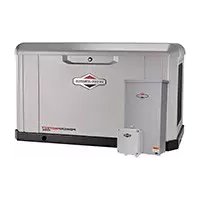
Power Protect 26kW - Generator BRIGGS & STRATTON - Free user manual and instructions
Find the device manual for free Power Protect 26kW BRIGGS & STRATTON in PDF.



| Product Type | Automatic Standby Generator |
| Brand | Briggs & Stratton |
| Model | Power Protect 26kW |
| Rated Power | 26 kW (108.3 A at LPG, 100 A at NG) |
| Output Voltage | 120/240 V Single Phase |
| Frequency | 60 Hz |
| Fuel Type | Natural Gas (NG) or Propane (LPG) |
| Engine | Briggs & Stratton, 993 cc, Air-Cooled |
| Weight | 285 kg (625 lb) |
| Sound Level (at 7 m) | 65 dB(A) at Normal Operation |
| Engine Oil Capacity | 2.3 to 2.4 L with filter |
| Recommended Oil | Full Synthetic 5W-30 Oil (API SJ/CF) |
| Required Battery | 12 VDC, Lead-Acid, Provided by Installer (min. 540 CCA) |
| Main Circuit Breaker | 125 A |
| Operating Temperature Range | -28 °C to 40 °C (-20 °F to 104 °F) |
| Installation | Professional Required, Outdoor with Safety Clearances |
| Key Features | Automatic Start, Digital Controller, Emergency Stop, Manual Mode |
| Safety | CO Detection, Low Oil Pressure Shutdown, Surge Protection |
| Regular Maintenance | Oil Change every 100 h, Air Filter, Spark Plugs, Valve Adjustment |
| Warranty | Refer to the included Warranty Booklet |
Frequently Asked Questions - Power Protect 26kW BRIGGS & STRATTON
User questions about Power Protect 26kW BRIGGS & STRATTON
0 question about this device. Answer the ones you know or ask your own.
Ask a new question about this device
Download the instructions for your Generator in PDF format for free! Find your manual Power Protect 26kW - BRIGGS & STRATTON and take your electronic device back in hand. On this page are published all the documents necessary for the use of your device. Power Protect 26kW by BRIGGS & STRATTON.
USER MANUAL Power Protect 26kW BRIGGS & STRATTON
en Installation and Operation Manual
17 kW 20 kW 26 kW
en Single Phase Air-Cooled Standby Generator System
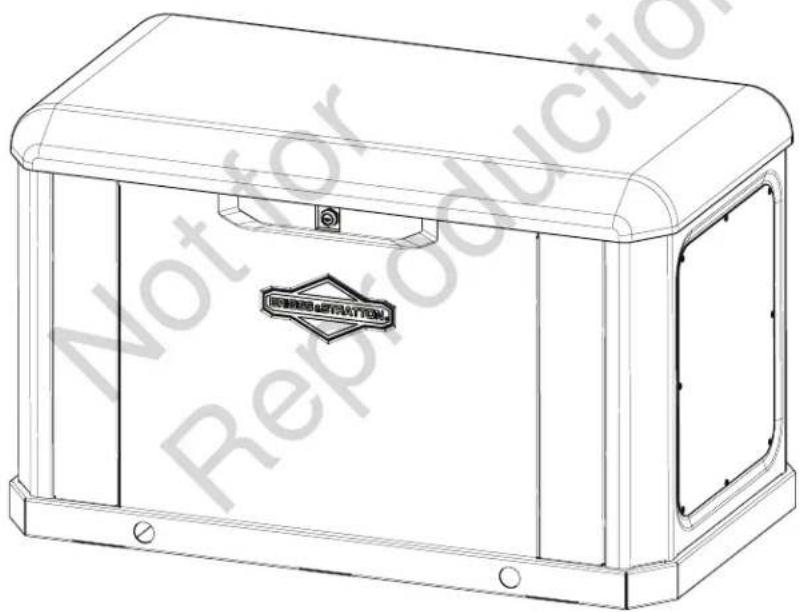
natural_image
Technical line drawing of a rectangular industrial enclosure with mounting brackets and a central emblem (no text or symbols)


This generator is rated in accordance with UL (Underwriters Laboratories) 2200 (stationary engine generator assemblies) and CSA (Canadian Standards Association) standard C22.2 N. 100-14 (motors and generators).
TABLE OF CONTENTS
CALIFORNIA PROPOSITION 65 ....3
THANK YOU....3
WHERE TO FIND BRIGGS & STRATTON....3
FOR FUTURE REFERENCE ....3
IMPORTANT SAFETY INSTRUCTIONS....3
Safety Alert Symbol and Signal Words....4
Safety Symbols and Meanings....4
Safety Messages....5
FCC Part 15 Information to User ....8
GENERAL INFORMATION......8
Equipment Description......8
Installer Responsibilities....8
Owner Responsibilities....8
Installation Factors to Consider 9
Delivery Inspection....9
Shipment Contents....9
GENERATOR PLACEMENT 9
Generator Location Considerations....10
Reducing the Risk of Carbon Monoxide Poisoning...10
Reducing the Risk of Fire....14
Federal and International Standards ....15
Other General Location Guidelines....16
INSTALLATION....16
Lifting the Generator....16
Cold Weather Kit....17
Anchoring and Wind Rating....17
Electrical and Fuel Inlet Locations....18
Access Panels....18
Fuel Installation Plan....19
Electrical Field Connections 23
Final Installation Considerations....27
System Controller....28
Initial Start-Up (No Load)....28
OPERATION....30
Controls 30
Important Owner's Considerations 32
Automatic Operation Sequence.... 33
Setting the Exercise Timer 33
MAINTENANCE....33
Servicing the System.... 33
Maintenance Schedule 34
Maintaining the Generator....34
Cleaning the Generator 34
Maintaining the Engine....35
Changing Engine Oil and Oil Filter 36
Adjusting the Valve Lash 36
Electronic Governor System ....37
Electronic Governing Check....37
Servicing the Spark Plugs 38
Engine Air Cleaner 39
Maintaining the Exhaust System 39
Maintaining the Fuel System 39
Mixer and Throttle Control Device....40
Alarms (Service Code Detection System)......40
Acknowledging and Resetting the Alarms (Service
Code Detection System) 40
Maintaining the Electrical System....40
TROUBLESHOOTING 43
Troubleshooting....43
DRAWINGS AND SCHEMATICS......45
SPECIFICATIONS......46
Generator Specifications 46
Engine Specifications 46
CALIFORNIA PROPOSITION 65
WARNING
This product can expose you to chemicals including used engine oil, which is known to the State of California to cause cancer, and carbon monoxide, which is known to the State of California to cause birth defects or other reproductive harm. For more information go to www.P65Warnings.ca.gov.
THANK YOU
Thank you for purchasing this quality-built Briggs & Stratton® generator. We are pleased that you have placed your confidence in the Briggs & Stratton brand. When operated and maintained according to the instructions in this manual, your generator can provide many years of dependable service.
This manual contains safety information to make you aware of the hazards and risks associated with standby generators and how to avoid them. This product is designed only for use as an optional generator system. It provides an alternate source of electric power and serves loads such as heating, refrigeration systems, and communication systems that, when stopped during any power outage, could cause discomfort or inconvenience.
SAVE THESE INSTRUCTIONS. This manual contains important instructions that users must obey during installation, operation, and maintenance of the generator and battery.
This generator system requires professional installation before use. The installer must obey the instructions completely.
WHERE TO FIND BRIGGS & STRATTON
Users never have to look far to find support and service for a generator. Many authorized service dealers worldwide provide quality service. Owners can also contact Customer Service by phone at 800-732-2989 between 8:00 a.m. and 5:00 p.m. central time or click on "Dealer Locator" at www.briggsandstratton.com, which provides a list of authorized dealers.
FOR FUTURE REFERENCE
Fill out the following information and keep it with the receipt. Keep this information at hand to contact the installer or authorized dealer in the future regarding service or repair of the unit.
Date of Purchase: ____
Dealer/Retailer: ____
Dealer's/Retailer's Phone Number: ____
GENERATOR:
Model Number: ____
Model Revision: ____
Serial Number: ____
ENGINE:
Model Number: ____
Serial Number: ____
IMPORTANT SAFETY INSTRUCTIONS
Briggs & Stratton has made every effort to ensure that the information in this manual is accurate and current. However, Briggs & Stratton reserves the right to change, alter, or otherwise improve the product and this document at any time without prior notice.
The manufacturer cannot possibly anticipate every circumstance that could involve a hazard. The warnings in this manual, and the tags and decals affixed to the unit are, therefore, not all-inclusive. If using a procedure, work method, or operating technique that the manufacturer does not recommend, ensure that it is safe for you and others. Also ensure that the chosen procedure, work method, or operating technique does not render the generator system unsafe.
Safety Alert Symbol and Signal Words

The safety alert symbol identifies safety information about hazards that can result in personal injury. A signal word (DANGER, WARNING, or CAUTION) accompanies the alert symbol to indicate the likelihood and the potential severity of injury. In addition, a hazard symbol may represent the type of hazard.

DANGER
Indicates a hazard that, if not
avoided, will result in death or serious injury.

WARNING
Indicates a hazard that, if not
avoided, could result in death or serious injury.

CAUTION
indicates a hazard that, if not
avoided, could result in minor or moderate injury.
NOTICE
Indicates information considered
important but not hazard-related.
Safety Symbols and Meanings
| SYMBOL MEANING | |
 | Safety alert symbol. Indicates a potential personal injury hazard. |
 | Read the manual. Failure to obey warnings, instructions, and Installation and Operation Manual could result in death or serious injury. |
 | Fire |
 | Explosion |
 | Electric Shock |
 | Toxic Fumes |
 | Wear Eye Protection |
 | Hazardous Chemical |
 | Hot Surface |
 | Auto Start |
Safety Messages
WARNING

Failure to read and obey the
Operator's Manual, all warnings, and operating instructions could result in death or serious injury.
WARNING

Engine exhaust contains
carbon monoxide, a poisonous gas that could kill you in minutes. You cannot smell it, see it, or taste it. Even if you do not smell exhaust fumes, you could still be exposed to carbon monoxide gas.
- Operate this product ONLY outdoors in an area that will not accumulate deadly exhaust gas.
- Direct exhaust gas away from any windows, doors, ventilation intakes, soffit vents, crawl spaces, open garage doors, or other openings that can allow exhaust gas to enter inside or be drawn into a potentially occupied building or structure.
- Carbon monoxide detector(s) MUST be installed and maintained indoors according to the manufacturer's instructions and recommendations. Smoke alarms cannot detect carbon monoxide gas.
- If you start to feel sick, dizzy, or weak, or the carbon monoxide alarm sounds while using this product, get to fresh air right away. Call emergency services. You may have carbon monoxide poisoning.
WARNING

Storage batteries give off
explosive hydrogen gas during recharging. The slightest spark could ignite hydrogen and cause an explosion, resulting in death or serious injury.
- DO NOT dispose of the battery in a fire. Recycle the battery.
- DO NOT allow any open flame, spark, heat, or lit cigarette during and for several minutes after charging a battery.
WARNING


Battery electrolyte
fluid contains acid and is extremely caustic. Contact with battery contents could cause severe chemical burns.
- DO NOT open or mutilate the battery.
- Wear protective goggles, a rubber apron, rubber boots, and rubber gloves.
- Immediately wash electrolyte from skin with water.
- If electrolyte contacts eyes, immediately flush with water and seek medical attention.
- Wash spilled electrolyte with an acid-neutralizing agent.
WARNING

A battery's high short-circuit
current could result in serious injury.
- Remove watches, rings, or other metal objects.
- Use tools having insulated handles.
- Disconnect the charging source prior to connecting or disconnecting battery terminals.
- Do not lay tools or metal parts on top of batteries.
- Disconnect the negative (-) cable at the battery during installation and maintenance.
WARNING

Failure to isolate the
generator from the utility power could result in death or serious injury to electric utility workers due to the backfeed of electrical energy.
- Use a listed transfer switch to connect to a building's electrical system.
WARNING

Generator voltage could
cause electrical shock or burns, resulting in death or serious injury.
- A licensed professional must perform the installation.
- Disconnect all sources of electricity before installing or servicing equipment.
- Ground the system before applying power.
WARNING

Hazardous Voltage -
Installing low- and high-voltage wire in the same conduit could cause electric shock or burns, resulting in death or serious injury.
- Do not run low- and high-voltage wire in the same conduit unless the insulation rating on ALL wiring is rated for 600V. See National Fire Protection Association (NFPA) 70 for more information.
WARNING

Exhaust heat/gases could
ignite combustibles or structures, resulting in death or serious injury.
- The exhaust outlet of the enclosure must have at least 5 ft (1.50 m) minimum clearance from any structure, shrubs, trees, or any kind of vegetation.
- An enclosure must be at least 5 ft (1.50 m) from windows, doors, any wall opening, shrubs, or vegetation over 12 inches (30.50 cm) in height.
- An enclosure must have a minimum of 5 ft (1.50 m) overhead clearance from any structure, overhang, or trees.
- DO NOT place enclosure under a deck or other type of structure that may confine airflow.
- Smoke detector(s) MUST be installed and maintained indoors according to the manufacturer's instructions. Carbon monoxide alarms cannot detect smoke.
- Do not place an enclosure in a manner other than shown in illustrations.
WARNING

Exhaust heat/gases could
ignite combustibles and cause a fire, resulting in death or serious injury.
- Remove all combustible materials from the inside of the generator compartment and the surrounding area.
WARNING


Gaseous vapors are
extremely flammable and explosive. Fire or explosion can cause severe burns or death.
- Never start and run the engine with the air cleaner assembly (if equipped) or the air filter (if equipped) removed.
WARNING

With the battery connected,
the generator may crank and start without warning, resulting in death or serious injury.
- Do not connect the negative (-) cable at the battery until the installation is complete.
- Before servicing the generator, stop the generator and disconnect the negative (-) cable at the battery.
WARNING

Hazardous Voltage - Contact
with power lines could cause electric shock or burns, resulting in death or serious injury.
- If using lifting or hoisting equipment, DO NOT contact any power lines.
- DO NOT lift or move the generator without assistance.
WARNING


Propane and natural
gas are extremely flammable and explosive, which could cause burns, fire, or explosion, resulting in death or serious injury.
- A licensed professional must perform the installation.
- Install the fuel supply system according to NFPA 37 and other applicable fuel-gas codes.
- Before placing the generator into service, the fuel system lines must be properly purged and leak-tested.
- NO leakage is permitted.
- DO NOT operate the engine if you smell fuel.
- The generator features an automatic safety gas fuel shut-off valve.
- DO NOT operate equipment if the shut-off valve is missing or inoperative.
- Liquefied Petroleum (LP) gas is heavier than air and settles in low areas.
- Natural gas is lighter than air and collects in high areas.
- The slightest spark could ignite these fuels and cause an explosion.
- DO NOT light a cigarette and DO NOT smoke.
- Inspect the fuel system periodically.
WARNING

Generator voltage could
cause electrical shock or burns, resulting in death or serious injury.
- DO NOT allow unqualified people to operate or service the generator.
WARNING


Unintentional sparking
could cause fire or electric shock, resulting in death or serious injury.
WHEN ADJUSTING OR MAKING REPAIRS TO YOUR WHEN GENERATOR -
- Disconnect the spark plug wire from the spark plug and place the wire where it cannot contact the spark plug.
WHEN TESTING FOR ENGINE SPARK -
- Use an approved spark plug tester.
- DO NOT check for spark with the spark plug removed.
NOTICE
Improperly treating the generator
could damage it and shorten its life.
- Operate the generator only for intended uses.
- If you have questions about intended use, contact the authorized dealer.
- Operate the generator only on level surfaces.
- Adequate, unobstructed flow of cooling and ventilating air is critical to proper generator operation.
- The access panels/doors must be installed whenever the unit is running.
- DO NOT expose the generator to excessive moisture, dust, dirt, or corrosive vapors.
- Remain alert at all times while working on this equipment. Never work on this equipment if experiencing physical or mental fatigue.
- DO NOT insert any objects through the cooling slots.
- DO NOT use the generator or any of its parts as a step. Stepping on the unit could cause stress and break parts. This damage may result in dangerous operating conditions from leaking exhaust gases, fuel leakage, oil leakage, etc.
- Shut off the generator if:
o Electrical output is lost.
o Equipment sparks, smokes, or emits flames.
o The unit vibrates excessively or makes unusual noises.
FCC Part 15 Information to User
Pursuant to part 15.21 of the FCC Rules, beware that changes or modifications to the product not expressly approved by Briggs & Stratton could void your authority to operate the product.
This device complies with part 15 of the FCC Rules.
Operation of this unit is subject to the following two conditions:
- This device may not cause harmful interference, and
- This device must accept any interference received, including interference that may cause undesired operation.
This equipment has been tested and found to comply with the limits for a Class B digital device, pursuant to part 15 of the FCC Rules. These limits are designed to provide reasonable protection against harmful interference in a residential installation. This equipment generates, uses, and can radiate radio frequency energy and, if not installed and used in accordance with the instructions, may cause harmful interference to radio communications. However, there is no guarantee that interference will not occur in a particular installation. Turn this equipment on and off to determine if it causes harmful interference to radio or television reception. If the user discovers harmful interference, the user should try to correct the interference by taking one or more of the following steps:
- Reorient or relocate the receiving antenna.
- Increase the separation between the equipment and the receiver.
- Connect the equipment into an outlet on a circuit, ensuring that the circuit is not the same one that the receiver uses.
- Consult the dealer or an experienced radio/TV technician for help.
GENERAL INFORMATION
For most applications, the Installation and Operation Manual contains all the information required to correctly install, operate, and maintain the generator. Briggs & Stratton has made every effort to ensure that the information in this manual is accurate and current. However, Briggs & Stratton reserves the right to change, alter, or otherwise improve the product and this document at any time without prior notice.
Equipment Description
NOTICE
This product does NOT qualify for
either an emergency standby or legally required standby system as defined by NFPA 70 (NEC).
- Emergency generator systems are intended to automatically supply illumination and/or power to designated areas and equipment during the failure of the normal supply. Emergency systems can also provide power for such functions as ventilation where essential to maintain life, where current interruption of the normal supply would produce serious life, safety, or health hazards.
- Legally required standby generator systems are intended to automatically supply power to selected loads during the failure of the normal source (which can create hazards, hamper rescue, or hinder firefighting operations).
Installer Responsibilities
- Read and obey the safety instructions.
- Install only a listed transfer switch that is compatible with the generator.
- Read and obey the instructions in this Installation and Operation Manual.
- Installation must strictly comply with all applicable codes, industry standards, laws, and regulations.
- Allow sufficient room on all sides of the generator for maintenance and service.
- Discuss the generator placement with the owner.
- Give the Quick Operation Manual (part number: 80103363) to the owner after the installation has been completed.
Owner Responsibilities
- Read and obey the instructions in this Installation and Operation Manual.
- Follow a regular schedule for maintaining and using the generator, as specified in this manual.
- Carbon monoxide detector(s) must be installed and maintained indoors according to the manufacturer's instructions and recommendations. Smoke alarms cannot detect carbon monoxide gas.
- Smoke detector(s) must be installed and maintained indoors according to the manufacturer's instructions and recommendations. Carbon monoxide alarms cannot detect smoke.
Installation Factors to Consider
The illustrations shown in this manual depict typical circumstances. They are meant to familiarize you with the installation options available for the generator.
Always consider installation factors such as federal and local codes, appearance, noise levels, fuel types, and distances. As the distance increases from the existing electrical service and gaseous fuel supply, and the number of bends in the fuel supply increases, installers must make compensations for piping and wiring materials. These compensations are necessary to comply with local codes and overcome drops in electrical voltage and drops in gaseous fuel pressure.
Delivery Inspection
Avoid damage from dropping, bumping, or colliding with the shipping carton.
After removing the carton, carefully inspect the generator for any damage that may have occurred during shipment.
If an owner discovers loss or damage at the time of delivery, the owner should ask the person(s) making the delivery to document the loss or damage on the freight bill and affix a signature under the consignor's memo of loss or damage. If the owner notices loss or damage after delivery, separate the damaged materials and then contact the carrier for claim procedures. Missing or damaged parts are not warranted.
Shipment Contents
The generator system includes:
- Oil (5W-30 Full synthetic)
- Status LED
- Flexible fuel line
- Fuel pipe coupling
- Quick Operation Manual
- Product and emissions warranty booklet
- Two access keys
- 15-amp ATO-type fuse
- Four lifting hole caps
- Touch-up paint
The generator system does not include (An owner needs):
- Carbon monoxide detector(s)
- Smoke detector(s)
- Starting battery
- Connecting wire and conduit
- Fuel supply valves and plumbing
- Crane, lifting straps, chains, or cables
- Two 60-inch (152 cm) lengths of 3/4-inch (1.90 cm) nominal minimum Schedule 40 steel pipe (not conduit)
- Torque screwdriver, 5-50 inch-pound range
- Multimeter
GENERATOR PLACEMENT
Before installing the generator, consult with the homeowner and convey the following requirements, which must be satisfied before the installation is complete. Two equally important safety concerns include carbon monoxide poisoning and fire. An installer must also meet several general location guidelines before completing the installation.
WARNING

Engine exhaust contains carbon monoxide, a poisonous gas that could result in death or serious injury. People and animals cannot smell it, see it, or taste it. Even if you do not smell exhaust fumes, you could still be exposed to carbon monoxide gas.
- Operate this product ONLY outdoors in an area that does not accumulate deadly exhaust gas.
- Direct exhaust gas away from any windows, doors, ventilation intakes, soffit vents, crawl spaces, open garage doors, or other openings that can allow exhaust gas to enter inside or be drawn into a potentially occupied building or structure.
- Carbon monoxide detector(s) MUST be installed and maintained indoors according to the manufacturer's instructions and recommendations. Smoke alarms cannot detect carbon monoxide gas.
- If you start to feel sick, dizzy, weak, or the carbon monoxide alarm sounds while using this product, get to fresh air right away. Call emergency services. You may have carbon monoxide poisoning.
- DO NOT run this product inside homes, garages, basements, crawl spaces, sheds, or other partially enclosed spaces, even if using fans or opening doors and windows for ventilation. Carbon monoxide can quickly build up in these spaces and can linger for hours, even after this product has shut off.
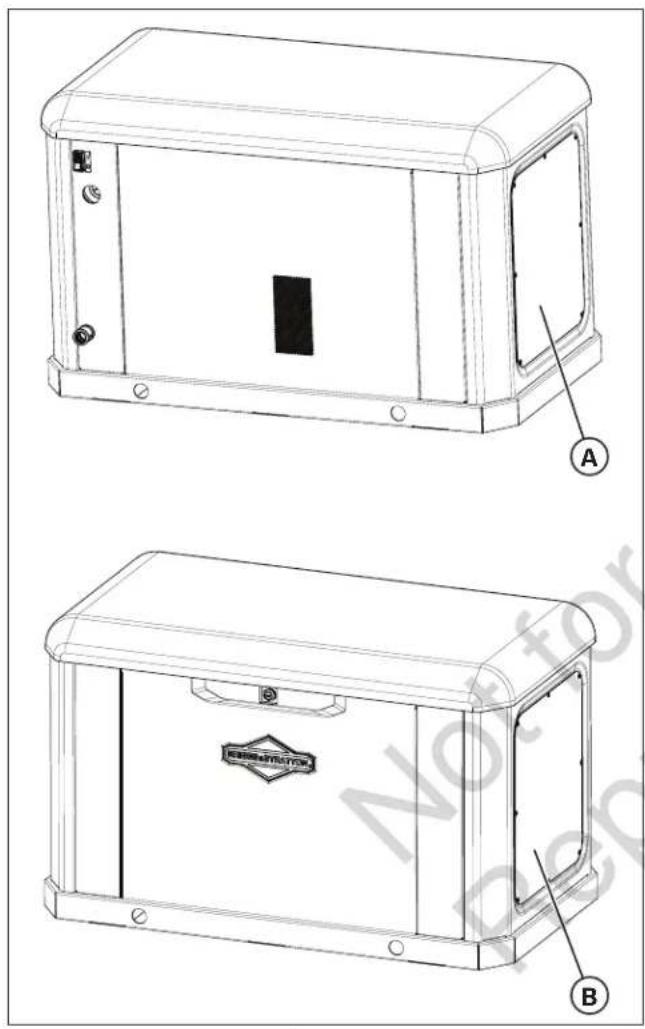
Figure 1
(A) Exhaust Outlet Side of Enclosure
(B) Air Inlet Side of Enclosure
Generator Location Considerations
The installation location of the generator directly affects:
- The amount and size of the plumbing required to fuel the generator
- The amount and size of the wiring required to control and connect the generator
- The safety of the installation regarding exhaust gas and carbon monoxide hazards, fire risks, proximity to other utilities, and exposure to weather elements
The Generator Locations section addresses specific location guidelines. The owner and installer must consult one another to determine how the site can affect installation costs and compliance with local codes and standards.
Two critical safety concerns include carbon monoxide poisoning and fire.
Reducing the Risk of Carbon Monoxide Poisoning
In high concentrations, carbon monoxide (CO) can be fatal in minutes. However, the effects of lower concentrations can also be lethal. This gas poses serious dangers to humans and their animals because no one can smell, see, or taste it. Symptoms of exposure to CO include:
- Watery, itchy eyes
- Throbbing temples
- Inability to think coherently
- Ringing in the ears
- Headache
- Incoherent or slurred speech
- Flushed appearance
- Inattentiveness
- Loss of physical coordination
- Tightness across the chest
- Drowsiness
- Nausea
- Dizziness
- Vomiting
- Fatigue
- Collapse
- Convulsions
If you (or someone nearby) suffers from any of the above symptoms, immediately seek fresh air and call for emergency medical help for possible carbon monoxide poisoning. If your carbon monoxide alarm sounds while using this product, immediately seek fresh air (even if you experience none of the previously mentioned symptoms).
Carbon Monoxide Detectors
Note: Installing functioning CO alarms indoors is the only way to recognize CO gas. Common smoke alarms do not detect CO gas and will not alert occupants of its presence.
A CO detector is an electronic device that detects hazardous levels of CO. When a buildup of CO occurs, the detector will alert the occupants by sounding an alarm and by flashing a visual indicator light.
By law many states require a home to have a functioning carbon monoxide (CO) detector. You must install and maintain carbon monoxide detector(s) indoors according to the manufacturer's instructions and recommendations.
Contact the local building inspection division for any relevant requirements regarding the use of CO detectors. See National Fire Alarm and Signaling Code (NFPA) 72 Code and Section R315 in the International Residential Code (ICC) for additional details.
Potential CO Entry Points
Operation Guidelines:
Note: Operate this product only outdoors and in an area that will not allow this deadly exhaust gas to collect.
Never operate this product inside homes, garages, basements, crawl spaces, sheds, under a deck, or other partially enclosed areas and understand that using fans and opening doors in these areas may not provide adequate ventilation. Carbon monoxide can quickly accumulate in these forbidden spaces and can remain in the air for several hours after this product has shut off.
Installation Guidelines:
Follow all illustrations in this manual when placing an enclosure.
Always point the generator's engine exhaust away from occupied areas. Never expose your neighbors' homes to the engine exhaust flowing from your standby generator during the installation process.
Never place the standby generator in any area where leaves or debris can accumulate.
Generator exhaust can enter through windows, doors, and other openings of a structure. Understand that exhaust and CO can seep into a structure through the smallest openings.
Protecting the Structure
Check the structure to ensure that the sealing and caulking remains adequate enough to prevent air from leaking in or out. Examine the structure for voids, cracks, or openings surrounding windows, doors, soffits, pipes, and vents, as these areas can permit exhaust gas and CO to enter the structure.
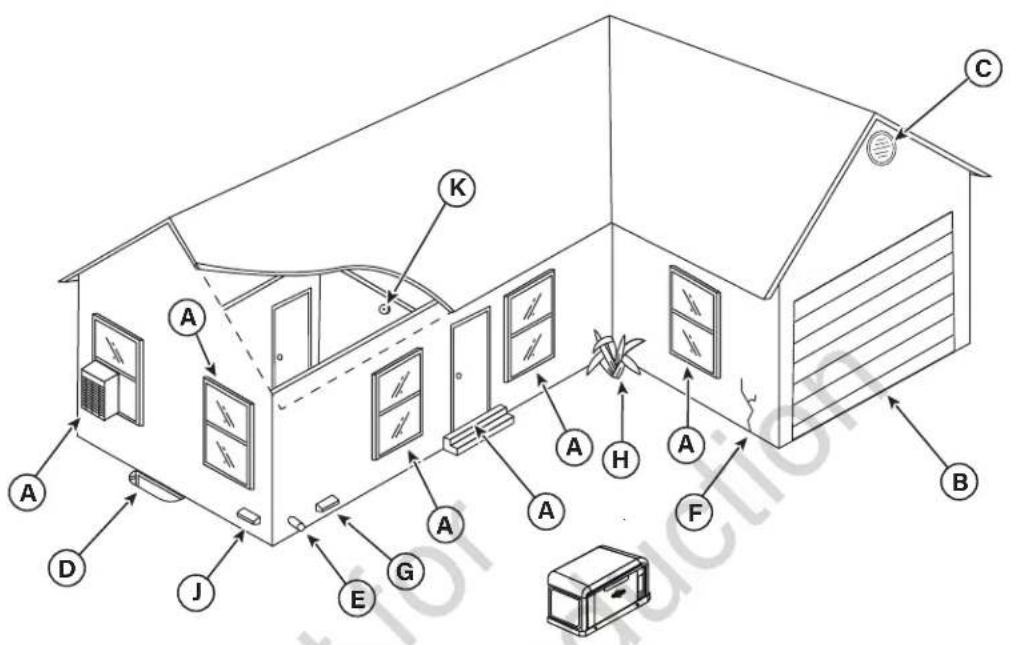
Figure 2
The following table includes some examples of potential entry points for CO gas.
| LOCATION | ENTRY POINT EX | PLANATION |
| A | Windows and doors | Openings that are part of a structure's architecture can permit fresh air and CO into the structure, especially when open. |
| B Garage door | or An open or imp | properly unsealed garage door can allow CO to flow into a garage. |
| C Attic vent | Generator exhaust can enter through attic vents and the vents for soffits, crawl spaces, and ridges or roofs. | |
| D | Basement windows | Basement windows or hatches that permit ventilation to or from the structure's lower level also allow CO gas to enter the structure. |
| E | Furnace intake or exhaust vent | Air intakes and furnace exhaust pipes are common entry points for CO gas. |
| F Wall cracks | Any cracks in a structure's walls, including the foundation and mortar, and any gaps around windows, doors, and pipes can let CO in. | |
| G Dryer vent | Sometimes the ex | exhaust vent for the clothes dryer lets CO gas into the structure. |
| H | Airflow restrictions | Areas featuring structural corners and heavy vegetation restrict the airflow and collect exhaust gas. |
| J | Makeup air system | Note: Keep all mechanical and gravity outdoor air intake openings for HVAC supply air systems 10 ft (3,0488 m) horizontally from the generator's enclosure. Refer to section 401 in the ICC Mechanical Code for details on requirements. |
| K | Carbon monoxide detector(s) | Note: Installing functioning CO alarms indoors is the only way to recognize CO gas. Common smoke alarms do not detect CO gas and will not alert occupants of its presence. |
Reducing the Risk of Fire
To help prevent fires, the generator must be installed a safe distance from all combustible materials. The unit's engine, alternator, and exhaust system components can become very hot during operation. Reduce the likelihood of a fire by keeping the unit properly ventilated, properly maintained, free of fuel leaks, and away from combustible materials. Also, flammable debris may collect within or outside the generator enclosure and may possibly ignite, causing a fire.
Federal and international standards describe the minimum safe clearances around and above the generator's enclosure.
Distance Requirements
An owner must maintain minimum clearances around the generator enclosure. These clearances exist primarily for fire prevention, but they also ensure adequate space for maintenance tasks, such as removing the unit's front and end panels.
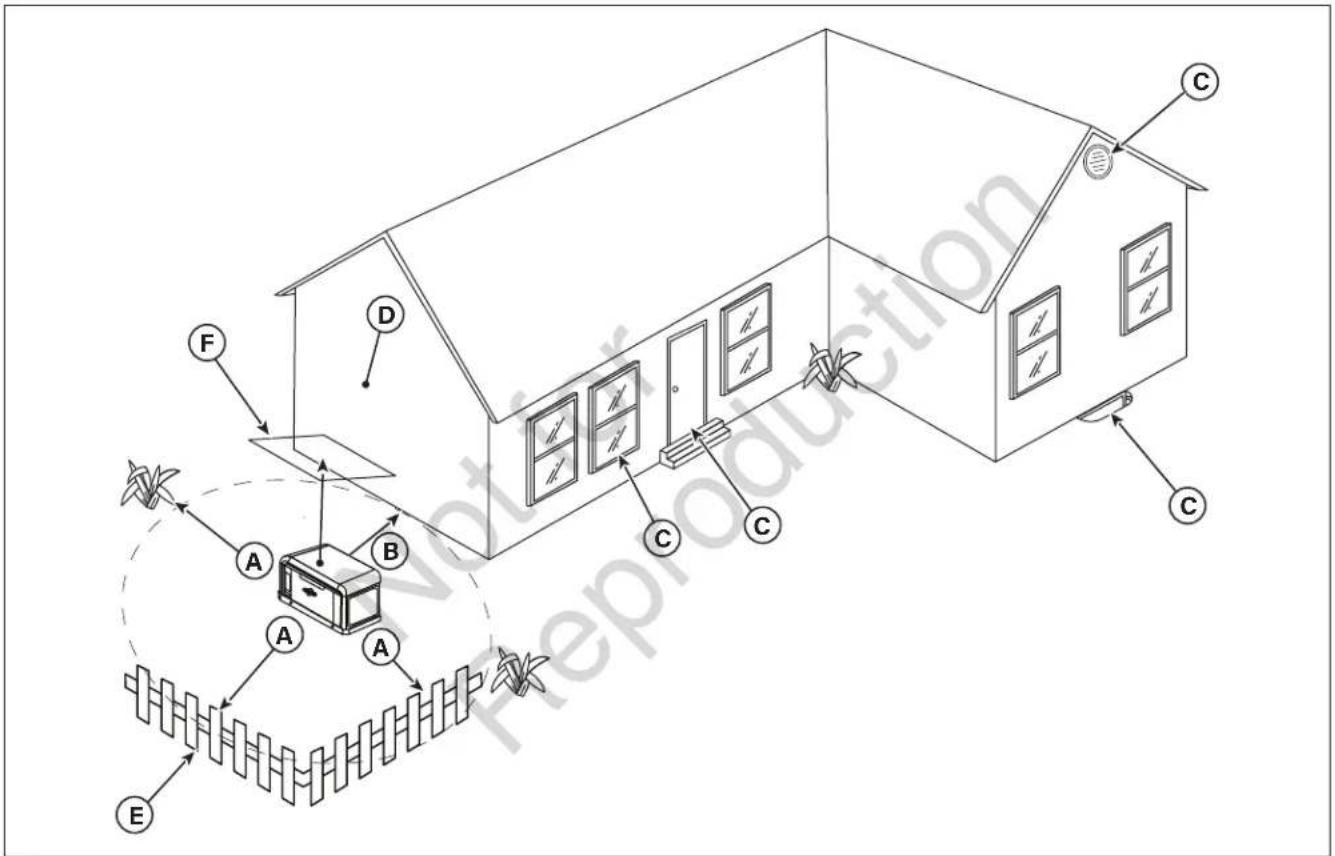
Figure 3
| LOCATION ITEM EXPLANATION | ||
| A Front and end clearance | Maintain a 3 ft (.91 m) minimum clearance from the front and ends of the generator. Keep shrubs, bushes, plants, and trees this same minimum distance from the unit and never use vegetation to conceal the unit. | |
| B Rear clearance | Since fuel and electrical connections occur here, keep 18 inches (45.70 cm) minimum clearance per independent testing laboratory, unless state codes tell you otherwise. | |
| C | Windows, vents, and openings | Keep all operable windows, doors, vents, window wells, or openings in the wall away from the point of the generator. See Protecting the Structure section in this manual. |
| D Existing wall | Keep the generator at least 18 inches (457 mm) away from existing walls. | |
| E Removable fence | Keep removable fences at least 3 ft (.91 m) away from the front of the generator. Removable fences include visual surrounds, fence panels, and temporary barriers without footings. | |
| F Overhead clearance | Maintain a 5 ft (1.52 m) minimum clearance from all structures, overhangs, and projections on a wall. | |
| G (not shown) | Maintenance and servicing | Allow adequate space to perform routine maintenance, such as servicing the engine and replacing the battery. Never use shrubs, bushes, trees, or plants to conceal the generator. |
Federal and International Standards
Generator installation must strictly adhere to ICC, IFGC, NFPA 37, NFPA 54, NFPA 58, and NFPA 70 standards.
National Fire Protection Association (NFPA) 37: This standard addresses the installation and use of stationary combustion engines. Its requirements describe keeping an enclosed generator a specific distance from a structure or wall. This standard also requires that when you locate a generator, you provide adequate space to perform maintenance and repair tasks and space for the maneuvering of first responders.
NFPA 37, Section 4.1.4, Engines Located Outdoors: This requirement specifies that engines and their weatherproof housings (if provided) installed outdoors must remain at least 5 ft (1.52 m) from openings in walls and at least 5 ft (1.52 m) from structures with combustible walls. The standard does not require a minimum separation if the following conditions exist:
- The structure's adjacent wall has a fire-resistance rating of at least one hour.
- Where a fire test involving consumption of the available combustibles, within the engine or, if provided, its weatherproof housing demonstrates that a fire originating at the engine or its weatherproof housing will not ignite combustible structures.
Annex A—Explanatory Material
A4.1.4 (2): This requirement means that demonstrating compliance involves conducting a full-scale fire test or by following calculation procedures.
This requirement concludes that due to the limited space frequently available for installation of the unit, exception (2) is beneficial for many residential and commercial installations. The manufacturer has contracted with an independent testing laboratory to conduct full-scale fire tests.
The ultimate goal of the fire testing was to determine the absolute worst fire scenario within the generator and to calculate the ignition risk of items outside the engine enclosure at specific distances. Note that the enclosure is constructed of non-combustible materials. Outcomes from independent lab tests showed that any fire that started within the generator enclosure would not pose any ignitability risk to nearby combustibles or structures for at least one hour.
Combining results from these full-scale tests and the requirements of NFPA 37, Sec 4.1.4, the guidelines for installation of the generators previously mentioned change to 18 inches (45.72 cm) from the back side of the generator to a stationary wall or building. To maintain clearance for proper maintenance and airflow, the area above the generator must be at least 5 ft (1.52 m), with a minimum of 3 ft (.91 m) at the front and ends of the enclosure. Keep trees, shrubs, plants, and bushes within these clearance requirements to prevent the obstruction of airflow. Also, note that exhaust fumes flowing from the generator could stifle plant growth. See Figure 3 for details.
Other General Location Guidelines
- Place the standby generator in a prepared location that is flat and has provisions for water drainage.
- Install the standby generator in a location where sump pump discharge, rain gutter downspouts, roof runoff, landscape irrigation, or water sprinklers cannot flood the unit or spray the enclosure and enter any air inlet or outlet openings.
- Install the standby generator where it cannot affect or obstruct any services (including covered, concealed, and underground), such as telephone, electric, fuel (natural gas or LPG vapor), irrigation, air conditioning, cable, septic, sewer, well, etc.
- Install the standby generator where leaves, grass, snow, and other materials cannot obstruct the air inlet and outlet openings. Construct a windbreak to protect the unit if the area is prone to prevailing winds, blowing, and drifting.
INSTALLATION
Lifting the Generator
WARNING

Hazardous Voltage -
Contact with power lines could cause electric shock or burns, resulting in death or serious injury.
- If lifting or hoisting equipment is used, DO NOT contact any power lines.
- DO NOT lift or move the generator without assistance.
Proper tools, equipment, and qualified personnel must be used in all phases of handling and moving the generator. The approximate weight of the generator appears in the Generator Specifications section.
Use the lifting holes (A) in the base of the generator to lift the generator onto the concrete pad. Lift the generator in accordance with the Occupational Safety and Health Administration (OSHA) or local lifting regulations. Retouch any chipped paint with the supplied touch-up paint.
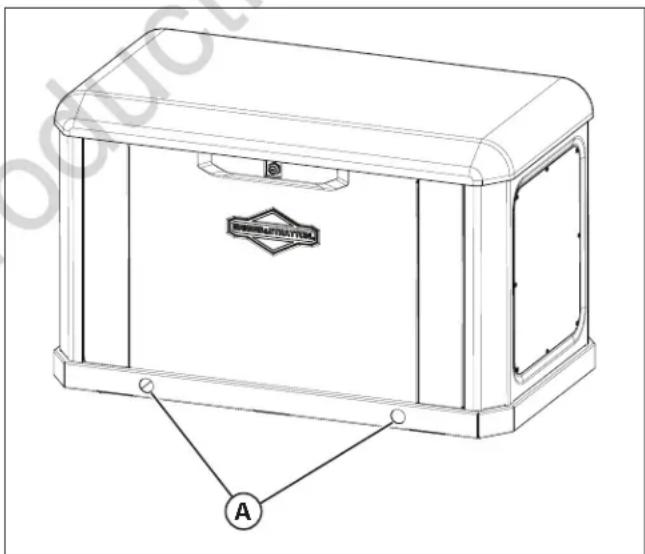
Figure 4
Cold Weather Kit
If the generator operates in temperatures below 30^ F ( -1^ C), Briggs & Stratton highly recommends that the installer install a cold weather kit.
Oil Sump Warmer Kit, Part Number 6840-00, includes:
- Oil sump warmer
- Install brackets
- Hardware
- Harness
Fuel Regulator Warmer Kit, Part Number 6845-00, includes:
- Regulator warmer
- Deflector bracket
- Harness
Battery Warmer Kit, Part Number 6869-00, includes:
- Battery warmer
- Harness
Find these items at the local service dealer.
For more information, please call 800-732-2989 between 8:00 a.m. and 5:00 p.m. CT.
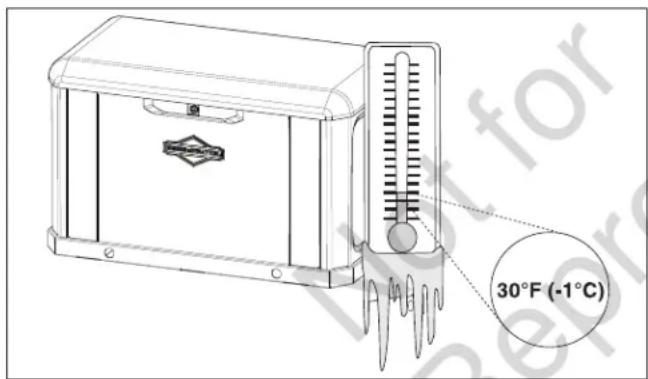
Figure 5
Anchoring and Wind Rating
Concrete Anchoring of Unit to Poured or Existing Slab
To achieve the listed wind rating, the generator must be installed in strict compliance with this Installation and Operation Manual. The product components must be of the material specified and all screws must be installed in accordance with the applicable provisions and the anchor manufacturer's published installation instructions.
The concrete slab or pad must meet the requirements below and the generator must be anchored with one of the following anchor types.
Anchor Types
- Quantity (4) 3/8-inch dia. ITW Red Head Large Diameter Tapcon (LTD) with 1-1/2-inch embedment, 2-inch min. edge of concrete, and 6-inch min. spacing from neighboring concrete anchors typ. If anchor does not provide a .812-inch min. OD integrated washer out-of-box, employ (1) .812-inch min. OD washer per anchor.
- Quantity (4) 3/8-inch dia. DeWalt Screw-Bolt+ with 1-1/2-inch embedment, 4-inch min. edge of concrete, and 6-inch min. spacing from neighboring concrete anchors typ. If anchor does not provide a .812-inch min. OD integrated washer out-of-box, employ (1) .812-inch min. OD washer per anchor.
- Quantity (4) 3/8-inch-16 SAE Gr. 2 min. or SS bolt with .812-inch min. OD washer, typ. Ensure 1/2-inch min. thread engagement U.N.O. by bolt and/or insert manufacturer, typ.
There are four 7/16-inch hole locations (A) in the base of the generator in which to anchor the unit.
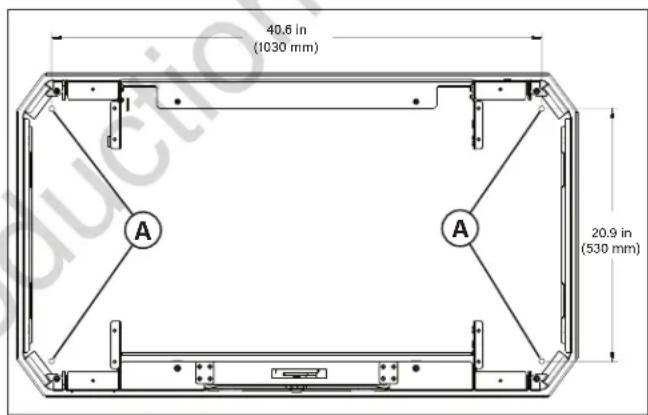
Figure 6
Concrete Slab/Pad Types
| WIND RATING MPH | ANCHOR TYPE | PAD MODEL | PAD DIMENSIONS | CONCRETE SPEC | ||
| WIDTH LENGTH | THICKNESS | |||||
| Up to 186 (at grade) | 3 Pre-cast(contact dealer) | 37 in(940 mm) | 55 in(1397 mm) | 4 in(102 mm) | 3000 psi(20.70 MPa) | |
| Up to 186 (at grade) | 1 or 2 Poured 37 in | (940 mm) | 55 in(1397 mm) | 4 in(102 mm) | 3000 psi(20.70 MPa) | |
Find these items at the local service dealer.
NOTICE
Unless mandated by local or state
codes, or required to achieve wind rating, a concrete slab or pad is not required.
Electrical and Fuel Inlet Locations
The 3/4-inch N.P.T. fuel inlet connector (A) and electrical inlet locations (B) are shown in Figure 7.
A 1.73 inch (44 mm) knock-out hole is provided for the electrical inlet. Make sure that the installed conduit(s) enter the unit in zone (C) as shown in the drawing below so that they properly enter the electrical box and do not interfere with the fully opened roof.
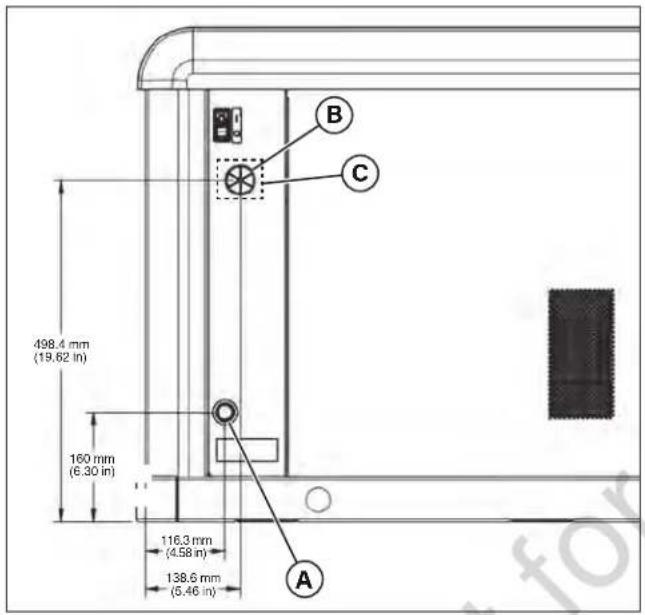
Figure 7
Access Panels
The generator enclosure has several access panels, as shown.
The access panels and the components located behind them are listed below:
(A) Roof (Controller, air filter, oil dipstick, and circuit breaker)
(B) Front Access Panel (oil drain, oil filter, battery)
(C) End Cap, Controller End (control box wiring cover, fuel regulator, fuel selector, generator data label)
(D) End Cap, Exhaust End (alternator fan)
(E) Rear Access Panel (engine starter, starter relay)
(F) Control Box Wiring Cover (field wiring, control wiring)
Each generator ships with a set of identical keys fastened to the fuel solenoid.
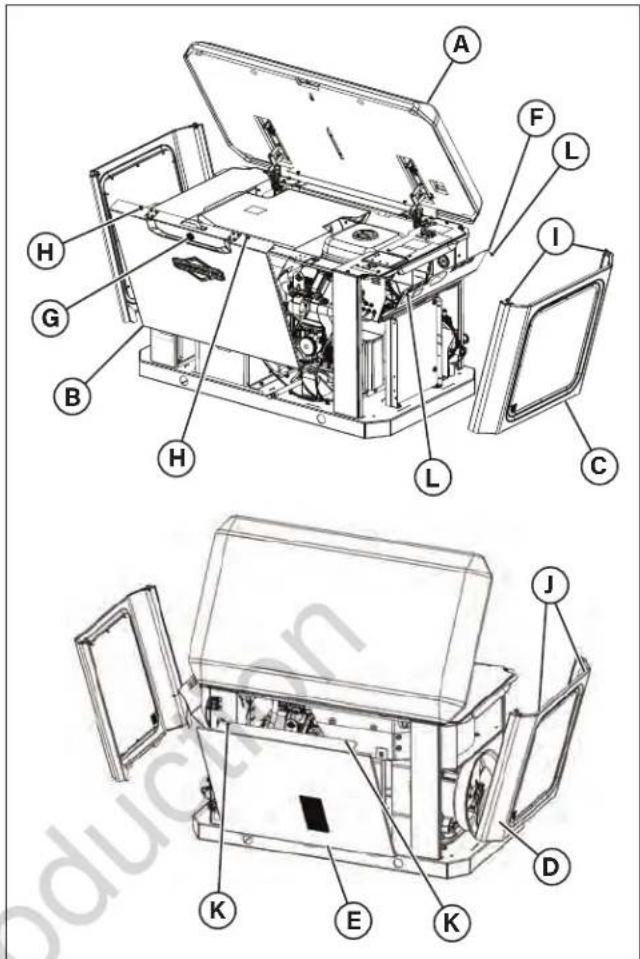
Figure 8
Opening the roof (A):
- Insert the key into the lock (G) of the front panel (B). Gently push down on the roof above the lock to assist in turning the key. Turn the key one quarter turn clockwise.
- Lift the roof (A) to the OPEN position.
Removing the front panel (B):
- Loosen two self-retaining fasteners (H) that secure the panel to the unit.
- Lift the panel to remove it from the unit.
Attaching the front panel (B):
- Place the panel into the unit, aligning the tabs on the panel into the slots on the base.
- Tighten the two self-retaining fasteners (H) that secure the panel to the unit.
Removing the end cap, controller end (C):
- Loosen two self-retaining fasteners (I) that secure the end cap to the unit.
- Lift the end cap to remove it from the unit.
Attaching the end cap (C):
- Place the end cap into the unit, aligning the tabs on the end cap into the slots on the base.
- Tighten the two self-retaining fasteners (I) that secure the panel to the unit.
Removing the end cap, exhaust end (D):
- Loosen two self-retaining fasteners (J) that secure the end cap to the unit.
- Lift the end cap to remove it from the unit.
Attaching the end cap, exhaust end (D):
- Place the end cap into the unit, aligning the tabs on the end cap into the slots on the base.
- Tighten the two self-retaining fasteners (J) that secure the panel to the unit.
Removing the rear panel (E):
- Using a Phillips head screw driver, loosen two self-retaining fasteners (K) that secure the panel to the unit.
- Using a standard blade screw driver, gently lift the rear panel lip off of the back rail.
- Tip the rear panel back under the roof (A).
- Move to the back of the unit and lift the rear panel off.
Attaching the rear panel (E):
- Move to back of unit and place rear panel into the unit, aligning the tabs on the panel into the slots on the base.
- Tip the rear panel forward under the roof (A).
- From the front or side of the unit, align the fasteners (K) and tighten with a Phillips head screw driver.
Removing the control box wiring cover (F):
- Remove two fasteners (L) that secure the control box wiring cover to the control box.
- Tip the control box wiring cover down to access field and control wiring.
Attaching the control box wiring cover (F):
- Tip the control box wiring cover up.
- Attach the control box wiring cover with the two fasteners (L).
Fuel Installation Plan
WARNING
Propane and natural
gas are extremely flammable and explosive, which could cause burns, fire, or explosion, resulting in death or serious injury.
- A licensed professional must perform the installation.
- Install the fuel supply system according to NFPA 37 and other applicable fuel-gas codes.
- Before placing the generator into service, properly purge and leak-test the fuel system lines.
- NO leakage is permitted.
- DO NOT operate the engine if you smell fuel.
NOTICE
DO NOT install the supplied flexible
fuel line underground or in contact with the ground.
- Keep the entire flexible fuel line visible for periodic inspection. Do not conceal it or run it within any wall, floor, or partition. Never let the line contact these structures.
The following information addresses the planning phase of installations for technicians specializing in gaseous fuel systems. Always obey the local applicable fuel-gas codes affecting the installation site. Consult your local fuel supplier or fire marshal with any questions or problems.
WARNING


Propane and natural
gas are extremely flammable and explosive, which could cause burns, fire, or explosion, resulting in death or serious injury.
- The generator features an automatic safety gas fuel shut-off valve.
- DO NOT operate equipment if the shut-off valve is missing or inoperative.
- Liquefied Petroleum (LP) gas is heavier than air and settles in low areas.
- Natural gas is lighter than air and collects in high areas.
- The slightest spark could ignite these fuels and cause an explosion.
- DO NOT light a cigarette and DO NOT smoke.
TO THE INSTALLER: Consult with the generator owner(s) and address any technical considerations affecting their installation plans before applying these guidelines.
The following general rules apply to piping on gaseous fuel systems:
- The piping material must follow federal and local codes, with rigid mounting and protection against vibration.
- Protect piping from physical damage, especially where it passes through flower and shrub beds and other cultivated areas where damage can occur.
- Install the provided flexible fuel line (B) between the generator fuel inlet port (A) and the rigid piping to prevent excessive stress on the piping material due to thermal expansion and contraction.
- Provide a union (C) or flanged connection downstream to allow for future removal.
- Install a manometer test port (D) for vapor fuels. Use the port to install a manometer and check if the engine receives the proper fuel pressure adequate for operation. See the service center for a digital or analog manometer designed for vapor fuels only (part number 19495). After completing the initial test runs, remove the manometer and plug the port.
- For vapor fuels only: Protect piping from freezing in areas that are prone to the formation of hydrates or ice. When terminating hard piping, use a sediment trap (E) where condensate liquid cannot likely freeze.
- Install a minimum of one accessible, approved manual shut-off valve (F) in the fuel supply line within 6 ft (1.8 m) of the generator.
- Install a manual shut-off valve in the interior of the building.
- Increase strength and flexibility of the piping supports and connections in areas prone to earthquakes, tornadoes, flood hazards, and unstable ground.
- Ensure that the size of the piping is adequate enough to maintain the required supply pressures and volume flow under varying generator load conditions, with all gas appliances connected to the fuel system turned on and operating.
- Use a pipe sealant or joint compound approved for use with natural gas/liquefied petroleum on all threaded fittings to reduce the possibility of leakage.
NOTICE
Keep thread sealant out of the gas
piping to prevent damage to component parts.
- Properly purge and leak-test piping according to applicable codes and standards.
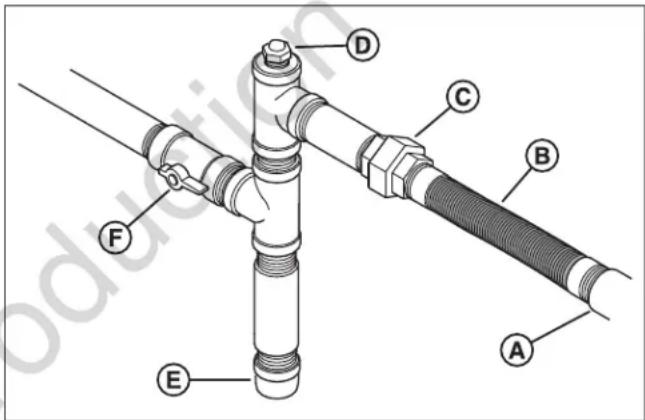
Figure 9
(A) Generator Fuel Inlet
(B) Flexible Fuel Line
(C) Union Fitting
(D) Manometer Test Port
(E) Sediment Trap
(F) Manual Shut-off Valve
Fuel Consumption
The following chart shows estimated fuel supply requirements at half and full load for natural gas and liquefied petroleum vapor fuels.
NG Fuel
| 17 kW 20 kW 26 kW | |||
| 1/2 Load | BTU/hr 170,000 187,000 206,000 | ||
| ft3/hr 170 187 206 | |||
| Full Load | BTU/hr 248,000 260,000 323,000 | ||
| ft3/hr 248 260 323 | |||
LP Fuel
| 17 kW 20 kW 26 kW | ||||
| 1/2 Load | BTU/hr 1 | 85,000 208 | 000 235,000 | 00 |
| ft3/hr | 74 | 83 | 94 | |
| gal/hr | 2.10 | 2.30 | 2.60 | |
| Full Load | BTU/hr | 295,000 | 338,000 | 427,000 |
| ft3/hr | 118 | 135 | 171 | |
| gal/hr | 3.30 | 3.70 | 4.70 | |
| Physical Properties LP Vapor | Natural Gas | |
| Normal Atmospheric State | Gas | Gas |
| Boiling Point (°F) | -44 | -259 |
| Heating Value:BTU per gallon (Net LHV*) | 83,340 | 63,310 |
| BTU per gallon (gross**) | 91,547 | |
| BTU per cubic feet (gas) | 2,500 | 1,000 |
| Density*** | 36.39 | 57.75 |
| Weight ^ | 4.24 | 2.65 |
* LHV (Low Heat Value) is the more realistic rating.
** Gross heat value does not consider heat lost in the form of water during combustion.
*** Density is given in "Cubic Feet of Gas per Gallon of Liquid."
^ Weight is given in “Pounds per Gallon of Liquid.”
Fuel Type
Consider the type of fuel that your generator uses, as it affects the entire installation process. The system was factory tested and adjusted using natural gas, but it can be converted to use liquefied petroleum vapor. For correct engine function, consider factors that affect each of these fuels, such as the location and the duration of possible utility interruptions. Follow these guidelines when choosing fuel type:
- Use clean, dry fuel that is free of moisture or any particulate material. Using fuels outside the recommended values can cause performance problems.
- In engines set up to run on propane (liquefied petroleum), only use commercial-grade HD-5 propane.
Natural gas or LP engines are certified to operate on natural or liquid propane gas. The emissions control system for this engine is EM (Engine Modifications).
Fuel Pressure
Both LP vapor and natural gas fuel supply pressure at the generator's fuel inlet port must be a minimum value at full load with all gas appliances turned on and in operation.
Natural Gas must be 3.5-7 inches Water Column (WC).
Liquefied Petroleum must be 11-14 inches WC.
Ensure that all gas line shut-off valves are OPEN and that adequate fuel pressure is available whenever automatic operation is needed.
Power Loss
Air density decreases at high altitudes, resulting in less available engine power. Engine power can decrease by 4.8% for each 1000 ft (305 m) above rated altitude of 800 ft (250 m) and by 1.1% for each 10° F (5.6° C) above 77° F (25° C). Adjust the transfer switch of any generator located in an area affected by high altitudes and drops in power. See the Automatic Transfer Switch Manual for details on the process of adjusting for a power decrease.
The Gaseous Fuel System
Fuel Pipe Sizing
An installer commonly uses NFPA 54 and 58 as resources on this topic. The installer must consider the specific gravity of gas, compensate for a nominal amount of restriction from bends and fittings, and refer to federal and local codes for guidance.
Fuel Conversion
The engine of your home generator system is factory calibrated and set to operate on natural gas, but it can also operate on liquefied petroleum vapor.
NOTICE
Units are set to NG at the factory.
To convert to either fuel, follow these steps:
- Put the key into the lock of the front panel. Lightly push down on the roof above the lock, and then turn the key one quarter turn clockwise.
- Lift the roof to the OPEN position.
- Push the controller OFF button.
- Remove the 15-amp fuse in the fuse holder below the controller.
- Remove utility power to the generator to de-energize the battery charger.
- Disconnect the negative (-) cable at the battery.
- Remove the end cap controller end.
- Find the fuel selector valve (A) on top of the fuel regulator (B). See Figure 10.
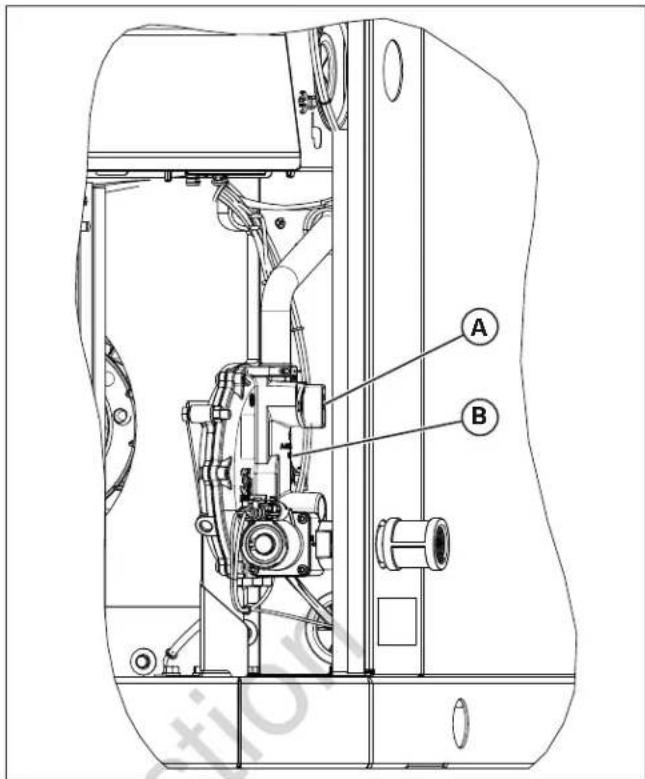
Figure 10
- To set the fuel selector valve:
A. For LP, rotate the lever (C) on the fuel selector valve until LP is aligned with "OUT" on the fuel regulator.
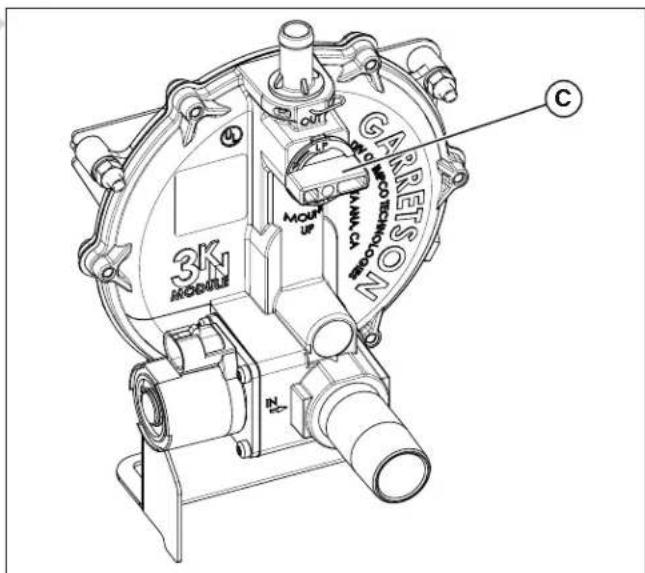
Figure 11
B. For NG, rotate the lever clockwise 90° so the handle position of the lever will be up and down and the "NG" letters (D) will be on the left.
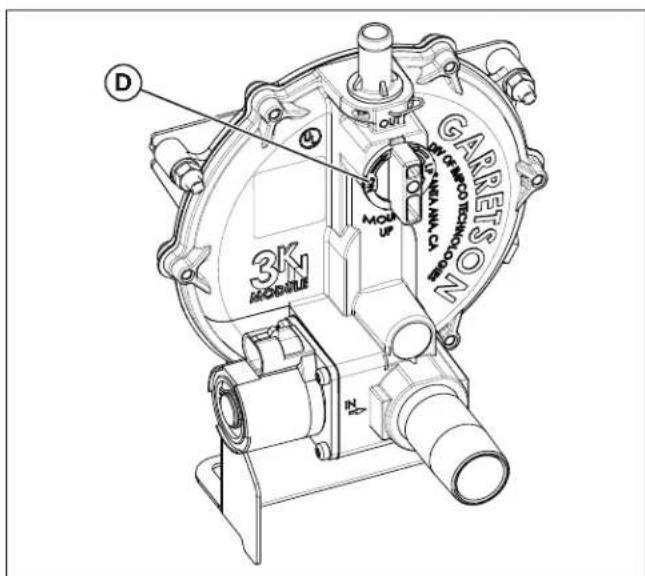
Figure 12
- Find the fuel selector switch (E) in the engine compartment. See Figure 13.
- Select either LP or NG.
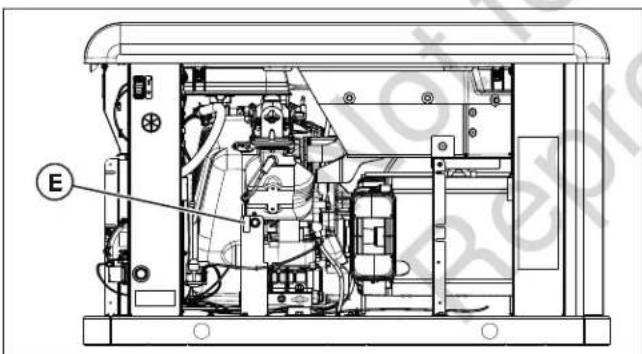
Figure 13
- Connect the negative (-) cable at the battery.
- Install the end cap controller end.
- Install the 15-amp fuse.
- Push and hold the config button on the controller to access the configuration menu.
- Push the select button to edit the items in the configuration menu.
-
To set up the generator's controller for LP fuel, enter the configuration menu by using the dealer password, which is available on the Power Portal.
-
Navigate to "select profile" and press "select" on the correct profile for the generator. For example, choose "20KW_LP" for operating a 20 kW unit running on LP fuel.
Note: Selecting a profile that is not intended for the generator can cause the generator to run erratically and could result in damage. - To save the new fuel setting, press and hold the stop/config button until "Saving Settings..." displays.
- For additional information on the operation of the generator controller, refer to the Operation Instructions GC1030 SERIES GENSET Controller Manual, part number 80086364.
- Push the controller auto button.
- Restore utility power to the generator.
- Close the roof.
Electrical Field Connections
WARNING

Generator voltage could
cause electrical shock or burns, resulting in death or serious injury.
- A licensed professional must perform the installation.
- Disconnect all sources of electricity before installing or servicing equipment.
- Ground the system before applying power.
WARNING

Hazardous Voltage -
Installing low- and high-voltage wire in the same conduit could cause electric shock or burns, resulting in death or serious injury.
- Do not run low- and high-voltage wire in the same conduit unless the insulation rating on ALL wiring is rated for 600V. See NFPA 70 for more information.
Low-voltage connections occur via a field connections terminal block (E) in the main electrical area. Compare the following illustration with your generator to get familiar with the location of these connections.
System Connector Location
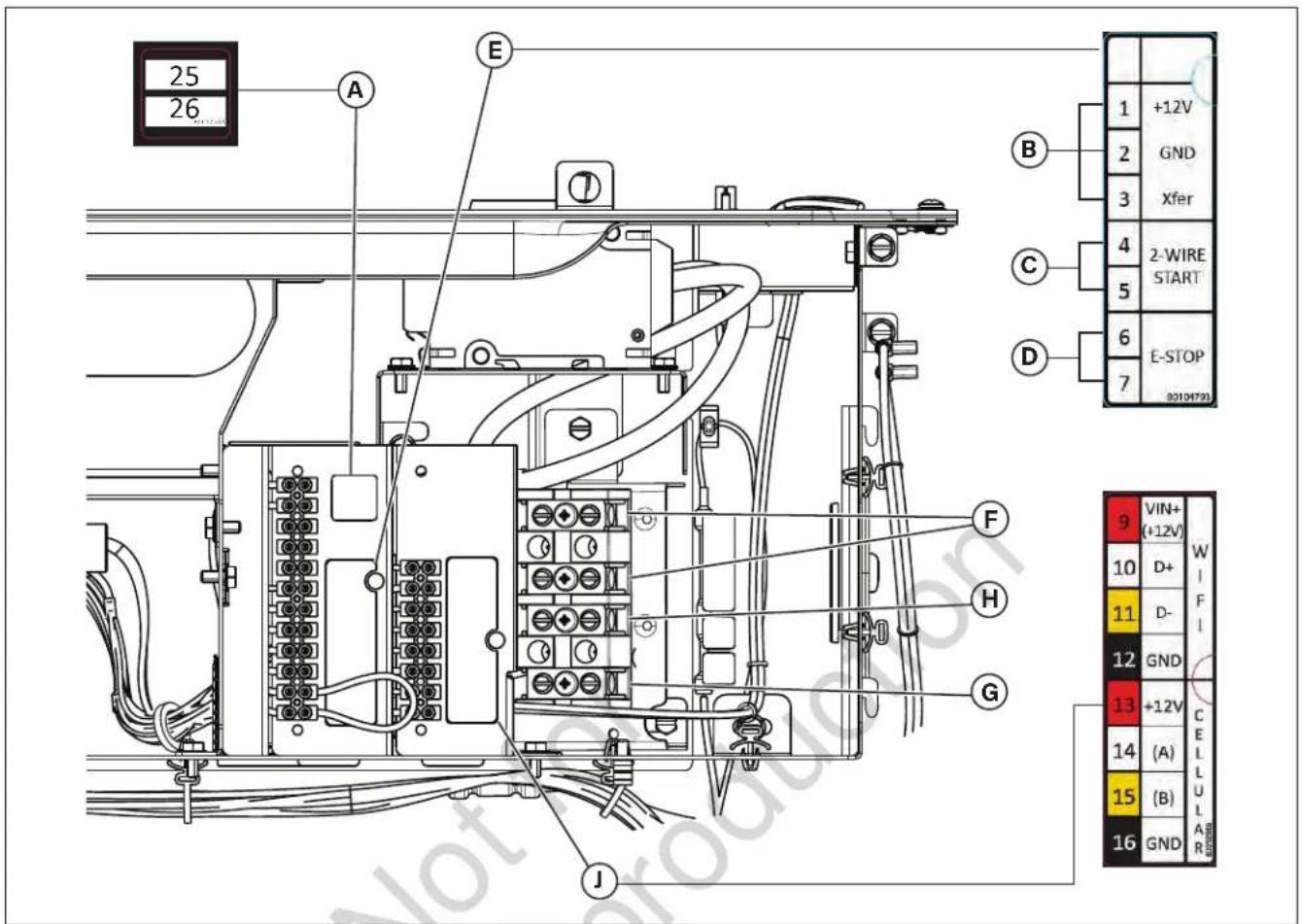
Figure 14
Legend for System Connector Location:
(A) Utility Connection — Connects utility 240VAC from the fuse block in ATS to the controller. Connect only one wire per terminal. Use #14 AWG (2.50 mm2) minimum 300V wire
(B) Transfer Switch Connection — Controls the transfer switch contactor
(C) Two-wire Start — Helps provide optional remote start contact
(D) E-Stop — Use with the optional external E-Stop
(E) Field Connections Terminal Block - Reference the following table
(F) Power Connection (L 1 and L2) — Offers power connection to the transfer switch
(G) Ground Connection — Connects to the transfer switch ground wire
(H) Neutral Connection — Connects to the transfer switch neutral wire
(J) Communications Terminal Block — Reference the following table
| PIN NUMBER | DESCRIPTION | WIRE TYPE CONNECT TO NOTES | ||
| 1 +12V | #18 AWG (1 mm2) | conductors,600V minimum, 90°C Cu wire. | Transfer Switch Basic Controller J7-8 12VDC | Transfer Switch Transfer Signal(only works with Basic Transfer Switch Controller) |
| 2 GND | #18 AWG (1 mm2) | conductors,600V minimum, 90°C Cu wire. | Transfer Switch Basic Controller J7-7 GND | |
| 3 Xfer | #18 AWG (1 mm2) | conductors,600V minimum, 90°C Cu wire. | Transfer Switch Basic Controller J7-4 T/R | |
| 4 2-WI | RE START #18 AWG (1 mm2) | conductors,600V minimum, 90°C Cu wire. | Refer to Transfer Switch Manual to verify if this function is available. | Contact Close for GENSET Start. (Only for Transfer Switch that provides this option).Mains monitoring must be disabled in the controller. |
| 5 2-WI | RE START #18 AWG (1 mm2) | conductors,600V minimum, 90°C Cu wire. | ||
| 6 E-ST | OP #18 AWG (1 mm2) | conductors,600V minimum, 90°C Cu wire. | E-Stop Switch Contact | Open to Shutdown GENSET |
| 7 E-ST | OP #18 AWG (1 mm2) | conductors,600V minimum, 90°C Cu wire. | E-Stop Switch | |
| 9 VIN+(+12V) | #18 AWG (1 mm2) conductors,600V minimum, 90°C Cu wire. | Refer to the Amplify Gateway Manual. | Comm to WIFI Module Twisted Pair #1: +12V and GND Twisted Pair #2: (D+) and (D-) | |
| 10 (D+) | #18 AWG (1 mm2) conductors,600V minimum, 90°C Cu wire. | |||
| 11 | (D-) | #18 AWG (1 mm2) conductors,600V minimum, 90°C Cu wire. | ||
| 12 GND | #18 AWG (1 mm2) | conductors,600V minimum, 90°C Cu wire. | ||
| 13 +12V | #18 AWG (1 mm2) | conductors,600V minimum, 90°C Cu wire. | Refer to the InfoHubTM Premium Manual. | Comm to Cellular Module Twisted Pair #1: +12V and GND Twisted Pair #2: (A) and (B) |
| 14 (A) | #18 AWG (1 mm2) | conductors,600V minimum, 90°C Cu wire. | ||
| 15 (B) | #18 AWG (1 mm2) | conductors,600V minimum, 90°C Cu wire. | ||
| 16 GND | #18 AWG (1 mm2) | conductors,600V minimum, 90°C Cu wire. | ||
| 25 | Utility | #14 AWG [2.50 mm2] 600V minimum, 90°C Cu Wire. | Transfer Switch Utility | Voltage Sensing for GENSET Start. Use either this signal or two-wire Start Signal for GENSET Start Signal (still required in two-wire start configuration for battery charger). |
| 26 | Utility | #14 AWG [2.50 mm2] 600V minimum, 90°C Cu Wire. | Transfer Switch Utility | |
- For power output connection (L1, L2, Neutral (N), and Ground), refer to the National Electric Code (NEC) and local codes.
-
For communication wires use 300V wire and #18 AWG (1 mm2) twisted-pair conductors that do not exceed a length of 500 ft (150 m).
-
When connecting to the terminal block, fasten only one wire to each connector screw.
- Torque terminal block screws to 4.4 in-lb (0.5 N·m).
- Torque circuit breaker connections to 45 in-lb (5 N·m).
Generator AC System Connection
The generator uses a single-phase, three-wire AC connection system. The stator assembly consists of a pair of stationary windings with two leads appearing from each winding. The junction of leads 22 and 33 forms the neutral lead, as shown schematically and as a wiring diagram.
NOTICE
the generator.
Neutral is not bonded to the ground at
NOTICE
transfer switch that is compatible with the generator.
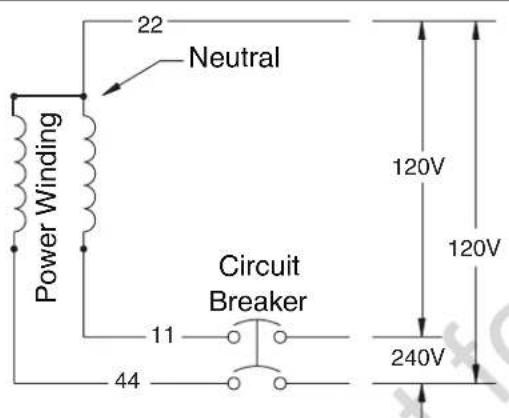
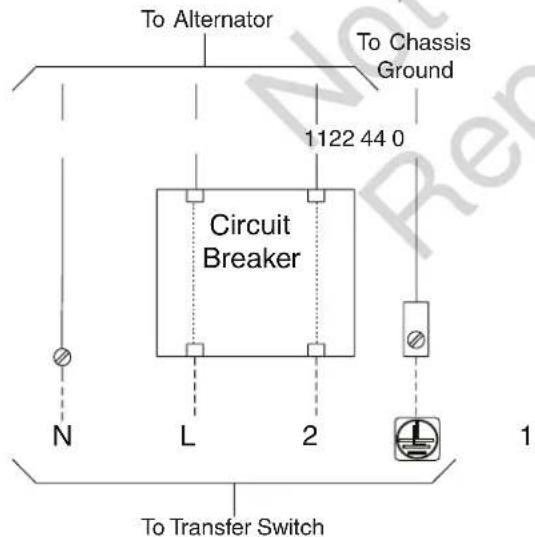
Figure 15
Grounding the Generator
Unless mandated by local code, additional chassis grounding to earth at the generator is not required. Any grounding at the generator must use metal piercing lock washers (or their equivalent). Also, any listed terminals must be installed per the terminal supplier's instructions. All grounding and terminal installations must comply with national electrical codes and local requirements.
Power Connections from the Generator to the Transfer Switch
WARNING

Failure to isolate the
generator from the utility power could result in death or serious injury to electric utility workers due to the backfeed of electrical energy.
- Use a listed transfer switch to connect to a building's electrical system.
Utility Circuit Connection
Route all 240V utility leads in conduit. The 240V utility leads deliver power to the generator's circuit board, and optional battery, oil sump, and fuel regulator warmers. This power also charges the battery. The generator starts when power on these leads is lost. Using the installer-supplied minimum 300V #14 AWG (2.50 mm2) wire, connect each control circuit terminal in the generator (25 and 26) to the fuse block in the automatic transfer switch.
Generator Power Connection
Using the installer-supplied minimum 300V wires and the table located in the Electrical Field Connections section, connect the generator power output L1, L2, neutral (N), and ground to the corresponding L1, L2, neutral (N), and ground in the transfer switch.
NOTICE
Refer to the National Electric Code
(NEC) for correct electrical field connections and wire size calculations.
Final Installation Considerations
Engine Oil
NOTICE
Any attempt to crank or start the
engine before it has been correctly filled with the recommended oil will result in equipment failure and service codes.
- Refer to Maintenance in the Operation section for oil fill information.
- Damage to equipment resulting from failure to obey this instruction will void the engine and generator warranty.
This engine ships from the factory pre-run and filled with full synthetic oil (API SJ/CF 5W-30). This step allows for system operation in a wide range of temperature and climate conditions. Before starting the engine, check the oil level as described in the Maintenance section.
Using full synthetic oil does not alter the required oil change intervals as described in the Operation section.
Battery
WARNING

Storage batteries give off
explosive hydrogen gas during recharging. The slightest spark could ignite hydrogen and cause an explosion, resulting in death or serious injury.
- DO NOT dispose of the battery in a fire. Recycle the battery.
- DO NOT allow any open flame, spark, heat, or lit cigarette in the area of the battery during the battery-charging process and for several minutes after charging.
WARNING

Generator voltage could
cause electrical shock or burns, resulting in death or serious injury.
- A licensed professional must perform the installation.
- Disconnect all sources of electricity before installing or servicing equipment.
- Ground the system before applying power.
WARNING


Battery electrolyte
fluid contains acid and is extremely caustic. Contact with battery contents could cause severe chemical burns.
- DO NOT open or mutilate the battery.
- Wear protective goggles, a rubber apron, rubber boots, and rubber gloves.
- Immediately wash electrolyte from skin with water.
- If electrolyte contacts the eyes, immediately flush them with water and seek medical attention.
- Wash down spilled electrolyte with an acid-neutralizing agent.
The installer must supply and install a rechargeable 12V starting battery. The starting battery MUST conform to the specifications shown in the following chart.
| BATTERY SPECIFICATIONS | ||
| Specifications Standard Cold Start (Less than 30° F / -1°C) | ||
| Volts 12VDC 12VDC | ||
| Amps (Minimum) | 540 CCA (Cold Cranking Amps) | 800 CCA (Cold Cranking Amps) |
| Construction Wet Lead Acid Wet Lead Acid | ||
| Terminal Type Top | Post Type Battery | Top Post Type Battery |
| Dimensions (Maximum) | BCI Size 26 or BCI Size 51 | BCI Size 24 |
WARNING

With the battery connected,
the generator may crank and start without warning, resulting in death or serious injury.
- Do not connect the negative (-) cable at the battery until the installation is complete.
Install the battery as described in Servicing the Battery in the Maintenance section of this manual. Always connect the negative cable last and secure the red positive terminal insulator.
Use the supplied tie-down strap to secure the battery to the unit. Attach each end of the strap to the existing tabs in the base of the unit.
System Controller
NOTICE
See the separate online manual titled
Operation Instructions GC1030 SERIES GENSET Controller (part number 80086364) for details on setup and operation.
The generator controller, located inside the generator housing, appears in the following figure.
Controls Used During Installation
Generator Controller
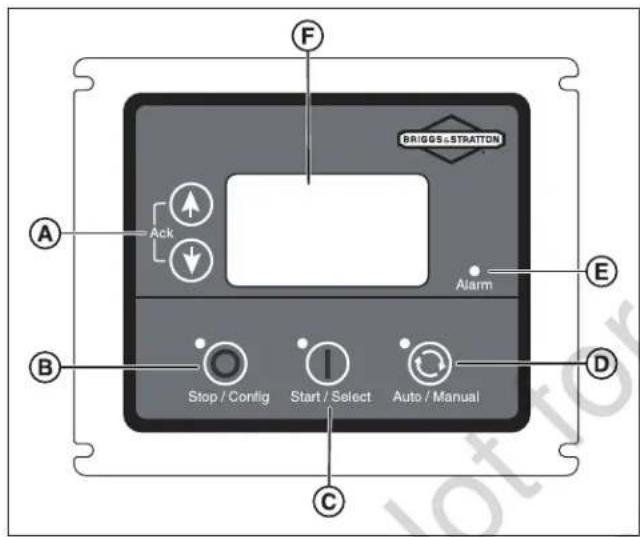
Figure 16
(A) Menu/Programming Navigation Buttons
(B) Stop/Config Button
(C) Start/Select Button
(D) Auto/Manual Button
(E) Alarm
(F) Digital Display — Displays generator mode, menu options, and alarms
Detailed descriptions of the controls appear in the Description of Control Keys section of the online manual titled Operation Instructions GC1030 SERIES GENSET Controller (part number 80086364).
Initial Start-Up (No Load)
WARNING

Exhaust heat/gases could ignite combustibles, causing a fire and resulting in death or serious injury.
- Remove all combustible materials from in and around the generator compartment.
The unit has been set up for natural gas operation at the factory. To complete fuel conversion, do so before performing the following steps. See the Fuel Conversion section.
Before operating the standby generator or putting it into service, inspect the entire installation carefully. Then begin testing the system without any electrical loads connected, as follows:
NOTICE
When the generator starts for the very
first time, it purges air from the gaseous fuel lines. This process can cause the engine to run roughly for a few minutes.
- Remove the two screws (A) retaining the control box wiring cover. Remove the cover.
- Connect an accurate multimeter to the line side of the generator's main circuit breaker.
- Set the generator's main circuit breaker to the ON (closed) position.
- Install a 15-amp fuse in the fuse holder below the controller.
- Push the start/select button on the controller. The engine starts in Low Idle Mode (LIM).
- Push the button again to bring the engine to full speed.
- Listen for unusual noises, vibrations, or other indications of abnormal operation. Check for oil leaks while the engine runs.
- Let the engine warm up for approximately five minutes to allow the internal temperatures to stabilize.
- Check the generator output at the load side of the circuit breaker. The voltage should be 225-250 volts and the frequency should be 59.0-61.0 Hz.
-
Check the generator output between one generator connection lug and a neutral lug, then between the other generator connection lug and a neutral lug. In both cases, the voltage reading should be 112-125 volts.
-
Push the stop/config button on the controller. The engine enters cool-down mode for approximately five minutes. Push the button again to stop the engine.
- Install the control box cover.
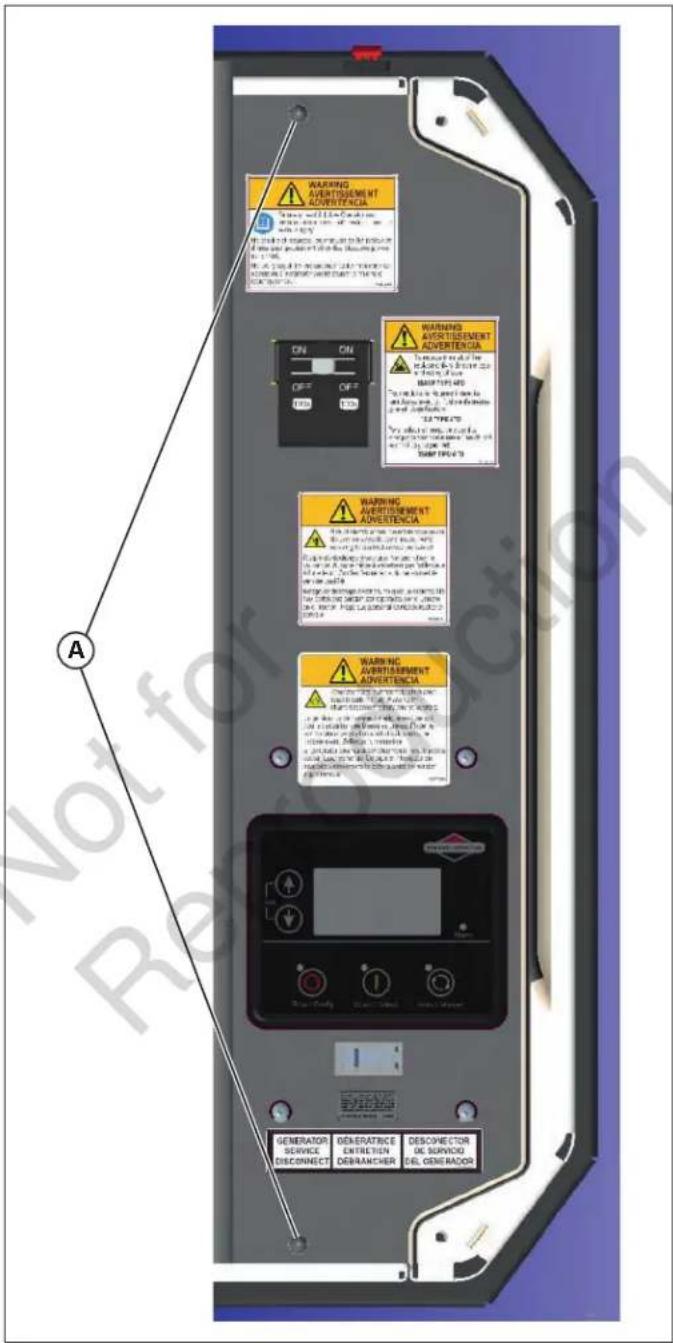
Figure 17
OPERATION
Controls


Failure to read and obey the
operator's manual, all warnings, and operating instructions could result in death or serious injury.
Front View
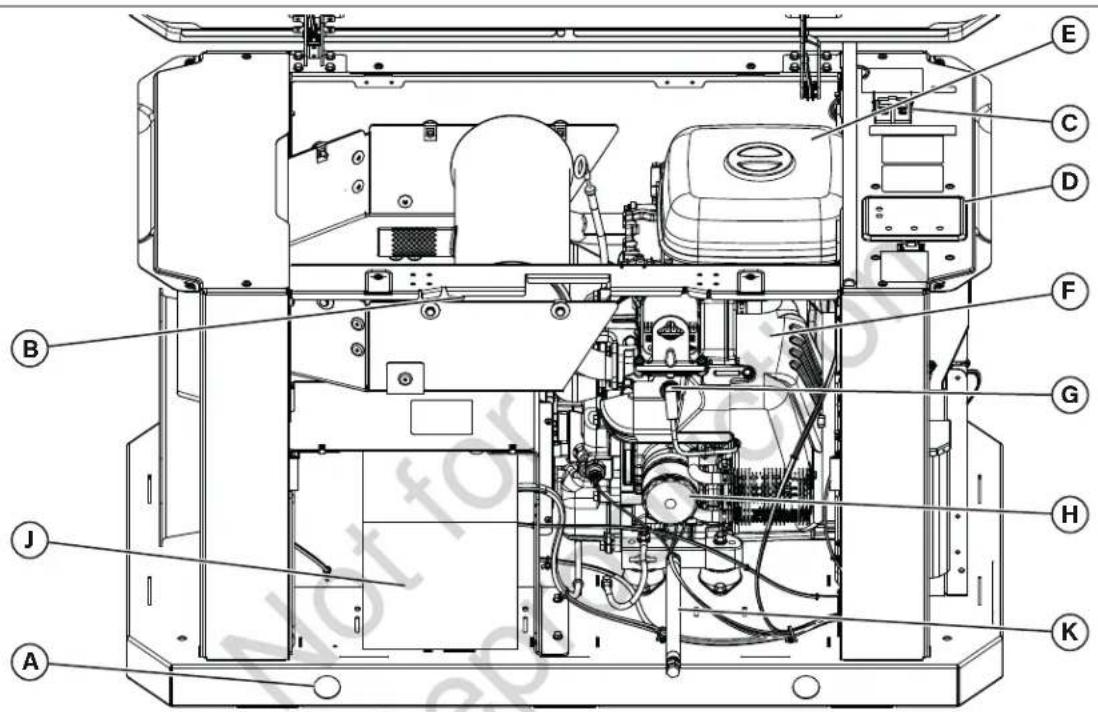
Figure 18
Generator is shown with roof and access covers removed for clarity. Legend for System Connector Locations:
(A) Lifting Holes — Provided at each corner for lifting generator
(B) Muffler — High-performance muffler lowers engine noise to comply with most residential codes
(C) Circuit Breaker — Protects the system from shorts and other over-current conditions
(D) Controller — Facilitates for generator operation control, menu start-up, and informational display functions
(E) Air Cleaner — Uses a dry-type filter element to protect engine by filtering dust and debris out of intake air
(F) Engine Label — Identifies engine model and type (located on the valve cover)
(G) Spark Plug — A device in the cylinder head of the engine that ignites the fuel mixture by means of an electric spark
(H) Oil Filter — Filters engine oil to prolong generator life
(J) Battery (installer supplied) — 12VDC, lead acid, automotive-style battery provides power to start the engine
(K) Oil Drain Hose — Facilitates oil changing
Back View
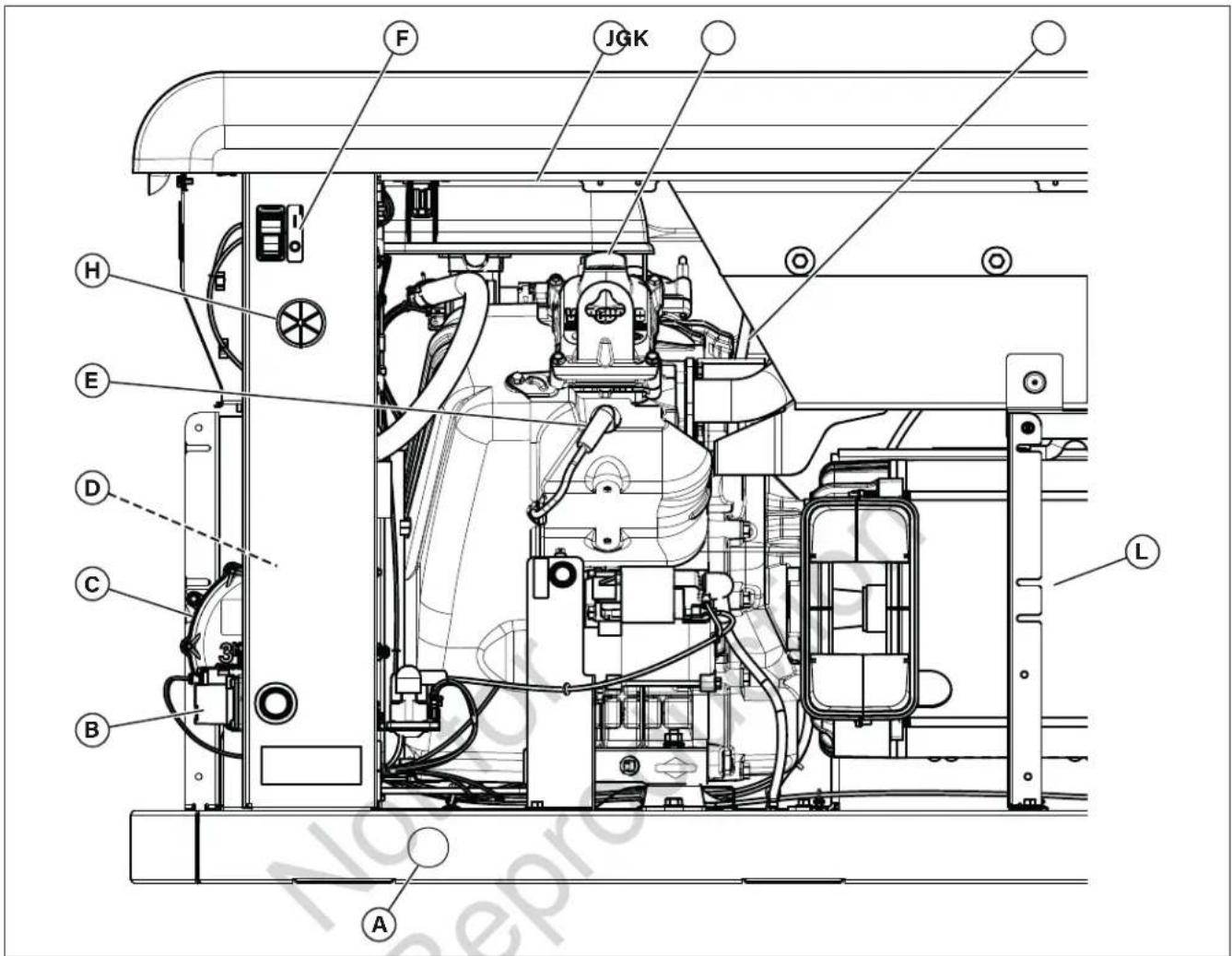
Figure 19
(A) Lifting Holes — Provided at each corner for lifting generator
(B) Fuel Solenoid — Automatically opens and closes to supply fuel to the unit when needed
(C) Fuel Regulator — Controls fuel flow to the engine for proper operation
(D) Fuel Selector Valve (not shown) — Aids in selecting the proper fuel type (LP or NG)
(E) Spark Plug — A device in the cylinder head of the engine that ignites the fuel mixture by means of an electric spark
(F) ON/OFF Switch — Aids in turning the generator on (I) and off (0)
(G) Oil Fill Cap — The location for adding oil to the engine
(H) Electrical Field Wiring Inlet — Wires to and from the generator are centered in this location
(J) Air Cleaner — Uses a dry-type filter element to protect the engine by filtering dust and debris out of the intake air
(K) Engine Oil Dipstick — Allows the user to check the engine oil level easily
(L) Alternator — An electrical machine that generates an alternating current
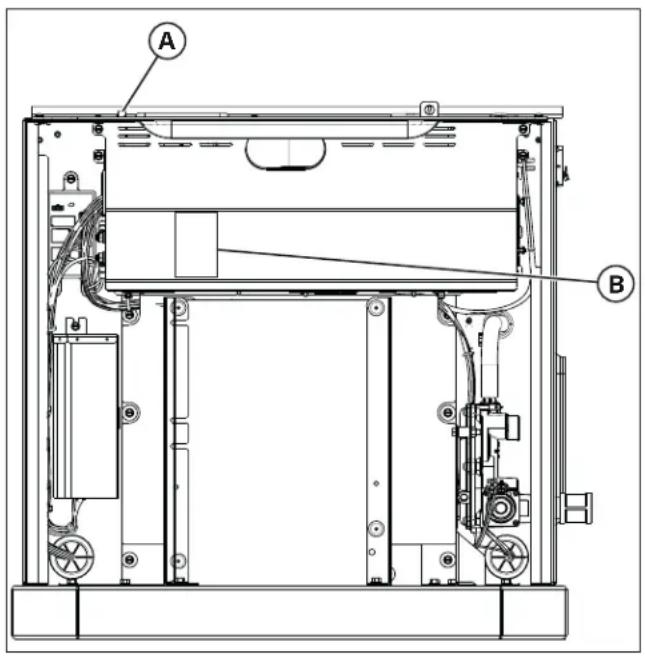
Figure 20
(A) Fuse Holder — For the 15-amp ATO-type fuse (fuse holder is located below the controller)
(B) Generator Data Label — Identifies the generator model number and serial number. Located inside the battery access compartment
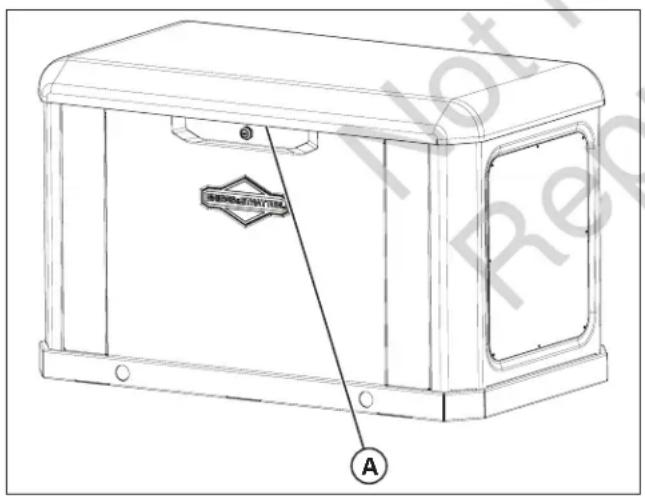
Figure 21
(A) Status LED — Three modes:
- Blue solid light: Unit ready for operation (controller in AUTO mode)
- Blue flashing light: Unit fault (review fault message on controller)
- No light: Unit controller in MANUAL mode or no battery power or ON/OFF switch in OFF position
Important Owner's Considerations
WARNING

Engine exhaust contains
carbon monoxide, a poisonous gas that could kill people and animals in minutes. People and animals cannot smell it, see it, or taste it. Even if you do not smell exhaust fumes, you could still be exposed to carbon monoxide gas.
- Carbon monoxide detector(s) MUST be installed and maintained indoors according to the manufacturer's instructions and recommendations. Smoke alarms cannot detect carbon monoxide gas.
- If you start to feel sick, dizzy, weak, or the carbon monoxide alarm sounds while using this product, get to fresh air right away. Call emergency services. You may have carbon monoxide poisoning.
WARNING


Propane and natural
gas are extremely flammable and explosive, which could cause burns, fire, or explosion, resulting in death or serious injury.
- The generator features an automatic safety gas fuel shut-off valve.
- DO NOT operate the equipment if the fuel shut-off valve is missing or inoperative.
Engine Oil
The engines ships from the factory pre-run and filled with full synthetic oil (API SJ/CF 5W-30). This step allows for system operation in a wide range of temperature and climate conditions. Before starting the engine, check the oil level as described in the Maintenance section.
NOTICE
Any attempt to crank or start the
engine before it has been correctly filled with the recommended oil will result in equipment failure.
- Damage to equipment resulting from failure to obey this instruction will void the engine and generator warranty.
Battery
The installer must supply a rechargeable 12VDC starting battery. See Battery in the Final Considerations section.
15-Amp Fuse
Ensure that the fuse is correctly installed before operating the generator.
Automatic Operation Sequence
The generator's controller monitors utility voltage. If the utility voltage drops below a preset level, the controller signals the engine to crank and start. When the utility voltage restores above a preset voltage level, the engine receives signals to shut down. The actual system operation is not adjustable and undergoes sequencing by sensors and timers on the controller in the following manner:
Utility Voltage Dropout Sensor
- This sensor monitors the utility source voltage.
- If the utility source voltage drops below approximately 70% of the nominal supply voltage, the sensor initiates a timer.
- The engine cranks and starts once the timer has expired.
Utility Voltage Pickup Sensor
This sensor monitors the utility voltage. When the utility voltage restores above approximately 80% of the nominal source voltage, a shut-down timer initiates and the engine cools down.
Engine Cool-down Timer
When the system senses the utility power, the load transfers to the utility source and the engine enters a five-minute cool-down period.
Setting the Exercise Timer
- Push and hold the stop/config button (B).
- Push the start/select button (C) to enter "write" mode.
- Enter the password (0000) by using the arrow keys (A) and the start/select button (C).
- In the configuration screen use the arrow keys (A) to find module.
- Push the start/select button (C) and, using the arrow keys (A), find auto exercise.
-
Push the start/select button (C) and, using the arrow keys (A), select each parameter and choose the desired settings.
-
Push and hold the stop/config button (B) to save your settings.
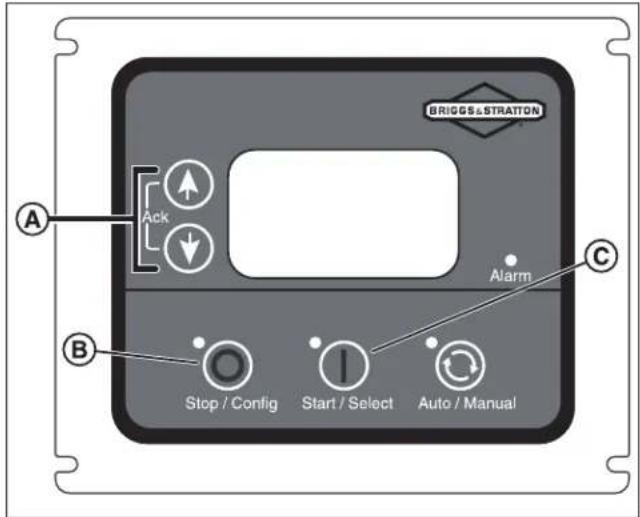
Figure 22
A detailed list of all the on-screen parameters appears in the Configuration of GCU section inside the online Operation Instructions GC1030 SERIES GENSET Controller Manual (part number 80086364).
MAINTENANCE
Servicing the System
WARNING

Generator voltage could
cause electrical shock or burns, resulting in death or serious injury.
- DO NOT allow unqualified people to operate or service the generator.
WARNING

With the battery connected,
the generator may crank and start without warning, resulting in death or serious injury.
- Before servicing, stop the generator and disconnect the negative (-) cable at the battery.
Always follow these steps before performing any generator maintenance:
-
Push the ON/OFF switch on the back of the generator to the OFF (0) position.
-
Remove utility power to the generator to de-energize the battery charger.
- Unlock and open the roof as described in the Access Panels section.
- Remove the 15-amp fuse from the fuse holder located below the controller.
- Disconnect the negative (-) cable at the battery.
- Perform the service steps as specified.
- Connect the negative (-) cable at the battery.
- Install the 15-amp fuse into the fuse holder.
- Close and lock the roof.
- Restore utility power to the generator.
- Push the ON/OFF switch on the back of the generator to the ON (I) position.
- Set the generator mode to auto.
Maintenance Schedule
Follow the hourly or calendar intervals of operation, whichever occurs first.
| Every 8 Hours of Operation or Daily |
| Clean Debris |
| Check the Engine Oil Level |
| Every 100 Hours of Operation or Annually |
| Change the Air Filter |
| Change the Engine Oil and Filter |
| Replace the Spark Plugs |
| Check the Valve Clearance |
| Check the Circuit Breaker Torques |
| Annually |
| Clean the Oil Cooler Fins |
Regular maintenance improves the performance and extends the life of the generator. See any authorized dealer for service.
Emissions Control
Any individual, whether from a non-road engine repair establishment or not, can perform maintenance, replacement, or repair of the emissions control devices and systems. However, only a factory-authorized dealer must do the work required to obtain a "no charge" emissions control service. See the Emissions Warranty for details.
Maintaining the Generator
The generator's warranty does not cover items that have been subjected to operator abuse or negligence. To receive full value from the warranty, the operator must maintain the generator as instructed in this manual.
The generator requires the owner to make some adjustments periodically to correctly maintain it.
Perform all service and adjustments at least once each season. Obey the requirements in the Maintenance Schedule section.
Generator maintenance also means keeping the unit clean. Operate the unit in an environment that remains free of excessive dust, dirt, moisture, or any corrosive vapors. Do not allow the cooling air inlets and outlets on the enclosure to become clogged with snow, leaves, or other foreign material. To prevent generator damage caused by overheating, keep the enclosure cooling inlets and outlets clean and unobstructed at all times.
Check the cleanliness of the unit frequently and clean it when dust, dirt, oil, moisture, or other foreign substances appear on its exterior and interior surface. Inspect the air inlet and outlet openings inside and outside the enclosure to make sure no blockages exist in the airflow.
NOTICE
Improperly treating the generator can damage it and shorten its life.
- DO NOT expose the generator to excessive moisture, dust, dirt, or corrosive vapors.
- DO NOT insert any objects through the cooling slots.
Cleaning the Generator
WARNING

Exhaust heat/gases could
ignite combustibles, causing a fire and resulting in death or serious injury.
- Keep the area near the generator clean and free of debris.
NOTICE
DO NOT use direct spray from a garden hose to clean the generator. Water can enter the engine and generator and cause damage.
NOTICE
Periodically inspect the engine exterior for contamination and potential damage from dirt, leaves, rodents, spiderwebs, insects, etc., and remove these materials.
- Push the ON/OFF switch on the back of the generator to the OFF (0) position.
- Remove utility power to the generator to de-energize the battery charger.
- Unlock and open the roof as described in the Access Panels section.
- Remove the 15-amp fuse from the fuse holder located below the controller.
- Disconnect the negative (-) cable at the battery.
-
Clean the generator using the following steps:
-
Wipe the exterior surfaces clean with a damp cloth.
- Use a soft bristle brush and vacuum cleaner to loosen and pick up dirt and debris. Use low-pressure air (not to exceed 25 psi or 175 kPa) to blow away dirt and debris.
-
Clear any snow, leaves, or debris from the air inlets and outlets. Keep these openings unobstructed to prevent generator damage caused by overheating.
-
Connect the negative (-) cable at the battery.
-
Install the 15-amp fuse into the fuse holder.
-
Close and lock the roof.
-
Restore utility power to the generator.
-
Push the ON/OFF switch on the back of the generator to the ON (I) position.
-
Set the generator mode to auto.
Maintaining the Engine
Engine Oil
Use only Briggs & Stratton® 80028446 SAE 5W-30 full synthetic engine oil. Other full synthetic high-quality detergent oils are acceptable if classified for service SJ or higher. Do not use special additives.
Checking the Engine Oil Level
Maintain the oil level somewhere between the "add" and the "full" marks on the dipstick. Before checking the oil level, follow these steps to ensure that an accurate reading appears on the dipstick:
- Push the ON/OFF switch on the back of the generator to the OFF (0) position.
- Remove utility power to the generator to de-energize the battery charger.
-
Unlock and open the roof as described in the Access Panels section.
-
Remove the 15-amp fuse from the fuse holder located below the controller.
- Disconnect the negative (-) cable at the battery.
- Allow approximately five minutes for the oil to drain back into the oil pan.
- Remove the dipstick. Wipe it with a clean cloth or paper towel. Then, push the dipstick all the way into the dipstick tube.
- Remove the dipstick and note the amount of oil on it. The oil must reach a level somewhere between the "add" and "full" marks on the dipstick.
- If the oil level is below the "add" mark on the dipstick, install the dipstick and proceed to step 10.
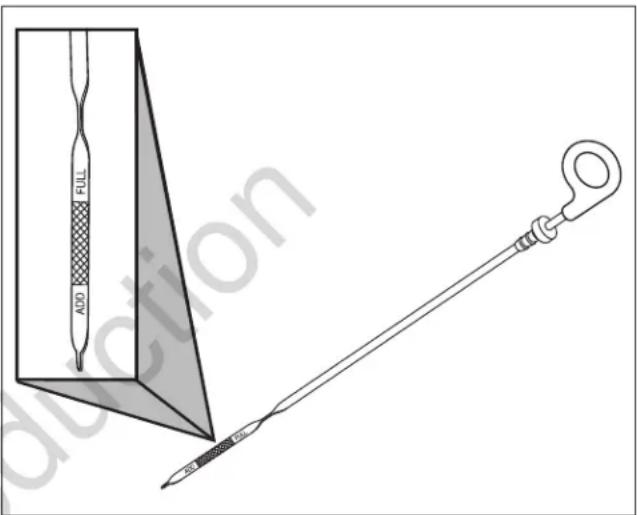
Figure 23
- Remove the oil fill cap from the valve cover.
- Add the required amount of oil to bring the level up to (but not over) the "full" mark on the dipstick. Install the oil fill cap on the valve cover and wipe up any spilled oil.
- Connect the negative (-) cable at the battery.
- Install the 15-amp fuse into the fuse holder.
- Close and lock the roof.
- Restore utility power to the generator.
- Push the ON/OFF switch on the back of the generator to the ON (I) position.
- Set the generator mode to auto.
Changing Engine Oil and Oil Filter
Change the oil while the engine is still warm from running.
- Push the ON/OFF switch on the back of the generator to the OFF (0) position.
- Remove utility power to the generator to de-energize the battery charger.
- Unlock and open the roof as described in the Access Panels section.
- Remove the 15-amp fuse from the fuse holder located below the controller.
- Disconnect the negative (-) cable at the battery.
- Place the oil drain hose into an approved container.
- Remove the brass fitting from the end of the oil drain hose.
- Replace the brass fitting on the hose when the oil has drained.
- Set an approved container beneath the oil filter area.
- Remove the oil filter and dispose of it properly.
- Before installing a new oil filter, lightly lubricate the oil filter gasket with fresh, clean oil.
- Install the oil filter by hand until the gasket contacts the oil filter adapter, then tighten the oil filter 1/2 to 3/4 turn.
- Add the required amount of oil to bring the level up to (but not over) the "full" mark on the dipstick. Install the oil fill cap and wipe up any spilled oil.
- Connect the negative (-} cable at the battery.
- Install the 15-amp fuse into the fuse holder.
- Close and lock the roof.
- Restore utility power to the generator.
- Push the ON/OFF switch on the back of the generator to the ON (I) position.
- Set the generator mode to auto.
Engine Oil
The engine is filled with full synthetic oil (API SJ/CF 5W-30). This oil allows for system operation in the widest range of temperature and climate conditions.
The manufacturer recommends using Briggs & Stratton® 80028446 SAE 5W-30 full synthetic engine oil. Other full synthetic high-quality detergent oils are acceptable if classified for service SJ or higher. Do not use special additives.
Note: An acceptable oil at all temperatures includes full synthetic oil that:
- Meets International Lubricant Specification Advisory Committee (ILSAC) GF-2 standards
- Carries the API certification mark
- Features an API service symbol with "SJ/CF energy conserving" or higher

Using full synthetic oil does not alter the required oil change intervals described in the Operation section.
Adjusting the Valve Lash
Check the valve lash every 100 hours of operation. Measure the valve clearance with the engine cold. To adjust the valve lash, proceed as follows:
- Push the ON/OFF switch on the back of the generator to the OFF (O) position.
- Remove utility power to generator to de-energize the battery charger.
- Unlock and open the roof as described in the Access Panels section.
- Remove the 15-amp fuse from the fuse holder located below the controller.
- Disconnect the negative (-) cable at the battery.
- Remove both spark plugs to ease manual rotation of the engine crankshaft.
- To gain access to rotate the engine by hand:
Remove the end cap, controller end. Remove the sound panel by removing the two self-tapping screws that secure it to the base to access the crankshaft nut. Replace the sound panel and end cap, controller end when finished.
OR remove the end cap, exhaust end to access the alternator fan and hub. Take care to use the hub for rotating to avoid possible damage to the fan blades, as damage to the fan blades will affect airflow through the alternator. Replace the end cap, exhaust end when finished. - Set the no. 1 cylinder at 1/4 inch (6 mm) past Top Dead Center (TDC) on the compression stroke.
- Using a feeler gauge (A), measure the valve clearance.
- For proper valve clearance for both the intake and exhaust, see the Engine Specifications section.
-
Adjust the clearance by loosening the locknut (B), then turn the adjusting screw (C).
-
After setting the proper clearance, hold the adjusting screw while torquing the locknut to 70 in-lb (8 N·m).
- Repeat these steps for cylinder no. 2.
- Connect the negative (-) cable at the battery.
- Install the 15-amp fuse into the fuse holder.
- Close and lock the roof.
- Restore utility power to the generator.
- Push the ON/OFF switch on the back of the generator to the ON (I) position.
- Set the generator mode to auto.
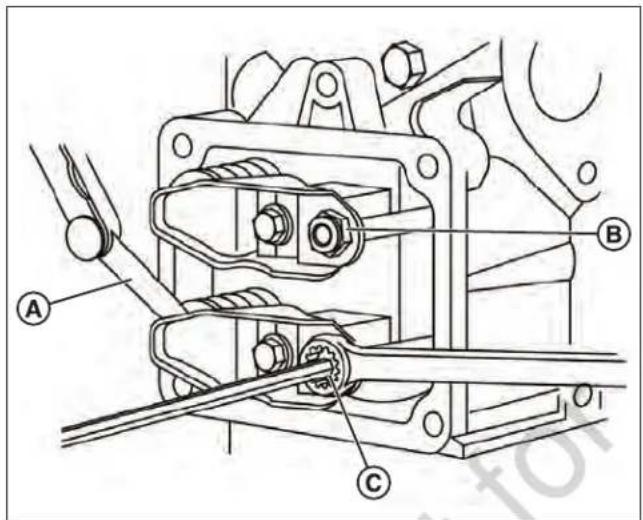
Figure 24
Electronic Governor System
The engine electronic governor system offers improved control and increased generator performance compared to mechanically governed systems. The result is a smooth steady-state operation without the "hunting" common to many mechanical governors. The system also reduces speed variations under engine loading and unloading and significantly reduces frequency fluctuation when the engine runs under higher loads.
The electronic governor system features a stepper motor (B), stepper motor throttle control linkages (C), and throttle side linkage (A). The controller contains a digital controller that processes engine speed information and sends appropriate commands to the stepper motor to control the position of the engine throttle.
Since the electronic governing system controls the engine throttle demand based on generator load, the following service codes and/or conditions could arise from an electronic governing system issue:
- Engine does not start
- Overspeed
- Under-frequency
- Unstable no-load engine control
While troubleshooting any of these conditions, use the controller's actuator test to initiate a verification of the electronic governor system.
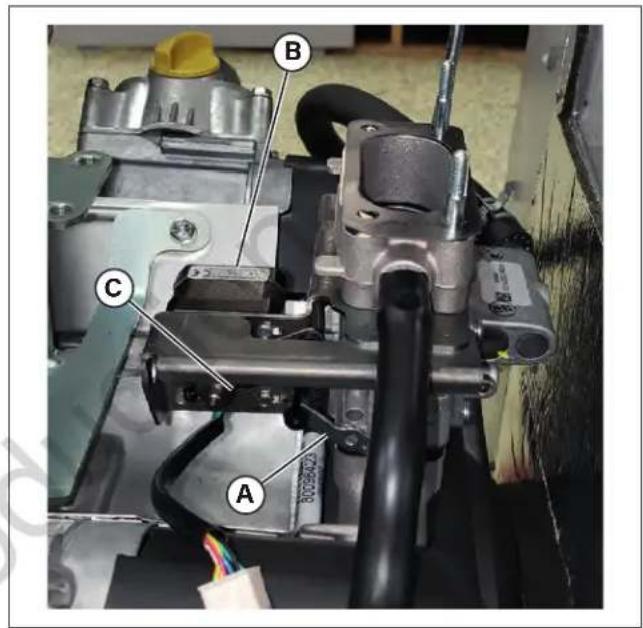
Figure 25
Electronic Governing Check
The generator has an electronic governing check feature that will turn on the stepper motor and move the throttle linkage clockwise and counterclockwise within the throttle limits. The test will rotate the stepper motor and move the throttle arm between the wide open throttle and dead idle limits for up to ten seconds. This check lets you visually verify whether or not the stepper motor functions correctly and whether or not the control linkages are connected. The engine will not attempt to start during this test. If the stepper motor does not move or if a linkage binds, the generator requires service.
NOTICE
If the stepper motor does not move,
ensure the stepper motor connector is attached.
Servicing the Spark Plugs
WARNING


Unintentional sparking
could cause fire or electric shock, resulting in death or serious injury.
WHEN ADJUSTING OR MAKING REPAIRS TO YOUR GENERATOR -
- Disconnect the spark plug wire from the spark plug and place the wire where it cannot contact the spark plug.
WHEN TESTING FOR ENGINE SPARK -
- Use an approved spark plug tester.
- DO NOT check for spark with the spark plug removed.
Changing the spark plugs helps the engine to start easier and operate better.
-
Push the ON/OFF switch on the back of the generator to the OFF (0) position.
-
Remove utility power to the generator to de-energize the battery charger.
-
Unlock and open the roof as described in the Access Panels section.
-
Remove the 15-amp fuse from the fuse holder located below the controller.
-
Disconnect the negative (-) cable at the battery.
-
Clean the area around the spark plugs.
-
Remove and inspect the spark plugs.
-
Check the electrode gap (A) with the wire feeler gauge (B) and reset the spark plug gap to the recommended gap if necessary (see the Engine Specifications section).
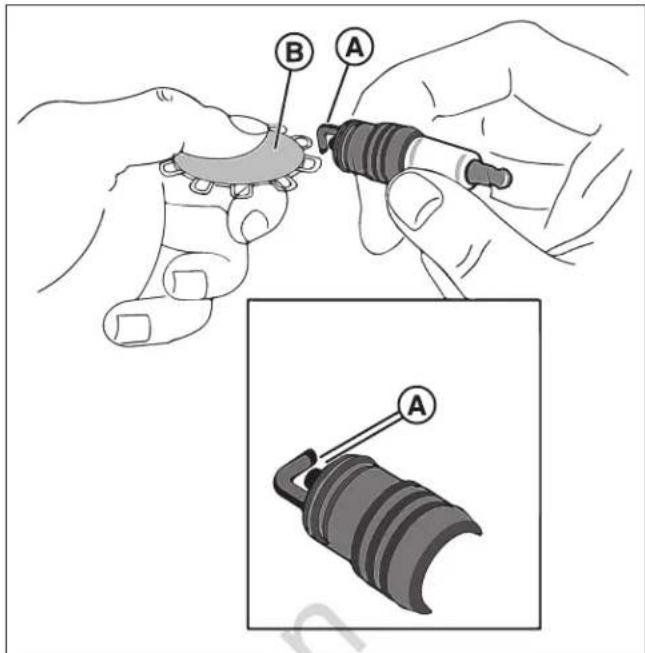
Figure 26
-
Replace the spark plugs if the electrodes appear pitted or burned or if cracks appear in the porcelain. Use the recommended replacement spark plugs (see the Engine Specifications section).
-
Install the spark plugs and tighten them to 180 in-lb (20 N·m).
-
Connect the negative (-) cable at the battery.
-
Install the 15-amp fuse into the fuse holder.
-
Close and lock the roof.
-
Restore utility power to the generator.
-
Push the ON/OFF switch on the back of the generator to the ON (I) position.
-
Set the generator mode to auto.
Engine Air Cleaner
WARNING


Gaseous vapors are
extremely flammable and explosive. Fire or explosion can cause severe burns or death.
- Never start and run the engine with the air cleaner assembly (if equipped) or the air filter (if equipped) removed.
- Push the ON/OFF switch on the back of the generator to the OFF (0) position.
- Remove utility power to the generator to de-energize the battery charger.
- Unlock and open the roof as described in the Access Panels section.
- Remove the 15-amp fuse from the fuse holder located below the controller.
- Disconnect the negative (-) cable at the battery.
- Remove the filter cartridge.
- Clean the outlet tube and check the dust unloader valve (if equipped). Use a clean cloth to wipe the filter sealing surface and the outlet tube surfaces. Remove all contaminants before inserting the new filter. Do not damage the sealing area on the tube. Check and squeeze the dust unloader valve attached to the service cover and ensure it is flexible and not inverted, damaged, or plugged.
- Clean the filter. Use a soft bristle brush to loosen dirt and a vacuum cleaner to remove dirt and debris. Replace the filter cartridge if you find any holes in the filter media.
- Install the clean filter correctly, inserting the filter carefully. Seat the filter by hand, ensuring it is completely seated in the air cleaner housing before putting the cover in place.
- Install the service cover. Ensure that all mounting bands, clamps, bolts, and connections in the entire air cleaner system are tight. Check for any holes in the piping and repair them if necessary.
- Connect the negative (-) cable at the battery.
- Install the 15-amp fuse into the fuse holder.
- Close and lock the roof.
- Restore utility power to the generator.
- Push the ON/OFF switch on the back of the generator to the ON (I) position.
- Set the generator mode to auto.
Maintaining the Exhaust System
WARNING

Contact with the muffler area
could cause burns, resulting in serious injury.
- DO NOT touch hot parts and AVOID hot exhaust gases.
- Allow equipment to cool before touching it.
Check the following when inspecting the exhaust system:
- Inspect the exhaust system manifold at the cylinder head for leaks.
- Check that all remaining bolts and shields (if used) are in place.
- Inspect the fasteners between the manifold and the exhaust pipe to ensure they are tight and that no exhaust leaks exist. Repair any leaks if necessary.
- Inspect the exhaust pipe connection for leaks. Repair any leaks if necessary.
Using or operating the engine without a spark arrester on the exhaust system (as defined in Section 4442) on any land covered with forest, brush, or grass violates California Public Resource Code, Section 4442. Also, the code specifies that the arrester must be maintained and in effective working order. Other states may have similar laws. See Federal Regulation 36 CFT Part 261.52.
Maintaining the Fuel System
WARNING


Propane and natural
gas are extremely flammable and explosive, which could cause burns, fire, or explosion, resulting in death or serious injury.
- Inspect the fuel system periodically.
- NO leakage is permitted.
- DO NOT operate the engine if you smell fuel.
Pressure Regulator
The pressure and regulator components have been specifically designed and calibrated to meet the engine's fuel system requirements.
If the regulator fails to operate or develops a leak, repair or replace it with the proper OEM recommended replacement parts. When inspecting the regulator, check the following:
- Check for any fuel leaks at the inlet and outlet fittings.
-
Check for any fuel leaks in the regulator body.
-
Check to ensure the regulator is correctly mounted and that the mounting bolts are tight.
- Check the regulator for external damage.
Mixer and Throttle Control Device
The mixer and throttle body components have been specifically designed to meet the engine's fuel system requirements.
A dirty air filter can significantly alter the mixer performance. Ensure that the air filter is clean. When inspecting the mixer and throttle body, check the following:
- Check all the fittings for leaks.
- Ensure the mixer and throttle body are securely mounted.
- Inspect and clean the air filter element according to the recommended service intervals listed in the Maintenance Schedule section.
- Inspect the air inlet hose connection and clamp. Inspect the hose for cracking, splitting, or chafing. Replace the hose as necessary.
- Check for leaks at the throttle body and intake manifold.
Alarms (Service Code Detection System)
The generator runs for long periods of time without an operator present. Therefore, the system features sensors that automatically shut down the generator in potentially damaging conditions, such as low oil pressure, high temperature, overspeed, and other conditions.
Service alarm descriptions appear in the digital display of the generator's controller.
See the Alarms section of the separate online manual titled Operation Instructions GC1030 SERIES GENSET Controller (part number 80086364) for details on service alarm descriptions.
Acknowledging and Resetting the Alarms (Service Code Detection System)
Push the up and down arrows (A) simultaneously to reset the alarm.
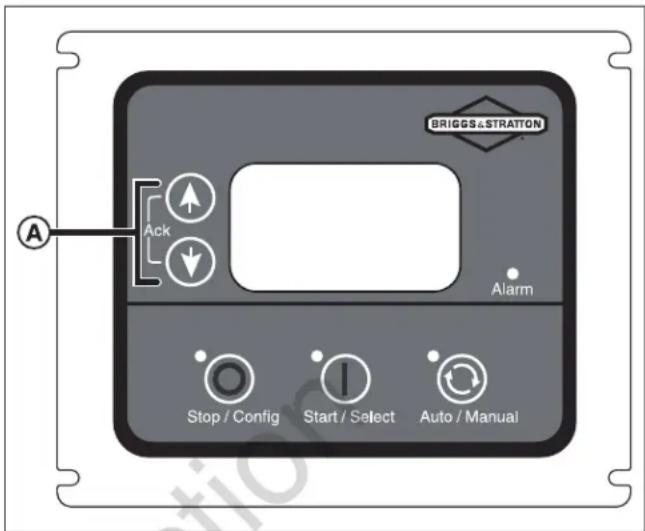
Figure 27
Maintaining the Electrical System
Wiring and Connections
The generator's electrical system incorporates computers to control various components. The electrical system connectors and grounds require good connections. When inspecting the electrical system, check the following:
- Check the positive (+) and the negative (-) battery cables for corrosion, rubbing, chafing, and burning. Ensure that both ends have tight connections.
- Check the battery for cracks or damage to the case. Replace the battery if necessary.
- Inspect the engine wire harness for rubbing, chafing, pinching, burning, and cracking and for breaks in the wiring.
- Ensure that the engine harness connectors are correctly locked in.
- Inspect the ignition coil wire for hardening, cracking, chafing, burning, separation, and split boot covers.
-
Inspect the spark plug wires for hardening, cracking, chafing, and burning. Check them for separation and split boot covers.
-
Replace the spark plugs at the required intervals listed in the Maintenance Schedule section.
- Ensure that all electrical components are securely mounted to the engine or chassis.
- Ensure that any additional electrical services installed by the owner have been correctly installed in the system.
Servicing the Battery
A person with a knowledge of batteries and their required precautions must service the battery or at least supervise the servicing of the battery. Keep unauthorized personnel away from the batteries.
WARNING


Battery electrolyte
fluid contains acid and is extremely caustic. Contact with battery contents could cause severe chemical burns.
- DO NOT open or mutilate the battery.
- Wear protective goggles, a rubber apron, rubber boots, and rubber gloves.
- Immediately wash electrolyte from skin with water.
- If electrolyte contacts eyes, immediately flush with water and seek medical attention.
- Wash spilled electrolyte with an acid-neutralizing agent.
WARNING

Storage batteries give off
explosive hydrogen gas during recharging. The slightest spark could ignite hydrogen and cause an explosion, resulting in death or serious injury.
- DO NOT dispose of the battery in a fire. Recycle the battery.
- DO NOT allow any open flame, spark, heat, or lit cigarette in the area of the battery during the battery-charging process and for several minutes after charging.
WARNING

A battery's high short-circuit
current could result in serious injury.
- Remove watches, rings, or other metal objects.
- Use tools having insulated handles.
- Disconnect the charging source prior to connecting or disconnecting battery terminals.
- Do not lay tools or metal parts on top of the batteries.
-
Disconnect the negative (-) cable at the battery during installation and maintenance.
-
Push the ON/OFF switch on the back of the generator to the OFF (0) position.
- Remove utility power to the generator to de-energize the battery charger.
- Unlock and open the roof as described in the Access Panels section.
- Remove the 15-amp fuse from the fuse holder located below the controller.
- Disconnect the negative (-) cable at the battery.
- Disconnect the positive (+) cable at the battery.
- Service or replace the battery as required.
- Connect the positive (+) cable at the battery.
- Connect the negative (-) cable at the battery.
- Install the 15-amp fuse into the fuse holder.
- Close and lock the roof.
- Restore utility power to the generator.
- Push the ON/OFF switch on the back of the generator to the ON (I) position.
- Set the generator mode to auto.
Replacing the Battery
- Push the ON/OFF switch on the back of the generator to the OFF (0) position.
- Remove utility power to the generator to de-energize the battery charger.
- Unlock and open the roof as described in the Access Panels section.
- Remove the 15-amp fuse from the fuse holder located below the controller.
- Disconnect the negative (-) cable at the battery.
- Disconnect the positive (+) cable at the battery.
- Remove the battery and install the replacement battery.

DO NOT POLLUTE. CONSERVE RESOURCES. RETURN AN USED BATTERY TO A RECYCLING COLLECTION CENTER.
- Connect the positive (+) cable at the battery.
- Connect the negative (-) cable at the battery.
- Install the 15-amp fuse into the fuse holder.
- Close and lock the roof.
- Restore utility power to the generator.
- Push the ON/OFF switch on the back of the generator to the ON (I) position.
- Set the generator mode to auto.
Charging the Battery
If necessary, charge the battery. Charge it using the following steps:
- Push the ON/OFF switch on the back of the generator to the OFF (0) position.
- Remove utility power to the generator to de-energize the battery charger.
- Unlock and open the roof as described in the Access Panels section.
- Remove the 15-amp fuse from the fuse holder located below the controller.
- Disconnect the negative (-) cable at the battery.
NOTICE
Failure to disconnect the negative
battery cable could result in equipment failure. DO NOT attempt to jump-start the generator. Damage to equipment resulting from failure to follow this instruction will void the engine and generator warranty.
- Charge the battery with the battery charger at 2 amps until the battery holds 12 volts. DO NOT exceed 13.70 volts when charging the battery.
NOTICE
DO NOT use a battery booster to
quick-charge a low battery.
- Connect the negative (-) cable at the battery.
- Install the 15-amp fuse into the fuse holder.
- Close and lock the roof.
- Restore utility power to the generator.
- Push the ON/OFF switch on the back of the generator to the ON (I) position.
- Set the generator mode to auto.
TROUBLESHOOTING
See the Alarms section of the separate online manual titled Operation Instructions GC1030 SERIES GENSET Controller (part number 80086364) for details on service alarm description and causes.
Call 800-732-2989 or visit www.briggsandstratton.com for assistance.
Troubleshooting
| PROBLEM CAUSE CORRECTION | ||
| The engine is running, but no AC output is available. | 1. Open or defective circuit breaker2. An alarm on the generator's controller3. Poor wiring connections or defective transfer switch | 1. Reset or replace the circuit breaker.2. See the separate online manual titled Operation Instructions GC1030 SERIES GENSET Controller (part number 80086364) for details. Contact the local service facility.3. Check and repair it or contact the local service facility. |
| The engine runs well at no-load but "bogs down" when loads are connected. | 1. Overloaded generator2. Short circuit in a connected load3. Shorted generator circuit4. Incorrect fuel pressure or mixture5. Kinked fuel line between the regulator and engine6. Clogged air filter | 1. Remove one or more loads.2. Disconnect the shorted electrical load.3. Contact the local service facility.4. See The Gaseous Fuel System section.5. Remove the kink. Replace the line if necessary.6. Clean or replace the air filter. |
| The engine does not start or it starts but runs rough. | 1. Missing or blown 15-amp fuse2. Blown thermal fuse(s).3. Fuel supply turned off or depleted4. Incorrect fuel selection5. Failed battery6. Clogged air filter7. Throttle linkage binding | 1. Install a new 15-amp fuse. See the System Controller section. Replace the thermal fuse(s).2. Replace the thermal fuse(s).3. Open the fuel valve(s) and check the propane tank.4. Check the fuel selector switch and set it to the proper setting (if applicable).5. Replace the battery.6. Clean or replace the air filter.7. Check the linkage. |
| The engine shuts down during operation. | 1. Fuel supply turned off or depleted2. Alarm showing on the controller digital display | 1. Check the fuel valves and fill the propane tank.2. See the separate online manual titled Operation Instructions GC1030 SERIES GENSET Controller (part number 80086364) for details. |
| The circuits lose power. | 1. An open generator circuit breaker2. Transfer switch problems | 1. Reset the circuit breaker.2. See the transfer switch manual. |
| The unit does not exercise. | 1. Controller not set to auto.2. Exercise timer not set or set to OFF.3. Unit date and time not set.4. Failed battery.5. Missing or blown 15-amp fuse. | 1. Push the auto button on the controller.2. Set the exercise timer.3. Set the unit date and time.4. Replace the battery.5. Install a new 15-amp fuse. See the System Controller section. |
| The generator undergoes excessive vibration. | Loose mechanical fastener. Check and repair it or contact the local service facility. | |
| Utility power returns and the unit does not stop. | 1. Blown fuses in the transfer switch.2. The five-minute cooldown still in process.3. Poor wire connection or defective controllers. | 1. Install new fuses.2. Wait five minutes.3. Check and repair the unit or contact the local service facility. |
| Possible issues exist in manual mode. | See Table 7 (Common Faults and Their Remedial Actions) inside the separate online manual titled Operation Instructions GC1030 SERIES GENSET Controller (part number 80086364) for details. | |
| Possible issues exist in auto mode. - See Table 7 (Common Faults and Their Remedial Actions) inside the separate online manual titled Operation Instructions GC1030 SERIES GENSET Controller (part number 80086364) for details. | ||
| Possible issues exist with Electronic Governing. | - See Table 7 (Common Faults and Their Remedial Actions) inside the separate online manual titled Operation Instructions GC1030 SERIES GENSET Controller (part number 80086364) for details. | |
DRAWINGS AND SCHEMATICS
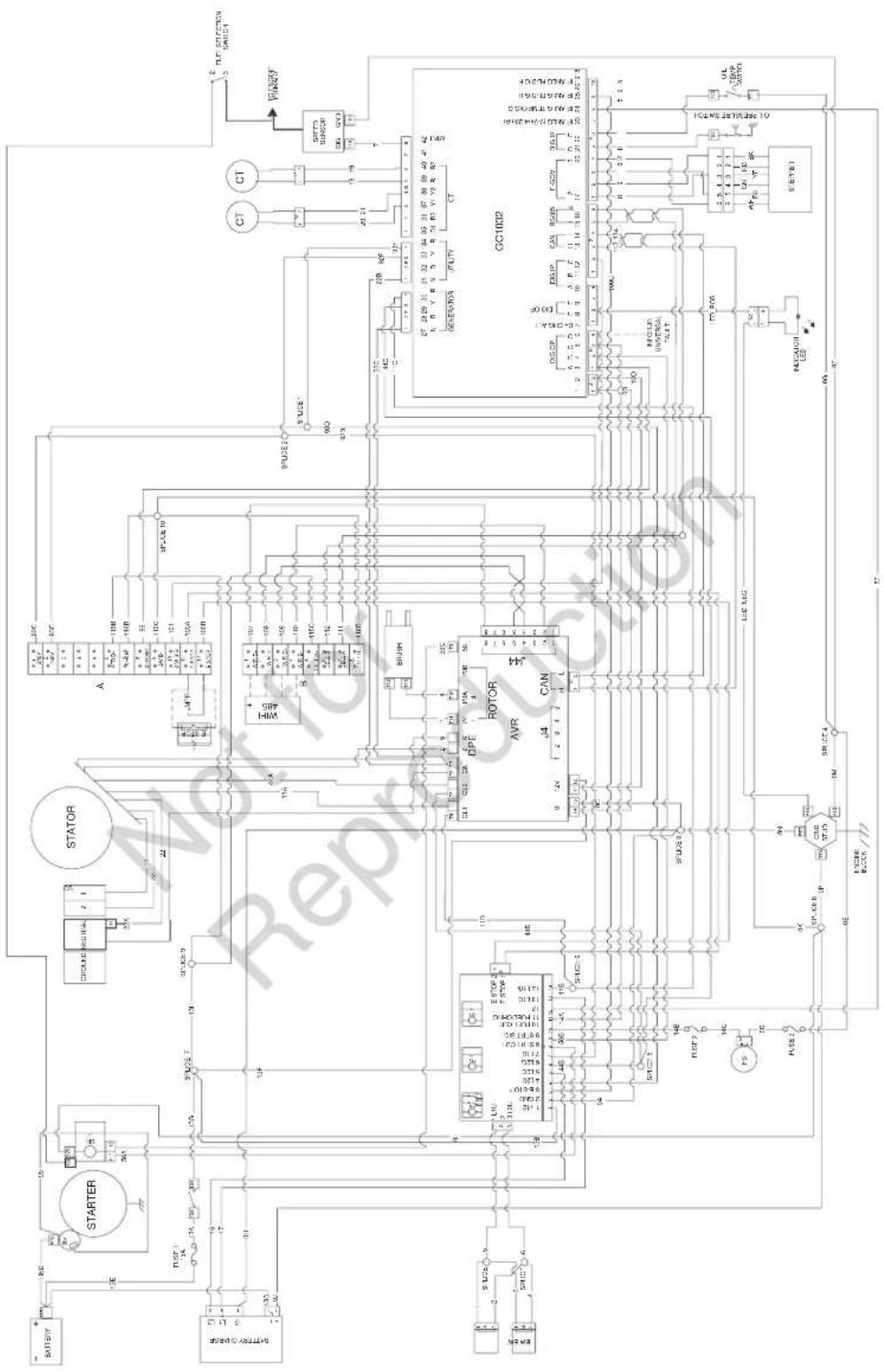
SPECIFICATIONS
Generator Specifications
| 17 kW 20 kW | 26 kW | |||
| Running Amperage, Standby (LP/NG) (Amps) 70.8/70.8 A 83.3/ | 83.3 A 108.3/100 A | |||
| Rated AC Voltage 120/240 V | ||||
| Phase Single | ||||
| Frequency 60 Hz | ||||
| Generator Breaker 80 A 100 A 125 A | ||||
| Operating Ambient Temperature | -20° - 104° F (-28° - 40° C) | |||
| Packaged Weight | 520 lb (240 kg) | 520 lb (240 kg) | 625 lb (285 kg) | |
| Sound Rating per ISO 3744. Lowest mic at 23 ft (7 m) at indicated load. | Low Idle Mode | 65 dB(A) | 65 dB(A) | 63 dB(A) |
| Normal Operation | 68 dB(A) | 68 dB(A) | 65 dB(A) | |
Engine Specifications
| Displacement | 60.60 ci (993 cc) |
| Bore | 3.405 in (86.50 mm) |
| Stroke | 3.366 in (85.50 mm) |
| Spark Plug Gap | .030 in (.76 mm) |
| Spark Plug Torque | 180 lb-in (20 N·m) |
| Armature Air Gap | .005-.008 in(.13-.20 mm) |
| Intake Valve Clearance | .004-.006 in(.10-.15 mm) |
| Exhaust Valve Clearance | .007-.008 in(.15-.20 mm) |
| Oil Type | 5W-30 full synthetic |
| Oil Capacity (with filter) | 78-80 oz (2.30-2.40 L) |
| Engine End Cover Bolt | 220 lb-in (25 N·m) |

natural_image
Technical line drawing of a rectangular enclosure with a central logo and mounting feet (no text or symbols)


Figura 1
Figura 2
Figura 6
Figura 8
Figura 9
Figura 10
Figura 17
FUNCIONAMIENTO
Controles
ADVERTENCIA

Figura 18
Figura 19
Figura 20
Figura 21
Figura 24
Figura 26
Les batteries rechargeables
Figure 1
Figure 2
Figure 3
Figure 4
Figure 6
Figure 8
Figure 9
Figure 10
Les batteries rechargeables
Figure 17
FONCTIONNEMENT
Commandes
AVERTISSEMENT

Figure 18
Figure 19
Figure 20
Figure 24
Figure 26
Les batteries rechargeables

- TABLE OF CONTENTS
- CALIFORNIA PROPOSITION 65
- WARNING
- THANK YOU
- WHERE TO FIND BRIGGS & STRATTON
- FOR FUTURE REFERENCE
- GENERATOR:
- ENGINE:
- IMPORTANT SAFETY INSTRUCTIONS
- Safety Alert Symbol and Signal Words
- DANGER
- CAUTION
- NOTICE
- Safety Symbols and Meanings
- Safety Messages
- WHEN ADJUSTING OR MAKING REPAIRS TO YOUR WHEN GENERATOR -
- WHEN TESTING FOR ENGINE SPARK -
- FCC Part 15 Information to User
- GENERAL INFORMATION
- Equipment Description
- Installer Responsibilities
- Owner Responsibilities
- Installation Factors to Consider
- Delivery Inspection
- Shipment Contents
- The generator system includes:
- The generator system does not include (An owner needs):
- GENERATOR PLACEMENT
- Generator Location Considerations
- Reducing the Risk of Carbon Monoxide Poisoning
- Carbon Monoxide Detectors
- Potential CO Entry Points
- Protecting the Structure
- Reducing the Risk of Fire
- Distance Requirements
- Federal and International Standards
- Annex A—Explanatory Material
- Other General Location Guidelines
- INSTALLATION
- Lifting the Generator
- Cold Weather Kit
- Anchoring and Wind Rating
- Concrete Anchoring of Unit to Poured or Existing Slab
- Anchor Types
- Electrical and Fuel Inlet Locations
- Access Panels
- Opening the roof (A):
- Removing the front panel (B):
- Attaching the front panel (B):
- Removing the end cap, controller end (C):
- Attaching the end cap (C):
- Removing the end cap, exhaust end (D):
- Attaching the end cap, exhaust end (D):
- Removing the rear panel (E):
- Attaching the rear panel (E):
- Removing the control box wiring cover (F):
- Attaching the control box wiring cover (F):
- Fuel Installation Plan
- Propane and natural
- Fuel Consumption
- Fuel Type
- Fuel Pressure
- Power Loss
- The Gaseous Fuel System
- Fuel Pipe Sizing
- Fuel Conversion
- Electrical Field Connections
- System Connector Location
- Generator AC System Connection
- Grounding the Generator
- Power Connections from the Generator to the Transfer Switch
- Utility Circuit Connection
- Generator Power Connection
- Final Installation Considerations
- Engine Oil
- Battery
- System Controller
- Controls Used During Installation
- Initial Start-Up (No Load)
- OPERATION
- Controls
- Front View
- Back View
- Important Owner's Considerations
- 15-Amp Fuse
- Automatic Operation Sequence
- Utility Voltage Dropout Sensor
- Utility Voltage Pickup Sensor
- Engine Cool-down Timer
- Setting the Exercise Timer
- MAINTENANCE
- Servicing the System
- Maintenance Schedule
- Emissions Control
- Maintaining the Generator
- Cleaning the Generator
- Maintaining the Engine
- Checking the Engine Oil Level
- Changing Engine Oil and Oil Filter
- Adjusting the Valve Lash
- Electronic Governor System
- Electronic Governing Check
- Servicing the Spark Plugs
- WHEN ADJUSTING OR MAKING REPAIRS TO YOUR GENERATOR -
- Engine Air Cleaner
- Maintaining the Exhaust System
- Maintaining the Fuel System
- Pressure Regulator
- Mixer and Throttle Control Device
- Alarms (Service Code Detection System)
- Acknowledging and Resetting the Alarms (Service Code Detection System)
- Maintaining the Electrical System
- Wiring and Connections
- Servicing the Battery
- Battery electrolyte
- Storage batteries give off
- A battery's high short-circuit
- Replacing the Battery
- DO NOT POLLUTE. CONSERVE RESOURCES. RETURN AN USED BATTERY TO A RECYCLING COLLECTION CENTER.
- Charging the Battery
- TROUBLESHOOTING
- SPECIFICATIONS
- FUNCIONAMIENTO
- Controles
- ADVERTENCIA
- FONCTIONNEMENT
- Commandes
- AVERTISSEMENT
Brand : BRIGGS & STRATTON
Model : Power Protect 26kW
Category : Generator