FUAT50010 - Alarm system ABUS - Free user manual and instructions
Find the device manual for free FUAT50010 ABUS in PDF.


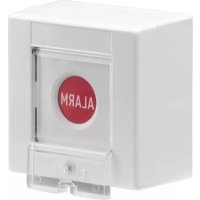
| Product type | Anti-aggression radio push button, accessory for Secvest alarm control panel |
| Brand | ABUS |
| Model | FUAT50010 |
| Dimensions (H × W × D) | 85 mm × 85 mm × 52 mm |
| Weight | Approx. 100 g (with battery) |
| Power supply | Non-rechargeable CR2477N 3V lithium battery |
| Battery life | Approx. 24 months |
| Radio range | Up to 50 m (depending on environment) |
| Operating frequency | 868.6625 MHz |
| Security level | 2 |
| Operating temperature | -10 °C to +50 °C |
| Protection rating | IP30 (indoor use estimation) |
| Housing material | Thermoplastic synthetic material |
| Main functions | Discrete triggering of an anti-aggression alarm by pressing, even when the control panel is disarmed; silent or local alarm depending on settings; tamper contact |
| Installation | Wall mounting as desired, preferably in the hallway, bedrooms, or under a counter |
| Pairing | Association with Secvest control panel in learn mode; automatic detection then assignment to "Aggression" zone |
| Maintenance and cleaning | Clean with a soft dry cloth; do not use harsh chemicals; replace battery periodically |
| Safety | Do not open, modify, or damage the device; keep battery out of reach of children; do not dispose of in fire |
| Spare parts and repairability | Battery type CR2477N; repair only by authorized professional |
| General information | Compliant with directive 2014/53/EU; declaration of conformity available at www.abus.com |
Frequently Asked Questions - FUAT50010 ABUS
User questions about FUAT50010 ABUS
0 question about this device. Answer the ones you know or ask your own.
Ask a new question about this device
Download the instructions for your Alarm system in PDF format for free! Find your manual FUAT50010 - ABUS and take your electronic device back in hand. On this page are published all the documents necessary for the use of your device. FUAT50010 by ABUS.
USER MANUAL FUAT50010 ABUS
[EN] Wireless panic button
Abmessung (HxBxT): 85mm x 85mm x 52mm
Installation
[EN] Wireless panic button
Dear customers, many thanks for your purchase of this wireless panic button. In choosing our product, you now have a piece of equipment that is built according to state-of-the-art technology.
This product complies with current domestic and European regulations. Conformity has been proven, and all related certifications are available from the manufacturer on request.
To maintain this status and to guarantee safe operation, it is your obligation to observe these operating instructions! In the event of questions, please contact your local specialist dealer.

Pay attention to the notes and instructions in these operating instructions! If you do not follow these instructions, your guarantee claim becomes invalid! No liability can be accepted for resulting damages! No part of the product may be changed or modified in any way.
Battery warning!
The device is supplied with direct current from a 3 V lithium battery. To guarantee a long working life and avoid fire and injury, please note the following:
- Do not dispose of the battery in domestic waste.
- The battery must not be directly exposed to heat or sunlight, and must not be stored in a place with a very high temperature.
- The battery must not be burned.
- The battery must not come into contact with water.
- The battery must not be dismantled, pierced or otherwise damaged.
- The battery contacts must not be short-circuited.
- The battery must be kept away from small children.
- The battery cannot be recharged.
Introduction
The FUAT50010 wireless panic button is an optional accessory for the Secvest wireless alarm centre. A panic alarm can be triggered easily and discretely at the touch of
a button. Depending on the centre settings, this alarm is either silent or localised. The alarm is also triggered when the centre is deactivated.
Technical data
Power supply 3 V lithium battery (size CR2477N)
Battery service life Approx. 24 months Environment class II (-10 °C to +50 °C)
Range Up to 50 m (depending on the surrounding conditions)
Security level 2 Housing material The
Operating frequency 868.6625 MHz
Dimensions 85 mm x 85 mm x 52 mm (HxWxD)
Installation
Open the housing by loosening the screw under the button cover and removing the upper side of the housing. Loosen the three screws which connect the button and the transmitter with the rear of the housing. Attach the rear side of the housing to the desired position (ideally near the entrance of residential units, in sleeping quarters or underneath shop counters).
Insert the supplied 3 V lithium battery (size CR2477N).
Learning
-
Set the Secvest wireless alarm centre into learning mode. Consult the instructions of the alarm centre for more details.
-
Activate the tamper contact of the panic button to send a tamper message to the wireless alarm system. The alarm centre recognises the button and immediately allocates the "Panic" zone attribute.
-
Make sure that the button is recognised by your wireless alarm centre, then attach the remaining components.
Declaration of Conformity
Hereby, ABUS Security-Center GmbH & Co. KG declares that the radio equipment type FUAT50010 is in compliance with Directive 2014/53/EU. The full text of the EU declaration of conformity is available at the following internet address: www.abus.com >> Search >> FUAT50010 >> Downloads
The Declaration of Conformity can also be obtained from the following address:
ABUS Security-Center GmbH & Co. KG Linker Kreuthweg 5, 86444 Affing, GERMANY

[EN] Wireless panic button
Chere cliente, cher client.
[EN] Wireless panic button
[EN] Wireless panic button
Security Tech Germany
[EN] Wireless panic button
Linker Kreuthweg 5, 86444 Affing, Germany