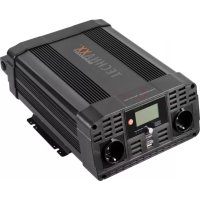
TE22 - Car charger TECHNAXX - Free user manual and instructions
Find the device manual for free TE22 TECHNAXX in PDF.



| Product type | Car DC-AC inverter (12V DC to 230V AC voltage converter) |
| Brand | Technaxx |
| Model | TE22 |
| Input voltage | 12V DC (10.2-15.8V) |
| AC output voltage | 230V / 50 Hz (sine wave) |
| Continuous output power | 2000 W |
| Peak output power | 4000 W |
| Continuous input current | 145 A |
| USB output ports | 2 ports: 1 USB-A QC3.0 (5-12V, max 3A) and 1 USB-C (5-12V, max 3A), shared 30 W |
| AC output ports | 2 Schuko sockets with on/off switch |
| Display | LCD screen: input voltage, output voltage, battery charge (%), output load (%) |
| Protections | Under voltage (alarm at 10.2V, shutdown), over voltage (>15.8V), overload, overheat (fan, shutdown at ~80°C) |
| Fan | Automatic high-speed cooling |
| Weight | 4.2 kg |
| Dimensions (L×W×H) | 36.0 × 26.0 × 11.9 cm |
| Rated charging efficiency | 85 % |
| Low voltage alarm | Triggered at ~10.2V, audible and visual (yellow LED) |
| Internal fuses | 6 car fuses 40A (replaceable by a technician) |
| Box contents | Inverter, 2 connecting cables 0.6m, instruction manual |
| Warranty | 2 years |
| Maintenance and cleaning | Wipe with a clean, dry cloth; avoid harsh products |
| Intended use | 12V vehicles (cars, caravans, boats); fixed installation |
| After-sales service | Tel: 01805 012643 (€0.14/min from German landline); Email: support@technaxx.de |
Frequently Asked Questions - TE22 TECHNAXX
User questions about TE22 TECHNAXX
0 question about this device. Answer the ones you know or ask your own.
Ask a new question about this device
Download the instructions for your Car charger in PDF format for free! Find your manual TE22 - TECHNAXX and take your electronic device back in hand. On this page are published all the documents necessary for the use of your device. TE22 by TECHNAXX.
USER MANUAL TE22 TECHNAXX
Technaxx® * User Manual Car Power Inverter with 2 USB Ports TE22
Do not use electric charge that need higher watts than maximum 2000W continuously! This device is only suitable for vehicle with 12V electrical systems!
The Declaration of Conformity for this device is under the Internet link: www.technaxx.de/ (in bottom bar "Konformitätserklärung"). Before using the device the first time, please read the user manual carefully. Service phone No. for technical support: 01805 012643 (14 cent/minute from German fixed-line and 42 cent/minute from mobile networks). Free Email: support@technaxx.de
Keep this user manual for future reference or product sharing carefully. Do the same with the original accessories for this product. In case of warranty, please contact the dealer or the store where you bought this product.
Warranty 2 years
Features
- Charges various electronic devices in a car (12V fixed connection needed)
- 2x USB port, 1 x USB-A Quick Charge 3.0, 1 x USB-C (max. 12V, max. 3A)
- 2x Schuko Plug with On/Off switch
- Converts 12V DC battery power into standard 230V AC (household) power, to run a variety of electronics, e.g. tablets, smartphones, laptop computers, game systems, small TVs, DVD/MP3 players, camping accessories, GPS units and much more
- Output power 2000W (max. continuous) and 4000W (peak)
Automatic safety shutdown to secure the car battery (Alarm at 10.5V - High/Low voltage & overload protection
- Overheating protection (built-in ventilation fan)
Technical specifications
| Input voltage (DC) | 12V (fixed connection) (10.2-15,8V) |
| Permanent current | 145A |
| Input current Max | 175A |
| Output power | 2000W (maximum, continuously), 4000W (peak) |
| Output voltage USB (DC) | 5V-12V |
| Output voltage Schuko (AC) / AC frequency | 230V / 50Hz nominal |
| Output Waveform | Sine wave |
| Nominal load efficiency | 85% |
| Low battery voltage shutdown and alarm | at ~10.2V |
| USB output ports (DC) | ~30Watt (share) |
| AC output | 2x Schuko port |
| Circuit protection (DC overload) | 6x 40A internal car fuse (replaceable; suggested by technical) |
| Weight / Dimensions | 4.2kg / (L) 36,0 x (W) 26.0 x (H) 11.9cm |
| Package Contents | Car Power Inverter with 2 USB Ports TE22, 2x0.6m connection cable, User Manual |
Normal use
The power inverter is intended to convert 12V direct current voltage to
- alternating current voltage 230V / 50Hz and/or
- direct current voltage of 12 V/ . 3000 mA (USB-A QC3.0)
- direct current voltage of 12 V/max. 3000mA (USB-C)
→The power inverter is only intended for permanent installation.
→This device is not intended for use by children or persons with limited mental capacity or lacking experience and/or lacking expertise. Children should be supervised to ensure they do not play with the device.
→This device is not intended for commercial use.
Any other use or modification of the device is considered improper and involves significant risks. The manufacturer assumes no liability for damages due to improper use.
Intended sites
The power inverter is intended for installation in
Automobiles (and lorries)
- Caravans
Boats
with 12V batteries.
Do not place the power inverter:
- near heat sources (radiators, direct sunlight), flammable materials, battery compartment or starter battery,
- moist locations or locations exposed to dripping or splashing water,
- in environments with explosion hazards
Product Overview
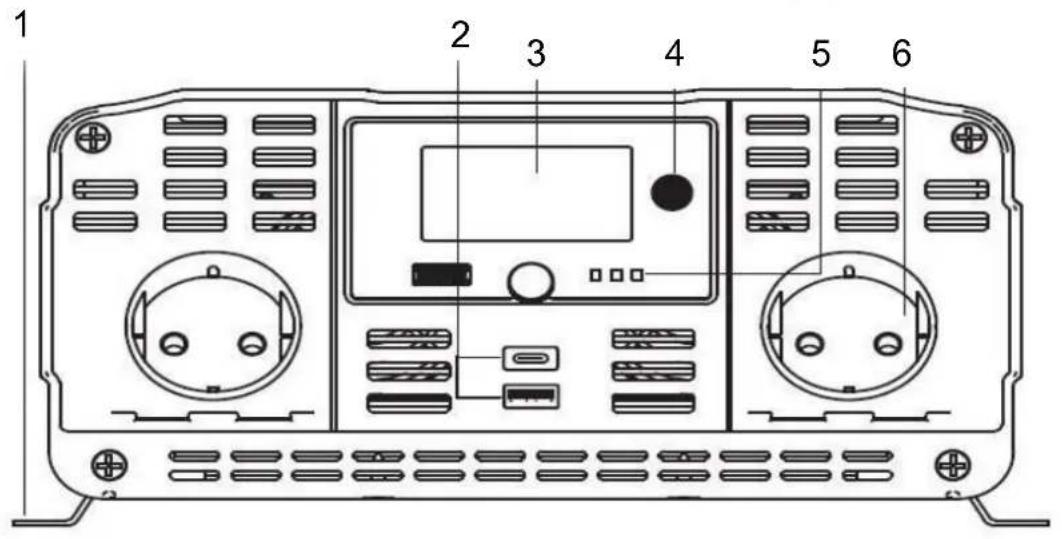
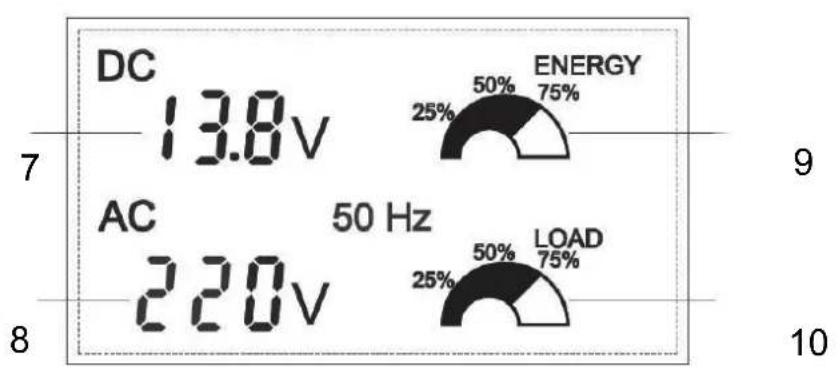
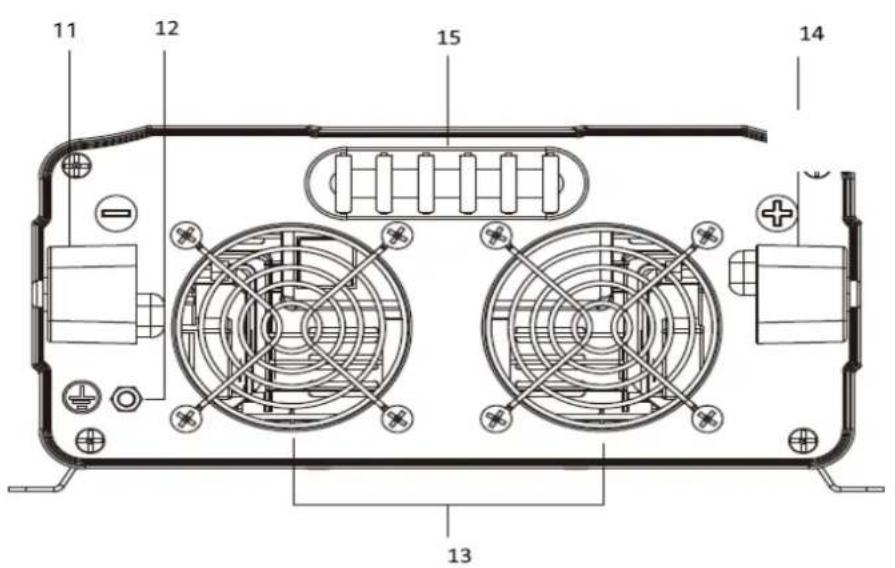
1 Metal holder
8 Output Voltage
| 2 | Two USB ports | 9 | Percentage of Battery load |
| 3 | LCD Digital Display | 10 | Percentage of output load |
| 4 | Power Button | 11 | Negative Power Input Terminal |
| 5 | LED indication (Red- Power on, Yellow-Fault, Green-Normal work) | 12 | Ground Terminal |
| 6 | Schuko port | 13 | Cooling Fan |
| 7 | Input Voltage | 14 | Positive Power Input Terminal |
| 15 | Fuses |
(2) Both USB ports share the max. of 6000mA
(4) Turns the inverter ON and OFF (Press Button for 3 secs)
(5) LED green: Inverter is working, LED Yellow: Low Voltage Alarm or Overload prtoetection, LED Red: connected with Battery
(13) High speed cooling fan. When the temperature inside the inverter exceeds a preset limit, the cooling fan automatically turns on to cool the inverter. When the temperature reduces, the fan turns off.
Determine Battery Capacity
Battery type and battery size strongly affect the performance. Therefore, you need to identify the type of loads your inverter will be powering and how much you will be using them between charges. Once you know how much power you will be using, you can determine how much battery capacity you need. Technaxx recommends that you purchase as much battery capacity as possible.
CAUTION: Risk of inverter damage.
- The inverter must only be connected to a battery that has a nominal output of 12V. - Not operate if connected to a 6/24V battery
Voltage converter installation
Install the power inverter with suitable screws (not included):
- in sturdy and even locations,
- on clean, dry and non-flammable surfaces.
- in well ventilated areas.
Please be sure not to cover the vents.
Connecting the inverter
This Inverter has two DC cable connections, one positive and one negative. The order of steps in the following procedure minimizes the
danger of sparking near the battery bank.
- Prepare all cable set ends with ring terminals at the battery ends
- Select the OFF position on the inverter
- Remove the red positive (+) screw connector cap
- Slide the red positive (+) cable lead onto the red positive (+) screw connector stud. Tighten the screw connector cap securely
- Remove the Black negative(-) screw connector cap
- Slide the Black negative(-) cable lead onto the Black negative(-) screw connector stud. Tighten the screw connector cap securely
- Securely connect the red positive (+) cable lead to the positive (+) terminal of the battery or power source
- Securely connect the black negative (-) cable lead to the negative (-) terminal of the battery or power source
- Connect a 2.00mm^2 wire or larger insulated wire between the chassis ground connector on the Inverter and a clean electrical grounding point on the vehicle. This will minimize possible electrical noise interference when using TVs or radios.
Note: Sparking is normal for first connection.
Operation
Before using the power inverter determine your equipment's total watts!
- Do not connect more watt than the Output Power (maximum continuous watt) of the device ( see technical specifications).
- Determine Total Wattage Required, Watt ratings are usually listed in equipment manuals or on nameplates. If your equipment is rated in Amp, multiply that number times AC utility voltage to determine watts.
(mathematic example: a drill requires 1.5A 1.5A × 230Volt = 345Watt .
No problem to use the drill.)
- Remember the vehicle's battery will be discharged when the vehicle is not running.
- To Determine DC Battery Amps Required, divide the total wattage required (from above) by the nominal battery voltage to determine the DC amps required. 345Watt / 12V = 28.75A DC
- To Estimate Battery Amp-Hours Required Multiply the DC amps required (from above) by the number of hours you estimate you will operate your equipment exclusively from battery power before you have to recharge your batteries with utility- or generator-supplied AC power. Compensate for inefficiency by multiplying this number by 1.2. This will give you a rough estimate of how many amp-hours of battery power (from one or several batteries) you should connect to your Inverter/Charger. 28.75A DC x 0.5h runtime x 1.2 inefficiency rating = 17.25 amp-hours
- To Estimate Battery Recharge Required, Given Your Application You
must allow your batteries to recharge long enough to replace the charge lost during inverter operation or else you will eventually run down your batteries. To estimate the minimum amount of time you need to recharge your batteries given your application, divide your required battery amphours (from above) by your Inverter/Charger's rated charging amps (depending on the ON/OFF settings).
17.25 amp-hours / 40A inverter/charger rating = 0.43h recharge
Operation
Turn ON the inverter: Hold ON/OFF Button on the front panel for 3 seconds. The GREEN LED indicator light will light verifying the inverter is receiving power
Turn OFF the inverter: Hold ON/OFF Button on the front panel for 3 seconds
When you have confirmed that the appliance to be operated is turned off, plug an appliance cord into one of the 230V AC outlets on the front panel of the inverter
- Turn Inverter, hold the ON/OFF Button for 3 seconds
- Turn the appliance ON.
To disconnect, reverse the above procedure
Note: If you are going to operate several loads from the inverter, turn them on separately after you have turned the inverter on. This will ensure that the inverter does not have to deliver the starting current for all the loads at once.
Using the Inverter to Operate a TV or Audio Device
The inverter is shielded and filtered to minimize signal interference. Despite this, some interference may occur with your television picture, especially with weak signals. Below are some suggestions to try and improve reception.
Make sure the television antenna produces a clear signal under normal operating conditions (i.e. at home plugged into a standard 230 volt AC wall outlet). Also, ensure that the antenna cable is adequately shielded and of good quality.
Try altering the position of the inverter, antenna cables, and television power cord. Add an extension cord from the inverter to the TV so as to isolate its power cord and antenna cables from the 12 volt power source.
Try coiling the television power cord and the input cables running from the 12 volt power source to the inverter.
Affix one or several "Ferrite Data Line Filters" to the television power cord. Ferrite Data Line Filters can be purchased at most electronic supply stores.
Try grounding the inverter with a minimum (0.75mm^2) wire, using as short a length as possible.
Protective Features
Low Voltage Alarm (Yellow LED on Inverter) – This state is not harmful to the Inverter, but could damage the power source. The Inverter shuts off when the input voltage drops to 10.5 volts and an audible alarm sounds same time.
Over-Voltage Protection (Yellow LED on Inverter) - The Inverter will automatically shut down when the input voltage exceeds 15.8 ± 0.5V volts DC
Overload Protection (Yellow LED on Inverter) The Inverter will automatically shut down if the continuous draw exceeds its maximum wattage rating. When the Inverter is at or near maximum output, an alarm will sound. When the alarm sounds you need to disconnect the device(s) to bring the Inverter output down to an acceptable level. If you continue to use the Inverter at or near the maximum output, it will eventually overheat and shut down. If you exceed the maximum Inverter output, the alarm will sound and the Inverter will automatically shut down. The yellow fault indicator will light and the alarm will continue to sound. The Inverter must be reset after an overload condition.
Temperature Protection
The Inverter is equipped with a cooling fan. Depending upon the load output and the temperature of the Inverter, the cooling fan will turn on and off as required to cool the Inverter if needed. If the temperature reaches approximately 80^ the Inverter will shut down automatically. Turn off the Inverter and allow it to cool for a minimum of 15 minutes. Before starting up again, verify the total wattage of the devices being powered.
To Reset the Inverter
- Turn off the Inverter using the ON/OFF switch on the Inverter, depending upon how the Inverter was controlled.
- Unplug all devices.
- Turn the Inverter back on using the ON/OFF switch on the Inverter. Before devices are reconnected, verify the total wattage of the devices to ensure they are less than the rating of the Inverter.
TROUBLESHOOTING
| Problem | Situation | Action |
| No Power on | Fault connection | Turn the Inverter power switch off; Verify cable are tightly connected to the Inverter and the power Source |
| Battery voltage below 10 Voltage | Recharge or replace battery | |
| Equipment being operated draws too much power | Allow Inverter to cool down. Ensure there's adequate ventilation around the Inverter. Ensure that load is no more than it's maximum rating for continuous operation | |
| Low Voltage alarm turns on immediately | The input voltage at input of the Inverter needs to be raised | Recharge/Replace battery or add additional batteries. Run the vehicle engine when using a 12V DC plug |
| Low voltage alarm is on all the time | Power battery condition with voltage drops | Replace battery |
| Inadequate power or voltage drops | Check condition of battery cables and cable leads. Clean or replace as necessary | |
| Low power output | Battery condition may be poor | Recharge or replace a battery |
| Fault connection | Make sure the battery and Inverter terminal are clean | |
| Inverter does not work after connecting the cables in reverse | The internal protection has disabled the inverter | Contact vendor company for help |
Warnings & Caution
- Use of the device in life support applications where failure of the device can reasonably be expected to cause the failure of the life support equipment or to significantly affect its safety or effectiveness is not recommended. - Do not use the
device in the presence of a flammable anesthetic mixture with air, oxygen or nitrous oxide, and also not near flammable materials, fumes or gases. Since the device requires adequate ventilation during operation, do not block fan or cooling vents and do not cover the device. Do not operate near car heating vents or in direct sunlight. Keep the device dry at all times and disconnect when not in use. Turn OFF connected equipment before (!) starting your engine. DO NOT plug a surge protector, line conditioner or UPS system into the device. If you attach AC extension cords, use the heaviest practical gauge. Before connecting a battery charger or adapter, check its manual to make sure that the technical specifications of the device fall within the recommendations of the external battery charger or adapter.
Hints for Environment Protection: Packages materials are raw materials and can be recycled. Do not disposal old devices or batteries into the domestic waste. Cleaning: Protect the device from contamination and pollution (use a clean drapery). Avoid using rough, coarse-grained materials or solvents/aggressive cleaner. Wipe the cleaned device accurately. Distributor: Technaxx Deutschland GmbH & Co.KG, Kruppstr. 105, 60388 Frankfurt a.M., Germany
Technical specifications
Before using the power inverter determine your equipment's total watts!

- Technaxx® * User Manual Car Power Inverter with 2 USB Ports TE22
- Do not use electric charge that need higher watts than maximum 2000W continuously! This device is only suitable for vehicle with 12V electrical systems!
- Features
- Technical specifications
- Normal use
- Intended sites
- Product Overview
- Determine Battery Capacity
- CAUTION: Risk of inverter damage.
- Voltage converter installation
- Connecting the inverter
- Operation
- Before using the power inverter determine your equipment's total watts!
- Using the Inverter to Operate a TV or Audio Device
- Protective Features
- Temperature Protection
- To Reset the Inverter
- TROUBLESHOOTING
- Warnings & Caution
Brand : TECHNAXX
Model : TE22
Category : Car charger