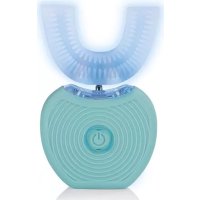
02005 - Toothbrush Maxxmee - Free user manual and instructions
Find the device manual for free 02005 Maxxmee in PDF.



| Product type | 360° sonic toothbrush |
| Brand | Maxxmee |
| Model | 02005 |
| Module number | BG-F-6810 |
| Power supply | Li-ion rechargeable battery 3.7 V, 450 mAh |
| Power | 5 W |
| Protection type | IP X7 |
| Charging time | 90 minutes |
| Operating time | 45 seconds per cycle |
| Sonic pulse | 10,000 pulses/min |
| LED | 2 units, wavelength 460-465 nm, luminous intensity 4000-6000 mcd |
| Brushing modes | 3 modes: gentle cleaning, intensive cleaning, gum massage |
| Package contents | 1 handheld device, 1 mouthpiece, 1 charging station, 1 USB cable (USB A to micro-B), 1 instruction manual |
| Charging station | Module TH-04, input 3.7 V, output 5 V = 1 A, protection class III |
| Intended use | Teeth cleaning, domestic use, from 14 years of age |
| Maintenance and cleaning | Mouthpiece and handheld device: clean under running water; charging station: wipe with a damp cloth; dry thoroughly before storage |
| Safety | Do not immerse the charging station; do not use if damaged; keep out of reach of children; do not look directly at the LED |
| Spare parts and accessories | Replacement mouthpieces available, contact customer service via www.dspro.de/kundenservice |
| Repairability | Do not repair yourself; entrust to the manufacturer, customer service or a specialized workshop |
| Disposal | Do not dispose of with household waste; deposit at a WEEE collection point |
| Warranty | Warranty excluded in case of improper use, depreciation or attempted repair; normal wear and tear excluded |
Frequently Asked Questions - 02005 Maxxmee
User questions about 02005 Maxxmee
0 question about this device. Answer the ones you know or ask your own.
Ask a new question about this device
Download the instructions for your Toothbrush in PDF format for free! Find your manual 02005 - Maxxmee and take your electronic device back in hand. On this page are published all the documents necessary for the use of your device. 02005 by Maxxmee.
USER MANUAL 02005 Maxxmee
Charging Up the Battery 20
Use 21
Cleaning and Storage 22
Troubleshooting 23
Technical Data 24
Disposal 24
EN
ITEMS SUPPLIED
1 x handheld device
1xmouthpiece
1 x charging station
1 x USB cable (A connector to Micro-B connector)
1 x operating instructions
Check the items supplied for completeness and the components for transport damage. If you find any damage, do not use the device but contact our customer service department. Never remove the rating plate and any possible warnings!

A USB mains adapter (not supplied with the device) corresponding to the technical data of the device is also required (see rating plate or the "Technical Data" chapter).
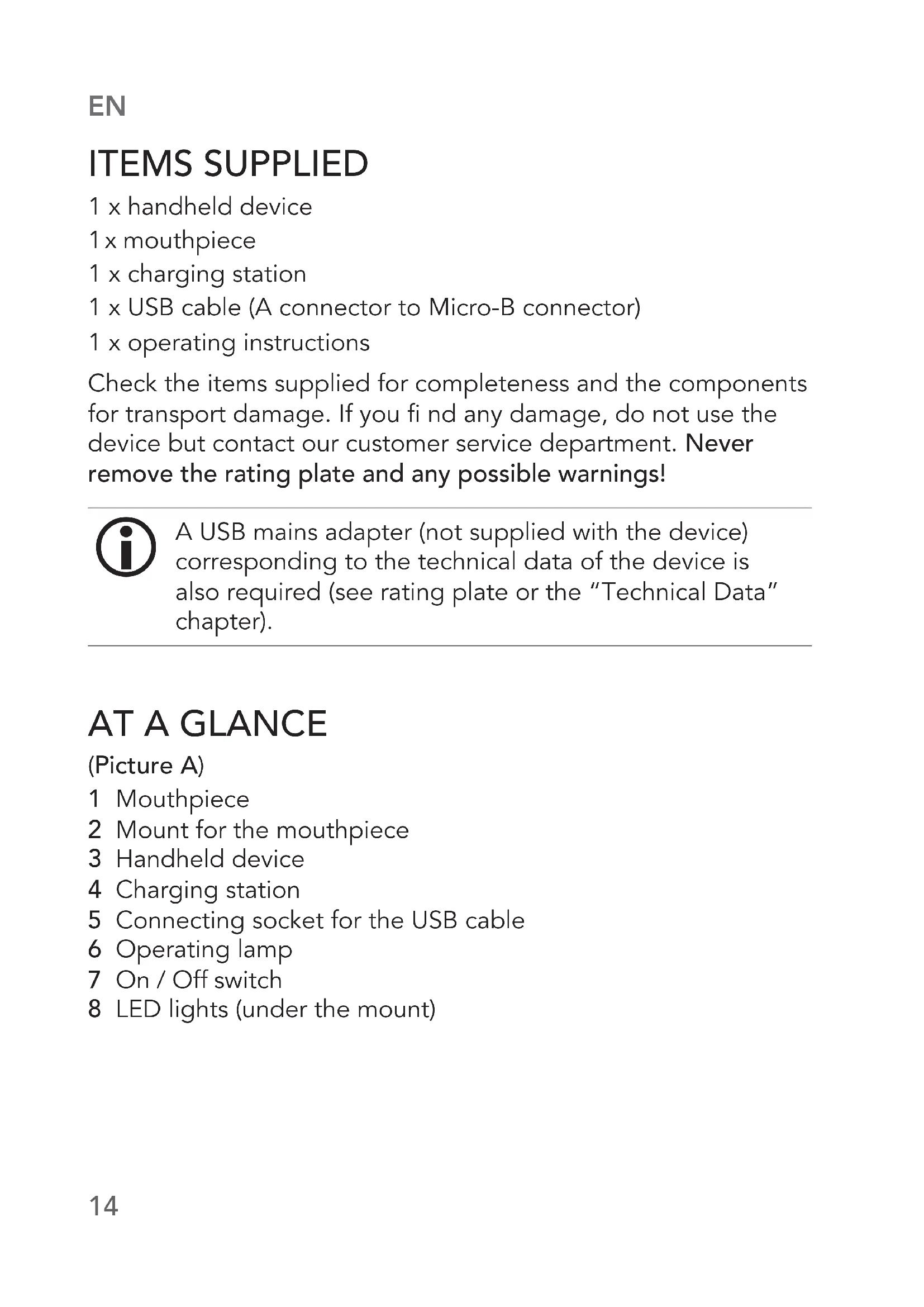
AT A GLANCE
(Picture A)
1 Mouthpiece
2 Mount for the mouthpiece
3 Handheld device
4 Charging station
5 Connecting socket for the USB cable
6 Operating lamp
7 On / Off switch
8 LED lights (under the mount)
Dear Customer,
We are delighted that you have chosen the MAXXMEE 360° sonic toothbrush. The 360° sonic toothbrush allows you to clean your teeth easily without using your hands and to have your gums massaged at the same time. Thanks to 3 intensity levels, the 360° sonic toothbrush is also suitable for sensitive teeth. If you have any questions about the device and about spare parts/ accessories, contact the customer service department via our website: www.dspro.de/kundenservice
We hope you have a lot of fun with your MAXXMEE 360° sonic toothbrush.
Information About the Operating Instructions
Before using the device for the first time, please read through these operating instructions carefully and keep them for future reference and other users. They form an integral part of the device. The manufacturer and importer do not accept any liability if the information in these operating instructions is not complied with.
INTENDED USE
This device is intended to be used for cleaning teeth. Do not use it on any other body part.
The device is only suitable for people aged 14 and over.
The device is for personal use only and is not intended for commercial applications.
Use the device only for the specified purpose and as described in the operating instructions. Any other use is deemed to be improper.
The warranty does not cover faults caused by incorrect handling, damage or attempted repairs. The same applies to normal wear and tear.
EN
SYMBOLS





Danger symbols: These symbols indicate possible dangers. Read the associated safety notices carefully and follow them.
Supplementary information
Read the operating instructions before use!
Only use indoors!
Symbol for direct current
SIGNAL WORDS
Signal words indicate hazards if the associated notices are not followed.
DANGER - high risk, results in serious injury or death
WARNING - medium risk, may result in serious injury or death
NOTICE - may result in risk of damage to material
SAFETYNOTICES
DANGER - Danger of Electric Shock
Use and store the device only in closed rooms. Do not charge the device in rooms with high humidity.
- Never immerse the charging station in water or other liquids! Make sure that it cannot fall into water or become wet. Only the handheld device and the mouthpieces may become wet.
If the charging station falls into water while it is connected to a plug socket, pull the mains adapter out of the plug socket immediately! Only after this should you pull the charging station out of the water and dispose of it.
- Do not use the charging station if it has malfunctioned or fallen into water. Have it checked in a specialist workshop before using it again.
- Never touch the charging station and the USB cable with wet hands when these components are connected to the mains power.
The charging station must always be disconnected from the mains power before it is cleaned..

WARNING - Danger from Rechargeable Batteries
- Do not expose the handheld device to high temperatures of over 40°C or a prolonged period of direct sunlight, do not use it in the immediate vicinity of fire or place it on a radiator. The battery could ignite or explode.
- Do not exert any pressure on the handheld device with built-in battery or pierce the handheld device. High pressure on the battery may cause an internal short circuit and overheating.
If the battery leaks, do not allow your skin, eyes and mucous membranes to come into contact with the battery acid. If you
EN
touch battery acid, rinse the affected areas with abundant clear water straight away and seek medical assistance immediately. There is a danger of burns from battery acid.

WARNING - Danger of Injury
- Keep children and animals away from plastic bags and films. There is a danger of suffocation.
Supervise children to ensure that they do not play with the device.
Children must not connect the device to the mains power or disconnect it from the mains power.
There may still be some production residues on the mouthpieces. To avoid harmful effects to your health, clean them before using them for the first time.
-
Never look directly into the light source! Your eyes could be damaged.
-
Do not use the device if it is damaged. Before each use, check whether all components are in good condition. If they are damaged or worn, this could cause injuries.
-
Do not make any modifications to the device or the USB cable. The device may only be taken apart and / or repaired by the manufacturer, customer service department or a specialist workshop.
Make sure that the connected USB cable does not present a trip hazard.
Make sure that the USB cable is always kept out of the reach of small children and animals. There is a danger of strangulation.

WARNING - Danger of Fire
- Fully unwind the USB cable before connecting a USB mains adapter.
NOTICE - Risk of Damage to Material and Property
Make sure that the USB cable is not squashed, bent or laid over sharp edges and does not come into contact with hot surfaces.
Never wind the USB cable around the charging station.
- Do not place any heavy objects on the device.
- Protect the device from: impacts, persistent moisture and sub-zero temperatures.
Use only original accessories from the manufacturer in order to guarantee that there is no interference that may prevent the device from working and to avoid possible damage.
In the event of damage / faults, switch the device off immediately.
The LEDs cannot be replaced.
EN
CHARGING UP THE BATTERY
PLEASE NOTE!
- Only ever connect the USB adapter that is used to a plug socket that is properly installed and matches its technical data. The plug socket must be readily accessible so that the connection to the mains can quickly be isolated.
- Do not charge up the device via a computer because the computer might be damaged by the high charging current.
Charge up the battery fully before you first use the device so that it reaches full capacity.
- Plug the USB cable into a proper USB mains adapter and plug this into a plug socket.
- Plug the USB cable with the Micro-B connector into the connecting socket (5) on the charging station (4). The operating lamp (6) lights up.
- Place the handheld device (3) in the charging station. The handheld device is charging when the LEDs (8) are fl ashing.
- The battery is fully charged when the LEDs are constantly lit.
USE
PLEASE NOTE!
Only ever use the device on your teeth!
If it feels unpleasant to use, stop using it immediately.
The sonic toothbrush works by vibration which might interfere with dentures or diseased teeth, for example. If you are unsure about using the device, please contact your dentist with confidence.
Attaching / Detaching the Mouthpiece
- Attaching: Plug the mouthpiece (1) as far as it will go onto the mount for the mouthpiece (2).
- Detaching: Pull the mouthpiece off the mount.
Application
- Apply a thin layer of toothpaste to both sides of the mouthpiece (1).
- Place the mouthpiece between your teeth and gently bite down on it.
- Press the On / Off switch (7) for approx. 3 seconds to switch on the device.
- Set the mode you want by pressing the On / Off switch several times:
Mode A: gentle cleaning
Mode B: intensive cleaning
Mode C: gum massage
O BlueLEDlight
- As required, slowly move the mouthpiece a little on the teeth without applying pressure for 20 to 30 seconds so that all teeth are cleaned.
EN
- Once all teeth have been cleaned, press the On / Off switch for approx. 3 seconds to switch off the device.

The device automatically switches off after 45 seconds.
CLEANING AND STORAGE
PLEASE NOTE!
-
Do not use any caustic or abrasive cleaning agents to clean the device. These may damage the surface.
-
Take the mouthpiece (1) off the handheld device (3) and clean it thoroughly under running water. Also clean the handheld device if necessary.
- Wipe down the charging station (4) with a clean damp cloth if necessary.
- Then thoroughly dry the mouthpiece and handheld device.
- Store the device and the accessories in a dry place which is out of the reach of children and animals.
TROUBLESHOOTING
If the device does not work properly, check whether you are able to rectify the problem yourself. If the problem cannot be solved with the steps below, contact the customer service department.

Do not attempt to repair an electrical device yourself!
The operating lamp (6) does not light up.
The USB cable is not connected correctly.
Correct the connections.
The plug socket is defective.
Try another plug socket.
The USB mains adapter is defective.
Try another USB mains adapter.
The battery is not charging. The LEDs (8) do not flash when the handheld device (3) is placed on the charging station (4).
The charging contacts are not resting on one another correctly.
Correct the fit of the charging contacts.
EN
TECHNICAL DATA
Article number: 02005
Model number: BG-F-6810
Voltage supply: 3.7 V
Power: 5
LEDs: x 2
Wavelength: 460-465 nm
Light intensity: 4000-6000 mcd
Acoustic pulses: 10000 P / min
Charge time: 90 min
Operating time: 45 seconds
Type of protection: IP X7
ID of the operating
instructions:
= = (Li-ion battery, 450 mAh) W
Charging station
Model number: TH-04
Input: 3.7V
Output: 5 V = 1 A
Protection class: III
All rights reserved.

DISPOSAL

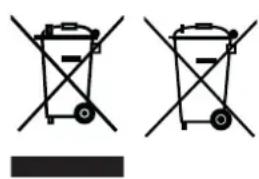
Dispose of the packaging material in an environmentally friendly manner so that it can be recycled.
This device is governed by the European Directive 2012/19/EU on waste electrical and electronic equipment (WEEE). Do not dispose of the device with built-in battery as normal domestic waste, but rather in an environmentally friendly manner via an officially approved waste disposal company.
SOMMAIRE
Composition 26
Apercu général 26
Chere cliente, cher client,
WAARSCHUWING - Gevaar door accu's
WAARSCHUWING - Verwondingsgevaar
WAARSCHUWING - Brandgevaar
- EN
- ITEMS SUPPLIED
- AT A GLANCE
- (PICTURE A)
- DEAR CUSTOMER
- INFORMATION ABOUT THE OPERATING INSTRUCTIONS
- INTENDED USE
- SYMBOLS
- SIGNAL WORDS
- SAFETYNOTICES
- DANGER - DANGER OF ELECTRIC SHOCK
- WARNING - DANGER FROM RECHARGEABLE BATTERIES
- WARNING - DANGER OF INJURY
- WARNING - DANGER OF FIRE
- NOTICE - RISK OF DAMAGE TO MATERIAL AND PROPERTY
- CHARGING UP THE BATTERY
- PLEASE NOTE
- USE
- ATTACHING / DETACHING THE MOUTHPIECE
- APPLICATION
- CLEANING AND STORAGE
- TROUBLESHOOTING
- TECHNICAL DATA
- CHARGING STATION
- DISPOSAL
- SOMMAIRE
- CHERE CLIENTE, CHER CLIENT
- WAARSCHUWING - GEVAAR DOOR ACCU'S
- WAARSCHUWING - VERWONDINGSGEVAAR
- WAARSCHUWING - BRANDGEVAAR
Brand : Maxxmee
Model : 02005
Category : Toothbrush