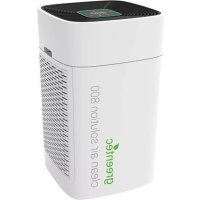
Clean Air Solution 800 - Air purifier Greentec - Free user manual and instructions
Find the device manual for free Clean Air Solution 800 Greentec in PDF.


| Product type | Air purifier |
| Brand | Greentec |
| Model | Clean Air Solution 800 |
| Dimensions | 400 × 400 × 660 mm |
| Weight | 14.0 kg |
| Power supply | 230 V ~ 50 Hz |
| Protection class | II |
| Maximum airflow | 800 m³/h |
| Noise level (at 1 m) | 25 - 48 dB(A) |
| Filtration | Washable synthetic pre-filter, combined HEPA 13 & activated carbon filter, ionizer |
| Sensor | Intelligent PM2.5 sensor |
| Modes | Automatic, Turbo (smoke), Sleep |
| Fan speed | 3 levels |
| Timer | 1 to 12 hours |
| Connectivity | Wi-Fi via Smart Life app |
| Remote control | Yes, with CR2032 battery |
| Additional functions | Child lock, PM2.5 display, filter replacement indicator |
| Pre-filter maintenance | Clean every 500 operating hours (washable) |
| Main filter replacement | Every 3000 operating hours |
| Sensor cleaning | Every 2 months |
| Intended use | Indoor air purification only |
| Delivery contents | Purifier with filters, remote control, manual |
Frequently Asked Questions - Clean Air Solution 800 Greentec
User questions about Clean Air Solution 800 Greentec
0 question about this device. Answer the ones you know or ask your own.
Ask a new question about this device
Download the instructions for your Air purifier in PDF format for free! Find your manual Clean Air Solution 800 - Greentec and take your electronic device back in hand. On this page are published all the documents necessary for the use of your device. Clean Air Solution 800 by Greentec.
USER MANUAL Clean Air Solution 800 Greentec
Symbole in thisem Handbuch

Warning
Air puri er with HEPA- 13 Iter technology
Contents
1) Important information. 3
Proper use & notes before use 3
Improper use 3
Safety information & instructions for use 3
Product information 4
II) Usage 6
Installation 6
Operation/control panel. 7
Operation via app 9
III) Maintenance and disposal 11
Troubleshooting 11
Cleaning 11
Maintenance 13
Storage 14
Disposal (Life-Cycle Service) 14
IV) Appendix 15
Technical information 15
Declaration of Conformity 15
Order parts or accessories 15
Symbols in this manual

Warning
This signal word refers to a danger with a medium risk, which can result in death or serious injury if insufficient steps are taken to avoid the risk.

Caution
This signal word refers to a danger with a low risk, which can result in minor or moderate injury if insufficient steps are taken to avoid the risk.

Warning of electrical voltage
This symbol refers to danger to the life and health of people due to electrical voltage.

Wear protective gloves
Notices bearing this symbol indicate that you must wear protective gloves.

Wear a protective mask
Notices bearing this symbol indicate that you must wear a protective mask (e.g. an FFP2 mask).

The latest edition of the barrier-free manual and the full EU Declaration of Conformity are available on our website.

www.greentec.ag
I) Important information
Proper use & notes before use
Thank you for purchasing our air puri er!
In order to facilitate the installation and use of this device, we recommend carefully reading this manual and keeping it stored safely. To ensure that you always enjoy fresh air, use this manual for quali ed and standardized installation, proper use, and maintenance. Our air puri er was developed by bringing together technology from home and abroad to give you the latest generation of air puri cation devices.
If any questions arise, please consult this manual. If it is in accordance with the warranty, we kindly welcome you to contact us with the address and phone number on the card. We welcome any comments or suggestions you have about our product and service.
This device is to be used solely for purifying ambient air in interior spaces in accordance with the safety information provided.

Warning: Please pay attention to the safety information and instructions!
Read this manual carefully prior to commissioning the device and pay attention to the safety information. This manual must be available at all times and must be carefully stored for future use.
People who use this device must have carefully read and understood this manual and must be aware of the dangers of handling electrical air purifiers.
Improper use
Do not place the device directly below the air conditioner in order to prevent condensation within the air puri er. For the same reason, the device should not be put into a room with high temperature actuation.
Do not use this product in a humid or high-temperature environment (e.g. bathroom, toilet or kitchen). Otherwise, functioning and lifetime of the device could be affected negatively.
Do not use the device as daily ventilator, dust cleaner or cooker hood. Besides, do not use this device to substitute proper ventilation as well as regular vacuum cleaning.
Improper use can endanger health and life.
Safety information & instructions for use

Warning: Read all of the safety information and instructions carefully!
Failure to adhere to the safety information and instructions could lead to electric shock, re and/or other serious injuries.
Retain all of the safety information and instructions for future use!
General information
- Follow this safety information to avoid the risk of re or electric shock.
- Never place the device in areas exposed to rain, water, moisture or high air humidity levels. Do not place it next to a wash basin or sink.
- Keep the packaging, e.g. the plastic Im, away from children! Risk of suffocation.
Only use a plug socket with the stated voltage (see Section Technical information). - Do not use the device if the power cable or plug is damaged, or if the connection to the wall socket is unstable.
- Do not modify, make attachments to or convert the device in any way.
- Make sure that the power cable is not trapped during operation and cannot be damaged in any other way. Arrange the cable so that it does not pose a trip hazard.
- Do not subject the power cable to tension.
- Unplug the device when not in use for long periods or for cleaning, and check the connecting elements for damage prior to each use. The device must not be used in the case of damage.
- Do not block the air inlet and outlet and do not sit on the device.
- Do not insert your ngers into the device's air inlet our air outlet to prevent physical injury.
- Do not modify the device.
- Do not use the device in rooms with an explosion risk, nor in rooms in which the air may contain fuel vapours, oil vapour, metal dust or insecticides.
- Do not use the device to combat harmful gases (e.g. carbon monoxide).
-
Do not use any spray cans containing ammable materials near the device.
-
Do not use any volatile liquids, petrol, kerosene, paint thinner or polish to clean the device. These substances can damage the surface of the device.
- Use only original greentec Iters specially intended for this device and do not use any other Iters.

Caution: Do not use the device near a smoke alarm. There might be the possibility that the smoke alarm does not work properly.
- Avoid open res and sparks in the room in question and never place the air puri er in direct sunlight.
The device must not be operated by people (including children) with reduced physical, sensory or mental capacities or with a lack of experience and expertise, unless they are being monitored and supervised. - Keep the device and the remote control away from children and animals. The device and its accessories are not to be used as toys.
Do not remove any safety notices, stickers or labels from the device and keep them in a legible condition.

Do not touch the plug or the device with damp or wet hands. Otherwise, there is a threat of electric shock.
People who use this device must be aware of the dangers of handling electrical air purifiers.
In the case of an emergency
Switch off the device at the control unit. Unplug the device where necessary. Do not reconnect a defective device to the power supply.
Product information
General information
Congratulations on your purchase of a quality air puri er!
The device has the following features:
- Adjustable fan for air purication
- Combined Iter technology:
o Synthetic pre-Iter: removes large granule dust, dander, pollen, oating compound and other Pollutants. Washable and reusable.
- Honeycomb-activated carbon iter: The cellular-activated carbon carries high ef cients additives. It has good absorption and dust collection characteristics.
HEPA-13 filter: The precision of the HEPA Iter is 0.01 micron. It is able to eliminate particles which are larger than 0.01 micron with the Itration rate of 99,95% . Dust, bacteria, fungi, viruses, allergens and other small and tiny particles are not able to get through the HEPA Iter.
Anion release: The ionizer releases large amounts of anions and makes the oxygen negatively charged, thus gathering the positively charged particles like oating dust, bacteria, viruses and smoke. The particles become denser and sink to the ground. The smaller the particle size, the higher the capture rate.
- Intelligent particle sensor system: Through the intelligent particle sensor system with its PM2.5 sensor, the air purer can automatically adjust the fan speed according to the air quality display.
Control panel with the following main functions: Setting fan speed; Setting timer, sleep mode...
The device directly reduces the presence of aerosols and clouds of airborne particles where it is placed. There is a speci c value for the rate of air circulation, depending on the size of the room in question, see Section Operation/control panel.
Thanks to its features, when used correctly, the device reduces the risk of airborne infection in indoor spaces.
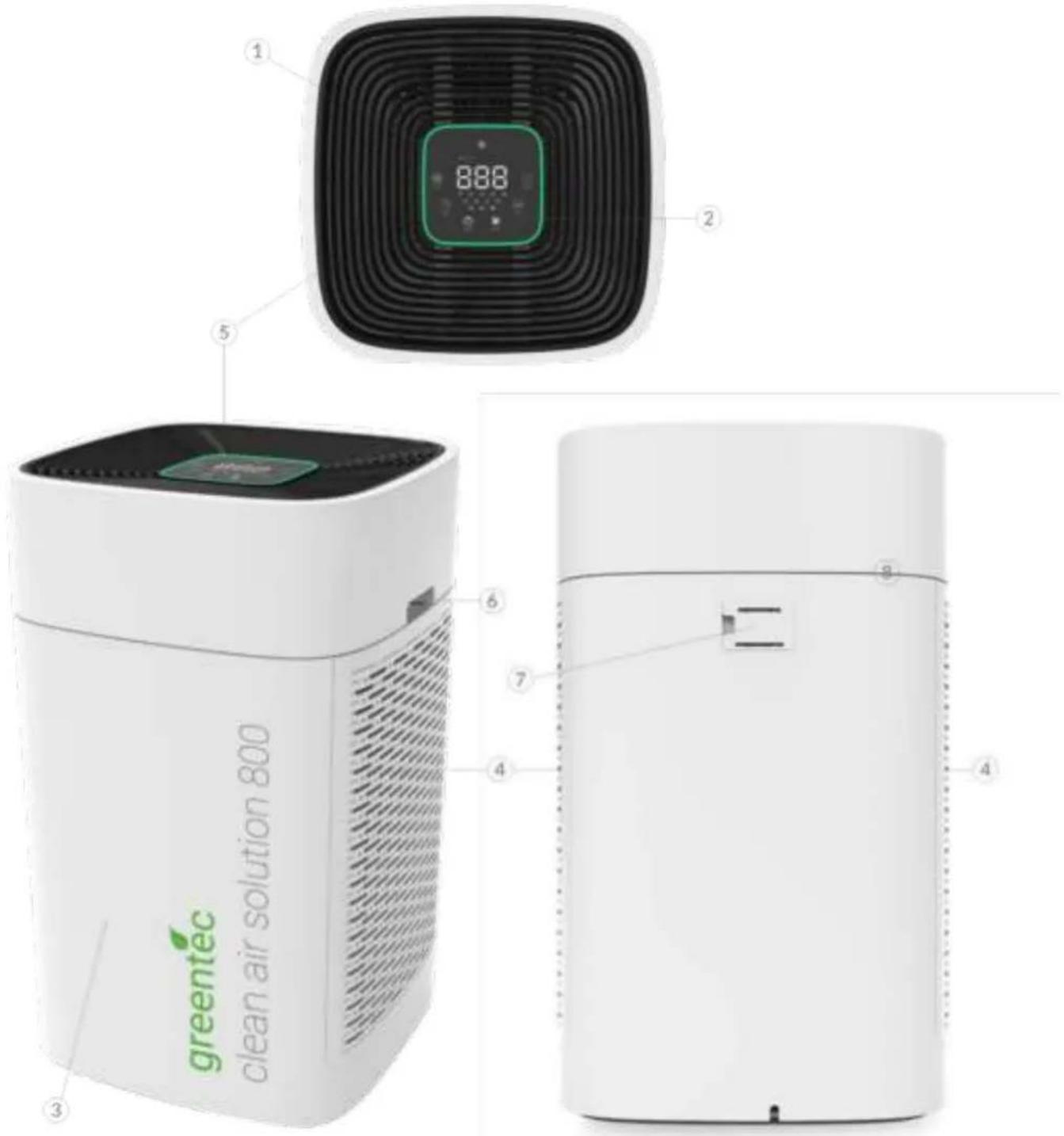
The device
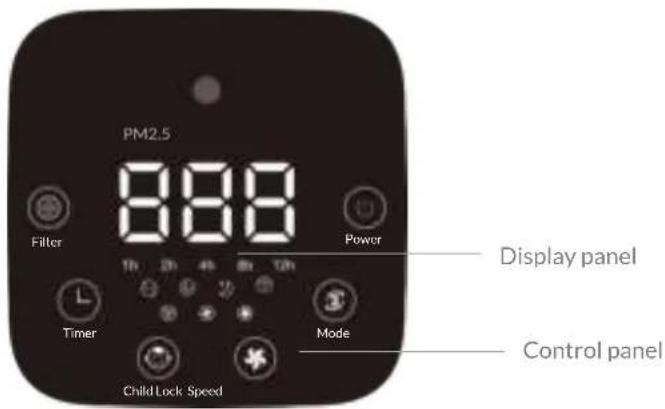
| # | Designation |
| 1 | Display panel |
| 2 | Control panel |
| 3 | Front |
| 4 | Air inlet (left & right side) |
| # | Designation |
| 5 | Air outlet |
| 6 | Handle |
| 7 | Particle Sensor |
II) Usage
Installation
Delivery scope
- 1 x air purication device, including power cable
- 1x Iter set wrapped in foil, located within the device
- 1 x manual in English and German
- 1x remote control
Unpacking of device
Carefully remove all packaging materials on the outside of the device. If, after removing the packaging, you notice that the device is damaged, contact the manufacturer or retailer who sold you the item. Please note that warranty claims are invalidated if the damage is due to an improper removal of the packaging.
Unpacking of Iters
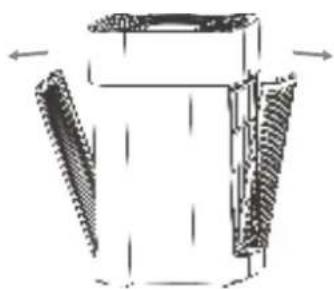
Open the two side plates as shown on the left.
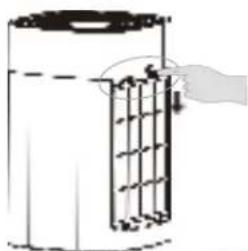
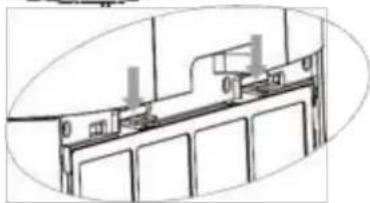
On both sides, take out the pre- Iters by pulling on the respective latches. Then take out the main Iters by pulling on the strip.
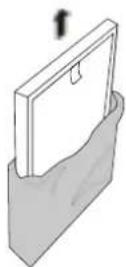
Then remove all packaging bags from the Iters.
Reassembly
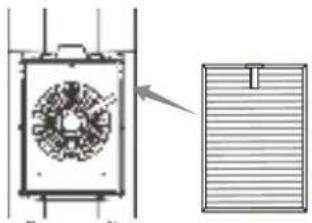
On each side, install the HEPA-13 & activated carbon compound Iter.
Note: Please ensure the tab side (the side with the strip) is facing you.
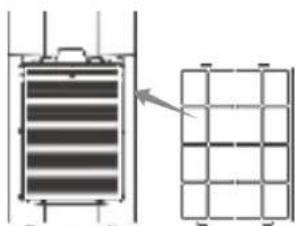
On each side, install the pre-Iter.
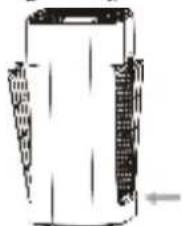
Note: Please ensure the tab side is facing you and that the two straps on the bottom on the liters into the slots on the device.
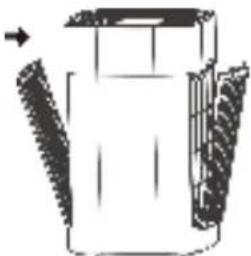
Carefully install the two side plates as shown on the left.
Positioning of the device
This device must be placed on a dry, stable and at surface.
Position the device in such a way that it is not touching any walls. Leave a minimum of 20cm of free space around the device and a minimum of 30cm free space above the device. Otherwise, it could lead to damage or dirt on the wall or device.
The rear of the device must face the wall; the front must face into the room. The front of the device can be identified by the large-scale greentec logo print.
Operation/control panel
Commissioning
Check the outside of the device for damage prior to every use. If you notice damage, do not switch on the device and contact the responsible retailer or manufacturer.
Once the device has been set up as described in the previous chapter, you may switch it on.
Remote control
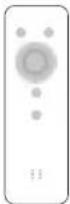
The product is equipped with a remote control. The remote control comes with a coin cell type CR 2032 (3 V). If you do not use the remote control for a long period, please take out the battery.
Note: Before the rst use, you need to open the battery compartment on the back of the remote control and take out the plastic cover on the coin cell.
Using the device

Press the power button in order to start the device. The icon turns green and the device runs in auto mode.
After switching on the device, press the mode button in order to switch between the following 3 modes:
AUTO mode: the 'AUTO' icon appears.
TURBO mode: the 'SMOKE' icon appears.
SLEEP mode: the 'SLEEP' icon appears.
Press the mode button a maximum of 3 times in order to enable auto mode. In this mode, the motor speed will be adjusted automatically to the degree of air pollution and the ionizer (anion release) function will be activated.
Note: If you change the wind speed during auto mode, the auto mode will be disabled.
Speed level 1: PM2.5 = 0 - 35 | blue light
Speed level 2:PM2.5 = 36 - 75 | green light
Speed level 3: PM2.5 = 76 - 150 | yellow light
Speed level 4: PM2.5 = 151 - 200 | red light

Press the mode button a maximum of 3 times in order to enable turbo smoke purification mode. The device will switch to highest speed level.
Press the mode button a maximum of 3 times in order to enable sleep mode. Lights will be reduced by half and the device will switch to the lowest speed level.
If the timer was set before activating sleep mode, the machine continues working in sleep mode until the timer runs out and then goes into standby.


When pressing the child lock button for 5 seconds, child lock will be activated. While active, the child lock disables all buttons and the device keeps running as set previously.
Press the child lock button for 5 seconds to exit this mode.

TIMER
Press the timer button to set the working time. Every push increases the working time by 60 minutes. You can set between 1 - 12 hours and the device is turned off when the timer expires.
To exit this mode, press the button until you reach 12 hours and then press once more.

SPEED
Press the speed button to switch to the next speed level. The speed control can be set to 3 different speed levels. When pressing the button while the highest level is active, the speed will switch to lowest level again.
Note: If you use the speed button, auto mode will be disabled.

FILTER
While the device is switched on, press the iter button in order to see the accumulated working time on the display. Since the screen can only display three digits, the thousands digit will be displayed rst, then hundreds, tens and single. Please read them together.
If a iter replacement is necessary, this icon will light up. For more information, see chapter Maintenance.

WiFi
To connect the device to your app, see chapter Operation via app.
Display function description
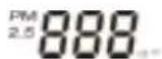
When the power is turned on, the PM2.5 particle sensor needs to be warmed up for 1 minute to display data. The display data range is 1 - 500 m / m^3
When the current display shows PM2.5 data, the PM2.5 and m / m^3 icons next to the numbers light up. When the current display shows data, which is not PM2.5 data, the PM2.5 and m / m^3 icons are not lit.
Operation via app

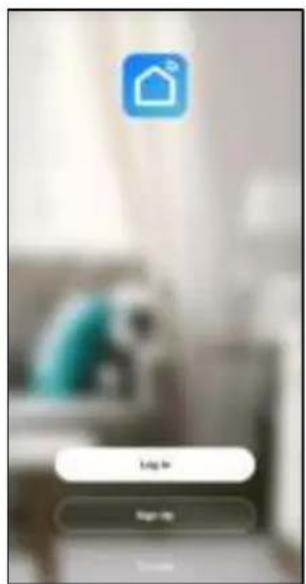
Scan the QR-Code and download the "Smart Life" app (suitable for iOS- and Android).
1
Either log in to your existing account or sign up for a new one.

2
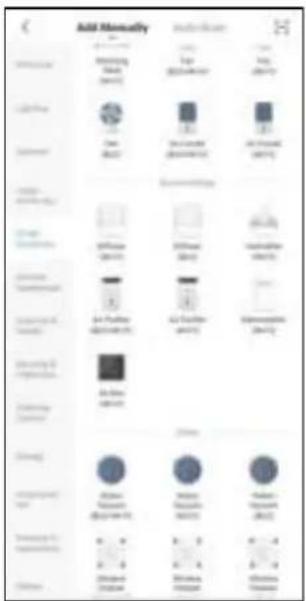
Now choose Add Device.
3
Choose the category "Small Home Appliances" and then select "Air Puri er (Wi-Fi)".
4
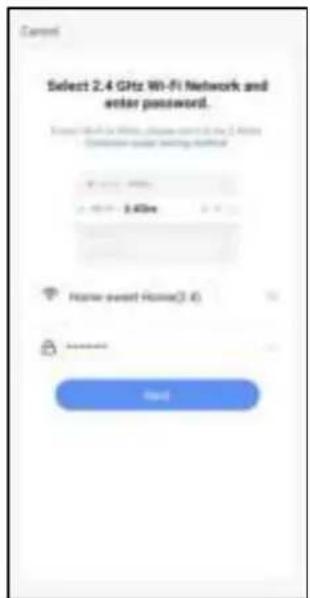
While the device is turned off (standby), press and hold the MODE button till a sound rings and the WiFi symbol is ashing quickly.
Use the app to type in your WiFi password and con rmit with the "Next" button.
5
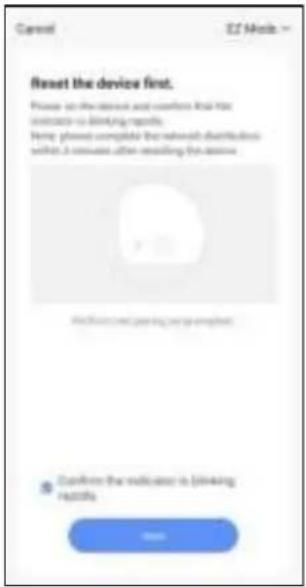
Is the WiFi symbol on the display ashing quickly?
Then press the "Next" button again.
[When the WiFi symbol is aashing slowly, you may need to close the app and repeat the previous steps.]
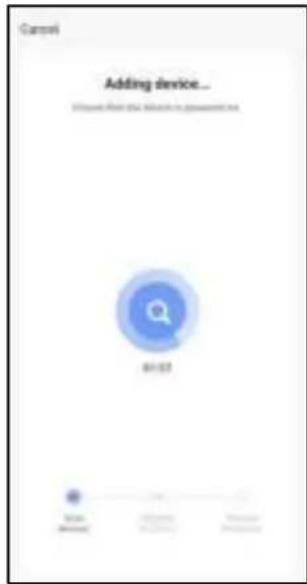
6
Wait for the con guration to be completed.
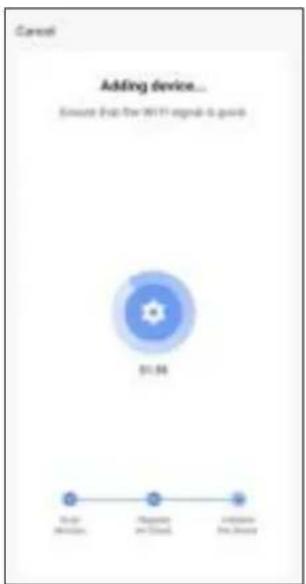
7
The con guration is almost completed.
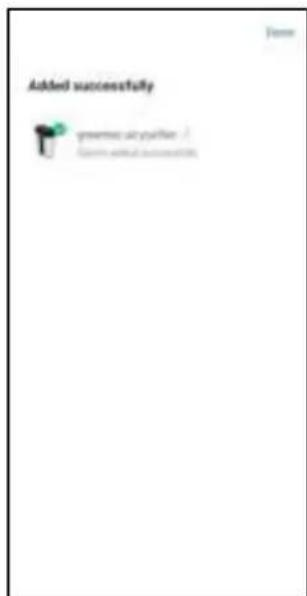
8
The air puri er was added successfully. You can rename and control it through the app.
III) Maintenance and disposal
Troubleshooting
The device is inspected in detail to ensure it works correctly prior to dispatch. Should faults occur despite this, please check the device for the following points (based on the relevant issue).
Errors
| Problem | Solution |
| No air comes out from the outlet | Please check whether the device is turned on and connected to the power supply. |
| Outlet air ow is signi cantly weakened | The Iters are dirty and they need to be cleaned or replaced. You can slightly shake the Iters to remove the dust and other objects on it. |
| The Iter packaging bag is not removed. Please remove the Iter packaging bag. | |
| The air quality has not been signi cantly improving after long running time | Open the window and let some fresh air into the room. |
| Check the Iter layers installation sequence. | |
| Check if Iters are dirty and replace them if necessary. | |
| Power is down and/or cut off suddenly | Check if the case is properly shut and close it properly if necessary. |
| Open the window and let some fresh air into the room. | |
| A creaking or banging sound comes from the running device | Check if the ionizer needs to be cleaned. For cleaning, follow the instructions in chapter Cleaning. |
| Air puri er randomly switches to sleep mode | Disable auto mode. |
The device does not work properly despite carrying out the checks recommended above
Contact customer service or the retailer who sold you the device.
Cleaning
Clean air inlet & outlet
Prior to every commissioning and where needed:
Check the air inlet and air outlet for dirt and foreign bodies and clean if necessary. Do not exude any pressure on the device to do so. Use suitable cleaning tools where required.
Clean the air outlet as described below:
- Switch off and unplug the device from the socket.

Do not touch the plug or the device with damp or wet hands. Otherwise, there is a threat of electric shock.
- Put the hand on the air outlet grille side with the triangular symbol and pull it up as illustrated below.
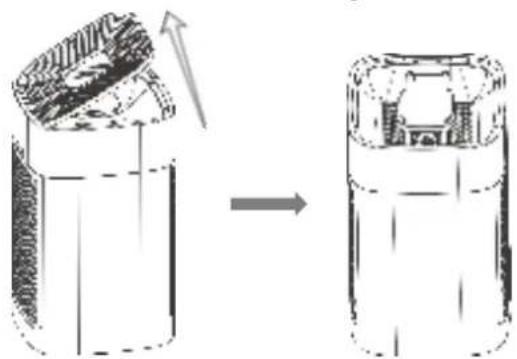
- Wipe the air outlet area with a dry, soft cloth and carefully remove any foreign bodies that may have gotten into the air outlet.
- Close the air outlet grille again by completing the steps from before in reverse order.
Clean casing
Whenever necessary, clean the outside of the device in order to prevent dust from collecting.
- Switch off and unplug the device from the socket.

Do not touch the plug or the device with damp or wet hands. Otherwise, there is a threat of electric shock.
- Gently wipe the surface of the device with a damp cloth.
Clean pre-Iter
Every two months, clean the pre-Iter in order to extend the Iter life. If the air puri er is used in a dusty environment, the pre-Iter may need to be cleaned more often.
- Switch off and unplug the device from the socket.

Do not touch the plug or the device with damp or wet hands. Otherwise, there is a threat of electric shock.

Wear gloves and a mask! Otherwise, there is a risk of exposure to contamination, viruses, bacteria and similar potential hazards.

- Open the two side plates (close by air inlets) and take out the pre- Iters as shown in chapter Installation.
- Clean the surface of the pre- lters with a vacuum cleaner running at minimum power. If necessary, use some water to clean the pre- lter more thoroughly.
- Let the pre- Iters dry thoroughly.
- Put the dry Iters back into the casing and close the side plates as shown in the chapter Installation.
Clean particle sensor
Every two months, clean the particle sensor to prevent clogging. If the air puri er is used in a dusty environment, the particle sensor may need to be cleaned more often.
- Switch off and unplug the device from the socket.

Do not touch the plug or the device with damp or wet hands. Otherwise, there is a threat of electric shock.
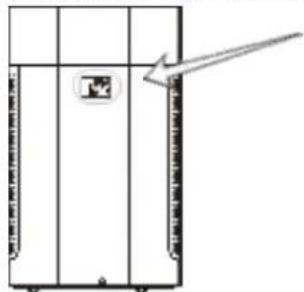
- The particle sensor is located on the back of the device, as illustrated below. Remove the sensor cover by putting your nger into the small hollow and pulling forward.
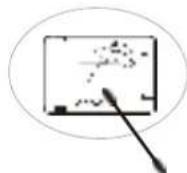
- Now use a dry cotton swab to clean the exposed particle sensor area.
- When nished, put the particle sensor cover back to its original position.
Clean ionizer
When the device emits a creaking sound while running, clean the air outlet area in order to ensure proper functioning of the ionizer, which is positioned beneath the air outlet grille.
- Switch off and unplug the device from the socket.

Do not touch the plug or the device with damp or wet hands. Otherwise, there is a threat of electric shock.
- Put the hand on the air outlet grille side with the triangular symbol and pull it up as illustrated below.
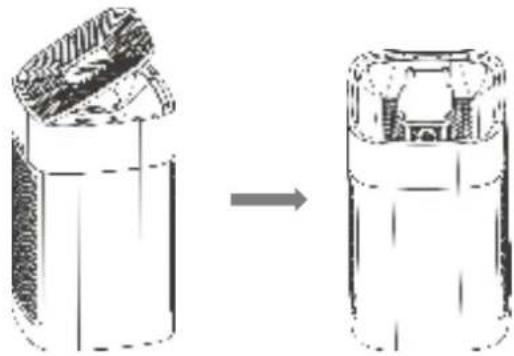
- Use suitable cleaning tools where required, e.g. vacuum cleaner with brush attachment at minimum power, to remove dust from the air outlet and the area beneath. Do not exert too much pressure on the device, especially on the grid.
- Close the air outlet grille again by completing the steps from before in reverse order.
Maintenance
Replacing the pre-Iter
Every 2 years, it is recommended to replace the pre-Iter.
- Switch off and unplug the device from the socket.

Do not touch the plug or the device with damp or wet hands. Otherwise, there is a threat of electric shock.

Wear gloves and a mask! Otherwise, there is a risk of exposure to contamination, viruses, bacteria and similar potential hazards.
- Open the two side plates (where the air inlets are) and take out the pre- Iters as shown in the chapter Installation.
- Now carefully extract the pre- Iters as described in the chapter Installation.

pre-Iter
- Put the replacement Iters into the device in the same position as the old Iter.
- Again, complete the respective steps described in the chapter Installation in order to close the side plates properly.
- Dispos of the used Iters in your domestic waste.
Replacing the main Iter
Every 3000 hours of operation, the 'FILTER' icon will light up and remain lightened, which means that the main Iter (HEPA-13 & activated carbon compound Iter) needs to be replaced on both sides. The Iter may need to be replaced in shorter intervals when there is a higher level of dirt in the air as usual.
Dirty Iters inhibit the performance of the device. Errors that arise when Iters needs to be replaced are described in chapter Troubleshooting.
- Switch off and unplug the device from the socket.

Do not touch the plug or the device with damp or wet hands. Otherwise, there is a threat of electric shock.

Wear gloves and a mask! Otherwise, there is a risk of exposure to contamination, viruses, bacteria and similar potential hazards.
- Open the two side plates as described in the chapter Installation.
- Now carefully extract the Iters.
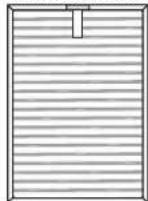
HEPA-13 & activated carbon compound Iter
- Put the replacement Iters into the device. Please ensure that the tab side (side with strip) is facing you.
- Again, complete the respective steps described in the chapter Installation in order to close the side plates properly.
- Put the used liters into the remaining bag of the new liters, seal the bags and immediately dispose of them in your domestic waste. If you notice that any of the parts on or in the device not listed here are missing or damaged, please contact your local retailer or manufacturer.
- Then connect the device to power supply, switch it on and press the 'FILTER' button on the control panel for 3 seconds in order to confirm replacement of the liters and to reset the counter.
Storage
The following storage conditions must be ensured when the device is not in use:
Take the battery out of the remote control and store the batteries separately from the remote control.
- Unplug the device before storing it.
Clean the air purer and particle sensor as explained in the chapter Cleaning. Let all parts dry thoroughly before moving to the next step.
- Store the device in a cool and dry place and protect it from both heat and frost.
- Cover the device with a cover or cloth. Ensure that the device is not connected to a plug socket before covering it.
Before using the device again, check the condition of the power cable. If in doubt, contact customer services about the condition of the cable.
Disposal (Life-Cycle Service)

As with other electrical and electronic devices, this device must not be disposed of in domestic waste due to the symbol showing a crossed-out waste bin.
Here at greentec, we want to promote the reuse of recyclable materials. As part of our Life-Cycle Service, we check the recycling options of old materials in our production chain. Please visit our website at www.greentec.ag for more information about options and locations for returns.
Help us to improve the recycling of old devices and to avoid negative consequences for the environment and human health by disposing of your device properly at the end of its lifespan or returning it to us!
IV) Appendix
Technical information
Technical information
Size: 400 × 400 × 660 ~mm
Weight: 14,0 kg
Flow rate: Max. 800m^3 /h
Connection: 230V
Rated frequency 50 Hz
Rated power 85W
Nominal current: 0,37A
Sound pressure level: Between 40,2 and 53,1 dB(A) at a distance of 1m

This is a double insulated appliance, which is subject to IEC protection class II.
Declaration of Conformity
This is a simplified Declaration of Conformity.
Hereby, greentec AG declares that the air puri er type CAS 200/ CAS 350/ CAS 500/ CAS 600 and CAS 800 comply with 2014/35/EU Low Voltage directive, 2011/65/EU and 2015/863/EU RoHS directive, 2014/30/EG EMV Electromagnetic compatibility directive as well as applied harmonised standards, in particular EN 60335-1, EN 60335-2-65, EN 62233, EN 55014-1, EN 55014-2, EN IEC 61000-3-2, EN 61000-3-3, IEC 60335-2-65, IEC 60335-1, EN ISO 13857.
The full and latest version of the Declaration of Conformity is available on our website: www.greentec.ag.
Order parts or accessories
If any parts need to be replaced or if you require additional parts, please visit our website www.greentec.ag in order to access information about replacement and additional parts.
If any problems occur, please contact our customer service. The contact information is available on our website www.greentec.ag.

greentec AG
Robert-Bosch-Str. 11

- Symbole in thisem Handbuch
- Warning
- Air puri er with HEPA- 13 Iter technology
- Contents
- 1) Important information. 3
- II) Usage 6
- III) Maintenance and disposal 11
- IV) Appendix 15
- Symbols in this manual
- Caution
- Warning of electrical voltage
- Wear protective gloves
- Wear a protective mask
- I) Important information
- Proper use & notes before use
- Warning: Please pay attention to the safety information and instructions!
- Improper use
- Safety information & instructions for use
- Warning: Read all of the safety information and instructions carefully!
- General information
- In the case of an emergency
- Product information
- II) Usage
- Installation
- Delivery scope
- Unpacking of device
- Unpacking of Iters
- Reassembly
- Positioning of the device
- Commissioning
- Remote control
- Using the device
- Display function description
- Operation via app
- 1
- 2
- 3
- 4
- 5
- 6
- 7
- 8
- III) Maintenance and disposal
- Troubleshooting
- Cleaning
- Clean air inlet & outlet
- Clean casing
- Clean pre-Iter
- Clean particle sensor
- Clean ionizer
- Maintenance
- Replacing the pre-Iter
- Replacing the main Iter
- Storage
- Disposal (Life-Cycle Service)
- IV) Appendix
- Technical information
- Declaration of Conformity
- Order parts or accessories
- greentec AG
Brand : Greentec
Model : Clean Air Solution 800
Category : Air purifier