
500 - Air purifier Greentec - Free user manual and instructions
Find the device manual for free 500 Greentec in PDF.


| Product Type | Air Purifier |
| Brand | Greentec |
| Model | 500 |
| Dimensions (Height) | 9.00 inches |
| Dimensions (Diameter) | 6.25 inches |
| Weight | 1.63 lb |
| Input Voltage | 110-240V, 50/60Hz |
| Output Voltage | 12V DC |
| Power Consumption | 10W |
| Ozone Output | 200 mg/hr (30-minute cycle) |
| Effective Coverage Area | 650 - 850 ft² |
| Operating Modes | Ionization, Purifier, Burst |
| Default Mode | Ionization Mode |
| Purifier Mode Duration | 30 minutes |
| Burst Mode Cycle | 5 min Purifier + 25 min Ionization |
| Filter Type | Replaceable (clean monthly, replace annually) |
| Filter Cleaning Method | Compressed air or vacuum (no water) |
| Filter Replacement Frequency | Annually |
| Included Accessories | Power adapter |
| Warranty | 1 Year Manufacturer's Warranty |
Frequently Asked Questions - 500 Greentec
User questions about 500 Greentec
0 question about this device. Answer the ones you know or ask your own.
Ask a new question about this device
Download the instructions for your Air purifier in PDF format for free! Find your manual 500 - Greentec and take your electronic device back in hand. On this page are published all the documents necessary for the use of your device. 500 by Greentec.
USER MANUAL 500 Greentec
natural_image
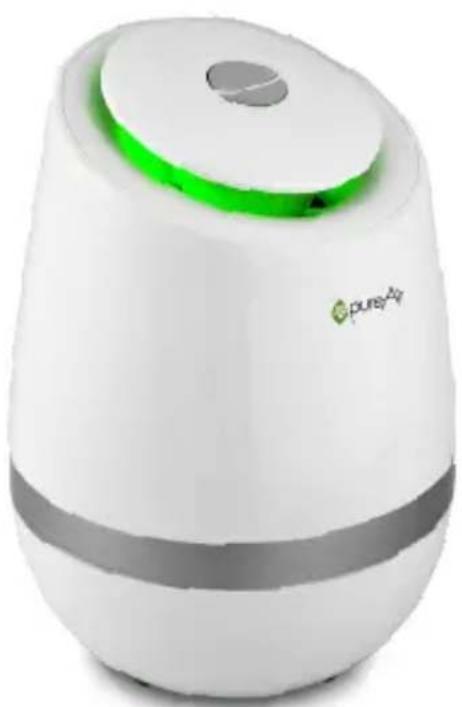
White cylindrical device with a green and gray component, labeled 'pureAir' at the bottom (no other text or symbols visible)
pureAir
Owner's Manual
Welcome
Thank you for your purchase of the pureAir 500. This air purifier has been designed to provide you a cleaner living space with years of low maintenance operation.
Please read through the usage and service instructions outlined in this owner's manual.
Table of Contents
Diagrams/Warnings 3
Getting Started....4
Modes....4
Cleaning/Maintenance....5
Filter Replacement....5
Specifications....6
Warranty Information....7
Diagrams/Warnings
BOTTOM TOP
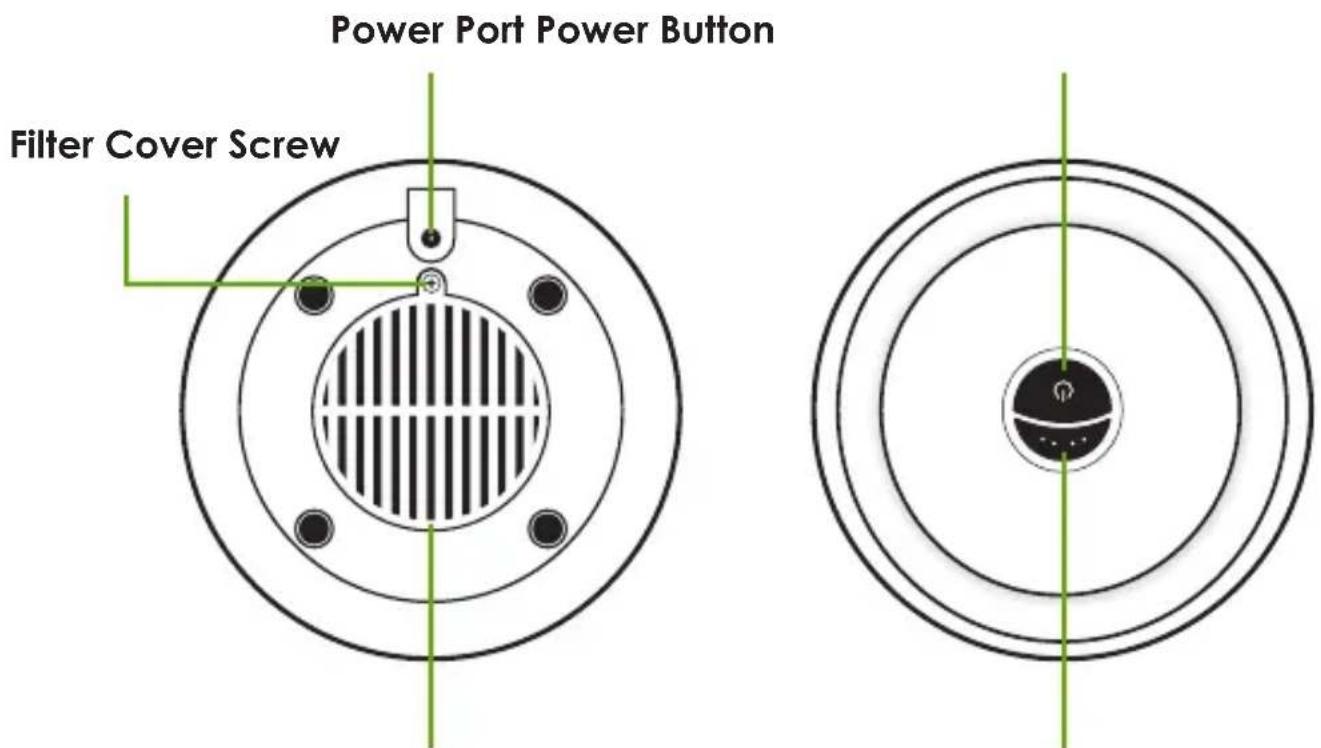
Filter Cover Mode Button

Do not operate this unit unless it is completely assembled.
Do not block the ventilation or filter.
Do not use Purifier Mode in an occupied space.
There are no user-serviceable parts inside the unit.
This unit is not intended for outdoor use.
Getting Started
- Begin by removing the Unit and Power Adapter from the packaging.
- Locate a suitable location to place your unit. (Ideal location is an area of the room with good circulation, or near the source of pollution.)
- Plug the Power Adapter into a wall outlet and then plug the other end into Power Port of your unit.
- Press the Power Button to control to power of your unit.
NOTE: Your unit will start in Ionization Mode.
- Press the Mode Button on the top of your unit to cycle through Ionization Mode, Purifier Mode, and Burst Mode.
Modes
Ionization Mode (Idle Green Light)
Ionization Mode is your unit's default mode. This mode is ideal for removing airborne particulates such as smoke, pollen, and pet dander from your breathing space.
Purifier Mode (Idle Red Light)
Purifier Mode creates Activated Oxygen ( O_3 ) and Ionization for a powerful 30 minute cycle before reverting back to Ionization Mode.
NOTE: Acticated Oxygen can cause temporary respiratory and eye irritation.
Keep room unoccupied when using Purifier Mode.
Burst Mode (Flashing Red Light)
Burst Mode repeats between 5 minutes of Purifier Mode and 25 minutes of Ionization Mode.
Cleaning
NOTE: For proper operation, the unit should be cleaned at least once per month.
- Turn the unit OFF and remove the Power Plug.
- Remove the Filter Screw from the Filter Cover.
- Carefully remove the Filter from the unit.
WARNING: No part of this unit should come into contact with water during cleaning.
-
Blow the Filter out with compressed air or use a vaccum to remove any dust or debris.
-
Blow the interior of your unit out with compressed air.
-
Replace the Filter, Filter Cover, and Filter Cover Screw.
-
Plug your unit in and return it to your previously set mode.
Maintenance
If your unit has stopped working properly, refer to your Warranty Information (Page 7) for coverage and replacement instructions.
Filter Life
Filter life depends upon the level of pollutants in the space being cleaned. Filters should be replaced once a year to ensure the highest quality of purification. Additional filters can be purchased through GreenTech Environmental or a GreenTech Environmental dealer.
Specifications
Input Voltage 110 - 240V | 50/60Hz
Output Voltage 12V DC
Power Consumption....10W
Unit Dimensions....9.00'' H x 6.25'' D
Unit Weight 1.63 lb
Ozone Output....200 mg/hr (30 Minute Cycle)
Effective Area.... 650 - 850 ft ^2
Warranty .... 1 Year Manufacturer's Warranty
natural_image
White and gray portable device with green accent, no visible text or symbols on body



Warranty Information
Your pureAir 500 Air Purifier is warranted to be free from all defects in material and workmanship in normal household use for a period of 1 Year from date of purchase. The warranty is granted only to the original purchaser and members of his or her immediate household. The warranty is subject to the following provisions. Any damages or malfunctions caused by negligence, abuse, or use not in accordance with the Owner's Manual are not covered by this warranty. Likewise, any defects or damages caused by unauthorized service are not covered. GreenTech Environmental will, at its option, repair or replace a defective Air Purifier that is covered by this warranty. As a matter of warranty policy, GreenTech Environmental will not refund the customer's purchase price. To obtain warranty service you must return the defective Air Purifier along with proof of purchase to the pureAir Authorized Warranty Station. All transportation charges on parts, or units, submitted under this Warranty shall be borne by purchaser. Unless this Warranty is expressly renewed or extended by GreenTech Environmental, any repaired or replaced part of unit shall be warranted to the original purchaser only for the length of the unexpired portion of the original warranty.
FURTHER LIMITATIONS AND EXCLUSIONS ARE AS FOLLOWS:
Any warranty that may be implied in connection with your purchase or use of the Air Purifier, including any warranty of merchantability or any warranty for Fitness For A Particular Purpose is limited to the duration of this warranty. Some states do not allow limitations on how long an implied warranty lasts, so the above limitations may not apply to you.
Your relief for the breach of this warranty is limited to the relief expressly provided above. In no event shall PureAir be liable for any consequential or incidental damages you may incur in connection with your purchase or use of the Air Purifier. Some states do not allow the exclusion or limitation of incidental or consequential damages, so the above limitation or exclusion may not apply to you. This warranty gives you specific legal rights, and you may also have other rights which vary from state to state.
REGISTRATION
Please register your new pureAir product within 10 days of purchase by visiting:
www.GreenTechEnv.com/Warranty

GREENTECH
ENVIRONMENTAL
- pureAir
- Owner's Manual
- Welcome
- Table of Contents
- Diagrams/Warnings
- BOTTOM TOP
- Getting Started
- Modes
- Ionization Mode (Idle Green Light)
- Purifier Mode (Idle Red Light)
- Burst Mode (Flashing Red Light)
- Cleaning
- Maintenance
- Filter Life
- Specifications
- Warranty Information
- FURTHER LIMITATIONS AND EXCLUSIONS ARE AS FOLLOWS:
- REGISTRATION
- GREENTECH
- ENVIRONMENTAL
Brand : Greentec
Model : 500
Category : Air purifier