1500 - Air purifier Greentec - Free user manual and instructions
Find the device manual for free 1500 Greentec in PDF.


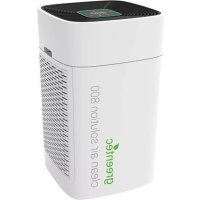
| Product Type | Air Purifier |
| Brand | Greentec |
| Model | 1500 (pureAir 1500) |
| Dimensions (H x W x D) | 6.75" x 6.50" x 7.00" |
| Weight | 3 lb |
| Input Voltage | 100 - 240VAC, 50/60Hz, 2.5A |
| Output Voltage | 15V DC, 3A |
| Power Consumption | 21W |
| Effective Area | Up to 1500 ft² |
| Purification Technologies | PCO Cell, Ionization, Activated Oxygen (O₃) |
| Fan Speeds | Low, Medium, High |
| Purification Levels | 0 (0-250 ft²), 1 (250-500 ft²), 2 (500-1000 ft²), 3 (1000-1500 ft²) |
| Away Mode Duration | 2 hours |
| Filter Types | Mesh, Foam, Honeycomb (in side filter assemblies) |
| Recommended Cleaning Interval | Monthly |
| Purification Plate Cleaning | Every 3 months (soak in water-ammonia solution) |
| PCO Cell Replacement Interval | Yearly |
| Purification Plate Replacement Interval | Every 2-3 years |
| Warranty | 1 Year Manufacturer's Warranty |
| Included Accessories | Remote with battery, Power Cord, DC Adapter, Owner's Manual |
| Safety Features | Automatic shut-off when cover removed; do not block vents |
| Assembly Required | Yes (front grille, filters, PCO cell, purification plate) |
Frequently Asked Questions - 1500 Greentec
User questions about 1500 Greentec
0 question about this device. Answer the ones you know or ask your own.
Ask a new question about this device
Download the instructions for your Air purifier in PDF format for free! Find your manual 1500 - Greentec and take your electronic device back in hand. On this page are published all the documents necessary for the use of your device. 1500 by Greentec.
USER MANUAL 1500 Greentec
natural_image
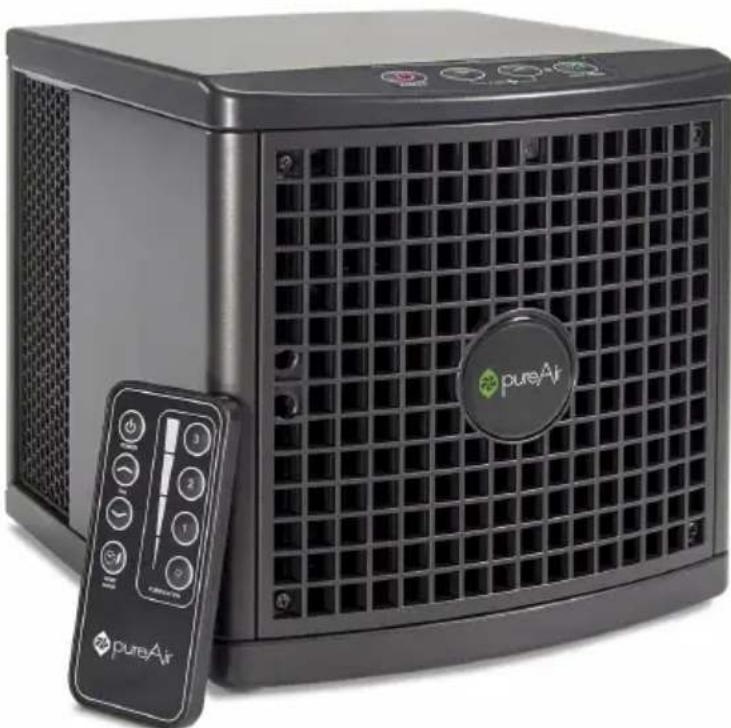
Exterior view of a black square air purifier with grid grille and control panel (no visible text or symbols)Owner's Manual
Welcome
Thank you for your purchase of the pureAir 1500. This air purifier has been designed to provide you a cleaner living space with years of low maintenance operation.
Please read through the usage and service instructions outlined in this owner's manual before operating the unit.
Table of Contents
Warnings 3
Diagrams....4 - 5
Getting Started.... 6
Settings 7
Disassembly/Assembly 8 - 9
Cleaning 10 - 11
Maintenance 12
Troubleshooting 13
Specifications.... 14
Warranty Information....15
Product Contents
1 pureAir 1500 Unit 1 Owner's Manual
1 Power Cord 1 DC Adapter
1 Remote with Battery
Warnings

Do not operate this unit unless it is completely assembled.

Eye damage may result from directly viewing the light produced by the lamp inside this unit for a continuous and extended period of time.

Do not block the ventilation or filters.

Do not use Away Mode in an occupied space.

The unit should be powered OFF and the POWER CORD disconnected whenever cleaning or servicing.

There are no user-serviceable parts inside the unit.

This unit is not intended for outdoor use.
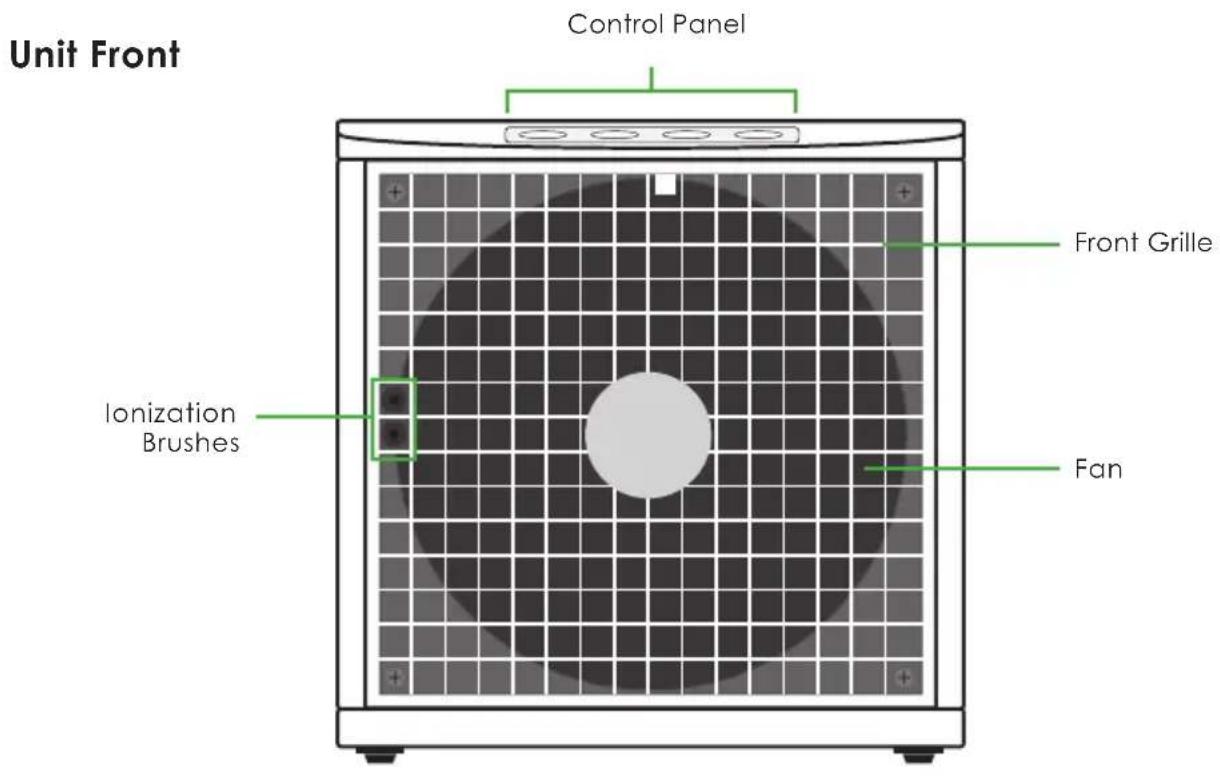
Diagrams
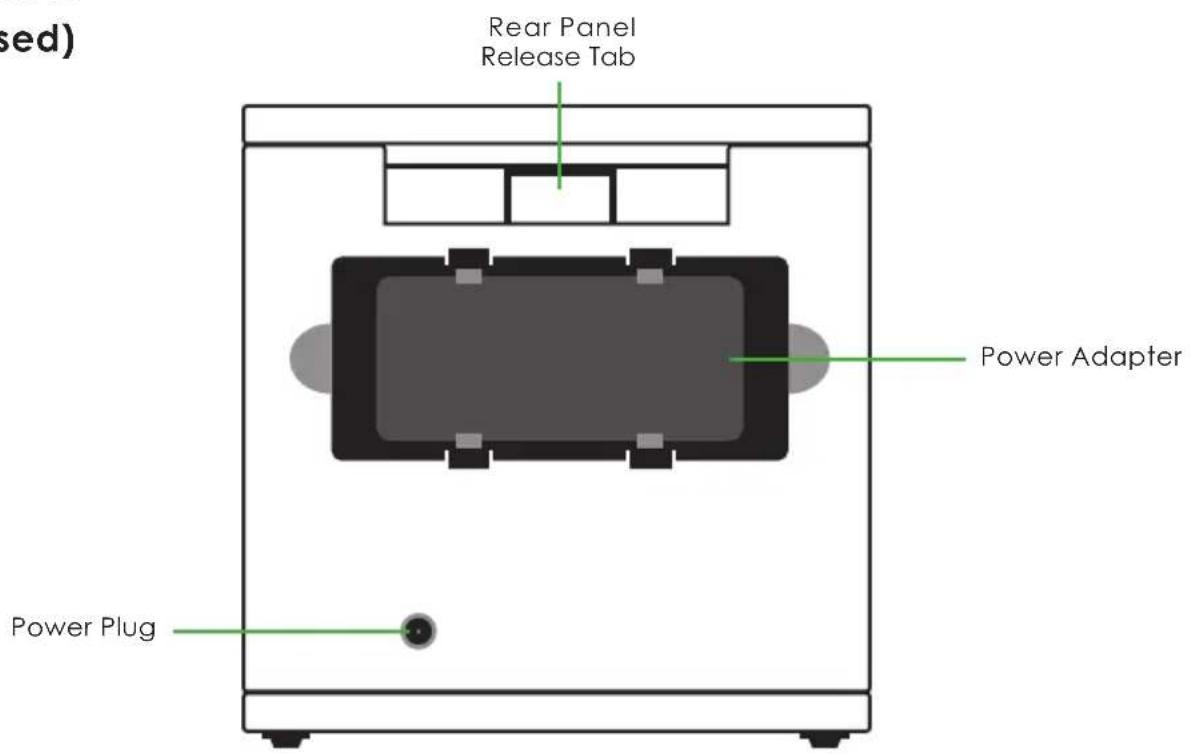
Unit Rear (Closed)
Diagrams
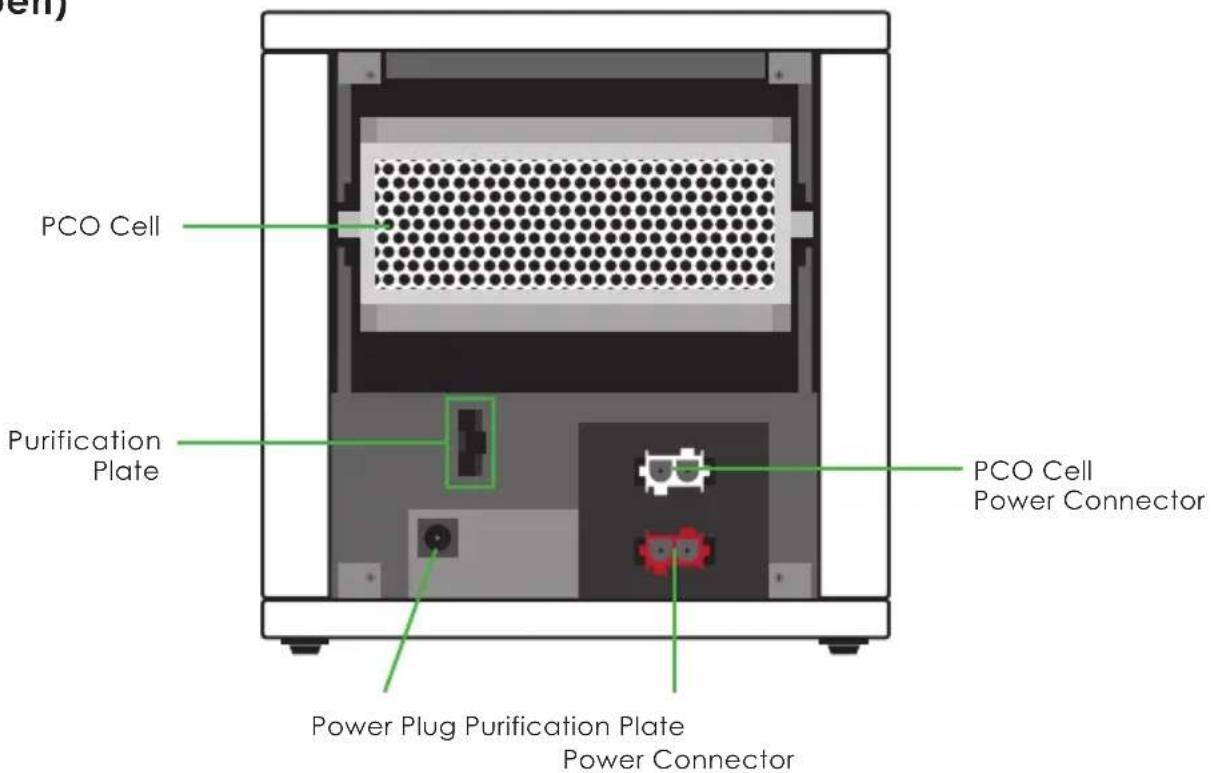
Unit Rear
(Open)
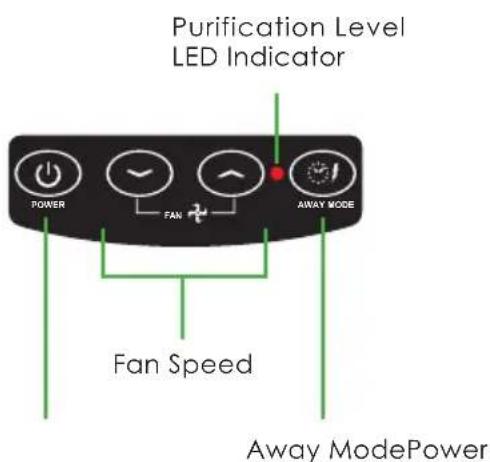
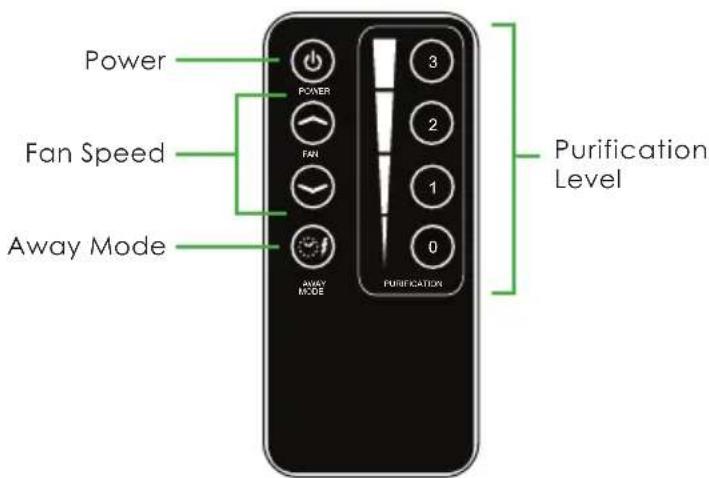
Control Panel Remote
Getting Started
- Remove the UNIT and POWER ADAPTER from the packaging.
- Find a suitable location to place your unit. (Ideal location is an area of the room with good circulation, or near the source of pollution.)
- Plug the POWER ADAPTER into a wall outlet and then plug the other end into the POWER PORT of your unit.
- Place the POWER ADAPTER into the open space in the rear of the unit.
- Press the POWER BUTTON to control to power of your unit.

Your unit will start operating in PURIFICATION LEVEL 0/FAN SPEED HIGH.
natural_image
Exterior view of a black square air purifier with a circular logo and control panel (no visible text or symbols on the device body)Settings
There are multiple ways to change the output of your unit. If you need the unit to be quieter, change the Fan Speed, if you need a larger or smaller area covered, change the Purification Level, and if you need a tough odor removed, use Away Mode.
Fan Speed
Three fan speeds are available (Low, Medium, High) and are adjusted with the FAN UP/DOWN buttons on both the machine's CONTROL PANEL as well as with the REMOTE.
Purification Level
Purification level is controlled on the REMOTE and adjusts the output of Activated Oxygen ( O_3 ). Four levels are available and will be signified by varying colors on the CONTROL PANEL.
LEVEL 0 (0 - 250ft²): LED is OFF.

(Level 0 uses only PCO and Ionization Technology.)
LEVEL 1 (250 - 500ft ^2 ): LED is GREEN
LEVEL 2 (500 - 1000ft²): LED is YELLOW
LEVEL 3 (1000 - 1500ff ^2 ): LED is RED
Away Mode
Away Mode is used to treat the toughest odors in your space with higher levels of Activated Oxygen and Ionization. To activate, press the AWAY MODE BUTTON on the CONTROL PANEL or REMOTE.

DO NOT use Away Mode in an occupied space. Prolonged exposure to Activated Oxygen may result in temporary respiratory or eye irritation.
Away Mode is active for 2 Hours before reverting back to previous settings.
Disassembly

Turn the unit OFF and remove the POWER CORD before performing any cleaning or maintenance to prevent injury.

Refer to the Diagram Section (Pg. 4-5) for further illustrations of part names and locations.
Rear Cover
After unplugging and removing the POWER CORD and POWER ADAPTER, press down on the tab above the POWER ADAPTER space and then pull back on the REAR COVER.
Side Filters
After removing the REAR COVER, slide each of the FILTER ASSEMBLIES straight out. These separate and contain 3 different filter pieces.
Purification Plate
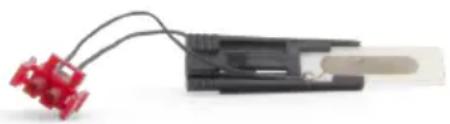
(a) Locate the PURIFICATION PLATE CONNECTOR (Red Connector Piece) on the right side of the unit. Squeeze the tabs on the left and right and gently pull free. (b) Grasp the PURIFICATION PLATE, press the tabs towards the middle and slide it out of its slot.
PCO Cell
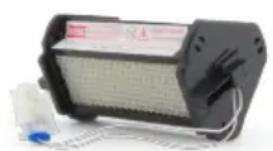
(a) Locate the PCO CELL CONNECTOR (White Connector Piece) on the right side of the unit. Squeeze the tabs on the left and right and gently pull free. (b) Grasp the PCO CELL, and gently pull back to remove it from the slot.
Front Grille
Locate and remove the four FRONT GRILLE SCREWS in the four corners of the FRONT GRILLE using a #1 Phillips Head Screwdriver. Place the screws where you will find them again easily. Remove the FRONT GRILLE carefully to ensure the IONIZATION BRUSH is not damaged.
Assembly

All parts must be properly installed before operating the unit. Failure to do so may damage the unit.
Front Grille
Replace the FRONT GRILLE and the four FRONT GRILLE SCREWS using a Phillips Head Screwdriver. Be careful to not over-tighten the screws or damage the IONIZATION BRUSH.
PCO Cell
(a) Slide the PCO CELL back into the upper slot with the warning at the top, facing out. (b) Plug the PCO CELL CONNECTOR back into the WHITE CONNECTOR SLOT.
Purification Plate
(a) Slide the PURIFICATION PLATE back into the small slot with the larger silver side facing to the left. (b) Plug the PURIFICATION PLATE CONNECTOR back into the RED CONNECTOR SLOT.
Side Filters
Ensure that the FILTER ASSEMBLIES are snapped together correctly, then replace the SIDE FILTERS in each of the side slots with the rounded edges facing outwards.
Rear Cover
Place the REAR COVER bottom edge into the hinge slot then push forwards until the tab clicks.
Power Cord
Insert the POWER ADAPTER into the rear slot and then replace the POWER CORD in the POWER PORT.
Cleaning
For proper operation, the unit should be cleaned at least once per month.

Turn the unit OFF and remove the POWER CORD before performing any cleaning or maintenance to prevent injury.

Review the Disassembly and Assembly Section (Pg. 8-9) before performing and cleaning and maintenance to prevent damage to the unit.
Unit Exterior
Wipe down the exterior with a damp cloth or use compressed air or a vacuum cleaner to remove dust. A non-abrasive cleaner may be used on the surfaces of the exterior.
Filter Assembly
Clean water or compressed air may be passed through the entire filter assemblies or the individual parts when disassembled. To disassemble the FILTER ASSEMBLIES grasp the sides of the rim and carefully separate the back piece from the housing. The three filters [mesh, foam, honeycomb] can then be removed and cleaned separately. If using water you must allow the filters to fully dry before reassembly. When reassembling, the HONEYCOMB FILTER goes in first, then the FOAM FILTER, and finally the thin MESH FILTER. Then simply reattach the rear piece to the housing.
Cleaning
Unit Interior
Using a damp cloth, a clear alcohol based cleaner, or compressed air/vacuum cleaner carefully clean the walls and components inside of the unit, after completing the DISASSEMBLY procedures.
PCO Cell
Using compressed air or a vacuum blow/suck the dust out of the PCO Cell. Do not use any liquid to clean the PCO Cell.
Purification Plate
The Purification Plate only needs cleaning every 3 months, unless it is used in a harsh environment (Smoking Area, Kitchen, Pet Area).
Using a 50/50 mix of warm water and clear ammonia, soak the PURIFICATION PLATE from 1-8 hours. Using a soft-bristle brush, scrub the metal center. Rinse thoroughly and allow to dry completely before reinstalling.

All parts must be properly installed before operating the unit. Failure to do so may damage the unit.
Maintenance

Turn the unit OFF and remove the POWER CORD before performing any cleaning or maintenance to prevent injury.

Review the Disassembly and Assembly Section (Pg. 8-9) before performing and cleaning and maintenance to prevent damage to the unit.
General Maintenance
Your unit should need little to no maintenance, besides an occasional PCO Cell or Purification Plate Replacement, but sometimes problems arise. If you can't find a resolution in the Troubleshooting Section (Pg. 13) contact GreenTech Environmental for further instructions. (www.GreenTechEnv.com)
PCO Cell Replacement
The PCO CELL does wear out and should be replaced yearly to ensure a high level of efficient cleaning. A replacement can be bought through your Dealer or GreenTech Environmental. (www.GreenTechEnv.com)
Purification Plate Replacement
The PURIFICATION PLATE does not wear out as often and will only need to be replaced every 2-3 years of constant use; earlier if you have a harsh environment. A replacement can be bought through your Dealer or GreenTech Environmental. (www.GreenTechEnv.com)
natural_image
Close-up of a black plastic electronic device with red connectors and wires (no visible text or symbols)Purification Plate PCO Cell
natural_image
Electronic device with grid and wiring, no visible text or symbolsTroubleshooting
Unit Fails to Turn On
- Check to make sure that the POWER PLUG, POWER CORD, and POWER ADAPTER are all properly connected.
- Verify that the POWER BUTTON has been activated on the CONTROL PANEL
If further problems persist, contact GreenTech Environmental (www.GreenTechEnv.com) for further instructions or replacement.
Unit is Operating in High or Away Mode, but no Noticeable Purification is Being Produced
- Ensure that the PURIFICATION PLATE is clean and that its CONNECTOR is fully inserted.
- View the unit operating in a dark room through the FRONT GRILLE. The PURIFICATION PLATE should have a dim purple glow.
If further problems persist, contact GreenTech Environmental (www.GreenTechEnv.com) for further instructions or replacement.
The Purification Plate Generates an Electrical Arc, Arcing Noise, or Burning Odor
The PURIFICATION PLATE is damaged and must be replaced. Contact GreenTech Environmental for replacement. (www.GreenTechEnv.com)
The PCO Cell is Not Lighting Up
- Ensure that the PCO CELL CONNECTOR is properly inserted into its slot.
If further problems persist, contact GreenTech Environmental (www.GreenTechEnv.com) for further instructions or replacement.
Ionization Needle Creates an Electrical Arc
The IONIZATION NEEDLE needs to be cleaned. Be sure to complete all of the cleaning procedures in the Cleaning Section (Pg. 10-11) every 30 days.
Fan Does Not Operate Properly
- Try adjusting the FAN SPEED using the CONTROL PANEL or REMOTE CONTROL.
- Remove the FRONT GRILLE and ensure there are no obstructions to the movement of the FAN. Clean it thoroughly and also clean the mount that it sits on.
If further problems persist, contact GreenTech Environmental (www.GreenTechEnv.com) for further instructions or replacement.
Specifications
Input Voltage ..... 100 - 240VAC | 50/60Hz | 2.5A
Output Voltage 15V DC 3A
Power Consumption....21W
Unit Dimensions....6.75" H x 6.50" W x 7.00"" D
Unit Weight 3 lb
Activated Oxygen ( O_3 ) Output
Purification Plate 25 - 360 mg/hr
PCO Cell .... < .02 ppm Ozone
Ionization Output ....6 KV DC Needle Ion Generator
24 - 30 KV, 20 - 30 Khz Ion Generation Pulsator
Effective Area.... Up to 1500 ft ^2
Warranty....1 Year Manufacturer's Warranty
Warranty Information
Your pureAir 1500 Air Purifier is warranted to be free from all defects in material and workmanship in normal household use for a period of 1 Year from date of purchase. The warranty is granted only to the original purchaser and members of his or her immediate household. The warranty is subject to the following provisions. Any damages or malfunctions caused by negligence, abuse, or use not in accordance with the Owner's Manual are not covered by this warranty. Likewise, any defects or damages caused by unauthorized service are not covered. GreenTech Environmental will, at its option, repair or replace a defective Air Purifier that is covered by this warranty. As a matter of warranty policy, GreenTech Environmental will not refund the customer's purchase price. To obtain warranty service you must return the defective Air Purifier along with proof of purchase to the pureAir Authorized Warranty Station. All transportation charges on parts, or units, submitted under this Warranty shall be borne by purchaser. Unless this Warranty is expressly renewed or extended by GreenTech Environmental, any repaired or replaced part of unit shall be warranted to the original purchaser only for the length of the unexpired portion of the original warranty.
FURTHER LIMITATIONS AND EXCLUSIONS ARE AS FOLLOWS:
Any warranty that may be implied in connection with your purchase or use of the Air Purifier, including any warranty of merchantability or any warranty for Fitness For A Particular Purpose is limited to the duration of this warranty. Some states do not allow limitations on how long an implied warranty lasts, so the above limitations may not apply to you.
Your relief for the breach of this warranty is limited to the relief expressly provided above. In no event shall GreenTech Environmental be liable for any consequential or incidental damages you may incur in connection with your purchase or use of the Air Purifier. Some states do not allow the exclusion or limitation of incidental or consequential damages, so the above limitation or exclusion may not apply to you. This warranty gives you specific legal rights, and you may also have other rights which vary from state to state.
REGISTRATION
Please register your new pureAir product within 10 days of purchase by visiting:
www.GreenTechEnv.com/Warranty

- Welcome
- Table of Contents
- Product Contents
- Warnings
- Diagrams
- Getting Started
- Settings
- Fan Speed
- Purification Level
- Away Mode
- Disassembly
- Rear Cover
- Side Filters
- Purification Plate
- PCO Cell
- Front Grille
- Assembly
- Power Cord
- Cleaning
- Unit Exterior
- Filter Assembly
- Unit Interior
- Maintenance
- General Maintenance
- PCO Cell Replacement
- Purification Plate Replacement
- Troubleshooting
- Unit Fails to Turn On
- Unit is Operating in High or Away Mode, but no Noticeable Purification is Being Produced
- The Purification Plate Generates an Electrical Arc, Arcing Noise, or Burning Odor
- The PCO Cell is Not Lighting Up
- Ionization Needle Creates an Electrical Arc
- Fan Does Not Operate Properly
- Specifications
- Warranty Information
- FURTHER LIMITATIONS AND EXCLUSIONS ARE AS FOLLOWS:
- REGISTRATION
Brand : Greentec
Model : 1500
Category : Air purifier