ManualGo.com
BIH07471EV - Cooker Atag - Free user manual and instructions
Find the device manual for free BIH07471EV Atag in PDF.



| Technical Specifications | Atag BIH07471EV cooker with convection oven, 4 induction hobs, energy class A. |
|---|---|
| Dimensions | Width: 60 cm, Height: 85 cm, Depth: 60 cm. |
| Oven Capacity | Capacity of 70 liters. |
| Cooking Functions | Fan oven, grill, traditional cooking. |
| Usage | Easy to use with an intuitive control panel and adjustment knobs. |
| Maintenance | Easy cleaning thanks to the pyrolytic self-cleaning function. |
| Safety | Child safety system, overheating protection. |
| Energy Consumption | Optimized electrical consumption to reduce costs. |
| Included Accessories | Cooking grid, roasting pan. |
| Warranty | 2 years manufacturer warranty. |
Frequently Asked Questions - BIH07471EV Atag
Download the instructions for your Cooker in PDF format for free! Find your manual BIH07471EV - Atag and take your electronic device back in hand. On this page are published all the documents necessary for the use of your device. BIH07471EV by Atag.
USER MANUAL BIH07471EV Atag
3. Bridge induction cooking zone 19 x 21 cm / 2,1 kW - 3,0 kW (boost)
3. Bridge induction cooking zone 19 x 21 cm / 2,1 kW - 3,0 kW (boost)
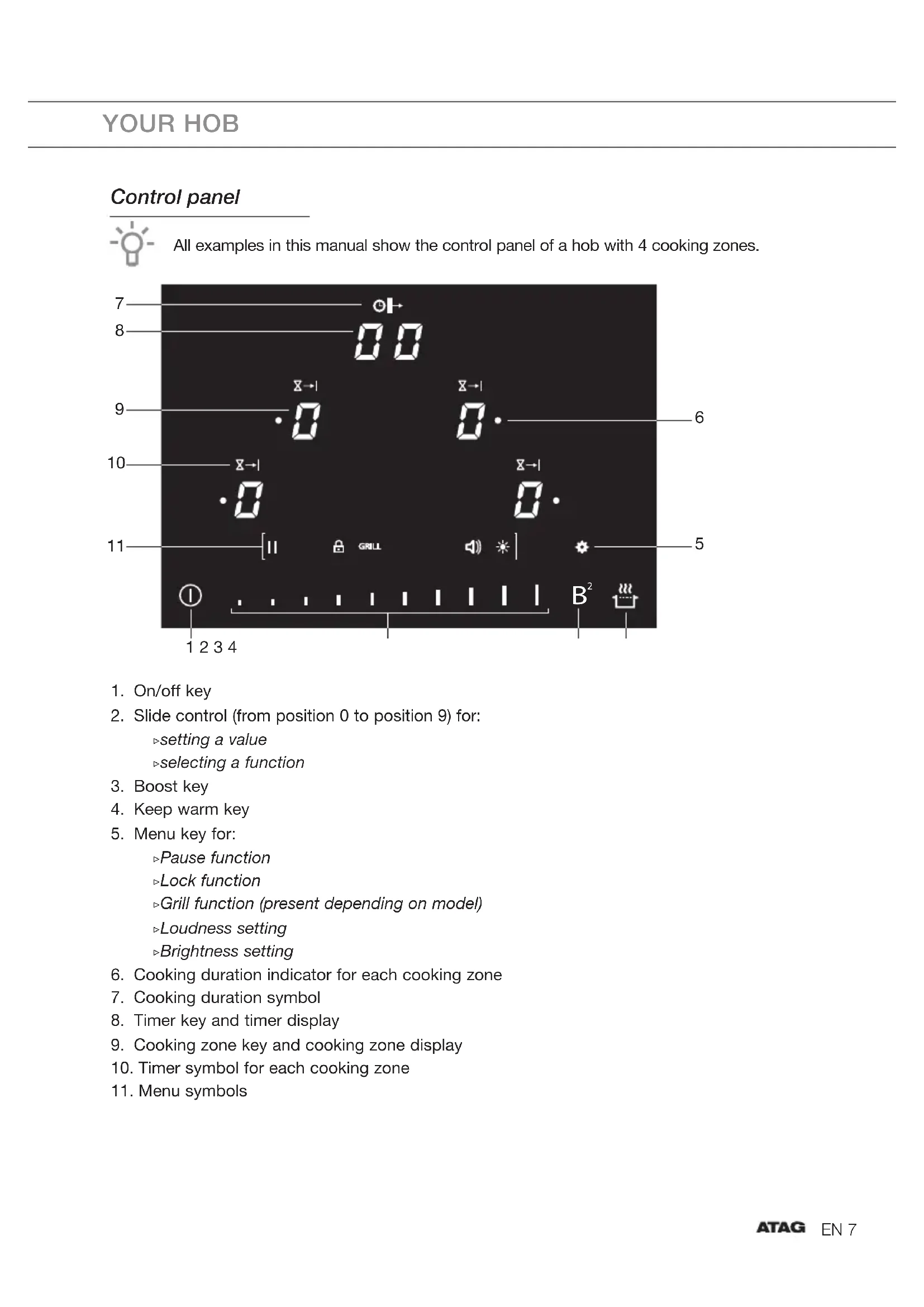
YOUR HOBEN 7 YOUR HOB Control panel All examples in this manual show the control panel of a hob with 4 cooking zones.
2. Slide control (from position 0 to position 9) for:
6. Cooking duration indicator for each cooking zone
9. Cooking zone key and cooking zone display
10. Timer symbol for each cooking zone
5EN 8 SAFETY Before use, read the separate safety instructions first! At first power on the hob the boost key will flash. The hob is in the settings mode. Let the power limiter set by an installer (see chapter ‘Installation’) or wait 2 minutes. After 2 minutes the hob is ready to be used. Temperature safety A sensor continuously measures the temperature of certain parts of the hob. Every cooking zone is equipped with a sensor that measures the temperature of the bottom of the pan to avoid any risk of overheating when a pan boils dry. In case of temperatures rising too high, the power is reduced automatically, or the hob switches off automatically. Cooking-time limiter The cooking-time limiter is a safety function of your cooking appliance. It will operate if you forget to switch off your hob. Depending on the setting you have chosen, the cooking time will be limited as follows: Cooking level Max. operating time Cooking level Max. operating time 1 516 minutes 6 138 minutes 2 402 minutes 7 138 minutes 3 318 minutes 8 108 minutes 4 258 minutes 9 90 minutes 5 210 minutes P 5 minutes (then switches back to level 9) Healthy cooking Burning point of different types of oil To ensure your food is fried as healthily as possible, it’s recommended to choose the type of oil according to the frying temperature. Each oil has a different burning point at which toxic gasses are released. The below table shows the burning points for various types of oil. Oil Smoke point °C Oil Smoke point °C Extra virgin olive oil 160 °C Sunflower oil 227 °C Butter / Coconut oil 177 °C Corn oil / Peanut oil 232 °C Canola oil 204 °C Olive oil 242 °C Virgin olive oil 216 °C Rice oil 255 °CEN 9 USE Induction noises A ticking sound
- This is caused by the capacity limiter on the left and right zones. Ticking can also occur at lower settings. Pans are making noise
- Pans can make some noise during cooking. This is caused by the energy flowing from the hob to the pan. At high settings this is perfectly normal for some pans. It will not damage either the pans or the hob. The fan is making noise
- To enlarge the lifespan of the electronics, the appliance is equipped with fans. If you use the appliance intense, the fan is activated to cool down the appliance and you will hear abuzzing sound. The fan runs on for several minutes after the hob has been switched off. Pans
- Always place a pan in the middle of a cooking zone.
- Induction cooking requires a particular quality of pan.
- Only use pans that are suitable for electric and induction cooking with: ▷ a thick base (minimum 2.25 mm); ▷ a clean and flat base. Pans that have already been used for cooking on a gas hob are no longer suitable for use on an induction hob. You can check for yourself whether your pans are suitable using a magnet. A pan is suitable if the base of the pan is attracted by the magnet. Suitable Unsuitable Special stainless-steel pans Earthenware Class Induction Stainless-steel Hard-wearing enamelled pans Porcelain Enamelled cast-iron pans Copper / Aluminium / Plastic Be careful with enamelled sheet-steel pans! The enamel may chip (the enamel comes loose from the steel), if you switch the hob on at a high setting when the pan is (too) dry. The base of the pan may warp - due, for example, to overheating or to the use of too high a power level.EN 10 USE
- Never use pans with a misshapen base. A hollow or rounded base can interfere with the operation of the overheating protection, so that the appliance becomes too hot. This may lead to the glass top cracking and the pan base melting.
- Damage arising from the use of unsuitable pans or from boiling dry is excluded from the guarantee. Minimum pan diameter
- The diameter of the bottom of the pan must be at least: ▷ 10 cm for zone ø 16 and ø 17.5 ▷ 11 cm for zone 21.5 cm and zone 19 x 21 cm ▷ 13 cm for zone ø 26.5 cm ▷ 23 cm for connected Bridge zones
- You will achieve the best results by using a pan with the same diameter as the zone. If a pan is too small the cooking zone will not work. Pan move function The hob has a pan move function. All settings that belong to a cooking zone (power level, timer etc.) can be moved to another cooking zone. To move the settings; touch and hold the cooking zone key for at least 3 seconds. A single beep sounds. Touch the cooking zone key of which you want to move the settings to. Put the pan on the new selected cooking zone. We recommend that you lift pans and not move them over the hob. You can also swap two pans at the same time. Make sure the bottom of the pan and the surface of the cooking zone are clean and dry. Pan detection The cooking zone automatically detects a suitable pan placed on a cooking zone. The cooking zone display lights up. A power level can be set.
- If there is no (suitable) pan on a cooking zone, the pan detection symbol shows when you set a power level. The symbol disappears when a suitable pan is put on the cooking zone.
- If you remove a pan from the cooking zone during cooking, the pan detection symbol shows. The cooking zone switches off. The symbol disappears when you put the pan back. The cooking zone switches on again with the power level set before.EN 11 Automatic connection of bridge induction cooking zones This connection is made automatically:
- when you switch on the hob and there is already cookware on the bridge induction cooking zones;
- when you put cookware (for instance a grill plate) on the bridge induction cooking zones when the hob is switched on. A connection symbol appears on the rear cooking zone. Grill plates The hob has a Grill function (depending on the model) for using a grill plate. The function keeps the grill plate at an ideal temperature for grilling. Power level setting The cooking zones have 9 levels. Beside it there is a level ‘boost’ (P). If you have switched on the hob the required cooking zone can be chosen within the next 5 seconds. Set the power level by touching the slide control. At the first touch, the level is set according to the part of the slide control that you touch. By sliding along the control, the power level setting is changing. By sliding to the right, the level increases, while sliding to the left decreases the level. When you move your finger away from the slide control, the cooking zone starts to operate at the level set. Boost function You can use the boost function to cook at the highest power level during a short period of time (max. 5 minutes). After the maximum boost time the power will be reduced to setting 9. Power limiter The hob is equipped with a power limiter. If the total power of operating cooking zones exceeds the maximum available amount of power, the power is automatically reduced. The display of the cooking zone who is being reduced in its power is first flashing; the level is then automatically reduced to the highest available power. Keep warm function Use this function to keep food warm directly after cooking (at approximately 70 °C).
- This will avoid liquids overflowing and burning on the bottom of the pan.
- This function can be started independently on all cooking zones.
- When the pan is removed from the cooking zone, the “Keep warm” function remains active for approximately 10 minutes. The maximum duration of “keeping warm” is 2 hours. USEEN 12 USE Automatic heat-up This function heats the cooking zone at level 9 in order to bring it rapidly up to the required temperature. After a given time interval, the power level returns to the established setting. This function is available for power level 1 to 8. Power level Heat-up time (seconds)
The menu functions The following menu functions are available:
- Pause function ▷ This function stops the entire hob’s cooking activity temporarily and allows restarting with the same settings.
- Locking function ▷ To avoid accidentally activating the setting of the cooking zones, in particular during cleaning, the control panel can be locked (with exception of the On/off key).
- Grill function (present depending on model) ▷ This function allows the optimal use of a grill plate with connected cooking zones and using appropriate power.
- Loudness setting ▷ Adjust the volume of the audio signal (see chapter ‘Settings’).
- Brightness setting ▷ Adjust the brightness level of the display (see chapter ‘Settings’).EN 13 Indications in the display In display Status Power level ‘0’ for a cooking zone Power level that is set for a cooking zone; 1 = low / 9 = high Boost function active No (suitable) pan on cooking zone (pan detection symbol) Bridge cooking zones are connected (present depending on model). Automatic heat-up function is activated Grill function is activated (present depending on model) Keep warm function is activated; maintain automatically at approximately 70°C Pause function activated; the hob is in pause mode Locking function is activated; the control panel is locked Residual heat indicator; The hob has a residual heat indicator for each cooking zone to show those which are still hot. Although the hob is switched off, the indicator ‘H’ will remain on for as long as the cooking zone is hot! Avoid touching them when this indicator is lit. Danger! Risk of burns. Fault code; See chapter ‘Troubleshooting’ Timer use The timer can be used in 3 different ways:
- As a minute minder (count-down timer) — after the set time has elapsed, an alarm will sound. ▷ The minute minder can be set for a maximum of 99 minutes. ▷ The minute minder can be used independently of whether the hob is operating. ▷ The minute minder can only be switched off or adjusted when the hob is switched on. ▷ Touch the timer key to stop the alarm.
- As a cooking timer — the timer is connected to an active cooking zone. After the set time has elapsed, the cooking zone will switch off automatically and an alarm will sound. ▷ A cooking timer can be set for each active cooking zone and can be set for a maximum of 99 minutes. ▷ Touch the timer key to stop the alarm.
- As a cooking duration counter (count-up timer) — shows the cooking time duration. ▷ The cooking duration counter is connected to a cooking zone. USEEN 14 Cooking settings Because the settings depend on the quantity and composition of the contents of the pan, the table below is intended as a guideline only. Use setting ‘boost’ to:
- bring the food or liquid to the boil quickly;
- wok. Use setting 9 to:
- fry boiled potatoes;
- deep fry foods. Use setting 7 and 8 to:
- fry thick slices of breaded meat;
- fry thin slices of (breaded) meat. Use setting 4-6 to:
- complete the cooking of large quantities;
- defrost hard vegetables;
- fry thick slices of breaded meat. Use settings 1-3 to:
- melt cheese. USEEN 15 Start cooking Use of the touch keys and slide control Place the tip of your finger flat on a key or the slide control to achieve the best results. You do not have to apply any pressure. The touch keys only react to the light pressure of a fingertip. Do not operate the controls with any other objects. Each key or slide control activation is followed by an audio signal.
1. Touch and hold the On/off key until you hear an audio signal.
▷ All cooking zone displays show ‘0’ indicating that the induction hob has entered the state of standby mode.
2. Place a suitable pan on the cooking zone.
Make sure the bottom of the pan and the surface of the cooking zone are clean and dry.
3. The cooking zone automatically detects the pan. To select another cooking zone, touch the
cooking zone key of the desired cooking zone or place a second pan on a cooking zone. ▷ A single beep sounds. ▷ The ‘0’ of the selected cooking zone will light up clearly for approx. 3 seconds.
4. Within 3 seconds, set the power level by touching the slide control or the boost key.
▷ The cooking zone starts automatically at the level that has been set. ▷ Set a higher or lower power level with the slide control. ▷ After 5 seconds the slide control will switch off.
5. Move the pans, if desired, over the hob from one cooking zone to another cooking zone
(while maintaining all settings). Consult chapter ‘Use/Pan move function’. When the pan detection symbol appears in the display:
- you have not placed a pan on the correct cooking zone;
- the pan you’re using is not suitable for induction cooking;
- the pan is too small or not properly centred on the cooking zone. ▷ The cooking zone will not work unless there is a suitable pan on the cooking zone. If the hob is not used for 20 seconds, it will shut off automatically. Finish cooking
1. Set the power level to ‘0’ to turn off the cooking zone.
2. Turn the induction hob off by touching the On/off key.
Symbol H will appear in the display of the cooking zone which is too hot to touch. The symbol disappears when the surface has cooled down to a safe temperature. It can also be used as an energy saving function; if you want to heat other pans, use the cooking zone that is still hot. OPERATIONEN 17 Switch on the automatic heat-up function
1. Switch on the hob and select the desired cooking zone .
2. Touch and hold the slide control for at least 3 seconds at the desired level.
▷ An ‘A’ appears in the display alternating with the selected power level. When the automatic heat-up time has expired, the cooking zone will switch automatically to the selected level which will show permanently on the display.
3. To stop the automatic heat-up function, select the cooking zone and touch the slide control.
Switch on the keep warm function
1. Switch on the hob and put a suitable pan on one of the cooking zones.
2. Touch the cooking zone key of the desired cooking zone.
▷ The ‘0’ of the selected cooking zone will light up clearly and a single beep sound.
3. Touch the keep warm key.
▷ The keep warm symbol ‘u’ appears in the display. The keep warm function is selected.
4. Set the power level to ‘0’ or touch the keep warm key to switch off the keep warm function.
Connecting the Bridge induction cooking zones (present depending on model) Two Bridge induction cooking zones can be connected to each other. This creates one large zone that can be used, for example, with a grill plate or a large fish pan on the same power. The pan must be large enough to cover the centres of the front and rear bridge induction cooking zone. This connection is made automatically if the hob detects cookware on both bridge induction cooking zones. If you want to use two separate pans, put one pan on the front cooking zone and set a power level. Then put the second pan on the rear cooking zone and set a power level for the rear zone. OPERATIONEN 18 Automatic connection of bridge induction cooking zones
1. Switch on the hob and put a large pan on two bridge induction cooking zones.
▷ The rear zone display shows a connection symbol to indicate that the two cooking zones are connected.
2. Use the slide control to set the desired cooking power for the two connected cooking
3. To change the connected zone’s cooking power later, first touch the cooking zone key of the
front cooking zone. Manual connection of bridge induction cooking zones
1. Simultaneously touch the right-hand side cooking zone keys.
▷ The rear cooking zone display shows a connection symbol to indicate that the two cooking zones are connected.
Disconnection of bridge induction cooking zones
1. Simultaneously touch the cooking zone keys of the connected cooking zones.
▷ The connection symbol will disappear on the rear cooking zone display. Timer control Using the minute minder (count-down timer) The hob is switched on and no cooking zone is selected.
1. Touch the timer key to switch on the minute minder.
2. Use the slide control to set the desired time (from 0 to 99 minutes).
▷ First set a value in the left display and wait until the number no longer flashes. OPERATIONEN 19 ▷ Set the value ‘0’ in the left display if you want to set a time less then 10 minutes. ▷ The right display start flashing; set a value in the right display. ▷ When the time is set, it will begin to countdown immediately. ▷ The timer display will show the remaining time. ▷ The last minute will be displayed in seconds. ▷ The alarm beeps after the set time has passed.
3. Touch the timer key to stop the alarm.
▷ The alarm stops automatically after 2 minutes. Touch the timer key and then touch the slide control at the position ‘0’ to switch off the minute minder before the time has passed. Using the cooking timer
1. Select the desired cooking zone.
2. Touch the timer key.
▷ The timer symbol above the relevant cooking zone appears.
3. Use the slide control to set the desired time (from 0 to 99 minutes).
▷ First set a value in the left display and wait until the number no longer flashes and the right display start flashing. Then set a value in the right display. ▷ If you want to set a time less then 10 minutes, touch the timer key again. ▷ The selected cooking zone will switch off automatically once the set time has elapsed. ▷ The alarm beeps after the set time has passed.
4. Touch the timer key to stop the alarm.
▷ The alarm stops automatically after 30 seconds. Changing the pre-set cooking time The cooking time can be changed anytime during the operation.
1. Touch the cooking zone key to select the zone of which you want to adjust the cooking
timer. ▷ A zone connected to the cooking timer is identified by the timer symbol above the cooking zone display.
2. Touch the timer key.
3. Use the slide control to change the time.
OPERATIONEN 20 Checking the remaining cooking time
1. Touch the cooking zone key to select the zone of which you want to see the remaining time.
▷ A zone connected to the cooking timer is identified by the timer symbol above the cooking zone display. ▷ The timer will display the remaining time of the selected cooking zone. ▷ During the last minute of countdown, remaining time will be displayed in seconds. Switching off the cooking timer If you want to switch off the cooking timer before the end of pre-set time:
1. Touch the cooking zone key to select the zone of which you want to switch off the cooking
timer. ▷ A zone connected to the cooking timer is identified by the timer symbol above the cooking zone display.
2. Touch the timer key.
3. Touch the slide control at the position ‘0’ to set the time to ‘00’.
▷ The timer symbol disappears. Using the cooking duration counter (count-up timer)
1. Select the desired cooking zone.
2. Touch and hold the timer key for at least 3 seconds until the cooking duration indicator next
to the power display appears. ▷ When selecting the cooking zone, the cooking duration symbol appears above the timer display. The cooking zone duration time is visible. ▷ The timer display shows the active cooking duration time of the selected cooking zone in ascending order.
3. To stop the cooking duration counter, select the cooking zone and touch the timer key
twice. ▷ After a few seconds the indicator, the symbols and the flashing timer display are disappeared. ▷ You can also switch off the cooking zone to stop the cooking duration counter. OPERATIONEN 21 Operating the menu functions Pause cooking This function stops the cooking activity temporarily (max. 20 minutes); timers and counters are also paused.
1. Touch the menu key.
▷ The menu options are displayed.
2. Touch the slide control at the position of the pause symbol.
3. Touch the slide control again at the position of the pause symbol to turn off the pause
function. ▷ The hob will automatically switch off after 20 minutes if the pause function is not switched off in the meantime. Locking function
3. Touch and hold the slide control at the position of the locking symbol until symbol ‘L’
appears in all displays.
The hob is now locked. After 5 seconds, the hob will switch off automatically.
4. To unlock; switch on the hob and touch the menu key.
5. Touch and hold for at least 8 seconds the slide control at the position of the locking symbol
until symbol ‘L’ disappears. ▷ The locking function is now de-activated. OPERATIONEN 22 Switch on the grill function (present depending on model)
1. Switch on the hob and put a grill plate on two bridge induction cooking zones.
▷ The rear cooking zone display shows a connection symbol.
2. Select the front cooking zone.
▷ The grill symbol shows on the front cooking zone display.
5. Set a power level for the grill by touching the slider.
▷ The grill function is active.
6. To switch off the grill function, simultaneously touch the cooking zone keys of the connected
cooking zones. ▷ To switch off the grill function, you can also select the front cooking zone and touch the menu key. Then touch the slide control at the position ‘Grill’. The grill symbol and the connect symbol disappear. ▷ The grill function is now de-activated. Recall function If the hob was switched off accidentally with the On/off key, all settings can be restored using the recall function.
1. Touch the On/off key within 5 seconds.
▷ The pause symbol is flashing.
2. Touch the slide control within 6 seconds at the position of the pause symbol.
▷ The previous settings are active again. OPERATIONEN 23 SETTINGS Setting the audio signal
1. Touch the menu key.
▷ The menu options are displayed.
2. Touch the slide control at the position of the loudspeaker symbol.
▷ The slide control shows the loudness setting.
3. Set the desired loudness setting with the slide control.
4. Touch the menu key to confirm.
Setting the brightness
1. Touch the menu key.
▷ The menu options are displayed.
2. Touch the slide control at the position of the brightness symbol.
▷ The slide control shows the brightness level.
3. Set the desired brightness with the slide control.
Power limiter Setting the power limiter should only be carried out by a registered and qualified installer. Please read the safety regulations and the installation instructions carefully. The hob is equipped with a power limiter. If the total power of operating cooking zones exceeds the maximum available amount of power, the power is automatically reduced. The display of the cooking zone who is being reduced in its power is first flashing; the level is then automatically reduced to the highest available power.
EV: ▷ The limiter is set at 7400 W by the factory, but it is possible to change it to 700 W, 1400 W, 2300 W, 2800 W, 3000 W, 3700 W, 4600 W or 6000 W.
EV: ▷ The limiter is set at 7400 W by the factory, but it is possible to change it to 1400 W, 2300 W, 3000 W, 3700 W, 4600 W, 6000 W or 10400 W. Power limiter configuration Make sure there are no pots or pans on the hob before you start!
1. Disconnect the appliance from the main power supply by removing the power connector
from the socket, by removing the fuse or turning the circuit breaker off.
2. Reconnect the appliance to the power supply.
▷ The boost key is flashing.
- Perform, within 2 minutes after reconnecting the hob to the power supply, the following steps.
- Make sure all cooking zones are switched off. INSTALLATIONEN 25
3. Touch and hold the boost key.
4. Then, touch each cooking zone key counterclockwise (start with the cooking zone key on
5. Release the boost key when you hear an audio signal.
▷ “C” is flashing alternately with “0” on the cooking zone display on the rear left. ▷ The configuration value appears in the cooking zone display on the front left.
6. Touch the cooking zone key on the rear left and choose “8” by using the slide control.
▷ “C” is flashing alternately with “8” on the cooking zone display on the rear left.
7. Touch the cooking zone key on the front left and select the power limitation wanted with the
8. Then, touch and hold the On/off key until all the display segments disappear.
▷ The hob is now ready for use with the selected power limiter active. INSTALLATIONEN 26 Cleaning Set the locking function before you start cleaning the hob. We recommend that you clean the appliance after each use. This prevents that over cooked food can damage the glass surface. Daily cleaning
1. Use a damp cloth and a mild cleaning agent (washing-up liquid) to clean the appliance.
2. Dry the appliance with a paper towel or a cloth.
Heavily polluted glass
1. Immediately remove any food remains, burned grease, sugar or stubborn stains from the
hob using a scraper, even if the hob is still hot! Sugar and/or other food related remains may permanently damage the glass ceramic surface. ▷ Hold the scraper at the correct angle (45° to 60°) in relative to the glass. Gently press the scraper against the glass and slide it over the surface to remove the dirt. Make sure the plastic handle of the scraper (in some models) does not meet with a hot cooking zone. ▷ Do not press the scraper perpendicularly against the glass. ▷ Do not scratch the hob surface with the tips of the scraper blade. This can cause permanent scratches in the glass.
2. After you have removed the stubborn stains from the glass, use the steps of the daily
cleaning to clean the hob.
3. If the cleaning result is not at your satisfaction you can repeat the above cleaning steps as
often as needed. Do not use abrasive cleaning agents, because they can cause scratches. Do not use steelwool, scourers or any type of sharp objects to clean the appliance. The hob can be still very hot due to the cooking process! Do not touch the surface directly. If desired use oven gloves to prevent burning while cleaning directly after cooking. MAINTENANCEEN 27 TECHNICAL SPECIFICATIONS Information according regulation (EU) 66/2014 Measurements according EN60350-2 Model identification BIH064--EV BIH074--EV Type of hob Induction hob Number of electric cooking zones and/or areas 4 Heating technology Induction cooking zones For circular electric cooking zones: diameter of useful surface area per electric heated cooking zone in cm 21,5 17,5 Energy consumption per cooking zone or area calculated perkg (EC electric hob ) in Wh/kg 182,9 191,8 For non-circular cooking zones or areas: lenght and width of useful surface area per electric heated cooking zone or area L/W in cm 19x21 19x21 Energy consumption per cooking zone or area calculated perkg (EC electric hob ) in Wh/kg 188 (back) 159,5 (front) Energy consumption for the hob calculated per kg (EC electric hob ) in Wh/kg 180,6 Model identification BIH085--EV Type of hob Induction hob Number of electric cooking zones and/or areas 5 Heating technology Induction cooking zones For circular electric cooking zones: diameter of useful surface area per electric heated cooking zone in cm 26,5 17,5 16,0 Energy consumption per cooking zone or area calculated perkg (EC electric hob ) in Wh/kg 196,5 162,7 170,9 For non-circular cooking zones or areas: lenght and width of useful surface area per electric heated cooking zone or area L/W in cm
19x21 Energy consumption per cooking zone or area calculated perkg (EC electric hob ) in Wh/kg 188 (back) / 159,5 (front) Energy consumption for the hob calculated per kg (EC electric hob ) in Wh/kg 175,5EN 28 Model identification BIH095--EV Type of hob Induction hob Number of electric cooking zones and/or areas 5 Heating technology Inductiekookzones For circular electric cooking zones: diameter of useful surface area per electric heated cooking zone in cm 26,5 21,5 17,5 Energy consumption per cooking zone or area calculated perkg (EC electric hob ) in Wh/kg 196,5 182,9 191,8 For non-circular cooking zones or areas: lenght and width of useful surface area per electric heated cooking zone or area L/W in cm
19x21 Energy consumption per cooking zone or area calculated perkg (EC electric hob ) in Wh/kg 188 (back) / 159,5 (front) Energy consumption for the hob calculated per kg (EC electric hob ) in Wh/kg 183,7 TECHNICAL SPECIFICATIONSEN 29 General If you notice a crack in the glass top (however small), switch the hob off immediately, unplug the hob, turn off the (automatic) fuse switch(es) in the meter cupboard or, in the event of a permanent connection, set the switch in the power supply lead to zero.) Contact the service department. Troubleshooting table If the appliance does not work properly, this does not always mean that it is defective. Try to deal with the problem yourself first by checking the points mentioned below or check for more information the website. Symptom Possible cause Solution The display lights up when the hob is activated for the first time. Boost key is flashing. This is the standard set-uproutine. Normal operation. Wait 2 minutes before operating the hob. A slight smell is noticeable the first few times the hob isused. The new appliance is heatingup. This is normal and will disappear once it has been used a few times. Ventilate the kitchen. The pans make a noise while cooking. This is caused by the energy flowing from the hob to the saucepan. At high settings this is perfectly normal for some pans. It will not damage either the pans or the hob. Circle of pan bottom remains visible after cleaning. Contaminated pan bottom used on the cooking zone. Clean the induction hob with a ceramic hob cleaner and remove the dirt / grease from the pan bottom. A cooking zone suddenly stops working and you hear a signal. The pre-set time has ended. Switch off the bleep by touching the timer key. The hob is not working and nothing appears in thedisplay. There is no power supply due to a defective cable or afaulty connection. Check the fuses and the electric switch and the power socket. A fuse blows as soon as the hob is switched on. The hob has been wrongly connected. Check the electrical connections. TROUBLESHOOTINGEN 30 Symptom Possible cause Solution Error code or Er03 The control panel is dirty or has water lying on it. Clean the control panel. You have touched two or more keys at the same time. Do not operate more than one key at the same time. Error code E2 Appliance is too hot. Let the appliance cool down. Error code Er47 or Er400 The hob is wrong connencted to the mains power supply. Let the power connection checked by an installer. Error code E5 or E6 Power supply failure/Power voltage wrong. Let the power connection checked by an installer. Error code E8 The air inlet is obstructed. Check air inlet. Other error code Other defect. Contact the service department. TROUBLESHOOTINGEN 31 ENVIRONMENTAL ASPECTS Disposal of packaging and appliance In the manufacturing of this appliance durable materials were used. Make sure to dispose of this equipment responsibly at the end of its lifecycle. Ask the authorities for more information regarding this. The appliance packaging is recyclable. The following may have been used:
- CFC-free polystyrene (PS hard foam). Dispose of these materials in a responsible manner and in accordance with government regulations. As a reminder of the need to dispose of household appliances separately, the product is marked with the symbol of a crossed-out wheeled dustbin. This means that at the end of its working life, the product must not be disposed of as urban waste. It must be taken to a special local authority differentiated waste collection centre or to adealer providing this service. Disposing of a household appliance separately avoids possible negative consequences for the environment and health deriving from inappropriate disposal and enables the constituent materials to be recovered to obtain significant savings in energy and resources. Declaration of conformity We declare that our products meet the applicable European Directives, Decisions and Regulations and the requirements listed in the standards referenced.EN 32EN 33844202 / VER 1 / 01-06-2021 Het toestelidentificatieplaatje bevindt zich aan de onderkant van het toestel. The appliance identification card is located on the bottom of the appliance. Plak hier het toestelidentificatieplaatje. Stick the appliance identification card here. Houd, wanneer u contact opneemt met de serviceafdeling, het complete typenummer bij de hand. When contacting the service department, have the complete type number to hand. Adressen en telefoonnummers van de serviceorganisatie vindt u op de garantiekaart. You will find the addresses and phone numbers of the service organisation on the guarantee card.