GRB207TUJA - Freezer LG - Free user manual and instructions
Find the device manual for free GRB207TUJA LG in PDF.


| Features | Details |
|---|---|
| Product type | Freezer |
| Net capacity | 207 liters |
| Energy class | A+ |
| Dimensions (W x D x H) | 59.5 x 65.5 x 169 cm |
| Weight | 70 kg |
| Cooling system | Static cooling |
| Noise level | 42 dB |
| Number of drawers | 5 drawers |
| Additional features | Temperature control, LED lighting |
| Annual energy consumption | 300 kWh |
| Warranty | 2 years |
| Maintenance tips | Regular defrosting, cleaning of seals |
| Safety measures | Overload protection, safety lock |
| Additional information | Install in a well-ventilated place, away from heat sources |
Frequently Asked Questions - GRB207TUJA LG
User questions about GRB207TUJA LG
0 question about this device. Answer the ones you know or ask your own.
Ask a new question about this device
Download the instructions for your Freezer in PDF format for free! Find your manual GRB207TUJA - LG and take your electronic device back in hand. On this page are published all the documents necessary for the use of your device. GRB207TUJA by LG.
USER MANUAL GRB207TUJA LG
| User's Guide Specification | CREATOR | CHECK | ||||
| D.WOLFF19.03.2010 | ||||||
| 1. Model Description | ||||||
| MODEL | ALEX/BUCK2/BICS2 | BRAND | LG | Part No. | MFL62880461 | |
| SUFFIX | LGU/GSF | Product Name | SXS | |||
| 2. Printing Specification | ||||||
| NOTES | 1. Trim Size (Format) : 148mm x 210 mm2. Printing Colors· Cover : 1 COLOR (BLACK)· Inside : 1 COLOR (BLACK)3. Stock (Paper)· Cover : Uncoated paper, 120 g/m2· Inside : Uncoated paper, 70 g/m24. Printing Method : Off-set5. Bindery : PERFECT BIND6. Language : EN/FR/ES7. Number of pages : 120 | |||||
| THE PART SHOULD NOT CONTAIN PROHIBITED SUBSTANCES (Pb,Cd,Hg,Cr+6,PB-B,PBDE) AND DETAILS SHOULD COMPLY WITH LG STANDARD OF LG(61)-A-9101. | ||||||
| Special Instructions3. | ||||||
| 4. Changes | ||||||
| 10 | ||||||
| 9 | ||||||
| 8 | ||||||
| 7 | ||||||
| 6 | ||||||
| 5 | ||||||
| 4 | ||||||
| 3 | ||||||
| 2 | 17/01/11 M. Bujewicz REV02 | Add information about food storage and enegry saving, add REV02 | ||||
| 1 | 04/19/10 B.Szymkowiak 01 | Change to REV01, Update content, update FR translation, change web adress to www/lg.com. | ||||
| REV. NO. | MM/DD/YY | SIGNATURE | CHANGE NO. | CHANGE CONTENTS | ||
OWNER'S MANUAL
SXS
REFRIGERATOR
Please read this manual carefully before operating your set and retain it for future reference.
Important
(In the UK Only)
The wires in this mains lead are coloured in accordance with the following code:
GREEN AND YELLOW:EARTH BLUE:NEUTRAL BROWN:LIVE
This appliance must be earthed
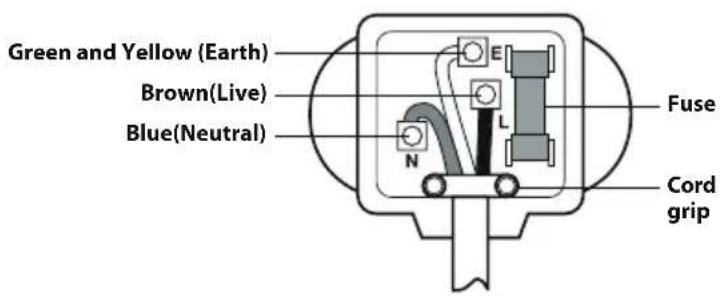
As the colours of the wires in the mains lead of this apparatus may not correspond with the coloured markings identifying the terminals in your plug, proceed as follows:
The wire which is coloured Green and Yellow must be connected to the terminal in the plug which is marked with the letter E or by the earth symbol (±) or coloured Green or Green and Yellow.
The wire which is coloured Blue must be connected to the terminal which is marked with the letter N or coloured Black.
The wire which is coloured Brown must be connected to the terminal which is marked with the letter L or coloured Red.
If a 13 amp(BS 1363) plug is used, fit a 13 amp BS 1362 fuse.
| ENGLISH | Introduction | Table of contents |
| Introduction 3 | ||
| Important safety instructions 3 | ||
| Identification of parts 5 | ||
| Installation | Where to install 8 | |
| Door removal 8 | ||
| Door replacement 9 | ||
| Feed water pipe installation 10 | ||
| Height adjustment 10 | ||
| Operation | Starting 12 | |
| Adjusting the temperature and functions 12 | ||
| Refreshment center (Applicable to some models only) 24 | ||
| No Plumbing Ice & Water (Applicable to some models only) 25 | ||
| Shelf (Applicable to some models only) 26 | ||
| Wine holder (Applicable to some models only) 26 | ||
| Egg box 26 | ||
| Humidity control in the vegetable compartment 27 | ||
| Convert into a vegetable or meat compartment (Applicable to some models only) 27 | ||
| Deodorizer(Applicable to some models only) 28 | ||
| Vacuum Fresh(Applicable to some models only) 28 | ||
| OptiTemp Zone Temperature Transition Corner (Applicable to some models only) 29 | ||
| Temperature Change at Opti Temp Zone (Applicable to some models only) 29 | ||
| Opti Temp Zone (Applicable to some models only) 29 | ||
| Suggestion on food storage | Location of foods 30 | |
| Storing foods 31 | ||
| Care and maintenance | How to dismantle parts 32 | |
| General information 34 | ||
| Cleaning 34 | ||
| Trouble shooting 35 |
Entry
The model and serial numbers are found on the inner case on the back or one side of the refrigerator compartment of this unit. These numbers are unique to this unit and are not available to others. You should record requested information here and retain this guide as a permanent record of your purchase. Staple your receipt here.
| Date of purchase : | |
| Dealer purchased from : | |
| Dealer address : | |
| Dealer phone no. : | |
| Model no. : | |
| Serial no. : |
Important safety instructions
Before it is used, this refrigerator must be properly installed and located in accordance with the installation instructions in this document. This Refrigerator is intended for Domestic indoor use only.
Never unplug your refrigerator by pulling on the power cord. Always grip plug firmly and pull it straight out from the outlet.
When moving your appliance away from the wall, be careful not to roll over the power cord or to damage it in any way.
After your refrigerator is in operation, do not touch the cold surfaces in the freezer compartment, particularly when your hands are damp or wet. Skin could adhere to these extremely cold surfaces.
Unplug the power cord from the power outlet for cleaning or other maintenance. Never touch the appliance with wet hands as you may receive an electric shock or injure yourself. Never damage, press, severely bend, pull or twist the power cord as damage to the cord may cause fire or electric shock. Never touch the cord if you are uncertain if the appliance is correctly earthed.
Never place glass items in the freezer as they may break due to expansion of their contents on freezing.
Never put your hands into the storage bin of the automatic ice maker as you could be injured during its operation.
The appliance is not intended for use by young children or infirm persons without supervision.
Young children should be supervised to ensure that they do not play with the appliance.
Never allow anyone to climb, sit, stand or hang on the refreshment centre door. These actions may damage the refrigerator and even tip it over, causing severe personal injury.
It is advised that this appliance should be connected through an independent power socket to prevent it and other appliances from overloading the circuit and causing a power outage.
The appliance should be positioned so that the supply plug is easily accessible for quick disconnection should an accident occur.
If the supply cord is damaged, it must be replaced by the manufacturer or its service agent or a similarly qualified person in order to avoid a hazard.
- Do not modify or extend the Power Cord length. It may cause electric shock or fire.
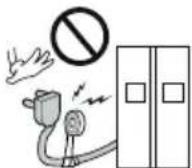
Don't use an extension cord
Accessibility of Supply Plug Supply Cord Replacement

Warning
| Child entrapment Warning | DANGER: Risk of child entrapment. Before you dispose of your old refrigerator please remove doors but leave the shelves in place so that children cannot climb inside. This appliance is not intended for use by persons (including children) with reduced physical, sensory or mental capabilities, or lack of experience and knowledge, unless they have been given supervision or instruction concerning use of the appliance by a person responsible for their safety. Children should be supervised to ensure that they do not play with the appliance. Do not store or use gasoline or other flammable vapour and liquids in the vicinity of this or any other appliance. In the event of an electric short circuit, grounding (earthing) reduces the risk of electric shock by providing an escape wire for the electric current. In order to prevent possible electric shock this appliance must be earthed. Improper connection of the earthing plug can cause electric shock. Consult a qualified electrician or service engineer if the earthing instructions are not completely understood, or if you have doubts as to whether the appliance is properly earthed. |
| Don't store Warning Grounding (Earthing) Warning | |
| Warning | Keep ventilation openings in the room where the appliance is installed clear of obstruction. Do not use mechanical devices or other means to accelerate the defrosting process, other than those recommended by the manufacturer. Do not damage the refrigerant circuit. Do not use electrical appliances inside the food storage compartments of the appliance, unless they are of the type recommended by the manufacturer. Disposal procedures. If disposing of this appliance, please consult with a service agent or a similarly qualified person for more details. |
| This appliance may contain (Check the rating/compliance label for the refrigerant type and amount. Applicable to some models only) a small amount of isobutane refrigerant (R600a), natural gas with high environmental compatibility, but it is also combustible. When transporting and installing the appliance, care should be taken to ensure that no parts of the refrigerating circuit are damaged. Refrigerant squirting out of the pipes could ignite or cause an eye injury. If a leak is detected, avoid any naked flames or potential sources of ignition and air the room in which the appliance is standing for several minutes. In order to avoid the creation of a flammable gas air mixture if a leak in the refrigerating circuit occurs, the size of the room in which the appliance may be sited depends on the amount of refrigerant used. The room must be 1m2 in size for every 8g of R600a refrigerant inside the appliance. The amount of refrigerant in your particular appliance is shown on the identification plate inside the appliance. Never start up an appliance showing any signs of damage. If in doubt, consult your dealer. |
Identification of parts
*Non dispenser model - Type 1
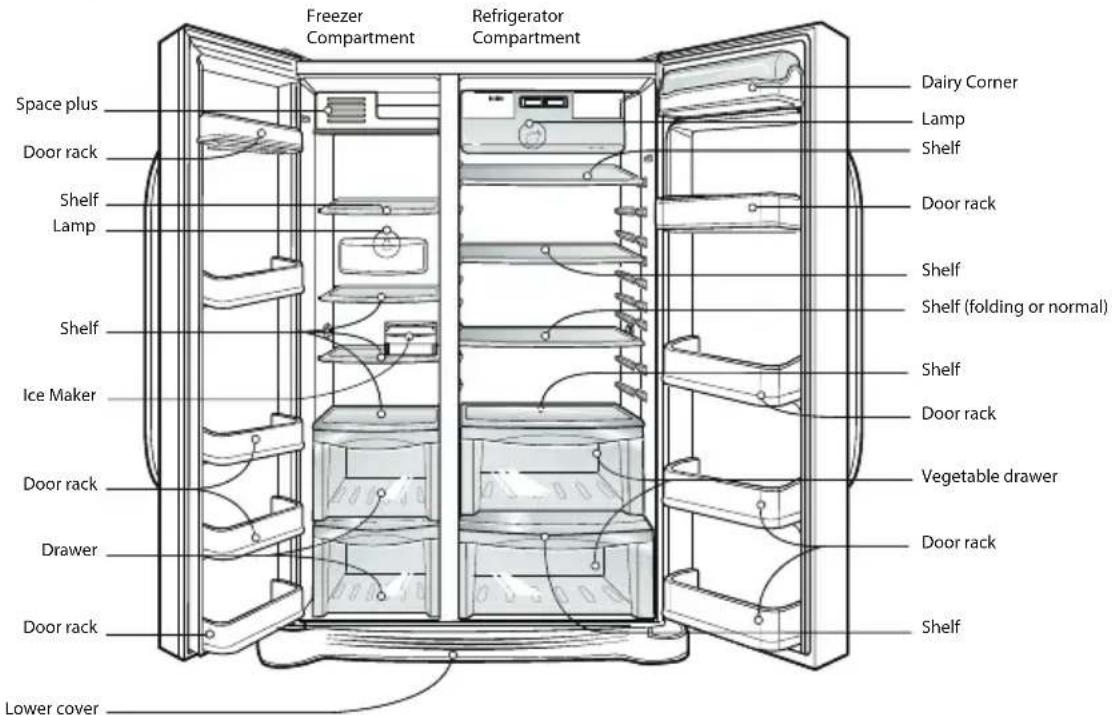
NOTE
- Parts, features, and options vary by model. Your model may not include every option.
*Non dispenser model - Type 2
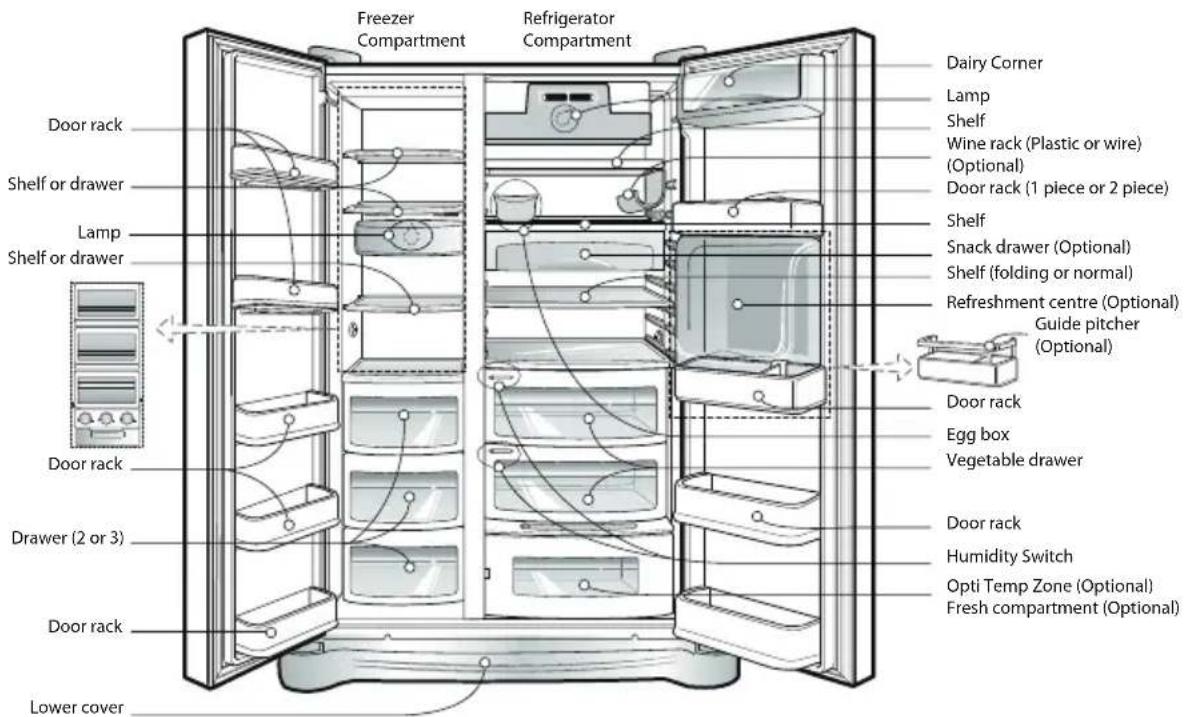
NOTE
-
Parts, features, and options vary by model. Your model may not include every option.
-
To Keep a position of inner parts like as baskets, drawers (Fridge), shelves and wire shelves Supplied by manufacturer is the most efficient usage for energy saving. (

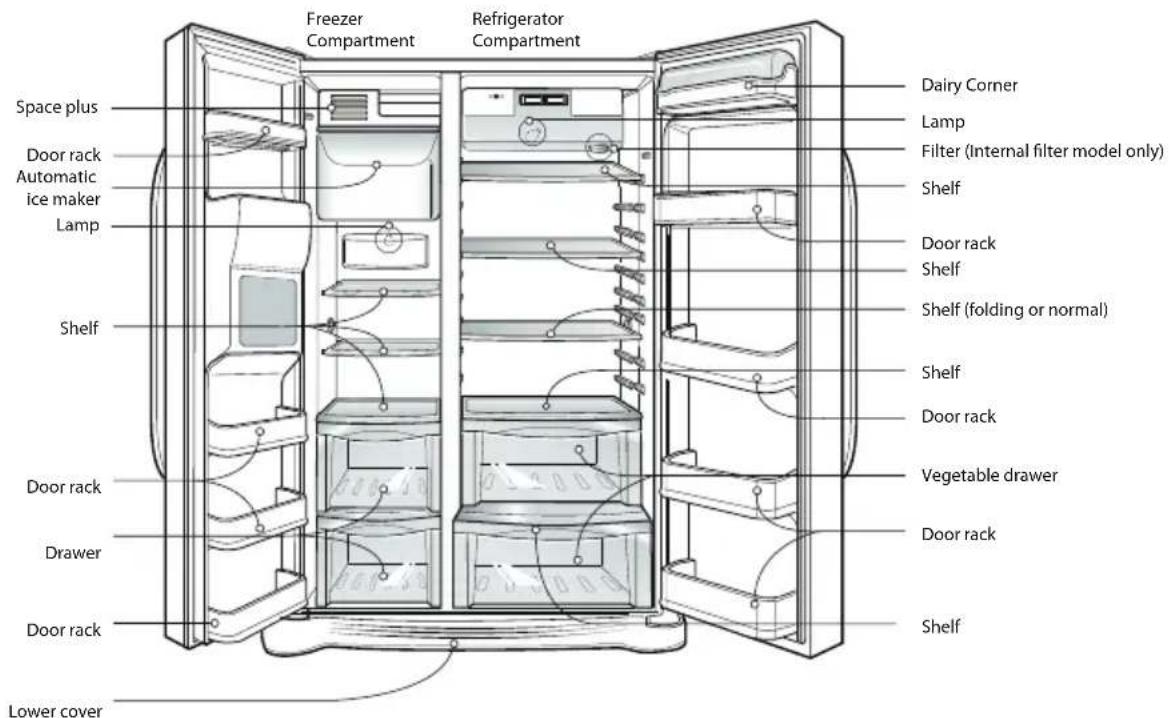
*Dispenser model - Type 1
NOTE
- Parts, features, and options vary by model. Your model may not include every option.
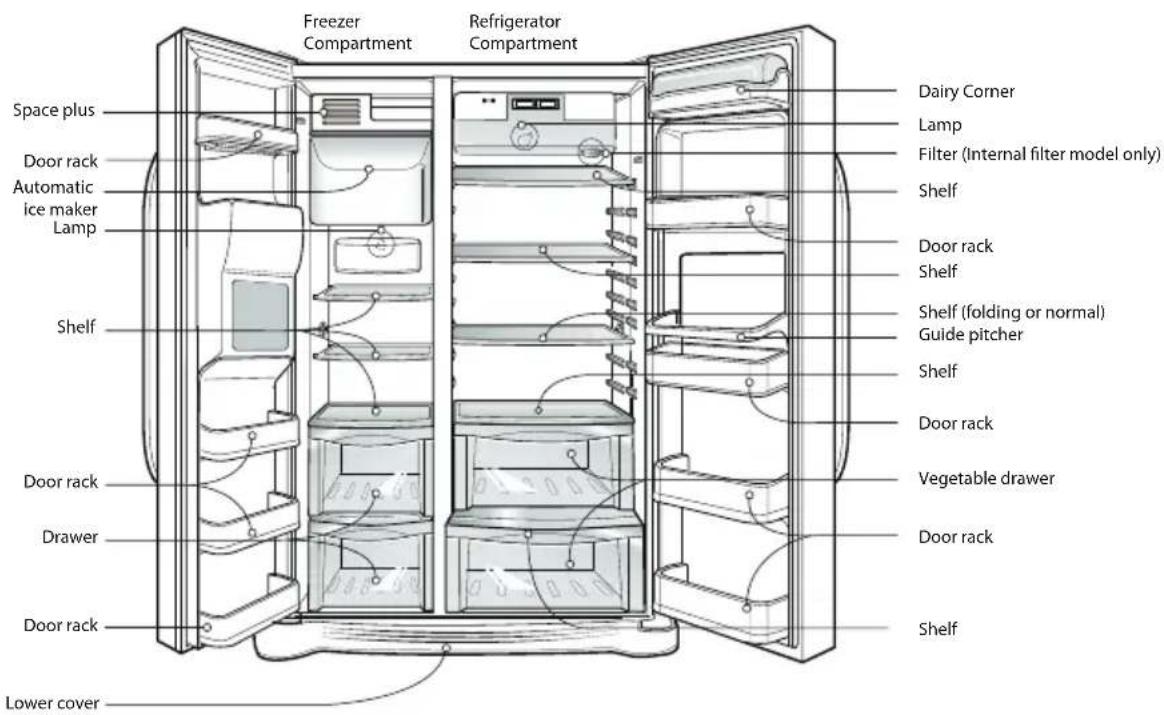
*Dispenser model - Type 2
*Dispenser model - Type 3
NOTE
- Parts, features, and options vary by model. Your model may not include every option.
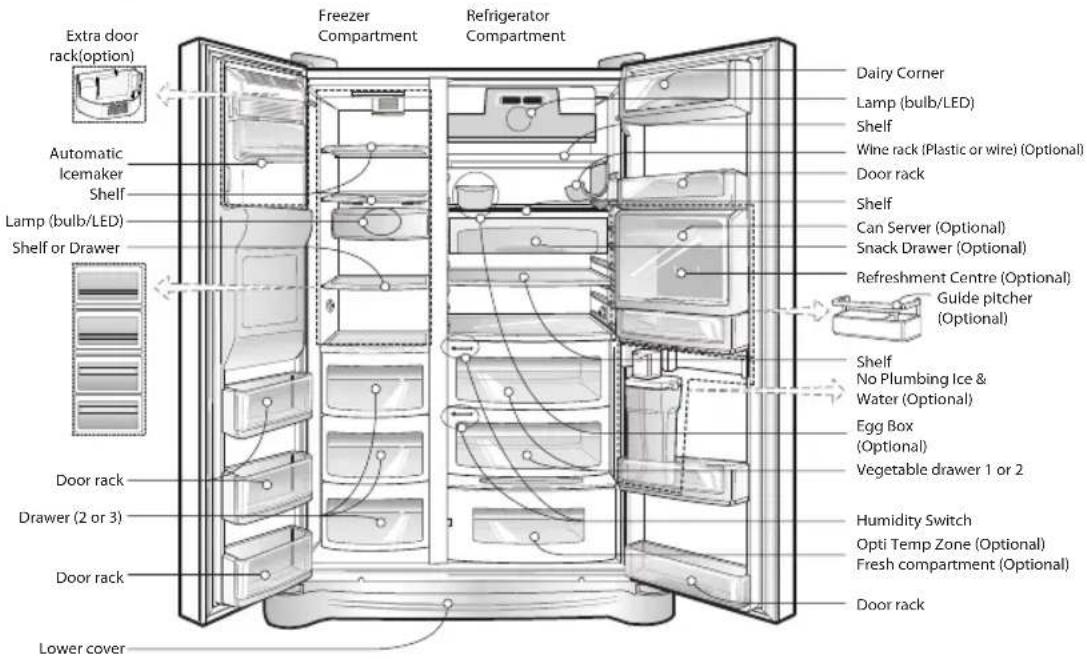
*Dispenser model - Type 4
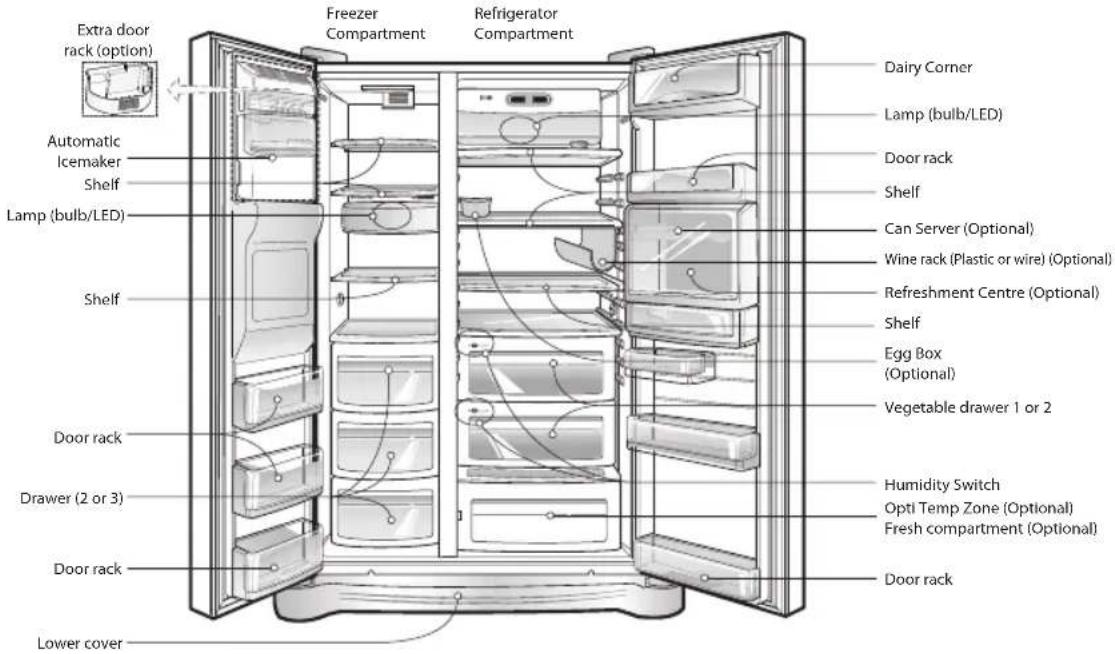
NOTE
- Parts, features, and options vary by model. Your model may not include every option.
Select a good location
Disposal of the old appliance
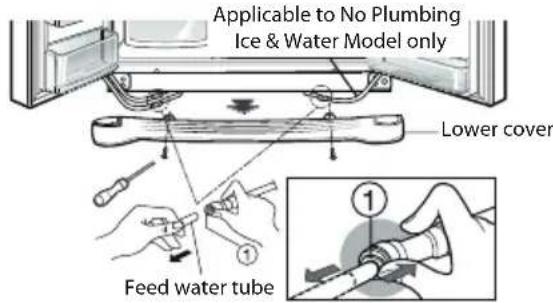
Remove lower cover and then feed water tube
Remove the freezer compartment door
Where to install
- Place your appliance where it is easy to use.
- Avoid placing the unit near heat sources, direct sunlight or moisture. Do not operate the appliance outdoors where it can be exposed directly, or indirectly to sun, wind and rain.
- To ensure proper air circulation around the fridge -freezer, please maintain sufficient space on both the sides as well as top and maintain at least 2 inches (5 cm) from the rear wall.
- To avoid vibrations, the appliance must be levelled.
- Do not install the appliance in temperatures of less than 5^ as the performance may be affected.
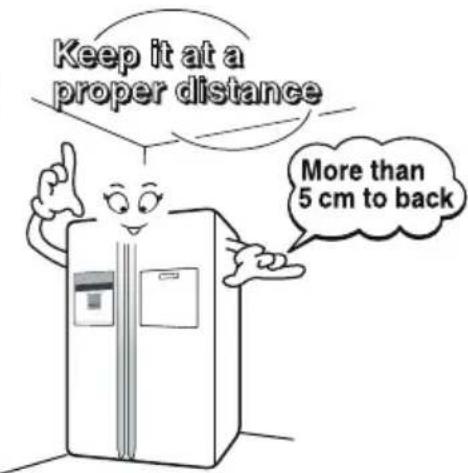
This appliance contains fluid (refrigerant, lubricant) and is made of parts and materials which are reusable and/or recyclable.
All the packaging materials should be sent to the collection centre for recycling. For details of your local recycling centre, please contact your local council.
Door removal
Electric Shock Hazard
Disconnect electrical supply to refrigerator before installing. Failure to do so could result in death or serious injury.
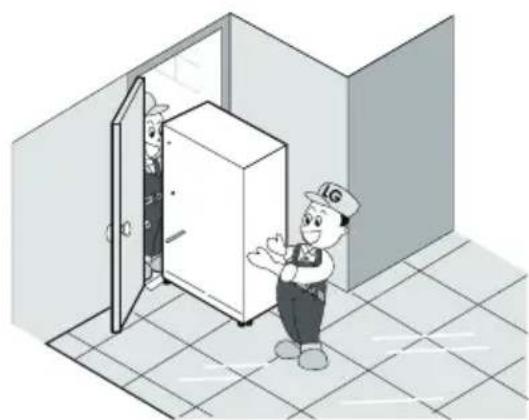
If your front door is too narrow to get the refrigerator into the house, remove the refrigerator doors and pass the appliance through laterally.
Remove the lower cover by loosening all the screws. Then push in the feed water tube while depressing the connector, as shown in the illustration on the right
NOTE
- If a tube end is deformed or abraded, trim the end with sharp knife until perfectly round.
1) Remove the hinge cover by loosening the screws. Then separate all connection wires except for the earth.
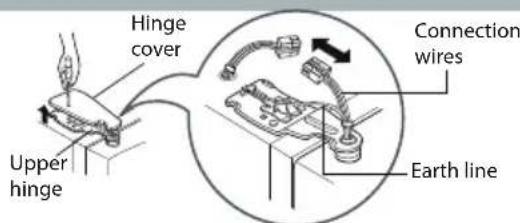
2) Remove the keeper by rotating it counter clockwise (1) and then lifting the upper hinge up (2).
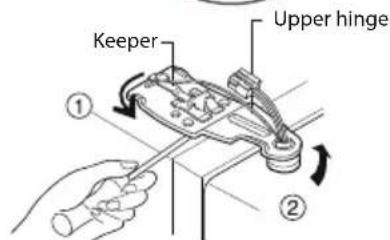
NOTE
- When removing the upper hinge, be careful that the door does not fall forwards.
Remove the refrigerator compartment door
Pass the refrigerator
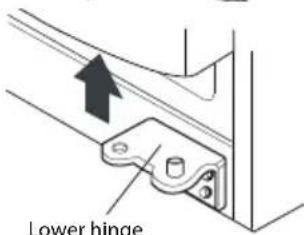
3) Remove the freezer compartment door by lifting it upward. The door should be lifted high enough for the feed water pipe tube to be completely pulled out.
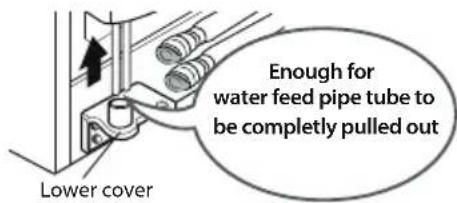
NOTE
- If you have removed the refrigerator compartment door to pass the appliance through an access door, lay the door down, but be careful not to damage the feed water pipe tube.
1) Loosen the hinge cover screws and remove the cover. Remove connection wires, if any, except for the earth line.
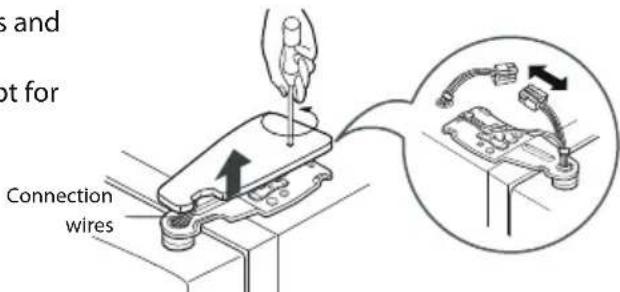
2) Remove keeper by rotating it clockwise (1) and then remove the upper hinge by lifting it up (2).
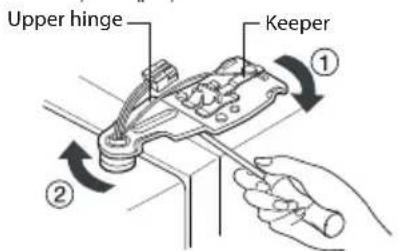
3) Remove the refrigerator compartment door by lifting it up.
Pass the refrigerator laterally through the access door as illustrated to the right.
Door replacement
Once the fridge is through the access door, remount the fridge doors by following the door removal instructions in reverse.
Before installation

Warning
If the freezer compartment door is lower than the refrigerator compartment door
If the freezer compartment door is higher than the refrigerator compartment door
Feed water pipe installation (Dispenser model only)
Automatic ice maker operation needs water pressure of 147 834kPa (1.5 8.5kgf / cm2) (The pressure is correct when an instant paper cup (180cc) is filled in 3 sec.).
- If water pressure does not reach the rating 147kPa(1.5kgf/cm^2) or below, it is necessary to purchase a separate pressure pump for normal automatic icing and cool water feed.
- Keep the total length of the feed water pipe tube within 8m and be careful that the tube does not bend. If the tube is 8m or longer it may cause water feed problems owing to the drain water pressure. - Install the feed water pipe tube at a place free from heat.
- Connect to drinking water supply only.
Refer to instructions with water filter kit for installation.
Height adjustment
Level the door by inserting flat(- type) driver into the groove of the left height adjusting screw and rotate it clockwise (①).
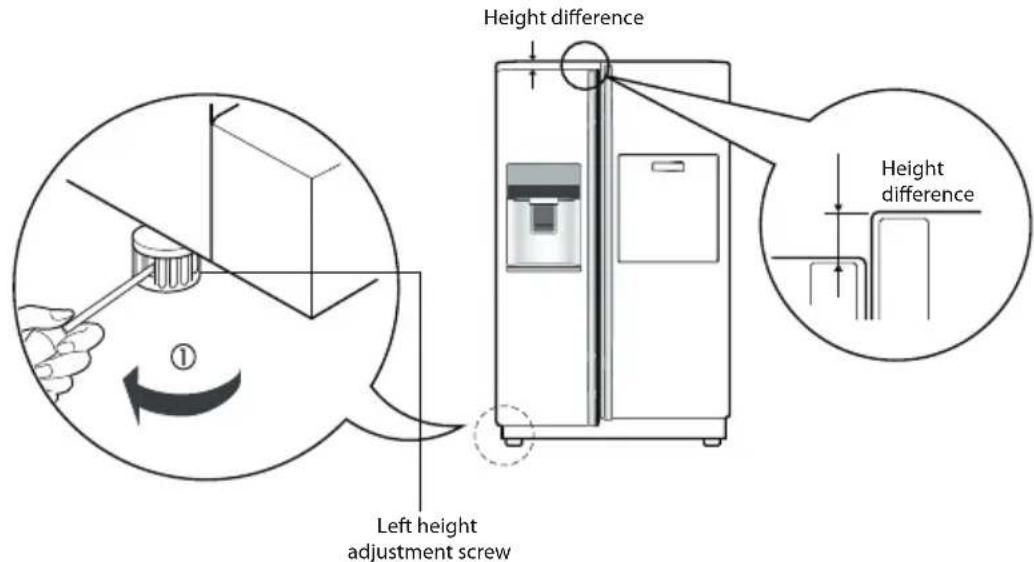
Level the door by inserting flat(- type) driver into the groove of the left height adjusting screw and rotate it clockwise (①).
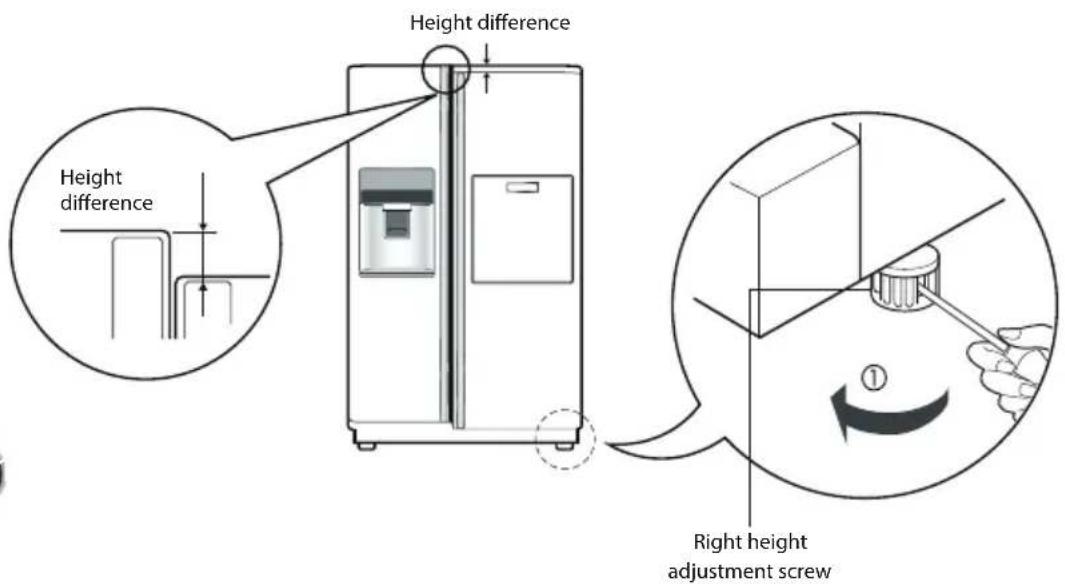
After levelling the door height
Next
The refrigerator doors will close smoothly by adjusting the front side using the height adjustment screw. If the doors do not close correctly, performance may be affected.
- Wipe off all dust accumulated during shipping and clean your appliance thoroughly.
- Install accessories such as the ice cube box, cover evaporating tray, etc., in their proper places. They are packed together to prevent possible damage during shipping.
- Connect the power supply cord (or plug) to the outlet. Don't double up with other appliances on the same outlet.
Starting
When your refrigerat do bfoivit insealtenormal operatinigil temperatures for 2-3 hours prior to fizeg iouth f esh or f If operation is interrupted, wait 5 minutes before restarting.
f s
Adjusting the temperature and fun tions
*Non dispenser model - Type 1
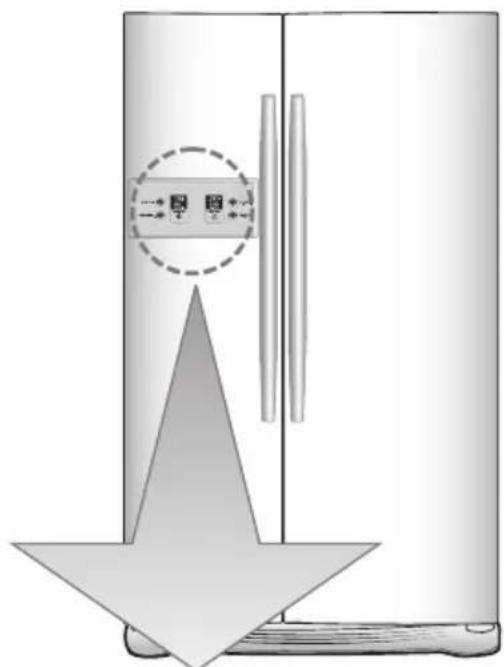
| Function display boardOptional | |||
| Type-1 | FRZ_TEMP, EXPRESS FRZ. | MOTOR GND LOCK CHECK LOCK DISPLAY Saving Mode | Temperature adjustment button for freezer compartment. For refrigerator compartment. REF.TEMP. REF.TEMP. EXPRESS FRZ. EXPRESS FRZ. Child lock: Hold3 secs. |
| Type-2 | FRZ_TEMP, EXPRESS FRZ. | MOTOR GND LOCK CHECK LOCK CHECK LOCK DISPLAY Saving Mode | |
| Type-3 | FRZ_TEMP, EXPRESS FRZ. | MOTOR GND LOCK CHECK LOCK CHECK LOCK DISPLAY Saving Mode | |

NOTE
- Your model may not include every option.
Display Type - 3: The control dated by touch. Exc v re on the essi moisture display panel may be any channel clean and keep the displ
*Non dispenser model - Type 2
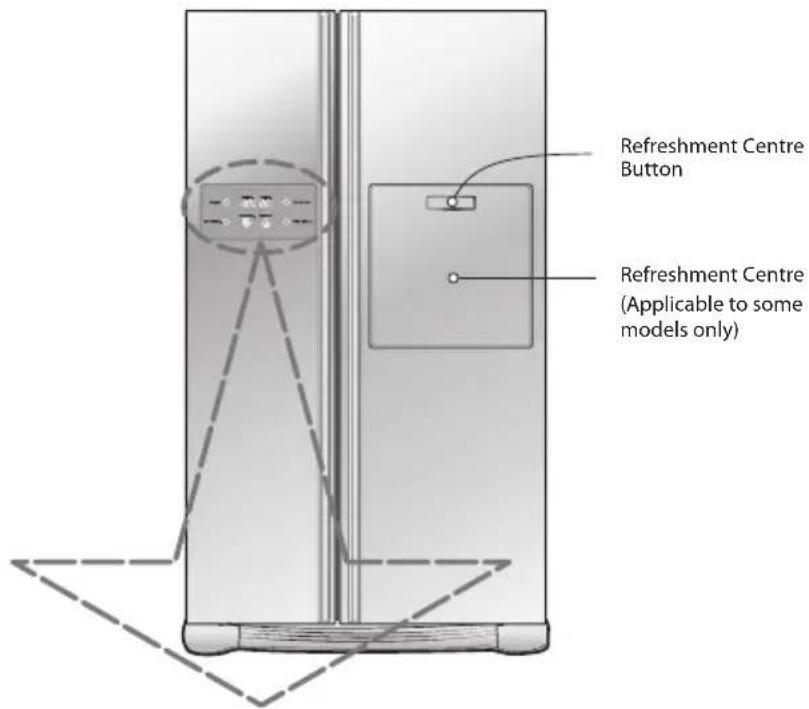
| Optional | Function display board | ||
| Type-1 | Display Power Saving Mode | ||
| Type-2 | |||
*Dispenser model - Type 1
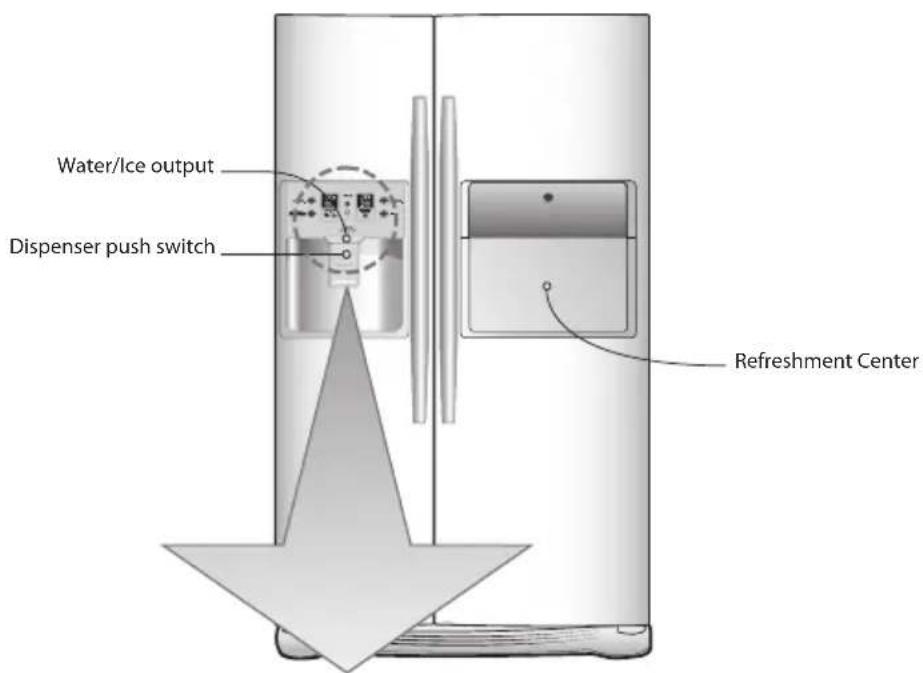
| Function display boardOptional | |||
| Type-1 | Display Saving Mode | Temperature adjustment button for freezer compartment. Temperature adjustment button for refrigerator compartment. | |
| Type-2 | Display Saving Mode | FRZ.temp. REF.TEMP. EXPRESS FRZ. CHILD LOCK:secs EXPRESS FREEzer. Child lock : Hold 3 sec. Dispenser selection button | |
| Type-3 | Display Saving Mode | Filter reset button Light ON/OFF button -Option | |
| Type-4 | Display Saving Mode | Filter reset button. Light ON/OFF button -Option | |
NOTE
. Your model may not include every option.
- Display Type - 3 and Type - 4: The control display is operated by touch. Excessive moisture on the display panel may cause a malfunction. Please keep display clean and dry.
*Dispenser model - Type 2
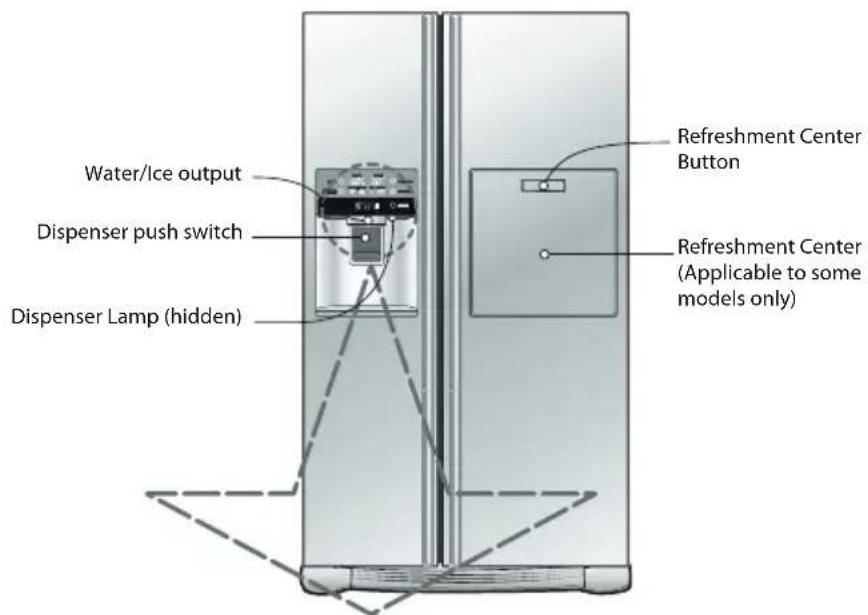
| Optional | Function display board | |
| Type-1 | Display Power Saving Mode | |
| Type-2 | Display Power Saving Mode | |
| Type-3 | Display Power Saving Mode | |
NOTE
- Your model may not include every option.
Display power-saving (on some model)
Display POWER-SAVE mode (on some model)
Freezer control
Refrigerator control
This function save the display power
Press the FREEZER and EXPRESS FRZ. buttons simultaneously and hold them for 5 seconds until the Ding sounds. All LED/LCDs will then turn ON, then OFF. When the power saving mode is activated, the display will remain off until the next time the door is opened. Then, it will come on whenever a door is opened or a button is pressed and remain on for 20 seconds after the last door opening or button selection. To deactivate the power saving mode, press the FREEZER and EXPRESS FRZ. buttons simultaneously and hold them for 5 seconds until the Ding sounds.
Display panel will automatically turn off in 20 seconds and turn on again when you open the door or press the button again.
You can adjust temperature of the fridge and freezer compartments
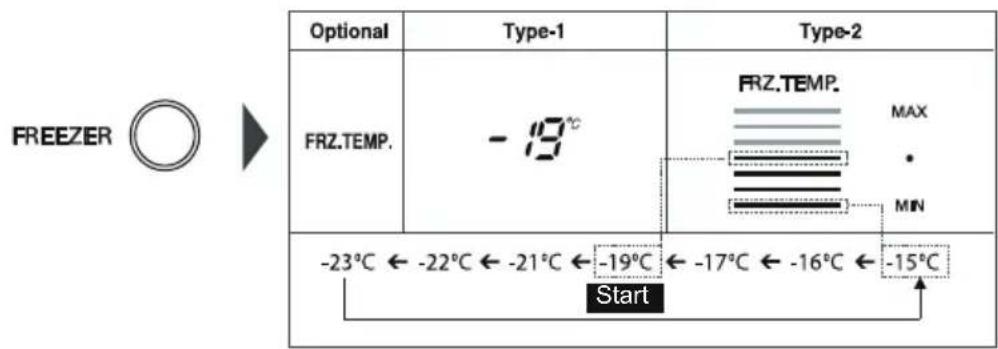
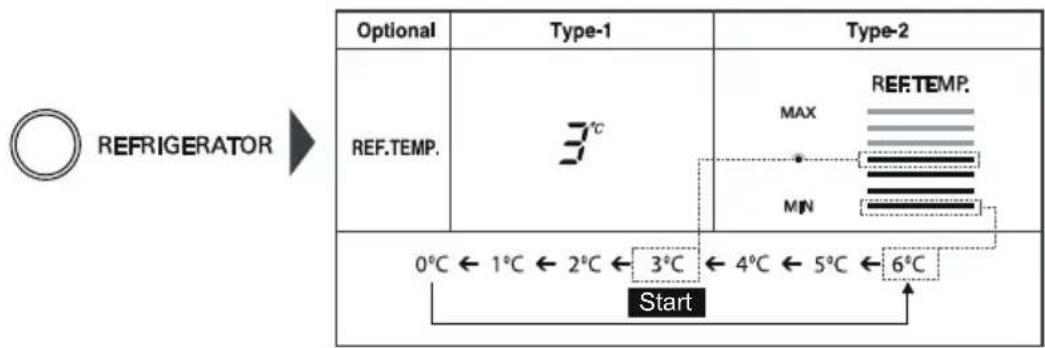
- The actual inner temperature varies depending on the food status. The indicated temperature is a target temperature, not the actual temperature within the refrigerator.
- Until your refrigerator has settled from transit, it will not perform at its optimum. It takes 2 or 3 days for the fridge to stabilise. During this period, please adjust the temperature as above.
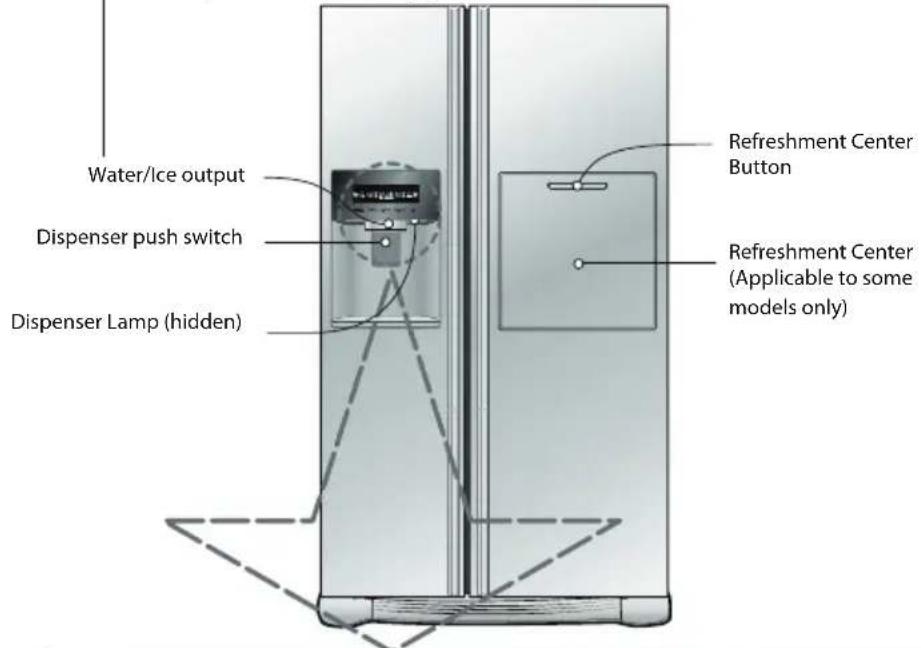
*Dispenser model - Type 3
| Type 1 | Function display board | ||||
| EXPRESS FRZ. LOCK SECS | FREEER | DISPENSER | REFRIGERATOR | LIGHT | |
| Type 2 | Function display board | ||||
| Type 3 | Function display board | ||||
NOTE
- Your model may not include every option.
- The control display panel is operated by touch. Excessive moisture on the display panel may cause a malfunction. Please keep display panel clean and dry.
Display Power Saving Mode
Press the FREEZER and EXPRESS FRZ. buttons simultaneously and hold them for 5 seconds until the Ding sounds. All LED/LCDs will then turn ON, then OFF. When the power saving mode is activated, the display will remain off until the next time the door is opened. Then, it will come on whenever a door is opened or a button is pressed and remain on for 20 seconds after the last door opening or button selection. To deactivate the power saving mode, press the FREEZER and EXPRESS FRZ. buttons simultaneously and hold them for 5 seconds until the Ding sounds.
How to adjust the temperature in the freezer compartment
How to adjust the temperature in the refrigerator compartment
You can adjust temperature of the fridge and freezer compartments
Freezer Compartment temperature adjustment

Refrigerator Compartment temperature adjustment

*Whenever pressing button, setting is repeated in the order of (Middle) (Middle Strong) (Strong) (Weak) (Middle Weak).
- The actual inner temperature varies depending on the food status. The indicated temperature is a target temperature, not the actual temperature within the refrigerator
- Until your refrigerator has settled from transit, it will not perform at its optimum. It takes 2 or 3 days for the fridge to stabilise. During this period, please adjust the temperature as above.
Dispenser use (on some model)
Automatic ice maker
Dispenser use (on some model)
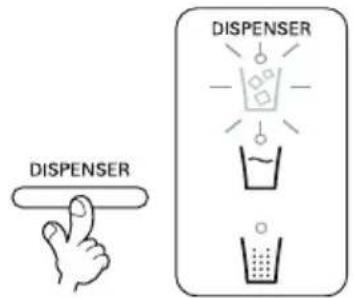
It is possible to select water or ice
*Select water and cubed ice by pressing the relevant button.
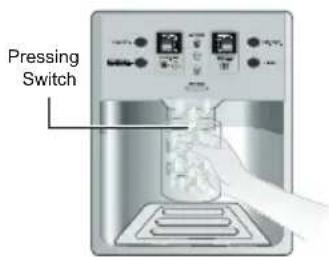
Activate the dispenser by using a cup to press against it
The function selected is highlighted on the panel.
- If 5 seconds pass and no ice has been dispensed, you will hear a "Tak!" sound. The sound signifies that the ice outlet is closed
- NB: Please wait for 2-3 seconds before removing the cup from beneath the dispenser to ensure it has finished dispensing the ice or water.
- he icemaker can automatically make 8 pieces of ice cules at anyone time, approximately 80 pieces per each 2. hr perio ( however these 5 quantities may vary accoring to certain conitions( 6(g( the uration an amount of times the refrigerator oor is opene (
- When the ice storage !in is full, ice making ceases
- 9f you choose not to use the automatic ice making function, turn the icemaker selection switch to the off position, an the on position for reselection(
NOTE
-
he manual selection function is only applicable to some mo els only(
The sound produced when the ice drops into the ice storage bin is normal, and is not caused by a defect. -
Choose from crushed ice, water, and cubed ice and depress the dispenser switch with a glass or other container.
Crushed Ice
Select crushed ice by pressing the selection button, which will be highlighted.
Water
Select water by pressing the selection button, which will be highlighted.
Cubed Ice
Select cubed ice by pressing the selection button, which will be highlighted
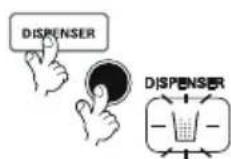
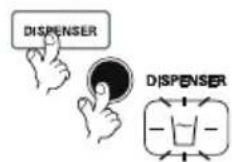
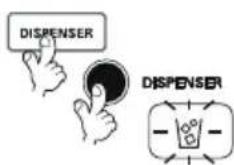
NB: Please wait for 2-3 seconds! before removing the cup from leneath the dispenser to ensure it has finishe dispensing the ice or water(
Door mounted automatic icemaker (on some model)
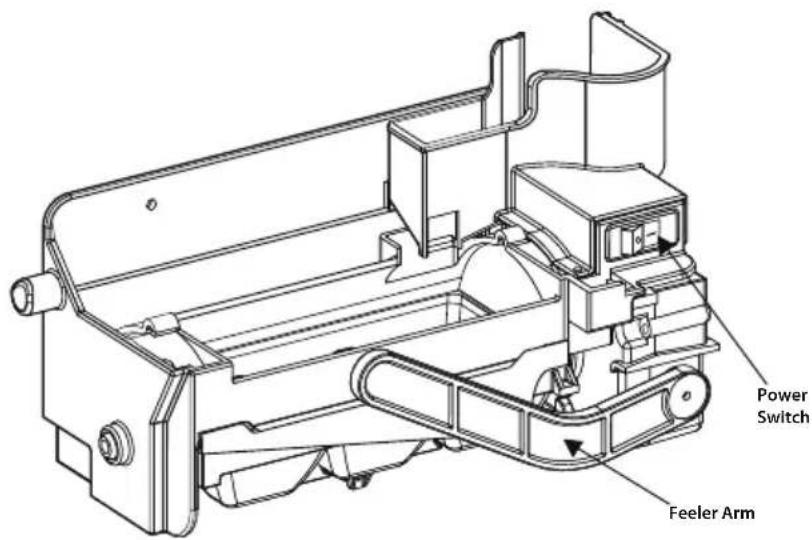
- The icemaker automatically makes 6 cubes of ice at any one time, which equals approximately 50-60 cubes per day. These quantities, however, may vary according to climatic conditions. E.g. the duration and amount of times the refrigerator door is opened.
- Icemaking stops when the ice storage bin is full.
- If you don't want to use the automatic icemaker, turn the icemaker switch to OFF. If you want to use automatic icemaker again, change the switch to ON.
NOTE
- The sound produced when the ice drops into the ice storage bin is normal, and is not caused by a defect.
WARNING
- Do not put your hands into the ice maker during operation. You may injure yourself.
- Do not store ice (cubes) for longer than two weeks, they can cause the dispenser to malfunction as the ice cubes clump together.
Precautions when using the dispenser (on some model)
To get cold water
The dispensed water will not be icy cold, but just cool or cold. If you want colder water, dispense ice before dispensing water.
If you have difficulty in replacing the ice storage bin
Rotate the rotary gear in 1/4 cycle as shown in the illustration and then push it back.
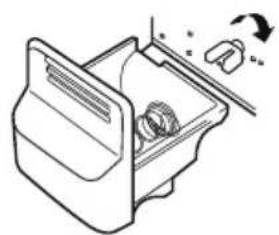
①
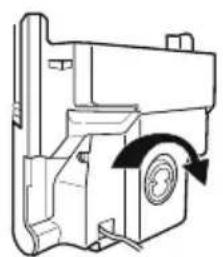
(2)
NOTE
Figure ① and ② epen s on mo el(

When the ice dispenser will not operate properly
It is normal that the ice maker will not operate correctly when there is only a small amount of ice left in the storage bin. Allow approximately one day for the ice maker to restock.
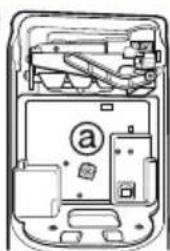
If the ice forms into a solid lump and interrupts the operation of the automatic ice maker mechanism, remove the ice storage bin, separate the ice, discard the inseparable ice, and put the usable ice pieces back into the bin. The intermittent dispensing of ice is normal. However, since ice may get stuck and block the ice chute, regularly check the ice chute and clear any obstacles.
①
②
NOTE
Figure ① and ② epen s on mo el(
WARNING
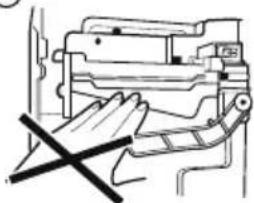
- Never insert your hand or any other object into the ice chute as this may damage dispenser parts or cause injury to the hand.
- If ice is discoloured, stop using the dispenser and call the service centre.
- Do not touch the blade ① as it may injure the hand.
- Never insert your hands into the ice maker during operation. It may cause injury ②
- Do not allow your children to hang off the ice dispenser or the ice storage bin. This could cause injury.
①
(2)
When ice maker does not operate smoothly
Ice is lumped together
- When ice is lumped together, take the ice lumps out of the ice storage bin, break them into small pieces, and place them back into the ice storage bin.
- When the ice maker produces small or lumped together ice, the amount of water supplied to the ice maker may need to be adjusted. Contact the service centre.
- If ice is not used frequently, it may lump together.
Power failure
- Ice may melt and drop into the freezer compartment. Take the ice storage bin out and discard all the ice then dry it and place it back. After the machine is powered again, crushed ice will be automatically selected.
The unit is newly installed
- It takes about 12 hours for a newly installed refrigerator to make ice in the freezer compartment.
| Operation | |
| Express Freeze | Please select this function for fast freezing. OFF→ON→OFF is repeated whenever pressing or ON/OFF button. The arrow graphic remains On after flickering 4 times when selecting Express Freeze Express Freeze will automatically turn off after a fixed time passes. |
| Lock | This button locks the other buttons Locking or Release is repeated whenever the LOCK or CHILD LOCK button is pressed for more than 3 seconds. If you use the lock button, none of the other buttons will work until you unlock them. |
| Filter condition (filter replacement cycle) display function (on some model) | There is a replacement indicator light for the water filter cartridge on the dispenser. The water filter should be replaced every six months. The filter light comes on as a reminder to let you know when to replace filter. After replacing the filter, press and hold the filter button for more than 3 seconds to reset the indicator. |
| Dispenser light (on some model) | This button turns the dispenser light on and off. The dispenser light function is turned ON or OFF by pressing Light/Filter button. |
The other functions
How ice/cold water is supplied
Door open warning
- A warning bleep will sound 3 times every 30 seconds if the main or minibar door is left open or ajar for more than a minute.
- Please contact your local service centre if the warning continues to sound when the door is closed.
Diagnosis (failure detection) function
- The Diagnosis function automatically detects the problem when a failure is found whilst using of refrigerator.
- If a fault occurs, and none of the refrigerator buttons or functions are working, do not turn power off but immediately contact your local service centre. Once powered off it may not be possible for a service engineer to use the Diagnosis function to detect what caused the original fault.
Water is cooled while stored in the water tank in the refrigerator compartment, and then sent to the dispenser. Ice is made in the automatic ice maker and is then sent to the dispenser as either crushed or cubed ice.
NOTE
It is normal that at first the water is not very cold. If you want colder water, add ice to the glass.
Throw away the first ice (about 20 pieces) and the first water (about 7 glasses) passing through the appliance when the refrigerator is initially installed.
)he first ice an water may incl e particles or o our from the fee water pipe or the fee water!o- ()he shoul also !e one if the refrigerator has not !een use for a long time(
Keep children away from the dispenser.
:hil ren may push the ispenser switch incorrectly, or amage the ispenser!!reaking associate parts( 9t may also cause them injury(
Always ensure that food does not block the ice chute.
9f foo s are place at the entrance of the ice chute, ice may not!le ispense ( he ice chute may!become covere with ice pow er if crushe ice is most commonly use ( Remove the accumulate ice pow er(
Never store beverage cans or other foods in the ice storage bin for rapid cooling.
)his may amage the automatic ice maker(
Never use fine crystal glasses or crockery to collect ice.
Such glasses or containers may !e !roken(
Put ice into a glass before filling with water or other beverages.
Water may!e splashe if ice is a e after the rink(
Never touch the ice outlet either with hands or any implement.
)ouching the ice outlet may cause a!reakage or han injury(
Never remove the ice maker cover. It might be necessary from time to time to level the ice so the storage bin can fill to capacity.
9f ice is allowe to pile up near the ice maker, the ice maker may think that it is already full an it will stop pro ucing ice(
If discolored ice is dispensed, stop using the appliance and contact your service centre immediately.
9ce may! le jamme in ice chute causing the refrigerator to fail(
Never use narrow or deep glassware when using the icemaker
as ice can back up into the ice chute and cause a malfunction.
Keep the glass at a proper distance from ice outlet.
A glass too close to the outlet may hin er ice from coming out(
| Freezer basket (two stars section) | Two stars section ** (Applicable to some models only) ·Two stars means the temperature in the section is -12℃~ -18℃. ·Freezer foods for short-term storage. Refreshment center(Applicable to some models only) Open the minibar door. |
| How to use | ·You can access the minibar without opening the refrigerator door, thus saving electricity. ·Inner lamp is lit in the refrigerator compartment when the minibar door opens, making it easy to identify the contents. |
| Use the minibar door as a stand | ·Never use the minibar door as a chopping board and take care not to damage it with sharp tools. ·Never rest or press on the open minibar door. |
| Never remove the inner minibar door cover | ·The minibar can not function correctly without the cover. Only applies to models with inner minibar cover. |
| Never place heavy items on the minibar door or allow children to hang or sit on it. | ·Not only may the minibar door be damaged, but children may be hurt. |
| The other functions | No Plumbing Ice & Water (Applicable to some models only) You can use the water in the water tank or general water bottles to use the Auto Ice Maker function and Water Dispenser function without having to connect the water pipe to the refrigerator. To disassemble the water tank OPTION 1 Turn the security switch to the"OPEN"position, as shown in ①. Next, hold and pull the cap of the water tank ② to loosen the water tank. OPTION 2 Turn the secure switch into "OPEN" position as shown in ①. Next to loosen the water tank hold and pull the cap of the water tank ② to loosen the water tank. To fill the water tank Lift up the clamps on both sides to open the water tank cover, and then fill the tank. Pour water up to the marked line (38). When the tank is full, close the tank cover and lock the clamps on both sides. To assemble the water tank OPTION 1 Adjust the top of the water tank cap and align the Pump tube with the centre, pushing the tank in firmly. Use the lever ③ to keep fixed ④. OPTION 2 Adjust the top of the water tank cap and align the pump tube with the centre, pushing the tank in firmly, as shown in ③. Turn the security switch to the"CLOSE" position ④. When using the water bottle | |
| ·When using the water bottle You can connect the cap to the general water bottle to use the water bottle, instead of the water tank provided. Turn the cap of the water tank in Open direction to open it. Open the water bottle and connect the cap. Only the water bottle of 1.5 ~2.0(35cm) can be used and there are some types that are not compatible. | ||
| NOTE ·When assembling or disassembling the water tank, be careful not to apply excessive force as it can damage the water tank. ·If there is no water in the water tank, you will not be able to use the Auto Ice Maker function and Water Dispenser function. ·Using other liquid besides water can cause problems to the pump. ·When the water in the water tank is low, the size of the ice cubes may become smaller. ·It's a good idea to clean out the water tank initially before filling it with water and placing it into position. ·The method of using the Dispenser and Ice Maker is the same as other common Dispenser models. ·When using the water bottle instead of the water tank, do not throw away the water tank. ·Because the water tank can get heavy, don't let children use or hold the water tank, especially with one hand. ·You may hear the water pump operating 9~10 times per day. | ENGLISH |
Shelf (Applicable to some models only)
You can store taller items such as a gallon container or bottles by simply pushing in front half of shelf underneath back half of shelf. Pull toward you to return to a full shelf.
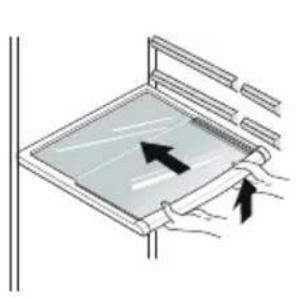
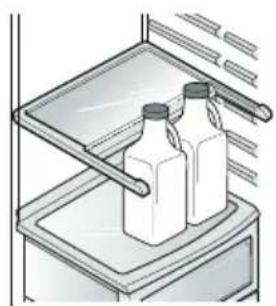
Wine holder (Applicable to some models only)
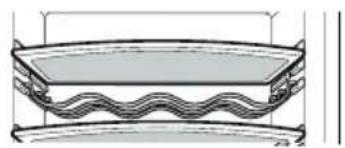
Bottles can be stored laterally with this wine corner.
This can be attached to any shelf.
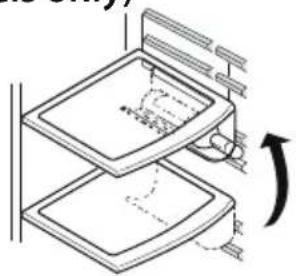
In case of inserting the wine holder :
Pull the wine holder downward as in ② after inserting it into the side anchoring part of the shelf as in ① by catching itupward as in ①.
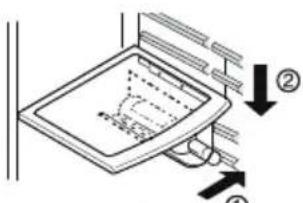
In case of separating the wine holder :
Pull the wine holder inward as in ③ after holding it upward as in ④ by catching it.
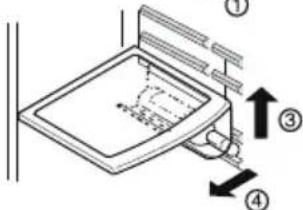
Bottles can be stored laterally with this wine rack.
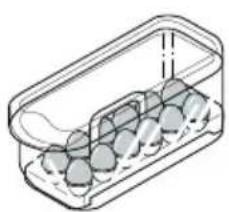
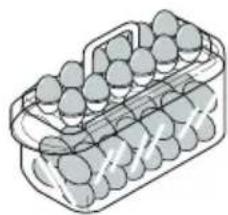
Egg box (Depends on model)
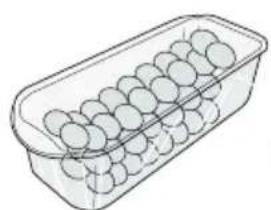
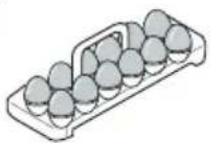
NOTE
- Never use the egg box as an ice storage bin. It can be broken.
- Never store the egg box in the freezer compartment or fresh compartment.
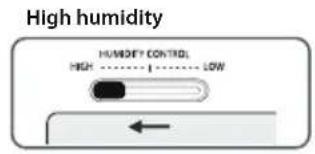
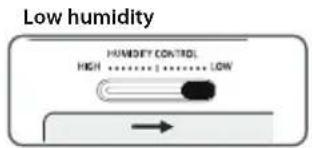
Humidity control in the vegetable compartment (Applicable to some models only)
The humidity can be controlled by adjusting the humidity control switch to the left/right when storing vegetables or fruits.
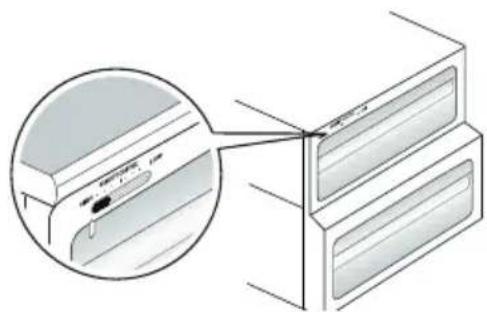
Convert into a vegetable or meat compartment (Applicable to some models only)
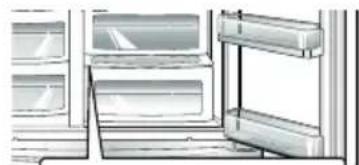
- The bottom drawer in the refrigerator can be converted into a vegetable or meat compartment
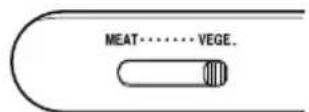
Vegetable compartment
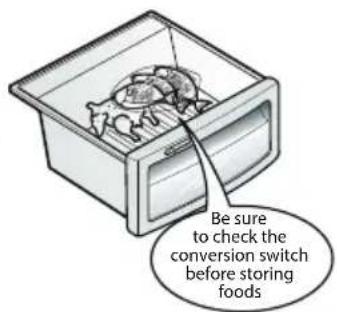
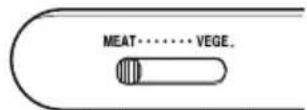
Meat compartment
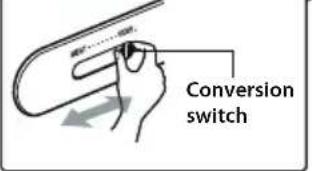
The meat compartment maintains the temperature at a lower point than the refrigerator compartment so that meat or fish can be stored fresh longer.
NOTE
Vegetables or fruit will be frozen if the conversion switch is set to meat compartment. Be sure to check its position before storing foods.
| Operation | |
| ENGLISH How to use the deodorizing system How to use | Deodorizer (Applicable to some models only) This system efficiently absorbs strong odours by using an optical catalyst. This system does not have any affect on stored food. • The deodoriser is located behind the vegetable compartment. It can be removed for cleaning with soapy warm water from time to time. • Please use closed containers to store pungent food. Odours are easily absorbed by other food in the compartment. Vacuum Fresh (Applicable to some models only) It helps to keep the vegetables and fruits fresher by allowing the drawer to have a partial vacuum due to a hermatical sealing. • Pressing the button on the drawer allows the air to be pushed out and the seal to be effective. • Put your hand inside to lift the button up and pull forward to ①, then open ②Drawer. When closing drawer, push it until you hear clicking. |
| Method to use | Opti Temp Zone Temperature Transition Corner (Applicable to some models only) By pressing the button, store vegetables, fruits or other types of food such as defrosting meat, raw fish, etc. Temperature Change at Opti Temp Zone (Applicable to some models only) |
| You can select optimum temperature range depending on types of foods stored. -3-step of temperature selection including -3°C, -1°C and 4°C is available. Vegetables/fruits and cold storage foods requiring humidity maintenance and meats/ fishes can be more freshly stored. ·When using the Opti Temp Zone as storage room of meats, storing vegetables or fruits, , undesirable freezing may occur to some items if the incorrect setting is selected. It is recommended that all meat and produce be stored in plastic or paper bags. ·The Opti Temp Zone is for temporary storage only(1~2 days). Longer storage of Meat and Fish should be stored in the freezer to avoid it from spoiling. ·If opening the R-room, the lamp turns on and then turns off again on closing. ·(Vegetable/Fruit)→(Cold storage while maintaining humidity)→(Meat) is sequentially repeated whenever pressing the "SELECT" button. Opti Temp Zone Temperature Transition Corner (Applicable to some models only) | |
| When removing OptiTempZone | ·First, remove the vegetable bin. ·After lifting the Opti Temp Zone case slightly ①, reach inside and pull it outward ②. |
| When installing OptiTempZone | ·Fit the Opti Temp Zone case on to the ledge ① and gently slide it in ②. ·When forced, the connecting parts can be damaged. |
| Suggestion on food storage | |
| Location of foods (Refer to identification of parts) | |
| Store wine. | |
| Store small foods such as bread, snacks, etc.. | |
| Freezer compartment shelf | Store various frozen foods such as meat, fish,ice cream, frozen snacks, etc.. |
| Freezer compartment door rack | • Store small packed frozen food. • Temperature is likely to increase as door opens. So, do not store long-term food such ice cream, etc.. |
| Freezer compartment drawer | • Store meat, fish, chicken, etc.. after wrapping them with tin foil. • Store dry. |
| Milkproduct corner | Store milk products such as butter, cheese,etc.. |
| Egg box | Place this egg box in the proper location. |
| Refreshment center | Store foods of frequent use such as beverage,etc.. |
| Refrigerator compartment shelf | Store side dishes or other foods at a proper distance. |
| Refrigerator compartment door rack | Store small packed food or beverages such as milk, juice, beer, etc.. |
| Vegetable drawer | Store vegetables or fruits. |
| Vegetable drawer/ meat drawer conversion corner | Store vegetable, fruits, meat to thaw, raw fish, etc.. setting the conversion switch as necessary. Be sure to check the conversion switch setting before storing foods. |
Freezer Compartment
Refrigerator Compartment
Storing foods
- Store fresh food in the refrigerator compartment. How food is frozen and thawed is an important factor in maintaining its freshness and flavour.
- Do not store food which goes bad easily at low temperatures, such as bananas, and melons.
- Allow hot food to cool prior to storing. Placing hot food in a refrigerator could spoil other food, and lead to higher energy consumption.
- When storing food, cover it with vinyl wrap or store in a container with a lid. This prevents moisture from evaporating, and helps food to keep its taste and nutrients.
- Do not block air vents with food. Smooth circulation of chilled air keeps refrigerator temperatures even.
- Do not open the door frequently. Opening the door lets warm air enter the refrigerator and causes temperatures to rise.
- Never keep too much food in the door rack as it may push against the inner racks so that the door cannot fully close.
- Do not store bottles in the freezer compartment - they may break when frozen.
- Do not refreeze food that has been thawed. This causes loss of taste and nutrients.
- When storing frozen food like ice cream for a long period, place it on the freezer shelf, not in the door rack.
- Do not touch cold foods or containers - especially metallic containers - with wet hands or place glass products in the freezer compartment.
- You may get chill blains, and glass containers may break when frozen, causing personal injury.
- Avoid placing sauces on top refrigerator shelves, which could freeze on direct contact with chilled air.
- Always clean food prior to refrigeration. Vegetables and fruits should be washed and wiped, and packed food should be wiped, to prevent adjacent food from spoiling.
- When storing eggs in their storage rack or box, ensure that they are fresh, and always store them in an upright position, which keeps them fresh longer.
NOTE
- If you keeping the refrigerator in a hot and humid place, frequently open the door or store a lot of vegetables, dew may form. This has no effect on operation or performance. Remove the dew with an absorbent dry cloth.
Suggestion for energy saving
- Please do not keep the door open for a long time, close door in the shortest time.
- Too much food are not advised to be put in. Enough space should be kept for cool air circulating freely.
-
Do not set the temperature of fridge-freezer lower than needed. Do not put the food near the temperature sensor.
-
Allow hot food to cool prior to storing. Placing hot food in the fridge-freezer could spoil other food, and lead to higher electric bills.
- Do not block air vents with food. Smooth circulation of cold air keeps fridge-freezer temperature even.
- Do not open the door frequently. Opening the door lets warm air enter the fridge-freezer, and cause temperature to rise.
| Freezer compartment lamp | How to dismantle parts NOTE ·Dismantle by reversing the assembly instructions. Be sure to unplug the power plug before dismantling and assembly. Never apply severe force to dismantle parts. Parts may be damaged. |
| Refrigerator compartment lamp | Separate the lamp by pulling it out ③ while slightly pressing ① and rotating ② the lamp cover. Turn the bulb counterclockwise. Use a 40-watt bulb(max.) which can be purchased at a service centre. To remove the lamp cover, press the protrusion under the lamp cover to the front and then pull the lamp cover out. Turn the bulb counterclockwise. Max. 40 W bulb or LED for refrigerator is used and can be purchased at a service centre. NOTE ·Not all bulbs will fit your refrigerator. Be sure to replace the bulb will one of the same size, shape and wattage. ·The dispenser lights are LEDs that can not be changed. |
| Freezer compartment shelf | To remove a shelf, push the shelf to the left ②, lift the left part of the shelf a bit ①, lift the right part up ③, and take it out. |
| Door rack and support | Lift the door rack holding both sides ① and pull it out ②. |
| Ice storage bin (Applicable to some models only) | Hold the ice storage bin as shown in the right figure and pull it out ② while slightly lifting it ①. ·Do not dismantle the ice storage bin unless it is necessary. ·Use both hands to remove the ice bin to avoid dropping it. |
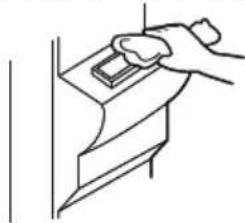
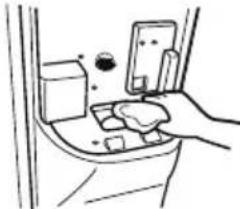
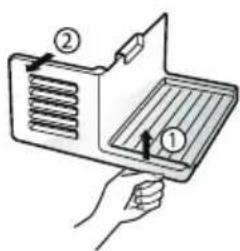
| After dispenser is used (Applicable to some models only) | The water collector has no self-draining function. It should be cleaned regularly. First take out the water collector cover. Press the cover where PUSH marked ① to lift the water collector cover up. Take out the water collector cover as illustrated ②. |
| Remove the cover by pulling the front side of water collector cover and dry it with a cloth. Pull the cover fully to the front ① and pull it out. ② Clean the base and cover with a dry cloth. |
Refreshment centre (Applicable to some models only)
Vegetable compartment cover
Vacuum Fresh (Applicable to some models only)
Space Plus (Applicable to some models only)
Ice storage bin (Applicable to some models only)
Ice maker (Applicable to some models only)
- Separate the lin ① to upwar (
- Separate the upper rack of the mini!ar an then pull out the mini!ar cover ②
- he miniar can!e remove!y pulling it upwar s(
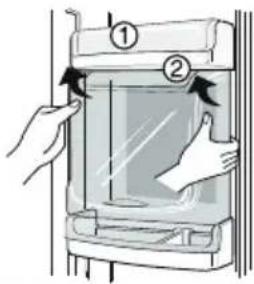
NOTE
-
Be sure to remove parts from the refrigerator door when removing the vegetable compartment, snack drawer and minibar cover.
-
to remove the vegetalle compartment cover, pull out the vegetalle compartment a lit to the front ① , lift the front part of the vegetalle compartment cover as shown!y ② , an take it out(
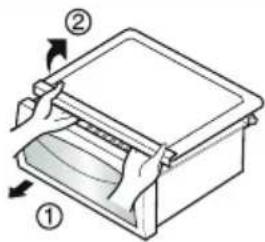
- to remove the vegetalle compartment cover, pull out the vegetalle compartment a!it to the front ①, lift the front part of the vegetalle compartment cover as shown!y ②, an take it out(
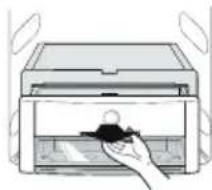
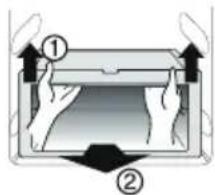
Lift the space plus ① an pull it out to ② irection(
0ol the ice storage!in as shown in the right figure an pull it out ② while slightly lifting it 1(
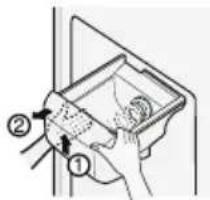
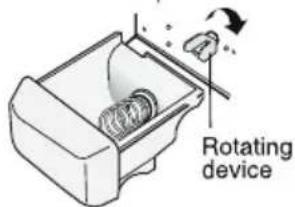
- 9t is recommen e that the ice storage!in is not ismantle unless a!solutely necessary(
- Be sure to use!oth han s when removing the ice storage !in, so as not to rop it on the floor(
- 9f the ice storage !in oes not fit well, slightly rotate the rotating evice(
)urn off the 9ce maker switch (off) after remove the SPA:6 PLUS, if you are on a long term vacation or on't use ice( 9f you want to use for ice, turn on the 9ce maker switch(on)(
| ENGLISH |
| Power failure |
| If you move |
| Anti condensation pipe |
| Understanding sounds you may hear |
| Exterior |
| Interior |
| After cleaning |
| Waming |
General information
During average length vacations, you will probably find it best to leave the refrigerator in operation. Place freezable items in freezer for longer life. When you plan not to operate, remove all food, disconnect the power cord, clean the interior thoroughly, and leave each door OPEN to prevent odour formation.
Most power failures that are corrected in an hour or two will not affect your refrigerator temperatures. However, you should minimize the number of door openings while the power is off.
Remove or securely fasten down all loose items inside the refrigerator. To avoid damaging the height adjusting screws, turn them all the way into the base.
The outside wall of the refrigerator cabinet may sometimes get warm, especially just after installation. Don't be alarmed. This is due to the anti-condensation pipe, which pumps through the refrigerator to prevent "sweating" on the outer cabinet wall.
Your new refrigerator may make sounds that your old one didn't make. Because the sounds are new to you, you might be concerned about them. Most of the new sounds are normal. Hard surfaces, like the floor, walls and cabinets, can make the sounds seem louder than they describes the kinds of actually are. The following sounds and what may be making them:
- The defrost timer will click when the automatic defrost cycle begins and ends. The thermostat control (or refrigerator control, depending on the model) will also click when cycling on and off.
Rattling noises may come from the flow of refrigerant, the water line, or items stored on top of the refrigerator. - Your refrigerator is designed to run more efficiently to keep your food items at the desired temperature. The high efficiency compressor may cause your new refrigerator to run longer than your old one, and you may hear a pulsating or high-pitched sound.
- You may hear the evaporator fan motor circulating the air through the refrigerator and freezer compartments.
- As each cycle ends, you may hear a gurgling sound due the refrigerant flowing in your refrigerator.
Contraction cause a popping noise to and expansion of the inside walls may a popping noise.
Water dripping on the defrost heater during a defrost cycle may cause a sizzling sound.
- You may hear air being forced over the condenser by the condenser fan.
- You may hear water running into the drain pan during the defrost cycle.
Cleaning
It is important that your refrigerator be kept clean to prevent undesirable odours. Spilled food should be wiped up immediately, since it may acidify and stain plastic surfaces if allowed to settle.
Use a luke warm solution of mild soap or detergent to clean the durable finish of your refrigerator. Wipe with a clean damp cloth and then dry.
Regular cleaning is recommended. Wash all compartments with a baking soda solution or a mild detergent and warm water. Rinse and dry.
Please verify that the power cord is not damaged, power plug is not overheated, or power plug is well inserted into the wall outlet socket.
Always remove power cord from the wall outlet prior to cleaning near to electrical equipment (lamps, switches, controls, etc.). Wipe up excess moisture with a sponge or cloth to prevent water or liquid from getting into any electrical part and causing an electric shock. Never use metallic scouring pads, brushes, coarse abrasive cleaners, strong alkaline solutions, flammable or toxic cleaning liquids on any surface. Do not touch frozen surfaces with wet or damp hands, because damp object will stick to extremely cold surfaces.
General information
Before calling for service, review this list. It may save you both time and expense. This list includes common occurrences that are not the result of defective workmanship or materials in this appliance.
| Occurrence Possible cause Solution | ||
| Running of refrigerator | Refrigerator control is off. | Set refrigerator control. See setting the controls. |
| Refrigerator compressor does not run. | Refrigerator is in defrost cycle. This is normal for a fully automatic defrosting refrigerator. The defrost cycle occurs periodically. Plug at wall outlet is disconnected. Make sure plug is tightly pushed into outlet. | For a fully automatic defrosting refrigerator. The defrost cycle occurs periodically. |
| Power outage. Check house lights. Call your electricity supplier. | This is normal. Larger, more efficient units run longer in these conditions. | |
| Refrigerator is larger than the previous one you owned. | This is normal. Larger, more efficient units run longer in these conditions. | |
| Room or outside weather is hot. It is normal for the refrigerator to work harder under these conditions. | It is normally for the refrigerator to work harder under these conditions. | |
| Refrigerator compressor runs too often or too long. | Refrigerator has recently been disconnected for a period of time. | It takes some hours for the refrigerator to cool down completely. |
| Large amounts of warm or hot food may have been stored recently. | Warm food will cause the refrigerator to run longer until the desired temperature is reached. | |
| Doors are opened too frequently or too long. | Warm air entering the refrigerator causes it to run longer. Open the door less often. | |
| Refrigerator or freezer door may be slightly open. | Make sure the refrigerator is level. It is normal for the refrigerator to have a slight lean backwards. Keep food and containers from blocking door. See problem section OPENING/CLOSING of doors. | |
| Refrigerator control is set too cold. Set the refrigerator control to a warmer setting until the refrigerator temperature is satisfactory. | This is normal for the refrigerator to have a slight lean backwards. Keep food and containers from blocking door. See problem section OPENING/CLOSING of doors. | |
| Refrigerator or freezer gasket is dirty, worn, cracked, or poorly fitted. | Clean or change gasket. Leaks in the door seal will cause refrigerator to run longer in order to maintain desired temperatures. | |
| Thermostat is keeping the refrigerator at constant temperature. | This is normal. Refrigerator goes on and off to keep the temperature constant. | |
| Refrigerator compressor does not run | Thermostat is keeping the refrigerator at a constant temperature. | Set refrigerator control. See setting the controls. |
| Temperatures are too cold | ||
| Temperature in the freezer is too cold but refrigerator temperature is satisfactory. | Freezer control is set too cold Set freezer control to a warmer setting until the freezer temperature is satisfactory. | to a warmer setting until the freezer temperature is satisfactory. |
| Temperature in the refrigerator is too cold but freezer temperature is satisfactory. | Refrigerator control is set too cold Set refrigerator control to a warmer setting until the refrigerator temperature is satisfactory. | to a warmer setting until the refrigerator temperature is satisfactory. |
| Food stored in drawers freezes. | Refrigerator control is set too cold See above solution. | |
| Meat stored in fresh meat drawer freezes. | Meat should be stored at a temperature just below the freezing point of water (32F, 0°C) for maximum fresh storage time. | It is normal for ice crystals to form due to the moisture content of meat. |
| Temperatures are too warm | ||
| Temperatures in the refrigerator or freezer are too warm. | Freezer control is set too warm. Set the refrigerator control to a colder setting until the freezer or refrigerator temperature is satisfactory. | |
| Refrigerator control is set too warm. Refrigerator control has some effect on freezer temperature. | Set the refrigerator control to a colder setting until the freezer or refrigerator temperature is satisfactory. | |
| Doors are opened too frequently or too long. | Warm air enters the refrigerator/ freeze whenever the door is opened. Open the door less often. | |
| Door is slightly open. Close the door completely | ||
| Large amounts of warm or hot food may have been stored recently. | Wait until the refrigerator or freezer has a chance to reach its selected temperature. | |
| Refrigerator has recently been disconnected for a period of time. | A refrigerator requires some hours to cool down completely. Do not place food items inside the refrigerator until it has initially reached it's set temperature, or has cooled down considerably. | |
| Temperature in the refrigerator is too warm but the freezer temperature is satisfactory. | Refrigerator control is set too warm. Set the refrigerator control to a colder setting. | |
| Sound and noise | ||
| Loudersound levels when refrigerator is on. | Today's refrigerators have increased storage capacity and maintain more even temperatures. | It is normal for sound levels to be higher. |
| Louder sound levels when compressor comes on. | Refrigerator operates at higher pressures during the start of the ON cycle. | This is normal. The sound will level o, as the refrigerator continues to run. |
| Vibrating or rattling noise. | Floor is uneven or weak. Refrigerator rocks on the floor when it is moved slightly. | Be sure floor is level and solid and can adequately support refrigerator. |
| Refrigerator control is set too cold See above solution. | ||
| Items placed on the top of the refrigerator are vibrating. | Remove items. | |
| Dishes are vibrating on the shelves in the refrigerator. | It is normal for dishes to vibrate slightly. Move dishes slightly. Make sure refrigerator is level and firmly set on floor. It is normal for the refrigerator to have a slight lean backwards. | |
| Refrigerator is touching wall or cabinets. Move refrigerator so that it does not touch the wall or refrigerator. | ||
| Water/Moisture/Ice inside refrigerator | ||
| Moisture collects on the inside walls of the refrigerator. | The weather is hot and humid which increases the rate of frost buildup and internal sweating. | This is normal. |
| Door is slightly open. See problem section opening/closing of doors. | ||
| Door is opened too often or too long. Open the door less often. | ||
| Water/Moisture/Ice outside refrigerator | ||
| Moisture forms on the outside of the refrigerator or between doors. | Weather is humid. This is normal in humid weather. | When humidity is lower, the moisture should disappear. |
| Door is slightly open,causing cold air from the inside the refrigerator to meet warm air from the outside. | This time, close the door completely. | |
| Odours in refrigerator | ||
| Interior needs to be cleaned. Clean interior with sponge, warm water and baking soda. | ||
| Food with strong odour is in the refrigerator. Cover food completely. | ||
| Some containers and wrapping materials produce odours. | Use a different container or brand of wrapping materials. | |
| Opening/Closing of doors/Drawers | ||
| Door(s) will not close. | Food package is keeping door open. | Move packages that keep door from closing. |
| Door was closed too hard, causing other door to open slightly | Close both doors gently. | |
| Refrigerator is not level. It rocks on the floor when it is moved slightly. | Adjust the height adjusting screw. | |
| Floor is uneven or weak. Refrigerator rocks on the floor when it is moved slightly. | Be sure floor is level and can adequately support refrigerator. Contact carpenter to correct sagging or sloping floor. It is normal for the refrigerator to have a slight lean backwards. | |
| Refrigerator is touching wall or cabinets. Move refrigerator. | ||
| Drawers are difficult to move. | Food is touching shelf on top of the drawer. Keep less food in drawer. | |
| Track that drawer slides on is dirty. Clean drawer and track. | ||
| Dispenser | ||
| Dispenser will not dispense ice | Ice storage bin is empty. When the first supply of ice is dropped into the bin, the dispenser should operate. | |
| Freezer temperature is set too warm. Turn the freezer control to a higher setting so that ice cubes will be made. When the first supply of ice is made, the dispenser should operate. | ||
| Household water line valve is not open. Open household water line valve and allow sufficient time for ice to be made. When ice is made, dispenser should operate. | ||
| Refrigerator or freezer door is not closed. | Be sure both doors are closed. | |
| Dispenser will not dispense ice. | Ice has melted and frozen around auger due to infrequent use, temperature fluctuations and/or power outrages. | Remove ice storage bin, and thaw and the contents. Clean bin, wipe dry and replace in proper position. When new ice is made, dispenser should operate. |
| Ice dispenser is jammed. | Ice cubes are jammed between the icemaker arm and back of the bin. | Remove the ice cubes that are jamming the dispenser. |
| Ice cubes are frozen together. Only the ice cubes made by the ice maker should be used with the dispenser. | ||
| Ice cubes that have been purchased or made in some other way have been used in the dispenser. | Use a different container or brand of wrapping materials. | |
| Dispenser will not dispense water. | Household water line valve is not open. See problem "Ice maker is not making any ice." | Open household water line valve. |
| Refrigerator or freezer door is not closed. Be sure both doors are closed. | ||
| Water has an odd taste and/or odour. | Water has been in the tank for too long. Dispense and discard 7 glasses of water to freshen the supply. Dispense and discard an additional 7 glasses to completely rinse out tank. | |
| Unit not properly connected to cold water line. | Connect unit to cold water line which supplies water to kitchen tap. | |
| Sound of ice dropping | This sound is normally made when automatically made ice is dropped into ice storage bin. Volume may vary according to refrigerator's location. | |
| Sound of water supply | This sound is normally made when ice maker is supplied with water after dropping the automatically made ice. | |
| Other | Please thoroughly read 'Automatic ice maker and dispenser' in this manual. | |
| Display shows the word OFF | The refrigerator control has been put into the store Demo(Demonstration) Mode. The Demonstration Mode disables the cooling system,only lamps and display work normally. To disable Demo Mode open one door, then press EXPRESS FRZ. and REF. TEMP buttons at the same time for 5 seconds. You will see the previous value setting you had on display when Demo Mode is deactivated. | |
| DISPOSAL OF YOUR OLD APPLIANCE 1. When this crossed-out wheeled bin symbol is attached to a product it means the product is covered by the European Directive 2002/96/EC. 2. All electrical and electronic products should be disposed of separately from the municipal waste stream via designated collection facilities appointed by the government or the local authorities. 3. The correct disposal of your old appliance will help prevent potential negative consequences for the environment and human health. 4. For more detailed information about disposal of your old appliance,please contact your local Council, waste disposal service or the shop where you purchased the product. | ||
| This product contains fluorinated greenhouse gases covered by the Kyoto Protocol (Optional). · Information of fluorinated greenhouse gases used as refrigerant of this refrigerator. | ||
| Chemical name composition of Gases Total | GWP (kg CO2-epg) | |
| R-134a 100% HFC-134a 1300 | ||
MANUEL D'UTILISATION
SXS
REFRIGERATEUR
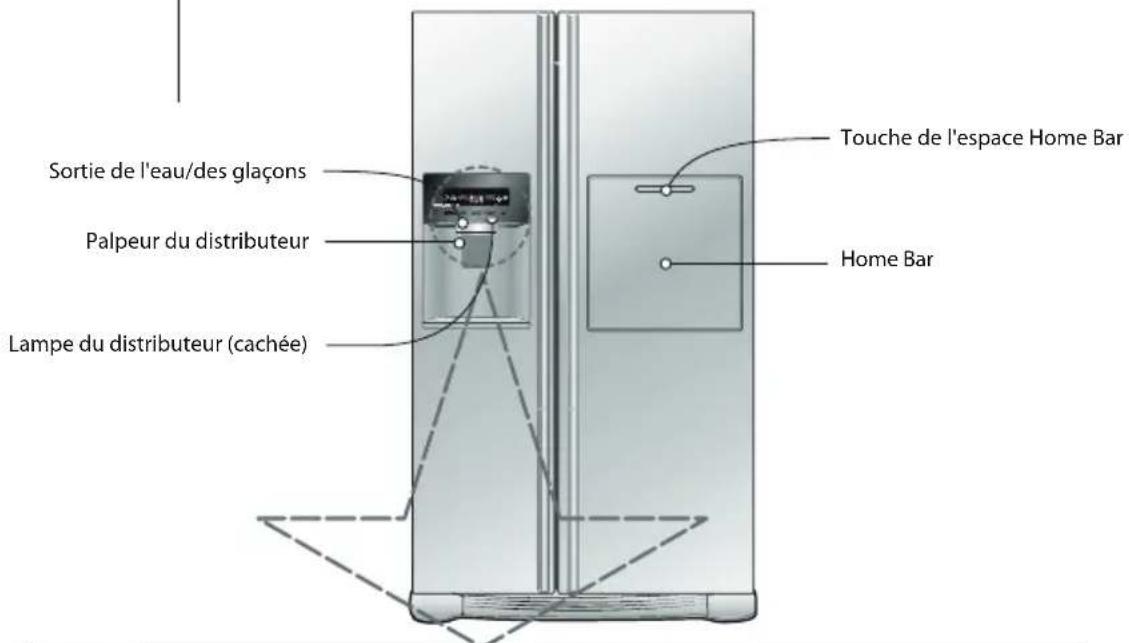
*Dispenser model - Type 3
Premiere installation
Balconnet et support
MISE AU REBUT DES PRODUITS
The model and serial number of the refrigerator is located on the back or one side of the refrigerator. Record it below should you ever need service.
MODEL
SERIAL
LG Electronics Wroctaw Sp. Z o.o., ul. LG Electronics 1-2, Biskupice Podgorne, 55-040 Kobierzyce, Poland. Printed in Poland
LG Customer Information Centre
For inquiries or comments, visit www.lg.com or call;
0844 847 5454
UK
3220 dites LG
FRANCE
Register your product Online!
www.lg.com