ManualGo.com
KE55XH8077 - TV SONY - Free user manual and instructions
Find the device manual for free KE55XH8077 SONY in PDF.



Download the instructions for your TV in PDF format for free! Find your manual KE55XH8077 - SONY and take your electronic device back in hand. On this page are published all the documents necessary for the use of your device. KE55XH8077 by SONY.
USER MANUAL KE55XH8077 SONY
About Manuals This TV comes with the following manuals. Please retain the manuals for future reference. Note
- Before operating the TV, please read the “Safety Information”.
- Read the supplied safety documentation for additional safety information.
- Images and illustrations used in the Setup Guide and this manual are for reference only and may differ from the actual product.
- The “xx” that appears in the model name corresponds to a numeric digit, related to design, colour or TV system. Location of the identification label Labels for the TV Model No., Production Date (year/month) and Power Supply rating are located on the rear of the TV or package. For models with supplied mains adaptor: Labels for mains adaptor Model No. and Serial No. are located on the bottom of mains adaptor. Notice for Radio Equipment Hereby, Sony Corporation declares that the radio equipment types KD-85XH8096, KD-75XH8096, KD-65XH8196, KD-65XH8096, KD-65XH8077, KD-55XH8196, KD-55XH8096, KD-55XH8077, KD-49XH8196, KD-49XH8096, KD-49XH8077, KD-43XH8196, KD-43XH8096, KD-43XH8077 are in compliance with Directive 2014/53/EU. The full text of the EU declaration of conformity is available at the following internet address: http://www.compliance.sony.eu/ Notice for customers: the following information is only applicable to equipment sold in countries applying EU directives. For this radio equipment, the following restrictions on putting into service or of requirements for authorization of use apply in AT, BE, HR, CY, CZ, DK, EE, FI, FR, DE, EL, HU, IE, IT, LV, LT, LU, MT, NL, PL, PT, SK, SI, ES, SE, UK, IS, LI, NO, CH, BG, RO, TR, AL, BA, MK, MD, RS, ME, Kosovo : 5150 - 5350 MHz band is restricted to indoor operations only. Installation/Set-up Install and use the TV set in accordance with the instructions below in order to avoid any risk of fire, electric shock or damage and/or injuries. Installation
- The TV set should be installed near an easily accessible mains socket.
- Place the TV set on a stable, level surface to prevent it from falling over and causing personal injury or property damage.
- Install the TV where it cannot be pulled, pushed, or knocked over.
- Install the TV so that the TV’s Table-Top Stand does not protrude out from the TV stand (not supplied). If the Table-Top Stand protrudes out from the TV stand, it may cause TV set to topple over, fall down, and cause personal injury or damage to the TV. Transporting
- Before transporting the TV set, disconnect all cables.
- Two or more people (three or more people for KD-85XH80xx) are needed to transport a large TV set. Setup Guide
- TV installation and setup. Reference Guide (this manual) / Safety Documentation
- Safety information, remote control, troubleshooting, wall-mount installation, specification, etc. Help Guide (On screen Manual)
- Settings, Android TV functions, Internet connection, troubleshooting, etc.
- To open it, press the HELP button on the remote control and select Help Guide.
- You can refer to the Help Guide with your smartphone. https://rd1.sony.net/help/tv/ haep1/h_aep/ IMPORTANT - Read the End User Software Licence Agreement before using your Sony product. Using your product indicates your acceptance of the End User Software Licence Agreement. The software licence agreement between you and Sony is available online at Sony website (http://www.sony.net/tv-software-licenses/) or on your product screen. Go to [Settings] [Device Preferences] [About] [Legal information] [Notices and licences]. IMPORTANT NOTICE Safety Information3
- When transporting the TV set by hand, hold it as shown below. Do not put stress on the LCD panel and the frame around the screen.• When lifting or moving the TV set, hold it firmly from the bottom. KD-85XH80xx KD- 75XH80xx / 65XH81xx / 65XH80xx / 55XH81xx / 55XH80xx / 49XH81xx / 49XH80xx / 43XH81xx / 43XH80xx
10 mm - 12 mmM6 screw (not supplied)Cord (not supplied)Screw (not supplied)1.5 N·m {15 kgf·cm}(supplied)
Remote Control and TV The remote control shape, location, availability and function of remote control buttons may vary depending on your region/ country/TV model. (Microphone): Use the Google Assistant*
. For hints on how to control your TV press (Microphone) button and speak the phrase “voice hints”.*
REC: Record the currently viewed programme on USB HDD/DVR*
EXIT (Power) (except KD-49XH81xx / 49XH80xx / 43XH81xx / 43XH80xx) (Power)/+/– (KD-49XH81xx / 49XH80xx / 43XH81xx / 43XH80xx only) Remote Control sensor / Light sensor / LED *1 Only on limited region/country/TV model/language.*2 The Google Assistant or voice search requires an Internet connection.*3 [TV box setup] setting is required.
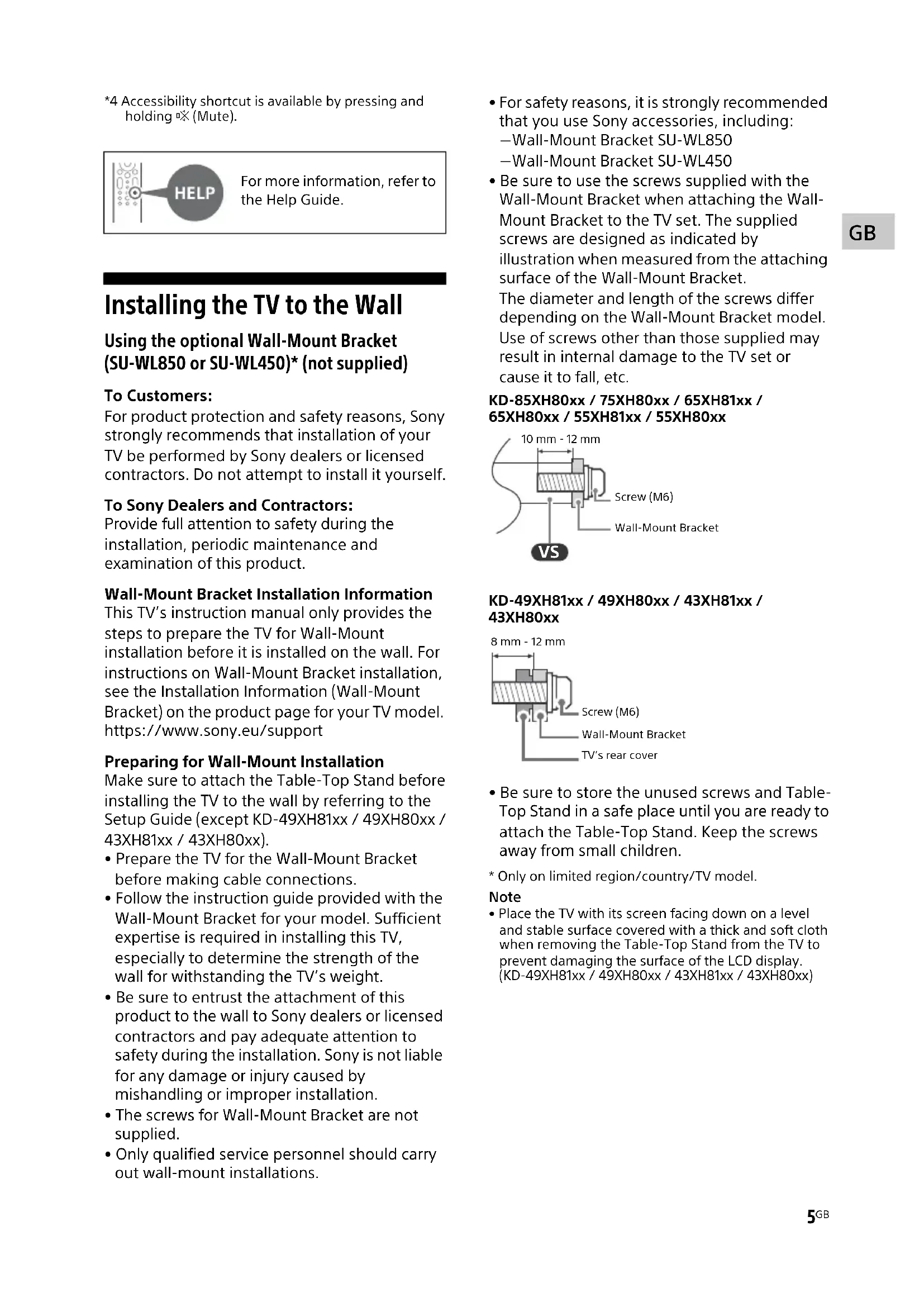
*4 Accessibility shortcut is available by pressing and holding (Mute). Installing the TV to the Wall Using the optional Wall-Mount Bracket (SU-WL850 or SU-WL450)* (not supplied) To Customers: For product protection and safety reasons, Sony strongly recommends that installation of your TV be performed by Sony dealers or licensed contractors. Do not attempt to install it yourself. To Sony Dealers and Contractors: Provide full attention to safety during the installation, periodic maintenance and examination of this product. Wall-Mount Bracket Installation Information This TV’s instruction manual only provides the steps to prepare the TV for Wall-Mount installation before it is installed on the wall. For instructions on Wall-Mount Bracket installation, see the Installation Information (Wall-Mount Bracket) on the product page for your TV model. https://www.sony.eu/support Preparing for Wall-Mount Installation Make sure to attach the Table-Top Stand before installing the TV to the wall by referring to the Setup Guide (except KD-49XH81xx / 49XH80xx / 43XH81xx / 43XH80xx).
- Prepare the TV for the Wall-Mount Bracket before making cable connections.
- Follow the instruction guide provided with the Wall-Mount Bracket for your model. Sufficient expertise is required in installing this TV, especially to determine the strength of the wall for withstanding the TV’s weight.
- Be sure to entrust the attachment of this product to the wall to Sony dealers or licensed contractors and pay adequate attention to safety during the installation. Sony is not liable for any damage or injury caused by mishandling or improper installation.
- The screws for Wall-Mount Bracket are not supplied.
- Only qualified service personnel should carry out wall-mount installations.
- For safety reasons, it is strongly recommended that you use Sony accessories, including: Wall-Mount Bracket SU-WL850 Wall-Mount Bracket SU-WL450
- Be sure to use the screws supplied with the Wall-Mount Bracket when attaching the Wall- Mount Bracket to the TV set. The supplied screws are designed as indicated by illustration when measured from the attaching surface of the Wall-Mount Bracket. The diameter and length of the screws differ depending on the Wall-Mount Bracket model. Use of screws other than those supplied may result in internal damage to the TV set or cause it to fall, etc. KD-85XH80xx / 75XH80xx / 65XH81xx / 65XH80xx / 55XH81xx / 55XH80xxKD-49XH81xx / 49XH80xx / 43XH81xx / 43XH80xx
- Be sure to store the unused screws and Table- Top Stand in a safe place until you are ready to attach the Table-Top Stand. Keep the screws away from small children.
- Only on limited region/country/TV model. Note
- Place the TV with its screen facing down on a level and stable surface covered with a thick and soft cloth when removing the Table-Top Stand from the TV to prevent damaging the surface of the LCD display. (KD-49XH81xx / 49XH80xx / 43XH81xx / 43XH80xx)For more information, refer to the Help Guide.
Screw (M6)Wall-Mount Bracket10 mm - 12 mm Screw (M6)Wall-Mount Bracket8 mm - 12 mmTV’s rear cover6
KD-85XH80xx / 75XH80xx / 65XH81xx / 65XH80xx / 55XH81xx / 55XH80xx 1 Remove the screws from the rear of the TV. 2 Attach the Wall-Mount Attachment (supplied with the TV) to the rear of the TV (to make it parallel with the wall). Note
- If using an electric screwdriver, set the torque at approximately 1.5 N.m {15 kgf.cm}.• Be sure to fasten the Wall-Mount Attachment when attaching them to the TV. Use only a flat head screwdriver to install the Wall-Mount Attachment. Use of another tool might result in over torqueing the Wall-Mount Attachment and damaging the TV. Detaching the Table-Top Stand from the TV KD-85XH80xx / 75XH80xx / 65XH81xx / 65XH80xx / 55XH81xx / 55XH80xx 1 Remove one side of the Table-Top Stand at a time. Firmly hold the Table-Top Stand securely with both hands while the other people lift up the TV. 2 Repeat the previous step and remove the other side of the Table-Top Stand. Note
- Three or more people are required to detach the Table-Top Stand.• Be careful not to use excessive force while detaching the Table-Top Stand from the TV as it may cause the TV set to fall resulting in personal injury or physical damage to the TV.• Take care when handling the Table-Top Stand to prevent damage to the TV.• Be careful when lifting the TV as the Table-Top Stand is detached, the Table-Top Stand may topple over and cause personal injury.• Take care when removing the Table-Top Stand from the TV to prevent it from falling over and damaging the surface that the TV is sitting on.
KD-49XH81xx / 49XH80xx / 43XH81xx / 43XH80xx Troubleshooting General troubleshooting for issues like: black screen, no sound, frozen picture, TV does not respond, or network is lost, do the following steps. 1 Restart your TV by pressing the power button on the remote control for about five seconds. The TV will restart. If the TV does not recover, try unplugging the mains lead. Then press the power button on the TV, and release it. Wait for two minutes, and plug in the mains lead. 2 Refer to the Help menu by pressing HELP on the remote control. 3 Connect your TV to the Internet and perform a software update. Sony recommends you to keep your TV software updated. Software updates provide new features and performance improvements. 4 Visit Sony support website (information provided at the end of this manual). When you plug in the TV, the TV may not be able to turn on for a while even if you press the power button on the remote control or the TV. It takes time to initialize the system. Wait for about one minute, then operate it again. The remote control does not function. Replace the batteries. The parental lock password has been forgotten. Enter 9999 for the PIN and enter the new PIN. Specifications System Panel system: LCD (Liquid Crystal Display) Panel, LED Backlight TV system: Depending on your country/area selection/TV model Analogue: B/G, D/K, I Digital: DVB-T/DVB-C/DVB-T2*
: DVB-S/DVB-S2 Colour system: PAL/SECAM/NTSC3.58 (Video only)/NTSC4.43 (Video only) Channel coverage: Depending on your country/ area selection/TV model Analogue: UHF/VHF/Cable Digital: UHF/VHF/Cable Satellite*
: IF Frequency 950-2,150 MHz Sound output: 10 W + 10 W Wireless technology Protocol IEEE 802.11a/b/g/n/ac Bluetooth® Version 4.2 Frequency band(s) Input/Output jacks Antenna (aerial)/cable 75 ohm external terminal for VHF/UHF Satellite antenna*
5.1 channel linear PCM: 32/44.1/48/88.2/96/
Two channel linear PCM: 48 kHz 16 bits, Dolby Audio, Dolby Atmos, DTS DIGITAL AUDIO OUT (OPTICAL) Digital optical jack (Two channel linear PCM: 48 kHz 16 bits, Dolby Audio, DTS) (Stereo mini jack) Headphone 1, 2 (HDD REC)*
USB device port ( 2 USB HDD device for REC feature) USB port 1 supports High Speed USB (USB 2.0) USB port 2 supports Super Speed USB (USB 3.1 Gen 1) CAM (Conditional Access Module) slot LAN 10BASE-T/100BASE-TX connector (Depending on the operating environment of the network, connection speed may differ. The communication rate and quality are not guaranteed.) DC IN 19.5 V (models with supplied mains adaptor only) Mains adaptor input Power, Product Fiche and others Power requirements except models with supplied mains adaptor 220 V - 240 V AC, 50 Hz models with supplied mains adaptor only
19.5 V DC with mains adaptor
0.50 W (25 W in software/EPG update mode)
KD-55XH81xx: 124.3 × 78.4 × 33.7 (124.3 × 71.8 × 7.1) KD-55XH80xx: 124.3 × 78.2 × 34.0 (124.3 × 71.8 × 7.1) KD-49XH81xx / 49XH80xx: 110.1 × 70.4 × 28.6 (110.1 × 64.5 × 5.7) KD-43XH81xx / 43XH80xx: 97.0 × 63.0 × 28.6 (97.0 × 57.0 × 5.7) Mass (Approx.) (kg) with Table-Top Stand (without Table-Top Stand) KD-85XH80xx: 45.6 (44.1) KD-75XH80xx: 32.9 (31.8) KD-65XH81xx: 22.3 (21.7) KD-65XH80xx: 22.6 (21.7) KD-55XH81xx: 16.6 (16.0) KD-55XH80xx: 16.8 (16.0) KD-49XH81xx / 49XH80xx: 12.1 (11.6) KD-43XH81xx / 43XH80xx: 9.8 (9.4) Others Optional accessories Wall-Mount Bracket: SU-WL850 (KD-75XH80xx / 65XH81xx / 65XH80xx / 55XH81xx / 55XH80xx only) Wall-Mount Bracket: SU-WL450 Operating temperature: 0 ºC – 40 ºC Operating humidity: 10 % – 80 % RH (non- condensing) *1 Not all the TV sets have DVB-T2 or DVB-S/S2 technology or satellite antenna terminal. *2 When 4096 × 2160p is input and [Wide mode] is set to [Normal], the resolution is displayed as 3840 × 2160p. To display 4096 × 2160p, set [Wide mode] setting to [Full 1] or [Full 2]. *3 To support 18 Gbps, set [HDMI signal format] to [Enhanced format]. *4 Refer to the online Help Guide for details. *5 Connect your audio system to the HDMI IN 3 to route TV audio to your audio system. *6 Only on limited region/country/TV model. *7 Energy consumption in kWh per year, based on the power consumption of the television operating 4 hours per day for 365 days. The actual energy consumption will depend on how the television is used. *8 Specified standby power is reached after the TV finishes necessary internal processes. *9 Standby power consumption will increase when your TV is connected to the network. Note
- Optional accessories availability depends on countries/region/TV model/stock.
- Design and specifications are subject to change without notice.
- Subscriptions for services and applications may be required and additional terms, conditions and/or charges may apply when using the Google Assistant. Notes on Digital TV function
- Digital TV (DVB terrestrial, satellite and cable), interactive services and network functions may not be available in all countries or areas. Some functions might not be enabled or might not operate correctly with some providers and network environments. Some TV service providers may charge a fee for their services.
- This TV supports digital broadcasting using MPEG-2, H.264/MPEG-4 AVC and H.265/HEVC codecs, but compatibility with all operator/ service signals, which may change over time, cannot be guaranteed. Trademark information
- The terms HDMI, HDMI High-Definition Multimedia Interface, and the HDMI Logo are trademarks or registered trademarks of HDMI Licensing Administrator, Inc.
- Dolby, Dolby Vision, Dolby Atmos, Dolby Audio, and the double-D symbol are trademarks of Dolby Laboratories. Manufactured under license from Dolby Laboratories. Confidential unpublished works. Copyright © 2012-2018 Dolby Laboratories. All rights reserved.
- Gracenote, the Gracenote logo and logotype, “Powered by Gracenote” logo are either registered trademarks or trademarks of Gracenote, Inc. in the United States and/or other countries.
- Google, Google Play, Chromecast, YouTube, Android TV and other related marks and logos are trademarks of Google LLC.
- For DTS patents, see http://patents.dts.com. Manufactured under license from DTS, Inc. DTS, the Symbol, DTS and the Symbol together, and Digital Surround are registered trademarks or trademarks of DTS, Inc. in the United States and/or other countries. © DTS, Inc. All Rights Reserved.
- Netflix is a registered trademark of Netflix, Inc.
- DiSEqC™ is a trademark of EUTELSAT. This TV supports DiSEqC 1.0. This TV is not intended for controlling motorized antennas.
- TUXERA is a registered trademark of Tuxera Inc. in the US and other countries.
- All other trademarks are the property of their respective owners.2