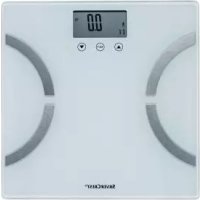
SPWD 180 H1 - Scale SILVERCREST - Free user manual and instructions
Find the device manual for free SPWD 180 H1 SILVERCREST in PDF.



| Product type | Bioimpedance scale (connected scale with body analysis) |
| Brand | SilverCrest |
| Model | SPWD 180 H1 |
| Dimensions (L x H x D) | Approximately 30 x 2.1 x 30 cm |
| Weight (with battery) | Approximately 1,600 g |
| Power supply | 1 CR2032 lithium battery (3 V) |
| Maximum capacity | 180 kg / 396 lb / 28 st |
| Graduation | 0.1 kg / 0.2 lb |
| Accuracy | ± (1% + 0.1 kg) from 30 to 180 kg |
| Weight units | kg / st:lb / lb (switchable) |
| Measurement functions | Weight, body fat, water, muscle, bone mass, recommended calorie intake |
| Display | Liquid crystal display (LCD) |
| User memory | 12 profiles |
| Gender | Male / Female |
| Age range | 10 to 80 years |
| Body height | 100 to 220 cm |
| Activity levels | 6 (none, low, normal, moderate, intense, high-level athlete) |
| Auto-off | Yes |
| Power on | Step-On (step onto platform) |
| Platform material | Safety glass (integrated electrodes) |
| Safety | Do not use with pacemaker; not recommended for pregnant women |
| Maintenance and cleaning | Clean, dry cloth; do not use aggressive liquids |
| Warranty | 3 years (TARGA GmbH) |
| Package contents | Scale, CR2032 battery (pre-installed), instruction manual |
Frequently Asked Questions - SPWD 180 H1 SILVERCREST
User questions about SPWD 180 H1 SILVERCREST
0 question about this device. Answer the ones you know or ask your own.
Ask a new question about this device
Download the instructions for your Scale in PDF format for free! Find your manual SPWD 180 H1 - SILVERCREST and take your electronic device back in hand. On this page are published all the documents necessary for the use of your device. SPWD 180 H1 by SILVERCREST.
USER MANUAL SPWD 180 H1 SILVERCREST
Operating instructions and safety instructions
FR
- Technical data .... 5
- Safety instructions .... 5
- Copyright 8
- Prior to use 8
7.1 Activating the battery....8
7.2 Entering or changing personal data....8
- First use 9
8.1 Switching on the scales / measuring weight 9
8.2 Switching on the scales / measuring weight, recommended calorie intake and body fat, water, bone and muscle percentages.... 10
8.3 Auto Power Off....10
8.4 Replacing the battery.... 11
- Troubleshooting 11
9.1 Nothing is indicated on the LCD display 11
9.2 "Lo" is indicated on the LCD display and the scales switch off.... 11
9.3 "USEL" is indicated on the LCD display and the scales switch off.... 12
9.4 "Err" is indicated on the LCD display.... 12
9.5 "Err2" is indicated on the LCD display.... 12
-
Maintenance / cleaning 12
-
Environmental and disposal information 13
11.1 Disposal of batteries.... 13 - Conformity information.... 13
- Warranty and servicing advice.... 14
Congratulations!
By purchasing the SilverCrest diagnostic scales SPWD 180 H1, hereinafter referred to as diagnostic scales, you have opted for a high-quality product.
Familiarise yourself with the diagnostic scales before using them for the first time, and read these operating instructions carefully. Pay particular attention to the safety instructions and use the diagnostic scales only as described in these operating instructions and for the specified range of applications.
Keep these operating instructions in a safe place. Include all documents when passing on the diagnostic scales to someone else.
1. Intended use
These diagnostic scales are used to determine a person's weight. Furthermore, it is possible to measure body fat, water, muscle and bone percentages and to determine your recommended daily calorie intake. These diagnostic scales should not be used outdoors or in tropical climates. These diagnostic scales are not designed for commercial use or operation in a company. Use the diagnostic scales only for private purposes in living areas as any other use is not as intended. These diagnostic scales meet all relevant norms and standards in relation to CE conformity. In the event of any modification to the diagnostic scales that was not approved by the manufacturer, compliance with these standards is no longer guaranteed. The manufacturer does not accept any liability for any resulting damage or faults in such cases. Only use accessories specified by the manufacturer.
Please observe the regulations and laws in the country of use.
2. Supplied items
• SilverCrest diagnostic scales SPWD 180 H1
• 1 lithium battery CR2032
• These operating instructions
3. Overview
These operating instructions have a fold-out cover. The diagnostic scales are illustrated with numbers on the inside cover. The numbers indicate the following:
1 LCD display
2 ▲ button
3 SET button
4 ▼ button
5 Tread
6 Electrodes
7 Battery compartment
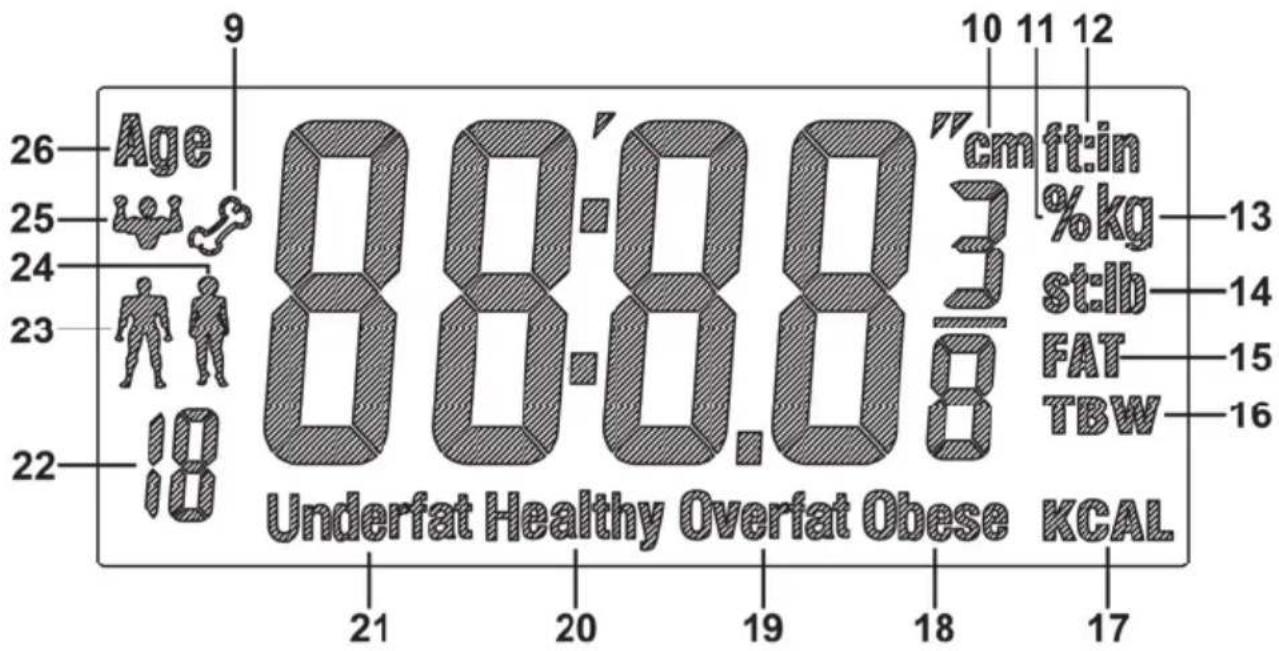
3.1 LCD display
other
| Age | BMI (%) | |---|---| | 26 | 9 | | 25 | 10 | | 24 | 11 | | 23 | 12 | | 22 | 13 | | 21 | 14 | | 20 | 15 | | 19 | 16 | | 18 | 17 | Underfat Healthy Overfat Obese KCAL9 Bone percentage
10 Body height in cm
11 Percentage (of body fat, water, muscle)
12 Body height in feet:inches
13 Unit of weight in kilograms
14 st:lb Unit of weight in stones:pounds
lb Unit of weight in pounds
15 Body fat percentage
16 Water percentage
17 Recommended calorie intake per day
18 Obese
19 Overweight
20 Normal weight
21 Underweight
22 User profile memory
23 Male
24 Female
25 Muscle percentage
26 Age
4. Technical data
Operating voltage: 3 V

Battery: 1 x 3 V lithium battery CR2032
Units of weight: kg / st / lb (adjustable)
Maximum weight: 180 kg / 396 lb / 28 st
Graduation: 0.1 kg / 0.2 lb
Measuring tolerance: +/- (1% +0.1 kg/ 0.2 lb) for 30 kg to 180 kg
Auto Power Off function: yes
User profile memories: 12
Gender: male / female
Age range for diagnostics functions: 10-80 years
Levels of activity: 6 (none, little, normal, moderate, intense, athletic)
Supported body heights: 100 - 220 cm
Dimensions (W x H x D): approx. 30 x 2.1 x 30 cm
Weight: approx. 1600g including battery
Operating temperature: +10 °C to +40 °C
The technical data and design may be changed without notification.
5. Safety instructions
Before using the diagnostic scales for the first time, please read the following instructions and pay attention to all warnings, even if you are familiar with handling electronic devices. Store these operating instructions in a safe place for future reference. If you sell the diagnostic scales or pass them on, always include these instructions.

WARNING! This symbol indicates important information for safe operation of the diagnostic scales and the safety of the user.
This symbol indicates that one must not step on the diagnostic scales with wet or damp feet. The same applies if the tread is wet or damp. You could slip and injure yourself.
text_image
Max. 180kg 396lbsThis symbol indicates that the diagnostic scales cannot bear weights over 180 kg or 396 lb. Otherwise, the diagnostic scales could be damaged and there is a risk of injury.

This symbol indicates other important information on the topic.
These diagnostic scales can be used by children aged 8 and older and by persons with reduced physical, sensory or mental abilities or lack of experience and knowledge if they are supervised or have been instructed on the safe use of the diagnostic scales and understand the resulting risks. Children must not play with the diagnostic scales. Cleaning and user maintenance must not be carried out by children without supervision. Always keep plastic packaging away from children. It poses a suffocation risk.
Do not use the diagnostic scales under any circumstances if you wear a pacemaker. Never use the diagnostic scales in the vicinity of anyone who wears a pacemaker or other medical devices.
⚠ The diagnostic scales are not suitable for pregnant women.
Do not step on the diagnostic scales with wet or damp feet or when the tread is damp. You could slip and injure yourself.
Do not overload the diagnostic scales with more than 180 kg. Otherwise, the diagnostic scales could be damaged and there is a risk of injury.
Do not jump on the tread of the diagnostic scales. They could be damaged otherwise and there is a risk of injury.
If smoke is produced, or there are any unusual sounds or smells, remove the battery immediately from the diagnostic scales. In such cases, the diagnostic scales should not be used until they have been inspected by authorised service personnel. Never inhale smoke from a potential device fire. If you have inhaled smoke, however, consult a doctor. The inhalation of smoke can be harmful.
The diagnostic scales must not become damaged in order to prevent hazards.
⚠ Ensure that no fire sources (e.g. burning candles) are placed on or near the diagnostic scales. It poses a fire hazard!
The diagnostic scales must never be exposed to any direct heat sources (for example, heaters) or direct sunlight or artificial light. Also avoid contact with dripping water and splashes and corrosive liquids. Do not use the diagnostic scales near water. In particular, the diagnostic scales should never be submerged in liquid (do not place any items filled with liquid, e.g. vases or drinks, on the diagnostic scales). Also ensure that the diagnostic scales are never subjected to excessive shocks and vibrations. Furthermore, no foreign objects may penetrate the device. Otherwise, the diagnostic scales could be damaged.
⚠️ If the battery has leaked, remove it to prevent damage to the diagnostic scales. You can remove leaked battery fluid with a dry, absorbent cloth. Wear suitable gloves for this purpose! Contact with skin must be avoided. In the event of skin or eye contact with chemicals, they must be immediately rinsed with generous amounts of water and a doctor must be consulted.
6. Copyright
All information contained in these instructions is subject to copyright and is provided for information purposes only. It is only permitted to copy or duplicate data and information with the express and written consent of the author. This also includes commercial use of the content and data. The text and illustrations are based on the state of the art at the time of printing. Subject to change.
7. Prior to use
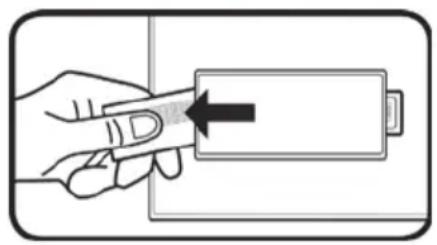
7.1 Activating the battery
natural_image
Illustration of a hand holding a battery with an arrow pointing to it (no text or symbols present)Remove the strip from the battery compartment (7) on the bottom of the diagnostic scales. The diagnostic scales are now ready to use.
7.2 Entering or changing personal data

Make sure that the correct unit of weight is set before you enter your personal data. Refer to the section "Switching on the scales / measuring weight".
You must enter your personal data when you first measure your body weight, recommended calorie intake and body fat, water, bone and muscle percentages. To do so, proceed as follows:
- Press the SET button (3) to switch on the scales.
- The user profile memory (22) then flashes on the LCD display (1). Use the ▲ button (2) or ▼ button (4) to select the desired user profile memory (22) [1-12]. Confirm your selection using the SET button (3).
- You can then successively enter gender [male (23)/female (24)], age (26), height and level of activity via the ▲ button (2) and ▼ button (4). Confirm each entry using the SET button (3).

You can use the level of activity to specify your sporting activity. The following 6 levels of activity are available: AC-1 = none, AC-2 = little, AC-3 = normal, AC-4 = moderate, AC-5 = intense and AC-6 = athletic.
8. First use

A solid surface is required to measure weight correctly. Thus always place the diagnostic scales on a solid, horizontal floor covering and never on carpet. This can distort the measurement result.

To obtain comparable measurement results, you should always weigh yourself if possible at the same time of day (preferably in the morning). Always weigh yourself if possible under the same conditions: on an empty stomach, after having gone to the toilet and naked.

Please note that values for the stone unit of weight are not represented as decimal values. The display is divided into two segments by a colon. Only whole numbers are displayed in the "st" unit of weight to the left of the colon. The remaining weight is displayed in the "lb" unit of weight to the right of the colon.
Example: "6:8.2 st:lb" is shown on the display. This corresponds to 6st and 8.2 lb.

The diagnostic scales must be calibrated before first use or after having been moved to ensure that they can determine one's weight exactly. To do so, step briefly on to the tread (5), step off it again and wait until the diagnostic scales switch off automatically. The diagnostic scales are now calibrated.
8.1 Switching on the scales / measuring weight
Due to the step on power function, the diagnostic scales are switched on automatically when you step on the tread (5) and they start to measure your weight immediately.
In their original state, the diagnostic scales are set to the "kg" (13) unit of weight. Once the selected unit of weight is displayed, press the buttons ▲ (2) or ▼ (4) to change it. The selected unit of weight is then indicated on the LCD display (1).
Stand on the tread (5) of the diagnostic scales so that your weight is evenly distributed. Remain as still as possible during the weighing process as the measurement result may be distorted otherwise. The measurement result is indicated on the LCD display (1) during the weighing process. The measurement is complete when the display flashes.
8.2 Switching on the scales / measuring weight, recommended calorie intake and body fat, water, bone and muscle percentages
You must first enter your personal data before performing these measurements. Please pay particular attention to the section "Entering or changing personal data". Proceed as follows to perform the measurement:
- Press the SET button (3) to switch on the scales.
- Press the ▲ button (2) or ▼ button (4) to select the desired user profile memory (22).
- Stand barefoot on the tread (5) and make sure that you are standing on the electrodes (6).
- The user profile memory (22) flashes several times. The age and body height set are displayed one after the other before the measurement of body weight begins. After the body weight is displayed flashing, measurement of the other values begins. Stay on the electrodes (6) until measurement is complete. During the weighing and measurement process, try to stay as still as possible to ensure an accurate result.
• After measuring successfully, the following values are displayed a few times in succession:
○ Body weight
○ Body fat percentage (15) and obese (18), overweight (19), normal weight (20) or underweight (21)
o Water percentage (16)
o Muscle percentage (25)
○ Bone percentage (9)
o Recommended calorie intake per day (17)
8.3 Auto Power Off
The diagnostic scales have an automatic switch-off function (Auto Power Off function). After displaying the measurement result, the diagnostic scales switch off automatically.
8.4 Replacing the battery
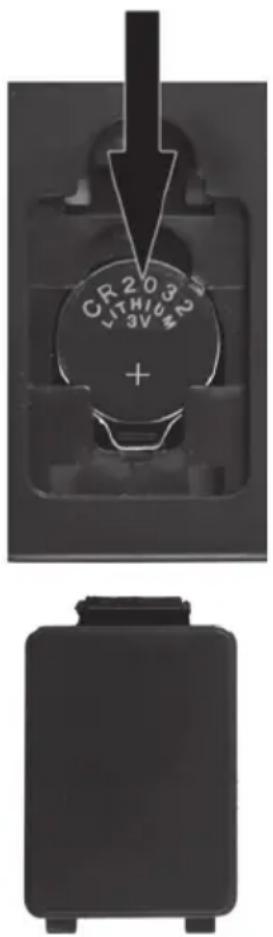
Replace the battery when it is empty. To replace the lithium battery CR2032, remove the cover of the battery compartment (7) at the rear of the diagnostic scales by unlocking the locking mechanism of the cover with your finger and then taking the cover off.
To remove the battery, push it down a bit (see the direction of the arrow in the illustration). You can then remove the battery from the holder.
Then insert a new lithium battery CR2032. Pay attention to the polarity when inserting the battery. This is indicated in the battery compartment (7), and the + symbol on the lithium battery CR2032 must be visible, as shown in the adjoining illustration.
Then insert the 2 guide lugs of the battery compartment cover back into the corresponding slots and press the battery compartment cover until the locking mechanism snaps into place. The diagnostic scales are now ready to use.
text_image
CR203 LITHICM +9. Troubleshooting
9.1 Nothing is indicated on the LCD display
- The lithium battery CR2032 is empty. Replace the lithium battery CR2032 with another of the same type. Please note the instructions in the section "Replacing the battery".
- The lithium battery CR2032 is inserted incorrectly. Please note the instructions in the section "Replacing the battery".
9.2 "Lo" is indicated on the LCD display and the scales switch off
- The lithium battery CR2032 is almost empty. Replace the lithium battery CR2032 with another of the same type. Please note the instructions in the section "Replacing the battery".
9.3 "USEL" is indicated on the LCD display and the scales switch off
- An error has occurred and the diagnostic scales cannot perform the measurement. In this case, step off the tread (5) of the diagnostic scales and start the measurement again.
9.4 "Err" is indicated on the LCD display
- Your weight exceeds the maximum load capacity of 180 kg / 396 lb / 28 st. You should step off the tread (5) of the diagnostic scales immediately to avoid damaging the scales.
9.5 "Err2" is indicated on the LCD display
- An error occurred during measurement. If this happens, step off the tread (5) on the diagnostic scales and restart the measurement. Make sure that you are standing on the electrodes (6).
10. Maintenance / cleaning
It is necessary to service the diagnostic scales if they have been damaged in any way, for example, if the housing is damaged, if liquid or objects have penetrated the diagnostic scales or if they have been exposed to rain or moisture. Servicing is also required if the device is not working properly or has been dropped. If smoke is produced, or there are any unusual sounds or smells, remove the battery immediately from the diagnostic scales. In such cases, the diagnostic scales should not be used until they have been inspected by authorised service personnel. Only have qualified personnel carry out the servicing on the device. Never open the housing of the diagnostic scales. Only use a clean, dry cloth for cleaning and never use any corrosive liquids.
11. Environmental and disposal information
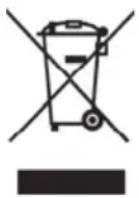
When the crossed out wheelie bin symbol appears on a product, this indicates that the product is subject to the European Directive 2012/19/EU. All old electrical and electronic devices must be separated from normal household waste and disposed of at designated state facilities. The correct disposal of old devices in this manner will prevent environmental pollution and human health hazards. The battery must be removed from the device before it is scrapped.
For further information about proper disposal, contact your local authorities, waste disposal office or the shop where you bought the device.

text_image
Three recycling symbols: a person sorting a bin, a recycling cycle with arrows, and a recycling symbol labeled 'a' with the letter 'b'.Dispose of the packaging in an environmentally compatible manner. Cardboard can be put out for municipal paper collections or brought to public collection points for recycling. Films and plastic used for packaging the device are collected by your local disposal services and disposed of in an environmentally compatible manner.
Please note the markings on the packaging material when disposing of it, it is labelled with abbreviations (a) and numbers (b), the meanings of which are as follows:
1-7: plastic / 20-22: paper and cardboard / 80-98: composite materials
11.1 Disposal of batteries
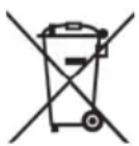
Remember to protect the environment. Used batteries should not be disposed of in household waste. They must be taken to a collection point for old batteries. Please note that only discharged batteries may be deposited in collection bins for portable batteries. Care must be taken to ensure that batteries that are not fully discharged do not short circuit.
12. Conformity information

The product complies with the requirements of the applicable European and national directives. Evidence of conformity has been provided. The manufacturer has the relevant declarations and documentation.
The complete EU Declaration of Conformity is available for download from this link:
https://www.targa.gmbh/downloads/conformity/326032_1904.pdf
13. Warranty and servicing advice
Warranty of TARGA GmbH
Dear Customer,
This device is sold with three years warranty from the date of purchase. In the event of product defects, you have legal rights towards the seller. These statutory rights are not restricted by our warranty as described below.
Warranty conditions
The warranty period commences upon the date of purchase. Please keep the original receipt in a safe place as it is required as proof of purchase. If any material or manufacturing faults occur within three years of purchase of this product, we will repair or replace the product free of charge as we deem appropriate.
Warranty period and legal warranty rights
The warranty period is not extended in the event of a warranty claim. This also applies to replaced and repaired parts. Any damage or defects discovered upon purchase must be reported immediately when the product has been unpacked. Any repairs required after the warranty period will be subject to charge.
Scope of warranty
The device was carefully manufactured in compliance with stringent quality guidelines and subjected to thorough testing before it left the works. The warranty applies to material and manufacturing faults. This warranty does not cover product components which are subject to normal wear and which can therefore be regarded as wearing parts, or damage to fragile components such as switches, rechargeable batteries or components made of glass. This warranty is void if the product is damaged, incorrectly used or serviced. To ensure correct use of the product, always comply fully with all instructions contained in the user manual. The warnings and recommendations in the user manual regarding correct and incorrect use and handling of the product must always be observed and complied with. The product is solely designed for private use and is not suitable for commercial applications. The warranty is rendered void in the event of incorrect handling and misuse, if it is subjected to force, and also if any person other than our authorised service technicians interfere with the device. No new warranty period commences if the product is repaired or replaced.
Submitting warranty claims
To ensure speedy handling of your complaint, please note the following:
- Before using your product for the first time, please read the enclosed documentation carefully. Should any problems arise which cannot be solved in this way, please call our hotline.
- Always have your receipt, the product article number as well as the serial number (if available) to hand as proof of purchase.
- If it is not possible to solve the problem on the phone, our hotline support staff will initiate further servicing procedures depending on the fault.

Service

Phone: 0800 404 7657
E-Mail: targa@lidl.co.uk

Phone: 1890 930 034
E-Mail: targa@lidl.ie

Phone: 800 62230
E-Mail: targa@lidl.com.mt

Phone: 8009 4409
E-Mail: targa@lidl.com.cy
IAN: 326032_1904

Manufacturer
Please note that the following address is not a service address. First contact the service point stated above.
TARGA
GmbH
Coesterweg 45
59494 Soest
GERMANY
Indholdsfortegnelse
natural_image
Illustration of a hand holding a battery with an arrow pointing to it (no text or symbols present)text_image
Three recycling symbols: a person sorting a bin, a recycling cycle, and a recycling symbol with the letter 'b'.https://www.targa.gmbh/downloads/conformity/326032_1904.pdf
13. Oplysninger om garanti og service
TARGA GmbH - Garanti
Kære kunde,
natural_image
Illustration of a hand inserting a battery into a rectangular block (no text or symbols)natural_image
Solid black rectangular object with rounded corners and a small protrusion on top (no text or symbols visible)9. Dépannage
https://www.targa.gmbh/downloads/conformity/326032_1904.pdf
Cher client, chère cliente,
Cher client, chère cliente,
natural_image
Illustration of a hand inserting a battery into a rectangular block, with no text or symbols present.text_image
Three recycling symbols: a person disposing of trash into a bin, a recycling cycle with arrows, and a recycling symbol labeled 'a' with 'b'.https://www.targa.gmbh/downloads/conformity/326032_1904.pdf
