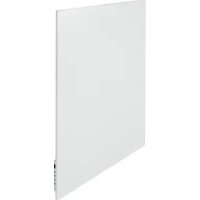
Mon Soleil 601 - Pan Eurom - Free user manual and instructions
Find the device manual for free Mon Soleil 601 Eurom in PDF.


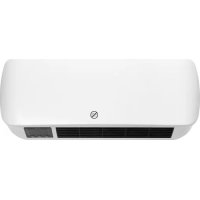
| Product type | Infrared electric heating panel |
| Brand | Eurom |
| Model | Mon Soleil 601 |
| Dimensions (W x H x D) | 60 x 100 x approx. 4 cm |
| Weight | 14.0 kg |
| Power supply | 220-240 V ~ 50 Hz |
| Maximum power | 600 W |
| Protection class | IP24 (splash-proof) |
| Thermostat | Yes, with integrated temperature sensor and optional external sensor |
| Mounting type | Wall mounting (suspension frame included) |
| Controls | Touch control panel, remote control, Eurom Smart app (Wi-Fi) |
| Main functions | Manual heating, weekly programming, open window detection, ECO mode |
| Temperature range | 0 to 37 °C |
| Display | LED screen with temperature, Wi-Fi, heating and window symbols |
| Connectivity | Wi-Fi 2.4 GHz (Eurom Smart app) |
| External sensor | Included for precise ambient temperature measurement |
| Safety | Overheat protection, automatic shutdown, hot surface (≤95°C), do not cover |
| Maintenance | Clean with a dry or slightly damp cloth; for Glass models, use glass cleaner |
| Usage | Domestic supplementary heating, suitable for damp rooms (IP24), minimum safety distance of 50 cm |
| Warranty | Manufacturer's warranty (according to terms, not detailed in the manual) |
Frequently Asked Questions - Mon Soleil 601 Eurom
User questions about Mon Soleil 601 Eurom
0 question about this device. Answer the ones you know or ask your own.
Ask a new question about this device
Download the instructions for your Pan in PDF format for free! Find your manual Mon Soleil 601 - Eurom and take your electronic device back in hand. On this page are published all the documents necessary for the use of your device. Mon Soleil 601 by Eurom.
USER MANUAL Mon Soleil 601 Eurom
natural_image
Four-panel image showing exterior wall panels and a close-up of a door panel, all without any visible text or symbols.Mon Soleil 350 & 601 & 720 (Metal)
Art.nr. 36.161.2 & 36.163.6 & 36.165.0
Art. nr. 36.162.9 & 36.164.3 & 36.166.7 (Swiss Plug)
Mon Soleil 300 & 450 & 720 Verre (Glass)
Art. nr. 36.169.8 & 36.171.1 & 36.173.5
Art. nr. 36.170.4 & 36.172.8 & 36.174.2 (Swiss Plug)
Infrarood verwarmingspaneel (metaal of glas) / Infrarot Heizplatte (Metall oder Glas) / Infrared heating panel (metal or glass) / Infrarouge panneau de chauffage (métal ou verre) / Infrarat panou de încălzire (metal sau sticlă)
This product is only suitable for well insulated spaces or occasional use.
Dank
natural_image
Technical drawings of a two-panel electronic device with labeled components (A and B), showing front, side, and top views without any readable text or symbols.natural_image
Close-up of a hand holding a thin wire with a black cable, attached to a white metal frame (no text or symbols visible)natural_image
Simple line drawing of a trash bin with diagonal lines crossing it, no text or symbols present.CE - verklaring
natural_image
Technical diagram of a two-panel electronic device with labeled components (A and B), showing front, side, and top views without any readable text or symbols.natural_image
Close-up of a hand holding a thin wire with a black cable, next to a white cable with a coiled wire (no text or symbols visible)Externer Temperatursensor (7)
Fernbedienung:
natural_image
Simple line drawing of a trash bin with diagonal lines crossing it, no text or symbols present.CE - Erklärung
Thank you very much for choosing for an EUROM device. You have made a good choice! We hope you will be satisfied about its functioning.
To get maximum profit from your device, it is important to read this manual attentive and totally before use, and to understand what is written. Read especially the safety instructions: they are there to protect you and your environment.
Keep the manual in a safe place for future reference. Store also the package: that is the best protection for your device in times of no-use. And if you at any time pass the appliance on, pass on the manual and package too.
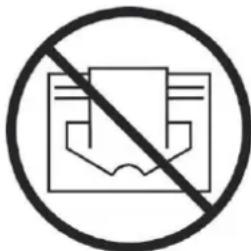
This symbol on your device means: do not cover!
Technical data
| Type | MS350 wifi | MS601 wifi | MS720 wifi | MS300 Verre wifi | MS450 Verre wifi | MS720 Verre wifi | |
| Supply voltage | V/Hz | 220-240 / 50 | |||||
| Maximale Leistung | W | 350 | 601 | 720 | 300 | 450 | 720 |
| Thermostat | + | + | + | + | + | + | |
| Protection class | IP24 | IP24 | IP24 | IP24 | IP24 | IP24 | |
| Dimensions | cm | 60x60 | 60x100 | 60x120 | 60x70 | 60x100 | 70x130 |
| Weight | kg | ||||||
General safety instructions
-
Before using the machine, carefully read this entire instruction manual.
-
Before using your new heater, check it, including cord and plug, for any visible damage. Do not use a damaged heater, but send it back to your dealer for replacement.
-
Do not use the heater until it is been fully installed in accordance with the instructions under the heading 'Description, Composition and Installation'.
-
This heater is strictly intended for normal domestic use. Only use it for the (additional) heating of your home.
-
This heater is in principle suitable for use in wet or damp rooms such as bathrooms, washrooms, etc. (IP24). Keep it at least 60 cm. away from water points and make sure that it can never fall into water and that no water can enter the stove. Should this ever happen, take out the plug from the socket first! Do not use an internally wet stove again but offer it for repair. Never
immerse the heater, cord or plug in water or other liquids and never touch the heater with wet hands.
- The supply voltage and utility frequency, specified on the machine, need to match those of the socket that is used. Only use an undamaged, earthed socket that is secured with a 30 mA earth leakage circuit breaker. The electrical socket that you are using must be to hand at all times in order to be able to remove the plug from the socket in the event of an emergency
- Fully extend the cord before plugging in the heater. Make sure it does not come into contact with any part of the heater and prevent it from heating up any other way. Do not run the cord underneath carpeting; do not cover it with mats, carpet strips or similar and make sure it is not placed in any passageways. Make sure the cord cannot be stepped on and that no furniture is placed on top of it. Do not lead the cord around sharp corners and do not roll it up too tightly after use!
- If possible, do not use an extension cord, as this poses the risk of overheating and fire. If the use of an extension cord is unavoidable, then make sure it is an undamaged, approved extension cord with a minimum diameter of 2 × 1.5 mm^2 and a minimum permissible power of 1000 Watt. To prevent overheating, always fully extend the cord!
- During use the plug can feel a little warm, that's normal. Is it really warm, then there is probably something wrong with the socket. Contact your electrician.
- Do not use the heater outdoors and do not use it in spaces, smaller than 7 m^3 .
- A heater contains hot and/or glowing and sparking components. Do not, therefore, use it in areas where fuels, paint, flammable liquids and/or gasses etc. are stored.
- Do not place the heater near, under, or directly opposite a socket and do not place it near an open fire or other heat source.
- Do not use the heater near or directly opposite furniture, animals, curtains, paper, clothes, bedding or other inflammable objects. Keep them at least 1 metre away from the heater!
- Never cover a heater! Never use the heater to dry clothes and do not place anything on top of the heater. Do not let anything lean against the heater.
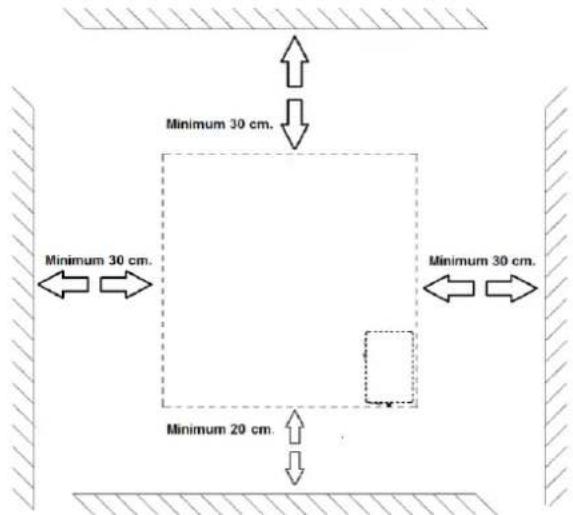
- Make sure that the air around the heater can circulate freely. Do not place the heater too close to walls or large objects and do not place it under shelves, cupboards or similar: take at all sides at least 30 cm free space and at least 20 cm from the floor. For hanging installation: don't block the space between stove and wall.
-
Always switch the heater off, unplug it and leave to cool down before:
-
cleaning the heater
- carrying out maintenance on the heater
-
touching or moving the heater.
-
This machine gets hot when in use ( ± 95^ ). To prevent burns, do not let bare skin come into contact with hot surfaces.
-
Close supervision is necessary if the product is used near children or incapacitated persons. Children of less than 3 years should be kept away unless continuously supervised. Children aged from 3 years and less than 8
years shall only switch on/off the appliance provided that it has been placed or installed in its intended normal operating position and they have been given supervision or instruction concerning use of the appliance in a safe way and understand the hazards involved. Children aged from 3 years and less than 8 years shall not plug in, regulate and clean the appliance or perform user maintenance.
- This appliance can be used by children aged from 8 years and above and persons with reduced physical, sensory or mental capabilities or lack of experience and knowledge if they have been given supervision or instruction concerning use of the appliance in a safe way and understand the hazards involved. Children shall not play with the appliance. Cleaning and user maintenance shall not be made by children without supervision.
- Carefully supervise when this appliance is used in the presence of children, incapacitated persons or pets. Let persons who are not able to leave the room independently, leave behind a working stove. The surface becomes hot (up to 95°C), so keep children and people with disabilities out of the neighborhood. Keep the packaging material away from children.
- This heater can also be controlled with a timer or an app as well as manually. However you operate it, always ensure that all safety regulations have been observed!
- Keep the heater clean. Dust, dirt and/or a build up of deposits in or behind the heater are a common cause of overheating. Make sure these deposits are removed regularly.
- Do not turn on the appliance if you have discovered damage to the appliance itself, the cord or the plug, if the appliance is malfunctioning, if it has been dropped or if there are any other signs of a defect. Return the complete product to the vendor or to a certified electrician for inspection and/or repair. Always ask for the original parts.
- Types Mon Soleil 300, 450 and 720 Verre: If the heater's glass is damaged in any way, dismantle the heater immediately, to prevent damage and/or injury from falling/fallen glass. Submit your device to your supplier for repairs.
- Do not use attachments and/or accessories that have not been recommended or supplied by the manufacturer.
- The appliance (incl. cord and plug) may only be opened and/or repaired by properly authorised and qualified persons.
- Only use this heater for its intended purpose and as described in this instruction manual.
Not abiding by the instructions may lead to damage, fire and/or personal injuries. A failure to adhere to these rules also immediately nullifies the guarantee and vendor, importer and/or manufacturer do not take responsibility for any of the consequences!
Description, composition and installation
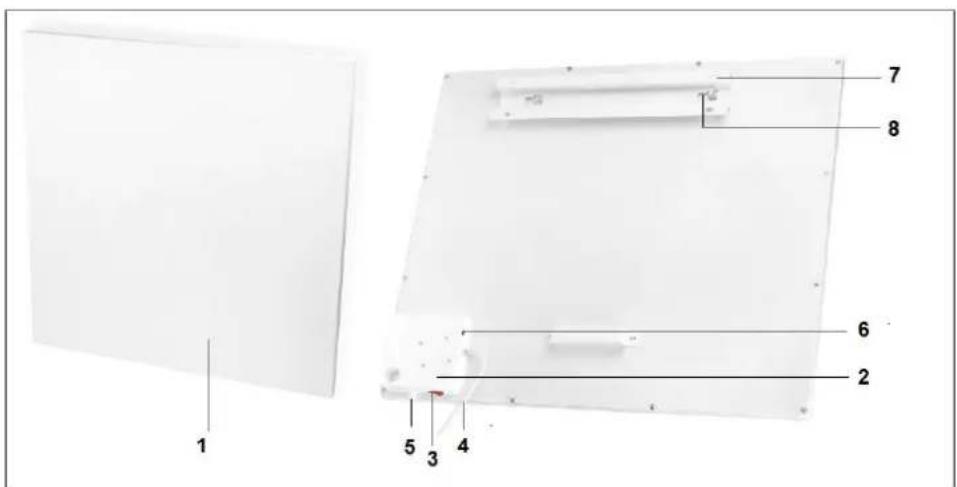
- Heating panel
- Control switch
- Main switch
- Electra cable with plug
- Permanent temperature sensor
- Connection external temperature sensor
- Suspension frame
- Suspension knobs 2
- Display
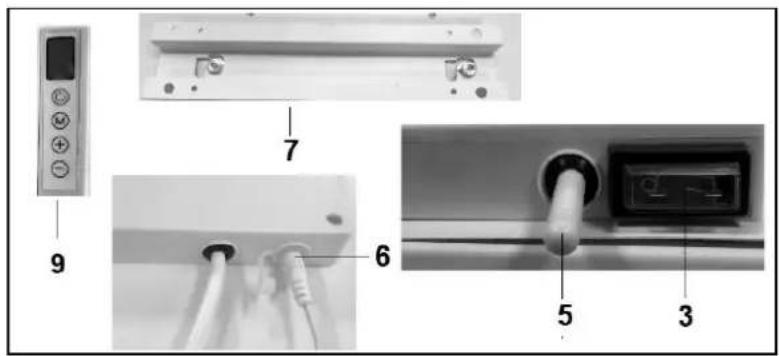
Attention! The illustration shows the Mon Soleil 350; other models have deviating dimensions and appearance, but the components described are the same.
Remove all packaging material and keep out of reach of children.
After removing packaging, check the appliance for damage or other signs that could indicate a fault/defect/malfunction. In case of doubt, do not use the appliance, but contact your vendor for inspection or replacement.
The fixing materials supplied are intended for a brick wall. If you are using a different type of surface, you should supply appropriate fixing materials yourself.
This heater has been designed to hang securely from the wall. Do not use it until it has been properly installed, as described in these instructions for use and never, for example, in a standing position or when leaning against something!
Wall mounting:
The heater must be at least 30 cm removed from all objects, walls, etc.; the distance to the floor must be at least 20 cm and there must be at least 30 cm above the heater.
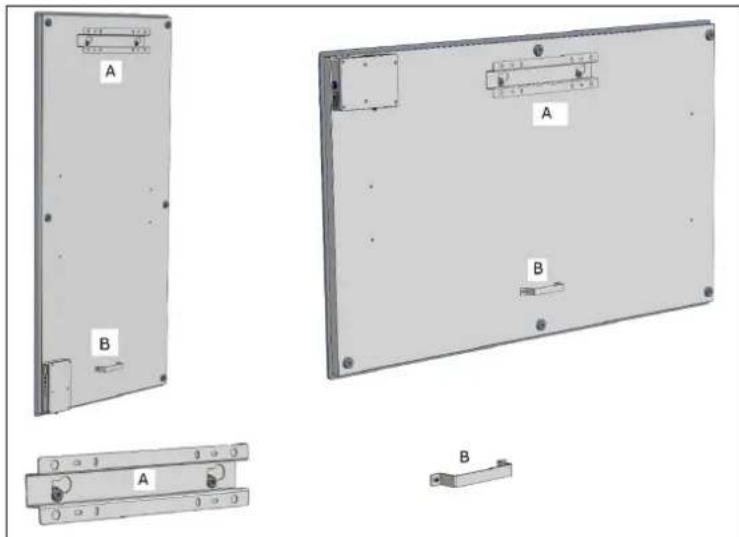
Pay attention: The wall-suspension system on the rear side of the heating panel is pre-mounted in order to hang the heating panel vertically. Viewed from the front, the main switch is at the bottom side and the control panel is at the right-hand side. If you want to hang the heating panel horizontally, you first have to mount the suspension frame, the suspension knobs and the wall spacer on the rear side of the heating panel in a different manner. Using a Phillips screwdriver, you can detach the suspension knobs and the wall spacer and then mount them in another position (see illustration). In case of horizontal mounting, it is sensible to use an external temperature sensor. This is because – when mounting the panel horizontally – the fixed temperature sensor is positioned at the top right-hand side of the panel and therefore, it measures a higher temperature. For measuring the room temperature correctly, it is better to use an external temperature sensor and to move the sensor downwards to below the heating panel.
A. Suspension frame including suspension knobs
B. Wall spacer
natural_image
Technical diagram of a device rear panel with labeled components (A and B), showing front, side, and top views without any readable text or symbols.- Choose a firm, even, vertical wall made of heat-resistant material on which to hang the heater.
- Define the position of the suspension frame: the frame should be mounted horizontal
to the wall. Position the suspension frame in such a manner that the minimum distances stated in the drawing above are guaranteed when installing the heating
panel in the suspension frame. Mount the suspension frame with the correct side
upwards (see the 'This side up' label on the suspension frame).
- Mark where the 4 holes need to be drilled: do this at the correct distance and perfectly level with respect to each other.
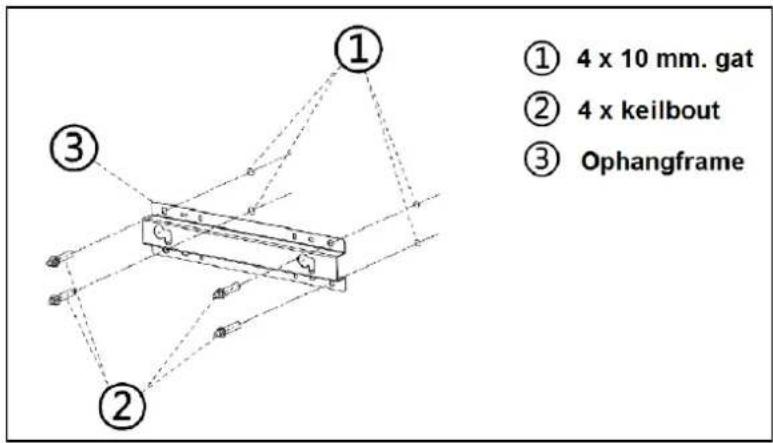
- Drill 10mm holes in the marked places and insert the cotter bolts into the holes.
- Screw the suspension frame immovably against the wall.
- Hang the heating panel in the suspension frame: the panel's suspension knobs through the eyes in the suspension frame.
- Slide the panel as far as possible to the right side and lower it as far as possible. Now the panel is suspended securely.
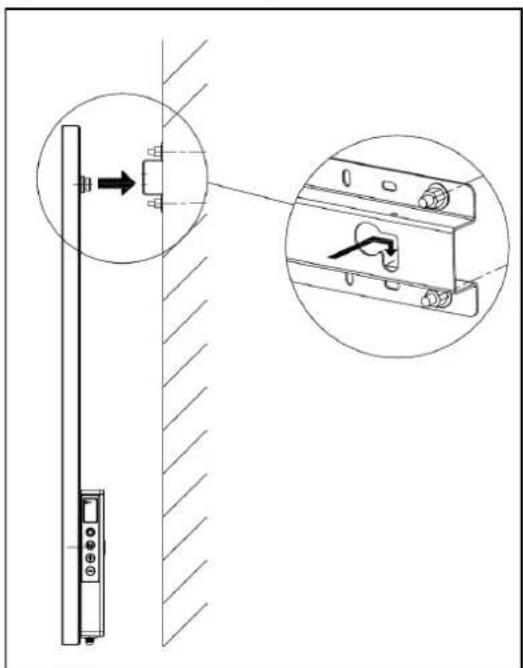
- To remove the panel from the wall, you must slide in the opposite direction and lift, until the knobs are in front of the eyes again. Now you can take the panel off.
Note: Guide the electric cable and the thermostat cable (if applicable) immediately downwards and make sure that they do not come into contact with the panel. Do not conceal any surplus cable behind the heater!
Use and Working
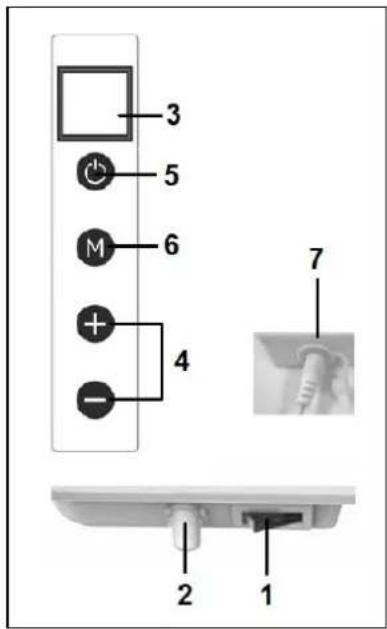
Control panel:
- Main switch & pilot light
- Temperature sensor
- Display
- Up/down key
- ON/OFF switch
- button M
- Connection external temperature sensor
External temperature sensor (7)
natural_image
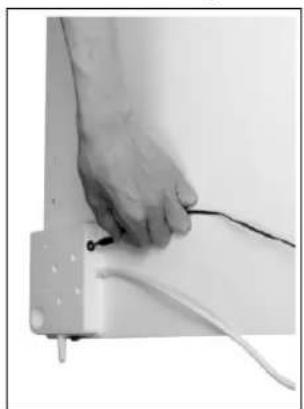
Close-up of a hand holding a thin black cable with a white cable attached to a white rectangular device (no text or symbols visible)Because the temperature sensor is located on the heater, it does not measure the external temperature very accurately. If you want accurate measuring, connect the separate thermostat (included in the delivery) by inserting the small plug into the control panel and placing the sensor approx. 2 metres away from the heater (see illustration). For this purpose, you should remove the heater from the wall and subsequently, place it back. When you have connected the separate thermostat, it automatically takes over the thermostat operation.
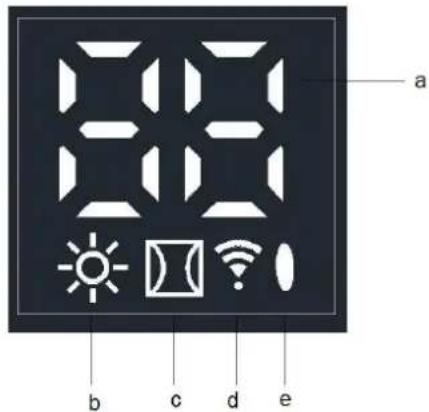
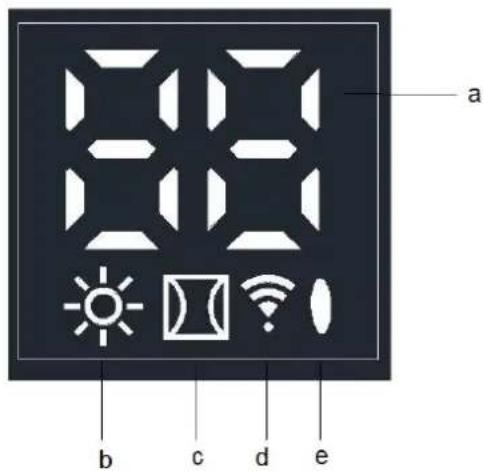
Display (3)
a. Temperature / Data
b. Heating symbol
c. Open-window detection symbol
d. WiFi symbol
e. Capacity indication symbol
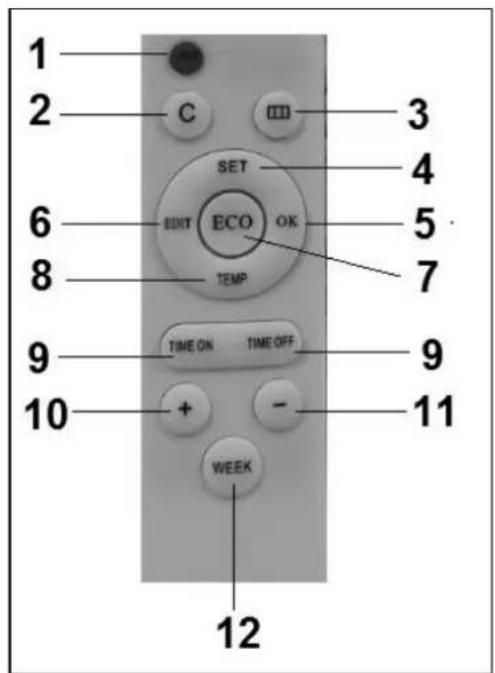
Remote control:
- ON/OFF button
- C (Cancel) button
- Open-window detection button
- SET button
- OK button
- EDIT button
- ECO button
- TEMP (temperature) button
- Time on / Time off button
- Higher (+)button
- Lower (-)button
- WEEK button
Operation using the control panel on the heater
Make sure the heater is firmly attached to the wall. Turn the main switch ON. The symbol indicating the capacity lights up and the WiFi symbol flashes on the display of the heater. When the WiFi symbol flashes, you can make a connection.
- Press the ON/OFF button on the control panel.
First the heater's display shows the set temperature for 3 seconds and subsequently, the ambient temperature. (The set temperature is the most recently set temperature or 20^ in case of first use.)
If the set temperature is higher than the ambient temperature, the heater will start to heat and the heating symbol will appear.
- Using the + and - buttons, the set temperature can be adjusted from 0 °C to 37 °C). If the set temperature is higher than the ambient temperature, the heater will start to heat and the heating symbol will appear.
When the set temperature is reached, the heater will automatically switch OFF and will switch ON again when the room cools down.
The heating symbol will disappear and re-appear accordingly.
If no button is pressed during two (2) minutes, the ambient temperature will disappear from the display. Pressing any button will make the ambient temperature re-appear.
Setting the time and day on the heater using the control panel
Using the M button, the time and day of the week can be entered so that you can use the timer function.
The heating panel should be ON, but should NOT heat and therefore, there is no heating symbol visible on the display. (Do this by setting the temperature lower than the ambient temperature, for example.)
| Step | Press button: | The display shows: | Explanation: |
| 1 | M | HH flashes | |
| 2 | + or - | 1 to 7 | Select day of the: 1 = Monday, 2 = Tuesday, etc. |
| 3 | M | H1 flashes | |
| 4 | + or - | 1 to 24 | Select the correct hour |
| 5 | M | H2 flashes | |
| 6 | + or - | 1 to 60 | Select the correct minute |
| 7 | M | Ambient temperature | |
| 8 | Day and time are set. | ||
Checking the day / time data on the heater using the control panel
The heating panel should be ON and should heat. Therefore, the heating symbol is visible on the heater's display. (Do this by setting the temperature higher than the ambient temperature, for example.)
Briefly and consecutively press the M button on the heater's control panel in order to check the day and time: HH = day of the week, H1 = hour and H2 = minute
Attention: If the infrared panel is switched OFF using the main switch or by removing the plug from the socket, the day will be set to 1 and the time to 00.00 the next time you switch the heater ON again.
Operation using the remote control
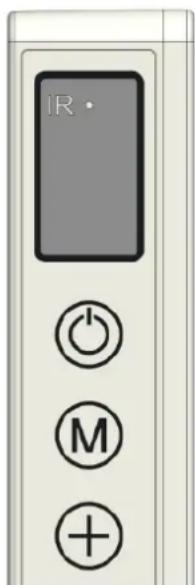
The remote control should be directed towards the display in order to operate the heating panel using the remote control. The illustration shows the position (IR) of the reception point of the remote control.
- Turn the main switch on the heater ON.
The symbol indicating the capacity lights up and the WiFi symbol flashes on the heater's display. When the WiFi symbol flashes, you can make a connection (please refer to the end of this instruction booklet).
- Press the red ON/OFF button on the remote control.
First the heater's display shows the set temperature for 3 seconds and subsequently, the ambient temperature. (The set temperature is the most recently set temperature or 20^ in case of first use.) If the set temperature is higher than the ambient temperature, the heater will start to heat and the heating symbol will appear.
- Using the + and - buttons, the set temperature can be adjusted from 0°C to 37°C). If the set temperature is higher than the ambient temperature, the heater will start to heat and the heating symbol will appear.
When the set temperature is reached, the heater will automatically switch OFF and will switch ON again when the room cools down.
The heating symbol will disappear and re-appear accordingly.
If no button is pressed during two (2) minutes, the ambient temperature will disappear from the display. Pressing any button will make the ambient temperature re-appear.
Setting the time and day on the heater using the remote control
First, the day of the week and time should be entered in order to be able to use the timer function.
The heating panel should be ON, but should NOT heat and therefore, there is no heating symbol visible on the heater's display. (Do this by setting the temperature lower than the ambient temperature, for example.)
| Step | Press button: | The display shows: | Explanation: |
| 1 | SET (3 sec.) | HH flashes | |
| 2 | + or - | 1 to 7 | Select day of the: 1 = Monday, 2 = Tuesday, etc. |
| 3 | SET | H1 flashes | |
| 4 | + or - | 1 to 24 | Select the correct hour |
| 5 | SET | H2 flashes | |
| 6 | + or - | 1 to 60 | Select the correct minute |
| 7 | SET | Ambient temperature | |
| 8 | Day and time are set. | ||
Checking the day of the week and time using the remote control
The heater should be ON and should heat. Therefore, the heating symbol is visible on the heater's display. (Do this by setting the temperature higher than the ambient temperature, for example.)
Briefly and consecutively press the SET button on the remote control in order to check the day and time: HH = day of the week, H1 = hour and H2 = minute
Setting the week timer using the remote control
In advance: Setting the week timer can be done using remote the control, but it is easier using the APP. As soon as the heater has a WiFi connection, you can no longer use the timer function on the remote control. The function buttons concerned will automatically switch off.
Attention: Timer setting made with the remote control are not visible in the APP and timer settings made with the APP are not visible on the heater's display. As soon as there is a WiFi connection, you can no longer make a new timer setting using the remote control. Therefore, never mix the two methods for setting the times!
Attention: If the infrared panel is switched OFF using the main switch or by removing the plug from the socket, the day will be set to 1 and the time to 00.00 the next time you switch the heater ON again. However, the timer data that were entered previously (ON and OFF times of the week timer) are stored. To avoid misunderstandings, the week timer is automatically set to OFF in case of turning the heater off
using the main switch or removing the plug from the socket. Otherwise, the panel would switch on and off at the wrong times.
Switching the week times on again is described below.
Please note that the abovementioned does not apply when using the Eurom Smart APP. The APP updates the time automatically and therefore, you do not have to enter the time manually.
Attention: If in the time setting mode no button is pressed for five (5) seconds, the timer-setting mode will stop and you will have to start all over again.
Attention: All timer settings – maximum 28 settings: seven (7) days multiplied by maximum four (4) settings per day – are processed consecutively. therefore, make sure that they do NOT contain contradictions.
| Step | Press button: | The display shows: | Explanation: |
| 1 | WEEK (3 sec.) | UU flashes | |
| 2 | SET | ON/OFF flashes | |
| 3 | + or - | Select: + = ON: Timer on (on the set times, the heater will automatically switch on/off) - = OFF: Timer off (on the set times, the heater will not automatically switch on/off) | |
| 4 | OK | UU | |
| 5 | SET | 01 or 99 flashes | Select: + = 01: All timer settings are executed only once - = 99: All timer settings are executed endlessly [see Attention (1)]. |
| 6 | OK | UU | |
| 7 | SET | U1 flashes | |
| 8 | + or - | U1 to U7 flashes | Select the day of the week (1 = Monday, 2 = Tuesday, etc.) for which you want to make a timer setting. |
| 9 | OK | The selected day | |
| 10 | EDIT | 01 flashes | |
| 11 | + or - | You should give a number (1 to 4) to this day, because you can only make four (4) timer settings per day. The sequence of the numbering is not important [see Attention (2)]. | |
| 12 | OK | The selected number | |
| 13 | TEMP | HP flashes | |
| 14 | + or - | Set the desired temperature (0 °C to 37 °C). The default setting is 20 °C. | |
| 15 | OK | The selected temperature | |
| 16 | TIME ON | HE flashes | |
| 17 | + or - | Set the desired start time from 00.00 to 23.00 [see Attention (3)]. | |
| 18 | OK | The selected start time | |
| 19 | TIME OFF | HF flashes | |
| 20 | + or - | Set the desired stop time from 00.00 to 23.00 [see Attention (3)]. | |
| 21 | OK | The selected stop time | |
| Timer setting(s) is/are entered; the ambient temperature will appear on the display after three (3) seconds. | |||
Attention (1):
The timer setting(s), which you make under 'once only (01)', should be made for the current week. On Sunday (day 7) at 24.00, all 'once only' setting(s) are set to 'non-active'. Therefore, a timer setting for Saturday that you made on Tuesday will work, but a timer setting for Tuesday that you make on Saturday will not work!
Attention (2):
If a timer setting with number 01 was made for this day, you must manually set the next timer setting for this day to 02 using the + button, otherwise the timer setting 01 will be overwritten.
Attention (3):
Start & stop times can only be entered in whole hours (not in minutes).
Removal of timer settings using the remote control
Removing all timer settings
- Press the WEEK button for three (3) seconds, until the display shows the flashing UU.
- Pressing the C (Cancel) button will erase all timer settings.
Removing all timer settings of a specific day
- Press the WEEK button for three (3) seconds, until the display shows the flashing UU.
- Press the SET button and the display will show your flashing selection of ON/OFF (timer on or off).
- Press the SET button again and the display will show your flashing selection of 01/99 (only once or endlessly).
- Press the SET button again and the display will show the flashing U1 (day 1).
- Using the + and/or - buttons, select the day for which you want to remove the timer settings.
- Pressing the C (Cancel) button will erase all timer settings of the day concerned.
Removing a specific timer setting
- Press the WEEK button for three (3) seconds, until the display shows the flashing UU.
- Press the SET button and the display will show your flashing selection of ON/OFF (timer on or off).
- Press the SET button again and the display will show your flashing selection of 01/99 (only once or endlessly).
- Press the SET button again and the display will show the flashing U1 (day 1).
- Using the + and/or - buttons, select the day for which you want to remove a specific timer setting.
- Press the EDIT button.
- Using the + and/or - buttons, select the number of the timer setting that you want to remove.
- Pressing the C (Cancel) button will erase the timer setting concerned.
Checking the timer settings using the remote control
Press the WEEK button a few times briefly. You will see the following settings in sequence:
- Timer ON or Timer OFF
- Once only (01) or endlessly (99)
- U1-U7, day of the week
- Timer setting number of the day concerned (1, 2, 3 or 4)
- The set temperature of the thermostat
- Start time in hours
- Stop time in hours
This is repeated for the next timer settings.
All 28 timer settings are shown, also the timer settings that have not been filled.
The temperature of the non-filled timer settings is 20 °C.
Open-window detection system (not applicable for Wi-Fi control)
Press the button on the remote control. The symbol will appear on the heater's display.
If the ambient temperature decreases 8^ C or more within 15 minutes, the heater will turn off and the related symbol will flash.
If this is the case and you press this button again, the heater will resume its normal operation.
ECO button
If the ECO button on the remote control is pressed, the display will show EC. The heater will start to heat if the ambient temperature drops to below 16 °C and will turn off if the ambient temperature increases to above 16 °C. Pressing the ECO button again will switch off the ECO mode.
Wi-Fi and app operation
The heater can also be controlled with an app on your smartphone. To do this, the heater must be connected to a Wi-Fi modem. The installation of the App is described in the manual APP operation.
Turning the WiFi connection on and off
- The heater should be ON, but should NOT heat and therefore, there is no heating symbol visible on the heater's display. (Do this by setting the temperature lower than the ambient temperature using the – button, for example.)
- Press the ON/OFF button for three (3) seconds to toggle between WiFi ON and OFF.
WiFi symbol flashes on the display: WiFi connection is ON.
No WiFi symbol on the display: WiFi connection is OFF.
Attention: As soon as there is a WiFi connection, you can no longer use the timer function on the remote control, which prevents contradictions.
As soon as there is a WiFi connection, the APP updates the time automatically and therefore, you do not have to enter the time manually.
Safety feature
In case of internal overheating, the overheating safeguard will switch the heater off. This may occur if the heater cannot give off enough heat or if it cannot draw in enough fresh air. As mentioned above, this is generally caused by (partially) covering the heater, or installing the heater too close to a wall or something similar. In case of overheating, switch off the heater and unplug. Give the heater time to cool down, remove the source of the overheating and use as normal. If the problem persists or if you have not been able to trace the source of the overheating, turn the heater off immediately and unplug. Contact a servicing point to have the heater repaired.
Cleaning and Maintenance
Keep the heater clean. Switch off the heater, remove the plug from the socket and allow the heater to cool down before cleaning or carrying out maintenance work.
- Wipe the outside of the heater regularly with a dry or slightly damp cloth. Do not use aggressive soaps, sprays, cleaners or abrasives, waxes, polishes or chemical solutions; This can cause irreparable scratches and damage! You can use a glass cleaner for the 'Verre' models. Never use cloths that are too wet, dry the appliance properly and ensure that the entire unit is dry before taking it back into use.
- You can keep the back of the heater free of dust with a feather duster. For thorough cleaning of the back, you can take the heater from the wall.
- If you want to store the Mon Soleil at the end of the season, remove it from the wall, unscrew the suspension frame (if applicable) and store the entire unit (in the original packaging) upright in a cool, dry and frost-free place.
Removal
In the EU this symbol indicates that this product may not be disposed of as ordinary household waste. Old equipment contains valuable materials, suitable for recycling. These materials should be made suitable for reuse in order to prevent any adverse effects to health and the environment caused by unregulated waste collection. Therefore, please make sure that you bring old equipment to a designated collection point. Alternatively, contact the original supplier, who can make sure that as many of the components as possible can be recycled.
natural_image
Simple line drawing of a trash bin with diagonal lines crossing it, no text or symbols present.CE-statement
Eurom - Genemuiden-NL hereby declares that the EUROM electrical convector heater, type Mon Soleil wifi 300 / 601 / 720 / 350 Verre / 450 Verre / 720 Verre, complies with the LVD guideline 2014/35/EU, EMC guideline 2014/30/EU, RED guideline 2014/53/EU and meets the following standards:
LVD 2015/35/EU
EN 60335-1:2012+A11:2014+A13:2017
EN 60335-2-30:2009+A11:2012
EMC 2014/30/EU
EN 55014-1 2006+A2:2011
EN 55014-1:2017
EN 55014-2: 2015
EN 61000-3-2:2014
EN 61000-3-3:2013
RED 2015/35/EU
EN 300 328 V2.1.1:2016
EN 301 489-1 V2.2.0:2017
EN 301 489-17 V3.2.0:2017
EN 62479:2010
Genemuiden, 21-12-2018
W.J. Bakker, alg.dir.
Remerciements
natural_image
Technical diagram showing three views of a rectangular panel with labeled components (A and B), no readable text or symbols present.natural_image
Technical diagram showing a vertical panel mounted on a wall with an inset close-up of a mechanical bracket detail (no text or symbols present)natural_image
Close-up of a hand holding a cable with a black wire, next to a white mechanical bracket (no text or symbols visible)natural_image
Simple line drawing of a trash bin with diagonal lines crossing it, no text or symbols present.Déclaration CE
natural_image
Technical drawings of a rectangular electronic device with labeled components (A and B), showing front, side, and top views without any readable text or symbols.natural_image
Technical diagram showing a vertical-mounted device mounted on a wall, with an inset close-up of its internal components (no text or symbols present)natural_image
Close-up of a hand holding a thin wire with a black cable, next to a white metal frame (no text or symbols visible)natural_image
Simple line drawing of a trash bin with diagonal lines crossing it, no text or symbols present.| Table VI: | Model identifier for electric local space heaters | |||
| Model number: | Mon soleil 350 wifi/ Mon soleil 350 wifi swissplug | |||
| Item | Symbol | Value | Unit | |
| Heat output | ||||
| Nominal heat out-put | P_nom | 0.35 | kW | |
| Minimum heat output (indicative) | P_min | 0 | kW | |
| Maximum continuous heat output | P_max,c | 0.35 | kW | |
| Auxiliary electricity consumption | ||||
| At nominal heat output | eI_max | 0 | kW | |
| At minimum heat output | eI_min | 0 | kW | |
| In standby mode | eI_SB | 0.00078 | kW | |
| Type of heat input, for electric storage local space heaters only (single select) | ||||
| manual heat charge control, with integrated thermostat | □ Yes □ No | |||
| manual heat charge control with room and/or outdoor temperature feedback | □ Yes □ No | |||
| electronic heat charge control with room and/or outdoor temperature feedback | □ Yes □ No | |||
| fan assisted heat output | □ Yes □ No | |||
| Type of heat output/room temperature control (single select) | ||||
| single stage heat output and no room temperature control | □ Yes □ No | |||
| Two or more manual stages, no room temperature control | □ Yes □ No | |||
| with mechanic thermostat room temperature control | □ Yes □ No | |||
| with electronic room temperature control | □ Yes □ No | |||
| electronic room temperature control plus day timer | □ Yes □ No | |||
| electronic room temperature control plus week timer | □ Yes □ No | |||
| Other control options (multiple selections possible) | ||||
| room temperature control, with presence detection | □ Yes □ No | |||
| room temperature control, with open window detection | □ Yes □ No | |||
| with distance control option | □ Yes □ No | |||
| with adaptive start control | □ Yes □ No | |||
| with working time limitation | □ Yes □ No | |||
| with black bulb sensor | □ Yes □ No | |||
| Contact details | EUROM-KOKOSSTRAAT 20-8281JC-GENEMUIDEN-NETHERLANDS | |||
| Model number: | Mon soleil 601 wifi/ Mon soleil 601 wifi swissplug | |||
| Item | Symbol | Value | Unit | |
| Heat output | ||||
| Nominal heat out-put | P_nom | 0.6 | kW | |
| Minimum heat output (indicative) | P_min | 0 | kW | |
| Maximum continuous heat output | P_max,c | 0.6 | kW | |
| Auxiliary electricity consumption | ||||
| At nominal heat output | eI_max | 0 | kW | |
| At minimum heat output | eI_min | 0 | kW | |
| In standby mode | eI_SB | 0.00078 | kW | |
| Type of heat input, for electric storage local space heaters only (single select) | ||||
| manual heat charge control, with integrated thermostat | □ Yes □ No | |||
| manual heat charge control with room and/or outdoor temperature feedback | □ Yes □ No | |||
| electronic heat charge control with room and/or outdoor temperature feedback | □ Yes □ No | |||
| fan assisted heat output | □ Yes □ No | |||
| Type of heat output/room temperature control (single select) | ||||
| single stage heat output and no room temperature control | □ Yes □ No | |||
| Two or more manual stages, no room temperature control | □ Yes □ No | |||
| with mechanic thermostat room temperature control | □ Yes □ No | |||
| with electronic room temperature control | □ Yes □ No | |||
| electronic room temperature control plus day timer | □ Yes □ No | |||
| electronic room temperature control plus week timer | □ Yes □ No | |||
| Other control options (multiple selections possible) | ||||
| room temperature control, with presence detection | □ Yes □ No | |||
| room temperature control, with open window detection | □ Yes □ No | |||
| with distance control option | □ Yes □ No | |||
| with adaptive start control | □ Yes □ No | |||
| with working time limitation | □ Yes □ No | |||
| with black bulb sensor | □ Yes □ No | |||
| Contact details | EUROM-KOKOSSTRAAT 20-8281JC-GENEMUIDEN-NETHERLANDS | |||
| Model number: | Mon soleil 720 wifi/ Mon soleil 720 wifi swissplug | |||
| Item | Symbol | Value | Unit | |
| Heat output | ||||
| Nominal heat out-put | P_nom | 0.72 | kW | |
| Minimum heat output (indicative) | P_min | 0 | kW | |
| Maximum continuous heat output | P_max,c | 0.72 | kW | |
| Auxiliary electricity consumption | ||||
| At nominal heat output | eI_max | 0 | kW | |
| At minimum heat output | eI_min | 0 | kW | |
| In standby mode | eI_SB | 0.00078 | kW | |
| Type of heat input, for electric storage local space heaters only (single select) | ||||
| manual heat charge control, with integrated thermostat | □ Yes □ No | |||
| manual heat charge control with room and/or outdoor temperature feedback | □ Yes □ No | |||
| electronic heat charge control with room and/or outdoor temperature feedback | □ Yes □ No | |||
| fan assisted heat output | □ Yes □ No | |||
| Type of heat output/room temperature control (single select) | ||||
| single stage heat output and no room temperature control | □ Yes □ No | |||
| Two or more manual stages, no room temperature control | □ Yes □ No | |||
| with mechanic thermostat room temperature control | □ Yes □ No | |||
| with electronic room temperature control | □ Yes □ No | |||
| electronic room temperature control plus day timer | □ Yes □ No | |||
| electronic room temperature control plus week timer | □ Yes □ No | |||
| Other control options (multiple selections possible) | ||||
| room temperature control, with presence detection | □ Yes □ No | |||
| room temperature control, with open window detection | □ Yes □ No | |||
| with distance control option | □ Yes □ No | |||
| with adaptive start control | □ Yes □ No | |||
| with working time limitation | □ Yes □ No | |||
| with black bulb sensor | □ Yes □ No | |||
| Contact details | EUROM-KOKOSSTRAAT 20-8281JC-GENEMUIDEN-NETHERLANDS | |||
| Model number: | Mon soleil 300 verre wifi/ Mon soleil 300verre wifi swissplug | |||
| Item | Symbol | Value | Unit | |
| Heat output | ||||
| Nominal heat out-put | P_nom | 0.3 | kW | |
| Minimum heat output (indicative) | P_min | 0 | kW | |
| Maximum continuous heat output | P_max,c | 0.3 | kW | |
| Auxiliary electricity consumption | ||||
| At nominal heat output | eI_max | 0 | kW | |
| At minimum heat output | eI_min | 0 | kW | |
| In standby mode | eI_SB | 0.00078 | kW | |
| Type of heat input, for electric storage local space heaters only (single select) | ||||
| manual heat charge control, with integrated thermostat | □ Yes □ No | |||
| manual heat charge control with room and/or outdoor temperature feedback | □ Yes □ No | |||
| electronic heat charge control with room and/or outdoor temperature feedback | □ Yes □ No | |||
| fan assisted heat output | □ Yes □ No | |||
| Type of heat output/room temperature control (single select) | ||||
| single stage heat output and no room temperature control | □ Yes □ No | |||
| Two or more manual stages, no room temperature control | □ Yes □ No | |||
| with mechanic thermostat room temperature control | □ Yes □ No | |||
| with electronic room temperature control | □ Yes □ No | |||
| electronic room temperature control plus day timer | □ Yes □ No | |||
| electronic room temperature control plus week timer | □ Yes □ No | |||
| Other control options (multiple selections possible) | ||||
| room temperature control, with presence detection | □ Yes □ No | |||
| room temperature control, with open window detection | □ Yes □ No | |||
| with distance control option | □ Yes □ No | |||
| with adaptive start control | □ Yes □ No | |||
| with working time limitation | □ Yes □ No | |||
| with black bulb sensor | □ Yes □ No | |||
| Contact details | EUROM-KOKOSSTRAAT 20-8281JC-GENEMUIDEN-NETHERLANDS | |||
| Model number: | Mon soleil 450 verre wifi/ Mon soleil 450 verre wifi swissplug | |||
| Item | Symbol | Value | Unit | |
| Heat output | ||||
| Nominal heat out-put | P_nom | 0.45 | kW | |
| Minimum heat output (indicative) | P_min | 0 | kW | |
| Maximum continuous heat output | P_max,c | 0.45 | kW | |
| Auxiliary electricity consumption | ||||
| At nominal heat output | eI_max | 0 | kW | |
| At minimum heat output | eI_min | 0 | kW | |
| In standby mode | eI_SB | 0.00078 | kW | |
| Type of heat input, for electric storage local space heaters only (single select) | ||||
| manual heat charge control, with integrated thermostat | □ Yes □ No | |||
| manual heat charge control with room and/or outdoor temperature feedback | □ Yes □ No | |||
| electronic heat charge control with room and/or outdoor temperature feedback | □ Yes □ No | |||
| fan assisted heat output | □ Yes □ No | |||
| Type of heat output/room temperature control (single select) | ||||
| single stage heat output and no room temperature control | □ Yes □ No | |||
| Two or more manual stages, no room temperature control | □ Yes □ No | |||
| with mechanic thermostat room temperature control | □ Yes □ No | |||
| with electronic room temperature control | □ Yes □ No | |||
| electronic room temperature control plus day timer | □ Yes □ No | |||
| electronic room temperature control plus week timer | □ Yes □ No | |||
| Other control options (multiple selections possible) | ||||
| room temperature control, with presence detection | □ Yes □ No | |||
| room temperature control, with open window detection | □ Yes □ No | |||
| with distance control option | □ Yes □ No | |||
| with adaptive start control | □ Yes □ No | |||
| with working time limitation | □ Yes □ No | |||
| with black bulb sensor | □ Yes □ No | |||
| Contact details | EUROM-KOKOSSTRAAT 20-8281JC-GENEMUIDEN-NETHERLANDS | |||
| Model number: | Mon soleil 720 verre wifi/ Mon soleil 720 verre wifi swissplug | |||
| Item | Symbol | Value | Unit | |
| Heat output | ||||
| Nominal heat out-put | P_nom | 0.72 | kW | |
| Minimum heat output (indicative) | P_min | 0 | kW | |
| Maximum continuous heat output | P_max,c | 0.72 | kW | |
| Auxiliary electricity consumption | ||||
| At nominal heat output | eI_max | 0 | kW | |
| At minimum heat output | eI_min | 0 | kW | |
| In standby mode | eI_SB | 0.00078 | kW | |
| Type of heat input, for electric storage local space heaters only (single select) | ||||
| manual heat charge control, with integrated thermostat | □ Yes □ No | |||
| manual heat charge control with room and/or outdoor temperature feedback | □ Yes □ No | |||
| electronic heat charge control with room and/or outdoor temperature feedback | □ Yes □ No | |||
| fan assisted heat output | □ Yes □ No | |||
| Type of heat output/room temperature control (single select) | ||||
| single stage heat output and no room temperature control | □ Yes □ No | |||
| Two or more manual stages, no room temperature control | □ Yes □ No | |||
| with mechanic thermostat room temperature control | □ Yes □ No | |||
| with electronic room temperature control | □ Yes □ No | |||
| electronic room temperature control plus day timer | □ Yes □ No | |||
| electronic room temperature control plus week timer | □ Yes □ No | |||
| Other control options (multiple selections possible) | ||||
| room temperature control, with presence detection | □ Yes □ No | |||
| room temperature control, with open window detection | □ Yes □ No | |||
| with distance control option | □ Yes □ No | |||
| with adaptive start control | □ Yes □ No | |||
| with working time limitation | □ Yes □ No | |||
| with black bulb sensor | □ Yes □ No | |||
| Contact details | EUROM-KOKOSSTRAAT 20-8281JC-GENEMUIDEN-NETHERLANDS | |||
Eurom
Kokosstraat 20
8281 JC Genemuiden (NL)
info@eurom.nl
www.eurom.nl

- Mon Soleil 350 & 601 & 720 (Metal)
- Mon Soleil 300 & 450 & 720 Verre (Glass)
- Dank
- CE - verklaring
- Externer Temperatursensor (7)
- Fernbedienung:
- CE - Erklärung
- General safety instructions
- Description, composition and installation
- Wall mounting:
- Use and Working
- Control panel:
- External temperature sensor (7)
- Display (3)
- Remote control:
- Operation using the control panel on the heater
- Setting the time and day on the heater using the control panel
- Checking the day / time data on the heater using the control panel
- Operation using the remote control
- Setting the time and day on the heater using the remote control
- Checking the day of the week and time using the remote control
- Setting the week timer using the remote control
- Attention (1):
- Attention (2):
- Attention (3):
- Removal of timer settings using the remote control
- Removing all timer settings
- Removing all timer settings of a specific day
- Removing a specific timer setting
- Checking the timer settings using the remote control
- Open-window detection system (not applicable for Wi-Fi control)
- ECO button
- Wi-Fi and app operation
- Turning the WiFi connection on and off
- Safety feature
- Cleaning and Maintenance
- Removal
- CE-statement
- LVD 2015/35/EU
- EMC 2014/30/EU
- RED 2015/35/EU
- Remerciements
- Déclaration CE
Brand : Eurom
Model : Mon Soleil 601
Category : Pan