
E900IDB - Frying Pan Eurom - Free user manual and instructions
Find the device manual for free E900IDB Eurom in PDF.


| Product type | Induction hob |
| Model | E900IDB |
| Power supply | 230 V ~ / 400 V 2-phase or 3-phase, 50/60 Hz |
| Total power | 7200 W (typical, refer to rating plate) |
| Number of cooking zones | 4 (E60IDB) / 6 (E900IDB) depending on model |
| Control type | Touch control with slider |
| Child lock | Yes, activates by pressing front right zone key for 3s then sliding from 0 to 9 |
| Key lock | Yes, for cleaning safety |
| Cooking zone timer | 1 min to 1 h 59 min per zone |
| Stand-alone timer (egg timer) | 1 min to 9 h 59 min |
| Warming function | Yes, keeps food warm |
| Booster function | Yes, 5 minutes extra power for rapid heating |
| Heat-up automatic | Yes, for levels 1-8 with preset times |
| Pause function | Freezes hob for up to 10 minutes |
| Recall function | Recovers settings within 6 seconds after accidental power off |
| Bridge function | Connects two zones for larger cookware |
| Chef Cook function (6-zone model) | Sets preset power levels (2-6-9) across zones |
| Residual heat indication | Shows 'H' when surface above 60°C |
| Automatic switch off | Yes, varies by power level (e.g., 480 min at level 1, 90 min at level 9) |
| Overheating protection | Shuts off if PCB exceeds 85°C (error ER21) |
| Cleaning | Use specific glass ceramic cleaner; avoid abrasive products |
| Safety certification | Complies with current safety regulations |
| Installation type | Built-in; minimum clearances: 50 mm to rear and sides, 760 mm to hood |
| Dimensions (notch) | Refer to installation diagram in manual (specific to model) |
Frequently Asked Questions - E900IDB Eurom
User questions about E900IDB Eurom
0 question about this device. Answer the ones you know or ask your own.
Ask a new question about this device
Download the instructions for your Frying Pan in PDF format for free! Find your manual E900IDB - Eurom and take your electronic device back in hand. On this page are published all the documents necessary for the use of your device. E900IDB by Eurom.
USER MANUAL E900IDB Eurom

eurø
appliances
cooking
USAGE AND
CARE GUIDE
PRODUCT CODE:
E60IDB
E900IDB
SAFETY INSTRUCTIONS AND WARNINGS
This hob is compliant with current safety regulations. Improper use can cause damage to property and/or to persons.
Read the operating instructions carefully before operating the hob as they contain important indications for installation, safety, use and maintenance of the appliance.
Observing them avoids dangers for persons and prevents damage to materials.
Keep the user instructions and hand them over to any other users.
Intended use
-This hob is intended for use in the home.
-This hob is not intended for outdoor use.
- Always use within the limits of normal domestic use, not for professional use, to prepare and keep food warm. Any other use is not permitted.
- Persons who, owing to their physical, sensory or psychological capacities or to their inexperience or lack of knowledge, are not able to safely use the hob, must not use it without the supervision and guidance of a responsible person.
These persons can only use the appliance on their own if it has been clearly explained to them how it works, in order to use it safely. It is important that they know how to recognise and understand what dangers may derive from incorrect use of the appliance.
- Persons with heart pacemakers or other electronic implants should consult their doctor or the manufacturer of the implants to clarify if they provide a sufficient interference resistance.
Children
- Keep children under the age of eight away from the appliance; alternatively, supervise them at all times.
- Children over the age of eight may only use the hob on their own if it has been clearly explained to them how it works and if they are able to use it correctly. It is important to recognise and understand what dangers may derive from incorrect use of the appliance.
- Children must not carry out cleaning work on the hob without supervision.
- Supervise children in the immediate vicinity of the hob; do not allow them to play with the appliance.
- When the appliance is operating it is very hot and remains hot for a certain time after it has been turned off. Keep children away from the appliance until it has completely cooled. By doing so, there is no risk of burns.
Risk of asphyxiation!
Children may play by wrapping themselves in the packaging material (e.g. in film) or wrap it around their heads and choke.
Keep packaging material away from children.
Danger of burns!
Keep items that could attract their attention out of the reach of children, placing them in compartments above or behind the hob. These items could cause them to climb onto the appliance.
SAFETY INSTRUCTIONS AND WARNINGS
Danger of burns!
Turn the handles and grips of pots and pans sideways, on the work surface, so that children cannot cling on to them in order to prevent the risk of burns.
-Use the lock function to prevent children from turning on the appliance by themselves. When using the hob, activate the lock so that children cannot change the settings (selected).
Danger of electric shock!
Do not turn on the hob or otherwise turn it off immediately if the glass ceramic plate is damaged or cracked.
Disconnect the hob from the power supply.
Technical safety
- Incorrectly performed repairs or installation and maintenance work can seriously endanger the user.
Installation and maintenance work, as well as repairs, may only be carried out by qualified technical personnel.
-Damage to the hob can compromise the safety of users. Check that there is no visible damage. Never use a damaged appliance.
-Electrical safety is only guaranteed if the hob is connected to a compliant earthing system. Make sure that this fundamental safety condition is verified. If in doubt, have the electrical system checked by a qualified technician.
-The connection data (voltage and frequency) indicated on the data plate of the hob must always correspond with that of the electrical mains, otherwise the appliance could be damaged.
Compare this data before connection.
In case of uncertainty, contact an electrician.
- Multiple sockets or extensions do not guarantee the necessary safety (risk of fire). Do not use these devices to connect the hob to the mains.
- For safety reasons, the hob must only be used after it has been recessed.
- Do not use the hob in non-stationary locations (e.g. on ships)
- Contact with live parts or changes to electrical or mechanical structures can endanger the user and cause malfunctions in the hob.
Never under any circumstances open the casing of the appliance.
-The appliance is not intended for operation with an external programmer clock or with a remote control system.
SAFETY INSTRUCTIONS AND WARNINGS
-The hob must be connected to the electric mains by an electrician. If a damaged power cord is replaced, a special power cord must be installed by an electrician.
-To carry out installation, maintenance or repair work, disconnect the hob from the power supply.
The appliance is only disconnected from the power supply if:
- The fuse of the electrical system is disabled or
- The fuses of the electrical system have been completely unscrewed, or
- The plug (if present) has been removed from the socket.
Always hold the plug, never pull the cord.
- If the hob is equipped with a communication module, make sure that the module is disconnected from the mains during installation, maintenance or repair work.
Correct use
-In case of overheating, greases and oils can ignite easily. Always remain near the appliance when using greases and oils.
Never extinguish fires caused by oil or grease with water. Turn off the appliance and carefully smother flames with a fire cover or blanket.
-The flames could ignite the grease filters of the extractor hood. Do not prepare flambé dishes under the extractor hood.
- If spray cans, slightly flammable liquids or combustible materials are heated, they can ignite. Therefore, do not store lightly flammable objects in the drawers directly under the hob. The cutlery tray, if present, must be made of heat-resistant material.
- Do not heat empty pots or pans.
- Cooking to prepare preserves or heating closed tins can result in bursting due to overpressure.
Do not use the hob to prepare preserves or to heat cans.
When covering the hob, there is a danger that the cover material will ignite, shatter or melt if the ignition is switched on or the residual heat is removed.
Do not cover the hob, for example with cover plates, a cloth or protective film.
- If an electrical appliance is used in the immediate vicinity of the hob, for example a blender, make sure that the power supply cable does not come into contact with the hob. The insulation of the power supply cable may be damaged.
- If the hob has been fitted behind the door of a unit, only operate it with the unit door open.
Close the unit door only when the residual heat indicators have turned off.
SAFETY INSTRUCTIONS AND WARNINGS
- The appliance in operation is very hot and remains hot for a certain time after it has been switched off. The risk of burns no longer exists only when the residual heat indicators are turned off.
- If the hob is very hot, there is a risk of being burnt. It is advisable to protect hands from heat by using special knobs or pot holders. Only use dry gloves or pot holders.
Wet or damp fabrics are good heat conductors and may cause scalding.
- If the hob is switched on or has been inadvertently switched on, or in the event of residual heat, there is a risk that metal objects may overheat (danger of burns).
Other types of materials could melt or ignite.
Damp lids could stick to the hob due to the suction effect.
Do not use the appliance as a support surface.
Switch off the cooking zones after use.
- If sugar or food containing sugar, plastic or tinfoil ends up on the hot hob and they melt, they can damage the glass ceramic surface as they cool. Immediately turn off the hob and immediately remove these substances with a spatula. Wear gloves oven.
Clean the cooking zones with a glass ceramic cleaner as soon as they have cooled.
- Pans from which liquids evaporate directly can damage the glass ceramic surface. Always remain in the vicinity of the appliance when it is operating.
- Pots and pans with a rough base may scratch the ceramic hob. Only use pots and pans with a smooth base.
- To move cookware it is always advisable to lift it off. This way the surface of the hob is not scratched.
- Salt, sugar or grains of sand, e.g. derived from cleaned vegetables, can scratch if they reach the base of the cooking cookware. Make sure that the glass ceramic surface and the base of the cooking cookware are clean before placing them on the hob.
- Light objects (e.g. a salt-cellar) that fall over can also crack or damage the glass ceramic plate. Caution: Do not drop any objects on the glass ceramic surface.
- Hot objects may damage the electronics under the sensor keys and indicator lights. Never place hot pots or pans on the sensor keys or on the indicator lights.
- Heat up greases and oils for one minute and never use the Booster.
SAFETY INSTRUCTIONS AND WARNINGS
- As the induction hobs heat very quickly, the temperature of the base of the pans can very quickly reach the point of self-combustion for fats and oils. Always remain in the vicinity of the appliance when it is operating.
- Warning for persons with pacemakers:
bear in mind that in the immediate vicinity of the appliance, when it is operating, an electromagnetic field is generated. The possibility of a pacemaker's operation being affected is very remote.
If in doubt, contact the pacemaker manufacturer or your doctor.
- The electromagnetic field of the hob when on can influence the operation of magnetisable objects.
Credit cards, life-saving devices, pocket calculators etc. must not be found in the immediate vicinity of a hob when on.
- Metal objects stored in a drawer under the appliance may become red hot if the appliance is used for a prolonged length of time. Do not store metal objects in a drawer located directly beneath the hob.
- The appliance is equipped with a cooling fan. If there is a drawer underneath the recessed appliance, a sufficient distance must be observed between the contents of the drawer and the lower part of the appliance to ensure the necessary ventilation of the hob.
Do not store small or pointed objects or paper in the drawer as these may enter the casing through the ventilation slots or they may be sucked in and thus damage the fan or impair cooling.
- Never use two pans on a single cooking zone.
- For stationary appliances permanently connected to the fixed wiring, compliance with this requirement is considered to be met if the instruction concerning disconnection incorporated in the fixed wiring is in accordance with AS/NZS 3000 Metallic objects such as knives, forks, spoons and lids should not be placed on the hob surface since they get hot.
The appliance is not intended to be operated by means of external timer or separated remote-control system.
Danger of fire: Do not store items on the cooking surfaces.
Caution: The cooking process has to be supervised continuously.
After use, switch off the hob element by its control and do not rely on the pan detector.
If the supply cord is damaged, it must be replaced by the manufacturer, its service agent or similarly qualified persons in order to avoid a hazard.
TABLE OF CONTENTS
| Safety precautions and warnings | 2 |
| Installation | 9 |
| General warnings | 9 |
| Safety distances | 11 |
| Power cord | 13 |
| Wiring diagram | 14 |
| Start and use | 15 |
| Description | 17 |
| 4 Function description | 18 |
| Start | 19 |
| Child Lock | 19 |
| Key Lock | 19 |
| Cooking zone Timer | 20 |
| Stand-alone Timer | 21 |
| Warming Function | 22 |
| Booster | 23 |
| Heat-up Automatic | 23 |
| Pause Function | 24 |
| Recall Function | 25 |
| Bridge Function | 25 |
| User Menù | 26 |
| 6 Function description | 28 |
| Start | 29 |
| Child Lock | 29 |
| Key Lock | 29 |
| Cooking zone timer | 30 |
| Stand-alone Timer | 31 |
| Warming function | 32 |
| Booster | 33 |
| Heat-up Automatic | 33 |
| Pause Function | 34 |
| Recall Function | 35 |
| Bridge Function | 35 |
TABLE OF CONTENTS
| Chef Cooking...... | 36 |
| User Menù...... | 37 |
| Problem and Solution...... | 39 |
| Safety Device...... | 40 |
| Cleaning and maintenance...... | 41 |
| Environmental protection...... | 43 |
INSTALLATION
General warnings
- The installation and connection of the appliance can only be carried out by a qualified electrician. Contact an electrician who is knowledgeable of the local rules and additional regulations issued by the local electricity operator and ensure that the work is carried out in compliance with the same. The manufacturer is not responsible for damage caused by incorrect installation or connection of the appliance. To prevent damage to the appliance, only recess it after installing the wall units and the extractor hood.
- The electrical safety of the appliance is only guaranteed if it is connected to a compliant earthing conductor. It is very important to verify that this condition is fulfilled as it is a fundamental premise. If in doubt, have the system checked by a specialist technician. The manufacturer is not responsible for damage caused by the absence or interruption of the earthing conductor.
- The appliance must not be connected to the mains with an extension cord; extensions do not guarantee the necessary safety of the appliance.
- The hob cannot be recessed above a dishwasher, a tumble drier, a washing machine, a refrigerator, a freezer, an oven or a cooker without a fan for cooling of the appliance.
- On the one hand, partly high emission temperatures can damage these appliances, on the other ventilation of the hob is not guaranteed.
Only recess this hob on ovens or electric
cookers equipped with a fume cooling system.
• If there is a drawer under the appliance,
do not store flammable objects in it (e.g. spray cans).
- Make sure that the connection cable to the hob electrical system is not subjected to mechanical stress after installation (e.g. due to a drawer).
- The worktop veneers must be prepared with a heat-resistant adhesive (100°C) so that they cannot detach or become deformed. The end wall profiles must be heat-resistant.
- On one side and on the back side of a recessed glass ceramic hob there can be walls or furniture of any height, while on the other side any piece of furniture or appliance present must not be higher than the hob.
INSTALLATION
NOTCH DIMENSIONS
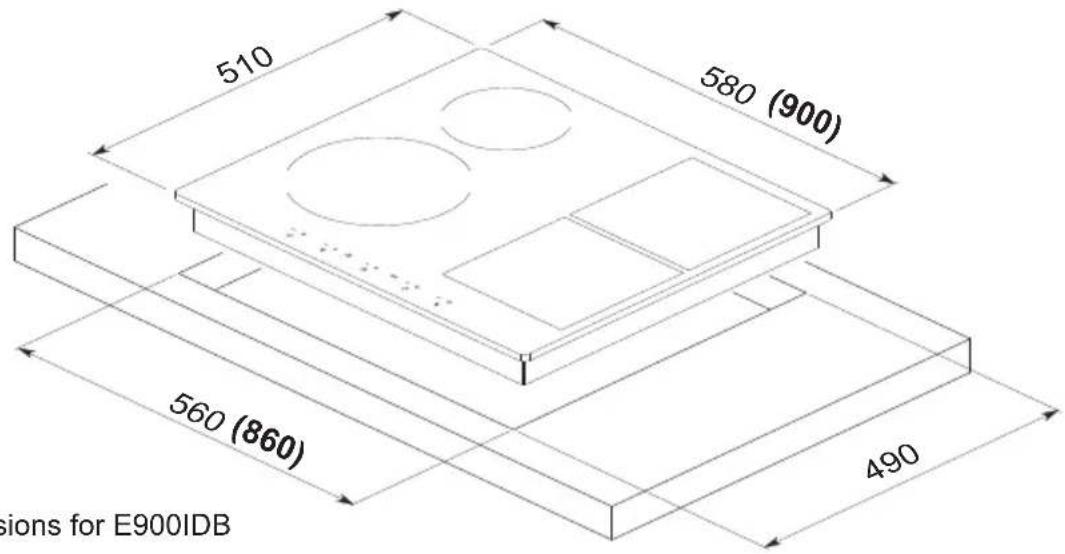
() = dimensions for E900IDB
- Make the notch in the worktop according to the dimensions relative to the model (see figure above).
- Respect the minimum distance of 50 mm towards the rear wall as well as to the right or left towards any side wall.

- Turn the hob upside down and apply the seal supplied with the accessories kit to the outside edge evenly.
ATTENTION:
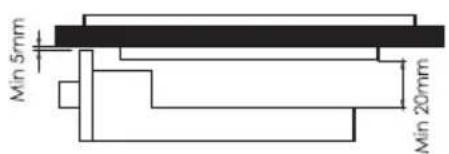
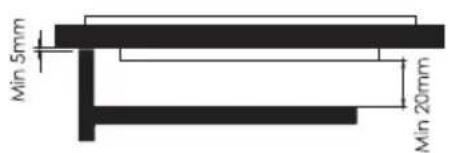
In order to ensure correct operation of the appliance, a gap of at least 5 mm must be left for the length of recessing on the front of the unit during installation.
This is because the electronic controls are equipped with a protection device which, when the temperature of the electronic part exceeds 85° C, turns off the hob until it returns below this limit. During operation then a fan comes on to guarantee the necessary air flow to avoid exceeding of the temperature limit.
Therefore provide the installation with an underlying protection that in any case guarantees a flow of air from the back of the unit or, if the hob is installed above an oven, a type of insulation that is adequate to ensure that this temperature is not exceeded. In the case of overtemperature, the electronic part may fail, for which the manufacturer declines all responsibility.
INSTALLATION

DISTANCE BETWEEN APPLIANCE AND EXTRACTOR HOOD
If the appliance is installed above an extractor hood, the safety distance indicated by the manufacturer of the hood must be respected. In the absence of precise indications or if the appliance is fitted with highly flammable materials (e.g. a shelf), the safety distance must be at least 760mm.
If several appliances are installed under the extractor hood, for which different safety distances are envisaged,
observe the greater safety distance indicated.
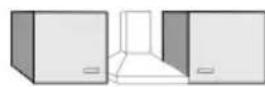
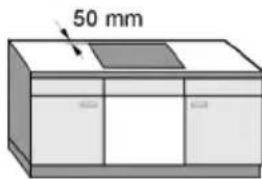
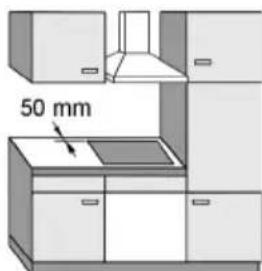
RECOMMENDED
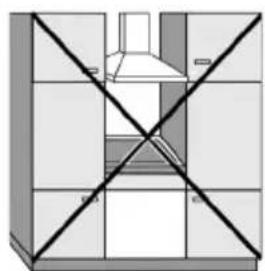
NOT RECOMMENDED NOT RECOMMENDED
Safety distance to the sides/rear wall
When recessing a hob, on the back and on the side (on the right or on the left) there should preferably be unit or room walls (see images above)
-50mm minimum safety distance on the back from the notch of the worktop to the rear edge of the same.
-50mm minimum safety distance on the right and/or left side of the worktop notch to the adjacent unit (e.g. column unit) or to the wall
INSTALLATION
Intermediate shelf
The installation of an intermediate shelf under a cooking hob is not necessary but is permissible.
To lay an electrical power cord, prepare a 10mm slot on the back.
To allow better ventilation of the hob, it is advisable to leave a 20mm slot.
Downward safety distance
To guarantee correct ventilation, it is necessary to maintain a minimum distance between the appliance and an oven, an intermediate shelf or a drawer.
The minimum distance between the lower edge of the hob and
- the upper edge of an oven must be 15mm
- the upper edge of an intermediate shelf must be 15mm
- the bottom of a drawer must be 75mm
Safety distance from the niche covering
If a covering is applied to the niche, a minimum distance must be observed between the worktop niche and the covering as high temperatures can damage or modify the materials.
If the covering is made of flammable material (e.g. wood), the minimum distance between the worktop and covering must be 50mm
If the covering is made of non-flammable material (e.g. metal, natural stone, ceramic tiles), the minimum distance between the worktop and covering notches must be 50mm less the thickness of the covering.
Example: covering thickness 15mm
50mm - 15mm = minimum distance 35mm
Electrical connection
The appliance can only be connected to the electrical network by a qualified electrician who is fully familiar with the general specific regulations of the local electricity company in force and who operates in compliance with the same.
Absorbed power
See data plate
Connection and protection
The necessary connection data is indicated on the plate and must correspond to that of the mains.
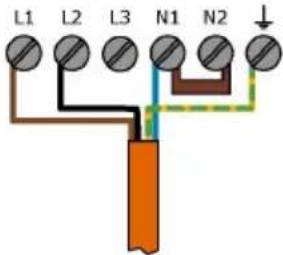
Determine the various connection possibilities from the relevant diagram.
Differential switch (circuit breaker)
For greater safety, it is advisable to include a circuit breaker with 30mA disconnection current
Separation devices
The device must be deactivated by means of disconnecting devices for each pole. (When the device is switched off, the contact opening must be at least 3mm). The disconnecting devices are overcurrent protections and protection switches.
INSTALLATION
Disconnect the appliance from the power supply
To disconnect the electrical circuit from the mains, after installation proceed as follows:
- Fuses: completely remove the fuses from the threaded caps or
- Automatic protections: press the control button (red) until the central button (black) orù
- Recess protections: bring the lever from 1 (on) to 0 (off) or
- Differential circuit breaker: Turn the main switch from 1 (on) to 0 (off) or press the control button.
After separation, make sure that there cannot be a connection to the power supply.
Power cord
-The appliance must be connected by means of a H 05 VV-F type cable (PVC insulated) or a H 05 RR-F (rubber insulated) of suitable diameter, observing the connection diagram.
- Determine the various connection possibilities from the relevant diagram.
- The permissible connection voltage and the corresponding connection value are indicated on the data plate.
Replacing the power cord
If it is necessary to replace the power cord a new one can be obtained from the manufacturer or from the service centre.
Replacement of the cable must be performed by a specialist expert operating in compliance with the regulations in force and with the indications of the electricity supplier
The protective conductor must be screwed to the marked connection point
INSTALLATION
Connection diagram
| MONOPHASE230V ~ | TWO PHASE230/400 V ~ | THREE PHASE230/400 V ~ | |
| 1/2 BURNERS |  | ||
| 3/4 BURNERS |  |  | |
 | |||
| 5/6 BURNERS | 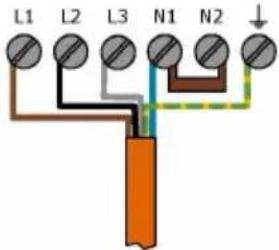 |
START AND USE
Practical tips for use of the appliances
- Use cooking containers whose manufacturing material is compatible with the principle of induction (ferromagnetic material). The use of these pots is recommended: in cast iron, enamelled steel or special stainless steel for induction. To make sure that a container is compatible, simply test it with a magnet.
SUITABLE MATERIAL
UNSUITABLE MATERIAL
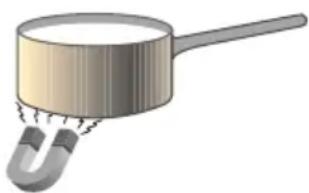

Cast iron, enamelled steel, special stainless steel with magnetic base
Copper, Aluminium, Glass, Terracotta, Ceramic, Non-magnetic stainless steel
In addition, to obtain the best performance from the hob:
First commissioning
First cleaning
-remove any protective and adhesive films
- before starting the appliance for the first time, clean it with a damp cloth and dry it
Commissioning
The metal components have been treated with a special protective product. At first start the appliance may emit odours and possibly steam. Even with the heating of the induction coils, odours may be given off during the first few hours of operation. With any further use the odour fades until it disappears completely.
Smells and any fumes are not symptomatic of incorrect connection and damage to the appliance and are not harmful to health.
- Use pots with a flat, thick base to ensure that they adhere perfectly to the heating zone.
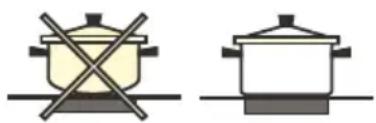
- Use pots of sufficient diameter to completely cover the heating zone in order to guarantee exploitation of all the heat available.
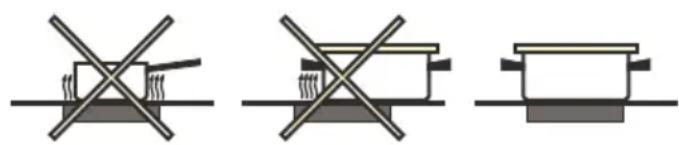
- Ensure the base of the cookware is always perfectly dry and clean to guarantee correct adherence and durability, both to the cooking zones and to the pots themselves.
- Avoid using the same pans used on gas burners: the concentration of heat on gas burners can deform the base of the pot, which loses adhesion.
START AND USE
Automatic switch off
Operation time limitation is an additional safety feature to turn OFF cooking zones after a certain time with no operation to the corresponding cooking zone by the user. The time after which the cooking zone is turned OFF is mentioned in the table below.
Each user operation related to the cooking zone will reset this time limit.
| COOKING LEVEL MAXIMUM OPERATION TIME (MIN) | |
| Warming level 1 480 | |
| Warming level 2 480 | |
| Warming level 3 480 | |
| 1 516 | |
| 2 402 | |
| 3 318 | |
| 4 258 | |
| 5 210 | |
| 6 138 | |
| 7 138 | |
| 8 108 | |
| 9 | 90 |
| P 5/10 | |
Residual Heat Indication
Residual Heat Indication is a safety feature to indicate that the surface of the glass ceramic on top of a cooking zone still as a temperature 60\ °C which may cause burns when touching by bare hands. The 7-segment of the corresponding cooking zone displays an H in this case.
An interruption of the power supply voltage cancels the residual heat indication even if the temperature of a cooking zone is 60\ °C when the cooktop is re-powered.
Overheating
The hobs is designed for an operating temperature of 85\ °C max. The operating temperature is supervised by a temperature sensor on the PCB.
If the temperature on PCB will exceed 85 °C, the whole cooktop will be turned off and an error ER21 will be displayed.
Supervision for Permanent Key Activation
The hob are supervised for permanent key activation. If the Hob is activated for more than 10 s, will go to OFF mode, emit a signal tone for 10 s and display Er03 as long as the permanent detection will be recognized.
As soon as the permanent key activation disappears, the Hob can be operated regularly.
DESCRIPTION
E60IDB
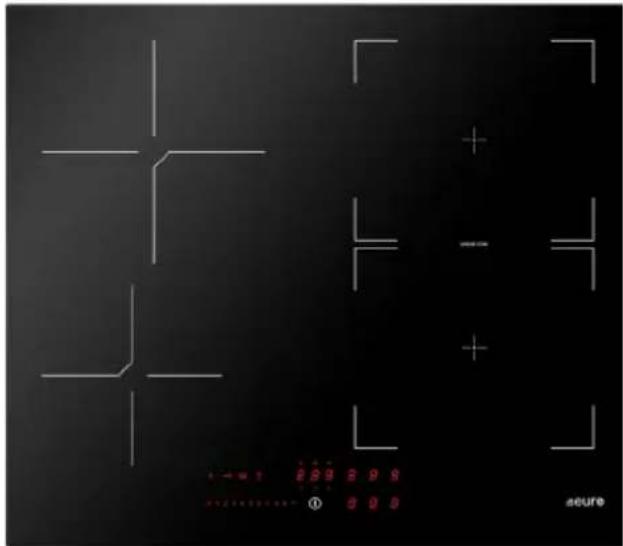
E900IDB

4 FUNCTION DESCRIPTION

Sensors key
1 On/Off
2 Power level setting range with slide bargraph
3 Cooking zone selection and power level display
4 Timer select Key
5 Timer display
6 Timer level decrement
7 Timer level increment
8 Break-Recall function key
9 Key-Lock function
10 Warming function
11 Egg Timer function
4 FUNCTION DESCRIPTION
START :
Once the hob is switched on, place the pan in the desired area and the corresponding display will automatically light up on the control panel.
Choose the power level with the slider.
Child Lock
Child lock is a functionality to protect the cooktop against unintended operation, e.g. by children. If locked, the cooktop may be turned ON, but no cooking zone, heating level or timer may be selected. The displays for the cooking zones will show
Child lock stays active even if the power supply voltage is interrupted and recovered. It has to be de-activated manually (see section de-activation of child Lock).
Activation
Press the front right cooking zone selection key for 3 seconds.
Release the button.
Move on the slider from 0 to 9. This sequence must be finished within 10 seconds.
The display shows for active child lock.
De-activation
Press any cooking zone select key for 3 seconds
Release the button and move slider to position 0.
This sequence must be finished within 10 seconds.
Key Lock
Key lock is a functionality intended to lock the keys during the cooktop is in operation or in pause state. This is useful for cleaning purposes (as the touch control is unable to differentiate a wet cloth from a finger).
Activation
Press special key

De-activation
Press special key again

4 FUNCTION DESCRIPTION
Cooking zone timer
Cooking zone timers can be used to switch a cooking zone OFF automatically after the set time has run out. It can be adjusted within a range of 1 min to 1 h 59 min. Beneath 10 min, the display shows the current time accurate to the second.
During the time is running, the cooking zone can be operated normally, i. e. changing the cooking level is possible.
Each cooking zone has an independent timer, i. e. an individual time selection per cooking zone is possible. If more than one 1 timer is set, the timer will always display the lowest remaining time.
Activation
Pot is placed on the corresponding zone and a cooking level has been set to this cooking zone.
- Select the corresponding cooking zone.
The display of the cooking zone shows a ⚡ in addition to the select cooking level.
- Touch the display of the timer.
0.00 start to flashing for the next 10s .
- Adjust the desired start time digit for digit with +/-
- Do not perform any action for 10s.
The timer starts counting backwards and the laser cap for the corresponding cooking zone starts pulsating. If it has reached 0, a signal tone will be emitted; the timer displays show and the corresponding cooking zone will be turned OFF.
If the residual heat detection detects a hot cooking zone, an H will be displayed at the corresponding cooking zone.
- Touch any button to disable the signal tone.
The signal tone stops and the cooktop can be operated normally. If no key is activated, the signal tone will stop automatically.
Notes
- The timer selection is kept for 10 s after the last action.
- Each change resets the selection time back to 10 s.
- If a cooking zone with a running cooking zone timer is selected, the current value of the timer is displayed on the timer display.
- A timer set for a cooking zone is indicated by the corresponding laser cap above the cooking zone.
- If more than 1 cooking zone timer is set, the timer value for the lowest time period running is displayed on the timer display. Additionally, the laser cap for this cooking zone timer will be flashing.
4 FUNCTION DESCRIPTION
Changing the value of the cooking zone timers
Cooktop is switched ON. Timer for cooking zone is active.
- Select the corresponding cooking zone.
- Touch the display timer.
The current time value is displayed flashing (rounded to full minutes).
- Set the new desired time digit for digit with +/- display above/beyond the digits.
Do not perform any action for 10s.
- The timer starts counting backwards starting with the new time. Beneath 10min, the display shows the current time accurate to the second. If it has reached 0, a signal tone will be emitted.
Note : The timer selection is kept for 10s after the last action. Each change resets the selection time back to 10s.
De-activation
- Set the cooking zone time to as described above.
Stand-alone Timer
Stand-alone timer has the behavior of an egg timer.
It can be adjusted within a range of 1 min to 9 h 59 min. Beneath 10 min, the display shows the current time accurate to the second.
After the adjusted time has run out, a signal tone will be emitted.
If stand-alone timer is running, the cooking zones can be operated normally. Stand-alone timer has no impact on any cooking zone.
Activation
Cooktop is switched ON.
- Ensure that no cooking zone has been selected.
The timer display show
- Touch the timer display.
The timer on the displays flashing for the next 10 s.
- Adjust the desired start time digit for digit with +/- above/beyond the digits.
- Do not perform any action for 10 s
The timer starts counting backwards. Beneath 10 min, the display shows the current time accurate to the second. If it has reached 0, a signal tone will be emitted
Note : The timer selection is kept for 10s after the last action. Each change resets the selection time back to 10s .
4 FUNCTION DESCRIPTION
Changing the value of the stand-alone timer
Cooktop is switched ON.
- Ensure that no cooking zone has been selected.
- Touch the timer Smart Kiis.
The current time value is displayed flashing (rounded to full minutes).
- Set the new desired time digit for digit with +/- Smart Kiis above/beyond the digits.
- Do not perform any action for 10 s .
The timer starts counting backwards starting with the new time. Beneath 10 min, the display shows the current time accurate to the second. If it has reached 0, a signal tone will be emitted.
Note: The timer selection is kept for 10 s after the last action. Each change resets the selection time back to 10 s
De-activation
- Ensure that no cooking zone has been selected.
- Touch the timer display.
The current time value is displayed flashing (rounded to full minutes).
- Set the Stand-alone time to as described above.
The stand-alone timer is deactivated.
Warming function
Warming function is intended to keep boiled food warm.
Activation
Cookware is placed on cooking zone. Cooktop is switched ON.
There are two possibility for activate the function :
- 1: select the cooking zone
Press the special key (just one warming level) - 2: warming level between 0 and 1 (toggling for all warming levels possible).
The display of the corresponding cooking zone shows
De-activation
Based on the possibility you chosen for activate :
-1 : Press special key
-2 : Change cooking level
4 FUNCTION DESCRIPTION
Booster
The booster enables the induction to dissipate a higher power for a cooking zone than its nominal power for a short period of time (5 minutes).
This is useful to heat-up/boil a great amount of water.
Note : As the booster function may reach high temperatures, it must only be used for cooking processes using water. Oil or fat may start to burn if booster is used.
Activation
- Select the cooking zone
will appear behind the current cooking level to indicate the selection.
- Type the P symbol on the slider area.
The booster for the selected cooking zone is activated.
The display for the cooking zone shows a P.
De-activation
- Select a cooking level for the cooking zone the booster is currently active.
The booster function is terminated and the cooking zone is heated with the new selected cooking level
Note : Booster function is de-activated automatically after 5 min
Heat-up Automatic
Heat-up automatic is a feature which enables heating up a cold pot with full heating power and returning automatically to the desired cooking level.
The time during the cooking zone is heated with full power is depending on the selected cooking level and mentioned in the table below. The heat-up times are adapted to be used with cold cookware and common household quantity of food.
| COOKING LEVEL | HEAT-UP AUTOMATIC TIME (s) |
| 1 | 48 |
| 2 144 | |
| 3 230 | |
| 4 312 | |
| 5 408 | |
| 6 120 | |
| 7 168 | |
| 8 216 | |
| 9 not available | |
| P not available |
4 FUNCTION DESCRIPTION
Activate
Cookware is placed on a cooking zone.
Cooktop is ON and a cooking level between 1 and 8 has been selected for the cooking zone.
- Select the corresponding cooking zone.
The slider area is lighted and the selected cooking zone shows a . beneath the cooking level.
Touch and hold the desired cooking level (1-8) and hold the selection for 3 s.
The heat-up automatic is activated. The display of the corresponding cooking zone displays 8
Note : Increasing the power level while heat-up automatic is active is possible.
Decreasing the power level while heat-up automatic is active will de-activate the heat-up automatic immediately.
De-activation
- Touch and hold the Cooking Zone Smart Kii for 3 s.
The heat-up automatic is de-activated. The cooking zone is heated with the cooking level set before.
Alternatively:
- Select a cooking level smaller than the cooking level currently set for this cooking zone.
The heat-up automatic is de-activated. The cooking zone is heated with the new cooking level.
Pause function
Pause function is a feature to "freeze" the cooktop for max. 10 min e.g. if the user is leaving the cooktop for a short period of time. During the pause function is active
- no cooking zone will dissipate any power
- all timers (including egg timer) will be stopped
- booster function and heat-up automatic will be stopped
Note: - Pause function has no influence on operation time limitation and display of residual heat.
- If pause state lasts longer than 10 min, the display will turn OFF the cooktop
Activation
Cooktop is switched ON and at least one cooking has a cooking level > 0.
- Touch and hold the Pause Smart Kii 1 for 1 s.
All 7-segment displays for the cooking zones show H The pause function is active.
4 FUNCTION DESCRIPTION
DE-ACTIVATION OF PAUSE FUNCTION
- Touch and hold the Pause for 1 s.
The symbol on the Pause starts flashing.
- Touch and arbitrary Smart Kii within the next 10 s.
The pause function is terminated and the cooktop will continue with all actions set before.
Recall Function
Recall function is a feature which enables recovering power levels and timer settings after the cooktop has been switched OFF unintendedly. Within 6 s after powering off the cooktop, all former setting (power levels, timers, heat-up automatic) can be recovered after a certain user action.
If the cooktop is turned OFF and ON again during 6 s, all former settings (power levels, timers, heat-up automatic) will be recovered automatically. Recall feature cannot be disabled by the user via the user menu.
Activate
Cooktop has just been switched off.
- Switch the cooktop ON again via the ON/OFF.
The Pause will flash for 6 s.
- Touch the Pause.
The Recall function becomes active. All power levels, timers and heat-up automatics set before will be recovered.
Bridge Function
Bridging of 2 cooking zones is the connection of 2 single cooking zones, so they can be controlled and will behave as one large cooking zone.
There is possible only in the square zone, where is the inscription "bridge".
This enables using cookware which has a larger bottom surface than a single cooking zone.
Activate
- Touch both cooking zone's simultaneously on the display.
The cooking zones are bridged. This is shown by the symbol ☐
De-activate
- Touch both cooking zone's Smart Kiis simultaneously.
The cooking zones are split into 2 separate zones again.
The symbol disappears.
4 FUNCTION DESCRIPTION
User Menù
User menu is intended for end customer to adapt the Touch Control to his personal needs.
Entering the user menù
The hobs is in standby mode.
- Touch ON/OFF to power up the Touch Control. Touch the ON/OFF again within 3 s to set the Touch Control to standby mode again.
Special function top left un the TC starts pulsating (for 60 s max.).
- Press and hold down pulsating Pause.
- Press all cooking zone selection in clockwise direction, starting with the middle front cooking zone selection.
Skip cooking zone selection which are not available.

Note: If there is no middle front cooking zone, start with the left front cooking zone.
- Each key press will be acknowledged by an acoustic signal (beep).
Release Pause.
The user menu is active. The display shows cooking zone.

in the display for the rear left
Select and changing menù
- Enter the user menu as described in "entering the user menù".
- Select the menu item which you want to display/change via the slider.
The value for the selected item is displayed on the display for the left front cooking zone.
- To change the menu item's value, select the menu item by touching on the displayed menu item.
The selected menu item is displayed by a 📄.
- Choose the menu intem's value by the slider via direct selection (sliding is not possible)
Note: Only valid values can be entered by the slider keys, i.e. undefined values will not be accepted during selection
4 FUNCTION DESCRIPTION
Exiting the User Menù
- Touch the Pause.
The service menu will be exited. All changes will be dropped.
- Touch the power key for 2 seconds.
The service menu will be exited. The changes will be saved.
User Menu Items Overview
The table below provides an overview about the implemented user menu items:
| ITEM MEANING | CHANGE ABLE | VALUE FORMAT | REMARK | |
| U2 | Volume for button tones | YES 2.4 ... 5 | Adjustment of the volume for button tones0:no button tones1:min.volume2:mid.volume3:max. volumeNotes:- For normative reasons, button tones for switching ON and OFF cannot be disabled. They will be emitted with last volume level which has been set before disabling the button tones-Tones for errors are always emitted with max. volume (setting 3) and cannot be disabled. | |
| U3 | Volume for signal tones | YES 0...3 | Adjustment of the volume for signal tones(e.g. when timer runs out)0:min.volume...3:max.volume | |
| U4 Display brightness YES 0...9 | Adjustment of the brightness for the display0: Max. brightness....9: Min. brightness | |||
| U5 Timer animation YES 0...1 | 0: No Timer animation1: Timer is animated during the last 59s before 0 | |||
| U7 | Behavior when timer has run out | YES 0...2 | 0: Signal tone for 120s1: Signal tone for 10s2: No tone | |
6 FUNCTION DESCRIPTION
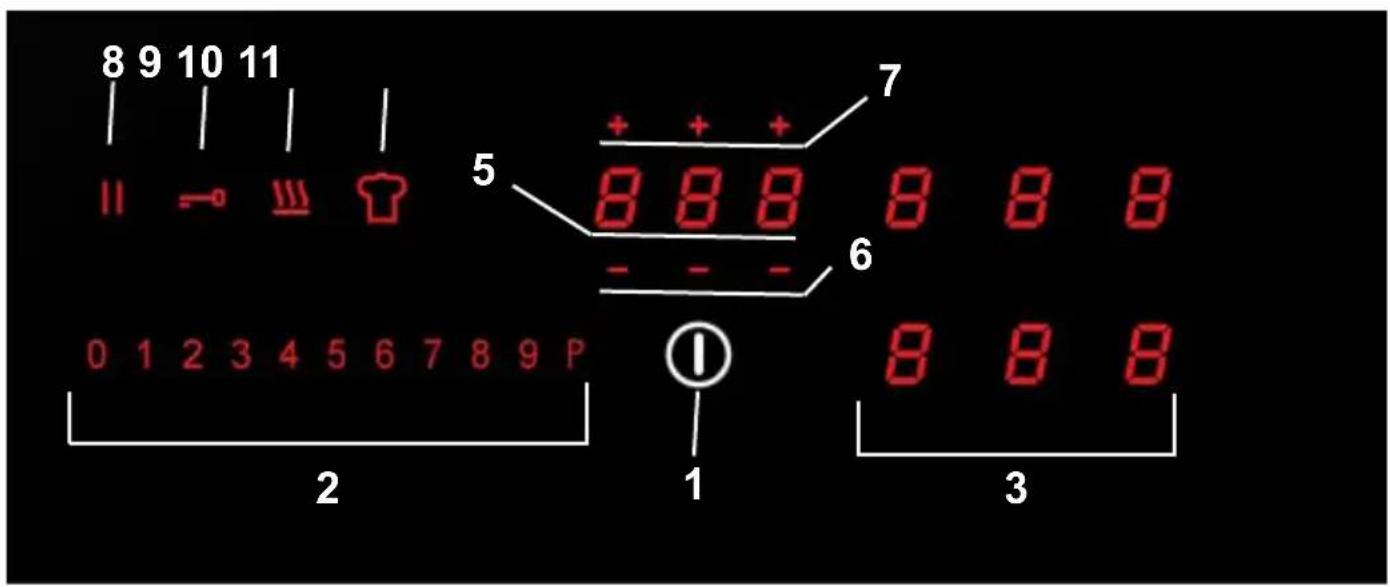
Sensors key
1 On/Off
2 Power level setting range with slide bargraph
3 Cooking zone selection and power level display
4 Timer select Key
5 Timer display
6 Timer level decrement
7 Timer level increment
8 Break-Recall function key
9 Key-Lock function
10 Warming function
11 Chef cook function key
6 FUNCTION DESCRIPTION
START :
Once the hob is switched on, place the pan in the desired area and the corresponding display will automatically light up on the control panel.
Choose the power level with the slider.
Child Lock
Child lock is a functionality to protect the cooktop against unintended operation, e.g. by children. If locked, the cooktop may be turned ON, but no cooking zone, heating level or timer may be selected. The displays for the cooking zones will show Child lock stays active even if the power supply voltage is interrupted and recovered. It has to be de-activated manually (see section de-activation of child Lock).
Activation
Press the front right cooking zone selection key for 3 seconds.
Release the button.
Move on the slider from 0 to 9. This sequence must be finished within 10 seconds.
The display shows for active child lock.
De-activation
Press any cooking zone select key for 3 seconds
Release the button and move slider to position 0.
This sequence must be finished within 10 seconds.
Key Lock
Key lock is a functionality intended to lock the keys during the cooktop is in operation or in pause state. This is useful for cleaning purposes (as the touch control is unable to differentiate a wet cloth from a finger).
Activation
Press special key

De-activation
Press special key again

6 FUNCTION DESCRIPTION
Cooking zone timer
Cooking zone timers can be used to switch a cooking zone OFF automatically after the set time has run out. It can be adjusted within a range of 1 min to 1 h 59 min. Beneath 10 min, the display shows the current time accurate to the second.
During the time is running, the cooking zone can be operated normally, i. e. changing the cooking level is possible.
Each cooking zone has an independent timer, i. e. an individual time selection per cooking zone is possible. If more than one 1 timer is set, the timer will always display the lowest remaining time.
Activation
Pot is placed on the corresponding zone and a cooking level has been set to this cooking zone.
- Select the corresponding cooking zone.
The display of the cooking zone shows a ☑ in addition to the select cooking level.
- Touch the display of the timer.
start to flashing for the next 10s.
- Adjust the desired start time digit for digit with +/-
- Do not perform any action for 10s .
The timer starts counting backwards and the laser cap for the corresponding cooking zone starts pulsating. If it has reached 0, a signal tone will be emitted; the timer displays show and the corresponding cooking zone will be turned OFF.
If the residual heat detection detects a hot cooking zone, an H will be displayed at the corresponding cooking zone.
- Touch any button to disable the signal tone.
The signal tone stops and the cooktop can be operated normally. If no key is activated, the signal tone will stop automatically.
Notes
- The timer selection is kept for 10 s after the last action.
- Each change resets the selection time back to 10 s.
- If a cooking zone with a running cooking zone timer is selected, the current value of the timer is displayed on the timer display.
- A timer set for a cooking zone is indicated by the corresponding laser cap above the cooking zone.
- If more than 1 cooking zone timer is set, the timer value for the lowest time period running is displayed on the timer display. Additionally, the laser cap for this cooking zone timer will be flashing.
6 FUNCTION DESCRIPTION
Changing the value of the cooking zone timers
Cooktop is switched ON. Timer for cooking zone is active.
- Select the corresponding cooking zone.
- Touch the display timer.
The current time value is displayed flashing (rounded to full minutes).
- Set the new desired time digit for digit with +/- display above/beyond the digits.
Do not perform any action for 10s.
- The timer starts counting backwards starting with the new time. Beneath 10min, the display shows the current time accurate to the second. If it has reached 0, a signal tone will be emitted.
Note : The timer selection is kept for 10s after the last action. Each change resets the selection time back to 10s.
De-activation
- Set the cooking zone time to as described above.
Stand-alone Timer
Stand-alone timer has the behavior of an egg timer.
It can be adjusted within a range of 1 min to 9 h 59 min. Beneath 10 min, the display shows the current time accurate to the second.
After the adjusted time has run out, a signal tone will be emitted.
If stand-alone timer is running, the cooking zones can be operated normally. Stand-alone timer has no impact on any cooking zone.
Activation
Cooktop is switched ON.
- Ensure that no cooking zone has been selected.
The timer display show
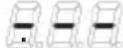
- Touch the timer display.
The timer on the displays flashing for the next 10 s.
- Adjust the desired start time digit for digit with +/- above/beyond the digits.
- Do not perform any action for 10 s
The timer starts counting backwards. Beneath 10 min, the display shows the current time accurate to the second. If it has reached 0, a signal tone will be emitted
Note : The timer selection is kept for 10s after the last action. Each change resets the selection time back to 10s .
6 FUNCTION DESCRIPTION
Changing the value of the stand-alone timer
Cooktop is switched ON.
- Ensure that no cooking zone has been selected.
- Touch the timer Smart Kiis.
The current time value is displayed flashing (rounded to full minutes).
- Set the new desired time digit for digit with +/- Smart Kiis above/beyond the digits.
- Do not perform any action for 10 s .
The timer starts counting backwards starting with the new time. Beneath 10 min, the display shows the current time accurate to the second. If it has reached 0, a signal tone will be emitted.
Note: The timer selection is kept for 10 s after the last action. Each change resets the selection time back to 10 s
De-activation
- Ensure that no cooking zone has been selected.
- Touch the timer display.
The current time value is displayed flashing (rounded to full minutes).
- Set the Stand-alone time to as described above.
The stand-alone timer is deactivated.
Warming function
Warming function is intended to keep boiled food warm.
Activation
Cookware is placed on cooking zone. Cooktop is switched ON.
There are two possibility for activate the function :
- 1: select the cooking zone
Press the special key (just one warming level) - 2: warming level between 0 and 1 (toggling for all warming levels possible).
The display of the corresponding cooking zone shows

De-activation
Based on the possibility you chosen for activate :
-1 : Press special key
-2 : Change cooking level
6 FUNCTION DESCRIPTION
Booster
The booster enables the induction to dissipate a higher power for a cooking zone than its nominal power for a short period of time (5 minutes).
This is useful to heat-up/boil a great amount of water.
Note : As the booster function may reach high temperatures, it must only be used for cooking processes using water. Oil or fat may start to burn if booster is used.
Activation
- Select the cooking zone
will appear behind the current cooking level to indicate the selection.
- Type the P symbol on the slider area.
The booster for the selected cooking zone is activated.
The display for the cooking zone shows a P.
De-activation
- Select a cooking level for the cooking zone the booster is currently active.
The booster function is terminated and the cooking zone is heated with the new selected cooking level
Note : Booster function is de-activated automatically after 5 min
Heat-up Automatic
Heat-up automatic is a feature which enables heating up a cold pot with full heating power and returning automatically to the desired cooking level.
The time during the cooking zone is heated with full power is depending on the selected cooking level and mentioned in the table below. The heat-up times are adapted to be used with cold cookware and common household quantity of food.
| COOKING LEVEL | HEAT-UP AUTOMATIC TIME (s) |
| 1 | 48 |
| 2 144 | |
| 3 230 | |
| 4 312 | |
| 5 408 | |
| 6 120 | |
| 7 168 | |
| 8 216 | |
| 9 not available | |
| P not available |
6 FUNCTION DESCRIPTION
Activate
Cookware is placed on a cooking zone.
Cooktop is ON and a cooking level between 1 and 8 has been selected for the cooking zone.
- Select the corresponding cooking zone.
The slider area is lighted and the selected cooking zone shows a . beneath the cooking level.
Touch and hold the desired cooking level (1-8) and hold the selection for 3 s.
The heat-up automatic is activated. The display of the corresponding cooking zone displays 8
Note : Increasing the power level while heat-up automatic is active is possible.
Decreasing the power level while heat-up automatic is active will de-activate the heat-up automatic immediately.
De-activation
- Touch and hold the Cooking Zone Smart Kii for 3 s.
The heat-up automatic is de-activated. The cooking zone is heated with the cooking level set before.
Alternatively:
- Select a cooking level smaller than the cooking level currently set for this cooking zone.
The heat-up automatic is de-activated. The cooking zone is heated with the new cooking level.
Pause function
Pause function is a feature to "freeze" the cooktop for max. 10 min e.g. if the user is leaving the cooktop for a short period of time. During the pause function is active
- no cooking zone will dissipate any power
- all timers (including egg timer) will be stopped
- booster function and heat-up automatic will be stopped
Note: - Pause function has no influence on operation time limitation and display of residual heat.
- If pause state lasts longer than 10 min, the display will turn OFF the cooktop
Activation
Cooktop is switched ON and at least one cooking has a cooking level > 0.
- Touch and hold the Pause Smart Kii 1 for 1 s.
All 7-segment displays for the cooking zones show H The pause function is active.
6 FUNCTION DESCRIPTION
DE-ACTIVATION OF PAUSE FUNCTION
- Touch and hold the Pause for 1 s.
The symbol on the Pause starts flashing.
- Touch and arbitrary Smart Kii within the next 10 s.
The pause function is terminated and the cooktop will continue with all actions set before.
Recall Function
Recall function is a feature which enables recovering power levels and timer settings after the cooktop has been switched OFF unintendedly. Within 6 s after powering off the cooktop, all former setting (power levels, timers, heat-up automatic) can be recovered after a certain user action.
If the cooktop is turned OFF and ON again during 6 s, all former settings (power levels, timers, heat-up automatic) will be recovered automatically. Recall feature cannot be disabled by the user via the user menu.
Activate
Cooktop has just been switched off.
- Switch the cooktop ON again via the ON/OFF.
The Pause will flash for 6 s.
- Touch the Pause.
The Recall function becomes active. All power levels, timers and heat-up automatics set before will be recovered.
Bridge Function
Bridging of 2 cooking zones is the connection of 2 single cooking zones, so they can be controlled and will behave as one large cooking zone. There is possible only in the square zone where is the inscription "bridge".
This enables using cookware which has a larger bottom surface than a single cooking zone.
Activate
- Touch both cooking zone's simultaneously on the display.
The cooking zones are bridged. This is shown by the symbol
De-activation
- Touch both cooking zone's Smart Kiis simultaneously.
The cooking zones are split into 2 separate zones again.
The symbol disappears.
6 FUNCTION DESCRIPTION
Chef Cook Function
Chef cook function is a feature which enables all cooking zones with different heating powers. Starting from the left to the right, the following power levels are set and dissipated as soon as a suitable cookware is placed onto the cooking zones:
- Left cooking zone(s): 2
- Middle cooking zones(s): 6
- Right cooking zone(s): 9
Activate
Cooktop is switched ON.
- Touch the chef cook function key.
The chef cook mode is activated. The displays for the cooking zones show the bridge symbols and the set power levels (2, 6 and 9) from left to right.
De-activation
- Touch the chef cook function key.
The chef cook mode is de-activated. The power levels for all cooking zones are set to 0.
6 FUNCTION DESCRIPTION
User Menù
User menu is intended for end customer to adapt the Touch Control to his personal needs.
Entering the user menù
The hobs is in standby mode.
- Touch ON/OFF to power up the Touch Control. Touch the ON/OFF again within 3 s to set the Touch Control to standby mode again.
Special function top left un the TC starts pulsating (for 60 s max.).
- Press and hold down pulsating Pause.
- Press all cooking zone selection in clockwise direction, starting with the middle front cooking zone selection.
Skip cooking zone selection which are not available.

Note: If there is no middle front cooking zone, start with the left front cooking zone.
- Each key press will be acknowledged by an acoustic signal (beep).
Release Pause.
The user menu is active. The display shows cooking zone.
in the display for the rear left
Select and changing menù
- Enter the user menu as described in "entering the user menù".
- Select the menu item which you want to display/change via the slider.
The value for the selected item is displayed on the display for the left front cooking zone.
- To change the menu item's value, select the menu item by touching on the displayed menu item.
The selected menu item is displayed by a 📄.
- Choose the menu intem's value by the slider via direct selection (sliding is not possible)
Note: Only valid values can be entered by the slider keys, i.e. undefined values will not be accepted during selection
6 FUNCTION DESCRIPTION
Exiting the User Menù
- Touch the Pause.
The service menu will be exited. All changes will be dropped.
- Touch the power key for 2 seconds.
The service menu will be exited. The changes will be saved.
User Menu Items Overview
The table below provides an overview about the implemented user menu items:
| ITEM MEANING | CHANGE ABLE | VALUE FORMAT | REMARK | |
| U2 | Volume for button tones | YES 2.4 ... 5 | Adjustment of the volume for button tones0:no button tones1:min.volume2:mid.volume3:max. volumeNotes:- For normative reasons, button tones for switching ON and OFF cannot be disabled. They will be emitted with last volume level which has been set before disabling the button tones-Tones for errors are always emitted with max. volume (setting 3) and cannot be disabled. | |
| U3 | Volume for signal tones | YES 0...3 | Adjustment of the volume for signal tones(e.g. when timer runs out)0:min.volume...3:max.volume | |
| U4 Display brightness YES 0...9 | Adjustment of the brightness for the display0: Max. brightness....9: Min. brightness | |||
| U5 Timer animation YES 0...1 | 0: No Timer animation1: Timer is animated during the last 59s before 0 | |||
| U7 | Behavior when timer has run out | YES 0...2 | 0: Signal tone for 120s1: Signal tone for 10s2: No tone | |
PROBLEMS AND SOLUTIONS
Error Handing
An error code always starts with the letters "E" or "ER" depending on the electronic component which has generated the error:
- Error codes starting with "E..." are sent by the induction generator via LIN to the Touch Control.
Refer to the customer documentation of the corresponding induction platform for details on those error codes.
- Error codes starting with "ER..." are detected directly by the Touch Control itself.
Refer to the table below for possible causes and remedies.
| Error code | Meaning Behavior | Possible Causes Remedy | ||
| ER03 Continu | ouskey activationdetected | Cooktop switchesoff after 10s | Water or cookwareplaced on TC'selectronic display | Remove water orcookware from the glass |
| ER20 Intern | al errorinside TC | Cooktop switchesoff | --- | Replace TC |
| ER21 Overte | temperature Cooktop | switchesoff | Temperature sensoron TC has detecteda temperature>85°C | Let the cooktop cooldown (error disappears iftemperature is <75°C)Check heat insulation ofthe TC |
| ER22 Intern | al errorinside TC | Cooktop switchesoff after 3.5 - 7.5 s | --- | Replace TC |
| ER31 Configurationsinside TouchControl andinduction areincongruent | ER31 is displayedcontinuously | The configurationdata inside theinduction generatoris different from theconfiguration insidethe TC | Download configuration .If error is still occurring,replace TC.If error is still occurring,replace the inductiongenerator | |
| ER36 Intern | al errorinside TC | Cooktop switchesoff | --- | Replace TC |
| ER47 No | communicationto at least oneLIN subscriber | ER47 is displayedcontinuously | LIN cable damagedNo power voltagesupply for LINsubscriber LINsubscriber defective | Check and replace LINcablingCheck power supplyvoltageReplace LIN subscriber |
SAFETY DEVICES
Anti-Overheating devices
All the induction coils and the electronic heat dissipater are respectively equipped with an overheating protection device.
Before the induction coils or heat dissipater can overheat, the overheating protection device ensures one of the following protection measures:
- If the Booster is on, it is deactivated.
- The power level set is reduced.
- The cooking zone switches off automatically. E2 appears on the display of the cooking zones
The cooking zone can be restarted when the fault message disappears.
If a second average temperature limit is exceeded, the induction reduces the power consumption to avoid a further increase in temperature.
The TC receives the information that there is a power reduction in operation but continues to show the unchanged settings that the user has chosen.
- The overheating device can trigger if:
- Cookware heats up without contents.
- Oil or butter are heated at high power.
- The lower part of the appliance is not sufficiently ventilated.
- A very hot cooking zone comes on again after a power failure.
If the overheating protection device is triggered again despite elimination of the causes, contact technical support
CLEANING AND MAINTENANCE
Danger of injury!
Steam from a steam cleaning appliance can reach voltage conductive parts and cause a short circuit.
NEVER use a steam appliance to clean a hob.
Always clean the hob after each use. Before doing so, allow it to cool completely.
After cleaning, dry the appliance to avoid scale deposits.
To avoid damaging the surfaces, DO NOT use the following cleaning products:
-washing-up liquid,
-detergents containing soda, ammonia, acids or chlorides,
- anti-scale products,
- products to eliminate stains and rust,
- abrasive detergents, e.g. abrasive creams or powders, cleaning pastes, solvents,
- dishwasher detergents,
- sprays for grills and ovens,
- glass cleaners,
- Abrasive brushes and sponges such as scourers or sponges that still contain residues of abrasive detergents,
- dirt removing rubber,
- sharp objects
(to avoid damaging the seal between the glass ceramic plate and the frame or between the frame and the worktop)
-If the appliance is installed on an oven or an electric stove equipped with a pyrolytic system, do not operate it while the pyrolytic system is in progress as it may trigger the overheating protecting device of the hob.
CLEANING AND MAINTENANCE
For cleaning do not use detergent for dishes. With washing-up liquid not all residues and deposits can be removed. It creates an invisible film that discolours the glass-ceramic. These discolourations will then be impossible to remove.
Clean the hob regularly with a specific glass ceramic detergent.
Remove the largest pieces of dirt with a damp cloth;
Clean the surface of the hob with a suitable ceramic glass cleaner using kitchen paper or a clean cloth.
Finally, wipe the surface with a damp cloth and dry it. In subsequent cooking procedures, residues may stick to the surface and damage the glass ceramic.
Carefully remove all detergent residues.
Stains due to calcareous residues, water and aluminium residues (spots with metallic reflections) can be removed by using a specific glass ceramic and stainless steel cleaner.
Danger of burns
Wear oven gloves before removing any residues of sugar, plastic or aluminium foil with a spatula from the hot hob.
Immediately turn off the hob if sugar, plastic or aluminium foil are found on it while it is still hot.
Carefully remove these substances while they are still hot from the hob using a spatula.
Clean the cooking zone once cold as described above.
ENVIRONMENTAL PROTECTION
This product complies with Directive 2012/19/EU
The crossed bin symbol on the appliance indicates that the product, at the end of its useful life, needing to be treated separately from household waste, must be sent to a separate collection centre for electrical and electronic equipment or returned to the retailer at the time of purchase of a new equivalent appliance.

The user is responsible for taking the appliance at the end of its life to the appropriate collection facilities, otherwise incurring the penalties provided for by the current waste legislation.
Adequate separate collection for future use of the equipment assigned for recycling, treatment and environmentally compatible disposal helps to prevent possible negative effects on the environment and on human health and promotes recycling of the materials that compose the product.
For more detailed information regarding the collection systems available, contact the local waste disposal service or the store where the purchase was made.
Manufacturers and importers must comply with their responsibility for environmentally compatible recycling, treatment and disposal either directly or by participating in a collective scheme
The manufacturer declines all responsibility in the event of damage to property or persons resulting from improper installation or improper, incorrect or unreasonable use of the appliance.
The manufacturer declines all responsibility for possible inaccuracies due to printing or transcription errors contained in this booklet. He reserves the right to make all the modifications deemed appropriate to his products, without compromising the essential characteristics of functionality and safety.
Pronto Service + Support: 1800 440 335 Email: service@eurostylegroup.com.au
HEAD OFFICE
65 Glynburn Road, Glyne SA 5070
Ph: 08 8165 1012
www.euroappliances.com.au



- SAFETY INSTRUCTIONS AND WARNINGS
- INTENDED USE
- CHILDREN
- RISK OF ASPHYXIATION
- DANGER OF BURNS
- DANGER OF ELECTRIC SHOCK
- TECHNICAL SAFETY
- CORRECT USE
- INSTALLATION
- GENERAL WARNINGS
- ATTENTION
- SAFETY DISTANCE TO THE SIDES/REAR WALL
- INTERMEDIATE SHELF
- DOWNWARD SAFETY DISTANCE
- SAFETY DISTANCE FROM THE NICHE COVERING
- ELECTRICAL CONNECTION
- ABSORBED POWER
- CONNECTION AND PROTECTION
- DIFFERENTIAL SWITCH (CIRCUIT BREAKER)
- SEPARATION DEVICES
- DISCONNECT THE APPLIANCE FROM THE POWER SUPPLY
- POWER CORD
- REPLACING THE POWER CORD
- START AND USE
- PRACTICAL TIPS FOR USE OF THE APPLIANCES
- FIRST COMMISSIONING
- FIRST CLEANING
- COMMISSIONING
- AUTOMATIC SWITCH OFF
- RESIDUAL HEAT INDICATION
- OVERHEATING
- SUPERVISION FOR PERMANENT KEY ACTIVATION
- DESCRIPTION
- 4 FUNCTION DESCRIPTION
- SENSORS KEY
- START
- CHILD LOCK
- ACTIVATION
- DE-ACTIVATION
- KEY LOCK
- COOKING ZONE TIMER
- NOTES
- CHANGING THE VALUE OF THE COOKING ZONE TIMERS
- STAND-ALONE TIMER
- CHANGING THE VALUE OF THE STAND-ALONE TIMER
- WARMING FUNCTION
- BOOSTER
- HEAT-UP AUTOMATIC
- ACTIVATE
- ALTERNATIVELY
- PAUSE FUNCTION
- DE-ACTIVATION OF PAUSE FUNCTION
- RECALL FUNCTION
- BRIDGE FUNCTION
- DE-ACTIVATE
- USER MENÙ
- ENTERING THE USER MENÙ
- SELECT AND CHANGING MENÙ
- EXITING THE USER MENÙ
- USER MENU ITEMS OVERVIEW
- 6 FUNCTION DESCRIPTION
- CHEF COOK FUNCTION
- PROBLEMS AND SOLUTIONS
- ERROR HANDING
- SAFETY DEVICES
- ANTI-OVERHEATING DEVICES
- CLEANING AND MAINTENANCE
- DANGER OF INJURY
- ENVIRONMENTAL PROTECTION
- THIS PRODUCT COMPLIES WITH DIRECTIVE 2012/19/EU
Brand : Eurom
Model : E900IDB
Category : Frying Pan