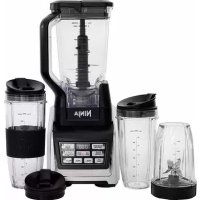
Duo AutoiQ BL642 - Blender NINJA - Free user manual and instructions
Find the device manual for free Duo AutoiQ BL642 NINJA in PDF.



| Technical Specifications | Power: 1,200 W |
|---|---|
| Bowl Capacity | 2.1 L |
| Bowl Material | BPA-free plastic |
| Adjustable Speed | Yes, 10 speeds |
| Pulse Function | Yes |
| Included Accessories | One lid, one pusher, a recipe book |
| Usage | Ideal for smoothies, soups, sauces, and more |
| Maintenance | Bowl and accessories dishwasher safe |
| Repair | Customer service available for spare parts |
| Safety | Automatic shut-off in case of overheating |
| Weight | 3.5 kg |
| Dimensions | 40 x 20 x 20 cm |
| Warranty | 2 years |
Frequently Asked Questions - Duo AutoiQ BL642 NINJA
User questions about Duo AutoiQ BL642 NINJA
0 question about this device. Answer the ones you know or ask your own.
Ask a new question about this device
Download the instructions for your Blender in PDF format for free! Find your manual Duo AutoiQ BL642 - NINJA and take your electronic device back in hand. On this page are published all the documents necessary for the use of your device. Duo AutoiQ BL642 by NINJA.
USER MANUAL Duo AutoiQ BL642 NINJA
natural_image
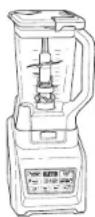
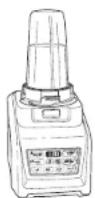
Black and white photo of a Ninja blender with digital display and control buttons (no readable text or symbols on the device itself)IMPORTANT SAFETY INSTRUCTIONS
For Household Use Only
WHEN USING ELECTRICAL APPLIANCES, BASIC SAFETY PRECAUTIONS SHOULD ALWAYS BE FOLLOWED, INCLUDING THE FOLLOWING:
READ ALL INSTRUCTIONS BEFORE USING YOUR NUTRI NINJA® I NINJA® BLENDER DUO™ WITH AUTO-IQ™ TECHNOLOGY.
POLARIZED PLUG
⚠ WARNING: To reduce the risk of electric shock, this appliance has a polarized plug (one blade is wider than the other). This plug will fit into a polarized outlet only one way. If the plug does not fit fully into the outlet, reverse the plug. If it still does not fit, contact a qualified electrician to install the proper outlet. DO NOT modify the plug in any way.
⚠ WARNING: Extension cords are not recommended for use with this product.
WARNING:
TO REDUCE THE RISK OF FIRE, ELECTRIC SHOCK OR INJURY:
1 WARNING: Remove utensils prior to processing. Failure to remove may cause the jar to be damaged or to shatter which may cause personal injury.
2 WARNING: Stacked Blade Assembly is sharp, not locked in place and removable, handle with care. When handling the Stacked Blade Assembly, always hold it by the shaft. Failure to do so will result in a risk of laceration.
3 ▲WARNING: Stacked Blade Assembly is sharp and not locked in place. If using the pour spout, ensure the lid is fully locked onto the pitcher. If pouring with the lid removed, carefully remove the Stacked Blade Assembly first, holding it by the shaft. Failure to do so will result in a risk of laceration.
4 CANTION: Do not blend hot liquids, doing so may cause excessive pressure build-up, resulting in risk of the user being burned.
5 CAUTION: We do not recommend grinding in any of our Nutri Ninja® Cups.
6 CANTION: Remove the Pro Extractor Blades® Assembly from the Nutri Ninja cup upon completion of blending. Some ingredients have the potential to expand after blending resulting in excessive pressure buildup that can pose a risk of injury.
7 To protect against electrical shock, do not submerge the appliance or allow the power cord to come into contact with water or any other liquid.
8 DO NOT allow the appliance to be used by children. Close attention is necessary when used near children. This is not a toy.
9 Never leave an appliance unattended when in use.
10 Appliance accessories are not intended to be used in the microwave as it may result in damage to the accessories.
11 Turn the appliance Off and remove the power cord from the electrical outlet when not in use, before assembling or disassembling parts and before cleaning. To unplug, grasp the plug and pull from the electrical outlet. Never pull from the power cord.
12 DO NOT abuse the power cord. Never carry the appliance by the power cord or yank it to disconnect from electrical outlet; instead grasp the plug and pull to disconnect.
13 DO NOT operate any appliance with a damaged cord or plug, or after the appliance malfunctions, has been dropped or damaged in any manner. This appliance has no serviceable parts. Return the appliance to SharkNinja Operating LLC for examination, repair or adjustment.
14 DO NOT let the power cord hang over the edge of table or counter or touch hot surfaces such as the stove.
15 Always use appliance on a dry, level surface.
16 Keep hands, hair, clothing, as well as utensils out of container while processing to reduce the risk of severe injury to persons or damage to the appliance. A scraper may be used but only when the appliance is not running.
17 Avoid contact with moving parts.
18 DO NOT attempt to sharpen blades.
19 DO NOT use the appliance if blade assemblies are bent or damaged.
20 To reduce risk of injury, never place the blade assemblies on the base without the pitcher or Nutri Ninja cup properly attached.
21 DO NOT operate this appliance on or near any hot surfaces (such as gas or electric burner or in a heated oven).
22 The use of attachments or accessories including canning jars, not recommended by the manufacturer may result in fire, electric shock or personal injury.
23 DO NOT remove the container from the motor base while the appliance is in operation.
24 To reduce the risk of injury, NEVER operate the appliance without the lid in place; DO NOT try to defeat the interlock mechanism; make sure that the attachment is properly installed before operating the appliance.
25 DO NOT expose containers to extreme temperature changes.
26 DO NOT overfill.
27 DO NOT operate the appliance empty.
28 To reduce the risk of burns, always allow the appliance to cool before taking off parts and before cleaning.
29 In the event that the unit overloads, the control panel lights will flash and the unit will shut down. Unplug the appliance and let it cool down for approximately 15 minutes before using again.
30 THIS PRODUCT IS INTENDED FOR HOUSEHOLD USE ONLY. Do not use this appliance for anything other than its intended use. Do not use outdoors.
31 The maximum rating is based on the Stacked Blade Assembly (pitcher) that drives the greatest power and other recommended attachments may draw significantly less power or current.
SAVE THESE INSTRUCTIONS
THIS BOOK COVERS MODEL NUMBER:
BL642
TECHNICAL SPECIFICATIONS
Voltage: 120V\~, 60Hz
Power: 1500 Watts
Pitcher Capacity: 72 oz. (9 cups, 2.1 L)
Max Liquid Capacity: 64 oz. (8 cups, 1.9 L)
Nutri Ninja® Cup Capacity: 18 oz. (2.25 cups, 530 mL)
24 oz. (3 cups, 710 mL)
32 oz. (4 cups, 950 mL)
CE MANUEL CONCERNE LE MODÈLE:
BL642
Thank you for purchasing the Nutri Ninja® | Ninja® Blender Duo™ with AUTO-iQ™ Technology.
Getting to Know Your Nutri Ninja® | Ninja® Blender Duo™ with AUTO-iQ™ Technology .....10
Before First Use 12
Assembly and Use of the Pitcher 13
Assembly and Use of the Nutri Ninja Cups 15
Programs, Speed Settings & Uses for the Pitcher 16
Programs, Speed Settings & Uses for the Nutri Ninja® Cup 16
Care & Maintenance 17
Troubleshooting Guide....18
Replacement Parts....18
Warranty & Registration....19
Table des matières
text_image
Diagram showing five stages of a food item: serving, adding, preserving, and drying with a dog.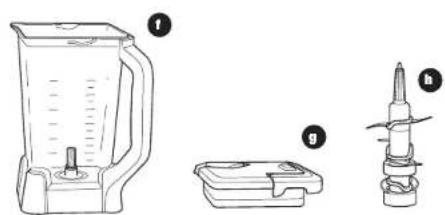
natural_image
Line drawings of a blender, a plastic container, and a mechanical tool (no text or symbols)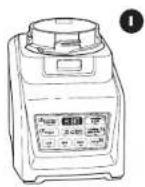
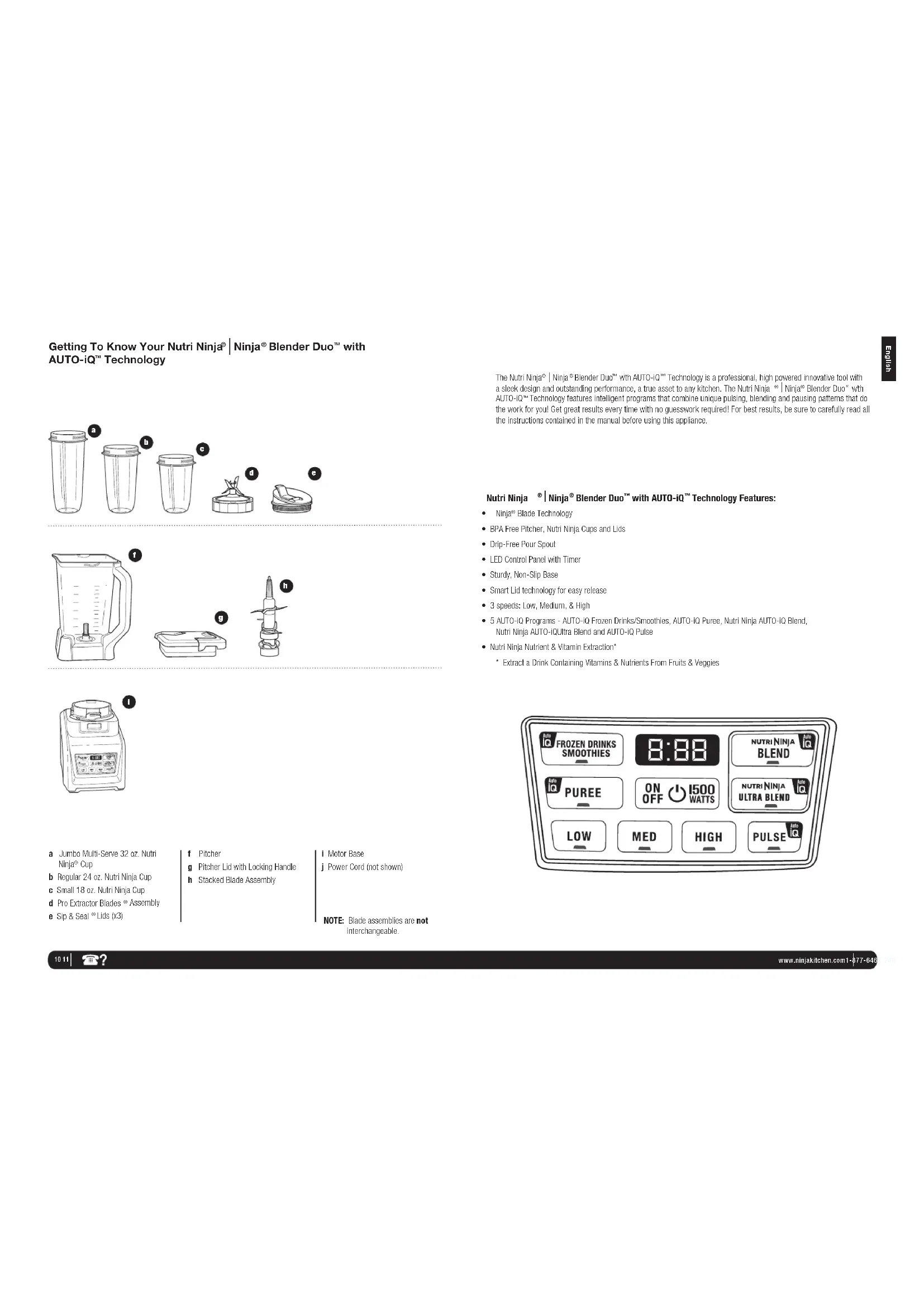
a Jumbo Multi-Serve 32 oz. Nutri Ninja® Cup
b Regular 24 oz. Nutri Ninja Cup
c Small 18 oz. Nutri Ninja Cup
d Pro Extractor Blades ® Assembly
e Sip & Seal ^® Lids (x3)
f Pitcher
g Pitcher Lid with Locking Handle
h Stacked Blade Assembly
Motor Base
Power Cord (not shown)
NOTE: Blade assemblies are not interchangeable.
The Nutri Ninja® | Ninja® Blender Duo™ with AUTO-Q™ Technology is a professional, high powered innovative tool with a sleek design and outstanding performance, a true asset to any kitchen. The Nutri Ninja® | Ninja® Blender Duo™ with AUTO-Q™ Technology features intelligent programs that combine unique pulsing, blending and pausing patterns that do the work for you! Get great results every time with no guesswork required! For best results, be sure to carefully read all the instructions contained in the manual before using this appliance.
Nutri Ninja ^® | Ninja ^® Blender Duo ^TM with AUTO-IQ ^TM Technology Features:
- Ninja ^2 Blade Technology
• BPA Free Pitcher, Nutri Ninja Cups and Lids - Drip-Free Pour Spout
• LED Control Panel with Timer - Sturdy. Non-Slip Base
• Smart Lid technology for easy release
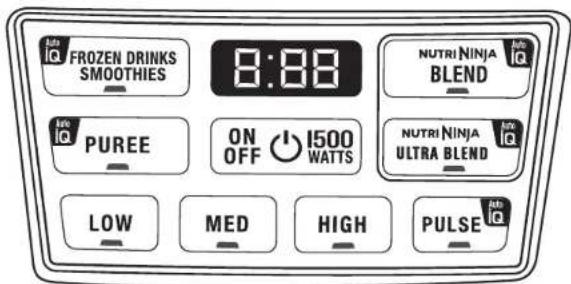
• 3 speeds: Low, Medium, & High - 5 AUTO-iQ Programs - AUTO-iQ Frozen Drinks/Smoothies, AUTO-iQ Puree, Nutri Ninja AUTO-iQ Blend, Nutri Ninja AUTO-iQ Ultra Blend and AUTO-iQ Pulse
• Nutri Ninja Nutrient & Vitamin Extraction*
* Extract a Drink Containing Vitamins & Nutrients From Fruits & Veggies
text_image
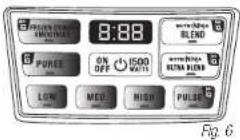
FROZEN DRINKS SMOOTHIES 8:88 NUTRI NINJA BLEND PUREE ON OFF 1500 OFF WATTS NUTRI NINJA ULTRA BLEND LOW MED HIGH PULSEBefore First Use
PLEASE KEEP THESE IMPORTANT SAFEGUARDS IN MIND WHEN USING THE APPLIANCE:
IMPORTANT: Make sure that the motor base is plugged in for use.
IMPORTANT: Never add Ingredients into the container before placing the Blade Assembly in first.
IMPORTANT: Blade Assemblies are not interchangeable.
IMPORTANT: DO NOT attempt to operate the appliance without the lid on.
IMPORTANT: Never run the appliance empty.
IMPORTANT: Appliance accessories are not intended to be used in the microwave as it may result in damage to the accessories.
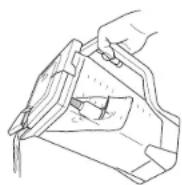
⚠ WARNING: Stacked Blade Assembly is sharp and not locked in place. If using the pour spout, ensure the lid is fully locked onto the blender pitcher. Failure to do so will result in a risk of laceration.
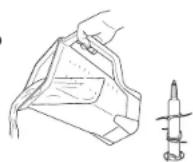
⚠ WARNING: Stacked Blade Assembly is sharp and not locked in place. If pouring with the lid removed, carefully remove the Stacked Blade Assembly first, holding it by the shaft. Failure to do so will result in a risk of laceration.
CAUTION: Do not immerse the motor base into water or any other liquid.
1 Remove all packaging material and labels from the appliance. Separate/remove all parts from each other.
2 Wash the lids, pitcher, Nutri Ninja ^® cups and Blade Assemblies in warm, soapy water. When washing the blade assemblies, use a dish-washing utensil with a handle to avoid direct hand contact with blades.
WARNING: Handle the Blade Assemblies with care when washing, as the blades are sharp.
3 Handle blade assemblies with care to avoid contact with sharp edges. Rinse and air dry thoroughly.
4 The pitcher, Nutri Ninja cups, lids, and blade assemblies, are all dishwasher safe. It is recommended that the lids and blade assemblies be placed on the top rack. Ensure that the blade assemblies are removed from the containers before placing in the dishwasher.
5 Wipe the motor base clean with a damp cloth.
Assembly and Use of the Pitcher
⚠ WARNING: Handle the Stacked Blade Assembly with care, as the blades are sharp.
WARNING: Remove utensils prior to processing. Failure to remove may cause the pitcher to be damaged or to shatter, which may cause personal injury.
WARNING: Never leave the appliance unattended while in use.
CAUTION: Do not blend hot liquids, doing so may cause excessive pressure buildup, resulting in risk of the user being burned.
IMPORTANT: Make sure that the motor base is plugged in for use.
ASSEMBLY

It's best to add the liquid ingredients first and then the dry ingredients.
1 Review warning and caution statements above before proceeding to number 2.
2 Place the motor base on a clean, dry, level surface such as a counter or table top. Press down on the motor base to make sure that the Suction Cups adhere to the counter or table top.
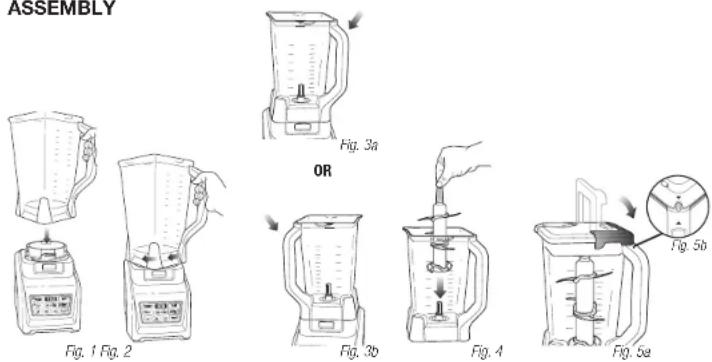
3 Align and lower the Pitcher onto the motor base.
(Fig. 1) Handle should be aligned slightly to the right of the "LOCK" symbol on the motor base.
4 Rotate the pitcher clockwise until it clicks in place. As the pitcher rotates, it will lower and the safety tabs on the bottom of the pitcher will slide under the safety tabs on the top of the motor base. (Fig. 2)
5 The pitcher can be placed on the motor base two ways; the handle can be on the front right corner or the front left corner. (Fig. 3a, Fig. 3b)
6 Holding the Stacked Blade Assembly by the top of the shaft, place it onto the drive gear inside the pitcher. Ensure that the Stacked Blade Assembly is seated properly and is standing upright. (Fig. 4)
NOTE: The Stacked Blade Assembly will fit loosely on the drive gear.
7 Add the ingredients to the pitcher, making sure that they do not exceed the highest measured marking line on the side of the pitcher.
NOTE: If you need to add additional ingredients while the appliance is processing, open the pour spout cap and pour the ingredients in through the opening.
NOTE: When blending any kind of liquids, such as mixtures of any drinks or smoothies, do not exceed the "MAX" liquid mark (64 oz.) on the Pitcher.
8 Plug the power cord into the electrical outlet and press the power button ( )
IMPORTANT: As a safety feature, the power light ( will flash and the motor will not work if the Pitcher and lid are not installed correctly. When the Pitcher and lid are installed properly, the power light ( will be solid, indicating that the appliance is ready for use.
9 Holding the lid by the handle in the upright position, place it on top of the Pitcher aligning the triangle (located on the lid with the triangle ( ) located on the Pitcher's handle. (Fig. 5a) Press the handle down until you hear a click. The triangles on the lid and the pitcher handle MUST be aligned in order for the blender to turn on. (Fig. 5b)
Assembly and Use of the Pitcher - cont.
USE REMOVAL
natural_image
Line drawing of a blender with a hand holding the control panel (no text or symbols)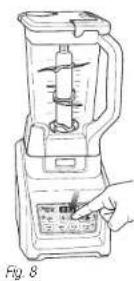
natural_image
Illustration of a blender being filled with liquid, showing the blade and handle (no text or symbols)10 Review warning and caution statements on page 13 before proceeding.
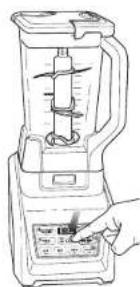
NOTE: Nutri Ninja® | Ninja® Blender Duo™ with AUTO-IQ™ Technology can sense which jar is on the motor base. The function lights will illuminate depending on which jar is placed on the motor base. (Fig. 6)
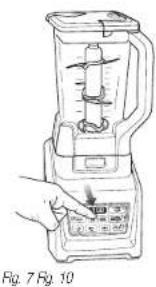
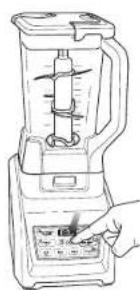
11 Press the power button to turn on the unit. Select the speed or AUTO-iQ Program that best suits your needs. The AUTO-iQ program will stop the appliance automatically at the end of the program. (Fig. 7)
12 To pause the appliance, press the selected speed or AUTO-iQ Program a second time. When the program is paused, the light on the program button will flash until you press it again to resume the rest of the program.
13 When you have reached your desired consistency, stop the appliance by pressing the power button (and wait for the Stacked Blade Assembly to stop turning. (Fig. 8)
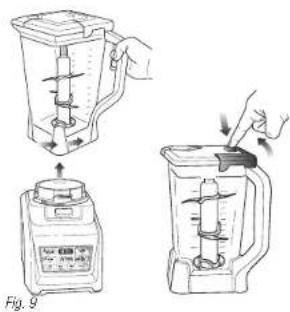
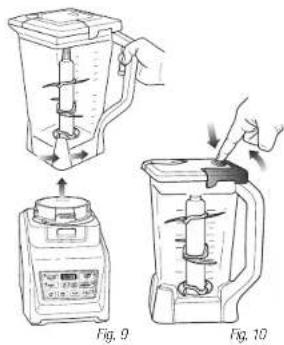
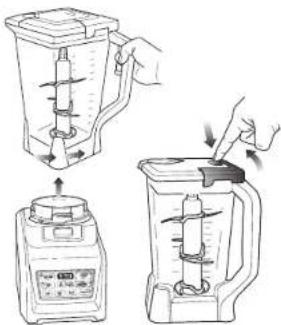
14 Turn the pitcher counter clockwise to remove and then lift off the base. (Fig. 9)
WARNING: Never insert your hands in the pitcher as the Stacked Blade Assembly is sharp. Always use a spatula to dislodge food that has stuck to the sides of the pitcher.
15 Open the pour spout cap and use the spout to empty liquid contents.
16 For thicker consistencies, first remove the lid by pressing the release button and pulling the lid handle up to a 90 degree angle to lift lid off the pitcher. Then, carefully remove the Stacked Blade Assembly by the top of the shaft. Place Stacked Blade Assembly away from the work area to avoid accidental contact. Finally, empty contents from the pitcher. (Fig. 10)
17 Make sure that the unit is unplugged when not in use.
Assembly and Use of the Nutri Ninja™ Cups
WARNING: Handle the Pro Extractor Blades ^® Assembly with care, as the blades are sharp.
WARNING: Remove utensils prior to processing. Failure to remove may cause the Nutri Ninja cup to be damaged or to shatter, which may cause personal injury.
WARNING: Never leave the appliance unattended while in use.
CAUTION: Do not blend hot liquids, doing so may cause excessive pressure buildup, resulting in risk of the user being burned.
CAUTION: Remove the Pro Extractor Blades Assembly from the cup upon completion of blending. Some ingredients have the potential to expand after blending resulting in excessive pressure buildup that can pose a risk of Injury.
IMPORTANT: Make sure that the motor base is plugged in for use.
ASSEMBLY
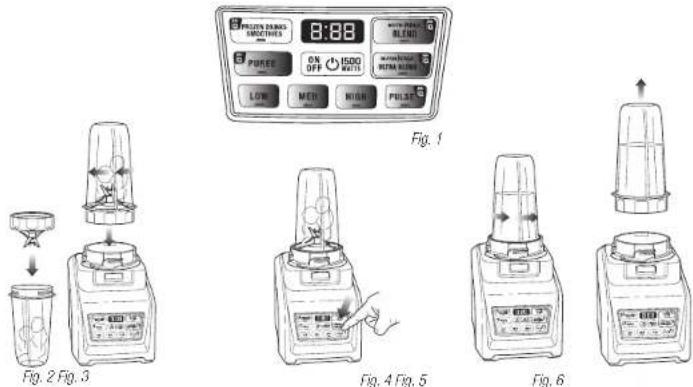
Fig. 4 Fig. 5
program will stop the appliance automatically at the end of the program. (Fig. 4)
7 To pause the appliance, press the selected speed or AUTO-iQ Program a second time. When the program is paused, the light on the program button will flash until you press it again to resume the rest of the program.
8 Once you have reached your desired consistency, stop the appliance by pressing the power button and wait for the blade to stop turning. Turn the Nutri Ninja cup counter-clockwise and pull straight up to remove. (Fig. 5, Fig. 6)
NOTE: Do not overfill! To avoid spilling, do not add ingredients past the "Max Liquid" line.
9 Turn the cup upright and remove the Pro Extractor Blades Assembly by twisting the blade assembly counter-clockwise.
10 Place the Sip & Seal ^® lid onto the Nutri Ninja cup, twist clockwise to seal and enjoy!
11 Make sure that the motor base is unplugged when not in use.
Programs, Speed Settings & Uses for the Pitcher
| FUNCTION CONTAINER | BLADE TYPE | SPEED or PROGRAM | TYPE OF FOOD | |
| Processing Pitcher | Stacked Blade Assembly | AUTO-IQ® Puree Medium | Dips Batters | |
| Chopping Pitcher | Stacked Blade Assembly | AUTO-IQ Pulse | Salsa Vegetables Nuts | |
| Frozen Drinks / Ice Crush | Pitcher | Stacked Blade Assembly | AUTO-IQ Frozen Drinks/ Smoothies | Ice Frozen Drinks |
| Pursecing Pitcher | Stacked Blade Assembly | AUTO-IQ Puree | Smoothies Soups* Milkshakes | |
* When blending soups, make sure they're cooled to room temperature first - Ninja ^® containers are not intended for hot blending.
Programs, Speed Settings & Uses for the Nutri Ninja® Cup
| FUNCTION CONTAINER | BLADE TYPE | SPEED or PROGRAM | TYPE OF FOOD | |
| Smoothies Nutri | Ninja Cup | Pro Extractor Blades** Assembly | Nutri Ninja AUTO-iQ Blend | Smoothies Frappes Milkshakes Protein Drinks |
| Green Smoothies | Nutri Ninja Cup | Pro Extractor Blades Assembly | Nutri Ninja AUTO-iQ Ultra Blend | Frozen Fruits Frozen Vegetables Kale Celery Spinach Seeds Ice |
| Grating Nutri | Ninja Cup | Pro Extractor Blades Assembly | AUTO-iQ Pulse High | Grated Cheese Bread Crumbs Spices |
| Chopping Nutri | Ninja Cup | Pro Extractor Blades Assembly | AUTO-iQ Pulse High | Salsa Vegetables Nuts |
Care & Maintenance
HOW TO CLEAN
CAUTION: Make sure that the motor base is unplugged from the power source before inserting or removing any blade assembly and before cleaning.
CAUTION: DO NOT immerse the motor base into water or any other liquid.
1 Separate/remove all parts from each other.
2 Hand Washing: Wash the lids, pitcher, Nutri Ninja® cup, and blade assemblies in warm, soapy water. When washing the blade assemblies, use a dish-washing utensil with a handle to avoid direct hand contact with blades. Handle blade assemblies with care to avoid contact with sharp edges. Rinse and air dry thoroughly.
Dishwasher: The containers, lids, blade assemblies and attachments are all dishwasher safe. The lids and blade assemblies are top rack dishwasher safe. Ensure that the blade assemblies are removed from the containers before placing in the dishwasher.
⚠ WARNING: Handle the Stacked Blade Assembly, and Pro Extractor Blade Assembly with care when washing, as the blades are sharp. Contact with the blades' edges can result in laceration.
3 Wipe the motor base clean with a damp cloth. Please call customer service if any servicing needs to be performed on the appliance at 1-877-646-5288.
HOW TO STORE
1 Store the Nutri Ninja® | Ninja® Blender Duo™ with Auto-iQ™ Technology upright with the blade assembly inside the corresponding container with the lid secured on top. Do not place anything on top. Store the rest of the attachments in a safe place where they will not be damaged and won't cause harm. Wrap the power cord around the cord wrap on the back of the motor base.
RESETTING THE MOTOR THERMOSTAT
The Nutri Ninja | Ninja Blender Duo with AUTO-iQ Technology features a unique safety system which prevents damage to the unit's motor and drive system should you inadvertently overload your appliance. If the appliance is being overloaded, the motor will stop. Allow the appliance to cool for approximately 15 minutes. To reset the appliance, follow the resetting procedure below:
1 Unplug the appliance from the electrical outlet.
2 Remove and empty the container and ensure that no food is jamming the blade assemblies.
3 Allow the appliance to cool for approximately 15 minutes.
4 Re-install the container onto the base and re-plug the appliance into the electrical outlet.
5 Proceed to use the appliance as before making sure not to exceed the recommended maximum capacities.
PROBLEMS POSSIBLE REASONS & SOLUTIONS
| Motor Doesn't Start or Blade Assembly Doesn't Rotate. | Make sure the container is securely placed on motor base.Make sure the lid is securely on container in the correct position (align arrows).The appliance is turned "Off". Press the power button ( ⭕) to turn "On".Check that the plug is securely inserted into the electrical outlet.Check the fuse or circuit breaker.The unit has overloaded. The appliance will stop and the power light will flash. Unplug and wait approximately 15 minutes before using again.The unit has overheated. Unplug and wait approximately 15 minutes before using again.Check to make sure the unit is not overloaded. |
| Food Is Unevenly Chopped. | Either you are chopping too much food at one time, or the pieces are not of oven size and processing smaller amounts per batch. |
| Food is Chopped Too Fine or is Too Watery. | The food has been over processed. Use AUTO-iQ "Pulse button for controlled processing. |
| Food Collects On Lid or On the Sides of the Container. | The mixture is too thick. Add more liquid. |
| You Cannot Achieve Snow From Solid Ice. | Do not use ice that has been sitting out or has started to melt. Use ice straight from the freezer.Start with a few pulses and then go to a continuous blending cycle. |
| Motor Base Won't Stick to Counter or Table Top. | Make sure surface and suction feel are wiped clean. Suction feet will only stick to smooth surfaces. Suction feet WILL NOT stick on some surfaces such as, wood, tile and non-polished finishes.DO NOT attempt to use appliance when the motor base is stuck to a surface that is not secure, (cutting board, platter, plates, etc.). |
| You get an "Err" Message | Your Ninja® is able to detect which jar is on the base. You may be trying to use a program that is not designed for the jar you have installed. The programs will light up indicating which programs are available for each jar. |
| You have a blinking red light | The unit is not installed properly. For your safety the unit will only be able to be turned on when it is properly assembled. Please refer to the assembly pages of this inspiration guide for assistance. |
Replacement Parts
ORDERING REPLACEMENT PARTS
To order additional parts and attachments, please visit our website: www.ninjakitchen.com or feel free to contact customer service: 1-877-646-5288.
Shark | NINJA
ONE (1) YEAR LIMITED WARRANTY
SharkNinja Operating LLC warrants this product to be free from material defects and workmanship for a period of one (1) year from the date of purchase when utilized for normal household use, subject to the following conditions, exclusions and exceptions.
The liability of SharkNinja Operating LLC is limited solely to the cost of the repair or replacement of the unit at our option. This Limited Warranty does not cover normal wear of parts and does not apply to any unit that has been tampered with or used for commercial purposes. This Limited Warranty does not cover damage caused by misuse, abuse, negligent handling or damage due to faulty packaging or mishandling in transit. This Limited Warranty does not cover damage or defects caused by or resulting from damages from shipping or repairs, service or alteration to the product or any of its parts, which have been performed by a repair person not authorized by SharkNinja Operating LLC.
If your appliance fails to operate properly while in use under normal household conditions within the Limited Warranty period, you may return the complete appliance and accessories with proof of purchase and date, freight prepaid. For Customer Service support, call 1-877-646-5288 or visit our website ninjakitchen.com.
If the appliance is found by SharkNinja Operating LLC to be defective, in SharkNinja Operating LLC's sole discretion, we will repair or replace it free of charge. Proof of purchase date and a check made payable to SharkNinja Operating LLC in the amount of \$19.95 to cover the cost of return shipping and handling must be included.*
This Limited Warranty is extended to the original purchaser of the unit and excludes all other legal, implied and/or conventional warranties. The responsibility of SharkNinja Operating LLC if any, is limited to the specific obligations expressly assumed by it under the terms of this Limited Warranty. In no event is SharkNinja Operating LLC liable for incidental or consequential damages to anyone of any nature whatsoever. Some states do not permit the exclusion or limitation of incidental or consequential damages, so the above may not apply to you.
This Limited Warranty gives you specific legal rights, and you may also have other rights which vary from state to state or from province to province.
*IMPORTANT: Carefully pack item to avoid damage in shipping. Be sure to include proof of purchase date and to attach tag to item before packing with your name, complete address and phone number with a note giving purchase information, model number and what you believe is the problem with the item. We recommend you insure the package (as damage in shipping is not covered by your Limited Warranty). Mark the outside of your package "ATTENTION CUSTOMER SERVICE".
PRODUCT REGISTRATION
Please visit ninjakitchen.com or call 1-877-646-5288 to register your new Ninja® product within ten (10) days of purchase. You will be asked to provide the store name, date of purchase and model number along with your name and address.
The registration will enable us to contact you in the unlikely event of a product safety notification. By registering you acknowledge to have read and understood the instructions for use, and warnings set forth in the accompanying instructions.
text_image
Diagram showing five stages of a blender with labeled parts (a-e) and a small object on the cover.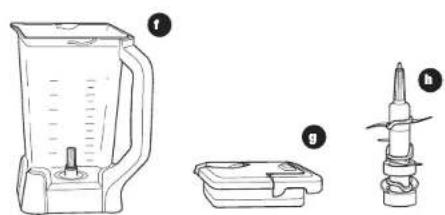
natural_image
Line drawings of a blender, a plastic container, and a drill bit (no text or symbols)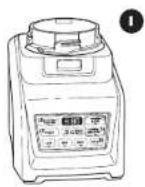
natural_image
Line drawing of a blender with a hand pressing a button (no text or symbols)Fig. 7
natural_image
Line drawing of a blender with a handle and control panel (no text or symbols)Fig. 8
natural_image
Illustration of a blender being processed with a hand using a tool, showing two steps (Fig. 9 and Fig. 10) — no text or symbols present.GARANTIE LIMITÉE D'UN AN
text_image
Diagram showing six labeled steps of a food item: serving, adding, adding with a lid, and adding with a base.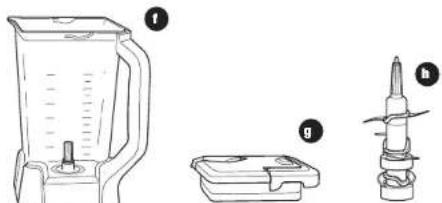
natural_image
Line drawings of a blender, a battery pack, and a screwdriver (no text or symbols)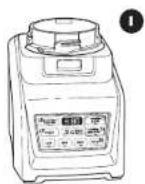
a Taza Nutri Ninja Jumbo multi-uso de 32 onzas
b Taza Nutri Ninja regular de 24 oz.
c Taza Nutri Ninja Pequeña de 18 oz.
d Cuchillas Pro Extractor Blades 43
e Tapa Sip & Seal ^® Lids (x3)
f Jarra de la licuadora
g. Tapa de la licuadora
h Cuchillas apiladas (Icuadora)
natural_image
Line drawing of a blender with a hand pressing a button (no text or symbols)Rg. 7 Rg. 10
natural_image
Line drawing of a blender with handle and control panel (no text or symbols)Fig. 8
EXTRACCIÓN
natural_image
Illustration of a blender being placed on top and bottom, showing internal components and motion (no text or symbols)Fig. 9
SharkNinja Operating LLC
US: Newton, MA 02459
CAN: Ville St-Laurent, QC H4S 1A7
1-877-646-5288
www.ninjakitchen.com
Copyright / Droit d'auteur / Derechos reservados © SharkNinja Operating LLC 2016
Ninja, Nutri Ninja and Sip & Seal are registered trademarks of SharkNinja Operating LLC.
Auto-iQ, Blender Duo and Pro Extractor Blades are trademarks of SharkNinja Operating LLC.
For SharkNinja U.S. Patent information visit sharkninja.com/USPatents.