
ADM 5.0 - Speaker Reloop - Free user manual and instructions
Find the device manual for free ADM 5.0 Reloop in PDF.



| Technical Features | Active speaker, 50W RMS power, frequency response from 50 Hz to 20 kHz, Bluetooth connectivity, XLR, RCA and 6.35mm jack input. |
|---|---|
| Usage | Ideal for DJs, musicians and live events, easy to transport and install. |
| Maintenance and Repair | Regularly check connections, clean grilles and avoid exposure to moisture. In case of failure, consult a qualified technician. |
| Safety | Use only in dry environments, avoid electrical overloads and do not expose to extreme temperatures. |
| General Information | Weight: 10 kg, dimensions: 30 x 30 x 50 cm, 2-year warranty, available in black. |
Frequently Asked Questions - ADM 5.0 Reloop
User questions about ADM 5.0 Reloop
0 question about this device. Answer the ones you know or ask your own.
Ask a new question about this device
Download the instructions for your Speaker in PDF format for free! Find your manual ADM 5.0 - Reloop and take your electronic device back in hand. On this page are published all the documents necessary for the use of your device. ADM 5.0 by Reloop.
USER MANUAL ADM 5.0 Reloop
Professional 2-way Active Monitors
For your own safety, please read this operation manual carefully before initial operation! All persons involved in the installation, setting-up, operation, maintenance and service of this device must be appropriately qualified and observe this operation manual in detail. This product complies with the requirements of the applicable European and national regulations. Conformity has been proven. The respective statements and documents are deposited at the manufacturer.
Mode d'emploi
ATTENTION!
To prevent fire or avoid an electric shock do not expose the device to water or fluids!
Never open the housing!
ATTENTION!
Keep information for further reference!
Congratulations on purchasing your Reloop ADM-5 active monitors. Thank you for placing your trust in our technology. Before operating this equipment we ask you to study and observe all instructions carefully.
Please remove your Reloop ADM-5 active monitors from their packaging. Before initial operation please check to make sure that the device has not been visibly damaged during transport. If you detect any damage to the power cable or the casing, do not operate the device and contact your specialised dealer.
SAFETY INSTRUCTIONS
CAUTION!
Please exercise particular caution when handling 220 V power voltage. This voltage rating may lead to a critical electrical shock! Any damage caused by the non-observance of this operation manual excludes any warranty claims. The manufacturer is not liable for any damage to property or for personal Injury caused by Improper handling or non-observance of the safety Instructions.
This device left the works in perfect condition. To maintain this condition and to ensure a risk-free operation the user must observe the safety instructions and warnings contained in this operation manual.
For reasons of safety and certification (CE) the unauthorised conversion and/or modification of the device is prohibited. Please note that in the event of damage caused by the manual modification to this device any warranty claims are excluded.
The inside of the device does not contain any parts which require maintenance, with the exception of wear parts that can be exchanged from the outside. Qualified staff must carry out maintenance, otherwise the warranty does not apply!
Ensure that the power will only be supplied after the device has been fully set up. Always plug in the mains plug last. Ensure that the mains switch is in the "OFF" position when connecting the device to power.
Only use cables that comply with regulations. Observe that all jacks and bushes are tightened and hooked up correctly. Refer to your dealer if you have any questions.
- Ensure that when setting up the product the mains cable is not squashed or damaged by sharp edges.
Prevent the mains cable from coming into contact with other cables! Exercise great care when handling mains cables and connections. Never touch these parts with wet hands!
- Be sure to connect the product exclusively to 220 V, 50 Hz A/C!
The fuse -9- must be exchanged exclusively against fuses of the same class, with the same trigger features and nominal current rating.
Connect the power cable exclusively to appropriate shock-proof outlets. The only supply point to be used is a supply outlet in accordance with specifications of the public supply network.
- Disconnect the device from the supply outlet when not in use and before cleaning! Be sure to hold the mains plug by the body. Never pull the mains cord!
- Position the device on a horizontal and stable low-flame base.
- Avoid any concussions or violent Impact when installing or operating the device.
- When selecting the location of installation make sure that the device is not exposed to excessive sunlight, heat, humidity, and dust. Make sure that no cables lie around openly. You will endanger your own safety and that of others!
Do not rest any containers filled with liquid that could easily spill onto the device or in its immediate vicinity. If, however, fluids should access the inside of the device, immediately disconnect the mains plug. Have the device checked by a qualified service technician before re-use. Damage caused by fluids inside the device is excluded from warranty.
Do not operate the device under extremely hot (in excess of 35^ ) or extremely cold (below 5^ ) conditions. Keep the device away from direct exposure to the sun and heat sources such as radiators, ovens, etc. (even during transport in a closed vehicle). Never cover the cooling fan or vents. Always ensure sufficient ventilation.
The device must not be operated after being taken from a cold environment into a warm environment. The condensation caused hereby may destroy your device. Do not switch on or operate the device until it has reached ambient temperature!
Controls and switches should never be treated with spray-on cleaning agents and lubricants. This device should only be cleaned with a damp cloth. Never use solvents or cleaning fluids with a petroleum base for cleaning.
- When relocating the device should be transported in its original packaging.
- When starting operation the cross-faders and volume controls of your amplifier must be set to minimum level. Bring the loudspeaker switches into the "OFF" position.
Devices supplied by voltage should not be left in the hands of children. Please exercise particular care when in the presence of children.
At commercial facilities the regulations for the prevention of accidents as stipulated by the association of professional government organiza-tions must be observed.
- At schools, training facilities, hobby and self-help workshops the operation of the device must be monitored with responsibility by trained staff.
- Keep this operation manual in a safe place for later reference in the event of questions or problems.
APPLICATION IN ACCORDANCE WITH REGULATIONS
- This device is an active loudspeaker which amplifies and plays low level audio signals.
- This product is authorised for connection to 220 V, 50 Hz AC and is designed exclusively for indoor application.
If the device is used for any other purposes than those described in the operation manual, damage can be caused to the product, leading to the exclusion of warranty rights. Moreover, any other application that does not comply with the specified purpose harbours risks such as short circuit, fire, electric shock, etc.
The serial number determined by the manufacturer must never be removed to uphold the warranty rights.
MAINTENANCE
Check the technical safety of the device regularly for damage to the mains line or the casing, as well as for wearout of wear parts such as rotary and sliding switches.
If it is to be assumed that a safe operation is no longer feasible then the device must be disconnected and secured against accidental use. Always disconnect the mains plug from the outlet!
It must be assumed that a safe operation is no longer feasible if the device bears visible defects, if the device no longer functions, following longer storage under unfavourable conditions or after major transport stress.
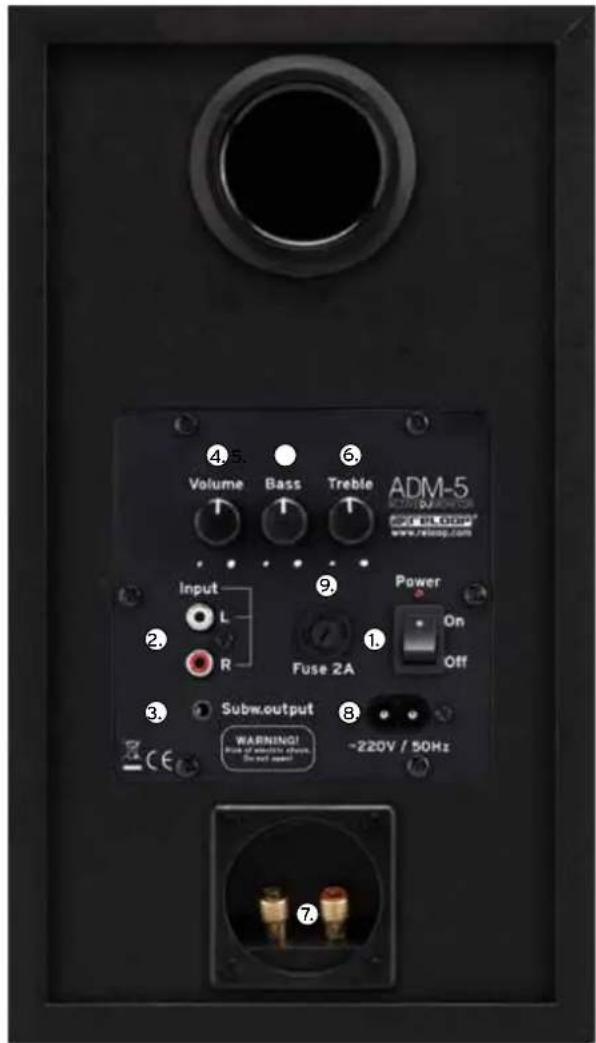
CONTROL ELEMENTS
Designation
- ON/OFF Switch
- Signal Input (RCA)
- Signal Output Subwoofer (3.5 mm Jack)
- Volume Control
- Bass Control
- Treble Control
- Screw-In Clamp for 2nd Speaker
- Connector for Mains Cord
- Fuse (2A)
INSTALLATION
- For optimum audibility of the high frequencies we recommend installing the tweeter of the studio monitors at face level; if necessary use an appropriate speaker stand. Be sure to use an even, stable underground; if necessary, use sound cushioning material.
- These speakers are near-field monitors which can be set up at a short distance to the listener.
- To avoid reflection from walls that are too close (e.g. room corners), turn the speakers slightly towards you. To optimise your ambience, acoustics, you may use sound absorbing plates.
- When using a microphone, be sure to position it always behind the loudspeaker to avoid potential feedback when activated.
Nearfield Installation
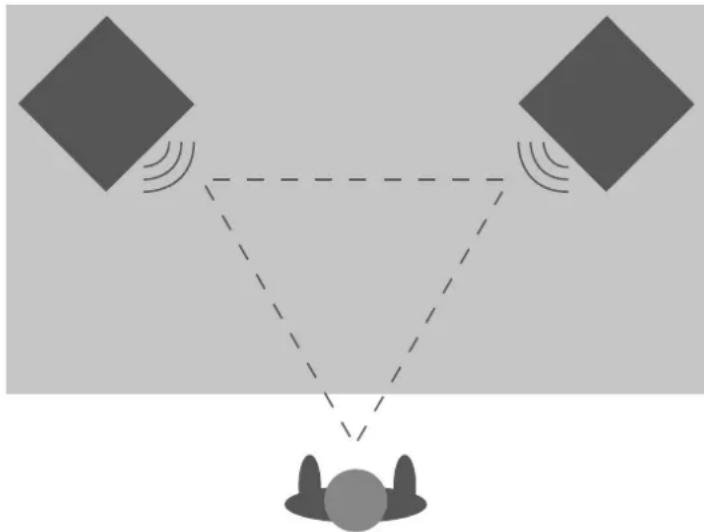
In control rooms the monitors are usually placed on the studio console (face level). For this purpose the positioning of the monitors and the listener should be arranged in an equilateral triangle. In this installation the monitors are placed at a 60^ angle to the listening position.
Mid-Field Installation
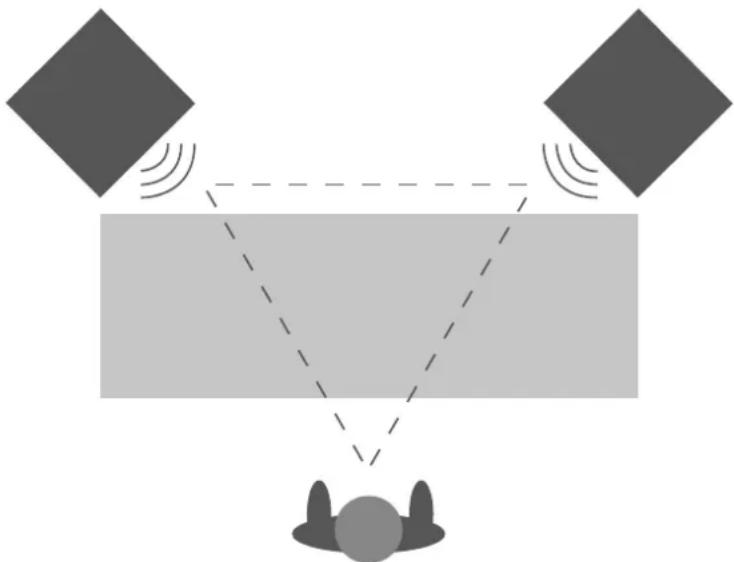
This installation is more or less the same as the close-field installation. This variant is usually used if the monitors are too large or heavy to be placed on the studio console. This setup offers a larger sweet spot and a better spacial acoustic imaging. In this installation the monitors' woofer should be positioned above the height of the studio console.
CONNECTIONS
- Connect the two speakers via the corresponding clamps -7-.
- Now connect your signal source with the Signal Input -2- (RCA)
- If required, connect a subwoofer via the corresponding Signal Output (3.5 mm Jack) -3-.
- Hook up the Mains Cord Connection -8- with the mains cable and connect it to your power outlet.
OPERATION
- Set volume control to minimum level:
Before switching on the device, turn the Volume Control -4- to minimum position (control to the left).
- Power On:
After all connections have been completed activate the device with the ON/OFF Button -1- - Volume Control:
Adjust the volume with the Volume Control -4-.
SOUND CONTROL
Use the Bass -5- and Treble Controllers -6- to lower or raise the low and high frequencies. The ideal adjustment depends on the given accomodations. A heavily dampened room requires raised high frequencies whereas a reverberant room requires a reduction of the high frequencies. If the monitors are positioned near a wall or corner the low frequencies will be raised. If the monitors are positioned in a bigger distance the low frequencies will be lowered.
TECHNICAL INFORMATION
Reloop Wave 5:
RMS power: 2 x 30W
- Type: Active: Active 2-way system
-S/N Ratio: >75dB
- Speaker: 13,34 cm (5,25") bass, 2,54 cm (1") tweeter
- Frequency range: 35 Hz - 20 kHz
Impedance: 8 Ohm
- Connections: RCA, 3.5 mm Jack
- Dimensions: 232 x 320 x 180 mm
- Weight: 8.5 kg (pair)
Subject to alterations!
Illustrations similar to original product!
Misprints excepted!
ReloopTrademark
Global Distribution GmbH, Schuckertstr. 28, 48153 Munster, Germany, Fax +49.251.60 99 368