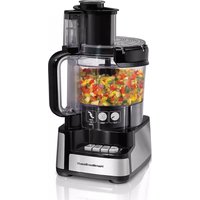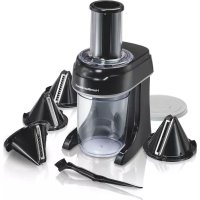
72950 - Food Processor HAMILTON BEACH - Free user manual and instructions
Find the device manual for free 72950 HAMILTON BEACH in PDF.


| Technical Features | Hamilton Beach 72950 food processor, 450-watt motor, 3.5-liter stainless steel bowl, 12 speeds, included accessories: whisk, dough hook, beater. |
|---|---|
| Usage | Ideal for mixing, kneading, whipping, and beating ingredients for various recipes, including doughs, cakes, and sauces. |
| Maintenance and Repair | Easy cleaning with dishwasher-safe accessories, regular checking of cables and removable parts to ensure optimal operation. |
| Safety | Equipped with a locking system to prevent accidents, non-slip feet for increased stability during use. |
| General Information | Compact dimensions for easy storage, limited manufacturer warranty, usage instructions included in the packaging. |
Frequently Asked Questions - 72950 HAMILTON BEACH
User questions about 72950 HAMILTON BEACH
0 question about this device. Answer the ones you know or ask your own.
Ask a new question about this device
Download the instructions for your Food Processor in PDF format for free! Find your manual 72950 - HAMILTON BEACH and take your electronic device back in hand. On this page are published all the documents necessary for the use of your device. 72950 by HAMILTON BEACH.
USER MANUAL 72950 HAMILTON BEACH
natural_image
Technical line drawing of a mechanical device with internal components and mounting base (no text or symbols)840278400
READ BEFORE USE
LIRE AVANT UTILISATION LEA ANTES DE USAR
English.... 2
USA: 1-800-851-8900
www.hamiltonbeach.com
Français.... 11
Canada: 1-800-267-2826
www.hamiltonbeach.ca
Español 20
When using electrical appliances, basic safety precautions should always be followed to reduce the risk of fire, electric shock, and/or injury to persons, including the following:
- Read all instructions.
- This appliance is not intended for use by persons (including children) with reduced physical, sensory, or mental capabilities, or lack of experience and knowledge, unless they are closely supervised and instructed concerning use of the appliance by a person responsible for their safety.
- Close supervision is necessary when any appliance is used by or near children. Children should be supervised to ensure that they do not play with the appliance.
- To protect against risk of electrical shock, do not put cord, plug, or base in water or other liquid.
- Unplug from outlet when not in use, before putting on or taking off parts, and before cleaning.
- Avoid contacting moving parts. Do not remove bowl cover until blades stop.
- Do not operate any appliance with a damaged supply cord or plug, or after the appliance malfunctions or has been dropped or damaged in any manner. Supply cord replacement and repairs must be conducted by the manufacturer, its service agent, or similarly qualified persons in order to avoid a hazard. Call the provided customer service number for information on examination, repair, or adjustment.
- The use of attachments not recommended or sold by the appliance manufacturer may cause fire, electric shock, or injury.
- Do not use outdoors.
-
Do not let cord hang over edge of table or counter, or touch hot surface, including stove.
-
Keep hands and utensils away from cutting blades while chopping food to reduce the risk of severe injury to persons or damage to the food chopper. A scraper may be used but must be used only when the food chopper is not running.
- Blades are sharp. Handle carefully.
- This appliance is intended for processing small quantities of food for immediate consumption. This appliance is not intended to prepare large quantities of food at one time.
- To reduce the risk of injury, never place cutting blade on base without first putting bowl properly in place.
- Be certain cover is securely locked in place before operating appliance.
- Do not attempt to defeat the cover interlock mechanism.
SAVE THESE INSTRUCTIONS
Other Consumer Safety Information
This appliance is intended for household use only.
⚠ WARNING Electrical Shock Hazard: This appliance is provided with a polarized plug (one wide blade) to reduce the risk of electric shock. The plug fits only one way into a polarized outlet. Do not defeat the safety purpose of the plug by modifying the plug in any way or by using an adapter. If the plug does not fit fully into the outlet, reverse the plug. If it still does not fit, have an electrician replace the outlet.
The length of the cord used on this appliance was selected to reduce the hazards of becoming tangled in or tripping over a longer cord. If a longer cord is necessary, an approved extension cord may be used. The electrical rating of the extension cord must be equal to or greater than the rating of the appliance. Care must be taken to arrange the extension cord so that it will not drape over the countertop or tabletop where it can be pulled on by children or accidentally tripped over.
Parts and Features
*To order parts:
US: 1.800.851.8900
www.hamiltonbeach.com
Canada: 1.800.267.2826
Mexico: 01 800 71 16 100
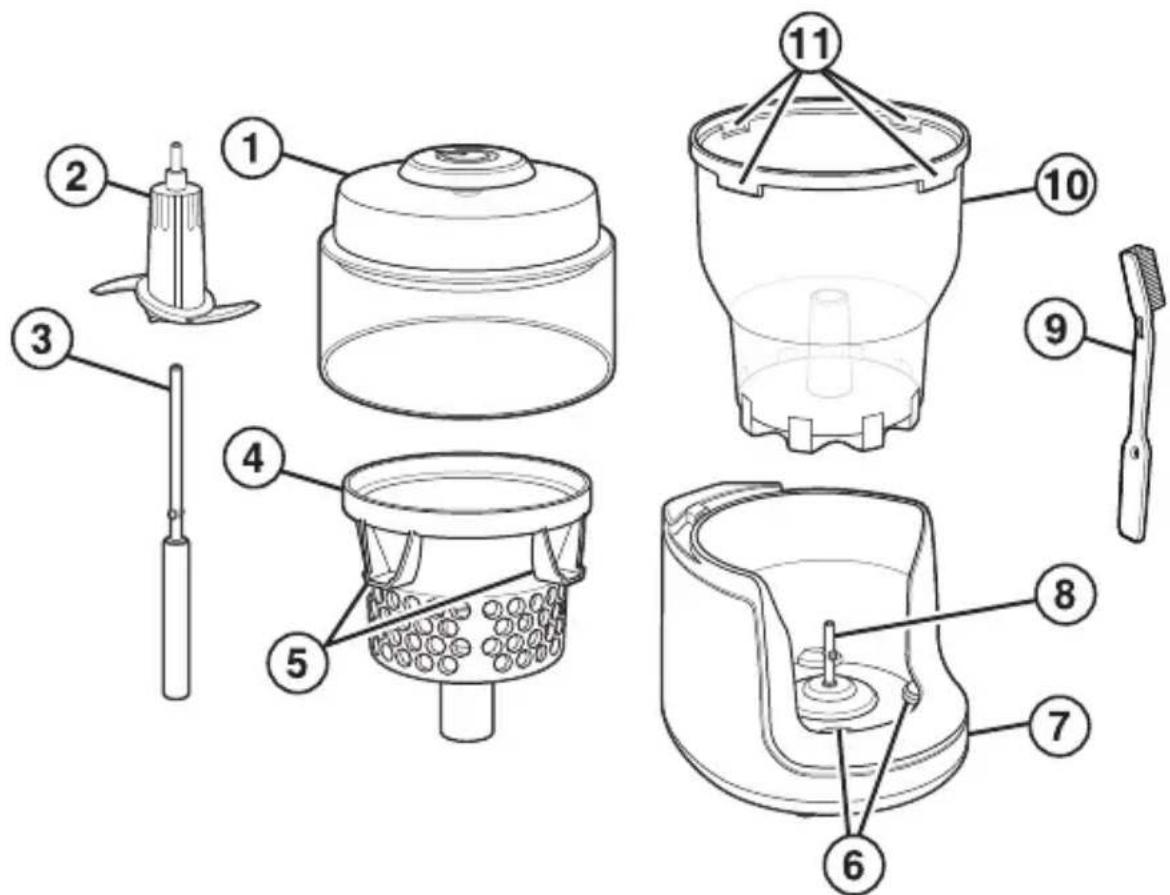
Before First Use: Wash lid, bowl, S-blade, Smart Chop™ attachment, and adapter in hot, soapy water.
Blade is sharp; handle carefully.
Rinse and dry.
text_image
Exploded diagram of a kitchen appliance with numbered parts for identification- Lid*
- S-Blade*
- Adapter*
- Smart Chop Attachment*
- Attachment Tabs
-
Base Tabs
-
Base
- Drive Shaft
- Spatula/Cleaning Brush*
- Bowl*
- Bowl Slots
This chopper offers two ways to chop: 1. With Smart Chop™ attachment to prevent overprocessing hard foods. 2. Without Smart Chop attachment for soft foods, fine chopping, or pureeing. Refer to chart on page 7 for specific foods.
How to Use Smart Chop Attachment to Prevent Overprocessing
- Unplug chopper. Place bowl onto base, aligning bowl with base tabs.
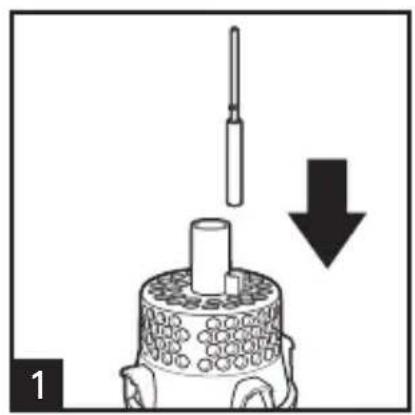
- Place adapter on drive shaft; then turn until it is seated on base.
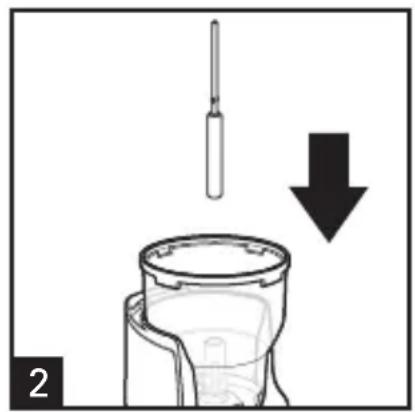
- Slide attachment over adapter, aligning attachment tabs with bowl slots. Slide S-blade onto adapter; turn clockwise until it drops into place.
- Cut food into 1.5" (3.8-cm) or less pieces that drop freely between S-blade hub and attachment sides.
- Place lid on bowl.
- Plug into outlet.
- Press and hold. To turn off, release lid. Do not remove lid until blade has stopped turning.
- Unplug.
natural_image
Diagram showing a mechanical component with a downward arrow indicating motion or force, no text or symbols present.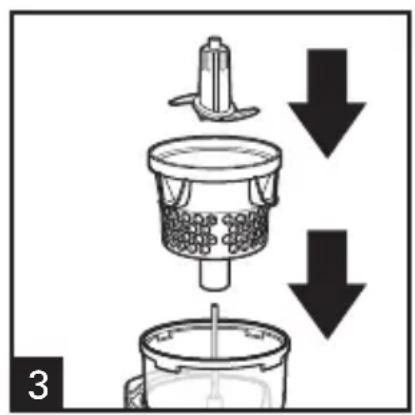
natural_image
Diagram of a kitchen appliance with downward arrows indicating process flow (no text or symbols)How to Use Without Smart Chop™ Attachment
- When not in use, rest Smart Chop attachment upside down on counter and place adapter in storage slot.
- Unplug. Place bowl onto base, aligning bowl with base tabs.
- Slide S-blade onto drive shaft; turn clockwise until it drops into place.
- Cut food into 1.5" (3.8-cm) or less pieces and place lid on bowl.
- Plug into outlet.
- Press and hold lid to chop or puree. To turn off, release lid. Do not remove lid until blade has stopped turning.
- Unplug.
natural_image
Diagram of a mechanical component with a downward arrow indicating force or direction (no text or symbols present)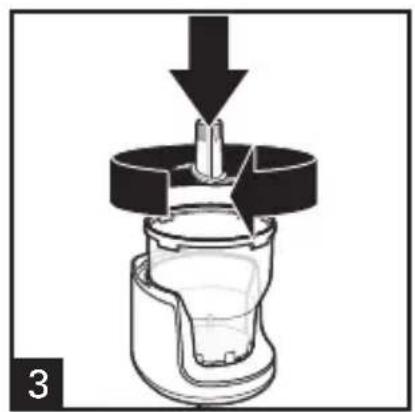
natural_image
Cross-sectional diagram of a mechanical component with an arrow indicating force or direction (no text or symbols)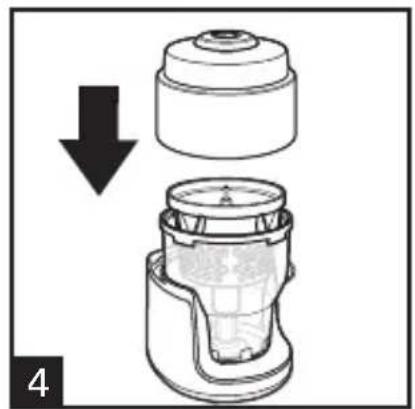
natural_image
Diagram showing a mechanical component with a downward arrow indicating process (no text or symbols present)Processing Chart
NOTES:
- When using Smart Chop™ attachment, do not add food above holes.
- Cut food into 1.5" (3.8-cm) or less pieces.
- Clear bowl has a capacity of 3 cups (710 ml). Do not add food above MAX (◆) fill line. For liquid ingredients, do not exceed 1 1/2 cups (355 ml) (MAX [◆] fill line on bowl).
- Do not process ice, raw meat, coffee beans, or whole, hard spices in food chopper. This could damage chopper.
How to Process: See pages 5 and 6
| FOOD SMART CHOP ATTACHMENT | BOWL | |
| Apple X | ||
| Avocado X | ||
| Broccoli/Cauliflower X | ||
| Carrots X | ||
| Celery X | ||
| Cheese X | ||
| Chickpeas X | ||
| Cucumber X | ||
| Fresh Herbs X | ||
| Garlic X | ||
| Ginger X | ||
| Green Onions | X | |
| Mushrooms | X | |
| Nuts | X | |
| Onions | X | |
| Peppers | X | |
| Toasted Bread/Crackers | X | |
| Tomatoes | X | |
| Zucchini | X |
How to Clean
WARNING Electrical Shock Hazard.
Unplug unit before cleaning. Do not immerse base, plug, or cord in water or other liquid.
- Unplug.
- Wash all removable parts in hot, soapy water or in top rack of dishwasher. Use spatula/cleaning brush if needed. Blade is sharp; handle carefully. Rinse and dry.
- Reassemble for safe storage.
- To clean base, wipe with a damp cloth. Do not use abrasive cleaners. Do not immerse base in water.
Troubleshooting
Food is spinning in attachment but not chopping.
- Cut food into 1.5" (3.8-cm) or less pieces that are small enough to fall freely between S-blade hub and sides of attachment.
Food gets stuck in holes of attachment.
- Food may be too wet. Dry food thoroughly with paper towels before placing in chopper.
- Foods with high moisture content, like onions and peppers, may stick to sides of attachment. This is normal. Simply remove attachment from bowl, turn upside down, and tap gently on cutting board or plate to dislodge food. You may also use included spatula/cleaning brush to remove food from sides of attachment or bowl.
Troubleshooting (cont.)
Food is chopped too coarsely.
- For fine chopping and pureeing, assemble chopper without Smart Chop™ attachment, placing S-blade in clear bowl. Pulse until desired consistency is reached.
Chopper will not turn on.
- Check to make sure chopper is properly assembled. See page 5 or 6.
Chopper shuts off during use and will not turn back on.
- This chopper is equipped with motor overload protection to prevent product damage due to overheating. To reset, unplug chopper and allow to cool for 15 minutes. Plug in and continue chopping.
S-blade does not rotate when motor is activated.
- Check to make sure S-blade is fully seated on drive shaft. With unit unplugged, spin blade on shaft by hand until it falls into place (you will feel a slight resistance to spinning motion).
LIMITED WARRANTY
This warranty applies to products purchased and used in the U.S. and Canada. This is the only express warranty for this product and is in lieu of any other warranty or condition.
This product is warranted to be free from defects in material and workmanship for a period of five (5) years from the date of original purchase in Canada and one (1) year from the date of original purchase in the U.S. During this period, your exclusive remedy is repair or replacement of this product or any component found to be defective, at our option; however, you are responsible for all costs associated with returning the product to us and our returning a product or component under this warranty to you. If the product or component is no longer available, we will replace with a similar one of equal or greater value.
This warranty does not cover glass, filters, wear from normal use, use not in conformity with the printed directions, or damage to the product resulting from accident, alteration, abuse, or misuse. This warranty extends only to the original consumer purchaser or gift recipient. Keep the original sales receipt, as proof of purchase is required to make a warranty claim. This warranty is void if the product is used for other than single-family household use or subjected to any voltage and waveform other than as specified on the rating label (e.g., 120 V \~ 60 Hz).
We exclude all claims for special, incidental, and consequential damages caused by breach of express or implied warranty. All liability is limited to the amount of the purchase price. Every implied warranty, including any statutory warranty or condition of merchantability or fitness for a particular purpose, is disclaimed except to the extent prohibited by law, in which case such warranty or condition is limited to the duration of this written warranty. This warranty gives you specific legal rights. You may have other legal rights that vary depending on where you live. Some states or provinces do not allow limitations on implied warranties or special, incidental, or consequential damages, so the foregoing limitations may not apply to you.
To make a warranty claim, do not return this appliance to the store. Please call 1.800.851.8900 in the U.S. or 1.800.267.2826 in Canada or visit hamiltonbeach.com in the U.S. or hamiltonbeach.ca in Canada. For faster service, locate the model, type, and series numbers on your appliance.
PRÉCAUTIONS IMPORTANTES
text_image
Exploded diagram of a kitchen appliance with numbered parts for identificationnatural_image
Diagram showing a tool above a cylindrical container with a downward arrow indicating process (no text or symbols)
natural_image
Diagram of a mechanical device with downward arrows indicating process flow (no text or symbols)natural_image
Diagram of a mechanical device with a tool inserted, showing a downward arrow and component (no text or symbols)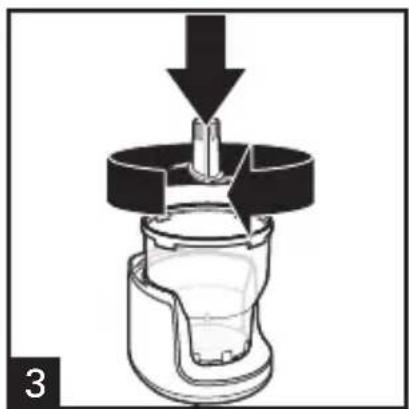
natural_image
Cross-sectional diagram of a mechanical device with a downward arrow indicating force or movement (no text or symbols present)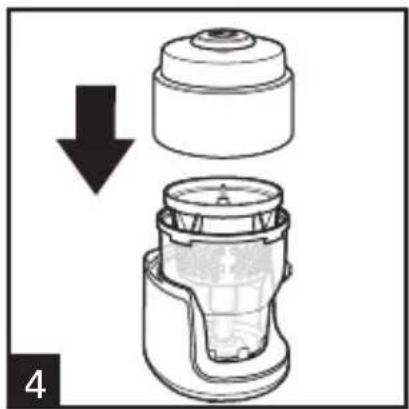
natural_image
Diagram showing a mechanical component with a downward arrow indicating compression or disassembly (no text or symbols present)text_image
Exploded diagram of a cleaning or cleaning device with numbered parts for identificationnatural_image
Diagram showing a mechanical component with a downward arrow indicating motion or force, no text or symbols present.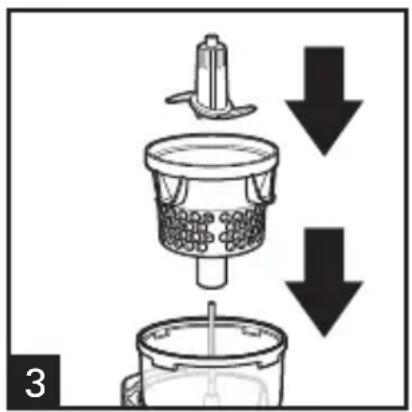
text_image
3natural_image
Diagram of a mechanical device with a tool inserted, showing a downward arrow and a cylindrical component (no text or symbols)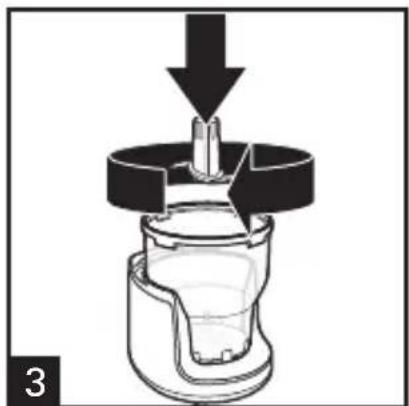
natural_image
Cross-sectional diagram of a mechanical component with a downward arrow indicating force or direction (no text or symbols)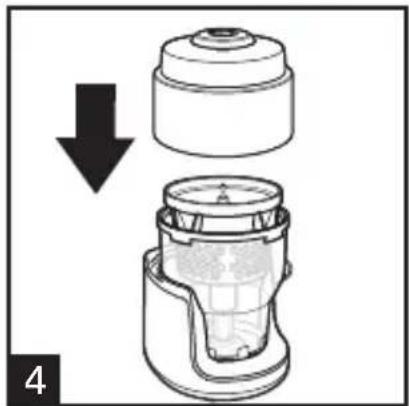
natural_image
Diagram of a mechanical component with a downward arrow indicating a process or assembly (no text or symbols present)Mixcoac MEXICO 03910 D.F.
Tel: 01 55 5563 8723
Fax: 01 55 5615 1856