
ES8162 - Razor PANASONIC - Free user manual and instructions
Find the device manual for free ES8162 PANASONIC in PDF.

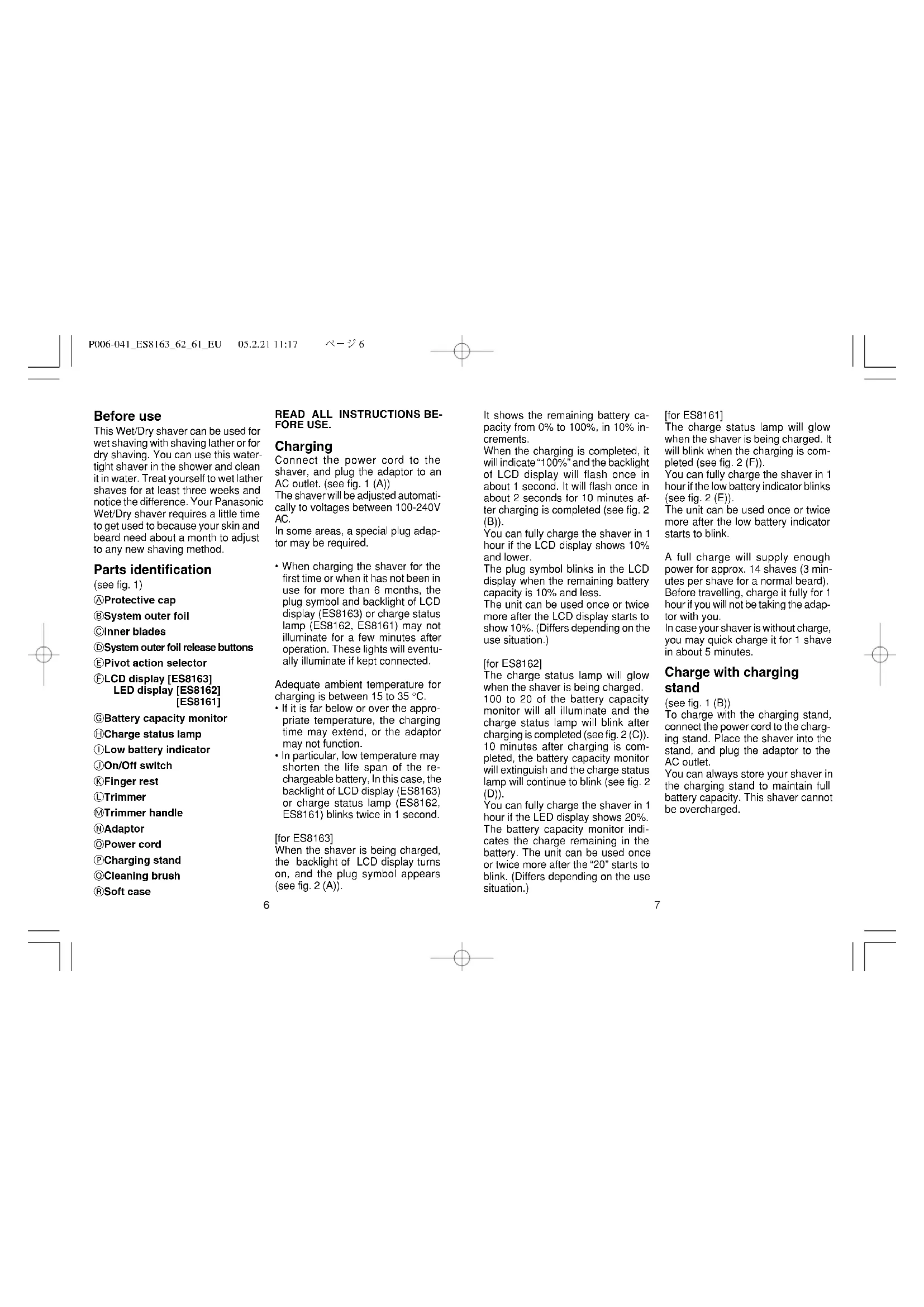


| Product type | Electric shaver |
| Brand | Panasonic |
| Model | ES8162 |
| Usage | Dry or wet shaving (Wet/Dry) |
| Water resistance | Can be used in the shower, washable under running water |
| Power source | Rechargeable Lithium-ion battery |
| Charger | RE7-25, 100-240 V AC (automatic voltage adaptation) |
| Full charge time | 1 hour |
| Quick charge (5 min) | For 1 shave |
| Battery life | Approximately 14 shaves (3 min per shave) |
| Display | LED: battery capacity monitor and charge status indicator |
| Shaving head | Outer foil with central blade, pivoting (Soft/Lock mode) |
| Integrated trimmer | Yes, sliding |
| Turbo cleaning mode | Sonic vibrations (hold On/Off for 2s) |
| Cleaning | With water and liquid hand soap, or with a brush |
| Outer foil replacement | Every year (recommended) |
| Inner blades replacement | Every 2 years (recommended) |
| Noise level | 67 dB(A) |
| Safety | Automatic stop of turbo mode after 20s; do not use if foil is damaged |
| Included accessories | Charger, charging stand, cleaning brush, storage case |
Frequently Asked Questions - ES8162 PANASONIC
User questions about ES8162 PANASONIC
0 question about this device. Answer the ones you know or ask your own.
Ask a new question about this device
Download the instructions for your Razor in PDF format for free! Find your manual ES8162 - PANASONIC and take your electronic device back in hand. On this page are published all the documents necessary for the use of your device. ES8162 by PANASONIC.
USER MANUAL ES8162 PANASONIC
Wet/Dry Rechargeable Shaver Operating Instructions
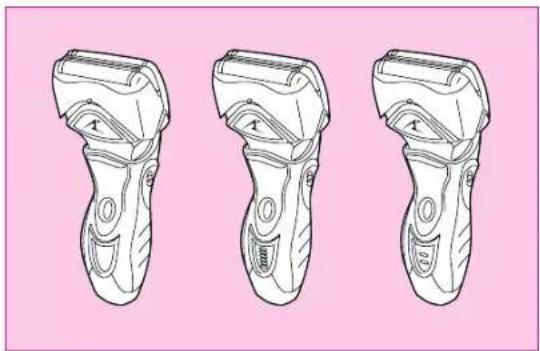
Model No. ES8163/ES8162/ES8161
Matsushita Electric Works, Ltd.
1048, Kadoma, Osaka 571-8686, Japan
No.1 EN, GR, FR, IT, NE, SP, DN, PO, NR, SW, FN, Po, Cz, Hu, Ru, Russi, TU, Uk (Europe) Printed in Japan
- Before operating this unit, please read these instructions completely.
2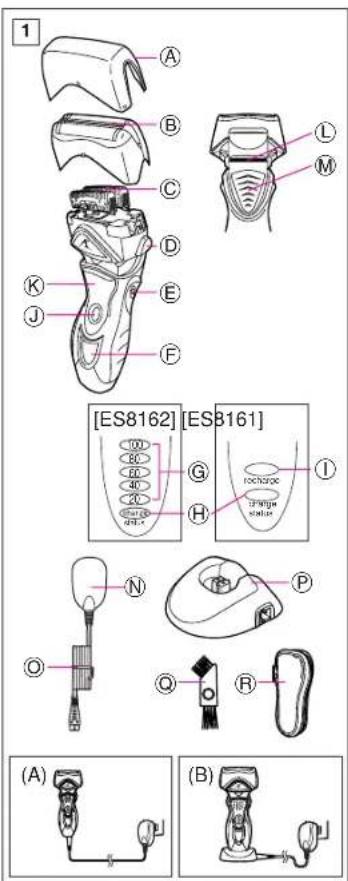
3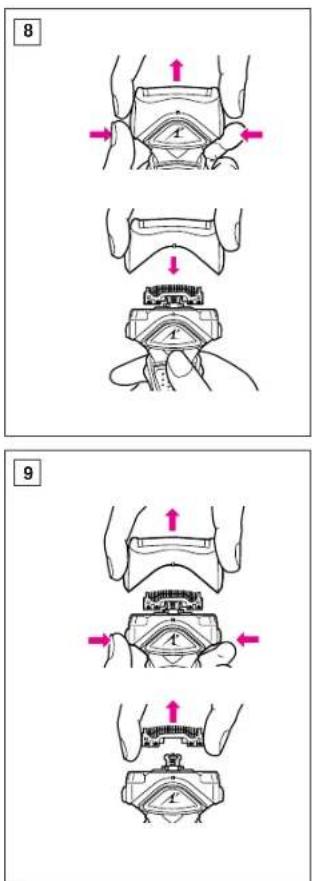
| Index | |||
| ENGLISH Page 6 | SVENSKA | Sid | 60 |
| DEUTSCH Seite 12 | SUOMI Sivu | 66 | |
| FRANÇAIS Page 18 | POLSKI | Strona | 72 |
| ITALIANO Pagina 24 | ČESKY | Strona | 79 |
| NEDERLANDS Pagina 30 | MAGYAR Oldal | 85 | |
| ESPÁÑOL Pagina 36 | ROMANA | Pagina | 92 |
| DANSK Side 42 | PYCCKM | стараца | 98 |
| PORTUGÉS Pagina 48 | ТURKCE Sayfa | 105 | |
| NORSK Side 54 | Украïnhсыкий | сторika | 111 |
Before use
This Wet/Dry shaver can be used for wet shaving with shaving lather or for dry shaving. You can use this watertight shaver in the shower and clean it in water. Treat yourself to wet lather shaves for at least three weeks and notice the difference. Your Panasonic Wet/Dry shaver requires a little time to get used to because your skin and beard need about a month to adjust to any new shaving method.
Parts identification
(see fig.1) Protective cap, System outer foil, Inner blades, System outer foil release buttons, Pivot action selector, LCD display [ES8163], LED display [ES8162] [ES8161], Battery capacity monitor, Charge status lamp, Low battery indicator, On/Off switch, Finger rest, Trimmer, Trimmer handle, Adaptor, Power cord, Charging stand, Cleaning brush, Soft case
READ ALL INSTRUCTIONS BEFORE USE.
Charging
Connect the power cord to the shaver, and plug the adaptor into an AC outlet. (See fig. 1 (A))
The shaver will automatically adjust to voltages between 100-240V AC.
In some areas, a special plug adaptor may be required.
- When charging the shaver for the first time or when it has not been used for more than 6 months, the plug symbol and backlight of the LCD display (ES8163) or charge status lamp (ES8162, ES8161) may not illuminate for a few minutes after operation. These lights will eventually illuminate if kept connected.
The adequate ambient temperature for charging is between 15 and 35°C.
- If the temperature is far below or above the appropriate range, the charging time may extend, or the adaptor may not function.
In particular, low temperature may shorten the life span of the rechargeable battery. In this case, the backlight of the LCD display (ES8163) or charge status lamp (ES8162; ES8161) blinks twice in 1 second.
[for ES8163]
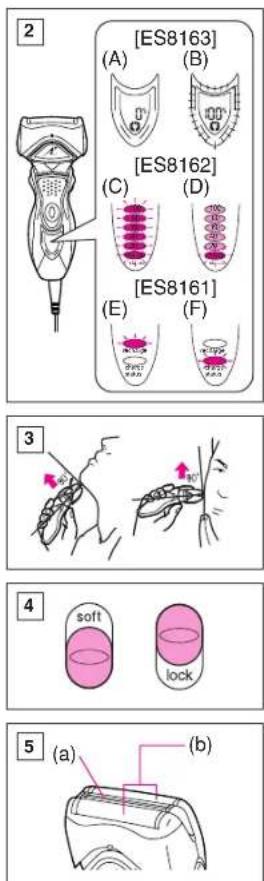
When the shaver is being charged, the backlight of the LCD display turns on, and the plug symbol appears (see fig. 2(A)).
It shows the remaining battery capacity from 0% to 100%, in 10% increments.
When charging is completed, it will indicate 100% and the backlight of the LCD display will flash once in about 1 second. It will flash once in about 2 seconds for 10 minutes after charging is completed (see fig. 2 (B)).
You can fully charge the shaver in 1 hour if the LCD display shows 10% or lower.
The plug symbol blinks in the LCD display when the remaining battery capacity is 10% or less.
The unit can be used once or twice more after the LCD display starts to show 10%. (Differs depending on the use situation.)
[for ES8162]
The charge status lamp will glow when the shaver is being charged. 100 to 20 of the battery capacity monitor will all illuminate and the charge status lamp will blink after charging is completed (see fig. 2(C)). 10 minutes after charging is completed, the battery capacity monitor will extinguish and the charge status lamp will continue to blink (see fig. 2(D)).
You can fully charge the shaver in 1 hour if the LED display shows 20%. The battery capacity monitor indicates the charge remaining in the battery. The unit can be used once or twice more after the "20" starts to blink. (Differs depending on the use situation.)
[for ES8161]
The charge status lamp will glow when the shaver is being charged. It will blink when the charging is completed (see fig. 2(F)).
You can fully charge the shaver in 1 hour if the low battery indicator blinks (see fig. 2(E)).
The unit can be used once or twice more after the low battery indicator starts to blink.
A full charge will supply enough power for approx. 14 shaves (3 minutes per shave for a normal beard). Before travelling, charge it fully for 1 hour if you will not be taking the adaptor with you.
In case your shaver is without charge, you may quick charge it for 1 shave in about 5 minutes.
Charge with charging
stand
(see fig. 1 (B))
To charge with the charging stand, connect the power cord to the charging stand. Place the shaver into the stand, and plug the adaptor to the AC outlet.
You can always store your shaver in the charging stand to maintain full battery capacity. This shaver cannot be overcharged.
Using your shaver
Caution - The system outer foil is very thin and can be damaged if handled improperly. Before each use, always check the foil for damage. To avoid personal injury, do not use if the foil or other parts of the shaving head is damaged.
Disconnect the power cord from the shaver, and push the On/Off switch to turn the shaver on.
If you push and hold the On/Off switch for more than 2 seconds, it will activate the turbo mode for "sonic" vibration cleaning. (see "Cleaning your shaver") Caution:
Shaving with "sonic" vibration may damage your skin. Please turn it off and on again to deactivate the turbo mode.
Do not place fingers on the On/Off switch during use.
This may cause the shaver to stop during use or change it to the "sonic" vibration cleaning mode. Place your finger on the finger rest during use.
Hold the shaver at a right angle (90°) to your skin (see fig. 3). Start out shaving by applying gentle pressure to your face. Stretch your skin with your free hand and move the shaver back and forth in the direction of your beard. You may gently increase the amount of pressure as your skin becomes accustomed to this shaver.
Applying excessive pressure does not provide a closer shave.
Pivot action selector (see fig.4)
Use the pivot action selector to choose the shaving mode, "soft" (soft) and "lock" (lock) based on your shaving preference.
The pivot action can be changed whether the switch is turned on or off.
System outer foil (see fig.5)
System outer foil has a slit blade (a) between 2 foils (b). They move up and down independently to follow the contours of your face.
The slit blade catches and cuts longer and lying hairs easily.
For wet shaving
Put a thin layer of shaving foam on your face, which works as a lubricant. Shaving foam is the most suitable among many other shaving aids (gel, soap, cream, etc.). Do not put a thick layer of shaving foam as it may affect the shaver's performance. If the shaving head is clogged with foam, simply rinse it under running water.
Using the trimmer
(see fig. 6)
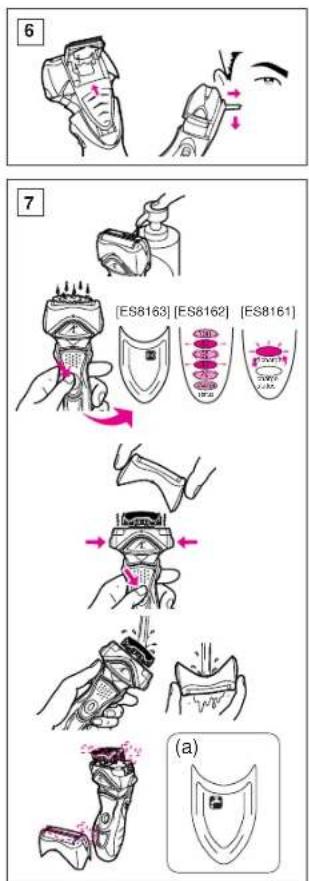
Slide the trimmer handle up to open the trimmer.
Place the trimmer at a right angle to your skin and move it downward to trim sideburns.
Cleaning your shaver (see fig. 7)
Warning - To prevent electric shock or personal injury, disconnect the power cord from the shaver before cleaning with water.
For cleanliness and convenience, we recommend that you clean your shaver with water and a liquid hand soap. Regular cleaning will keep your shaver in good condition while preventing odors or bacteria from developing, and maintain the cutting performance.
With the system outer foil in place, apply some hand soap onto the outer foil.
Push and hold the On/Off switch for more than 2 seconds to activate the turbo mode for "sonic" vibration cleaning.
At the same time, the "sonic" cleaning symbol appears in the LCD display (ES8163), or the lamps of the Battery capacity monitor (ES8162), or Low battery indicator/Charge status lamp (ES8161) will flash around randomly.
Pour some water over the outer foil. After about 20 seconds, it will be automatically turned off, or you can turn it off by pushing the On/Off switch.
Remove the system outer foil and push the On/Off switch for more than 2 seconds to activate the turbo mode for "sonic" vibration cleaning and clean it with running water.
Wipe off any moisture from the shaver with a dry cloth and dry it with-
out the system outer foil.
It is recommended to clean your shaver with the "sonic" vibration cleaning when the tap symbol (a) appears in LCD (ES8163).
Brush cleaning
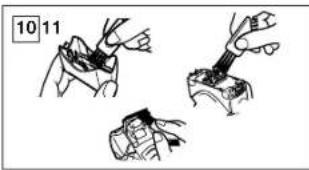
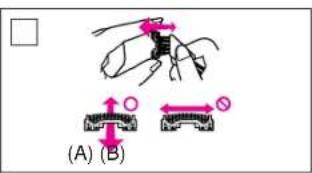
Squeeze the foil frame release buttons and lift the foil frame upward to remove it (see fig. 9). Remove the inner blades one at a time by grasping it firmly at both ends and pulling it straight away from the shaver. Clean the outer foils, the shaver body and the trimmer with the long brush (see fig. 10). Clean the inner blades with the short brush by moving it in the direction in fig. 11 (A). Do not move the brush in the direction in fig. 11 (B), as it will damage the inner blade, and its cutting performance. Do not use the short brush to clean the outer foils.
Replacing shaving head components
It is recommended that you replace the system outer foil at least once a year and the inner blade at least once every 2 years to maintain your shaver's cutting performance.
Replacing the system outer foil (see fig. 8)
Squeeze the system outer foil release buttons and lift the system outer foil upward to remove it. To insert the new system outer foil, press down until it snaps into place.

Replacing the inner blades (see fig.9)
Squeeze the system outer foil release buttons and lift the system outer foil upward to remove it. Remove the inner blade one at a time by grasping it firmly at both ends and pulling straight away from the shaver. Do not touch the metal parts of inner blades.
To insert the new inner blade, hold the blade one at a time at both ends and press downward until it snaps into the shaver.
For environmental protection and recycling of materials
This shaver contains a Lithium-ion battery.
Please make sure that the battery is disposed of at an officially assigned location, if there is one in your country.
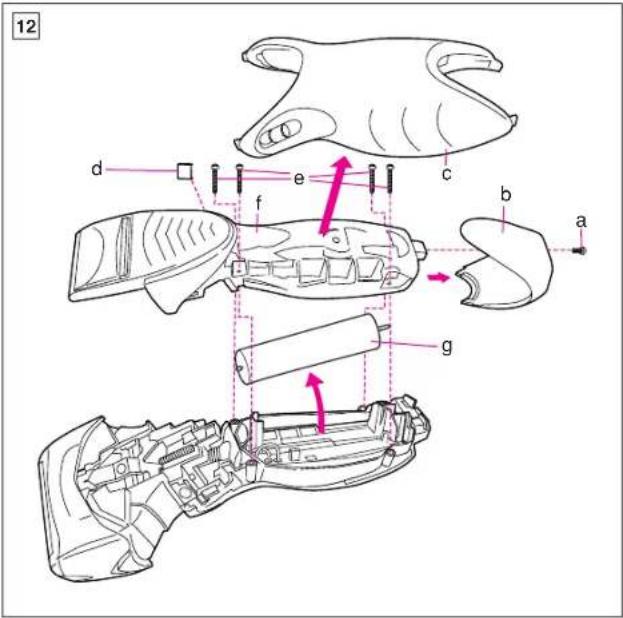
How to remove the built-in rechargeable battery before disposal of the shaver (see fig. 12)
WARNING:
Do not attempt to replace the battery for the purpose of reusing the shaver. This could result in the risk of fire or electric shock.
The battery in this shaver is not intended to be replaced by consumers. However, the battery may be replaced at an authorized service center. The procedure described below is intended only for removal of the rechargeable battery for the purpose of proper disposal.
1. Disconnect the power cord from the shaver when removing the battery. 2. Remove the bottom cover screw (a). 3. Remove the bottom cover (b). 4. Slide the back panel (c) and remove it. 5. Remove the housing clip (d). 6. Remove the four housing screws (e). 7. Remove the housing B (f). 8. Lift the battery (g) and remove it.
Caution
- Do not charge the shaver where it will be exposed to direct sunlight or a heat source, or where there is a lot of moisture.
- Use only the included adaptor RE7-25 to charge the [ES8163] [ES8162] [ES8161] shaver.
- Dry the shaver completely before charging it.
- The shaver and adaptor will become slightly hot during use or charging, however this is not a malfunction.
- Keep the adaptor away from water and handle it only with dry hands.
- Grip the adaptor when disconnecting it from an AC outlet; tugging on the power cord may damage it.
- Store the adaptor in a dry area where it will be protected from damage.
- Do not pull, twist, or severely bend the power cord.
- Do not wrap the power cord tightly around the appliance.
- If the power cord gets damaged, it cannot be replaced alone. Contact an authorized service center.
- If static noise is emitted from the television during use or recharging, connect the adaptor to a different outlet.
- Do not touch the edge (metal part) of the inner blade.
Failure to observe this may lead to hand injuries.
- Wash the shaver in tap water. Do not use salt water or boiling water. Also, do not use cleaning products that are designed for toilets, bathrooms, or kitchen appliances. Do not submerge the shaver for a long time.
- Do not wipe any part of the shaver with thinner, benzine, or alcohol. Clean it by using a cloth dampened with soapy water.
- Do not take the housing apart as this can affect the watertight construction.
- Do not clean with water when the shaver is connected to the power cord.
- When cleaning the shaver with water, do so with both inner blades attached. (Doing so with only one of the inner blades attached makes an abnormal noise and may damage the shaver.)
- Keep the unit away from children.
- Keep instructions in a safe place.
This product is intended for household use only.
Airborne Acoustical
Noise: 67 (dB(A) re 1pW)
Before use
You can fully charge the shaver in 1 hour if the battery charge indicator shows 10% or less.
The charge indicator lights up when the remaining battery capacity is 10% or less.
After the charge indicator starts showing 10%, you can use the appliance for one or two more shaves. (Depends on usage.)
[EN8ES8162]
Charge indicator light: The charge indicator lights up when the shaver is being charged. When the battery is fully charged, the indicator lights up green for 10-20 minutes, then the charge indicator light goes out.
Charging will take about 1 hour until fully charged (see fig. 2(C)). After 10 minutes of charging, the charge indicator light will go out, and the charge indicator light will blink (see fig. 2(D)). You can fully charge the shaver in 1 hour if the charge indicator shows 20%.
The battery charge indicator shows the remaining battery charge. After the indicator starts blinking "20%", you can use the appliance for one or two more shaves. (Depends on usage.)
[DAE ES8161]
Charge indicator light: The charge indicator lights up when the shaver is being charged. After charging is complete, it will blink (see fig. 2(F)). You can fully charge the shaver in 1 hour if the battery discharge indicator lights up (see fig. 2(E)). After the battery discharge indicator starts blinking, you can use the appliance for one or two more shaves. The charging time will be about 14 hours for a full charge (3 minutes of shaving with normal hair growth). If you are going on a trip and don't have time to charge fully, you can charge the shaver for 1 hour. If the shaver is not charged, you can quickly charge it for about 5 minutes for one shave.
P078-118_ES8163_62_61_EU
05.2.21 11:18 100
Charging with the charging stand
(CM.PMC.1B) Insert the plug into the socket. Insert the plug into the AC outlet. For continuous charging of the battery, we recommend always leaving the plug in the socket. This model of plug is protected against overcharging.
Using the trimmer
Warning: The device is very sharp and can be easily damaged if handled incorrectly. Before each use, always check the grid for damage. To avoid injury, do not use the trimmer if the grid or other parts of the trimmer head are damaged.
Disconnect the trimmer from the power supply by pressing the ON/OFF switch to the OFF position.
If you press the ON/OFF switch for more than two seconds, it activates the turbo mode "sonic" (see "Trimmer modes"). Warning: Using the trimmer in "sonic" mode may damage your skin. Please turn the trimmer off and on again to deactivate turbo mode.
When using the trimmer, do not place your fingers on the ON/OFF switch. This may cause the trimmer to turn off during use or switch to "sonic" mode. When using the trimmer, place your fingers on the handle.
Hold the trimmer at a right angle (90°) to the skin (see fig. 3). Start trimming, carefully guiding the trimmer to the skin. Stretch the skin with your free hand and move the trimmer back and forth against the direction of hair growth. As the skin becomes accustomed to the trimmer, you can carefully increase the pressure on the skin. Excessive pressure on the skin is not necessary, as it does not improve the quality of trimming.
Switching the working modes
(see fig. 4) Use the working modes switch to select the trimmer modes "soft" (marking) and "lock" (locking) depending on your preference. The working mode can be changed regardless of whether the switch is in the ON or OFF position.
Triple trimmer system
(see fig. 5) Triple trimmer system (a),
The fixed trimmer between the 2 grids (b). They move up and down independently, following the contours of your face. The central blade easily captures and cuts longer hairs that lie flat against the skin.
Wet shaving
Apply a thin layer of shaving foam to the skin: this foam will perform a lubricating function. Shaving foam is a better product compared to soap, cream, etc. Do not apply foam in a thick layer, as this may negatively affect the efficiency of the trimmer. If the trimmer head becomes clogged with foam, rinse it under the tap.
Using the trimmer (see fig. 6)
Turn the trimmer upside down to open the trimmer. Place the trimmer at a right angle to the blade and guide the trimmer down to level the height of the trimmer blades.
Cleaning
(see fig. 7)
Caution - To avoid electric shock or injury, disconnect the power supply from the trimmer before cleaning the trimmer in water.
For cleaning and disinfection, it is recommended to rinse the trimmer under running water. Regular cleaning helps maintain the trimmer in good condition, preventing unpleasant odors or bacteria, and also ensures high efficiency of the trimmer. Do not remove the outer net; wash it with soap.
Press and hold the "On/Off" switch for at least two seconds to activate the turbo mode of the "sonic" cleaning system.
Simultaneously, the "sonic" cleaning indicator (ES8163), the battery charge indicator lights (ES8162), and the battery discharge/charge status indicator (ES8161) will light up in a random sequence.
Rinse the outer net with a small amount of water. After rinsing, the trimmer automatically turns off, or you can turn it off by pressing the "On/Off" switch. Remove the outer net of the system and press the "On/Off" switch for at least 2 seconds to activate the turbo mode of the "sonic" cleaning system, and then rinse the trimmer under running water.
Wipe the moisture from the trimmer with a dry cloth and dry it on the outer net of the system. It is recommended to clean the trimmer using the "Sonic" mode when the water drop symbol (a) appears on the LCD display (ES8163).
Cleaning with the brush
Hold the outer net fixer, lift the outer net upward, and remove it (see fig. 9). To remove the inner blades, firmly grasp them from both sides and pull them out of the trimmer. Clean the outer net, the trimmer body, and the blades with the long brush (see fig. 10). Clean the inner blades with the short brush, moving it in the direction indicated in fig. 11 (A). Do not move the brush in the direction indicated in fig. 11 (B) - this will damage the inner blade and reduce its cutting ability. Do not use the short brush for cleaning the outer net.
Replacing the shaver head parts
To maintain the high efficiency of shaving, it is recommended to replace the outer cutter system at least once a year, and the inner blades at least once every two years.
Replacing the outer cutter system
(see fig. 8)
Press the release buttons on the shaver head, lift the head upward. To remove the inner blades, firmly grasp them from both sides and pull them upward away from the shaver. To insert new inner blades, place them one by one, grasping each blade from both sides, and press down until they click into place.
Replacing the inner blades (see fig. 9)
Press the release buttons on the shaver head and remove the head by lifting it upward. Remove the inner blades one by one, firmly grasping them from both sides and pulling them upward away from the shaver. Do not touch the metal parts of the inner blades.
To insert a new inner blade, grasp it from both sides and press it down until it clicks into place in the shaver.
Protecting the environment and recycling used materials
This shaver contains a rechargeable battery.
Please dispose of the shaver at an official
designated collection point, if such a service is available in your country.
Removing the built-in battery for disposal of the shaver (see fig. 12)
Caution:
Do not attempt to replace the battery of a rechargeable shaver. This may cause fire or electric shock.
The battery is not intended to be replaced by the user. The battery may be replaced at an authorized service center. The procedure described below is intended only for charging the battery with the appropriate tool.
- Disconnect the power adapter from the outlet before charging the battery.
- Unscrew the screws of the lower cover (a).
- Remove the lower cover (b). 4. Disconnect the connector (c) and remove it.
- Remove the housing clamp (d).
- Unscrew the four housing screws (e).
- Remove the housing (f). 8. Lift the battery (g) and remove it.
Caution
Do not charge the battery in direct sunlight, near heat sources, or in high humidity. Use only the charger (RE7-25) included with the battery for models ES8163, ES8162, ES8161. Rinse the battery before charging. During charging, the battery and charger may become warm; this is normal. Keep the charger away from water and touch it only with dry hands. When disconnecting the charger from the AC outlet, pull the charger itself; if you pull the cord directly, you may damage it. Store the charger in a dry place to protect it from damage. Do not pull the cord, twist it, or bend it excessively. Do not wrap the cord around the device. If the cord is damaged, it must be replaced separately. Contact an authorized service center.
P078-118_ES8163_62_61_EU
05.2.21
11:18
一104
In cases where the TV is a source of static electricity during use or charging, connect the charger to a grounded outlet. Do not touch the metal part of the plug. Failure to comply may result in injury. Rinse the shaver under running water. Do not immerse the shaver in salt water or chlorinated water. Also, do not use cleaning agents intended for cleaning toilets, bathtubs, or kitchen equipment. Do not immerse the shaver in water for extended periods. It is forbidden to clean the shaver with abrasive, white, or raw materials. Clean only with a damp cloth. Do not use water on the shaver body, as this may damage its water resistance. Do not rinse the shaver with water while it is connected to the power supply. When cleaning the shaver with water, the inner blades must be removed. (If you clean it with the blades attached, excessive noise may occur and the shaver may be damaged.)
Keep out of reach of children. Store the instructions in a safe place.
This device is intended for use only in domestic conditions.
Installed by the manufacturer in accordance with clause 2 of the Federal Law of the Russian Federation on the Protection of Consumer Rights for this product for 7 years from the date of manufacture, provided that the product is used strictly in accordance with this instruction manual and accepted technical standards.

BZ02
Made by Aloni
This device is intended for household use only. Electric shaver, type. Power level: 67 (D5(B) at 1 nBt)
Before use
(DIV.MAN.6) To attach the foils for trimming, slide the slider upward.
Insert the foils at a right angle to the shaving head until they click, then move them downward.
Shaving foils (DVB.Ma7)
Warning: To reduce the risk of electric shock or injury, always remove the foil from the shaver before cleaning.
For best results, we recommend using the shaver for dry shaving.
Regular cleaning of the shaver ensures proper operation, prevents unpleasant odors and bacterial growth, and guarantees optimal shaving quality.
Apply a small amount of shaving oil to the outer foil surface without removing it from the shaver.
The shaving time indicator will flash for about 5 seconds after the shaver is turned on/off.
According to the LED display (ES8163), the shaving time indicator appears, or with a high frequency the battery charge indicator (ES8162) flashes, indicating low battery/charging status (ES8161).
Remove the outer rubber coating.
The automatic switch-off will occur after 20 seconds, or you can switch it off manually by pressing the “On/Off” button.
To remove the outer rubber coating, press and hold the “On/Off” button for 6 seconds to activate the intensive cleaning mode, then rinse the coating under a stream of water and dry it with a dry cloth and dry without the outer rubber coating.
To clean the trimmer with intensive cleaning, it is recommended to use the water tap valve (a) (ES8163).
Cleaning
Press the release button of the protective cap with the coating and pull the cap upward to remove it (see Fig. 9). Then clean the inside, firmly pressing the blades together and pulling them towards you. Clean the outside of the coating, the trimmer body, and the blades with a long brush (see Fig. 10). Use the short brush to clean the inside blades, moving the blades as shown in Fig. 11 (A). Do not move the blades as shown in Fig. 11 (B), as this may damage the blades and reduce the quality of shaving. Do not use the short brush to clean the outer coating of the trimmer system.
Replacing the trimmer components
To maintain optimal performance of the trimmer, it is recommended to replace the outer coating at least once a year, and the inner blades at least once every two years.
Replacing the outer rubber coating
(see Fig. 8)
Press the clips that release the lock of the rubber coating of the trimmer system, remove the system. Attach the new coating by pressing on it until it clicks.
Remove the inner blades (see Fig. 9).
Press the button, turn the locking screws of the outer blade housing of the shaving system, and remove the outer blade housing of the shaving system. Remove the inner blades, holding them by the side edges and pulling them towards you. Do not touch the metal surface of the inner blades.
Install new inner blades, holding them by the side edges, and close them in the shaver, pressing on the blades until you hear a click.
Disposal of the shaver and materials
The shaver comes with a rechargeable battery.
Ensure the battery is disposed of at an official collection point, if such exists in your country.
Removing the built-in rechargeable battery (see Fig. 12)
WARNING: Do not attempt to replace the battery yourself to extend the shaver's life. You risk electric shock or injury.
The battery installed in the shaver is not replaceable by the user. However, the battery can be replaced by an official service center. Follow the instructions below for removing the battery for environmentally friendly disposal. Before removing the battery, the shaver must be disconnected from the power supply. Before removing the battery, the shaver must be disconnected from the power supply.
2. Remove the (a) bottom cover. 3. Remove the bottom cover (b). 3.4. Pull out the (c) tab and remove it. 5. Unlock the battery holder (d). 6. Remove the (e) screw. 7. Remove the battery holder (f). 8. Lift the battery (g) and remove it.
Precautions
Do not charge the shaver's battery in direct sunlight, near heat sources, or in high humidity. The shaver's battery [ES8163] [ES8162] [ES8161] can only be charged with the charging adapter RE7-25,00 included with the shaver. - Before charging, dry the shaver.
Always dry the shaver. - During charging, the shaver and the adapter may become warm, but this is not a malfunction. Do not allow the adapter to come into contact with water. Only touch it with dry hands. When unplugging the adapter from the outlet, pull it out by the plug, not by the cord. Do not pull on the cord, as this may damage it. Store the adapter in a dry place, protected from damage. Do not bend, twist, or wrap the cord around the shaver at a sharp angle. Do not wind the cord around the shaver too tightly. In case of damage, the cord cannot be replaced.
In any case, contact an official service center.
During operation or charging, place the adapter in a different outlet. Do not touch the blades (metal part) of the inner blades. Improper handling can cause damage. - Rinse the shaver under running water. Do not use mineralized or boiling water.
Use a soft cloth dampened with warm water to clean the appliance. Do not immerse it in water or rinse it under the tap. Do not wipe the components with thinner, benzene, or alcohol. To clean the appliance, use a cloth dampened in warm water. Do not disassemble the body of the appliance to avoid losing its seal. Be careful not to let water enter the appliance, as it may come into contact with electrical parts. If water gets inside, unplug it immediately and contact service. Store the appliance in a dry place. Keep the instructions in a safe place.
The appliance is intended for household use only. The manufacturer sets a service life (durability) of its products at 5 years from the date of manufacture, provided that the appliance is used in strict accordance with this instruction manual and technical standards. 20 years for the product.
The date of manufacture is indicated on the product.
Acoustic noise: 67 dB(A) re 1 pW
Maxusita Electric Works, Ltd. 1048, Kadoma, Osaka 571-8686, Japan


- WET/DRY RECHARGEABLE SHAVER OPERATING INSTRUCTIONS
- BEFORE USE
- PARTS IDENTIFICATION
- READ ALL INSTRUCTIONS BEFORE USE
- CHARGING
- CHARGE WITH CHARGING
- STAND
- USING YOUR SHAVER
- FOR WET SHAVING
- USING THE TRIMMER
- CLEANING YOUR SHAVER (SEE FIG. 7)
- BRUSH CLEANING
- REPLACING SHAVING HEAD COMPONENTS
- REPLACING THE INNER BLADES (SEE FIG.9)
- FOR ENVIRONMENTAL PROTECTION AND RECYCLING OF MATERIALS
- HOW TO REMOVE THE BUILT-IN RECHARGEABLE BATTERY BEFORE DISPOSAL OF THE SHAVER (SEE FIG. 12)
- CAUTION
- [EN8ES8162]
- [DAE ES8161]
- CHARGING WITH THE CHARGING STAND
- SWITCHING THE WORKING MODES
- TRIPLE TRIMMER SYSTEM
- WET SHAVING
- USING THE TRIMMER (SEE FIG. 6)
- CLEANING
- CLEANING WITH THE BRUSH
- REPLACING THE SHAVER HEAD PARTS
- REPLACING THE OUTER CUTTER SYSTEM
- (SEE FIG. 8)
- REPLACING THE INNER BLADES (SEE FIG. 9)
- PROTECTING THE ENVIRONMENT AND RECYCLING USED MATERIALS
- REMOVING THE BUILT-IN BATTERY FOR DISPOSAL OF THE SHAVER (SEE FIG. 12)
- BZ
- MADE BY ALONI
- SHAVING FOILS (DVB.MA7)
- REPLACING THE TRIMMER COMPONENTS
- REPLACING THE OUTER RUBBER COATING
- REMOVE THE INNER BLADES (SEE FIG. 9)
- DISPOSAL OF THE SHAVER AND MATERIALS
- REMOVING THE BUILT-IN RECHARGEABLE BATTERY (SEE FIG. 12)
- PRECAUTIONS
Brand : PANASONIC
Model : ES8162
Category : Razor