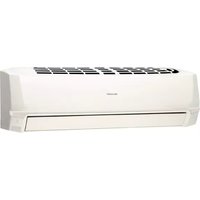
USER MANUAL AYXP12HR SHARP
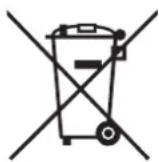
Attention: Your product is marked with this symbol. It means that used electrical and electronic products should not be mixed with general household waste. There is a separate collection system for these products.
1. In the European Union
Attention: If you want to dispose of this equipment, please do not use the ordinary dust bin!
Used electrical and electronic equipment must be treated separately and in accordance with legislation that requires proper treatment, recovery and recycling of used electrical and electronic equipment.
Following the implementation by member states, private households within the EU states may return their used electrical and electronic equipment to designated collection facilities free of charge. In some countries your local retailer may also take back your old product free of charge if you purchase a similar new one.
*) Please contact your local authority for further details.
If your used electrical or electronic equipment has batteries or accumulators, please dispose of these separately beforehand according to local requirements.
By disposing of this product correctly you will help ensure that the waste undergoes the necessary treatment, recovery and recycling and thus prevent potential negative effects on the environment and human health which could otherwise arise due to inappropriate waste handling.
2. In other Countries outside the EU
If you wish to discard this product, please contact your local authorities and ask for the correct method of disposal.
For Switzerland: Used electrical or electronic equipment can be returned free of charge to the dealer, even if you don't purchase a new product. Further collection facilities are listed on the homepage of www.swico.ch or www.sens.ch.
1. In the European Union
If the product is used for business purposes and you want to discard it:
Please contact your SHARP dealer who will inform you about the take-back of the product. You might be charged for the costs arising from take-back and recycling. Small products (and small amounts) might be taken back by your local collection facilities.
For Spain: Please contact the established collection system or your local authority for take-back of your used products.
2. In other Countries outside the EU
If you wish to discard of this product, please contact your local authorities and ask for the correct method of disposal.
Thank you for purchasing a SHARP air conditioner. Please read this manual carefully before operating the product.
CONTENTS
- IMPORTANT SAFETY INSTRUCTIONS ....E-1 PART NAMES. E-2
- USING THE REMOTE CONTROL E-4
- SETTING AIR PURIFYING FILTER E-5 TIPS ON SAVING ENERGY E-5 AUXILIARY MODE E-5 BASIC OPERATION E-6 ADJUSTING THE AIR FLOW DIRECTION E-7 PROGRESSIVE AIRFLOW E-8
- POWERFUL JET OPERATION
- PLASMACLUSTER OPERATION SELF CLEAN OPERATION E-9
- ONE-HOUR OFF TIMER. E-10
- TIMER OPERATION .E-10 MAINTENANCE E-12 ADDITIONAL NOTES ON OPERATION E-13 BEFORE CALLING FOR SERVICE E-13
IMPORTANT SAFETY INSTRUCTIONS
WARNING FOR USE
1 Do not pull or deform the power supply cord. Pulling and misuse of the power supply cord can result in damage to the unit and cause electrical shock. 2 Be careful not to expose your body directly to the outlet air for a long time. It may affect your physical conditions. 3 When using the air conditioner for infants, children, elderly, bedridden, or disabled people make sure the room temperature is suitable for those in the room. 4 Never insert objects into the unit. Inserting objects can result in injury due to the high speed rotation of internal fans. 5 Ground the air conditioner without fail. Do not connect the grounding wire to gas pipe, water pipe, lightning rod or telephone grounding wire. Incomplete grounding may cause electric shock. 6 If anything is abnormal with the air conditioner (ex. a burning smell), stop the operation immediately and turn the circuit breaker OFF. The appliance shall be installed in accordance with national wiring regulations. Improper cable connection can cause the power supply cord, plug and the electrical outlet to overheat and cause fire. 8 If the supply cord is damaged, it must be replaced by the manufacturer or its service agent or a similarly qualified person in order to avoid a hazard. Use only the manufacture-specified power cord for replacement.
IMPORTANT SAFETY INSTRUCTIONS
WARNING FOR INSTALLATION/ REMOVAL/REPAIR
- Do not attempt to install/remove/repair the unit by yourself. Incorrect work will cause electric shock, water leak, fire etc. Consult your dealer or other qualified service personnel for the installation/ removal/repair of the unit.
CAUTIONS FOR USE
1. Open a window or door periodically to ventilate the room, especially when using gas appliances. Insufficient ventilation may cause oxygen shortage. 2. Do not operate the buttons with wet hands. It may cause electric shock. 3. For safety, turn the circuit breaker off when not using the unit for an extended period of time. 4. Check the outdoor unit mounting rack periodically for wear and to make sure it is firmly in place. 5. Do not put anything on the outdoor unit nor step on it. The object or the person may fall down or drop, causing injury. 6. This unit is designed for residential use. Do not use for other applications such as in a kennel or greenhouse to raise animals or grow plants. 7. Do not place a vessel with water on the unit. If water penetrates into the unit, electrical insulations may deteriorate and cause electric shock. 8. Do not block the air inlets nor outlets of the unit. It may cause insufficient performance or troubles. 9. Be sure to stop the operation and turn the circuit breaker off before performing any maintenance or cleaning. A fan is rotating inside the unit and you may get injured. 10. Do not splash or pour water directly on the unit. Water can cause electrical shock or equipment damage. 11. This appliance is not intended for use by young children or infirm persons without supervision. Young children should be supervised to ensure that they do not play with the appliance. 12. This appliance is unfit for use in Nordic region.
CAUTIONS FOR LOCATION/INSTALLATION
- Make sure to connect the air conditioner to power supply of the rated voltage and frequency. Use of a power supply with improper voltage and frequency can result in equipment damage and possible fire.
- Do not install the unit in a place where inflammable gas may leak. It may cause fire.
Install the unit in a place with minimal dust, fumes and moisture in the air.
- Arrange the drain hose to ensure smooth drainage. Insufficient drainage may cause wetting of the room, furniture etc.
- Make sure a leak breaker or a circuit breaker is installed, depending on the installation location, to avoid electrical shock.
INDOOR UNIT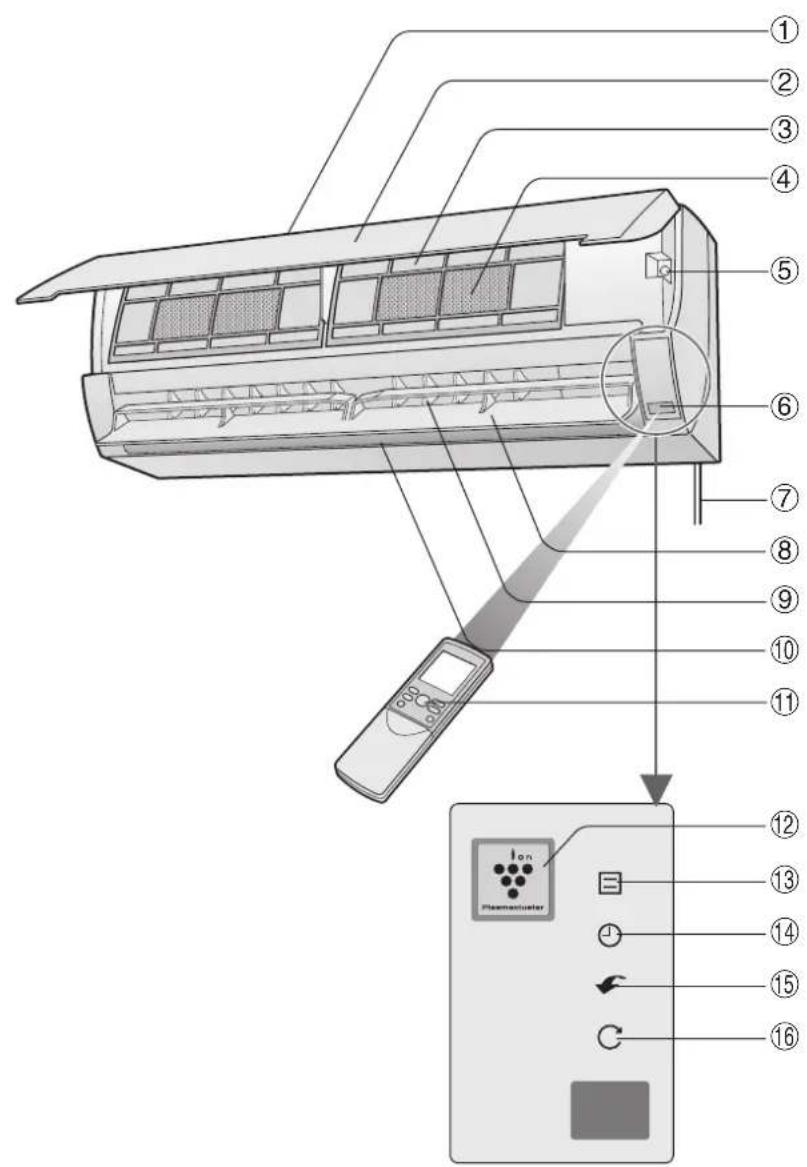
① Inlet (Air) ② Open Panel ③ Air Filter ④ Air Purifying Filter ⑤ AUX. Button ⑥ Receiver Window ⑦ Power Supply Cord ⑧ Vertical Adjustment Louvre ⑨ Horizontal Adjustment Louvre ⑩ Outlet (Air) Remote Control
⑪ PLASMACLUSTER Lamp (blue) ⑫ OPERATION Lamp (red) ⑬ TIMER Lamp (orange) ⑭ POWERFUL JET Lamp (green) ⑮ SELF CLEAN Lamp (green)
OUTDOOR UNIT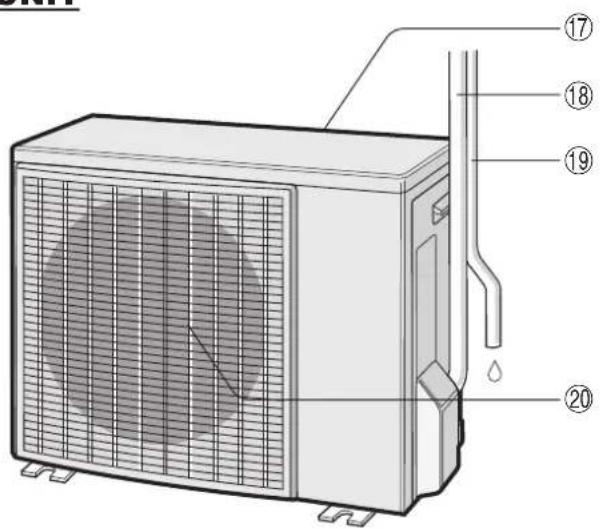
⑯ Inlet (Air) ⑰ Refrigerant Tube and Interconnecting Cord ⑱ Drainage Hose ⑲ Outlet (Air)
NOTE:
Actual units might vary slightly from those shown above.
REMOTE CONTROL
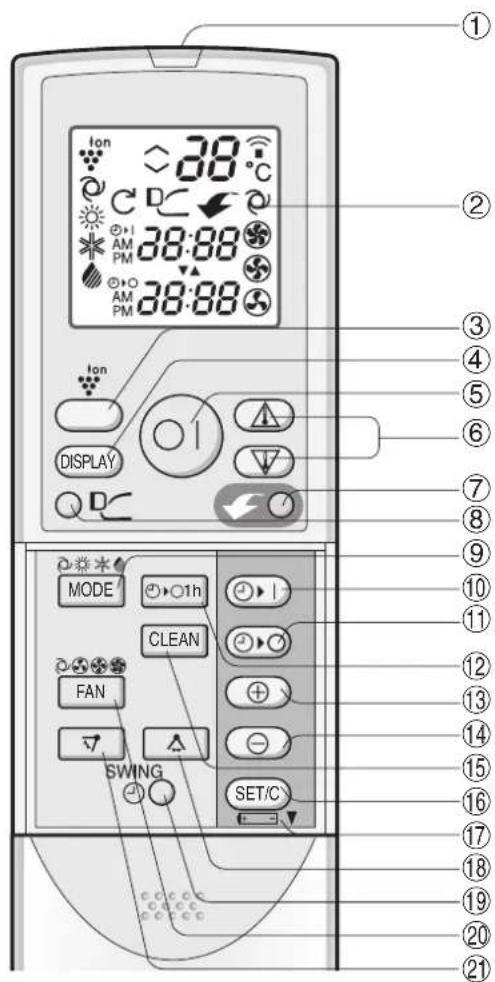
1 TRANSMITTER 2 DISPLAY (Liquid Crystal Display) 3 PLASMACLUSTER Button 4 DISPLAY Button 5 ON/OFF Button 6 THERMOSTAT Button 7 POWERFUL JET Button 8 PROGRESSIVE AIRFLOW Button 9 MODE Button 10 TIMER ON Button (for setting the timer) 11 TIMER OFF Button (for setting the timer) 12 ONE-HOUR OFF TIMER Button 13 TIME ADVANCE Button 14 TIME REVERSE Button 15 SELF CLEAN Button 16 TIMER SET/CANCEL Button 17 Indicates battery compartment is below this mark 18 SWING Button (A: horizontal direction) 19 CLOCK Button 20 FAN Button 21 SWING Button (V: vertical direction)
L.C.D. REMOTE CONTROL DISPLAY
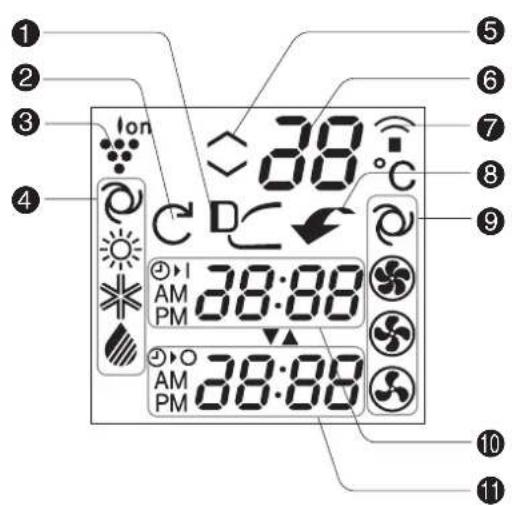
PROGRESSIVE AIRFLOW Symbol SELF CLEAN Symbol PLASMACLUSTER Symbol MODE Symbols

AUTO

COOL

DRY
Thermostat setting for AUTO and DRY modes 6 TEMPERATURE Indicator 7 TRANSMITTING Symbol 8 POWERFUL JET Symbol 9 FAN SPEED Symbols

AUTO

LOW

HIGH

SOFT
10 TIMER ON Indicator/CLOCK Indicates the on timer preset time or current time. TIMER OFF Indicator
Indicates the preset time for off timer or one-hour off timer.
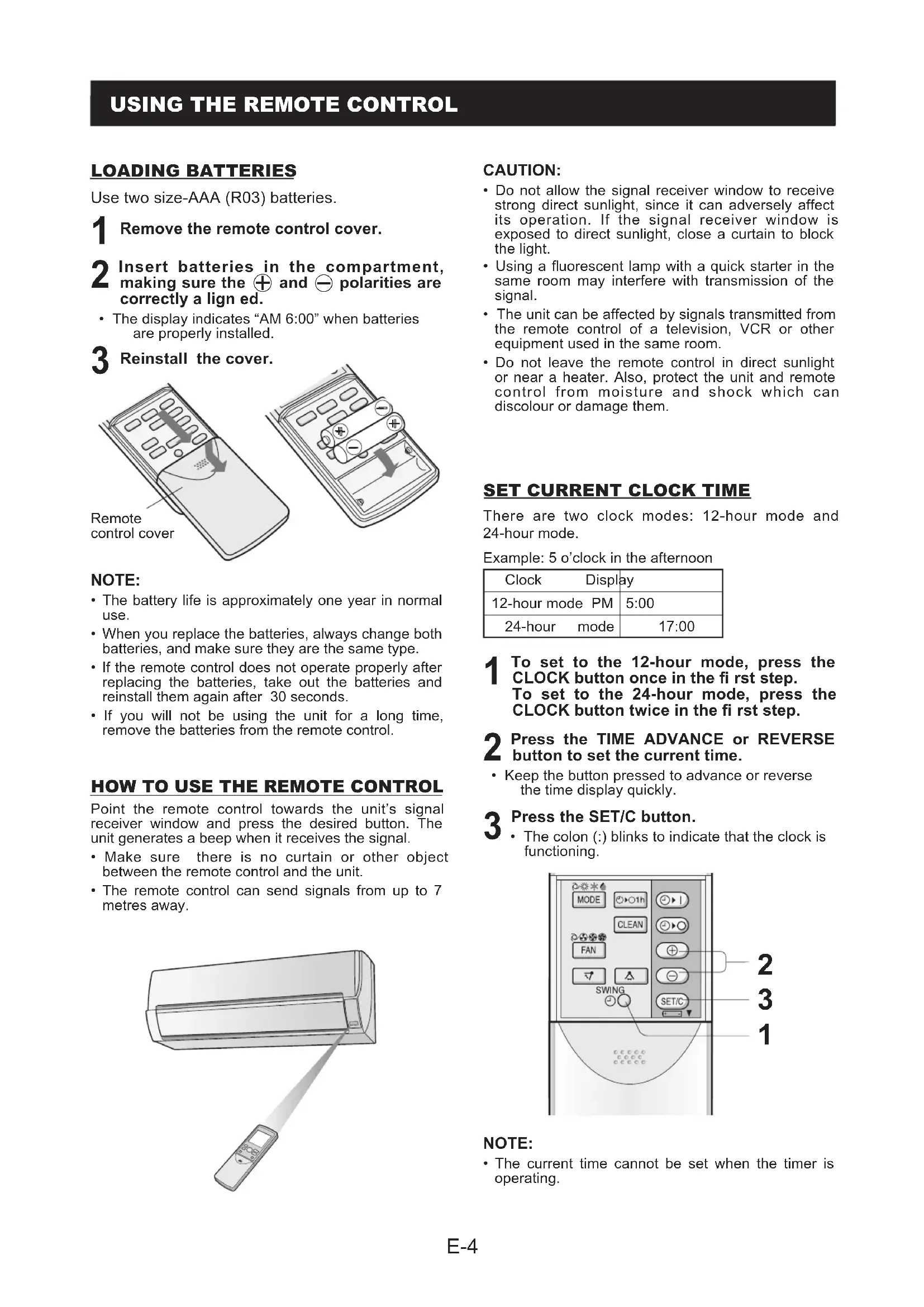
LOADING BATTERIES
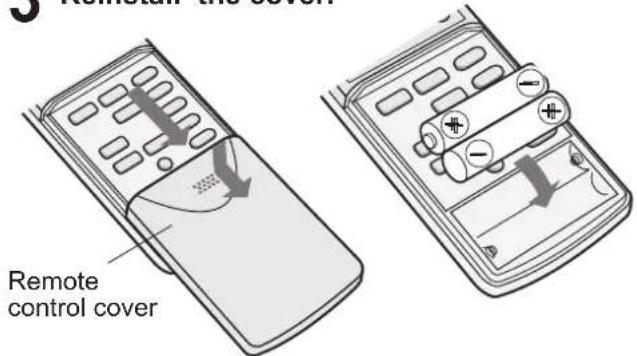
Use two size-AAA (R03) batteries.
1 Remove the remote control cover. 2 Insert batteries in the compartment, making sure the ⊕ and ⊖ polarities are correctly aligned. The display indicates "AM 6:00" when batteries are properly installed. 3 Reinstall the cover.
NOTE:
- The battery life is approximately one year in normal use.
- When you replace the batteries, always change both batteries, and make sure they are the same type.
- If the remote control does not operate properly after replacing the batteries, take out the batteries and reinstall them again after 30 seconds.
- If you will not be using the unit for a long time, remove the batteries from the remote control.
HOW TO USE THE REMOTE CONTROL
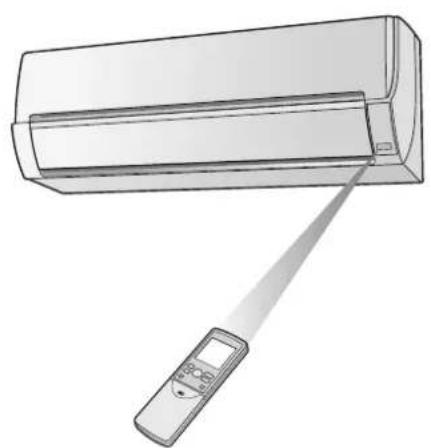
Point the remote control towards the unit's signal receiver window and press the desired button. The unit generates a beep when it receives the signal.
Make sure there is no curtain or other object between the remote control and the unit. - The remote control can send signals from up to 7 metres away.
CAUTION:
- Do not allow the signal receiver window to receive strong direct sunlight, since it can adversely affect its operation. If the signal receiver window is exposed to direct sunlight, close a curtain to block the light.
- Using a fluorescent lamp with a quick starter in the same room may interfere with transmission of the signal.
- The unit can be affected by signals transmitted from the remote control of a television, VCR or other equipment used in the same room.
- Do not leave the remote control in direct sunlight or near a heater. Also, protect the unit and remote control from moisture and shock which can discolour or damage them.
SET CURRENT CLOCK TIME
There are two clock modes: 12-hour mode and 24-hour mode.
Example: 5 o'clock in the afternoon
| Clock Display |
| 12-hour mode PM | 5:00 |
| 24-hour mode | 17:00 |
1. To set to the 12-hour mode, press the CLOCK button once in the first step. To set to the 24-hour mode, press the CLOCK button twice in the first step. 2. Press the TIME ADVANCE or REVERSE button to set the current time.
- Keep the button pressed to advance or reverse the time display quickly.
Press the SET/C button. The colon (:) blinks to indicate that the clock is functioning.
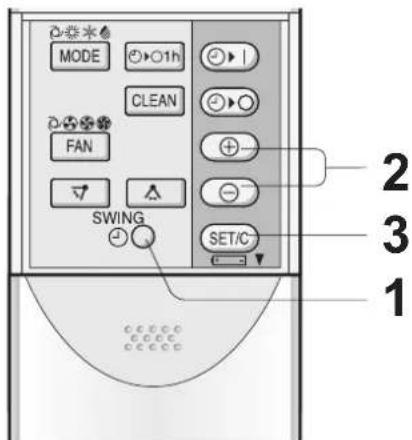
NOTE:
- The current time cannot be set when the timer is operating.
SETTING AIR PURIFYING FILTER
The air purifying filters are packed as accessories of this unit. During operation of the air conditioner, the filters remove dust and tobacco smoke from the air and discharge clean air.
Take out the air filters.
1. Open the open panel. 2. Push the air filters up slightly to unlock them. 3. Pull the air filters down to remove them.
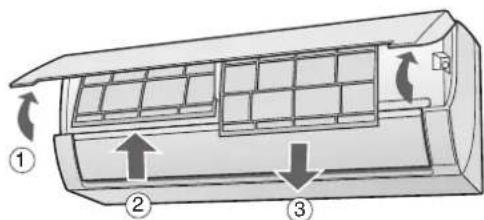
2. Set the air purifying filter under the filter stoppers located on the air filter.
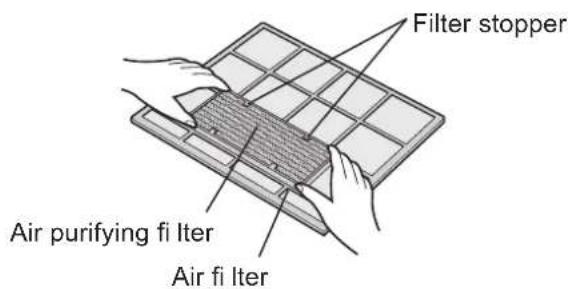
Reinstall the air filters.
1. Reinstall the air filters in the original positions. 2. Close the open panel. 3. Push the arrow-marked part of the panel firmly to lock it in place.
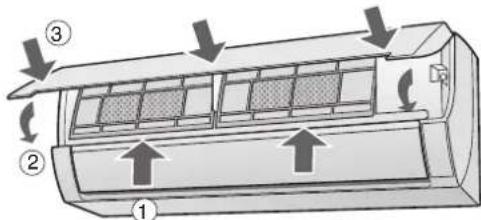
Precautions:
- The filters are sealed in a plastic bag to preserve their dust collection effectiveness. Do not open the bag until you are ready to use the filters. (Otherwise, the filters' lifespan may be shortened.)
- Do not expose the filters to direct sunlight. (Otherwise, they may deteriorate.)
TIPS ON SAVING ENERGY
Below are some simple ways to save energy when you use your air conditioner.
SET THE CORRECT TEMPERATURE
- Setting the thermostat 1°C higher than the desired temperature in COOL mode and 2°C lower in HEAT mode will save approximately 10 percent in power consumption.
- Setting the temperature lower than necessary during cooling operation will result in increased power consumption.
BLOCK DIRECT SUNLIGHT AND PREVENT DRAFTS
- Blocking direct sunlight during cooling operation will reduce power consumption.
- Close the windows and doors during cooling and heating operations.
SET PROPER AIR FLOW DIRECTION TO OBTAIN THE BEST AIR CIRCULATION
KEEP FILTER CLEAN TO ENSURE THE MOST EFFICIENT OPERATION
MAKE MOST OF THE TIMER OFF FUNCTION
DISCONNECT THE POWER CORD WHEN THE UNIT IS NOT USED FOR AN EXTENDED PERIOD OF TIME
- The indoor unit still consumes a small amount of power when it is not operating.
AUXILIARY MODE
Use this mode when the remote control is not available.
TO TURN ON
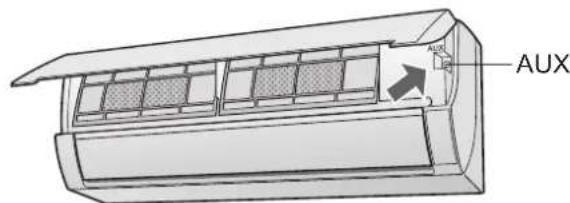
Lift the open panel of the indoor unit and press the AUX. button.
- The red OPERATION lamp ( ) on the unit will light and the unit will start operating in the AUTO mode. The fan speed and temperature setting are set to AUTO.
TO TURN OFF
Press the AUX. button again.
- The red OPERATION lamp ( ] ) on the unit will turn off.
NOTE:
- If the AUX. button is pressed during normal operation, the unit will turn off.
TIPS ABOUT AUTO MODE
In the AUTO mode, the temperature setting and mode are automatically selected according to the room temperature and outdoor temperature when the unit is turned on.
Modes and Temperature Settings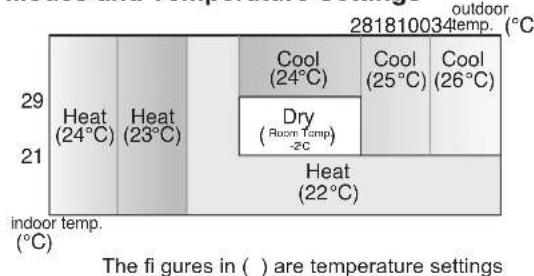
During operation, if the outdoor temperature changes, the temperature settings will automatically slide as shown in the chart.
MODE CHANGEOVER
During seasons when you need cooling during the day and heating at night, or if the room temperature becomes extremely higher than the temperature setting due to supplementary heating equipment, the mode will automatically switch between HEAT and COOL to maintain a comfortable room temperature.
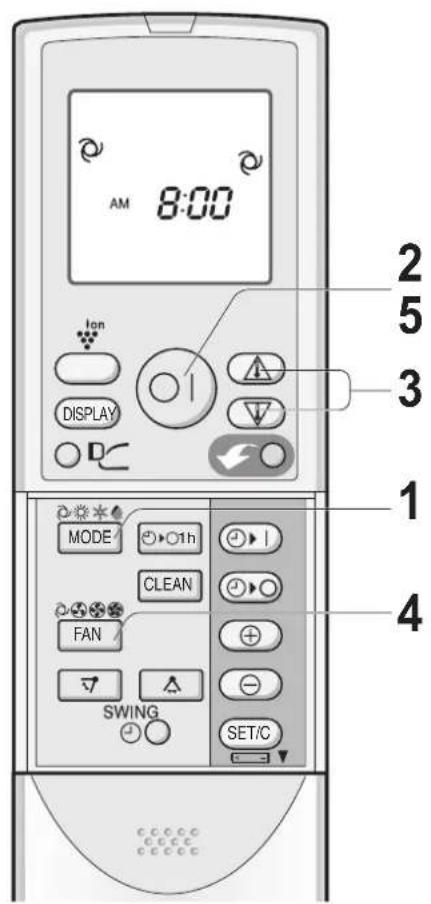
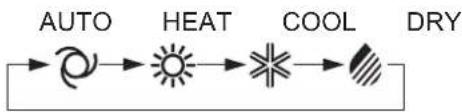
1. Press the MODE button to select the operation mode.
2. Press the ON/OFF button to start operation.
The red OPERATION lamp ( ) on the unit will light up.
3. Press the THERMOSTAT button to set the desired temperature.
AUTO/DRY MODE
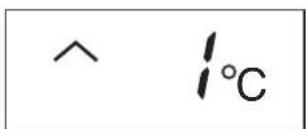
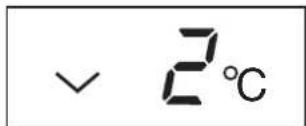
- The temperature can be changed in 1°C increments within the range of 2°C higher to 2°C lower from the temperature automatically determined by the air conditioner.
(Example: 1°C higher)
(Example: 2°C lower)
COOL/HEAT MODE
The temperature can be set within the range of 18 to 32°C.
4. Press the FAN button to set the desired fan speed.
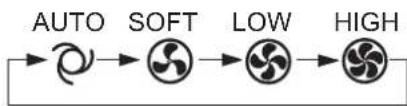
- In DRY mode, the fan speed is preset to AUTO and cannot be changed.
5. To turn off the unit, press the ON/OFF button again.
The red OPERATION lamp ( ) on the unit will turn off.
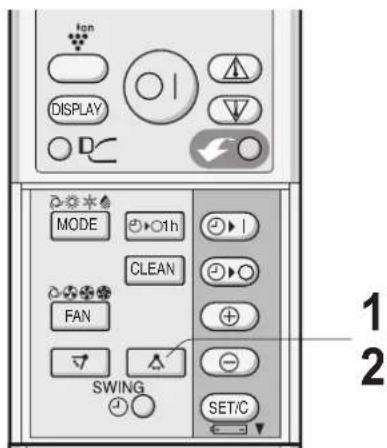
VERTICAL AIR FLOW DIRECTION
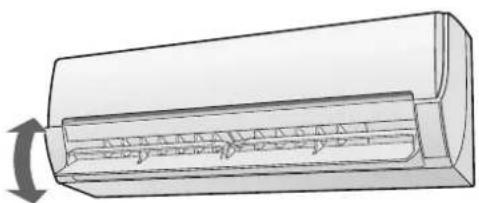
The vertical adjustment louvre will swing continuously.
The louvre will stop moving within the range shown in the diagram.
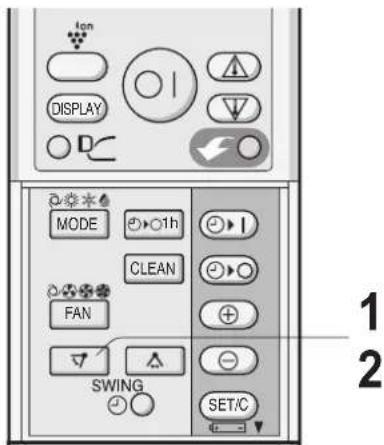
Adjustment range
COOL and DRY modes
HEAT mode
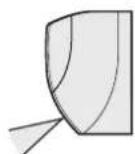
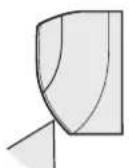
HORIZONTAL AIR FLOW DIRECTION
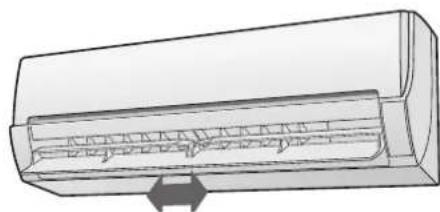
- The horizontal adjustment louvres will swing continuously.
NOTE:
- The adjusted position will be memorized and will be automatically set to the same position when operated the next time.
- The adjustment range is narrower than the swing range in order to prevent condensation from dripping.
CAUTION:
Never attempt to adjust the louvres manually.
- Manual adjustment of the louvres can cause the unit to malfunction.
- When the vertical adjustment louvre is positioned at the lowest position in the COOL or DRY mode for an extended period of time, condensation may result.
PROGRESSIVE AIRFLOW
Press the PROGRESSIVE AIRFLOW button during cooling or dry operation when you do not want to feel cold air. The vertical adjustment louvre is set obliquely upward to deliver cool air to the ceiling. Press the button during heating operation. The vertical adjustment louvre is set downward to deliver warm air down to the floor and warm you.
The remote control will display "D".
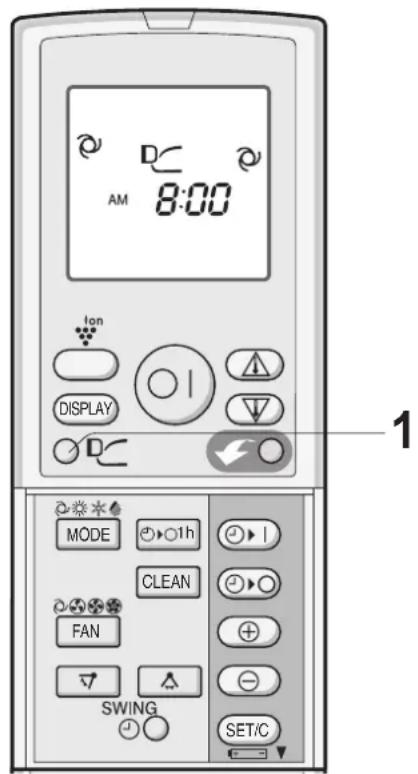
TO CANCEL
Press the PROGRESSIVE AIRFLOW button again.
NOTE:
- The PROGRESSIVE AIRFLOW setting is cancelled when you press the POWERFUL JET button while PROGRESSIVE AIRFLOW is set.
- If you want PROGRESSIVE AIRFLOW operation in POWERFUL JET mode, press the PROGRESSIVE AIRFLOW button during POWERFUL JET operation.
In this operation, the air conditioner works at the maximum power and optimum louvre direction to make the room cool or warm rapidly.
The remote control will display "". - The temperature display will go off. The green POWERFUL JET lamp ( ) on the unit will light up.
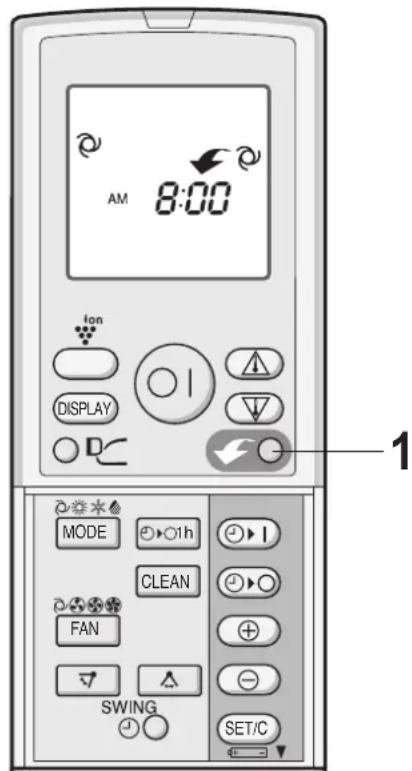
TO CANCEL
- The POWERFUL JET operation will also be cancelled when the operation mode is changed, or when the unit is turned off.
- The green POWERFUL JET lamp ( √ ) on the unit will turn off.
NOTE:
- The air conditioner will operate at "Extra HIGH" fan speed for 5 minutes, and then shift to "HIGH" fan speed. The vertical adjustment louvre will be set automatically to a diagonally lower direction, though it can be changed if necessary.
- You cannot set the temperature or fan speed during the POWERFUL JET operation.
- To turn off the POWERFUL JET lamp, press the DISPLAY button.
PLASMACLUSTER OPERATION
The Plasmacluster Ion generator inside the air conditioner will release positive and negative plasmacluster ions into the room.
Approximately the same numbers of positive and negative ions released into the air will reduce some airborne mold.
The remote control will display

- The blue PLASMACLUSTER lamp on the unit will light up.
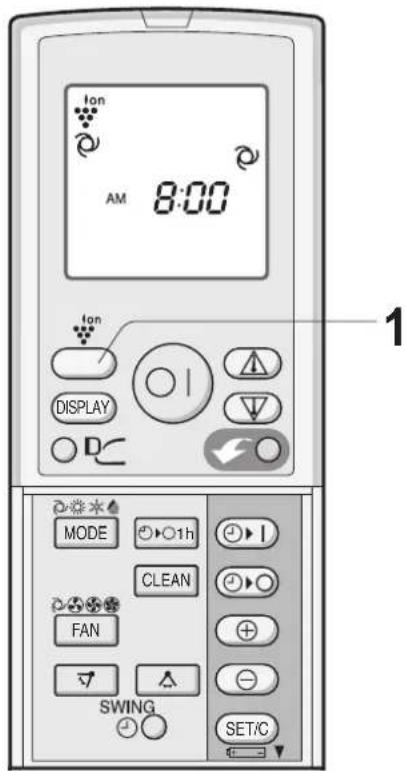
TO CANCEL
Press the PLASMACLUSTER button again.
- The PLASMACLUSTER lamp on the unit will turn off.
NOTE:
- Use of the PLASMACLUSTER operation will be memorized, and it will be activated the next time you turn on the air conditioner.
- To turn off the PLASMACLUSTER lamp, press the DISPLAY button.
- To perform the PLASMACLUSTER operation without accompanying heat, cool or dry mode, press the PLASMACLUSTER button while the unit is not operating. The mode symbol of the remote control will go off and the fan speed can not be set AUTO.
SELF CLEAN OPERATION
SELF CLEAN operation will provide effect to reduce the growth mold fungus, and to dry inside of the air conditioner unit with Plasmacluster ions.
This operation is accompanied by FAN or HEAT mode. Utilize the operation at seasonal change over terms.
Mold fungus already grown can not be eliminated by this operation.
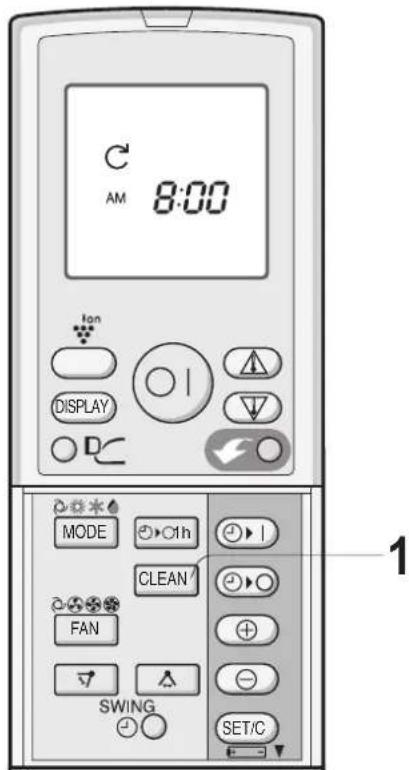
The remote control displays " C The red OPERATION lamp ( ), the green SELF CLEAN lamp ( C ) and the blue PLASMACLUSTER lamp on the unit will light up. - The unit will stop operation after forty minutes.
TO CANCEL
Press the SELF CLEAN button.
Alternatively, turn the unit off by pressing the ON/OFF button.
- The red OPERATION lamp (□), the green SELF CLEAN lamp (○) and the blue PLASMACLUSTER lamp on the unit will turn off.
NOTE:
- You cannot set the temperature, fan speed, air flow direction or timer setting during the SELF CLEAN operation.
ONE-HOUR OFF TIMER
When the ONE-HOUR OFF TIMER is set, the unit will automatically turn off after one hour.
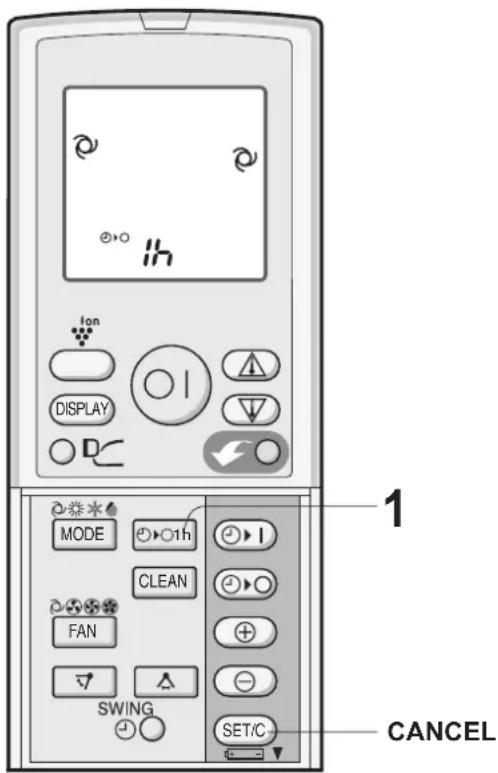
1 Press the ONE-HOUR OFF TIMER button. The remote control displays "0".
The orange TIMER lamp ( ) on the unit will light up. - The unit will stop operating after one hour.
TO CANCEL
Press the TIMER CANCEL (SET/C) button.
- The orange TIMER lamp (①) on the unit will turn off.
Alternatively, turn the unit off by pressing the ON/OFF button.
The red OPERATION lamp (E) and the orange TIMER lamp on the unit will turn off.
NOTE:
- The ONE-HOUR OFF TIMER operation has priority over TIMER ON and TIMER OFF operations.
- If the ONE-HOUR OFF TIMER is set while the unit is not operating, the unit will operate for an hour at the formerly set condition.
- If you wish to operate the unit for another hour before the ONE-HOUR OFF TIMER is activated, press the ONE-HOUR OFF TIMER button again during operation.
- If TIMER ON and/or TIMER OFF are set, TIMER CANCEL button cancels every setting.
TIMER OPERATION
TIMER OFF
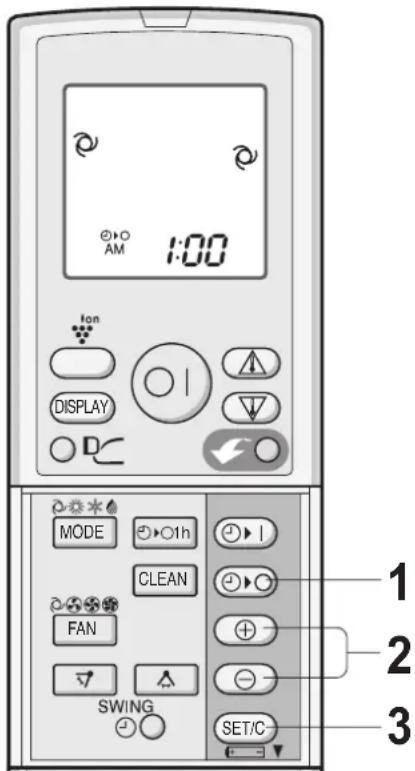
1 Press the TIMER OFF (①) button. 2 The TIMER OFF indicator will blink; press the TIME ADVANCE or REVERSE button to set the desired time.
(The time can be set in 10-minute increments.)
3 Point the remote control at the receiver window on the unit and press the TIMER SET (SET/C) button.
The orange TIMER lamp ( ) on the unit will light. - The unit will generate a beep when it receives the signal.
When the TIMER OFF mode is set, the temperature setting is automatically adjusted to prevent the room from becoming excessively hot or too cold while you sleep. (Auto Sleep function) The Auto Sleep function will not activate during the AUTO mode.
COOL/DRY MODE:
One hour after the time operation begins, the temperature setting rises 1°C higher than the original temperature setting.
HEAT MODE:
One hour after the timer operation begins, the temperature setting drops 3°C lower than the original temperature setting.
TIMER ON
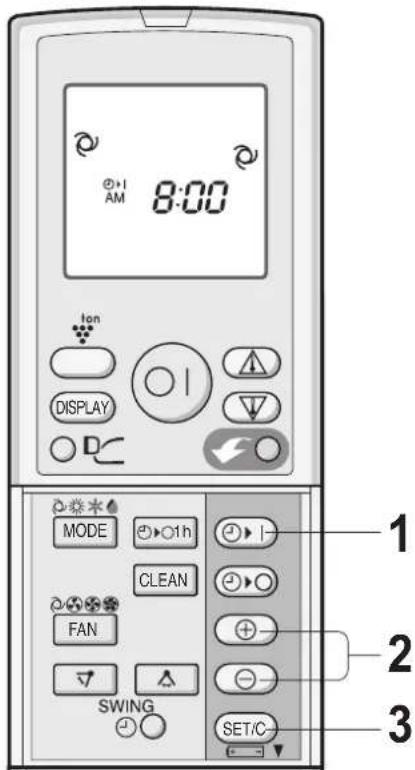
1 Press the TIMER ON (⊕) button. The TIMER ON indicator will blink; press the TIME ADVANCE or REVERSE button to set the desired time.
(The time can be set in 10-minute increments.)
3 Point the remote control at the receiver window on the unit and press the TIMER SET (SET/C) button.
The orange TIMER lamp (⊙) on the unit will light. The unit will generate a beep when it receives the signal.
4 Select the operation condition.
NOTE:
- The unit will turn on prior to the set time to allow the room to reach the desired temperature by the programmed time. (Awaking function)
TO CANCEL TIMER MODE
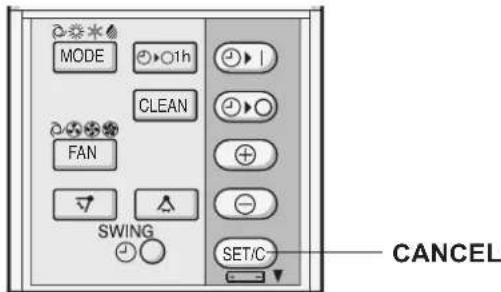
Press the TIMER CANCEL (SET/C) button.
The orange TIMER lamp (⊙) on the unit will turn off. - The current clock time will be displayed on the remote control.
NOTE:
- If any TIMER ON, TIMER OFF and ONE-HOUR OFF TIMER are set, the TIMER CANCEL button cancels all settings.
TO CHANGE TIME SETTING
Cancel the TIMER setting first, then set it again.
COMBINED USE OF ON AND OFF TIMERS
You can use the ON and OFF timers in combination.
Example:
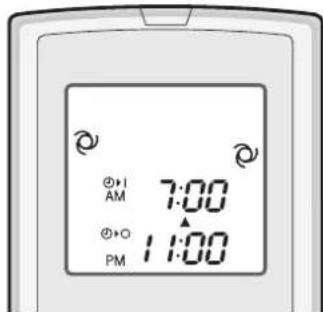
To stop operation at 11:00 p.m. and resume operation to bring the room temperature to the desired level by 7:00 a.m.
1. Set the TIMER OFF to 11:00 p.m. during operation. 2. Set the TIMER ON to 7:00 a.m.
The arrow (∇ or △) between the TIMER ON indicator and the TIMER OFF indicator shows which timer will activate first.
NOTE:
- You cannot program the ON-TIMER and OFF-TIMER to operate the unit at different temperatures or other settings.
- Either timer can be programmed to activate prior to the other.
MAINTENANCE
Be sure to disconnect the power cord from the wall outlet or turn off the circuit breaker before performing any maintenance.
CLEANING THE FILTERS
The air filters should be cleaned every two weeks.
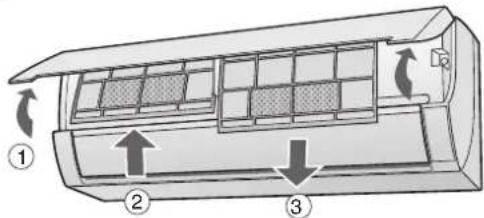
1. Turn off the unit. 2. Remove the filters.
① Lift the open panel. ② Push the air filters up slightly to unlock them. ③ Pull the air filters down to remove them.
Take off the air purifying filters from the air filters. Clean the filters.
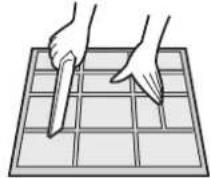
Use a vacuum cleaner to remove dust. If the filters are dirty, wash them with warm water and a mild detergent. Dry filters in the shade before reinstalling.
5 Reinstall the air purifying filters. 6 Reinstall the filters.
① Reinstall the filters in the original positions. ② Close the open panel. ③ Push the arrow-marked part of the panel firmly to lock it in place.

CLEANING THE UNIT AND THE REMOTE CONTROL
- Wipe them with a soft cloth.
- Do not directly splash or pour water on them. It can cause electrical shock or equipment damage.
- Do not use hot water, thinner, abrasive powders or strong solvents.
MAINTENANCE AFTER AIR CONDITIONER SEASON
1 Operate the unit in the SELF CLEAN operation to allow the mechanism to thoroughly dry. 2 Stop the operation and unplug the unit. Turn off the circuit breaker, if you have one exclusively for the air conditioner. 3 Clean the filters, then reinstall them.
MAINTENANCE BEFORE AIR CONDITIONER SEASON
1 Make sure that the air filters are not dirty. 2 Make sure that nothing obstructs the air inlet or outlet. 3 Check the outdoor mounting rack periodically for wear and to make sure it is firmly in place.
CHANGING THE AIR PURIFYING FILTER
The filters should be changed every 3 6 months
1. Remove the air filters. Change the air purifying filters.
① Take off the old air purifying filters from the air filters. ② Set the new air purifying filters under the filter stoppers located on the air filters.
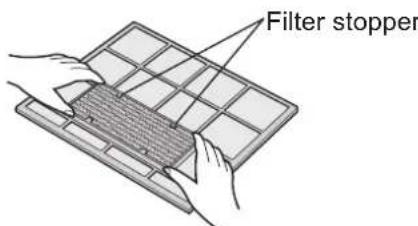
3. Reinstall the air filters.
NOTE:
- The dirty air purifying filters are not washable for reuse. The new filters are available at your nearest dealer.
Replacement filter: Type AZ-F900F
Disposal of Filters
Please dispose of replaced filters according to the local disposal laws and regulations.
AIR PURIFYING filter materials
Filter: Polypropylene
Frame: Polyester
ADDITIONAL NOTES ON OPERATION
BEFORE CALLING FOR SERVICE
- The built-in protective device may prevent the unit from operating when used out of this range.
- Condensation may form on the air outlet if the unit operates continuously in the COOL or DRY mode when humidity is over 80 percent.
WHEN POWER FAILURE OCCURS
This air conditioner has a memory function to store settings when a power failure occurs.
After power recovery, the unit will automatically restart in the same settings which were active before the power failure, except for timer settings.
If the timers were set before a power failure, they will need to be re-set after power recovery.
PREHEATING FUNCTION
In the HEAT operation, the indoor fan may not start for two to five minutes after the unit is turned on to prevent cold air from blowing out of the unit.
DE-ICING FUNCTION
- When ice forms on the heat exchanger in the outdoor unit during the HEAT operation, an automatic de-icer provides heat for about 5 to 10 minutes to remove the ice. During de-icing, the inside and outside fans stop operating.
- After de-icing is completed, the unit automatically resumes operation in the HEAT mode.
HEATING EFFICIENCY
- The unit employs a heat pump that draws heat from the outside air and releases it into the room. The outside air temperature therefore greatly affects the heating efficiency.
- If the heating efficiency is reduced due to low outside temperatures, use an additional heater. It takes time to warm up and heat the entire room because of the forced air circulation system.
BEFORE CALLING FOR SERVICE
The following conditions do not denote equipment malfunctions
UNIT DOES NOT OPERATE
The unit will not operate if it is turned on immediately after it is turned off. The unit will not operate immediately after the mode is changed. This is to protect the internal mechanisms. Wait 3 minutes before operating the unit.
UNIT DOES NOT SEND OUT WARM AIR
The unit is preheating or de-icing.
ODORS
Carpet and furniture odors that entered into the unit may be sent out from the unit.
CRACKING NOISE
The unit may produce a cracking noise. This sound is generated by the friction of the front panel and other components expanding or connecting due to a temperature change.
A LOW BUZZING NOISE EMITTED
-15. This is a sound emitted when the unit is generating Plasmacluster ions.
SWISHING NOISE
The soft, swishing noise is the sound of the refrigerant flowing inside the unit.
WATER VAPOUR
- In the COOL and DRY operation, water vapour can sometimes be seen at the air outlet due to the difference between the room air temperature and the air discharged by the unit.
- In the HEAT operation, water vapour may flow out of the outdoor unit during de-icing.
THE OUTDOOR UNIT DOES NOT STOP
After stopping the operation, the outdoor unit will rotate its fan for about a minute to cool down the unit.
ODOR EMITTED FROM THE PLASMACLUSTER AIR OUTLET
This is the smell of ozone generated from the Plasmacluster Ion generator. The ozone concentration is very small, posing no adverse effect on your health. The ozone discharged into the air rapidly decomposes, and its density in the room will not increase.
If the unit appears to be malfunctioning, check the following points before calling for service.
IF THE UNIT FAILS TO OPERATE
Check to see if the circuit breaker has tripped or the fuse has blown.
IF THE UNIT FAILS TO COOL (OR HEAT) THE ROOM EFFECTIVELY
- Check the filters. If dirty, clean them.
- Check the outdoor unit to make sure nothing is blocking the air inlet or outlet.
- Check the thermostat is proper setting.
- Make sure windows and doors are closed tightly.
- A large number of people in the room can prevent the unit from achieving the desired temperature.
- Check whether any heat-generating appliances are operating in the room.
IF THE UNIT FAILS TO RECEIVE THE REMOTE CONTROL SIGNAL
- Check whether the remote control batteries have become old and weak.
- Try to send the signal again with the remote control pointed properly towards the unit's signal receiver window.
- Check whether the remote control batteries are installed with the polarities properly aligned.
Please call for service when OPERATION lamp, TIMER lamp and/or PLASMACLUSTER lamp on the unit blink.

PROGRESSIVE AIRFLOW
POWERFUL AIR JET OPERATION
A LOW HUM IS EMITTED
PROGRESSIVE AIRFLOW
PLASMACLUSTER OPERATION
Press the CLEAN button.
Try to turn on the unit by pressing the OPERATION/STOP button.
Press the SET/C button.
The timer lamp ( ) of the unit will go off. The setting of the timer is cancelled.

NOTE:
If any of the timers (ON/OFF, OFF/ON, or OFF) have been set, pressing the SET/C button cancels the settings.
FOR OTHER SETTINGS OF THE TIME
Application of XPONDAIAKONTH, application to the device.
COMBINED USE OF XPONDAIAKONTH
ACTIVATION AND DEACTIVATION OF THE DEVICE