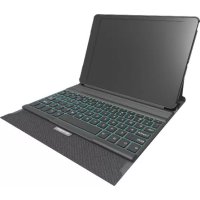
KeyFolio Exact Plus - Keyboard KENSINGTON - Free user manual and instructions
Find the device manual for free KeyFolio Exact Plus KENSINGTON in PDF.



| Product Type | Bluetooth Keyboard for iPad with Protective Case |
| Brand | Kensington |
| Model | KeyFolio Exact Plus |
| Connectivity | Bluetooth 3.0 or later |
| Power | Rechargeable lithium-polymer battery via micro-USB cable |
| Battery Life | Approximately 60 hours of continuous use (estimated) |
| Charging Time | Approximately 3 hours |
| Backlight | Yes, with color change and brightness adjustment |
| Special Features | Integrated wrist rest, magnetic closure, multiple viewing angles |
| Shortcut Keys | Home, search, Siri, playback control, volume, lock, copy/paste, word selection |
| Pairing | Press and hold pairing button for 3 seconds |
| Indicator Lights | Bluetooth, charging, power |
| Dimensions (approx.) | 26 x 20 x 2 cm (estimated for iPad) |
| Weight (approx.) | 500 g |
| Materials | Plastic, aluminum (metal parts) |
| Operating Temperature | 10 °C to 27 °C |
| Care and Cleaning | Wipe with a soft, dry cloth. Do not use abrasive cleaners. |
| Safety | Do not open, expose to moisture, or dispose of in fire. Contains lithium-polymer battery. |
| Box Contents | KeyFolio Exact Plus keyboard, micro-USB cable, quick start guide |
| Warranty | Limited manufacturer warranty (see Kensington website) |
Frequently Asked Questions - KeyFolio Exact Plus KENSINGTON
User questions about KeyFolio Exact Plus KENSINGTON
0 question about this device. Answer the ones you know or ask your own.
Ask a new question about this device
Download the instructions for your Keyboard in PDF format for free! Find your manual KeyFolio Exact Plus - KENSINGTON and take your electronic device back in hand. On this page are published all the documents necessary for the use of your device. KeyFolio Exact Plus by KENSINGTON.
USER MANUAL KeyFolio Exact Plus KENSINGTON
KeyFolio Exact Plus™
Thin Folio with Backlit Keyboard for iPad® Air
QUICK START GUIDE
GUIDE DE DEMARRAGE RAPIDE
KURZANLEITUNG
SNELSTARTGIDS
GUIDA RAPIDA
GUIA RAPIDA
GYORSKALAUZ
PRÍRUČKA ZACÍNÁME
SZYBKI START
KPATKOE PYKOBOДCTBO
ПОЛьЗВATEЛЯ
MANUAL DE INICIO RAPIDO

Register Now!
Enregisterr maintainant!
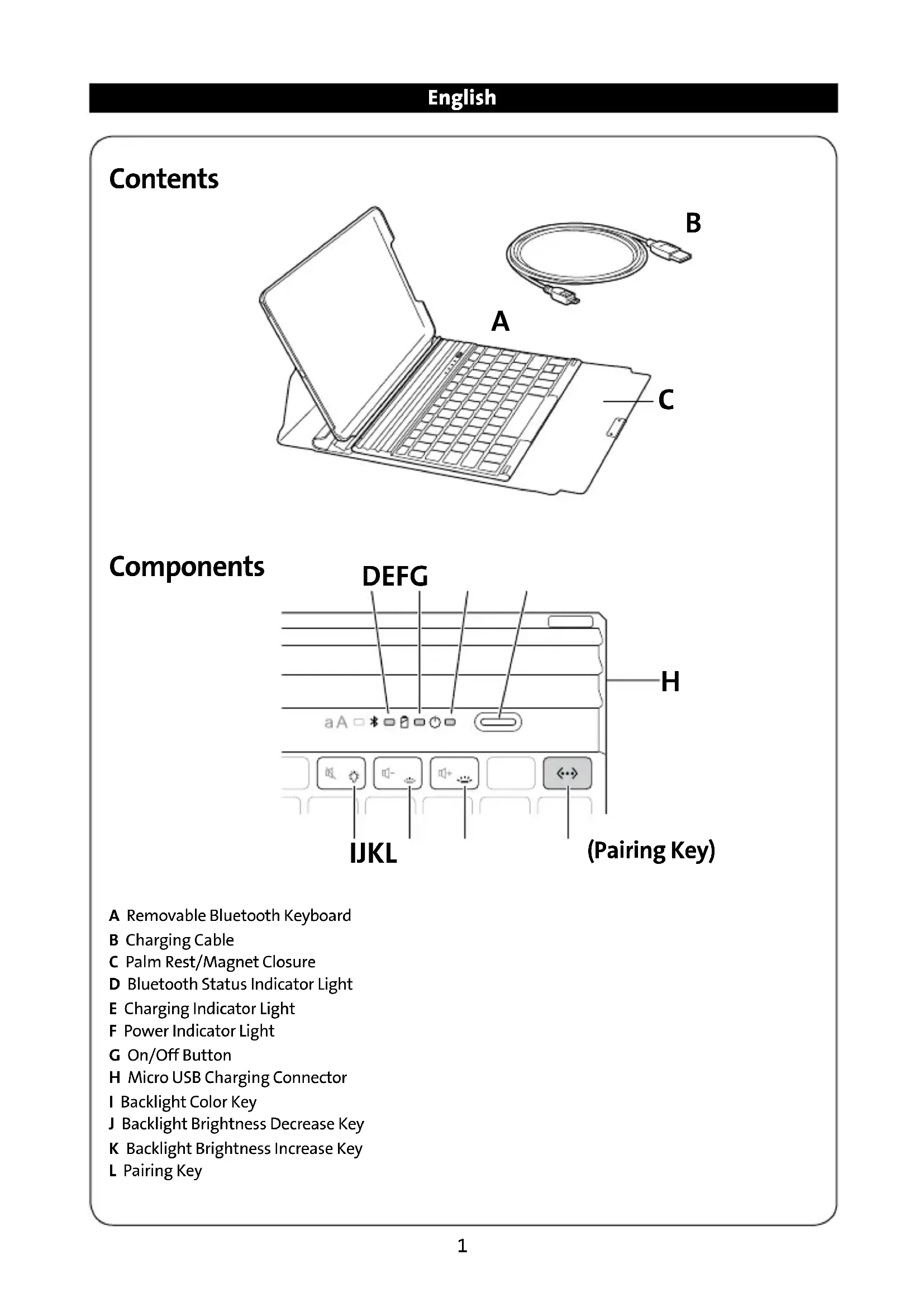
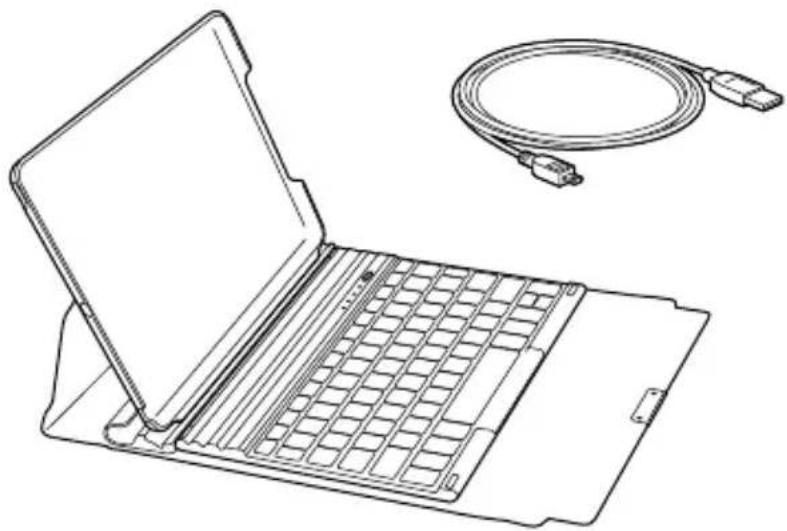
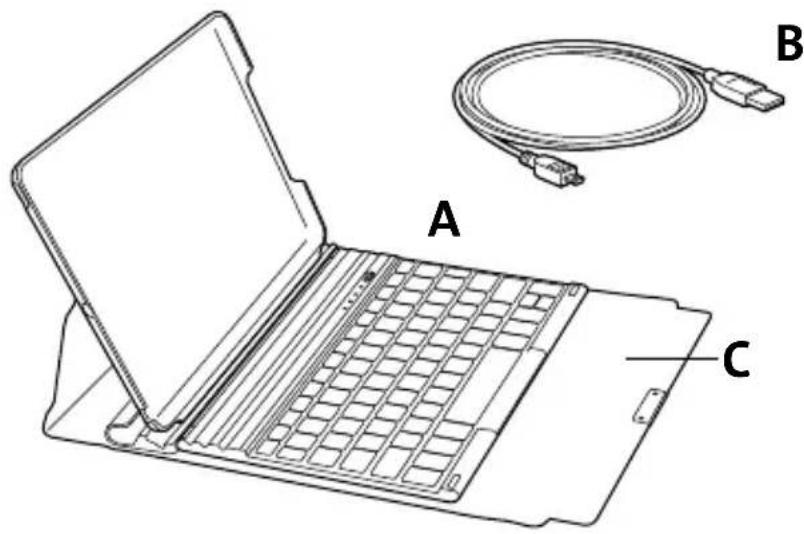
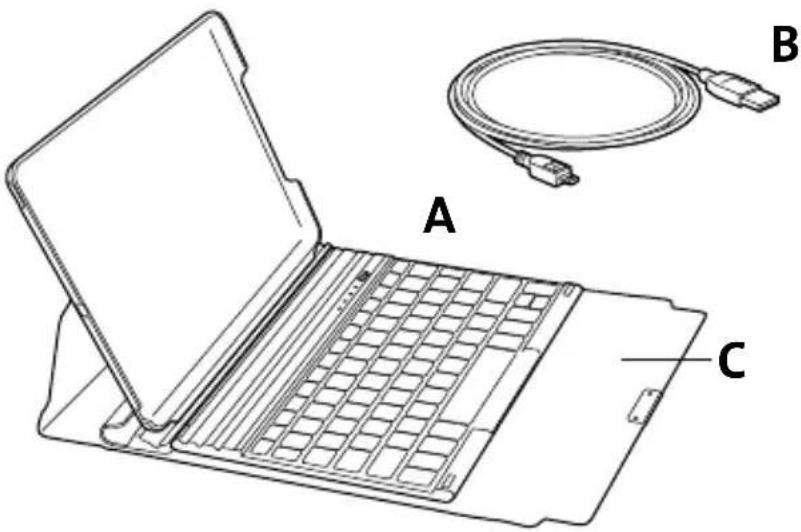
A Removable Bluetooth Keyboard
B Charging Cable
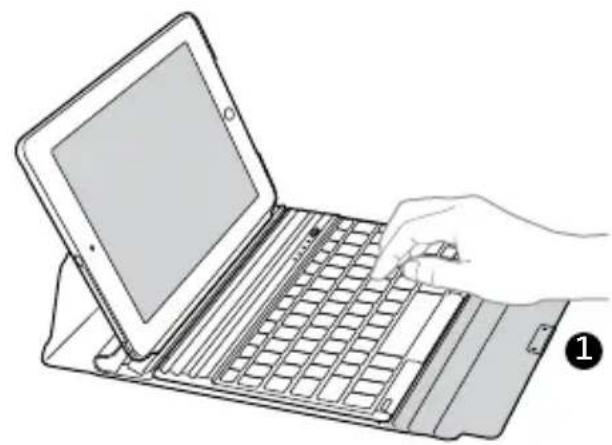
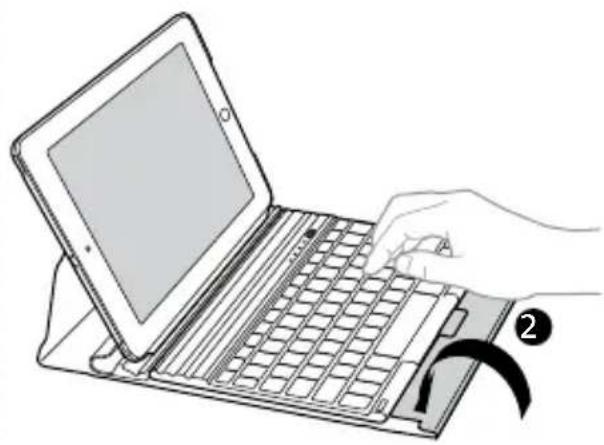
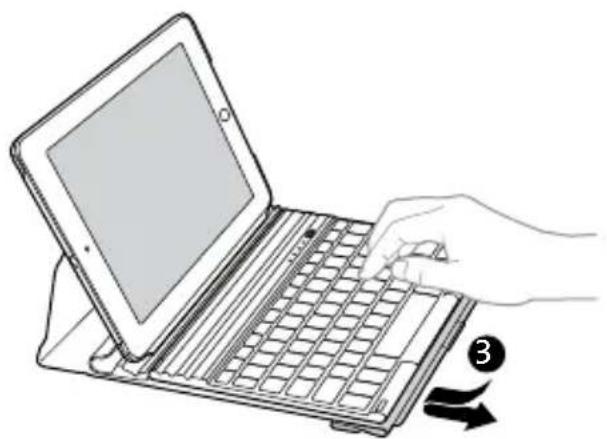
C Palm Rest/Magnet Closure
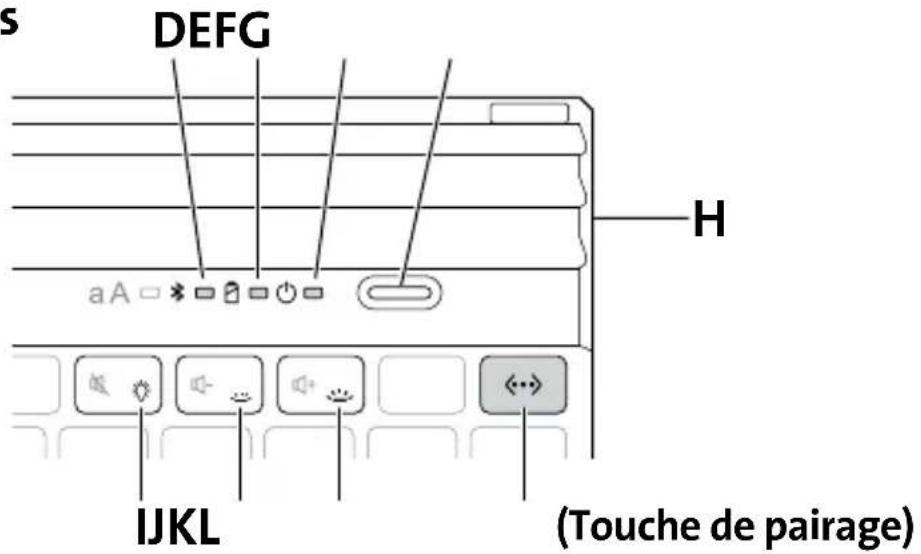
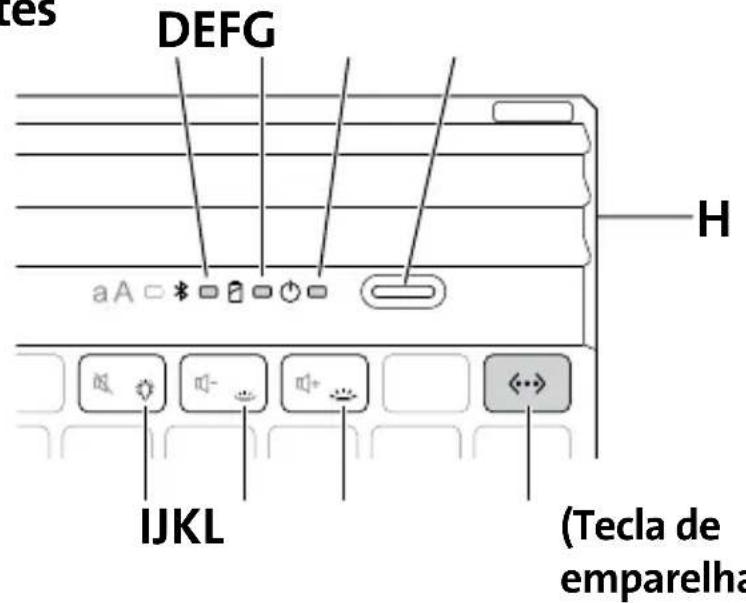
D Bluetooth Status Indicator Light
E Charging Indicator Light
F Power Indicator Light
G On/Off Button
H Micro USB Charging Connector
I Backlight Color Key
J Backlight Brightness Decrease Key
K Backlight Brightness Increase Key
L Pairing Key
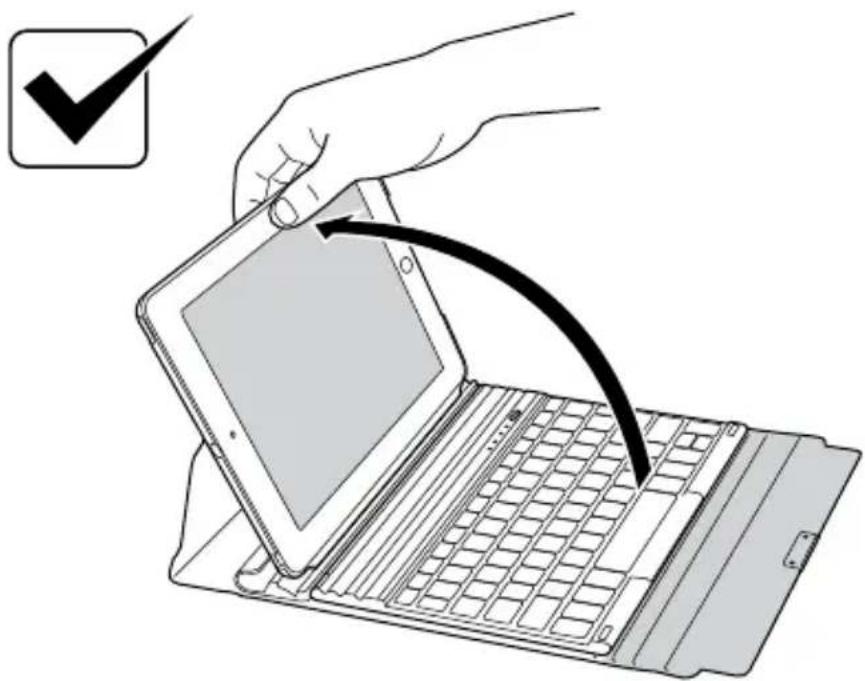
One-Handed Operation
Pairing
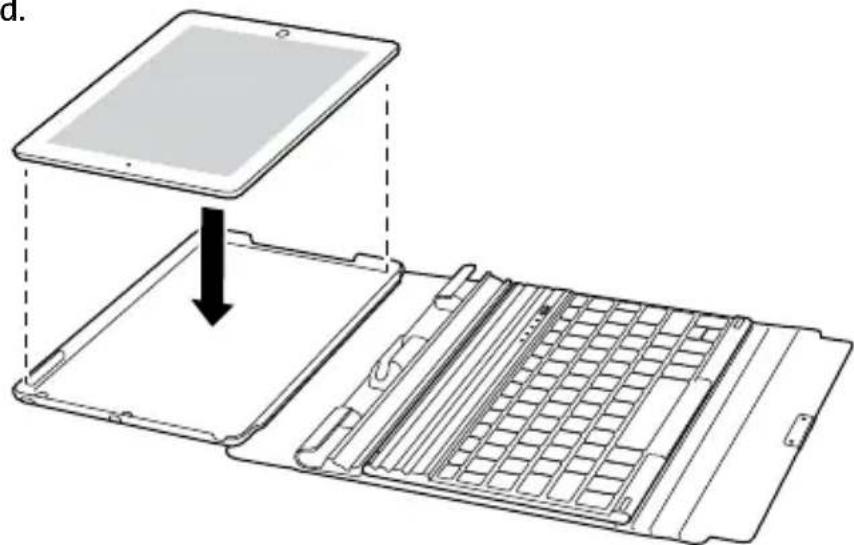
1 Insert your iPad.
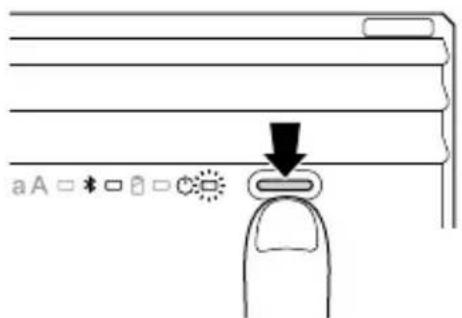
2 Press the On/Off Button. The Power Indicator Light glows.
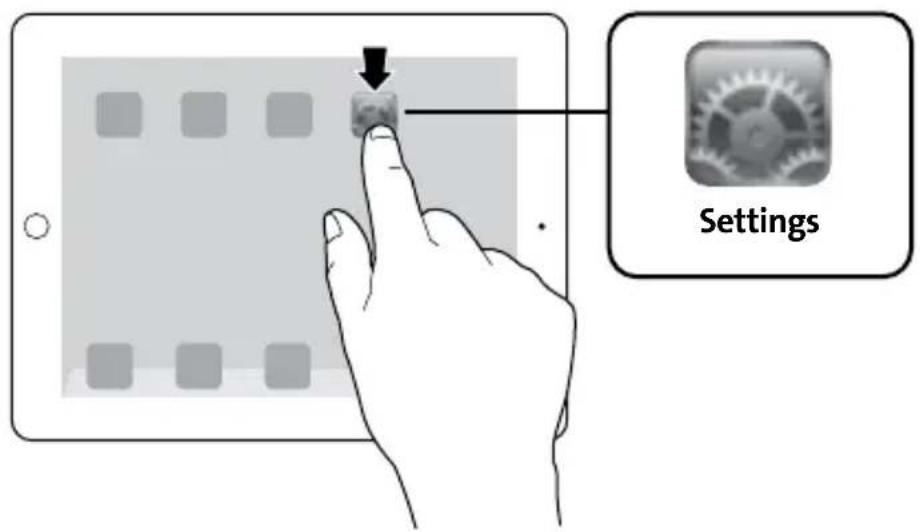
3 On your iPad, tap Settings.
4 Open Bluetooth and make sure Bluetooth is on.

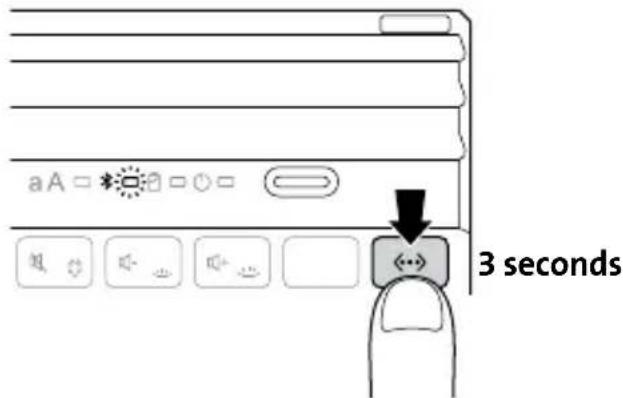
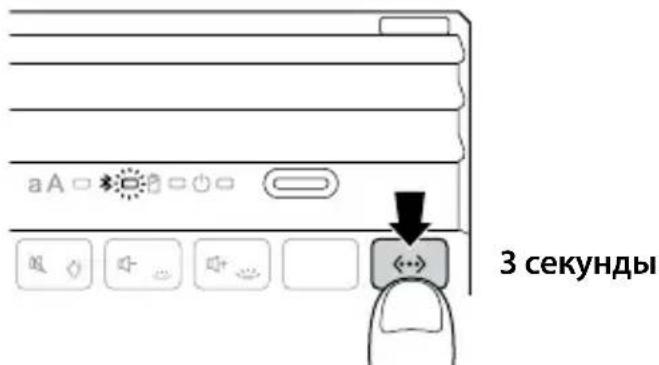
5 On the Keyboard, press the Pairing Key for 3 seconds. The Bluetooth Status Indicator Light starts blinking.
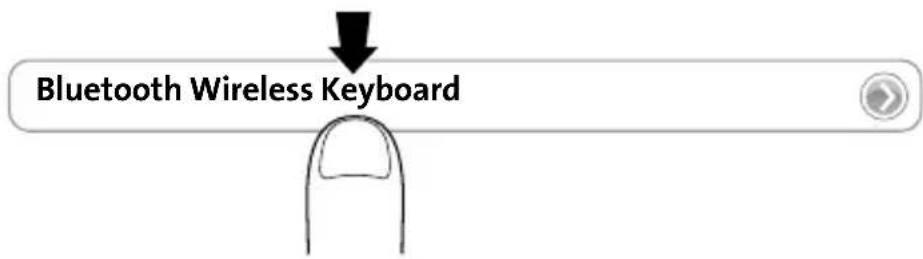
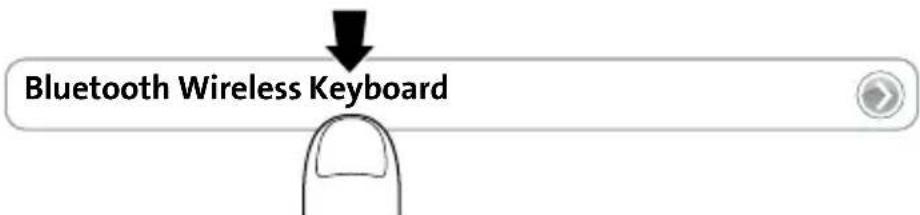
6 The Keyboard now appears on your iPad screen. Tap Bluetooth Wireless Keyboard.
7 Your iPad screen displays a passkey. Enter the passkey on the Keyboard, and press Enter.
8 Your iPad screen shows the Keyboard as Connected. On the Keyboard, the Bluetooth Status Indicator Light turns off. You can now use your Keyboard to type in any app.

NOTE: The Keyboard will go into sleep mode if left idle for 15 minutes. To wake up the Keyboard, press any key to resume the connection.
To extend battery life, turn off the keyboard when not in use.
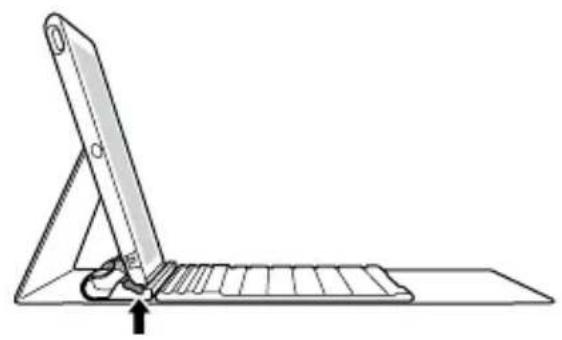
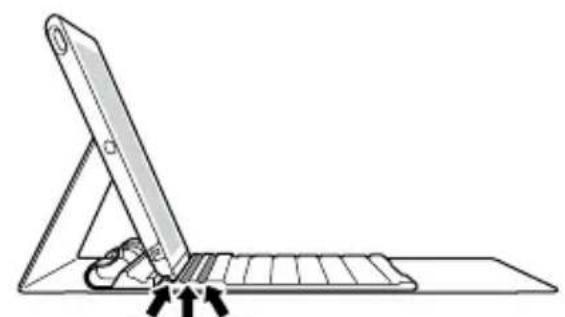
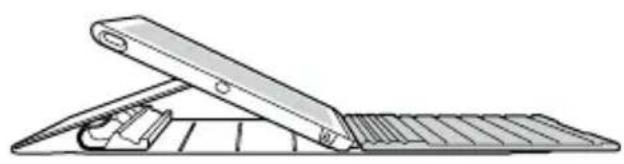
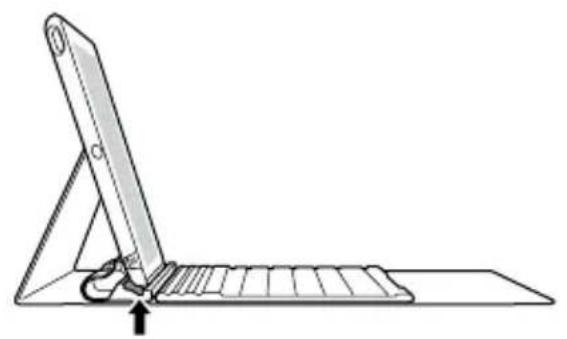
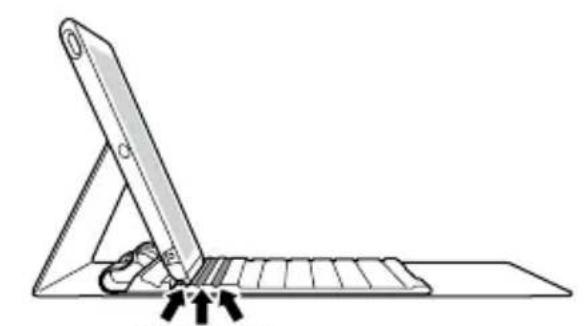
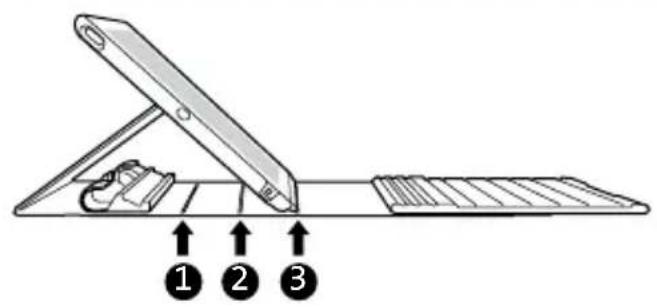
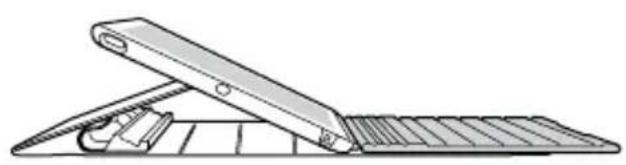
Viewing Angles
123
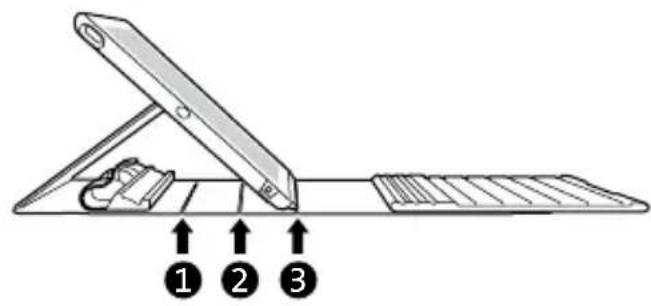
Palm Rest Functions
Charging
| ○□ | Blinking Battery needs charging |
| ∅□ | Glowing green Charging in progress |
| Turns off Battery is fully charged |
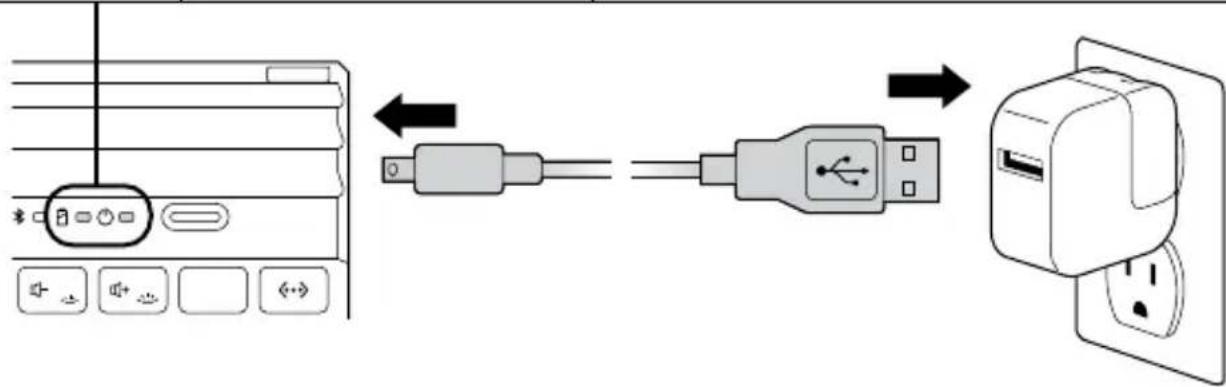
Backlight Functions
| To turn on backlight | FN + | To increase brightness | FN + |
| To turn off backlight | FN + X2 | To decrease brightness | FN + |
| To change backlight colors | FN + | 1234567 → → → → → |
To conserve battery life, backlight turns off after 15 seconds if no key is pressed. Any key press will turn on backlight again. Backlight functions are automatically disabled when battery level is low.
Key Functions
| Key | Function | Key | Function |
| Home Search | |||
| On-screen keyboard International keyboard* | |||
| Siri® Last track | |||
| Play/pause Next track | |||
| Mute Fn + = toggle backlight color | Volume down Fn + = decrease backlight brightness Fn + again or twice = turn off backlight | ||
| Volume up Fn + = increase backlight brightness | Lock | ||
| Pair Fn + X = Cut | |||
| Fn + C = Copy Fn + V = Paste | |||
| Display recently opened apps Fn + Select | left word | ||
| Fn + → Select right word | |||
- Toggles between available languages
Troubleshooting
I can't connect the Keyboard to my iPad.
Try the following in sequence. You can stop when the problem is fixed.
1 Make sure you have installed and set up Bluetooth correctly on your iPad. Check the documentation that came with your iPad for instructions.
2 Make sure that the Keyboard is within range of your iPad. Maximum Bluetooth range is about 10 meters/33 feet.
3 If your iPad is connected to other Bluetooth devices, you may need to disconnect some devices before you can connect to the Keyboard.
4 If you changed any Bluetooth settings on your iPad, try connecting the Keyboard to your iPad again.
5 Make sure that both your iPad battery and the Keyboard battery are sufficiently charged.
If this does not solve the problem, please contact Kensington Support at kensington.com.
Technical Support
Technical support is available to all registered users of Kensington products. Technical Support contact information can be found on the back page of this manual.
Web Support
You may find the answer to your problem in the Frequently Asked Questions (FAQ) section of the Support area on the Kensington Website: www.support.kensington.com.
Telephone Support
There is no charge for technical support except long-distance charges where applicable.
Please visit www.kensington.com for telephone support hours. In Europe, technical support is available by telephone Monday to Friday 09:00 to 21:00 (Central European time).
Please note the following when calling support:
- Call from a phone where you have access to your device.
- Be prepared to provide the following information:
Name, address, and telephone number
- Name of the Kensington product
- Make and model of your computer
- System software and version
- Symptoms of the problem and what led to them

WARNING! IMPORTANT SAFETY INSTRUCTIONS
Failure to read and follow these safety instructions could result in fire, explosion, electrical shock or other hazard, causing serious and/or fatal injury and/or property damage.
- Do not modify, disassemble, open, drop, crush, puncture, or shred the KeyFolio.
- The KeyFolio contains a lithium-polymer battery, which is flammable. Keep away from open flame.
- To prevent short circuit or other potential hazards, prevent metal objects such as coins or keys from coming into contact with the KeyFolio, and do not insert foreign objects into the KeyFolio or its ports.
- Keep your KeyFolio dry, and do not use with wet hands. Moisture in or on the KeyFolio may lead to electrical shock. If exposed to moisture during use, unplug the KeyFolio immediately. If your KeyFolio gets wet, have a qualified technician evaluate the product's safety before resuming use.
- Your KeyFolio may become warm during operation. This is normal. However, to prevent overheating, keep area around KeyFolio ventilated and do not place anything on or around KeyFolio during operation. Do not operate your KeyFolio near a heat source, heat vent, or in direct sunlight. Your KeyFolio should be used in temperatures between 50 - 80^ (10-27°C).
- If the KeyFolio begins to swell or expand, emits a strong odor, or becomes hot to the touch, discontinue use of the KeyFolio, and have the product examined by a qualified electronic technician.
- Inspect your KeyFolio and cables for damage before use. Have any damaged part repaired or replaced before use.
- Your KeyFolio is not user serviceable. Do not attempt to open, modify, or repair.
- If the battery inside the KeyFolio leaks for any reason, discontinue use, and do not allow the KeyFolio's contents to contact your skin or eyes. In the event of accidental contact wash the affected area with large amounts of water and seek medical attention immediately.
- Your KeyFolio is not a toy. Keep them away from children. Insure that all persons who use this product read and follow these warnings and instructions.
- Do not leave the KeyFolio on prolonged charge when not in use.
Enhancing Performance by Proper Care and Storage of your KeyFolio
- Do not store your KeyFolio either fully charged or discharged. It is best to store your KeyFolio with at least 30% charge remaining. To check the charge level of your KeyFolio press the battery indicator button.
- Avoid frequent full discharges because this puts additional strain on the battery in the KeyFolio. Charge your KeyFolio between uses even if it is not fully discharged. The lithium-polymer battery used in this product has no "memory effect." Therefore, several partial discharges with frequent recharges are better than one full discharge, and will help prolong the life of your KeyFolio. Short battery life in laptops is mainly caused by heat, rather than charge/discharge patterns.
Do not store your KeyFolio at elevated temperatures (such as in your car) or in high humidity.
Disposing of your KeyFolio
- Do not incinerate or dispose of your KeyFolio in a fire or microwave.
- Do not dispose of your KeyFolio as ordinary refuse, as it contains a lithium-polymer battery. Consult your local municipal or civil authority for instructions on correctly disposing of a lithium-polymer battery.
- In the USA and Canada: This mark indicates your KeyFolio can be recycled by the Rechargeable Battery Recovery Corporation ("RBRC"). When you are ready to dispose of the KeyFolio, please contact the RBRC at 1-800-8-BATTERY or www.rbrc.org.
FEDERAL COMMUNICATIONS COMMISSION RADIO FREQUENCY INTERFERENCE STATEMENT
This device has been tested and found to comply with the limits for a Class B digital device, pursuant to Part 15 of the FCC Rules. These limits are designed to provide reasonable protection against harmful interference in a residential installation. This equipment generates, uses, and can radiate radio frequency energy and, if not installed and used in accordance with the instructions, may cause harmful interference to radio communications.
However, there is no guarantee that interference will not occur in a particular installation. If this equipment causes harmful interference to radio or television reception, which can be determined by turning the equipment off and on, the user is encouraged to try to correct the interference by one or more of the following measures:
- Reorient or relocate the receiving antenna.
- Increase the separation between the equipment and receiver.
- Connect the equipment into an outlet on a circuit different from that to which the receiver is connected.
- Consult the dealer or an experienced radio/TV technician for help.
MODIFICATIONS: Modifications not expressly approved by Kensington may void the user's authority to operate the device under FCC regulations and must not be made.
SHIELDED CABLES: In order to meet FCC requirements, all connections to equipment using a Kensington input device should be made using only the shielded cables.
FCC DECLARATION OF CONFORMITY COMPLIANCE STATEMENT
This product complies with Part 15 of the FCC rules. Operation is subject to the following two conditions: (1) This device may not cause harmful interference, and (2) This device must accept any interference received, including interference that may cause undesired operation. As defined in Section 2.909 of the FCC Rules, the responsible party for this device is Kensington Computer Product Group, 333 Twin Dolphin Drive, Redwood Shores, CA 94065, USA.
INDUSTRY CANADA CONFORMITY
This device has been tested and found to comply with the limits specified in RSS-210. Operation is subject to the following two conditions: (1) This device may not cause interference, and (2) This device must accept any interference, including interference that may cause undesired operation of the device. This Class [B] digital apparatus complies with Canadian ICES-003.
CE DECLARATION OF CONFORMITY
Kensington declares that this product is in compliance with the essential requirements and other relevant provisions of applicable EC directives. For Europe, a copy of the Declaration of Conformity for this product may be obtained by clicking on the Compliance Documentation link at www.support.kensington.com.
INFORMATION FOR EU MEMBER-STATES ONLY
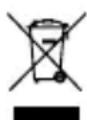
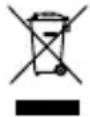
The use of the symbol indicates that this product may not be treated as household waste. By ensuring this product is disposed of correctly, you will help prevent potential negative consequences for the environment and human health, which could otherwise be caused by inappropriate waste handling of this product. For more detailed information about recycling of this product, please contact your local city office, your household waste disposal service, or the shop where you purchased the product.
Kensington and the ACCO name and design are registered trademarks of ACCO Brands. The Kensington Promise is a service mark of ACCO Brands. KeyFolio Exact is a trade mark of ACCO Brands. iPad and Siri are registered trademarks of Apple Inc., registered in the U.S. and other countries. Bluetooth is a registered trademark owned by Bluetooth SIG. All other registered and unregistered trademarks are the property of their respective owners.
© 2013 Kensington Computer Products Group, a division of ACCO Brands USA LLC. Any unauthorized copying, duplicating, or other reproduction of the contents hereof is prohibited without written consent from Kensington Computer Products Group. All rights reserved. 10/13
Contenu
Composants
Bluetooth Wireless Keyboard
Connecté
| Pour allumer le rétroéclairage | FN + ∅ | Pour augmenter la luminosité | FN + ∅ |
| Pour éteindre le rétroéclairage | FN + ∅ X2 | Pour diminuier la luminosité | FN + ∅ |
| Pour modifier les couleurs du rétroéclairage | FN + ∅ | 1 2 3 4 5 6 7 → → → → → → → → → → → → → → → → → → → → → → → → → → → → → → → → → → → → → → → → → → → → → → → → → → → → → → → → → → → → → → → → → → → → → → → → → → → → → → → → → → → → → → → → → → → → → → → → → → → → ∈ → → → → → → → → → → → → → → → → → → → → → → → → → → → → → → → → → → → → → → → → → → → → → → → → → → → → → → → → → → → → → → → → → → → → → → → → → → → → → → → → → → → → → → → → → → → → → → → → → → → ← → → → → → → → → → → → → → → → → → → → → → → → → → → → → → → → → → → → → → → → → → → → → → → → → → → → → → → → → → → → → → → → → → → → → → → → → → → → → → → → → → → → → → → → → → → → → → → → → → → → ∅ → → → → → → → → → → → → → → → → → → → → → → → → → → → → → → → → → → → → → → → → → → → → → → → → → → → → → → → → → → → → → → → → → → → → → → → → → → → → → → → → → → → → → → → → → → → → → → → → → → → · |
To conserve battery life, backlight turns off after 15 seconds if no key is pressed. Any key press will turn on backlight again. Backlight functions are automatically disabled when battery level is low.
Fonctions clés
Assistance technique
Bluetooth Wireless Keyboard
Verbunden
INDUSTRY CANADA-KONFORMITÄT
Bluetooth Wireless Keyboard

Bluetooth Wireless Keyboard
Verbonden
WAARSCHUWING! BELANGRIJKE VEILIGHEIDSVOORSCHRIFTEN
CONFORMITEIT MET INDUSTRY CANADA
| Zapnutí podsvićení | FN + √ | Zvýšení jasu | FN + √ |
| Vypnutí podsvićení | FN + √ X2 | Snížení jasu | FN + √ |
| Změna barvy podsvićení | FN + √ | 1 2 3 4 5 6 7 → → → → → → → → → → → → → → → → → → → → → → → → → → → → → → → → → → → → → → → → → → → → → → → → → → → → → → → → → → → → → → → → → → → → → → → → → → → → → → → → → → → → → → → → → → → → → → → → → → → → |
DEKLARACJA ZGODNOSCI WE
2 BkIIOuHTe nITaHne.3arOpNTcN HnDKaTOP nITaHn.
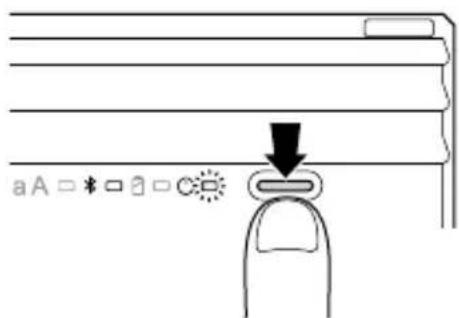
K yctpOiCTBy iPad nocIe TOrO, kak octaHetc rOpetb ToIbKO HnDnKaTOp nTuHaN.
3 Ha yctpoiCTBe iPad KocHnTeCb nyHKTa «HaCtpoiKn>.
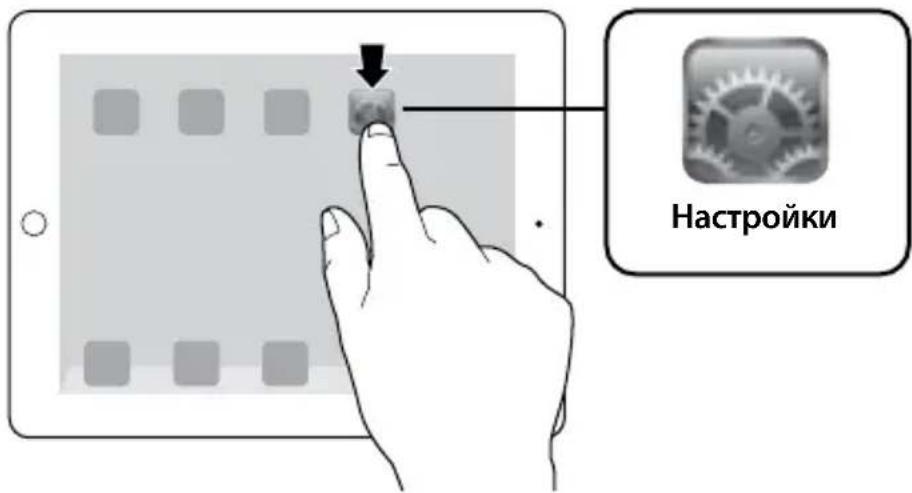
4 Bb6epnte npHKT «Bluetooth» n y6eNTecb B TOM, qTO TexHONorna Bluetooth BKJIOueHa.

5 Ha KnaBnAtype HaxMnteKnaBnSy "Pairing" (PojKnIouHne) n ydepkBaIte ee HaxaToB TeueHne 3 ceyHd. HndkaTOp cOcToHnBaLbTeoth HaHT MraTb.
6 Ha ekpahe yctpoiCTBa iPad dOJxHa nOBuTbcKnaBnAtypa. KocHTecb «Bluetooth Wireless Keyboard».
7 Ha ekpahe yctpoiCTBa iPad oTo6paxaetc coo6uHne, Tpe6yIoUee BBecTn napoiB. BBeNTe napoiB Ha KnaBnatype n HaxMITE KnaBnSy Enter.
8 Ha ekpahe yctpoiCTBa iPad oTo6pkaeTcnoKlIoueHne K KlaBnatype. HdkaTop coCTOHa Bluetooth Ha KlaBnatype racHeT. KlaBnatype rOtOBa K nCNoIb3OBAHHIO.

ПРИМЕЧАН. Рп 6e3dewcTbHn 6OJee 15 MInHyT KlaBnAtypa nepeiDeT B cIaun peKIM. ДЯ ВьЮda KlaBnAtypbI N3 cIaUeRo peKIMa HaxMnTe IIO6yU KlaBnUsy.
Дя ЗКОHOMN 3apya 6aTape nOTKJIIOUaIte KnaBnAtypy,ecn OHa He NcNoJb3YeETc.
YrIbI npocmotpa
123
YcTpaHHeN HeNCnPaBHOCTeI
He ydaemcnaodknouumb knabuamypy kycmpoucmby iPad. Ymo de lam?
BbINOHnTe yKa3aHbIe HnKe DeiCTBnE. Ecnn ydaIOCb ycTpaHnTb HeNCnPpABHOCTb, To daJIbHeNlne DeiCTBnRA BnIAOTcHNo63aTeNbHbIMN.
1 Y6eIntecb B TOM, yTo texHONorna Bluetooth dOcTynHa n npaBnIbHo HaCTpoEHa Ha yctpoiCTBe iPad. CoOTBeTCTByIOUne NHCTpyKuIN cM. B DOkymeHTaUIN K yCTpoiCTBy iPad.
2 Y6eINTEcB B TOM, yTO KlaBnaTpya HaxOHTcB 30He DeiCTBnA yCTpoiCTBa iPad. MakcImaJIbHbI paDnyc DeiCTBnA Bluetooth coCTaBnE rnpimepHO 10 MeTPOB.
3 Ecni yctpoiCTBO iPad noKJIoueHO K npyrmu yctpoiCTBaM Bluetooth, otKIOUHTe HeKOToPbIe yCTPOICTBa nepei noKJIoueHHeM KlaBnAtypbl.
4 B cIyuae n3MeHnHaCTpoek Bluetooth Ha yCTpoiCTBe iPad, BbINOHHe NOBTOPOHoe IOKNIUOHe NkAIBNaTpybl K iPad.
5 Y6eNTecb B TOM, yTo 6aTapen ycTpoiCTBa iPad n KlaBnAtypbl 3apJxehbl.
Ecn He ydaocb peuNTb npo6nemy camocToTeIbHo, o6paTntecb B cnjxby nopeKkN Kensington Ha caTe www.kensington.com.
Texnuecka noidepkk
TexHnuecka NOdepKka DOctynHa IJRA BCex 3aperncptpOBAHbIX NOLb3OBaTeJe N3deIi KOMnAHn Kensington. KOHTaKTTha INΦOpMaцna O TexHnuecko NOdepKke IMeETcRa Ha 6bpaTHo CTopoHe oBLOKKn DaHHoro pyKOBOdCTBa.
Be6-noDnepxka
Bbl moxte haHTn OTBeT Ha BaW BOpoc Ha CTpaHnue OTBeTOB Ha YaCTO 3aDaBaemble BOpocbl (FAQ) pa3dena texnuecko noDpeKKn caTa: www.support.kensington.com.
TelefoHHa noDepKka
3BOHOK B clyx6y noidepKKn 6ecnlaTbI, 3a nckloueHem MejdyropoHnx IMeJyHapOndhix 3BOHkoB. YTo6bl y3HaTb yaCbI pa60tbl cnyk6bl noidepKKn no TelefoHy, nocTeTne www.kensington.com. B Ebpone clyx6a texHuecko noidepKKn no TelefoHy pa60taTc noHeelbHnka no pTnUcy, c 09:00 do 21:00.
IoxaIyIcTa, yUHTe cIeIyIOoee, KOrIa 6yIeTe 3BOHITb B ClyJx6y IOnIepKKn:
3BOHnTe C TeIefoHa, paCNOJoxKeHHOro pAdom CyCTpoiCTBOM.
- BydTe rOToBbl npedocTaBt bCneDyUcUo IHΦOpMaUIO:
-IMMa, aDpeu Homep TeJefoHa
- Ha3BaHne n3dJIeNIA KOMNaHnI Kensington
-ИЗROTOВТЕЛь И мОДЕЛь ВашERO KOMПБIOTEpa
- Bauche semthoe nporpaMMhoe oecneueHne n ero Bercnra
-ПриЗнakи HeICnpaBHOCTN UTO NOCLyKINIO npuHNo ee BO3HNKHOBeHnA

IPEyIPEXJHNE.MEPbI IPEIOCTOPOXHOCTN.
IrhopnpoBaHne noLoXeHn TexHnK 6e3OanCHOCTM MoXe T npNBecTn K NoXapy, B3pbIBy, NopaxeHIO 3JIeKTPnueCKnM TOKOM nN K dpyrIM nHcndeHTaM, BNeKyuIm 3a CO6oB cepBe3HbIe n/nn CmepTeNbHbIe TpaMbI n/nn nopCy uMyueeCTBa.
3anpeaetcBnOu3MeHb,pa3bnpaTb,BCKpbBaTb,pOHrTb,NOMaTb,JeMaTb OTBepCTNn HapyaTb ceNoCTHOCTb npOdykTa KeyFolio.
- YcTpoiCTBO KeyFolio coIepKHT nITnEBo-nOpIMePHyIO 6aTapeIO, KOtOpaI yBnIeTcI orHeoNaCHO. YcTpoiCTBO DOJXHO XpaHHTbCRA BdAII N OTOKpbITOrO OrHr.
- UTo6bI npEoTbpaTb KOpOTKoe 3aMbKaHne n npOue ONaChbie CnTyauu, 3aPpeUaeTcXpaHntb yCTpoiCTBO KeyFolio pRdOM c MetaJInueCKmN o6BeKTamN, HApPImep, MOHeTaM N IIN KJIouaM. TakaKe 3aPpeuaetcBCTaBIAr b NOCTOpOHnE o6BeKtBi B OTBepCTna DaHHoro yCTpoiCTBa.
3anpeuetaTcnoBepraYyCTPOINCTBOKeyFolio BO3deICTBUN Bnarn 6paTb erO MOKpbIM pykam. Bnara chapxynnn BnN BHyTPn yCTPOINCTBa MoKET npINBeCTN K nopaxeHIO 3JIeKTPnueckm TOKOM. B cnyae nonadHn Bnarn BO Bpem nCNoJb3OBAHn, yCTPOINCTBO KeyFolio DOnJXHO 6bITb He3aMeDInTeJbHO OTKnIOUeHo. IpexJe Yem BO3o6HOBtB nCNoJb3OBAHne yCTPOINCTBA, NOBepRweroCRA Bo3DeICTBUN Bnarn, peKOMeHNyEM npOKOHcyNbTnPoBaTbCSy KBaIIINΦnIpOpBaHNO CneuaJIInCTa.
- Uсточьо KeyFolio может HarpeBaTbCЯ BO Bpempa60tbl.3To HopMaIbHo.Tem He MeHee,чTO6bl
-празOTBpATITb BO3MOxHbIперрев усточьо KeyFolio, peKOMeHdYeM ИСПОЛБ3OBaTb erOВхоршо
-празТРИВаEMOMnomeшEN.КрмЕТOr,BOВбрЯ pa60tbl yсточьАЗпpeшaTe ra3MeaTaB
-Кakne-ln60 прдмтbl,КakHa CamOM ystpoCTBe,TakNOKO Hero.3anpeaetcNCSNoB3OBaTb
-усточьо KeyFolio радOMсИСТоЧнКAMTNenla,обогрBaTeJЯМилппппрЯБIMn COJIHeuHbIMn
-лучам.Усточьо KeyFoliodoJXHOncPOnb3OBaTbCprnTemnepaType 10-27 °C.
- Ecnn yctpoiCTBO KeyFolio haunHaet yBelenuHBaTbCra, HarpeBaTbCra nn n3daBaTb CnIbHbI 3anax, peKOMeHnyem He3aMeDInTeNbHO ppeKpaTtB erO nCNoJIb3OBaHne I npOKOHcyJbTnpoBaTbCra y KBaIIΦnIupoBaHNO CneuaJINCTa.
- UcTpoIcTBo KeyFolio n Ka6eNn DoJxHbI npOBepaTbcra Ha HAnuHne NOBpeXdHn neped KaKdbIM NcNoJIb3ObaHnEM. PpeXd YeM npNCtUynTb K NcNoJIb3ObaHnIO, peKOMeHdyem NounHnTb nn 3aMeHnTb NOBpeXdEHnHyIO qAcTb.
- UcTpoIcTBo KeyFolio He o6cnyJnBaetcra nolb3oBaTeJIem. 3aIpeuaeTcra OTKpbIbA Tb n peMOHTnpoBaTb yCTpoIcTBo cAmOCToRrTeJIbHO.
- Ecnn 6aTapeB Bnytpn uYcTpoNCTBa KeyFolio NaUaJa npoteKaTb, Heo6xOJMo 0e 3aMeHnTb. HactoTeIbHO peKOMeHdyem N36eRaTb Bo3MOXHO rONaDaHnC oDepeKIMOrO 6aTapeH Ha KOny nIN B rIa3a. PpN CnyauHOM KOHTaKTe Heo6xOJMo IpOMbITb NOcTpaDaBShn yUacTOK 6oJIbShm KOnuYeCTBOM BObln HemeJeHNO O6paTuTbcra K BpaUy.
- IcnoIb3OBAHnE yCTpoiCtBa KeyFolio npeIctabIaRET HeKOTOpyIO OnaCHOCTb. YCTPOICTBO DOJXHO XpaHITbcB HneOCTyIHOM dJIa DeTee MeCTe. Y6eIITecB B TOM, UTO JInuA, IcNoIb3YIOUne DaHHbI npOdyKT, O3HaKOMUNICb INONHOCTbIO CO6IIoDAIoT daHHbIe MEPbl npeIOCTOPOXHOCTN.
3anpeaaetcnoctabnHeicnoh3yeMooe yctpoictboKeyFolio Ha dInTeIbHyio 3aprky.
IprodJeHne cpoKa cnJx6bI ycTpoiCTBa KeyFolio 6laRopapra HndLejkaUeMy IcNoIb3OBaHNIO n Co6JIIODeHNIO ycNOBn XpaHeHnA
3aPpeaaetcXpaHnTb yctpoiCTBO KeyFolio noHocTBIO 3apJxKeHHbIM nIpa3pJxKeHHbIM. OtnImaIbHOe ycNoBne xpaHeHne -3TO 30% OT nonHoro 3apJa. TTo6bl npOBepuTb yPOBeHb 3apJa yCTpoiCTBa KeyFolio, HaxMnte COOTBeCTByUOyU KHOJky.
Bo n36exaHne DOONHnTeBbIX Harpy3OK, peKOMeHdyem CneIITb 3a TeM, YTO6bl yCTpoiCTBO KeyFolio kak moxno pexe OKa3bIbaIOB nonHOCTbO pa3pJxKeHHbIM. UcTPOiCTBO KeyFolio dOnXho 3apJxTaBC B npomexkyTKax MEXdy NcNOb3OBaHNMAu, daXe eCNI OHO He 6blIO NOIHOCTbIO pa3pJxKeHo. IInTbeBO-nOpImepHa8 batape, INcNoB3yeMaB B daHHOM IpOdyKte, He IMeET ekTa 3aPOMHaHn. PoTOMy, uactNchBie pa3pJdkn u cactbIe POn3apJdkn 6OJee 6laRtBOPHO BnIyOT Ha pa60Ty yCTpoiCTBa KeyFolio, yBeJIuNbBa cPok erO cnJk6bl, no cpaBHeHIO C oDHOI NOH IOH IOH pa3pJko. IpruHoi He6oIbIwOr cPoka cnJk6bl 6atapeB IN HOYt6yke JABnEeTcA Kopee HarpeBaHne, a He peryIaRPhIe pa3pJdkn i 3apJdkn.
- 3anpeaetcxaHHTb yctpoiCTBO KeyFolio B Mectax,ДЯ KOTOpbIX xapaKtepHO HAnuHne BbICOKOI TemnepaTypbl (HaNPmEp, B MaunHe) nIN NOBbUeHHoB BlaXHoCTn.
Ytuln3aun yctpoNCTBa KeyFolio
3aIpeaaetcraTnunnnpoBaTb yctpoCTBOKeyFolio c nOmoBIO OTHN MIKPOBOHOBO neu.
3aPepaetcBb6paBbYcTpoCTBOKeyFolioKaOobHbIe 6bTOBbIEOTXObI,TAK KaOHO coepknt IITnEBO-NOIMepHyIO 6aTapeIO. YTo6bl NOpUHTb INΦOpMauIO O npabNtHoI yTNIN3aUNI IITnEBO-NOIMepHbIX 6aTapeI, o6paTNTecB B rOpOckyIO aDMHNCTpaCIO NII K PpeCTABNTeJAM rpaKDaHCKO BlaCTN.
- INHOpMaunIy nla KHaIbI. DaHHbI 3HaK
06o3nhaaet,TO KopnpaunRechargeable Battery
Recovery («RBRC») roToBa npHЯTb yCTpoiCtBO KeyFolio Ha yTuInn3aunio. YTo6bl nepeDaTb yCTpoiCtBO KeyFolio Ha yTuInn3aunio, CBJXntecb c KopnpaunieR BRC no TeJefoHy 1-800-8-2288379 nIu Chepe3 Be6-y3en www.rbrc.org.
IIOLOXEHNE O PAIDNONOMEXAX ΦEDEPAJIbHOI KOMICCNI IO CB3N
PnmuueaHne: daHHoe yctpoiCTBO 6bIIO npOBepHO n np3HaHO COOTBeTCTByIOUM ORpaHueHNm dIy cHpOboBix yctpoiCTB Klacca B B COOTBeTCTBn C YactbI 15 npabIN PedepaIbHO Komccnn IIO CB3N. DaHhble OrpaHueHn pa3pa6oTaHb, UTO6bI o6ecneHTb pa3ymHyIO 3auNTy O BpeIHORO BIIHnB H XKnbIX NOMEeHNx. DaHHoe o6OpdyobAHne BBipap6aTBBAET, INCNOJIb3yeT I MOKeT IN3JyAaTb paIIOuCAToTHyIO 3heprIO I, eCNY UCTAHOBNeHO INCNOJIb3yeTcR He B COOTBeTCTBn C INCHTpKUIMM, MOKeT CO3DaBaTb NOMExN JINHHM paIIOOCB3N.
Ondako HET NkakonrapaHTn, YTO NOMEXn He 6ydyT CO3aBaTcBra B ONpeIeHHOBKe. Ecn daHHoe 6OpuydoBaHne CO3daet NOMEXn paIIO n TeIeBUNHOHOMy npIeMy, HxKHO ppeIpnuHb T cIeDyUOue Mebp:
- NObepHyTb nIepeHeCTn npIeMHyO aHTeHHy.
- YBéNJHITb paCCToHnE MeKJy O6OpYOBaHNem IpiNeMHNKOM.
IopKnIOuHTb o6OpyOBOAHne Kpo3eTke, KOtOpA He IMeet O6ux cToi, B KOTOpYo BKIOUeH npnEMHnK. - PpokOHcyIbTnIOBaTbcra y dInlepa nIIN ONbITHO rpaNToEXHnKa Iny NOLyHeHn NOMOJI.
N3MEHEHNA: N3MeHNA, He Odo6peHHbIe KOMnAHnei Kensington, MoryT JInuHTb NOJb3OBATeJIa BO3MOXHOCTN MCNoJIb3OBAbT daHHoe yCTpOcTBo B COOTBeTCTBUN C Tpe6OBaHmM ΦeepaJIbHOJ KOMnCCnI NO CBa3N, I He DOJIxHbI 6blT BblONHeHbl.
3KPAHPOBAHHbIE KABENI: Tn COOBETBn Tpe6oAHnM FepaBHO KomCCn No CB3N, BCE NOKJIIOeHNK O6OpyOBAHnIO C nCNoB3OBAHnEM BXoHOro yCTpOcTBa PpOn3BOcTBA KOMNaHm Kensington, DOnXhbl 6bItb BbINOHeHbI TObKO C nCNoB3OBAHnEM YKa3aHHbIX 3KpaHPOBaHHbIX Ka6enei.
3AABJIeHHeO CO6JIIODEHm IN DEKJIAPAUcIM COOTBETCTBnA ΦEJEPALbHOI KOMUCCN IIO CB83N (ΦKC)
DaHHbI npOdyKT COOTBETCTBye Pa3demy 15 PpaBnI ΦKc. Ppi EKcnlyataun DoJHKbI 6bTb co6JIIODeHb IBa ycNOBnA: (1) DaHHoe yCTpoiCTBO He DoJHKHO 6bITb NCTOCHNKOM BpeHORo N3NJyehn; (2) DaHHoe yCTpoiCTBO DoJHKHO pINHMaTb BCE nOlyaemoe n3NJyehne, BKIOUaay n3NJyehne, Moryuee npBecTN K HeKeNaTeBHO pa6Ote. KaK onpeJeNo B Naparpafe 2.909 PpaBnI DKC, CTopoHoi, OTBeauoue 3a daHHoe yCTpoiCTBO, RaJIaETcKensington Computer Products Group, 333 Twin Dolphin Drive, Redwood Shores, CA 94065, USA (CLUA).
COOTBETCTBNE TPEBOAHNIM MHHICTPCTBA IPOMBIUIHEHHOCTNI KAHADJI
JaHHoe yctpoIcTBo npOJIO nCnblTAHN I COOTBeTCTByET cTAndApTy RSS-210. PpI EKcnIyatauIN daHORO yctpoIcTBa DOnJIbY BInONJIHrTcR CJeDyIOUe Tpe6OBaHn: (1) yCTpoIcTB OHe DoJIKHO Co3DaBaTb NOMex, I (2) yCTpoIcTBo DoJIKHO 6bITb YcToIuNBO K JIO6bIM NOMExAM, B TOM UcNCE I K Tem, KOtOpBle MOrYT Bb3BaTb C6On B erO pa6Ote.
Данны сфобов annapatknacca [B] COOTBETCTByeT KaHaDCOMy CTaHApTy Ha BbIbBAIOue nomexn obOpyuObaHne ICES-003.
DEKJIAPALU O COOTBETCTBNI DUNPEKTINBI COBETA EBPONbl
KOMnHaHnKensington 3aBnEeT, YTO daHHbI IPOyKT COOTBeTCTByeT OCHOBHbIM Tpe6oBaHnM IN DpyrIM BaXhIM ycIOBnM COOTBeTCTByuOxN DupeKtNB E3C.
KoNnJaeknapaun O COOTBeCTBn DnE EbpOnbHa daHbH npOdyKT MoKET 6bITb NOnyHeHa no CcbInke 'Compliance
Documentation'(Дokум entaць O COOTBETCTBn)Ha caIte www SUPPORT.kensington.com.
INHΦOPMALIaTOJIbKOДЛЯTOCUYAPCTB-QUEHOB EC
3n 3a kn yka3bBAOT Ha TO, YTO daHHe n3dEne He MOKeT OTHOCITcK 6bI TobbIM OTXoDAM.ObecneuB npaBnBHyIO yTNIN3aUIO n3dEInB, Bbl NOMOKeTe B IpeoTbpaAeHN NOteHuaNbHbIX HeraTbHBix NocJeCTBn DnIg OKpyKaIOSe CpeBbl NcnoBueCCKO 3doPobBja, KOTOpble MOrYt 6bITb BblBaHbI HnPaBnBHO erO yTNIN3aUne.IIraNoyehn60one Noop6HO INhOpMaun 6yTNIN3aUIN DaHHoro n3dEInna, NOxaknycta, CBAXNTecb C BaINM MeCTbIM ROPoDCkIM OFHICOM, ClyK60B BBiBO3a 6bITOBbIX OTXODOB ININ MaRa3NHOM, B KOTOPOM
Bbl Kynnnn nn3dennne.
Ha3BaHne n dI3aHn Kensington n ACCO ABnIOTc 3aperntpnpoBAHHbIM TOBaphbIM 3HaKaMn KOMnHn ACCO Brands. Kensington Promise ABnEeTc 3aKOM o6CnykBaHnA ACCO Brands.KeyFolio ABnIeTc 3aperntpnpoBAHHbIM TOBapHBIM 3aKOM KOMnAHn ACCO Brands.iPad n Siri ABnIOTc 3aperntpnpoBAHHbIM TOPOBbIM MapkAmn Apple Inc.B CIIA n Dpynx ctpaHax.Blueothm ABnEeTc 3aperntpnpoBAHHbIM TOBapHBIM 3aKOM rpynnbl KOMnAHn Bluetooth SIG.Bce npouine 3aperntpnpoBAHHbIe n He3aperntpnpoBAHHbIe TOBapHBIe 3HaKn ABnIOTc CO6CTBEHOCTbIO COOTBeTCTBYIOUX BlaJeNbCeB. Bce npouine 3aperntpnpoBAHHbIe n He3aperntpnpoBAHHbIe TOBapHBIe 3HaKn ABnIOTc CO6CTBEHOCTbIO COOTBeTCTBYIOUX BlaJeNBceB.
© 2013 Kensington Computer Products Group, noДразделенг КOMпани ACCO Brands. 3aпeшаетс Hecaнцоюрванhoe KОпроване, Дублорване Илп раMHОжени ИньIM снOCOBmОс ДерЖМOrO NaCTORI OOKymeHTa 6e3 NcMbEmHOrO cornacry KOMпани Kensington Computer Products Group. Bce npaba zaши龟bl. 10/13
Conteudo
Components
Bluetooth Wireless Keyboard
Ligado