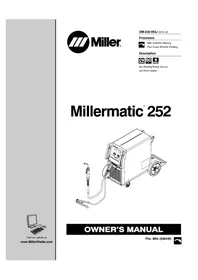
Matic 252 - Welding machine Miller - Free user manual and instructions
Find the device manual for free Matic 252 Miller in PDF.


Frequently Asked Questions - Matic 252 Miller
User questions about Matic 252 Miller
0 question about this device. Answer the ones you know or ask your own.
Ask a new question about this device
Download the instructions for your Welding machine in PDF format for free! Find your manual Matic 252 - Miller and take your electronic device back in hand. On this page are published all the documents necessary for the use of your device. Matic 252 by Miller.
USER MANUAL Matic 252 Miller
Flux Cored (FCAW) Welding
Description


Arc Welding Power Source and Wire Feeder
Millermatic® 252
natural_image
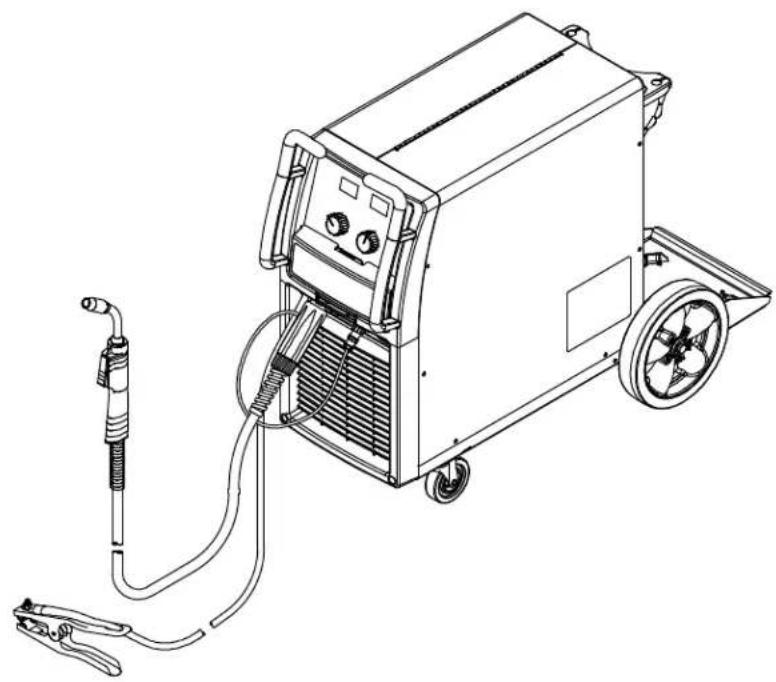
Line drawing of a welding machine with attached clamps and hoses (no text or symbols)
Visit our website at
www.MillerWelds.com
OWNER'S MANUAL
File: MIG (GMAW)

From Miller to You
Thank you and congratulations on choosing Miller. Now you can get the job done and get it done right. We know you don't have time to do it any other way.
That's why when Niels Miller first started building arc welders in 1929, he made sure his products offered long-lasting value and superior quality. Like you, his customers couldn't afford anything less. Miller products had to be more than the best they could be. They had to be the best you could buy.
Today, the people that build and sell Miller products continue the tradition. They're just as committed to providing equipment and service that meets the high standards of quality and value established in 1929.
This Owner's Manual is designed to help you get the most out of your Miller products. Please take time to read the Safety precautions. They will help you protect yourself against potential hazards on the worksite.

Miller is the first welding equipment manufacturer in the U.S.A. to be registered to the ISO 9001 Quality System Standard.
We've made installation and operation quick and easy. With Miller you can count on years of reliable service with proper maintenance. And if for some reason the unit needs repair, there's a Troubleshooting section that will help you figure out what the problem is. The parts list will then help you to decide the exact part you may need to fix the problem. Warranty and service information for your particular model are also provided.
natural_image
Illustration of a welding worker in protective gear performing welding with sparks flying (no text or symbols)Miller Electric manufactures a full line of welders and welding related equipment.
For information on other quality Miller
products, contact your local Miller distributor to receive the latest full line catalog or individual specification sheets. To locate your nearest distributor or service agency call 1-800-4-A-Miller, or visit us at www.MillerWelds.com on the web.
Working as hard as you do – every power source from Miller is backed by the most hassle-free warranty in the business.

Miller®
TABLE OF CONTENTS
SECTION 1 – SAFETY PRECAUTIONS - READ BEFORE USING .... 1
1-1. Symbol Usage 1
1-2. Arc Welding Hazards 1
1-3. Additional Symbols For Installation, Operation, And Maintenance 3
1-4. California Proposition 65 Warnings 4
1-5. Principal Safety Standards 4
1-6. EMF Information 4
SECTION 2 - CONSIGNES DE SÉCURITÉ - LIRE AVANT UTILISATION 5
SECTION 8 - MIG WELDING (GMAW) GUIDELINES 36
8-1. Typical MIG Process Connections 36
8-2. Typical MIG Process Control Settings 37
8-3. Holding And Positioning Welding Gun 38
8-4. Conditions That Affect Weld Bead Shape 39
8-5. Gun Movement During Welding 40
8-6. Poor Weld Bead Characteristics 40
8-7. Good Weld Bead Characteristics 40
8-8. Troubleshooting - Excessive Spatter 41
8-9. Troubleshooting – Porosity 41
8-10. Troubleshooting – Excessive Penetration 41
8-11. Troubleshooting – Lack Of Penetration 42
8-12. Troubleshooting - Incomplete Fusion 42
8-13. Troubleshooting - Burn-Through 42
8-14. Troubleshooting – Waviness Of Bead 43
8-15. Troubleshooting - Distortion 43
8-16. Common MIG Shielding Gases 44
8-17. Troubleshooting Guide For Semiautomatic Welding Equipment 44
SECTION 9 - PARTS LIST 46
WARRANTY

Protect yourself and others from injury — read and follow these precautions.
1-1. Symbol Usage

DANGER! – Indicates a hazardous situation which, if not avoided, will result in death or serious injury. The possible hazards are shown in the adjoining symbols or explained in the text.

Indicates a hazardous situation which, if not avoided, could result in death or serious injury. The possible hazards are shown in the adjoining symbols or explained in the text.
NOTICE – Indicates statements not related to personal injury.
Indicates special instructions.

This group of symbols means Warning! Watch Out! ELECTRIC SHOCK, MOVING PARTS, and HOT PARTS hazards. Consult symbols and related instructions below for necessary actions to avoid the hazards.
1-2. Arc Welding Hazards

The symbols shown below are used throughout this manual to call attention to and identify possible hazards. When you see the symbol, watch out, and follow the related instructions to avoid the hazard. The safety information given below is only a summary of the more complete safety information found in the Safety Standards listed in Section 1-5. Read and follow all Safety Standards.

Only qualified persons should install, operate, maintain, and repair this unit.

During operation, keep everybody, especially children, away.
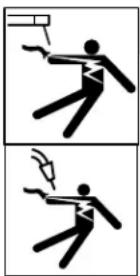
ELECTRIC SHOCK can kill.
Touching live electrical parts can cause fatal shocks or severe burns. The electrode and work circuit is electrically live whenever the output is on. The input power circuit and machine internal circuits are also live when power is on. In semiautomatic or automatic wire welding, the wire, wire reel, drive roll housing, and all metal parts touching the welding wire are electrically live. Incorrectly installed or improperly grounded equipment is a hazard.
- Do not touch live electrical parts.
●Wear dry, hole-free insulating gloves and body protection.
●Insulate yourself from work and ground using dry insulating mats or covers big enough to prevent any physical contact with the work or ground.
- Do not use AC output in damp areas, if movement is confined, or if there is a danger of falling.
- Use AC output ONLY if required for the welding process.
- If AC output is required, use remote output control if present on unit.
- Additional safety precautions are required when any of the following electrically hazardous conditions are present: in damp locations or while wearing wet clothing; on metal structures such as floors, gratings, or scaffolds; when in cramped positions such as sitting, kneeling, or lying; or when there is a high risk of unavoidable or accidental contact with the workpiece or ground. For these conditions, use the following equipment in order presented: 1) a semiautomatic DC constant voltage (wire) welder, 2) a DC manual (stick) welder, or 3) an AC welder with reduced open-circuit voltage. In most situations, use of a DC, constant voltage wire welder is recommended. And, do not work alone!
- Disconnect input power or stop engine before installing or servicing this equipment. Lockout/tagout input power according to OSHA 29 CFR 1910.147 (see Safety Standards).
- Properly install and ground this equipment according to its Owner's Manual and national, state, and local codes.
- Always verify the supply ground – check and be sure that input power cord ground wire is properly connected to ground terminal in
disconnect box or that cord plug is connected to a properly grounded receptacle outlet.
- When making input connections, attach proper grounding conductor first – double-check connections.
- Keep cords dry, free of oil and grease, and protected from hot metal and sparks.
- Frequently inspect input power cord for damage or bare wiring – replace cord immediately if damaged – bare wiring can kill.
●Turn off all equipment when not in use.
- Do not use worn, damaged, undersized, or poorly spliced cables.
- Do not drape cables over your body.
- If earth grounding of the workpiece is required, ground it directly with a separate cable.
- Do not touch electrode if you are in contact with the work, ground, or another electrode from a different machine.
- Do not touch electrode holders connected to two welding machines at the same time since double open-circuit voltage will be present.
- Use only well-maintained equipment. Repair or replace damaged parts at once. Maintain unit according to manual.
●Wear a safety harness if working above floor level.
- Keep all panels and covers securely in place.
- Clamp work cable with good metal-to-metal contact to workpiece or worktable as near the weld as practical.
- Insulate work clamp when not connected to workpiece to prevent contact with any metal object.
- Do not connect more than one electrode or work cable to any single weld output terminal.
SIGNIFICANT DC VOLTAGE exists in inverter welding power sources AFTER removal of inputpower.
- Turn Off inverter, disconnect input power, and discharge input capacitors according to instructions in Maintenance Section before touching any parts.
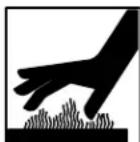
HOT PARTS can burn.
- Do not touch hot parts bare handed.
- Allow cooling period before working on equipment.
- To handle hot parts, use proper tools and/or wear heavy, insulated welding gloves and clothing to prevent burns.
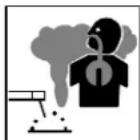
FUMES AND GASES can be hazardous.
Welding produces fumes and gases. Breathing these fumes and gases can be hazardous to your health.
- Keep your head out of the fumes. Do not breathe the fumes.
- If inside, ventilate the area and/or use local forced ventilation at the arc to remove welding fumes and gases.
- If ventilation is poor, wear an approved air-supplied respirator.
- Read and understand the Material Safety Data Sheets (MSDSs) and the manufacturer's instructions for metals, consumables, coatings, cleaners, and degreasers.
- Work in a confined space only if it is well ventilated, or while wearing an air-supplied respirator. Always have a trained watchperson nearby. Welding fumes and gases can displace air and lower the oxygen level causing injury or death. Be sure the breathing air is safe.
- Do not weld in locations near degreasing, cleaning, or spraying operations. The heat and rays of the arc can react with vapors to form highly toxic and irritating gases.
- Do not weld on coated metals, such as galvanized, lead, or cadmium plated steel, unless the coating is removed from the weld area, the area is well ventilated, and while wearing an air-supplied respirator. The coatings and any metals containing these elements can give off toxic fumes if welded.
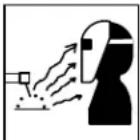
ARC RAYS can burn eyes and skin.
Arc rays from the welding process produce intense visible and invisible (ultraviolet and infrared) rays that can burn eyes and skin. Sparks fly off from the weld.
- Wear an approved welding helmet fitted with a proper shade of filter lenses to protect your face and eyes from arc rays and sparks when welding or watching (see ANSI Z49.1 and Z87.1 listed in Safety Standards).
- Wear approved safety glasses with side shields under your helmet.
- Use protective screens or barriers to protect others from flash, glare and sparks; warn others not to watch the arc.
- Wear protective clothing made from durable, flame-resistant material (leather, heavy cotton, or wool) and foot protection.
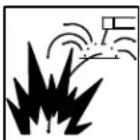
WELDING can cause fire or explosion.
Welding on closed containers, such as tanks, drums, or pipes, can cause them to blow up. Sparks can fly off from the welding arc. The flying sparks, hot workpiece, and hot equipment can cause fires and
burns. Accidental contact of electrode to metal objects can cause sparks, explosion, overheating, or fire. Check and be sure the area is safe before doing any welding.
- Remove all flammables within 35 ft (10.7 m) of the welding arc. If this is not possible, tightly cover them with approved covers.
- Do not weld where flying sparks can strike flammable material.
- Protect yourself and others from flying sparks and hot metal.
- Be alert that welding sparks and hot materials from welding can easily go through small cracks and openings to adjacent areas.
●Watch for fire, and keep a fire extinguisher nearby.
- Be aware that welding on a ceiling, floor, bulkhead, or partition can cause fire on the hidden side.
- Do not weld on closed containers such as tanks, drums, or pipes, unless they are properly prepared according to AWS F4.1 (see Safety Standards).
- Do not weld where the atmosphere may contain flammable dust, gas, or liquid vapors (such as gasoline).
- Connect work cable to the work as close to the welding area as practical to prevent welding current from traveling long, possibly unknown paths and causing electric shock, sparks, and fire hazards.
- Do not use welder to thaw frozen pipes.
- Remove stick electrode from holder or cut off welding wire at contact tip when not in use.
OM-230 693 Page 2
- Wear oil-free protective garments such as leather gloves, heavy shirt, cuffless trousers, high shoes, and a cap.
- Remove any combustibles, such as a butane lighter or matches, from your person before doing any welding.
- After completion of work, inspect area to ensure it is free of sparks, glowing embers, and flames.
- Use only correct fuses or circuit breakers. Do not oversize or bypass them.
- Follow requirements in OSHA 1910.252 (a) (2) (iv) and NFPA 51B for hot work and have a fire watcher and extinguisher nearby.
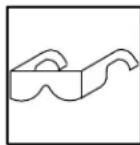
FLYING METAL or DIRT can injure eyes.
●Welding, chipping, wire brushing, and grinding cause sparks and flying metal. As welds cool, they can throw off slag.
●Wear approved safety glasses with side shields even under your welding helmet.
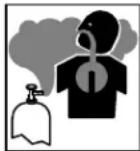
BUILDUP OF GAS can injure or kill.
●Shut off shielding gas supply when not in use.
●Always ventilate confined spaces or use approved air-supplied respirator.
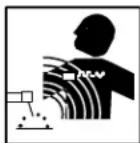
ELECTRIC AND MAGNETIC FIELDS (EMF) can affect ImplantedMedical Devices.
●Wearers of Pacemakers and other Implanted Medical Devices should keep away.
- Implanted Medical Device wearers should consult their doctor and the device manufacturer before going near arc welding, spot welding, gouging, plasma arc cutting, or induction heating operations.
NOISE can damage hearing.
Noise from some processes or equipment can damage hearing.
- Wear approved ear protection if noise level is high.
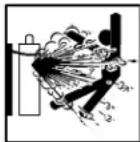
CYLINDERS can explode if damaged.
Shielding gas cylinders contain gas under high pressure. If damaged, a cylinder can explode. Since gas cylinders are normally part of the welding process, be sure to treat them carefully.
- Protect compressed gas cylinders from excessive heat, mechanical shocks, physical damage, slag, open flames, sparks, and arcs.
- Install cylinders in an upright position by securing to a stationary support or cylinder rack to prevent falling or tipping.
- Keep cylinders away from any welding or other electrical circuits.
●Never drape a welding torch over a gas cylinder.
●Never allow a welding electrode to touch any cylinder. - Never weld on a pressurized cylinder – explosion will result.
- Use only correct shielding gas cylinders, regulators, hoses, and fittings designed for the specific application; maintain them and associated parts in good condition.
●Turn face away from valve outlet when opening cylinder valve. - Keep protective cap in place over valve except when cylinder is in use or connected for use.
- Use the right equipment, correct procedures, and sufficient number of persons to lift and move cylinders.
- Read and follow instructions on compressed gas cylinders, associated equipment, and Compressed Gas Association (CGA) publication P-1 listed in Safety Standards.
1-3. Additional Symbols For Installation, Operation, And Maintenance
FIRE OR EXPLOSION hazard.
- Do not install or place unit on, over, or near combustible surfaces.
- Do not install unit near flammables.
- Do not overload building wiring – be sure power supply system is properly sized, rated, and protected to handle this unit.
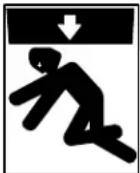
FALLING EQUIPMENT can injure.
- Use lifting eye to lift unit only, NOT running gear, gas cylinders, or any other accessories.
- Use equipment of adequate capacity to lift and support unit.
- If using lift forks to move unit, be sure forks are long enough to extend beyond opposite side of unit.
- Keep equipment (cables and cords) away from moving vehicles when working from an aerial location.
- Follow the guidelines in the Applications Manual for the Revised NIOSH Lifting Equation (Publication No. 94–110) when manually lifting heavy parts or equipment.
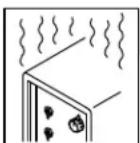
OVERUSE can cause OVERHEATING
- Allow cooling period; follow rated duty cycle.
- Reduce current or reduce duty cycle before starting to weld again.
- Do not block or filter airflow to unit.
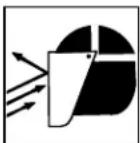
FLYING SPARKS can injure.
●Wear a face shield to protect eyes and face.
- Shape tungsten electrode only on grinder with proper guards in a safe location wearing proper face, hand, and body protection.
- Sparks can cause fires — keep flammables away.
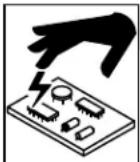
STATIC (ESD) can damage PC boards.
- Put on grounded wrist strap BEFORE handling boards or parts.
- Use proper static-proof bags and boxes to store, move, or ship PC boards.

MOVING PARTS can injure.
- Keep away from moving parts.
- Keep away from pinch points such as drive rolls.
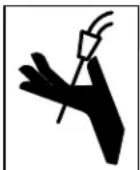
WELDING WIRE can injure.
- Do not press gun trigger until instructed to do so.
- Do not point gun toward any part of the body, other people, or any metal when threading welding wire.

MOVING PARTS can injure.
- Keep away from moving parts such as fans.
- Keep all doors, panels, covers, and guards closed and securely in place.
●Have only qualified persons remove doors, panels, covers, or guards for maintenance and troubleshooting as necessary.
●Reinstall doors, panels, covers, or guards when maintenance is finished and before reconnecting input power.
READ INSTRUCTIONS.
- Read and follow all labels and the Owner's Manual carefully before installing, operating, or servicing unit. Read the safety information at the beginning of the manual and in each section.
- Use only genuine replacement parts from the manufacturer.
- Perform maintenance and service according to the Owner's Manuals, industry standards, and national, state, and local codes.
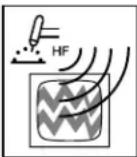
H.F. RADIATION can cause interference.
●High-frequency (H.F.) can interfere with radio navigation, safety services, computers, and communications equipment.
●Have only qualified persons familiar with electronic equipment perform this installation.
- The user is responsible for having a qualified electrician promptly correct any interference problem resulting from the installation.
- If notified by the FCC about interference, stop using the equipment at once.
●Have the installation regularly checked and maintained. - Keep high-frequency source doors and panels tightly shut, keep spark gaps at correct setting, and use grounding and shielding to minimize the possibility of interference.
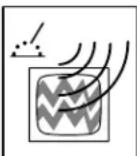
ARC WELDING can cause interference.
- Electromagnetic energy can interfere with sensitive electronic equipment such as computers and computer-driven equipment such as robots.
-
Be sure all equipment in the welding area is electromagnetically compatible.
-
To reduce possible interference, keep weld cables as short as possible, close together, and down low, such as on the floor.
- Locate welding operation 100 meters from any sensitive electronic equipment.
- Be sure this welding machine is installed and grounded according to this manual.
- If interference still occurs, the user must take extra measures such as moving the welding machine, using shielded cables, using line filters, or shielding the work area.
1-4. California Proposition 65 Warnings
Welding or cutting equipment produces fumes or gases which contain chemicals known to the State of California to cause birth defects and, in some cases, cancer. (California Health & Safety Code Section 25249.5 et seq.)
Battery posts, terminals and related accessories contain lead and lead compounds, chemicals known to the State of California to cause cancer and birth defects or other reproductive harm. Wash hands after handling.
This product contains chemicals, including lead, known to the state of California to cause cancer, birth defects, or other reproductive harm. Wash hands after use.
For Gasoline Engines:
Engine exhaust contains chemicals known to the State of California to cause cancer, birth defects, or other reproductive harm.
For Diesel Engines:
Diesel engine exhaust and some of its constituents are known to the State of California to cause cancer, birth defects, and other reproductive harm.
1-5. Principal Safety Standards
Safety in Welding, Cutting, and Allied Processes, ANSI Standard Z49.1, from Global Engineering Documents (phone: 1-877-413-5184, website: www.global.ihs.com).
Safe Practices for the Preparation of Containers and Piping for Welding and Cutting, American Welding Society Standard AWS F4.1, from Global Engineering Documents (phone: 1-877-413-5184, website: www.global.ihs.com).
National Electrical Code, NFPA Standard 70, from National Fire Protection Association, Quincy, MA 02269 (phone: 1-800-344-3555, website: www.nfpa.org and www.sparky.org).
Safe Handling of Compressed Gases in Cylinders, CGA Pamphlet P-1, from Compressed Gas Association, 4221 Walney Road, 5th Floor, Chantilly, VA 20151 (phone: 703-788-2700, website: www.cganet.com). Safety in Welding, Cutting, and Allied Processes, CSA Standard W117.2, from Canadian Standards Association, Standards Sales, 5060 Spectrum Way, Suite 100, Ontario, Canada L4W 5NS (phone: 800-463-6727, website: www.csa-international.org).
Safe Practice For Occupational And Educational Eye And Face Protection, ANSI Standard Z87.1, from American National Standards Institute,
25 West 43rd Street, New York, NY 10036 (phone: 212-642-4900, website: www.ansi.org).
Standard for Fire Prevention During Welding, Cutting, and Other Hot Work, NFPA Standard 51B, from National Fire Protection Association, Quincy, MA 02269 (phone: 1-800-344-3555, website: www.nfpa.org. OSHA, Occupational Safety and Health Standards for General Industry, Title 29, Code of Federal Regulations (CFR), Part 1910, Subpart Q, and Part 1926, Subpart J, from U.S. Government Printing Office, Superintendent of Documents, P.O. Box 371954, Pittsburgh, PA 15250-7954 (phone: 1-866-512-1800) (there are 10 OSHA Regional Offices—phone for Region 5, Chicago, is 312-353-2220, website: www.osha.gov).
U.S. Consumer Product Safety Commission (CPSC), 4330 East West Highway, Bethesda, MD 20814 (phone: 301-504-7923, website: www.cpsc.gov).
Applications Manual for the Revised NIOSH Lifting Equation, The National Institute for Occupational Safety and Health (NIOSH), 1600 Clifton Rd, Atlanta, GA 30333 (phone: 1-800-232-4636, website: www.cdc.gov/NIOSH).
1-6. EMF Information
Electric current flowing through any conductor causes localized electric and magnetic fields (EMF). Welding current creates an EMF field around the welding circuit and welding equipment. EMF fields may interfere with some medical implants, e.g. pacemakers. Protective measures for persons wearing medical implants have to be taken. For example, access restrictions for passers-by or individual risk assessment for welders. All welders should use the following procedures in order to minimize exposure to EMF fields from the welding circuit:
- Keep cables close together by twisting or taping them, or using a cable cover.
- Do not place your body between welding cables. Arrange cables to one side and away from the operator.
-
Do not coil or drape cables around your body.
-
Keep head and trunk as far away from the equipment in the welding circuit as possible.
- Connect work clamp to workpiece as close to the weld as possible.
- Do not work next to, sit or lean on the welding power source.
- Do not weld whilst carrying the welding power source or wire feeder.
About Implanted Medical Devices:
Implanted Medical Device wearers should consult their doctor and the device manufacturer before performing or going near arc welding, spot welding, gouging, plasma arc cutting, or induction heating operations. If cleared by your doctor, then following the above procedures is recommended.
SECTION 2 - CONSIGNES DE SÉCURITÉ - LIRE AVANT UTILISATION
fre_som_2010-03

natural_image
Two identical black-and-white pictograms of a person in motion, one flying and the other holding a flag (no text or symbols)Safety in Welding, Cutting, and Allied Processes, CSA Standard W117.2, de Canadian Standards Association, Standards Sales, 5060 Spectrum Way, Suite 100, Ontario, Canada L4W 5NS (téléphone : 800-463-6727, site internet : www.csa-international.org).
Safe Practice For Occupational And Educational Eye And Face Protection, ANSI Standard Z87.1, de American National Standards Institute,
25 West 43rd Street, New York, NY 10036 (téléphone : 212-642-4900, site Internet : www.ansi.org).
Standard for Fire Prevention During Welding, Cutting, and Other Hot Work, NFPA Standard 51B, de National Fire Protection Association, P.O. Box 9101, Quincy, MA 02269-9101 (téléphone : 617-770-3000, site Internet : www.nfpa.org).
OSHA, Occupational Safety and Health Standards for General Industry, Title 29, Code of Federal Regulations (CFR), Part 1910, Subpart Q, and Part 1926, Subpart J, de U.S. Government Printing Office, Superintendent of Documents, P.O. Box 371954, Pittsburgh, PA 15250-7954 (téléphone : 1-866-512-1800) (il y a 10 bureaux régionaux–letéléphone de la région 5, Chicago, est 312-353-2220, site Internet : www.osha.gov).
U.S. Consumer Product Safety Commission (CPSC), 4330 East West Highway, Bethesda, MD 20814 (téléphone : 301-504-7923, site internet : www.cpsc.gov).
Applications Manual for the Revised NIOSH Lifting Equation, The National Institute for Occupational Safety and Health (NIOSH), 1600 Clifton Rd, Atlanta, GA 30333 (télé[hone : 1-800-232-4636, site internet: www.cdc.gov/NIOSH).
2-6. Informations relatives aux CEM
| o|o | Wire Feed Output |  |  | Duty Cycle |  | Do Not Switch While Welding | |
 | Volts Increase ( |  | [1000] | [Z606] | |||
| [1999] | Gas Metal Arc Welding (GMAW) Gun |  | Wire Feed Spool Gun | [1000] | Gas Input Gas Out | [1999] | |
 | Voltage Input Press |  | [1000] | Rated No-Load Voltage (Average) | |||
SECTION 4 - INSTALLATION
4-1. Specifications
| Rated Output Max. Open Circuit | Voltage | Amps Input at Rated Output (60% Duty Cycle), 60 Hz, Single-Phase | ||||||
| 200 (208) V | 230 V | 460 V | 575 V | KVA | KW | |||
| 250 A at 28 VDC,40% Duty Cycle | 200 A at 28 VDC,60% Duty Cycle | 38 | 482.3* | 462* | 231* | 180.8* | 9.80.46* | 7.50.13* |
| Wire Type and Diameter | Wire Feed Speed | Dimensions | Net Weight Without Gun | ||
| Solid Steel | Stainless Steel | Flux Cored | 50–700 IPM(1.3–17.8 m/min) | H: 30 in. (762 mm)W: 19 in. (483 mm)D: 40 in. (1016 mm) | 205 lb(93 kg) |
| .023 – .045 in.(0.6 – 1.2 mm) | .023 – .045 in.(0.6 – 1.2 mm) | .030 – .045 in.(0.8 – 1.2 mm) | |||
| * While idling | |||||
| Operating Temperature Range – -20C to +40C | Storage Temperature Range – -30C to + 50C | ||||
4-2. Welding Power Source Duty Cycle And Overheating
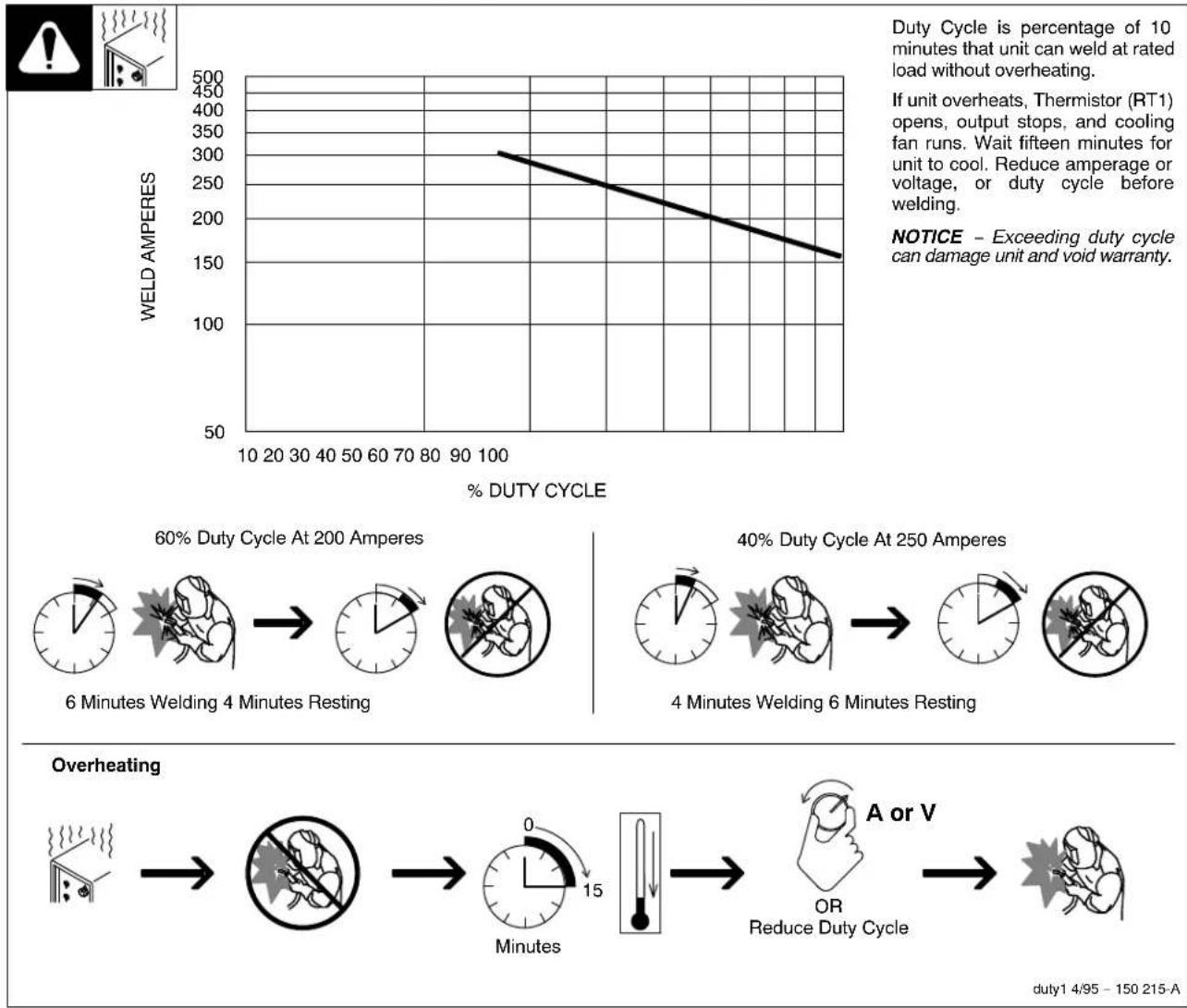
Duty Cycle is percentage of 10 minutes that unit can weld at rated load without overheating.
If unit overheats, Thermistor (RT1) opens, output stops, and cooling fan runs. Wait fifteen minutes for unit to cool. Reduce amperage or voltage, or duty cycle before welding.
NOTICE - Exceeding duty cycle can damage unit and void warranty.
duty1 4/95 - 150 215-A
4-3. Volt-Ampere Curves
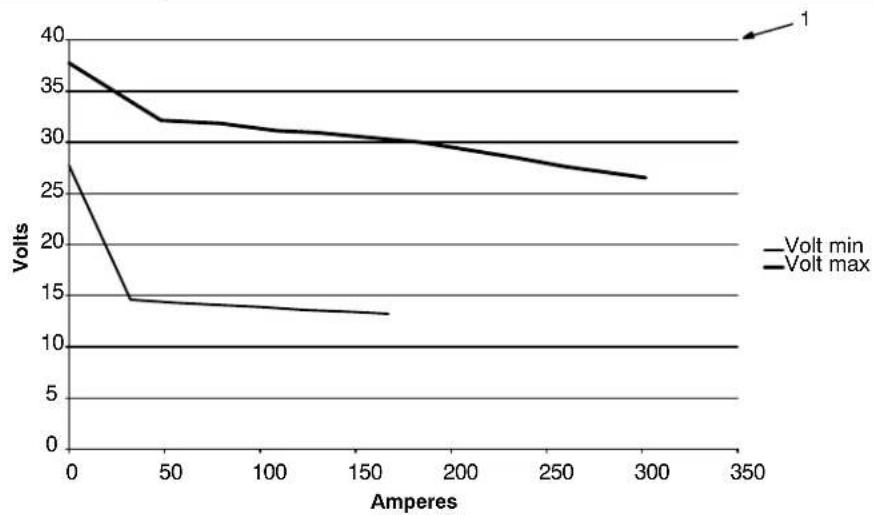
line
| Amperes | Volt min | Volt max | | ------- | -------- | -------- | | 0 | 27 | 38 | | 50 | 14 | 32 | | 100 | 13 | 31 | | 150 | 13 | 30 | | 200 | 13 | 29 | | 250 | 13 | 28 | | 300 | 13 | 26 |1 Normal Volt-Ampere Curves
The volt-ampere curves show the normal minimum and maximum voltage and amperage output capabilities of the welding power source. Curves of other settings fall between the curves shown.
ssb1.1 10/91 - 239 342
4-4. Connecting To Weld Output Terminals
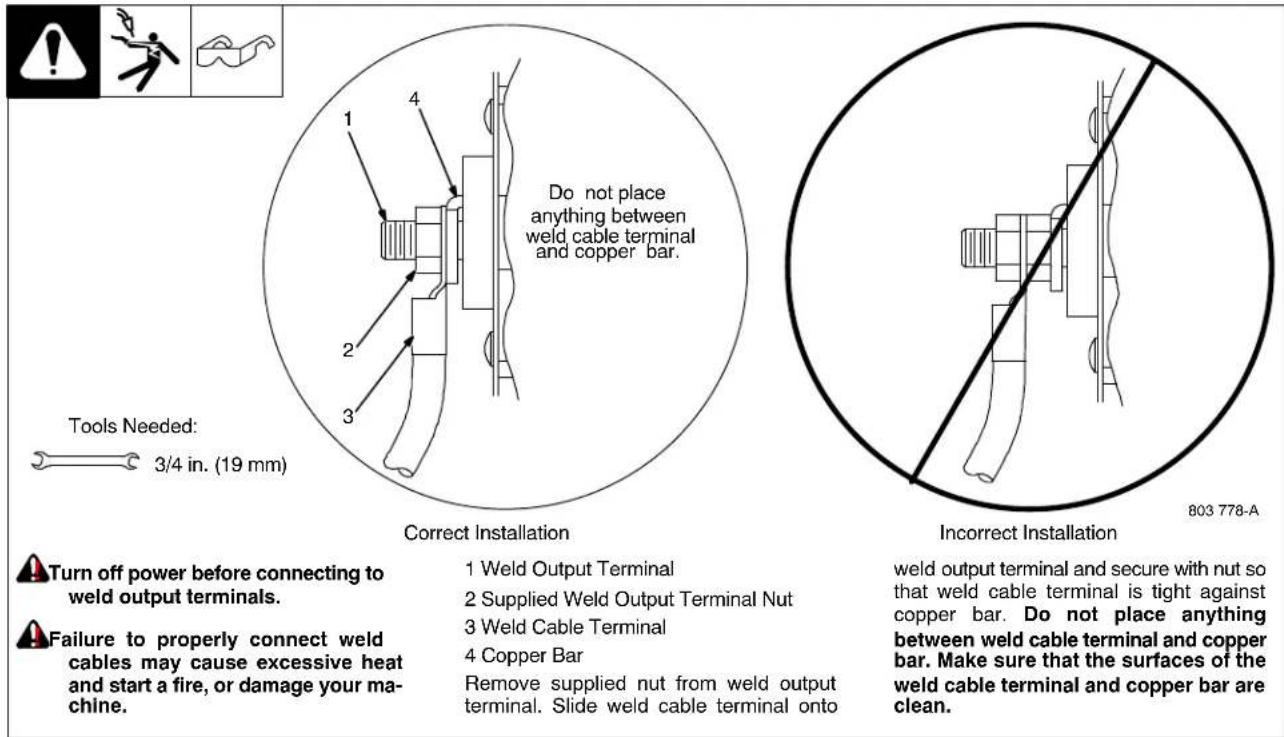
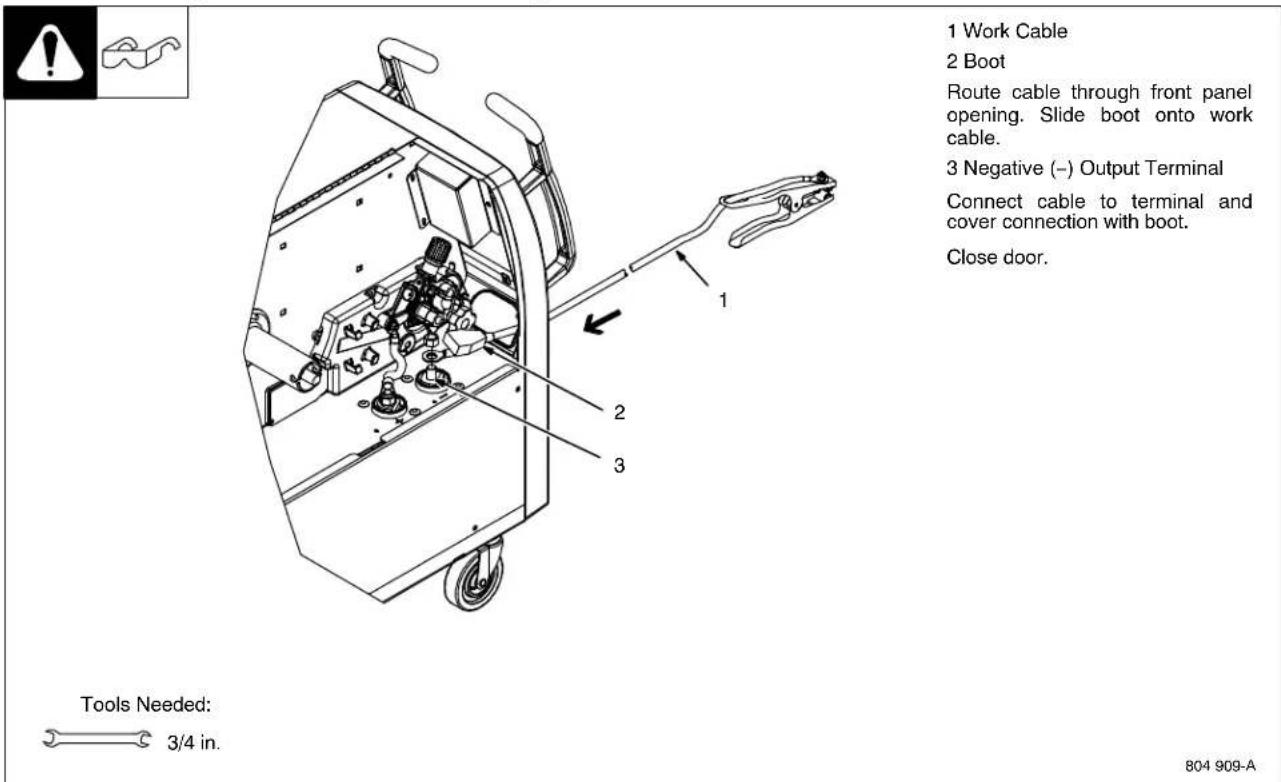
4-5. Installing Work Cable And Clamp
4-6. Connecting Spoolmatic® 15A Or 30A Gun

XR Edge guns prior to serial no. LE079101 require an adapter cord (part no. 195 498).
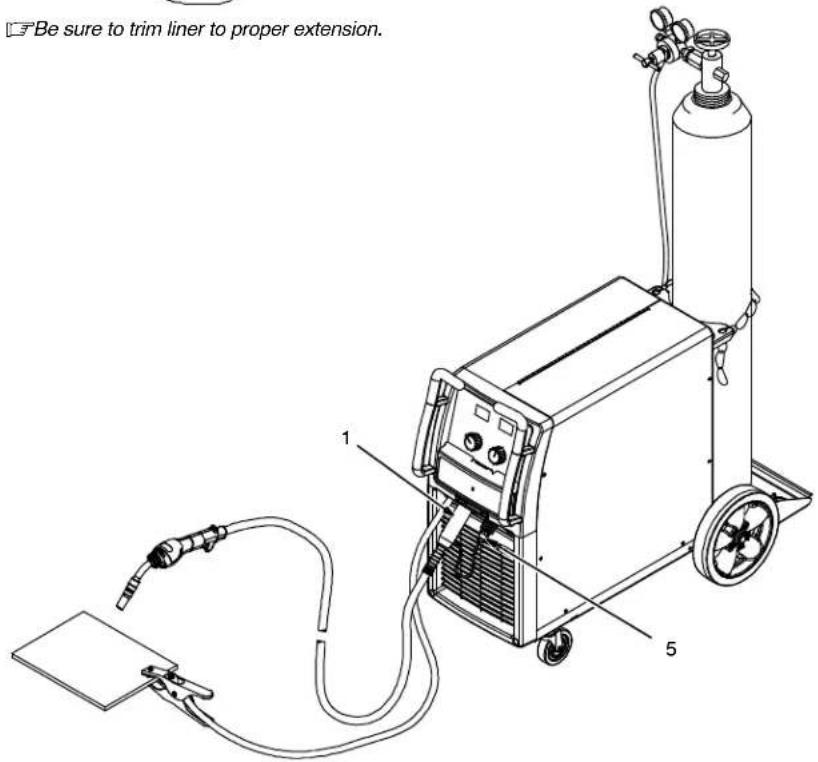
1 Gun End
2 Gun Liner
3 Wire Outlet Guide
Trim excess liner from end of gun so no more than 3/32 in. (2.4 mm) of liner extends past wire outlet guide.
4 Gun Securing Knob
Loosen securing knob. Insert gun end through opening until it bottoms against drive assembly (make sure gun end does not touch drive rolls). Tighten knob.
Be sure to change drive rolls to the proper size and type.
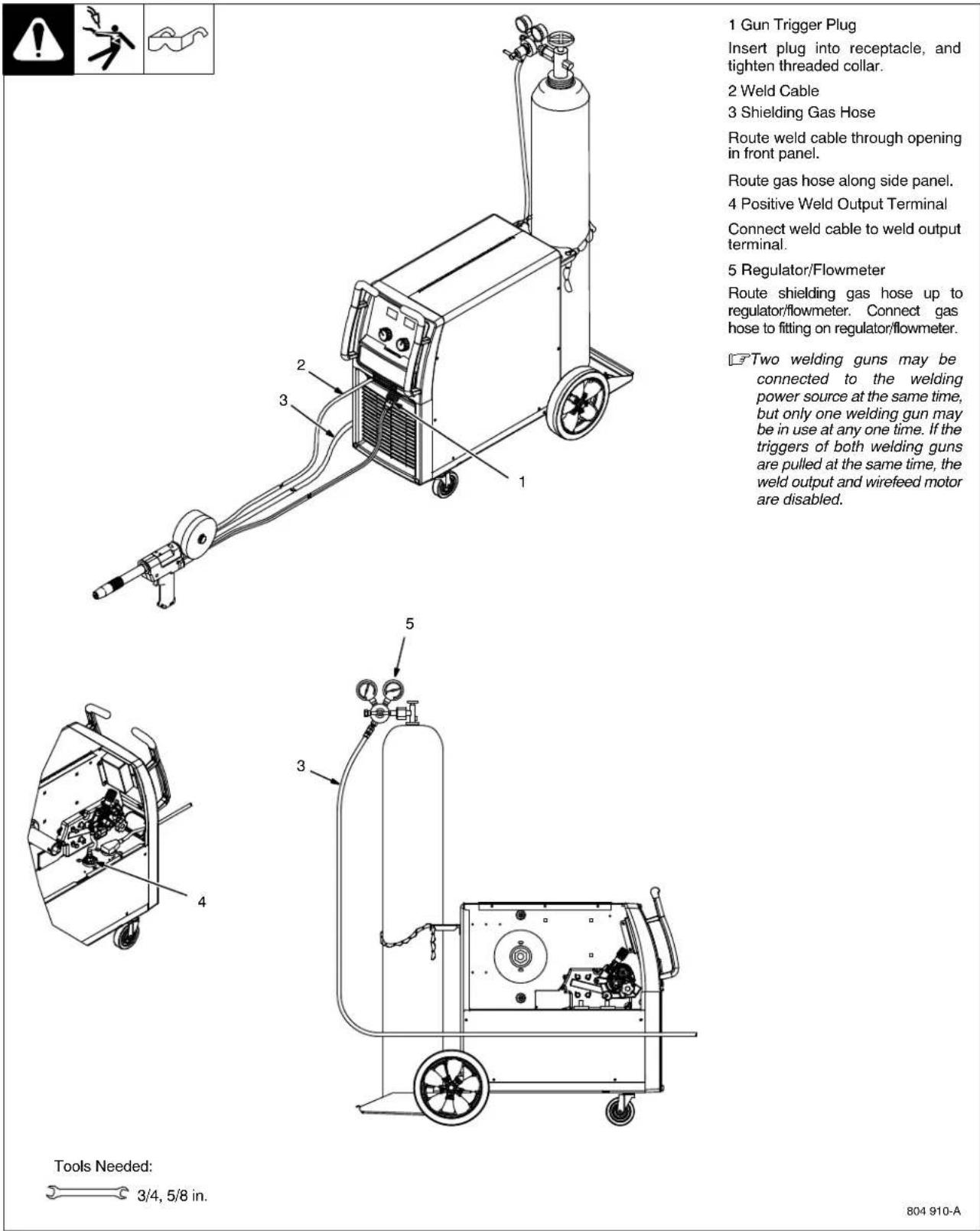
5 Gun Trigger Plug
Insert plug into receptacle, and tighten threaded collar.
If Aluma-Pro push/pull gun has a listed SUP value, set the power source to match the SUP value (see Section 5-5).
Ref. 804 910-A / 804 936-A
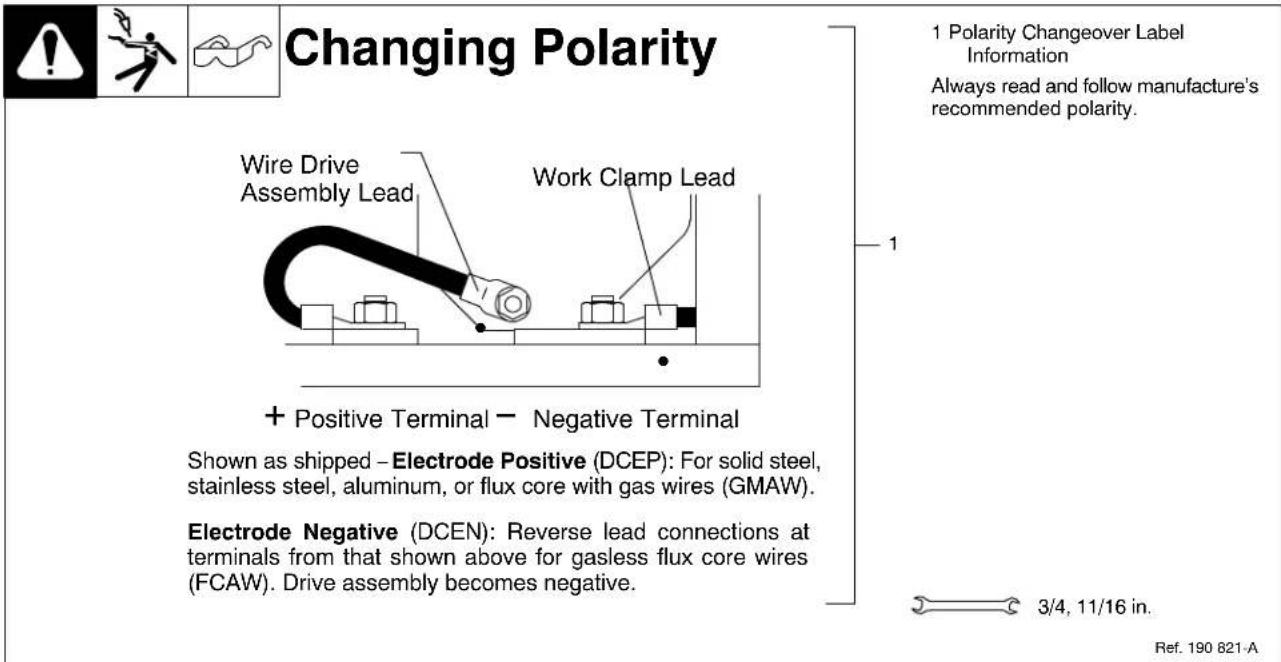
4-8. Setting Gun Polarity For Wire Type
4-9. Installing Gas Supply
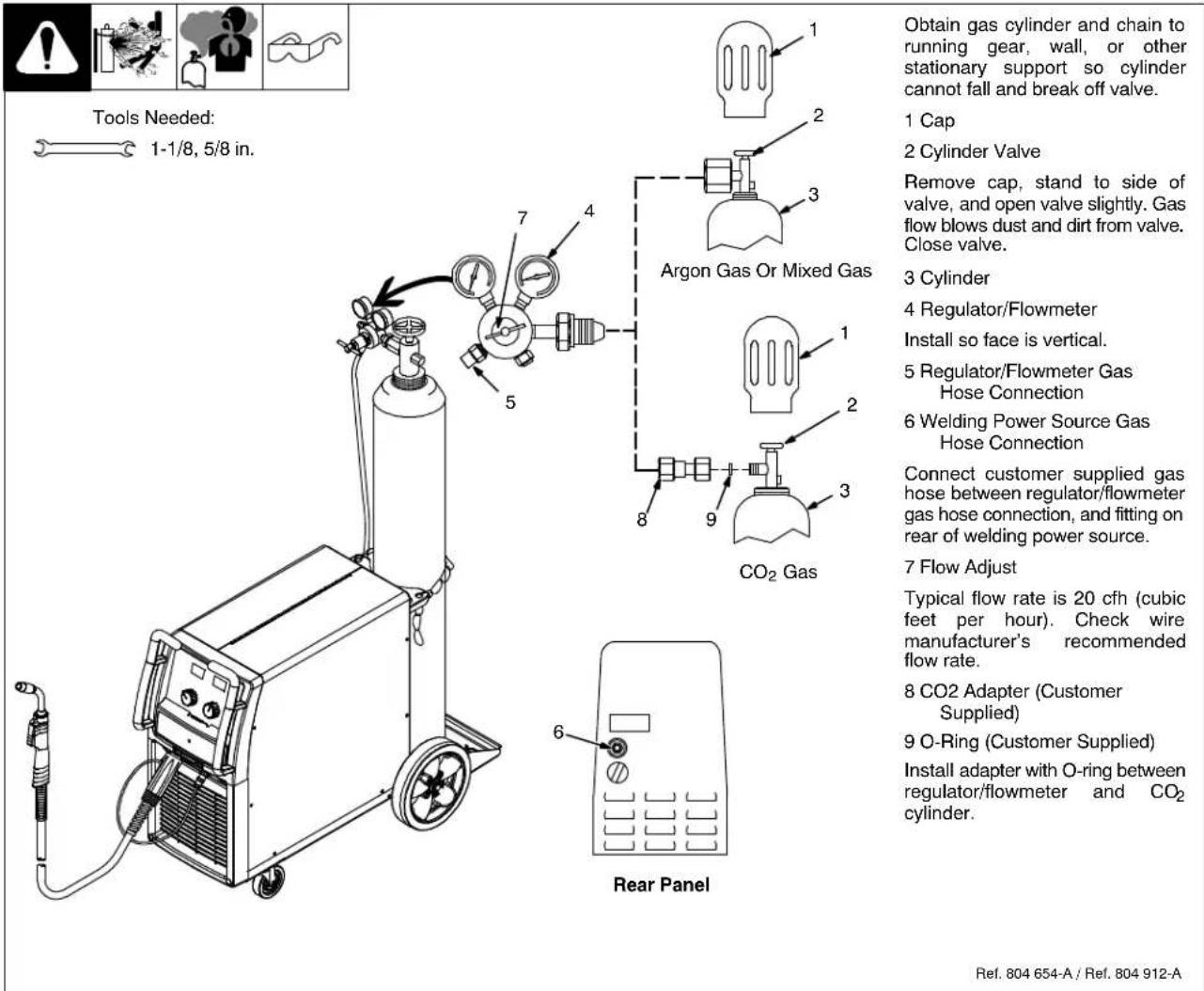
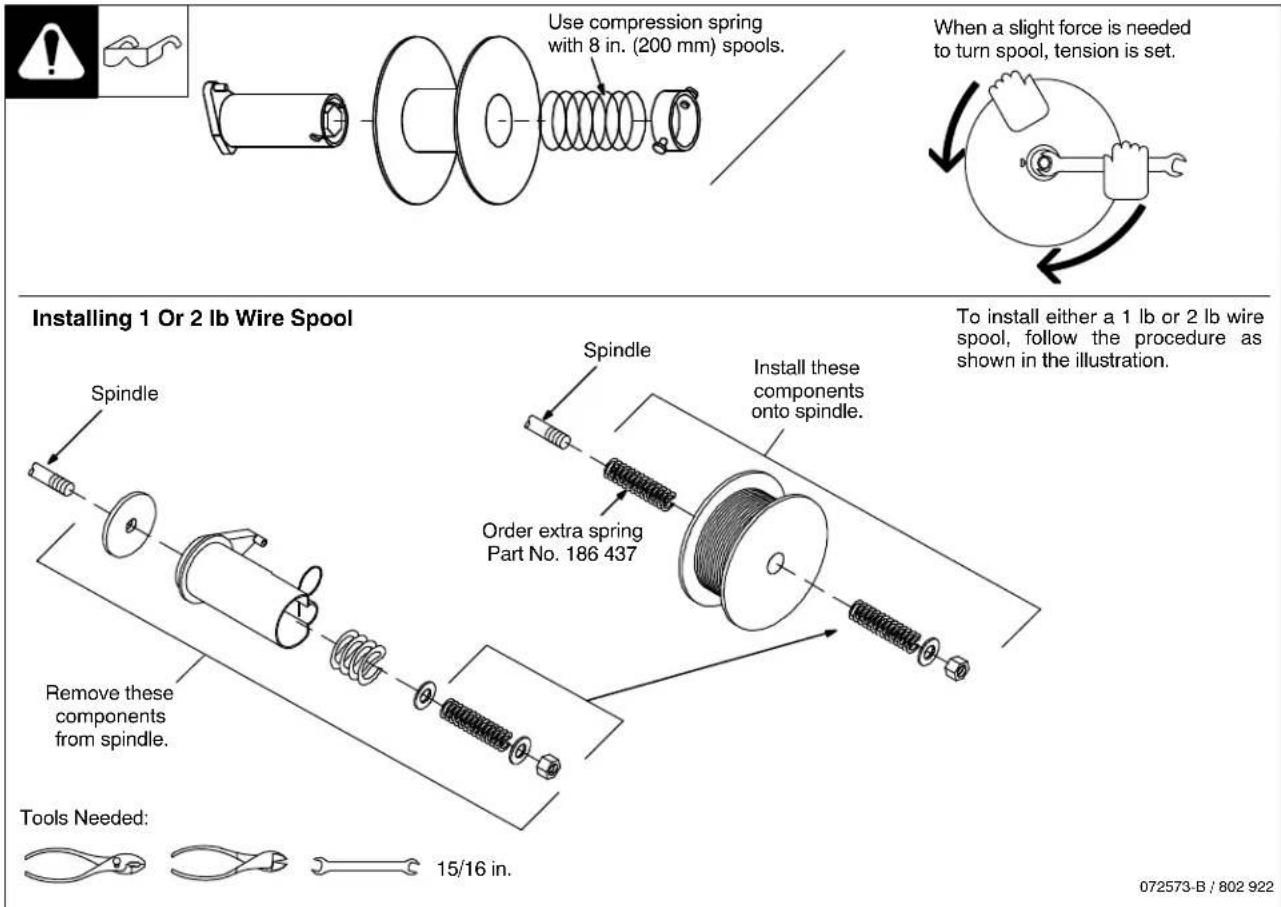
4-10. Installing Wire Spool And Adjusting Hub Tension
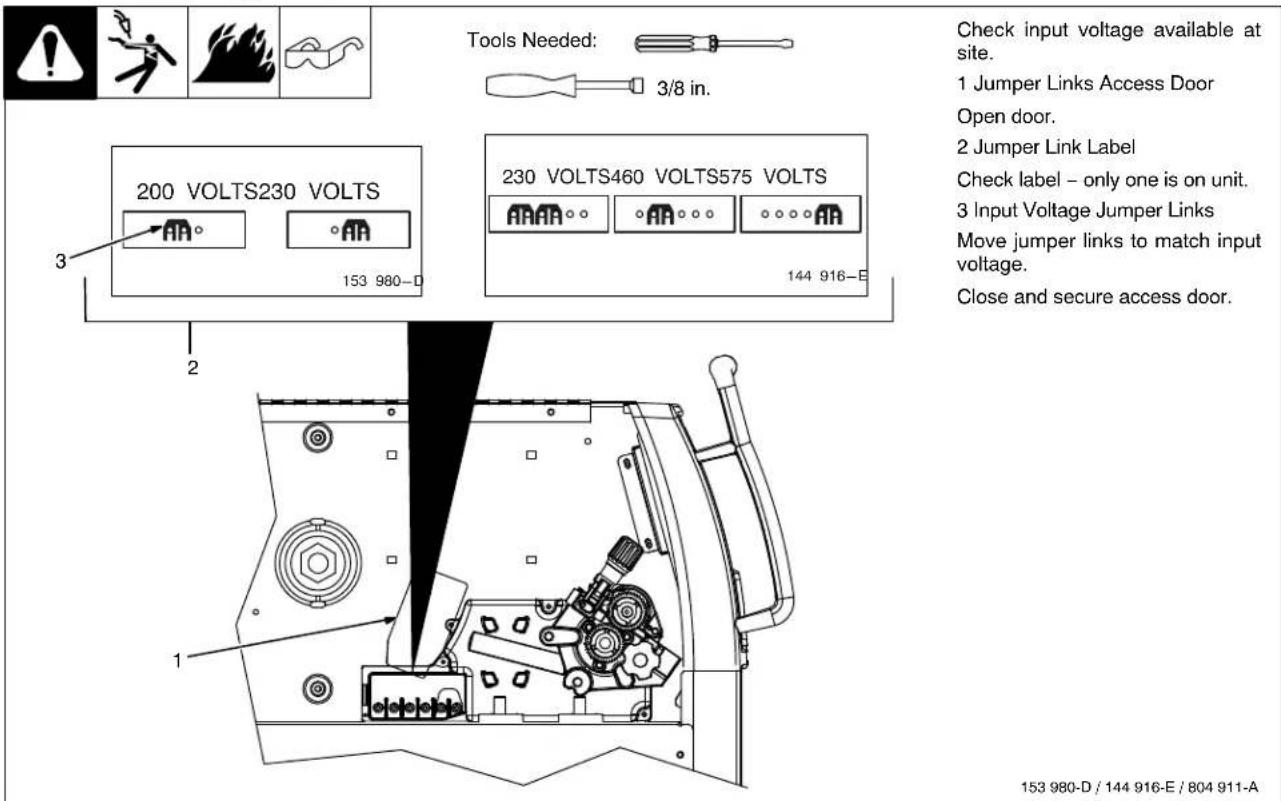
4-11. Positioning Jumper Links
4-12. Electrical Service Guide

Failure to follow these electrical service guide recommendations could create an electric shock or fire hazard. These recommendations are for a dedicated branch circuit sized for the rated output and duty cycle of the welding power source.
| 60 Hz Single Phase | |||||
| Input Voltage (V) 200 230 400 460 575 | |||||
| Input Amperes (A) At Rated Output 48 46 24 23 18 | |||||
| Max Recommended Standard Fuse Rating In Amperes ^1 Time-Delay Fuses ^2 Normal Operating Fuses ^3 | 60 50 30 25 2070 60 35 30 25 | ||||
| Min Input Conductor Size In AWG ^4 | 8 8 12 12 14 | ||||
| Max Recommended Input Conductor Length In Feet (Meters) | 96(29) | 127(39) | 156(47) | 206(63) | 209(64) |
| Min Grounding Conductor Size In AWG ^4 | 8 10 12 12 14 | ||||
Reference: 2008 National Electrical Code (NEC) (including article 630)
1 If a circuit breaker is used in place of a fuse, choose a circuit breaker with time-current curves comparable to the recommended fuse.
2 "Time-Delay" fuses are UL class "RK5". See UL 248.
3 "Normal Operating" (general purpose - no intentional delay) fuses are UL class "K5" (up to and including 60 amps), and UL class "H" (65 amps and above).
4 Conductor data in this section specifies conductor size (excluding flexible cord or cable) between the panelboard and the equipment per NEC Table 310.16. If a flexible cord or cable is used, minimum conductor size may increase. See NEC Table 400.5(A) for flexible cord and cable requirements.
4-13. Serial Number And Rating Label Location
The serial number and rating information for this product is located on back. Use rating label to determine input power requirements and/or rated output. For future reference, write serial number in space provided on back cover of this manual.
4-14. Selecting A Location And Connecting Input Power
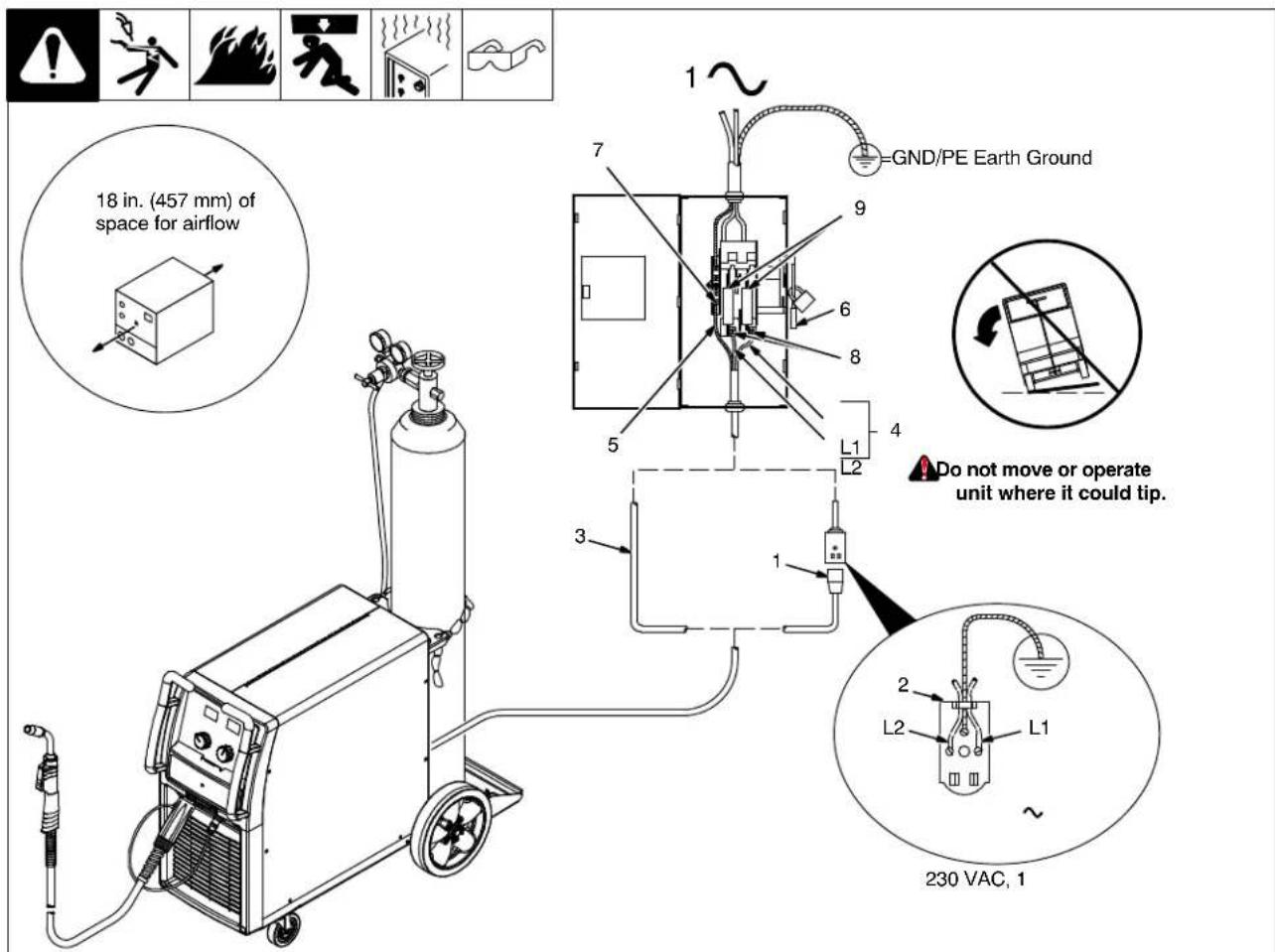
804 912-A
Installation must meet all National and Local Codes – have only qualified persons make this installation.
Disconnect and lockout/tagout input power before connecting input conductors from unit.
Always connect green or green/yellow conductor to supply grounding terminal first, and never to a line terminal.
Special installation may be required where gasoline or volatile liquids are present – see NEC Article 511 or CEC Section 20.
1 Plug (NEMA Type 6-50P)
2 Receptacle
[NEMA Type 6-50R (Customer Supplied)]
3 Input Power Cord.
Connect directly to line disconnect device if hard wiring is required.
4 Black And White Input Conductor (L1 And L2)
5 Green Or Green/Yellow Grounding Conductor
6 Disconnect Device (switch shown in the OFF position)
7 Disconnect Device Grounding Terminal
8 Disconnect Device Line Terminals
Connect green or green/yellow grounding conductor to disconnect device grounding terminal first.
Connect input conductors L1 and L2 to disconnect device line terminals.
9 Over-Current Protection
Select type and size of over-current protection using Section 4-12 (fused disconnect switch shown).
Connect plug to receptacle if hard wiring method is not used.
Close and secure door on disconnect device. Remove lockout/tagout device, and place switch in the On position.
4-15. Threading Welding Wire
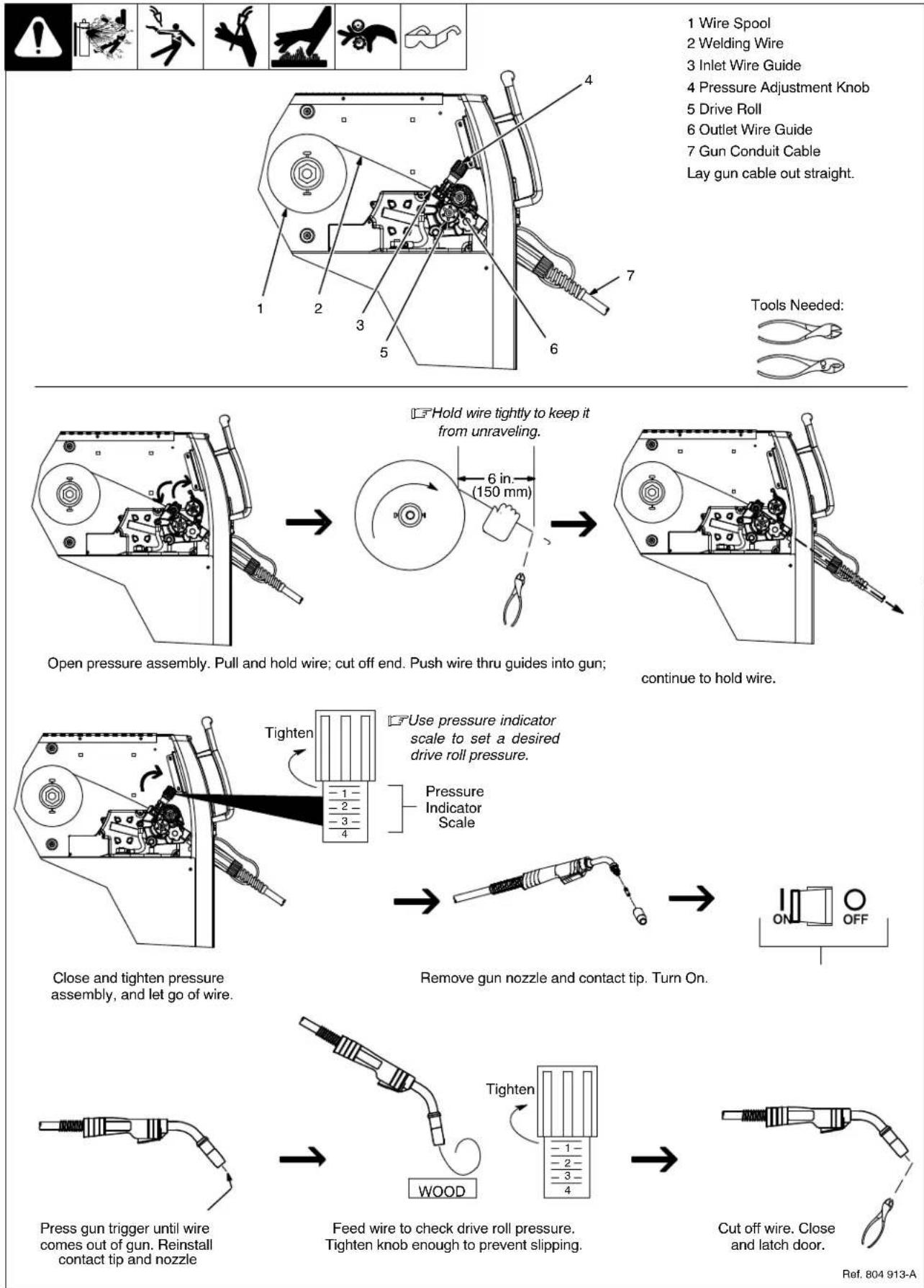
1 Wire Spool
2 Welding Wire
3 Inlet Wire Guide
4 Pressure Adjustment Knob
5 Drive Roll
6 Outlet Wire Guide
7 Gun Conduit Cable
Lay gun cable out straight.
Open pressure assembly. Pull and hold wire; cut off end. Push wire thru guides into gun;
continue to hold wire.
Close and tighten pressure assembly, and let go of wire.
Remove gun nozzle and contact tip. Turn On.
Press gun trigger until wire comes out of gun. Reinstall contact tip and nozzle
Feed wire to check drive roll pressure. Tighten knob enough to prevent slipping.
Ref. 804 913-A
Notes
4-16. Weld Parameters
Selecting Wire, Gas and Control Settings
| Material | Suggested Wire Types | Suggested Shielding Gases And Flow Rate | Wire Sizes (Diameters) | |
| STEEL226 650-B | Solid(or hard)ER70s-6 | 75% Ar/25% CO _2 25 cfh (Ar/CO _2 produces less spatter-better overall appearance) | 0.023" (0.6mm) | |
| 0.030" (0.8mm) | ||||
| 0.035" (0.9mm) | ||||
| 0.045" (1.1mm) | ||||
| Solid(or hard)ER70s-6 | 100% CO _2 25 cfh | 0.023" (0.6mm) | ||
| 0.030" (0.8mm) | ||||
| 0.035" (0.9mm) | ||||
| 0.045" (1.1mm) |
| Suggested Wire Types | Suggested Shielding Gases And Flow Rate | Wire Sizes (Diameters) | ||
| STEEL | Flux core E71T-1 | 100% CO2 25 cfh 75% Ar/25% CO2 25 cfh | 0.035” (0.9mm) | |
| 0.045” (1.1mm) | ||||
| STAINLESS STEEL | Stainless Steel ER 308, ER 308L ER 308LSi | Tri-Mix, 35 cfh (90% He/7.5% Ar/2.5% CO2) | 0.023” (0.6mm) | |
| 0.030” (0.8mm) | ||||
| 0.035” (0.9mm) | ||||
| 0.045” (1.1mm) | ||||
| Aluminum with Optional Spoolmatic® spoolgun. | Aluminum 4043 ER | 100% Ar, 25 cfh | 0.030” (0.8mm) | |
| 0.035” (0.9mm) | ||||
| 0.047” (1.2mm) |
| 1/2"(12.7 mm) | 3/8"(9.5 mm) | 1/4"(6.4 mm) | 3/16"(4.8 mm) | 1/8"(3.2 mm) | 14 ga.(2.0 mm) | 18 ga.(1.2 mm) | 22 ga.(0.8 mm) | |
| — | — | — | 20.0/480 | 18.3/350 | 18.0/240 | 17.0/190 | 15.8/125 | |
| — | 24.3/500 | 21.0/400 | 19.0/290 | 18.0/250 | 17.3/200 | 16.3/115 | 15.9/95 | |
| 29.5/515 | 26.0/475 | 21.0/375 | 18.4/265 | 17.4/230 | 16.5/190 | 15.8/120 | 15.0/88 | |
| 29.5/315 | 28.0/300 | 20.0/225 | 17.5/195 | 17.2/190 | 16.5/165 | 15.5/95 | — | |
| — | — | — | — | 21.5/330 | 20.0/235 | 19.0/180 | 18.7/140 | |
| — | 23.8/325 | 22.4/290 | 20.8/245 | 20.1/190 | 19.4/145 | 18.6/100 | 18.2/85 | |
| — | 23.6/325 | 22.2/290 | 20.6/245 | 19.9/190 | 19.2/145 | 18.5/100 | 18.0/88 | |
| — | — | — | — | — | — | — | — |
| 1/2"(12.7 mm) | 3/8"(9.5 mm) | 1/4"(6.4 mm) | 3/16"(4.8 mm) | 1/8"(3.2 mm) | 14 ga.(2.0 mm) | 18 ga.(1.2 mm) | 22 ga.(0.8 mm) |
| — | 26.0/500 | 24.0/380 | 23.0/325 | 21.5/270 | 20.0/235 | — | — |
| 24.3/380 | 23.8/350 | 23.5/300 | 23.0/275 | 21.5/210 | 21.0/200 | — | — |
| — | — | — | — | 21.2/500 | 20.1/350 | 19.0/210 | — |
| — | — | 23.9/450 | 20.7/375 | 19.2/275 | 18.2/190 | 17.7/120 | — |
| — | 24.5/500 | 21.5/425 | 20.0/350 | 19.3/250 | 18.9/163 | — | — |
| — | 24.0/325 | 22.0/300 | 20.0/250 | 19.0/200 | — | — | — |
| — | — | 24.5/620 | 22.5/540 | 20.8/480 | 19.7/460 | — | — |
| — | 26.5/630 | 24.5/530 | 23.0/460 | 20.0/350 | 18.5/380 | — | — |
| — | 25.0/455 | 23.5/390 | 21.7/320 | 19.5/270 | — | — | — |
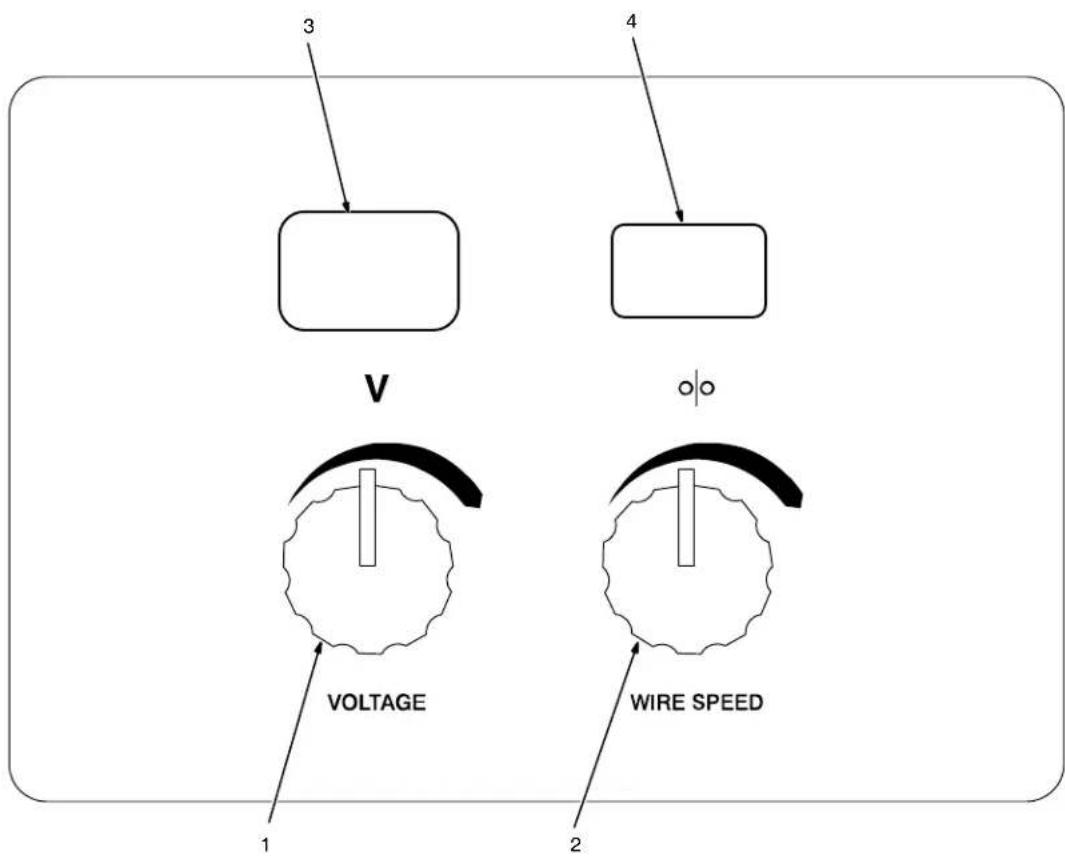
1 Voltage Control
Turn control clockwise to increase voltage.
2 Wire Speed Control
Turn control clockwise to increase wire feed speed.
3 Voltmeter
4 Wire Feed Speed Meter
This unit has three automatic timers included in its operation to help save contact tips, gas, and wire:
Tip Saver - Weld output shuts off if tip is shorted to work surface.
Safety shut-off – Weld output will shut off if no arc is detected within 3 seconds after gun trigger is depressed.
Jog mode – When loading a new roll of wire or if the gun trigger is accidentally pressed, gas will shut off after 1 minute and wire will shut off after 2 minutes saving wire and gas.
JOG Mode
If the trigger on either gun is held for more than 3 seconds without striking an arc, the unit will automatically shut off weld power (and shielding gas output on MIG gun only), but will feed wire continuously at the preset wire feed speed (which may be faster or slower than Run-in Speed) until trigger is released.
Run-in Wire Feed Speed Settings
Run-in settings for the MIG and Spool Guns are independently set and stored in unit memory. The settings are in percent of the welding wire feed speed preset. Both settings are adjustable from 25 to 150 percent.
MIG Gun Run-in is factory set at 100% which is recommended for most wire sizes and types.
Spool Gun Run-in is factory set at 50% which is recommended for .030 & .035 wire. A Run-in setting of 25% is recommended for .047 wire.
To check Run-in settings, start with the power switch OFF. Press and hold the MIG or Spool Gun Trigger while turning the power switch ON. The unit will power up with both the displays reading 888, then the voltage display will read RUN and the wire feed display will read the preset Run-in percentage from memory for the gun selected. To return to the weld mode without making a change, simply release trigger and pull the trigger again momentarily (one second).
To change Run-in settings, start with the power switch OFF. Press and hold the MIG or Spool Gun Trigger while turning the power switch ON. The unit will power up with both the displays reading 888, then the voltage display will read RUN and the wire feed display will read the preset Run-in percentage from memory for the gun selected. To change the Run-in value, release the trigger and turn the wire feed control knob (or the wire feed adjustment knob located on the bottom handle of the spool gun) to the desired setting for the selected gun. To return to weld mode after the Run-in speed change, pull the trigger momentarily (one second).
5-2. Voltmeter And Wire Feed Speed Meter Operation

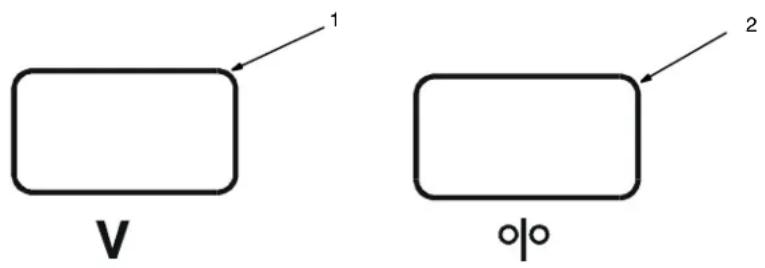
Both meters display 888 at unit power up. After 0.5 seconds, preset values appear on both meters. The settings for the last active gun used will be the default at initial power up of the unit. If the power is reset to quickly, characters other than 888 may appear. To reset, turn power off for at least 3 seconds, then turn power back on.
Welding Status
When either a MIG gun or spool gun trigger is pressed and a welding arc is established, the voltmeter displays actual weld voltage. When the gun trigger is released and welding arc extinguished, the voltmeter displays the last actual voltage for 5 seconds and then returns to preset voltage. If welding resumes before unit displays preset voltage, actual welding voltage will appear on the voltmeter.
The wire feed speed meter always displays preset wire feed speed (IPM).
Gun Selection
The wire feed speed meter will display preset wire feed speed (IPM) for the appropriate gun selection either MIG, Spool or Push/Pull gun. To preset desired wire feed speed, connect desired gun, press gun trigger for one second, and release trigger. The meter preset will be retained by the meter board until a different gun is connected and preset is performed or the unit is turned off and back on. The settings for the last active gun used will be the default at initial power up of the unit.
5-3. Jog Mode
If the trigger on either gun is held for more than 3 seconds without striking an arc, the unit will automatically shut off weld power (and shielding gas output on MIG or push/pull gun), but will feed wire continuously at the preset wire feed speed (which may be faster or slower than Run-in Speed) until trigger is released. Jog wire feed speed is the same as weld wire feed speed, so any time jog speed is changed, be sure to change back to weld wire feed speed before welding. Jog wire feed speed for the spool gun and push/pull gun is limited to 300 ipm (7.6 m/min).
5-4. Timers
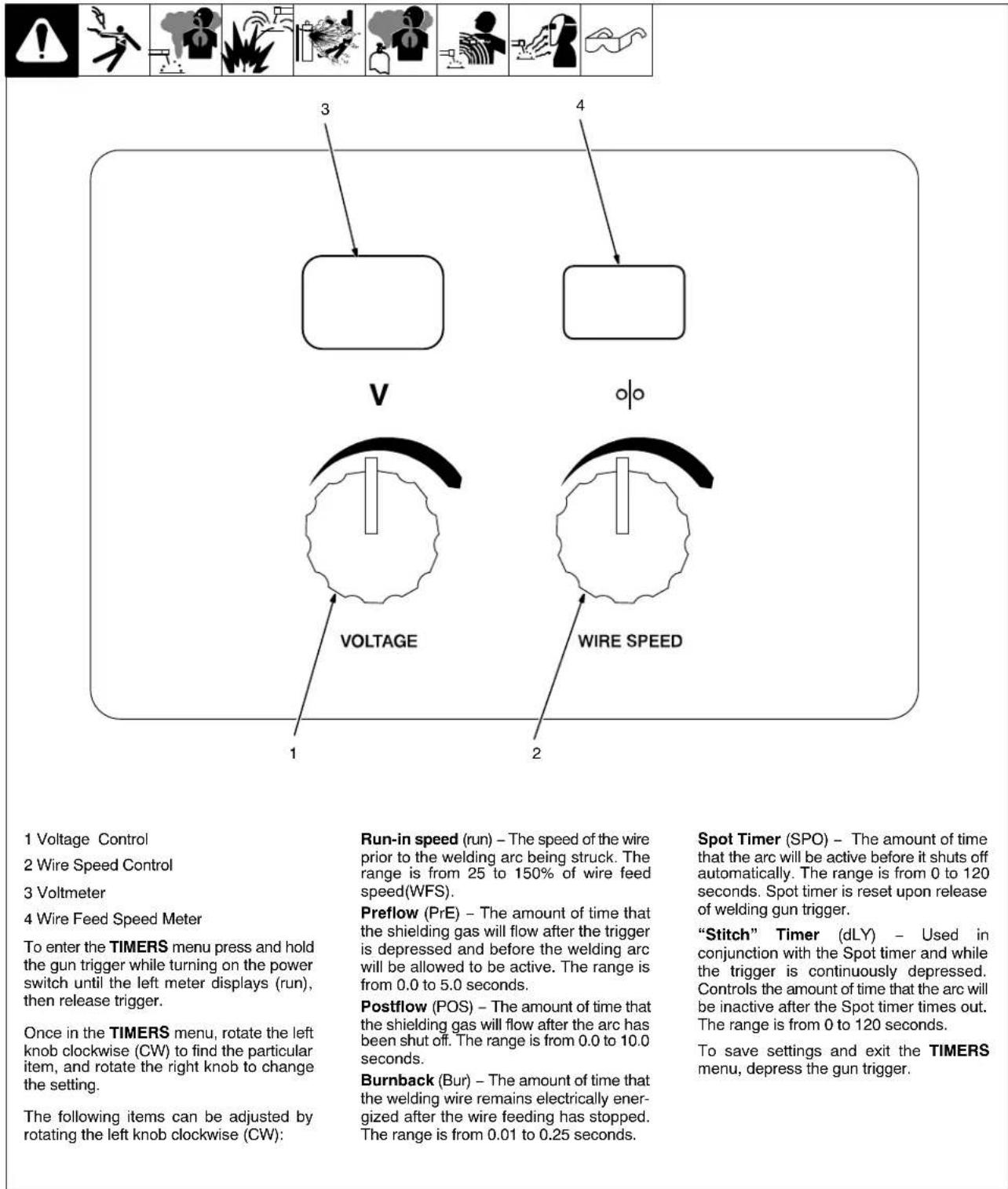
Welding wire birdnesting at the welding power source drive rolls may occur if this value is set too high.
5-5. Set Up Push Motor Torque (SUP) Or Reset (rES)

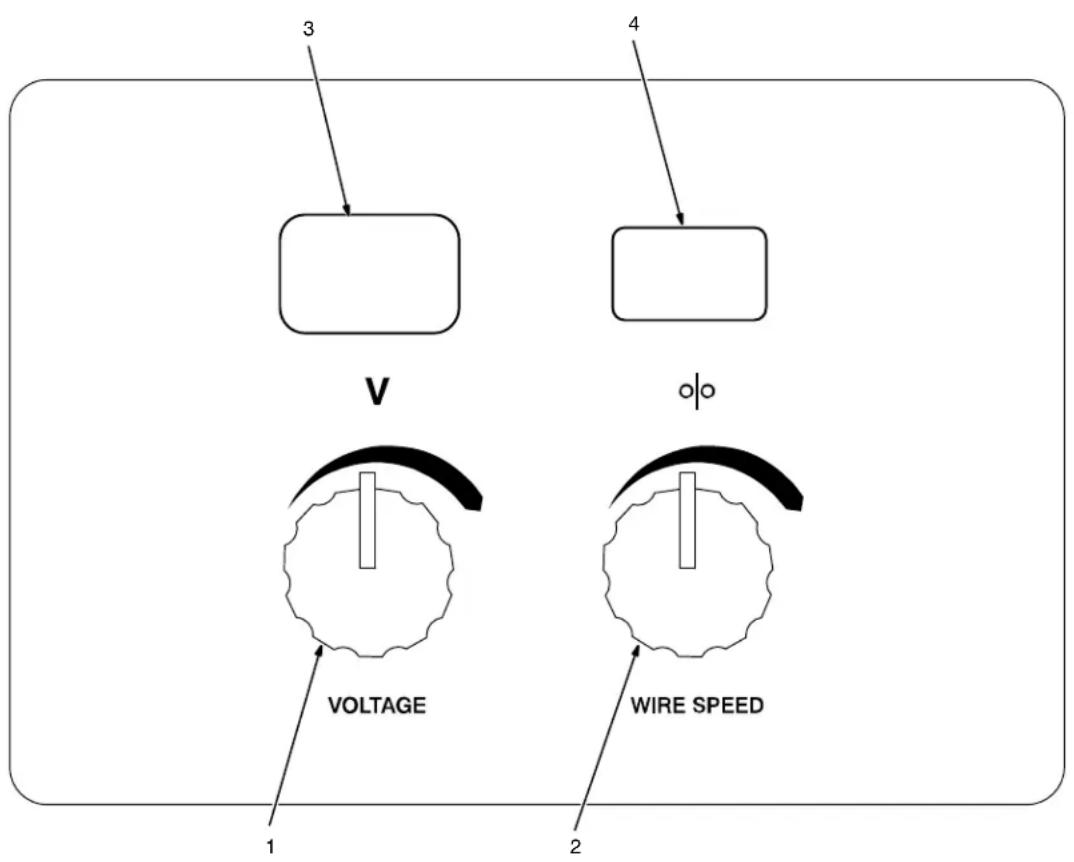
1 Voltage Control
2 Wire Speed Control
3 Voltmeter
4 Wire Feed Speed Meter
Depress the gun trigger while turning on the power switch until the left meter displays (RUN).
Rotate the left knob counterclockwise (CCW) to find the particular item, and rotate the right knob to change the setting.
The following items can be adjusted by rotating the left knob counterclockwise (CCW):
Set up Push Motor Torque (SUP) – This feature is only active when a push/pull gun is connected to the welding power source. The (SUP) setting will adjust the over-torque limit of the push motor inside the welding power source. The range is 0-250 and the default value is 130. Increasing this setting will increase the
over-torque limit and speed up the remote wire feed speed motor.
If Aluma-Pro push/pull gun has a listed SUP value, set the power source to match the SUP value.
To save settings and exit the (SUP) menu, depress the gun trigger.
Reset (rES) - Rotate the right knob to select ON. Press and release gun trigger to reset system to factory default values.
SECTION 6 - MAINTENANCE & TROUBLESHOOTING
6-1. Routine Maintenance
 |  |  |  |  |  |  |  | powerntaining. | Maintain more oftenduring severe conditions. | |
| ✓ = Check ◇ = Change ☑ = Clean ☆ = Replace* To be done by Factory Authorized Service Agent | Reference | |||||||||
| Every3Months | ☆ Unreadable Labels | Weld Terminals | ✓☆ Weld Cables | |||||||
| Every6Months | ○ Inside Unit ↕ Apply Light | Coat Of OilOr Grease To Drive MotorShaft | ○ Clean Drive Rolls | |||||||
6-2. Unit Overload
Thermistor RT1 in SCR1 protects the unit from damage due to overheating. If HL.P 002 is displayed on the meters, wait for unit to cool allowing fan motor to run before trying to weld. If unit is cool and no weld output continues, contact Factory Authorized Service Agent.
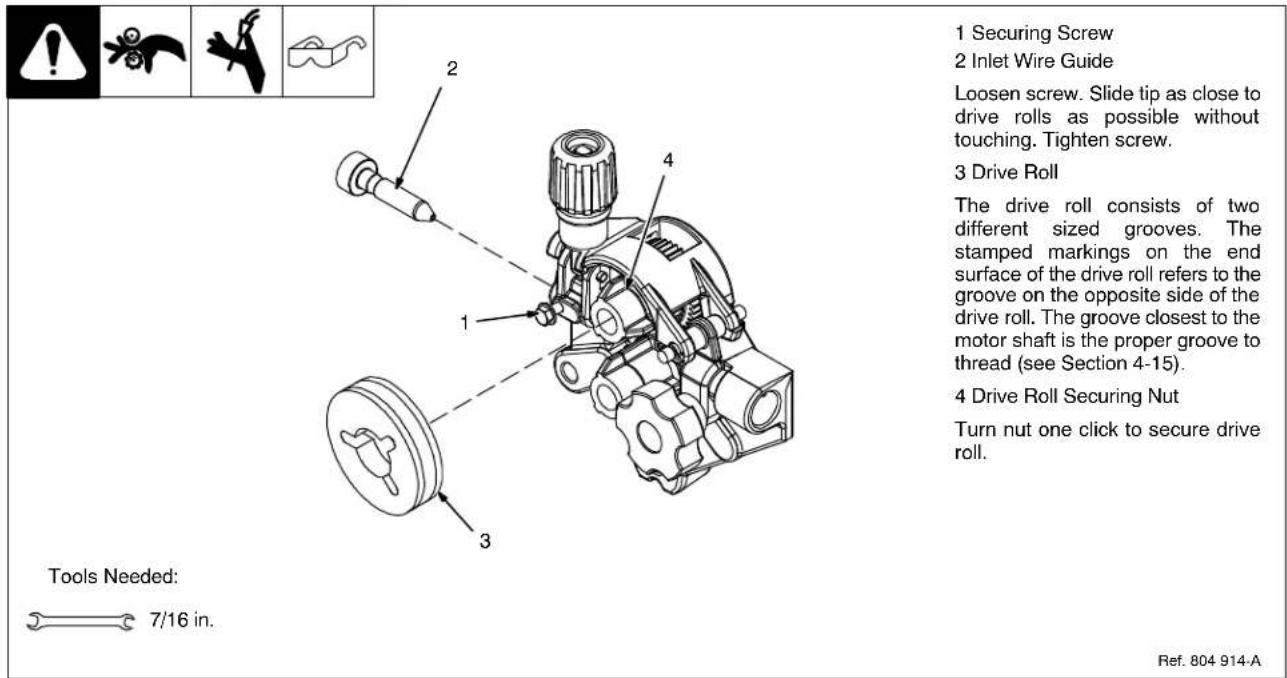
6-3. Changing Drive Roll and Wire Inlet Guide
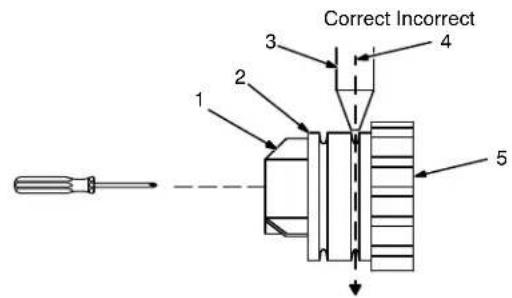
6-4. Aligning Drive Rolls and Wire Guide
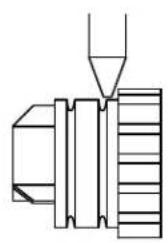
natural_image
Pure mechanical assembly diagram without any text, numbers, or symbolsTurn Off power.
View is from top of drive rolls looking down with pressure assembly open.
1 Drive Roll Securing Nut
2 Drive Roll
3 Wire Guide
4 Welding Wire
5 Drive Gear
Insert screwdriver, and turn screw in or out until drive roll groove lines up with wire guide.
Close pressure roll assembly.
Tools Needed:

Ref. 800 412-A
6-5. Troubleshooting
| Trouble Remedy | |
| No weld output; wire does not feed. | Be sure line disconnect switch is On (see Section 4-14). |
| Replace building line fuse or reset circuit breaker if open (see Section 4-14). | |
| Secure gun trigger connections (see welding gun Owner's Manual). | |
| HL.P 001 appears on meters. Turn power switch off and back on, if HL.P 001 appears on meters again, have Factory Authorized Service Agent check unit. | |
| HL.P 002 appears on meters. Thermistor RT1 is detecting an overheating condition. Wait for unit to cool allowing the fan to run. After unit is cool, if HL.P 002 message remains, have Factory Authorized Service Agent check for an open Thermistor RT1 (see Section 6-2). | |
| HL.P 004 appears on meters. Reset message by releasing the trigger or removing stuck wire causing short circuit (see Section 5-2). If message remains, have Factory Authorized Service Agent check for shorted trigger leads. | |
| Have Factory Authorized Service Agent check Power switch. | |
| Have Factory Authorized Service Agent check all board connections and main control board. | |
| No Weld Output; wire feeds. Connect work clamp to get good metal to metal contact. | |
| Low weld output. | Connect unit to proper input voltage or check for low line voltage (see Section 4-14). |
| Check input voltage jumper links and correct position if necessary (see Section 4-11). | |
| Have Factory Authorized Service Agent check main control board. | |
| Fan motor does not run. Have Factory Authorized Service Agent check fan-on-demand circuit. | |
| Low, high, or erratic wire speed. Readjust front panel settings (see Section 5-1). | |
| No wire feed. Turn Wire Speed control to | higher setting (see Section 5-1). |
| Clear obstruction in gun contact tip or liner (see welding gun Owner's Manual). | |
| Readjust drive roll pressure (see Section 4-15). | |
| Change to correct size drive rolls (see Section 6-3). | |
| Rethread welding wire (see Section 4-15). | |
| HL.P 002 appears on meters. Thermistor T is detecting an overheating condition. Wait for unit to cool allowing the fan to run. After unit is cool, If HL.P 002 message remains, contact Factory Authorized Service Agent (see Section 6-2). | |
| HL.P 004 appears on meters. Reset message by releasing the trigger or removing stuck wire causing short circuit (see Section 5-2). If message remains, have Factory Authorized Service Agent check for shorted trigger leads. | |
| HL.P 005 appears on meters. Wire feed malfunction. Check wire feed delivery system. | |
| Check gun trigger and leads. Repair or replace gun if necessary. | |
| Have Factory Authorized Service Agent check main control board. | |
Notes
SECTION 7 - ELECTRICAL DIAGRAM
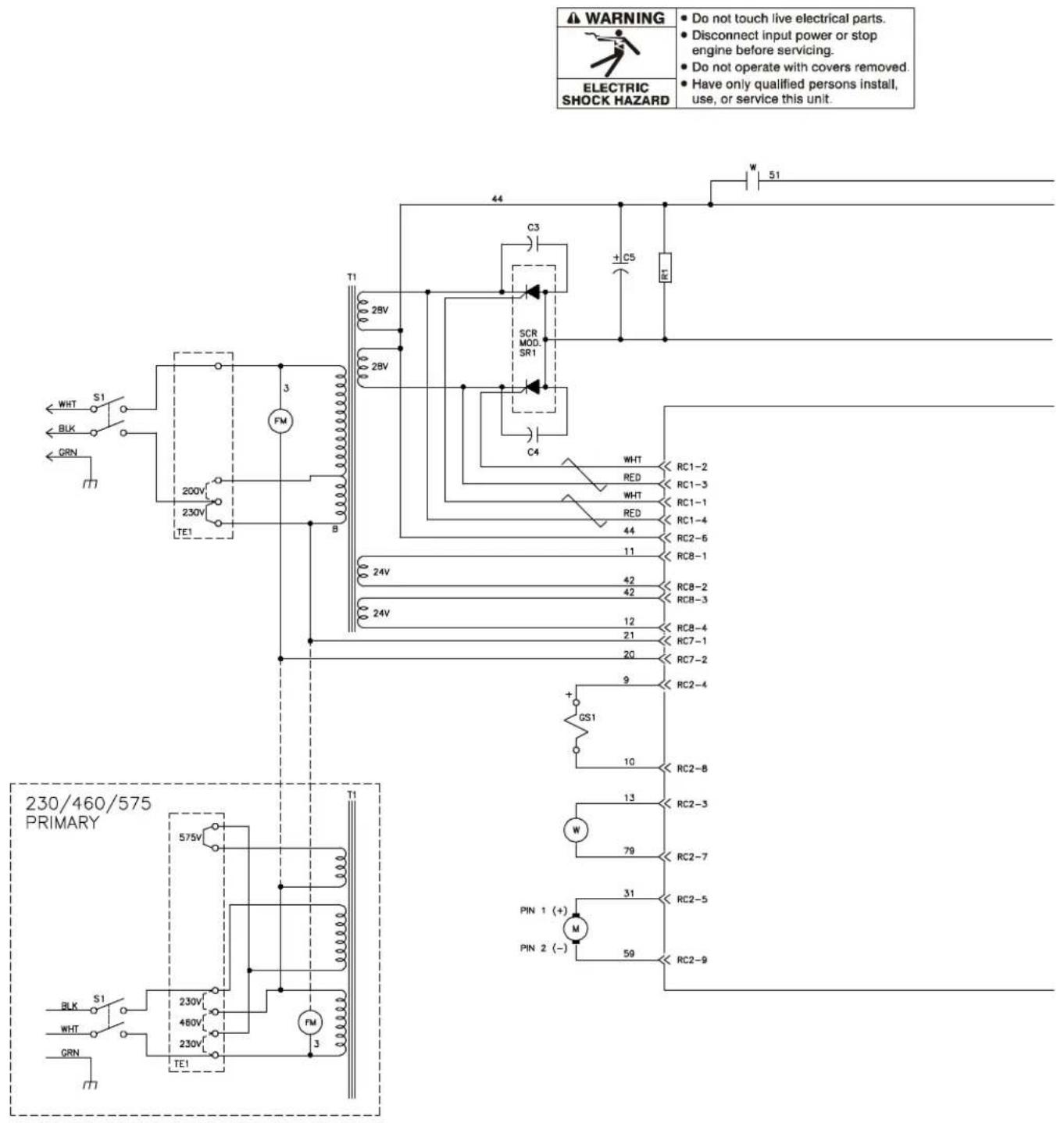
Figure 7-1. Circuit Diagram
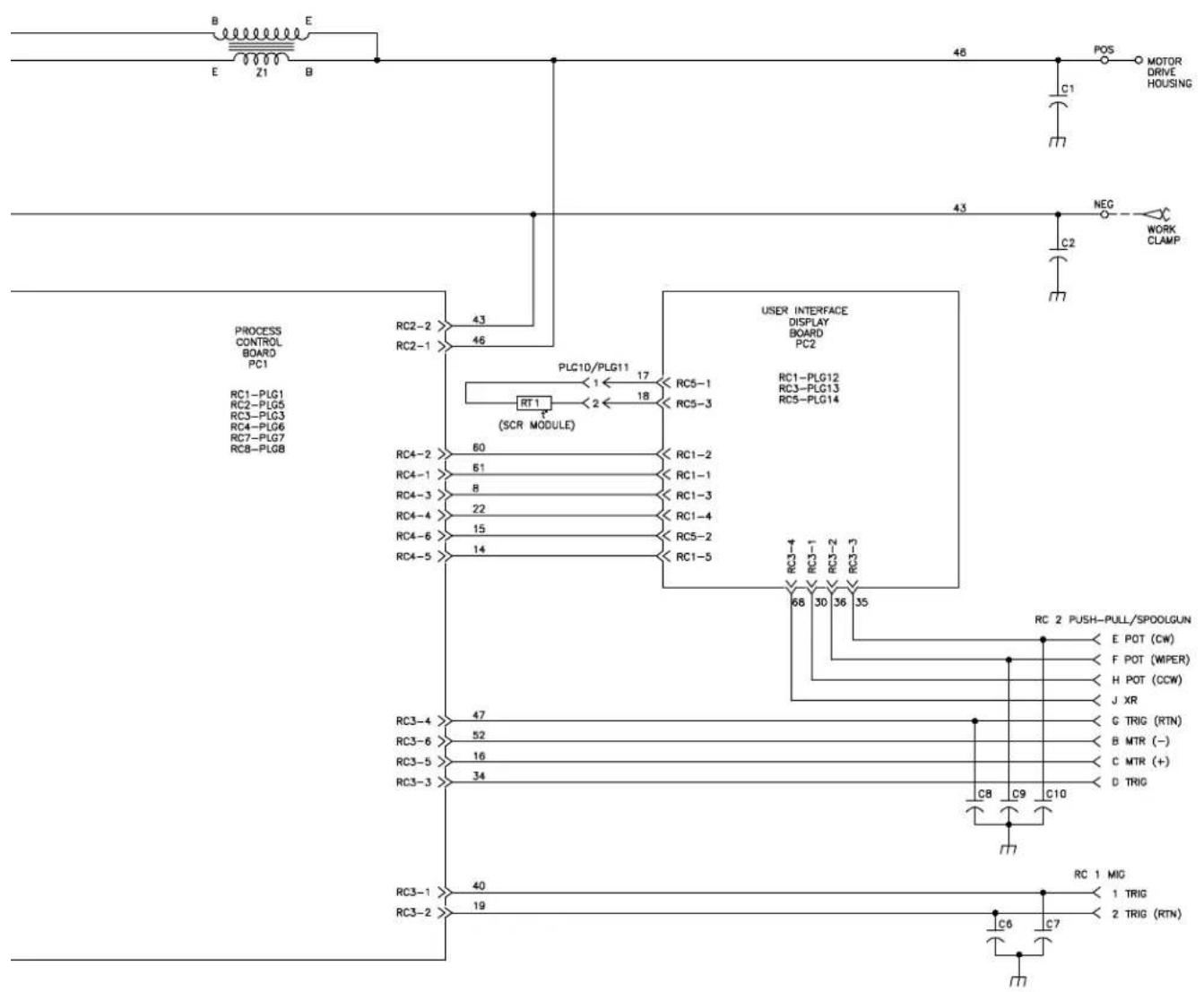

mig1 2009-12
8-1. Typical MIG Process Connections
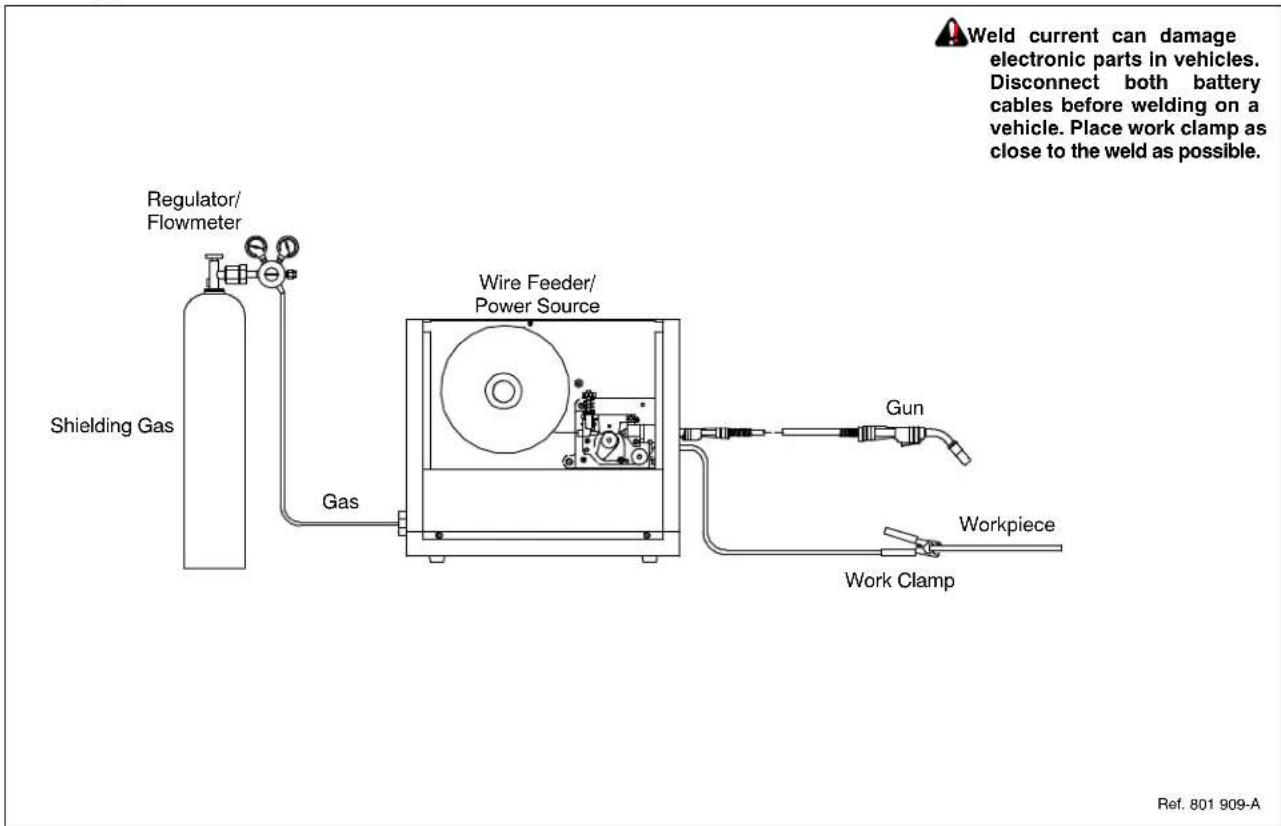
8-2. Typical MIG Process Control Settings
These settings are guidelines only. Material and wire type, joint design, fitup, position, shielding gas, etc. affect settings. Test welds to be sure they comply to specifications.
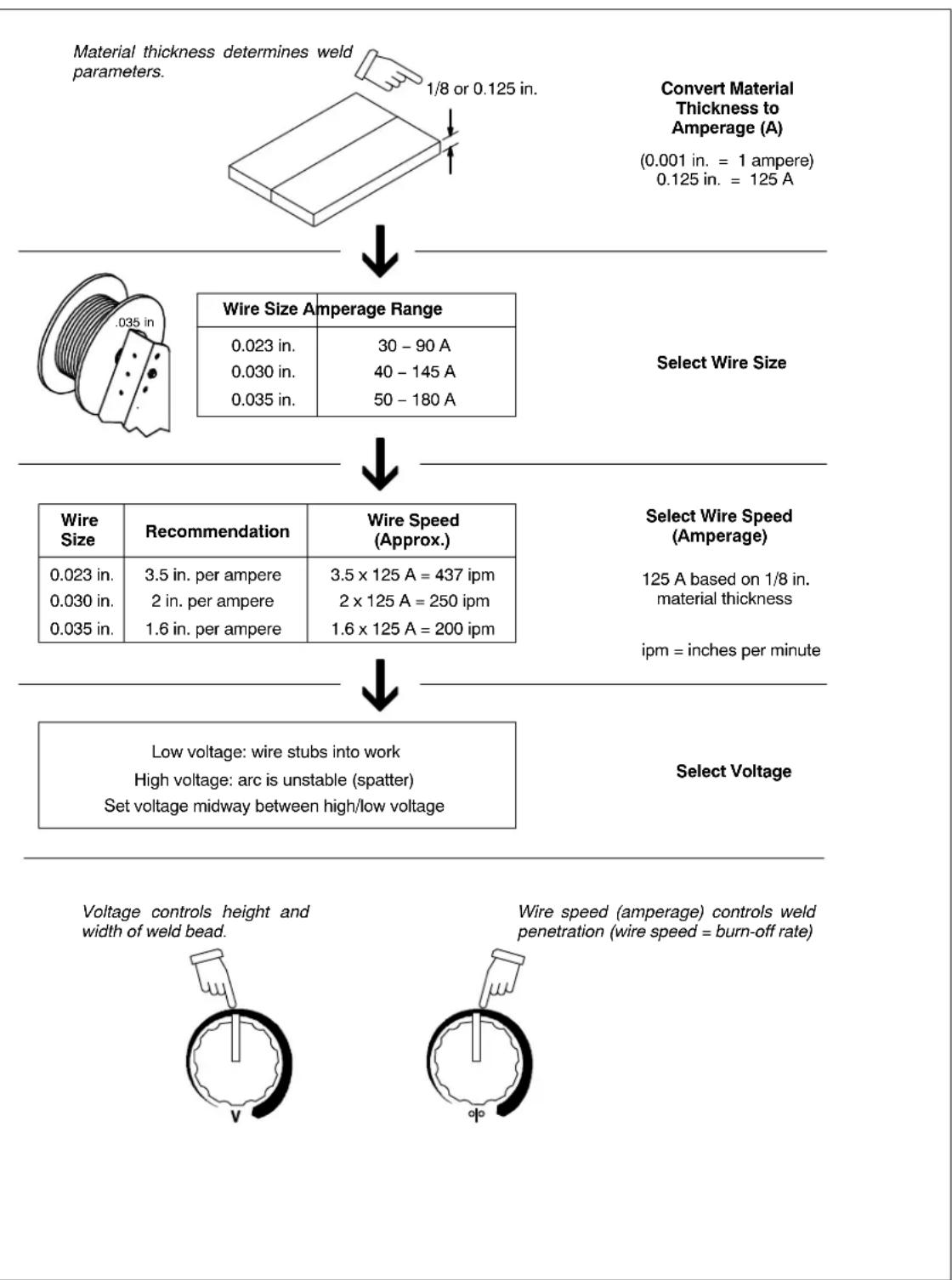
flowchart
graph TD
    A["Material thickness determines weld parameters."] --> B["1/8 or 0.125 in."]
    B --> C["Select Wire Size"]
    C --> D["Wire Size Amperage Range"]
    D --> E["0.023 in."]
    D --> F["0.030 in."]
    D --> G["0.035 in."]
    D --> H["30 - 90 A"]
    D --> I["40 - 145 A"]
    D --> J["50 - 180 A"]
    C --> K["Select Wire Speed (Amperage)"]
    K --> L["125 A based on 1/8 in. material thickness"]
    K --> M["ipm = inches per minute"]
    C --> N["Select Voltage"]
    N --> O["Low voltage: wire stubs into work"]
    N --> P["High voltage: arc is unstable (spatter)"]
    N --> Q["Set voltage midway between high/low voltage"]
    O --> R["Voltage controls height and width of weld bead."]
    P --> S["Wire speed (amperage) controls weld penetration (wire speed = burn-off rate)."]
8-3. Holding And Positioning Welding Gun
Welding wire is energized when gun trigger is pressed. Before lowering helmet and pressing trigger, be sure wire is no more than 1/2 in. (13 mm) past end of nozzle, and tip of wire is positioned correctly on seam.
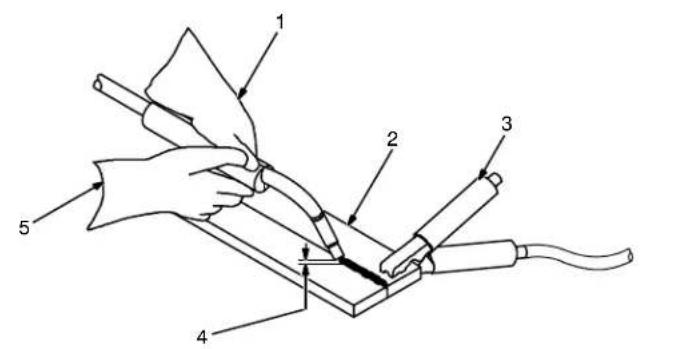
1 Hold Gun and Control Gun Trigger
2 Workpiece
3 Work Clamp
4 Electrode Extension (Stickout)
1/4 to 1/2 in. (6 To 13 mm)
5 Cradle Gun and Rest Hand on Workpiece
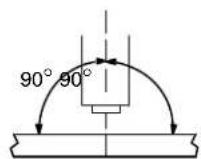
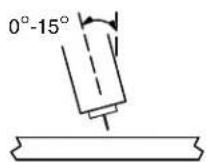
End View of Work Angle Side View of Gun Angle
GROOVE WELDS
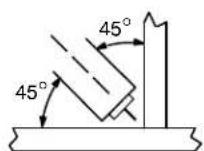
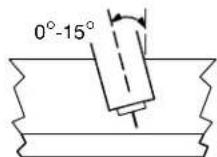
End View of Work Angle Side View of Gun Angle
FILLET WELDS
S-0421-A
8-4. Conditions That Affect Weld Bead Shape
Weld bead shape depends on gun angle, direction of travel, electrode extension (stickout), travel speed, thickness of base metal, wire feed speed (weld current), and voltage.
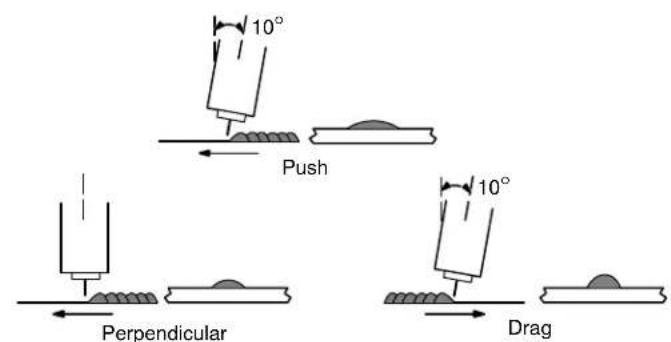
GUN ANGLES AND WELD BEAD PROFILES
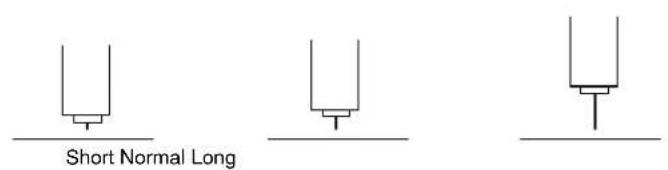
ELECTRODE EXTENSIONS (STICKOUT)
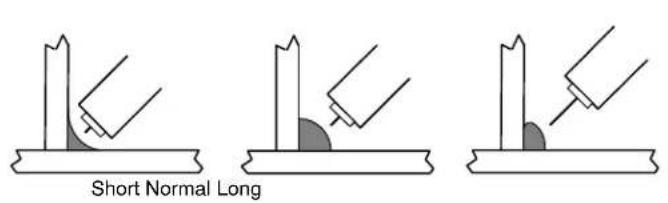
FILLET WELD ELECTODE EXTENSIONS (STICKOUT)

GUN TRAVEL SPEED
8-5. Gun Movement During Welding
Normally, a single stringer bead is satisfactory for most narrow groove weld joints; however, for wide groove weld joints or bridging across gaps, a weave bead or multiple stringer beads works better.
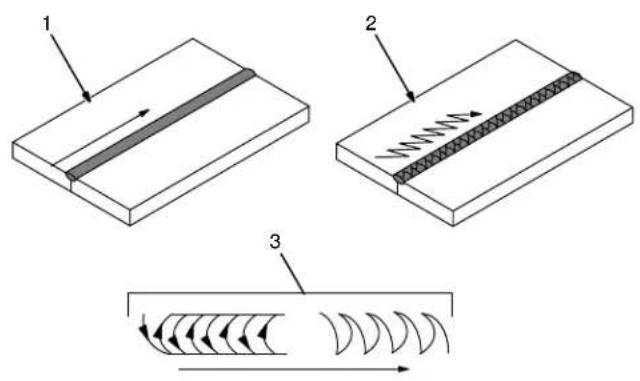
1 Stringer Bead – Steady Movement Along Seam
2 Weave Bead – Side To Side Movement Along Seam
3 Weave Patterns
Use weave patterns to cover a wide area in one pass of the electrode.
S-0054-A
8-6. Poor Weld Bead Characteristics
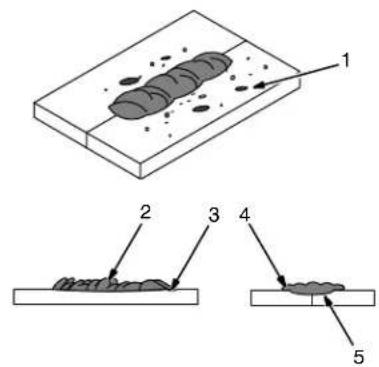
1 Large Spatter Deposits
2 Rough, Uneven Bead
3 Slight Crater During Welding
4 Bad Overlap
5 Poor Penetration
S-0053-A
8-7. Good Weld Bead Characteristics
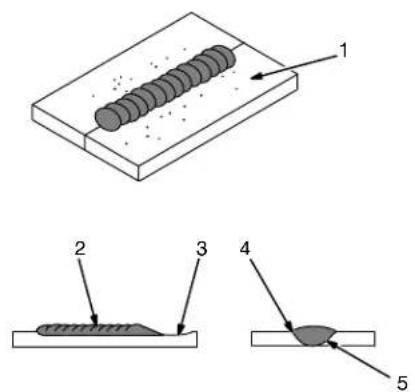
1 Fine Spatter
2 Uniform Bead
3 Moderate Crater During Welding
Weld a new bead or layer for each 1/8 in. (3.2 mm) thickness in metals being welded.
4 No Overlap
5 Good Penetration into Base Metal
S-0052-B
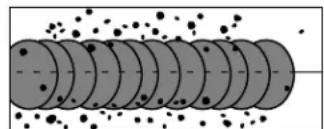
8-8. Troubleshooting - Excessive Spatter
natural_image
Diagram of a cylindrical object with internal layers and scattered particles (no text or symbols)Excessive Spatter - scattering of molten metal particles that cool to solid form near weld bead.
S-0636
| Possible Causes Corrective Actions | |
| Wire feed speed too high. Select lower wire feed speed. | |
| Voltage too high. Select lower voltage range. | |
| Electrode extension (stickout) too long. Use shorter electrode extension (stickout). | |
| Workpiece dirty. | Remove all grease, oil, moisture, rust, paint, undercoating, and dirt from work surface before welding. |
| Insufficient shielding gas at welding arc. Increase flow of shielding gas at regulator/flowmeter and/or prevent drafts near welding arc. | |
| Dirty welding wire. Use clean, dry welding wire. | |
| Eliminate pickup of oil or lubricant on welding wire from feeder or liner. | |
| Incorrect polarity. | Check polarity required by welding wire, and change to correct polarity at welding power source. |
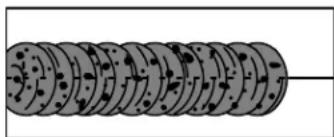
8-9. Troubleshooting – Porosity
natural_image
Diagram of a cylindrical object with repeating circular patterns and a horizontal line extending from its top (no text or symbols)Porosity - small cavities or holes resulting from gas pockets in weld metal.
S-0635
| Possible Causes Corrective Actions | |
| Insufficient shielding gas at welding arc. Increase flow of shielding gas at regulator/flowmeter and/or prevent drafts near welding arc. | |
| Wrong gas. Use welding grade shielding gas; change to different gas. | |
| Dirty welding wire. Use clean, dry welding wire. | |
| Eliminate pick up of oil or lubricant on welding wire from feeder or liner. | |
| Workpiece dirty. | Remove all grease, oil, moisture, rust, paint, coatings, and dirt from work surface before welding. |
| Use a more highly deoxidizing welding wire (contact supplier). | |
| Welding wire extends too far out of nozzle. Be sure welding wire extends not more than 1/2 in. (13 mm) beyond nozzle. | |
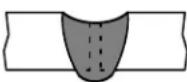
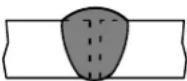
8-10. Troubleshooting – Excessive Penetration
Excessive Penetration
Good Penetration
Excessive Penetration – weld metal melting through base metal and hanging underneath weld.
S-0639
Possible Causes Corrective Actions
| Excessive heat input. Select lower voltage range and reduce wire feed speed. |
| Increase travel speed. |
8-11. Troubleshooting – Lack Of Penetration
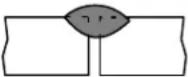 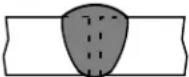 Lack Of Penetration – shallow fusion between weld metal and base metal.Lack of Penetration Good Penetration S-0638 Lack Of Penetration – shallow fusion between weld metal and base metal.Lack of Penetration Good Penetration S-0638 | |
| Possible Causes Corrective Actions | |
| Improper joint preparation. | Material too thick. Joint preparation and design must provide access to bottom of groove while maintaining proper welding wire extension and arc characteristics. |
| Improper weld technique. | Maintain normal gun angle of 0 to 15 degrees to achieve maximum penetration. |
| Keep arc on leading edge of weld puddle. | |
| Be sure welding wire extends not more than 1/2 in. (13 mm) beyond nozzle. | |
| Insufficient heat input. | Select higher wire feed speed and/or select higher voltage range. |
| Reduce travel speed. | |
| Incorrect polarity. | Check polarity required by welding wire, and change to correct polarity at welding power source. |
8-12. Troubleshooting – Incomplete Fusion
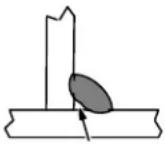 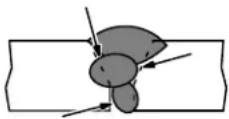 Incomplete Fusion – failure of weld metal to fuse completely with base metal or a preceding weld bead.S-0637 Incomplete Fusion – failure of weld metal to fuse completely with base metal or a preceding weld bead.S-0637 | |
| Possible Causes Corrective Actions | |
| Workpiece dirty. | Remove all grease, oil, moisture, rust, paint, undercoating, and dirt from work surface before welding. |
| Insufficient heat input. | Select higher voltage range and/or adjust wire feed speed. |
| Improper welding technique. Place stringer bead in proper location(s) at joint during welding. | |
8-13. Troubleshooting – Burn-Through
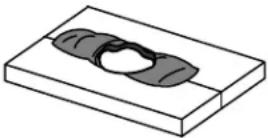 | Burn-Through – weld metal melting completely through base metal resulting in holes where no metal remains.S-0640 | |
| Possible Causes Corrective Actions | ||
| Excessive heat input. Select lower voltage range and reduce wire feed speed. | ||
8-14. Troubleshooting – Waviness Of Bead
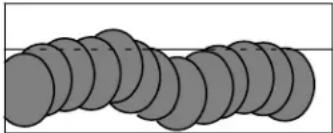 | Waviness Of Bead – weld metal that is not parallel and does not cover joint formed by base metal.S-0641 | |
| Possible Causes Corrective Actions | ||
| Welding wire extends too far out of nozzle. | Be sure welding wire extends not more than 1/2 in. (13 mm) beyond nozzle. | |
| Unsteady hand. Support hand on solid surface or use two hands. | ||
8-15. Troubleshooting – Distortion
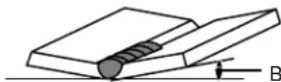 ase metal movesin the direction ofthe weld bead. ase metal movesin the direction ofthe weld bead. | Distortion – contraction of weld metal during welding that forcesbase metal to move.S-0642 | |
| Possible Causes Corrective Actions | ||
| Excessive heat input. Use restraint (clamp) to | hold base metal in position. | |
| Make tack welds along joint before starting welding operation. | ||
| Select lower voltage range and/or reduce wire feed speed. | ||
| Increase travel speed. | ||
| Weld in small segments and allow cooling between welds. | ||
8-16. Common MIG Shielding Gases
This is a general chart for common gases and where they are used. Many different combinations (mixtures) of shielding gases have been developed over the years. The most commonly used shielding gases are listed in the following table.
| Gas | Application | |||
| Spray Arc Steel Short | Circuiting Steel | Short Circuiting Stainless Steel | Aluminum | |
| Argon X | ||||
| Argon + 25% CO2 | X | |||
| 80% or greater Argon + balance CO2 or Oxygen | X | X1 | ||
| 100% CO2 | X | |||
| Tri-Mix2 | X | |||
1 Limited short circuiting use
2 90% HE + 7-1/2% AR + 2-1/2% CO 2
8-17. Troubleshooting Guide For Semiautomatic Welding Equipment
| Problem Probable Cause | Remedy | |
| Wire feed motor operates, but wire does not feed. | Too little pressure on wire feed rolls. Increase pressure setting on wire feed rolls. | |
| Incorrect wire feed rolls. | Check size stamped on wire feed rolls, replace to match wire size and type if necessary. | |
| Wire spool brake pressure too high. Decrease brake pressure on wire spool. | ||
| Restriction in the gun and/or assembly. | Check and replace cable, gun, and contact tip if damaged. Check size of contact tip and cable liner, replace if necessary. | |
| Wire curling up in front of the wire feed rolls (bird nesting). | Too much pressure on wire feed rolls. | Decrease pressure setting on wire feed rolls. |
| Incorrect cable liner or gun contact tip size. | Check size of contact tip and check cable liner length and diameter, replace if necessary. | |
| Gun end not inserted into drive housing properly. | Loosen gun securing bolt in drive housing and push gun end into housing just enough so it does not touch wire feed rolls. | |
| Dirty or damaged (kinked) liner. | Replace liner. | |
| Wire feeds, but no gas flows. | Gas cylinder empty. | Replace empty gas cylinder. |
| Gas nozzle plugged. | Clean or replace gas nozzle. | |
| Gas cylinder valve not open or flowmeter not adjusted. | Open gas valve at cylinder and adjust flow rate. | |
| Restriction in gas line. | Check gas hose between flowmeter and wire feeder, and gas hose in gun and cable assembly. | |
| Loose or broken wires to gas solenoid. | Have Factory Authorized Service Agent repair wiring. | |
| Gas solenoid valve not operating. | Have Factory Authorized Service Agent replace gas solenoid valve. | |
| Incorrect primary voltage connected to welding power source. | Check primary voltage and relink welding power source for correct voltage. | |
| Problem RemedyProbable Cause | ||
| Welding arc not stable. | Wire slipping in drive rolls. | Adjust pressure setting on wire feed rolls. Replace worn drive rolls if necessary. |
| Wrong size gun liner or contact tip. Match liner and contact tip to wire size and type. | ||
| Incorrect voltage setting for selected wire feed speed on welding power source. | Readjust welding parameters. | |
| Loose connections at the gun weld cable or work cable. | Check and tighten all connections. | |
| Gun in poor shape or loose connection inside gun. Repair or replace gun as necessary. | ||
9-1. Drive Roll And Wire Guide Kits
Base selection of drive rolls upon the following recommended usages:
1 V-Grooved rolls for hard wire.
2 U-Grooved rolls for soft and soft shelled cored wires.
3 U-Cogged rolls for extremely soft shelled wires (usually hard surfacing types).
4 V-Knurled rolls for hard shelled cored wires.
5 Drive roll types may be mixed to suit particular requirements (example: V-Knurled roll in combination with U-Grooved).
| Wire Diameter | Kit No. | Drive Roll | Inlet Wire Guide | |||
| Fraction Decimal Metric | Part No. Type | |||||
| .023/.025 in. | .023/.025 in. | 0.6 mm | 087 131 | 087 130 | V-Grooved | 056 192 |
| .030/.035 in. | .030/.035 in. | 0.8/0.9 mm | 204 579 | 203 526 | V-Grooved | 056 192 |
| .030 in. | .030 in. | 0.8 mm | 079 594 | 053 695 | V-Grooved | 056 192 |
| .035 in. | .035 in. | 0.9 mm | 079 595 | 053 700 | V-Grooved | 056 192 |
| .045 in. | .045 in. | 1.2 mm | 079 596 | 053 697 | V-Grooved | 056 193 |
Ref. S-0026-B/7-91
A complete Parts List is available on-line at www.MillerWelds.com
Warranty Questions?
Call
1-800-4-A-MILLER for your local Miller distributor.
Your distributor also gives you ...
Service
You always get the fast, reliable response you need. Most replacement parts can be in your hands in 24 hours.
Support
Need fast answers to the tough welding questions? Contact your distributor. The expertise of the distributor and Miller is there to help you, every step of the way.

Miller®
TRUE BLUE® WARRANTY
Effective January 1, 2010
(Equipment with a serial number preface of MA or newer)
This limited warranty supersedes all previous Miller warranties and is exclusive with no other guarantees or warranties expressed or implied.
LIMITED WARRANTY – Subject to the terms and conditions below, Miller Electric Mfg. Co., Appleton, Wisconsin, warrants to its original retail purchaser that new Miller equipment sold after the effective date of this limited warranty is free of defects in material and workmanship at the time it is shipped by Miller. THIS WARRANTY IS EXPRESSLY IN LIEU OF ALL OTHER WARRANTIES, EXPRESS OR IMPLIED, INCLUDING THE WARRANTIES OF MERCHANTABILITY AND FITNESS.
Within the warranty periods listed below, Miller will repair or replace any warranted parts or components that fail due to such defects in material or workmanship. Miller must be notified in writing within thirty (30) days of such defect or failure, at which time Miller will provide instructions on the warranty claim procedures to be followed.
Miller shall honor warranty claims on warranted equipment listed below in the event of such a failure within the warranty time periods. All warranty time periods start on the delivery date of the equipment to the original end-user purchaser, and not to exceed one year after the equipment is shipped to a North American distributor or eighteen months after the equipment is shipped to an International distributor.
- 5 Years Parts — 3 Years Labor
* Original main power rectifiers only to include SCRs, diodes, and discrete rectifier modules
2.3 Years — Parts and Labor
* Engine Driven Welding Generators (NOTE: Engines are warranted separately by the engine manufacturer.)
* Inverter Power Sources (Unless Otherwise Stated)
* Plasma Arc Cutting Power Sources
* Process Controllers
* Semi-Automatic and Automatic Wire Feeders
* Smith 30 Series Flowgauge and Flowmeter Regulators (No Labor)
* Transformer/Rectifier Power Sources
* Water Coolant Systems (Integrated)
3.2 Years — Parts
* Auto-Darkening Helmet Lenses (No Labor)
- 1 Year — Parts and Labor Unless Specified
* Automatic Motion Devices
* CoolBelt and CoolBand Blower Unit (No Labor)
* External Monitoring Equipment and Sensors
* Field Options
(NOTE: Field options are covered for the remaining warranty period of the product they are installed in, or for a minimum of one year — whichever is greater.)
* Flowgauge and Flowmeter Regulators (No Labor)
* RFCS Foot Controls (Except RFCS-RJ45)
* Fume Extractors
* HF Units
* ICE Plasma Cutting Torches (No Labor)
* Induction Heating Power Sources, Coolers, and Electronic Controls/Recorders
* Load Banks
* Motor Driven Guns (w/exception of Spoolmate Spoolguns)
* PAPR Blower Unit (No Labor)
* Positioners and Controllers
* Racks
* Running Gear/Trailers
* Spot Welders
* Subarc Wire Drive Assemblies
* Water Coolant Systems (Non-Integrated)
* Weldcraft-Branded TIG Torches (No Labor)
* Work Stations/Weld Tables (No Labor)
5.6 Months — Parts
* Batteries
* Bernard Guns (No Labor)
* Tregaskiss Guns (No Labor)
- 90 Days — Parts
* Accessory (Kits)
* Canvas Covers
* Induction Heating Coils and Blankets, Cables, and Non-Electronic Controls
* M-Guns
* MIG Guns and Subarc (SAW) Guns
* Remote Controls and RFCS-RJ45
* Replacement Parts (No labor)
* Roughneck Guns
* Spoolmate Spoolguns
Miller's True Blue® Limited Warranty shall not apply to:
-
Consumable components; such as contact tips, cutting nozzles, contactors, brushes, relays, work station table tops and welding curtains, or parts that fail due to normal wear. (Exception: brushes and relays are covered on all engine-driven products.)
-
Items furnished by Miller, but manufactured by others, such as engines or trade accessories. These items are covered by the manufacturer's warranty, if any.
-
Equipment that has been modified by any party other than Miller, or equipment that has been improperly installed, improperly operated or misused based upon industry standards, or equipment which has not had reasonable and necessary maintenance, or equipment which has been used for operation outside of the specifications for the equipment.
MILLER PRODUCTS ARE INTENDED FOR PURCHASE AND USE BY COMMERCIAL/INDUSTRIAL USERS AND PERSONS TRAINED AND EXPERIENCED IN THE USE AND MAINTENANCE OF WELDING EQUIPMENT.
In the event of a warranty claim covered by this warranty, the exclusive remedies shall be, at Miller's option: (1) repair; or (2) replacement; or, where authorized in writing by Miller in appropriate cases, (3) the reasonable cost of repair or replacement at an authorized Miller service station; or (4) payment of or credit for the purchase price (less reasonable depreciation based upon actual use) upon return of the goods at customer's risk and expense. Miller's option of repair or replacement will be F.O.B., Factory at Appleton, Wisconsin, or F.O.B. at a Miller authorized service facility as determined by Miller. Therefore no compensation or reimbursement for transportation costs of any kind will be allowed.
TO THE EXTENT PERMITTED BY LAW, THE REMEDIES PROVIDED HEREIN ARE THE SOLE AND EXCLUSIVE REMEDIES. IN NO EVENT SHALL MILLER BE LIABLE FOR DIRECT, INDIRECT, SPECIAL, INCIDENTAL OR CONSEQUENTIAL DAMAGES (INCLUDING LOSS OF PROFIT), WHETHER BASED ON CONTRACT, TORT OR ANY OTHER LEGAL THEORY.
ANY EXPRESS WARRANTY NOT PROVIDED HEREIN AND ANY IMPLIED WARRANTY, GUARANTY OR REPRESENTATION AS TO PERFORMANCE, AND ANY REMEDY FOR BREACH OF CONTRACT TORT OR ANY OTHER LEGAL THEORY WHICH, BUT FOR THIS PROVISION, MIGHT ARISE BY IMPLICATION, OPERATION OF LAW, CUSTOM OF TRADE OR COURSE OF DEALING, INCLUDING ANY IMPLIED WARRANTY OF MERCHANTABILITY OR FITNESS FOR PARTICULAR PURPOSE, WITH RESPECT TO ANY AND ALL EQUIPMENT FURNISHED BY MILLER IS EXCLUDED AND DISCLAIMED BY MILLER.
Some states in the U.S.A. do not allow limitations of how long an implied warranty lasts, or the exclusion of incidental, indirect, special or consequential damages, so the above limitation or exclusion may not apply to you. This warranty provides specific legal rights, and other rights may be available, but may vary from state to state.
In Canada, legislation in some provinces provides for certain additional warranties or remedies other than as stated herein, and to the extent that they may not be waived, the limitations and exclusions set out above may not apply. This Limited Warranty provides specific legal rights, and other rights may be available, but may vary from province to province.

Owner's Record
Please complete and retain with your personal records.
Model Name Serial/Style Number
Purchase Date (Date which equipment was delivered to original customer.)
Distributor
Address
City
State Zip
For Service
Contact a DISTRIBUTOR or SERVICE AGENCY near you.
Always provide Model Name and Serial/Style Number.
| Contact your Distributor for: | Welding Supplies and ConsumablesOptions and AccessoriesPersonal Safety EquipmentService and RepairReplacement PartsTraining (Schools, Videos, Books)Technical Manuals (Servicing Information and Parts)Circuit DiagramsWelding Process HandbooksTo locate a Distributor or Service Agency visit www.millerwelds.com or call 1-800-4-A-Miller |
| Contact the Delivering Carrier to: | File a claim for loss or damage during shipment.For assistance in filing or settling claims, contact your distributor and/or equipment manufacturer's Transportation Department. |
Miller Electric Mfg. Co.
An Illinois Tool Works Company
1635 West Spencer Street
Appleton, WI 54914 USA
International Headquarters-USA
USA Phone: 920-735-4505 Auto-Attended
USA & Canada FAX: 920-735-4134
International FAX: 920-735-4125
For International Locations Visit
www.MillerWelds.com

Miller®