StereoMicro - Microscope BRESSER - Free user manual and instructions
Find the device manual for free StereoMicro BRESSER in PDF.



| Product Type | Binocular stereo microscope |
| Brand | Bresser |
| Model | StereoMicro |
| Category | Microscope |
| Use | Observation of opaque objects (rocks, insects, plants, etc.) |
| Lighting | Integrated LED |
| Power supply | 2 batteries (type AA/LR6) or power adapter (included) |
| Focus adjustment | Focus wheel |
| Interpupillary distance adjustment | Yes, by swiveling the eyepiece tubes |
| Object clamp | Yes |
| Observation stage | With specimen plate |
| Eyepieces | 2 removable eyepieces (not specified) |
| Material | Robust plastic |
| Safety | Suitable for children under adult supervision; warnings against choking, electric shock, and injury hazards |
| External cleaning | With a dry cloth, without cleaning liquid |
| Lens cleaning | With lens cloth or microfiber, possibly moistened with eyeglass cleaner |
| Storage | In the included carrying case or transport packaging; remove batteries if unused for a long time |
| Certification | CE according to EN 61010-1:2001 |
| Package contents | Microscope, 2 eyepieces, object clamp, diffuser cap, lens cloth, power adapter, instruction manual |
| Warranty | Not specified |
Frequently Asked Questions - StereoMicro BRESSER
User questions about StereoMicro BRESSER
0 question about this device. Answer the ones you know or ask your own.
Ask a new question about this device
Download the instructions for your Microscope in PDF format for free! Find your manual StereoMicro - BRESSER and take your electronic device back in hand. On this page are published all the documents necessary for the use of your device. StereoMicro by BRESSER.
USER MANUAL StereoMicro BRESSER
natural_image
Microscopic view of a white and black microscope stand against a blue background (no text or symbols visible)StereoMicro
Art. No. 88-52000
DE Bedienungsanleitung
GB Operating Instructions
FR Mode d'emploi
NL Handleiding
IT Istruzioni per l'uso
ES Instrucciones de uso
PT Manual de utilização

DE Bedienungsanleitung ....4
GB Operating Instructions 10
FR Mode d'emploi 16
NL Handleiding 22
It Istruzioni per l'uso 28
ES Instrucciones de uso 34
PT Manual de utilização 40

natural_image
Close-up of a mechanical component with labeled part '8' and figure label 'Fig. 3' (no other text or symbols)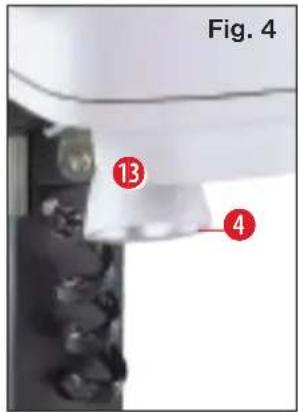

Liebe Eltern,
This product is ideal for children wanting to explore their world in a completely new way. The device is as such, easy to use and care for, rugged and good-looking.
More important to you and of course to us is that it is safe to use. During manufacture, we made sure that this product is as safe it can be for children to use. Some residual risk is, however, unavoidable. This product, after all, is not a toy in the usual sense but rather an optical instrument that children can use to experiment, research and discover their world.
That's why we request your cooperation here. These operating instructions were written for children but please read them through together with your child or children and answer his/her/their questions. Don't
forget to explain possible risks. These are summarised under the heading „warnings“. Please adjust/set up the device together with your child or children and never allow any child to use any of our optical products unsupervised.
We hope all users and their parents will enjoy our products.
Your Bresser team

Dear junior researcher,
Congratulations on becoming the proud owner of this product.
You'll be amazed when reading these instructions just how much can be done and explored with your new device.
Take a look and emerge yourself into the adventurous world of nature and discovery.
It really is exciting and a lot of fun discovering the world with this product.
Before you get started, read the operating instructions fully, as there are a few things you need to know to get the best out of your new device.
The „Warnings“ should be read carefully. Use the product exactly as per the operating instructions to avoid any risk or injury. Keep these instruc-
tions in a safe place for later reference. If you give the device away or make a present of it make sure these instructions accompany it.
And now it just remains to say, „Have loads of fun researching and discovering“
Pia

DANGER to your child!
Aids with sharp edges and tips are sometimes used with this device. Please store the device and all of its accessories and aids out of the reach of children. There is a risk of INJURY.
This device contains electronic components that are powered by either a mains connection or batteries. Never leave a child unsupervised with this device. The device should only be used as per these instructions otherwise there is a serious RISK of ELECTRICAL SHOCK.
Batteries should be kept out of children's reach. When inserting batteries please ensure the polarity is correct. Leaking or damaged batteries can cause injury if they come into contact with the skin. If you need to handle such batteries please wear suitable safety gloves.
Children should only use this device under supervision. Keep packaging materials (plastic bags, rubber bands, etc.) away from children. There is a risk of SUFFOCATION.
FIRE-/ DANGER OF EXPLOSION!
Do not expose the device to high temperatures. Use only the mains adapter supplied or those battery types recommended. Never short circuit the device or batteries or throw into a fire. Exposure to high temperatures or misuse of the device can lead to short circuits, fire or even explosion!
RISK of material damage
Never take the device apart. Please consult your dealer if there are any defects. The dealer will contact our service centre and send the device in for repair if needed.
Do not subject the device to temperatures exceeding 60°C.
TIPS on cleaning
Remove the device from it's energy source before cleaning (remove plug from socket / remove batteries).
Clean the exterior of device with a dry cloth. Do not use cleaning fluids so as to avoid causing damage to electronic components.
Protect the device from dust and moisture. Store the device in the bag supplied or in its original packaging. Batteries should be removed from the device if it is not going to be used for a long period of time.
Clean the lens (objective and eye-piece) only with the cloth supplied or some other soft lint-free cloth (e.g. micro-fibre). Do not use excessive pressure - this may scratch the lens.

Dampen the cleaning cloth with a spectacle cleaning fluid and use it on very dirty lenses.
DISPOSAL

Dispose of the packaging material/s as legally required.
Consult the local authority on the matter if necessary.

Do not dispose of electrical equipment in your ordinary refuse. The European guideline 2002/96/EU on Electronic and Electrical Equipment Waste and relevant laws applying to it require such used equipment to be separately collected and recycled in an environment-friendly manner. Empty batteries and accumulators must be disposed of separately. Information on disposing of all such equipment made after 01 June 2006 can be obtained from your local authority.
EEC conformity explanation
CE Meade Instruments Europe GmbH & Co KG, resident in 46414 Rhede/Westf., Gutenbergstr. 2, Germany, explains the agreement with in the following specified EEC guidelines for this product:
EN 61010-1:2001
Product description:
StereoMicro
Model /Description:
Microscope STX
Rhede, 05-05-2009
Meade Instruments Europe GmbH & Co. KG
Helmut Ebbert
Managing director

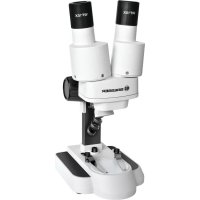
Your microscope is made up of the following parts (Fig. 1-4):
1 Binocular view piece (with eye-piece supports)
2 Stereo objective
3 Eyepieces
4 Illumination (LED)
5 Microscope stage (with object plate)
6 Stage clips
7 Focus knob
8 On/off switch
9 Battery compartment
10 Battery compartment clamp closure
11 Battery compartment cover
12 Battery contacts (flat sheets and spring terminals)
13 Diffusion cap
Location
Before you start, choose an ideal location for using your microscope. It is important that you have enough light available (window, desk lamp).
Simple Observation
Place the object to be observed (for example, a rock) in the middle of the microscope stage (5). When the object is large enough, it is best to fix it in place with the stage clips (6).
Now, take a look through the binocular eye lens (1) and change the distance of the eyepiece (3), so that you have a circular, clear image.
The sharpness is adjusted by slowly turning the focus knob (7).
Illumination
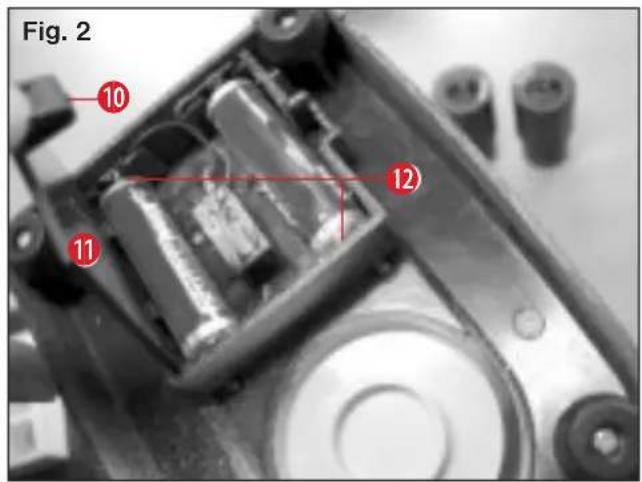
Remove both eyepieces (3) from the eyepiece supports (1) and turn the entire microscope over. In the base of the microscope there is a battery compartment (9). Push the clamp closure (10) and open the battery
compartment by pulling the cover (11) open diagonally.
Place the batteries in the compartment so that the flat minus poles (-) press against the spring terminal and the plus poles (+) are touching the flat contact sheets (12).
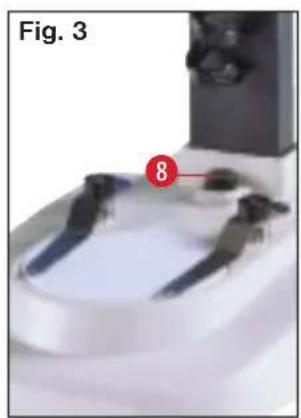
Close the battery compartment with the cover (11) and turn the microscope around again. Place the eye-pieces back on. You can not turn on the light (4) with the on/off switch (8) on the base of the microscope.

Chers parents,
Meade Instruments Europe
GmbH & Co. KG
Gutenbergstr. 2
DE-46414 Rhede
Germany
www.bresser.de

- StereoMicro
- Liebe Eltern,
- Dear junior researcher,
- DANGER to your child!
- FIRE-/ DANGER OF EXPLOSION!
- RISK of material damage
- TIPS on cleaning
- DISPOSAL
- EEC conformity explanation
- Helmut Ebbert
- Your microscope is made up of the following parts (Fig. 1-4):
- Location
- Simple Observation
- Illumination
- Chers parents,
Brand : BRESSER
Model : StereoMicro
Category : Microscope