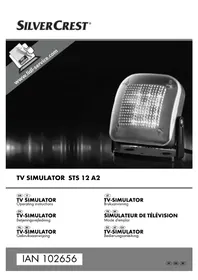
STS 12 A2 - Light simulator SILVERCREST - Free user manual and instructions
Find the device manual for free STS 12 A2 SILVERCREST in PDF.



| Product type | Light simulator (TV simulator) |
| Brand | SilverCrest |
| Model | STS 12 A2 |
| Power supply | AC adapter 9 V, 200 mA |
| Adapter input voltage | 100 - 240 V ~, 50 - 60 Hz |
| Adapter output voltage | 9 V =, 200 mA |
| Protection class | II |
| Main functions | TV flicker simulation with dusk sensor |
| Operating modes | ON, DUSK+2HRS, DUSK+4HRS, DUSK+6HRS, OFF |
| Dusk sensor | Yes, automatic activation at dusk |
| Included accessories | Simulator, AC adapter, mounting hardware (2 screws, 2 wall plugs, adhesive tapes), instruction manual |
| Care and cleaning | Clean with a soft, dry cloth; avoid moisture |
| Safety | Do not stare at the LEDs; do not use near flames; do not expose to rain; keep out of reach of children |
| Warranty | 3 years from date of purchase |
| After-sales service (France) | 0800 919270, kompernass@lidl.fr, IAN 102656 |
| Importer | KOMPERNASS HANDELS GMBH, BURGSTRASSE 21, 44867 BOCHUM, GERMANY |
Frequently Asked Questions - STS 12 A2 SILVERCREST
User questions about STS 12 A2 SILVERCREST
0 question about this device. Answer the ones you know or ask your own.
Ask a new question about this device
Download the instructions for your Light simulator in PDF format for free! Find your manual STS 12 A2 - SILVERCREST and take your electronic device back in hand. On this page are published all the documents necessary for the use of your device. STS 12 A2 by SILVERCREST.
USER MANUAL STS 12 A2 SILVERCREST
Operating instructions
DK
TV-SIMULATOR
Before reading, unfold the page containing the illustrations and familiarise yourself with all functions of the device.
SE
GB/IE Operating instructions Page 1
| SE | Bruksanvising | Sidan | 17 |
| DK | Betjeningsvejledning | Side | |
| FR/BE Mode d'emploi Page 49 | |||
| NL/BE Gebruiksaanwijzing Pgina 65 | |||
| DE/AT/CH Bedienungsanleitung | Seite | 81 | |
0
Index
Introduction 2
Copyright 2
Intended use 2
Scope of delivery and transport inspection . . . . . . 3
Unpacking 3
Disposal of the packaging 4
Operating elements 4
Technical data 4
Safety instructions 5
Functions 7
Setup 7
Wall mounting 8
Operation 11
Cleaning 13
Storage 13
Disposal of the appliance 13
Appendix 14
Notes on the EC Declaration of Conformity 14
Warranty 14
Service 15
Importer 15
Introduction
Congratulations on the purchase of your new appliance.
You have clearly decided in favour of a high-quality product. These operating instructions are a part of this product. They contain important information in regard to safety, use and disposal. Before using the product, familiarise yourself with all operating and safety instructions. Use this appliance only as described and only for the specified areas of application. In addition, pass these operating instructions on to whoever might acquire the appliance at a future date.
Copyright
This documentation is copyright protected.
Any copying or reproduction of it, including as extracts, as well as the reproduction of images, also in an altered state, is only permitted with the written authorisation of the manufacturer.
Intended use
This appliance is used to simulate light proportions similar to those created by a TV set. This appliance is intended exclusively for indoor use in private households. Do not use it for commercial applications!
WARNING
Risks from unintended use!
Risks can be engendered if the appliance is used for unintended purposes and/or other types of use.
Use the appliance exclusively for its intended purposes.
Observe the procedures described in these operating instructions.
Claims of any kind for damage resulting from unintended use, incompetent repairs, unauthorised modification or the use of unauthorised spare parts will not be accepted. The user alone bears the risk.
Scope of delivery and transport inspection
WARNING
- Packaging materials should not be used as a plaything. There is a risk of suffocation.
This appliance is supplied with the following components as standard:
TV Simulator
- Power adapter
Assembly material (2 screws, 2 plugs, adhesive strips)
- Operating instructions
NOTE
- Check the contents to ensure that everything is available and for signs of visible damage.
- If the contents are not complete, or are damaged due to defective packaging or through transportation, contact the Service Hotline (see chapter Service).
Unpacking
Remove all appliance parts and these operating instructions from the carton.
Remove all packaging materials from the appliance.
Disposal of the packaging
The packaging protects the appliance against transport damage. The packaging materials are selected from the point of view of their environmental friendliness and disposal technology and are therefore recyclable.

The recirculation of packaging into the material circuit saves on raw material and reduces the amount of waste generated. Dispose of packaging material that is no longer needed as per the regionally established regulations.
Operating elements
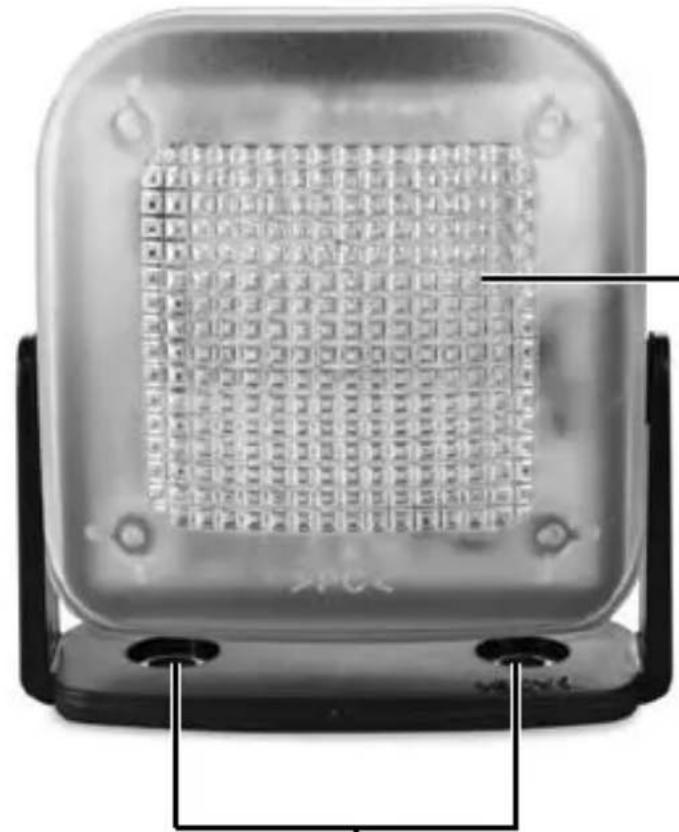
Light surface
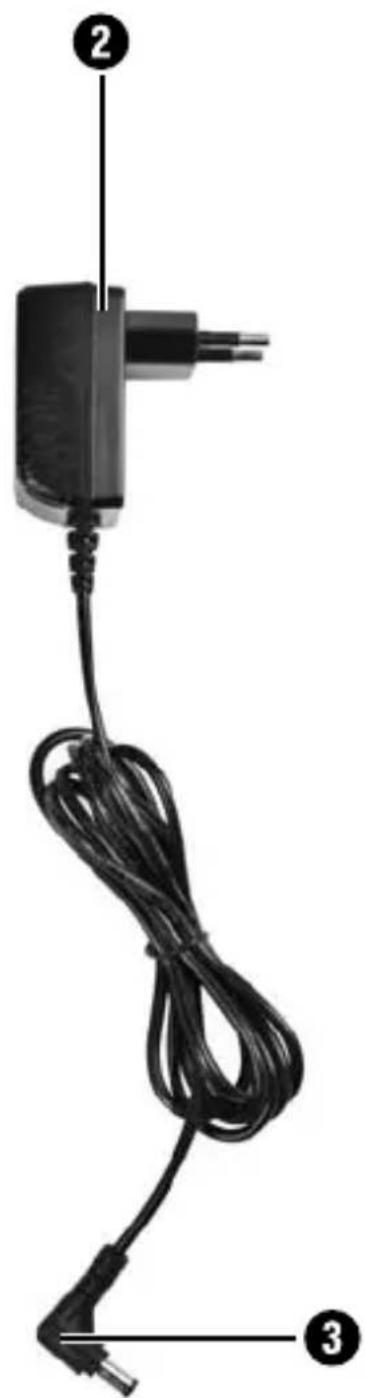
Power adapter
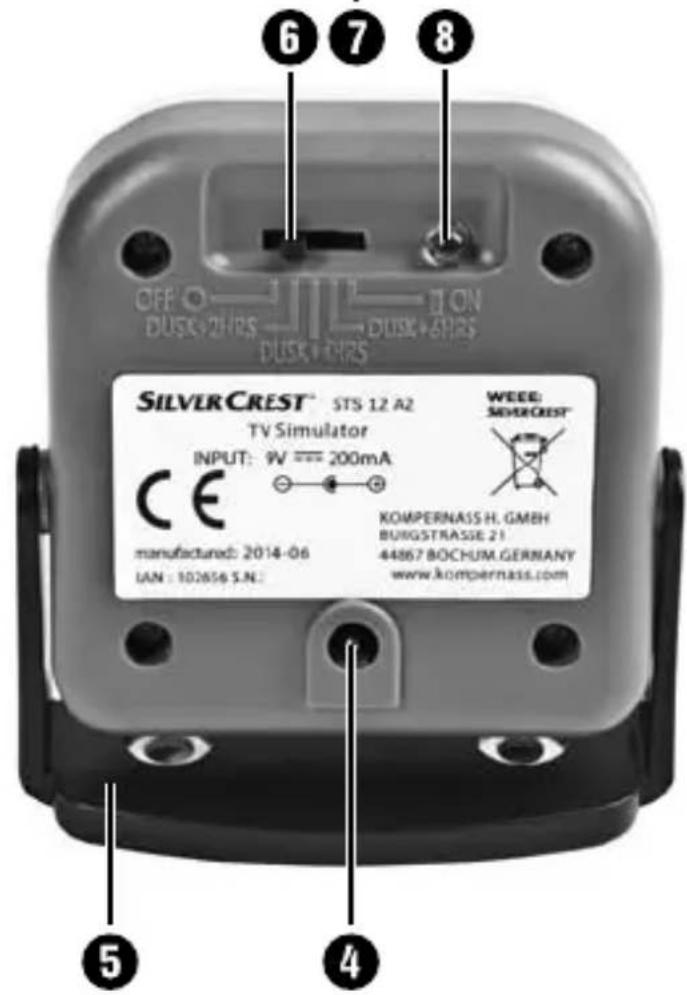
3 Barrel connector
Plug socket
5 Stand
Switch
Holes for wall mounting
8 Twilight sensor
Technical data
| Power adapter Type YA-DY1304-9-200 | |
| Input voltage 100 - 240 V | ~, 50 - 60 Hz |
| Current consumption 200 mA | |
| Output voltage 9 V | --- |
| Output current 200 mA | |
| Protection class | II / ☐ |
| Polarity | ○-○-⊕ |
| Appliance | |
| Input voltage 9 V | --- |
| Current consumption 200 mA | |
| Polarity | ○-○-⊕ |

Safety instructions
RISK OF ELECTRIC SHOCK!
- Use the appliance only indoors. Do not use the appliance outdoors.
- Do not use the appliance if the power adapter or the power cable are damaged.
Ensure that water or moisture cannot penetrate the appliance.
WARNING - RISK OF INJURY!
- This appliance is not intended for use by individuals (including children) with restricted physical, physiological or intellectual abilities or deficiencies in experience and/or knowledge unless they are supervised by a person responsible for their safety or receive instructions from this person in how the appliance is to be used.
Children should be supervised to ensure that they do not play with the appliance.
GB IE
WARNING - RISK OF INJURY!
- Do not use the appliance if people suffering from epilepsy are in the room. The changes in light levels can cause epileptic seizures in people susceptible to them.
Before use, check the appliance for visible external damage. Do not operate a damaged appliance or one that has been dropped. There is also a risk of personal injury! - Never look directly into the LEDs! They are very bright and can cause injury to the eyes!
Repairs must only be carried out by authorised specialist companies or by the Customer Service. Incompetent repairs may result in risks for the user. In addition, warranty claims become void.
Place the power cable such that no one can stumble over it.
CAUTION - PROPERTY DAMAGE
-
Do not operate the appliance close to open fl ames (e.g. candles). The appliance could be irreparably damaged!
-
Avoid direct sunlight. The appliance could be irreparably damaged!
- This appliance must not be exposed to rain. Protect the appliance against moisture and the penetration of liquids and objects into the housing. Never submerge the appliance in water and do not place objects filled with liquids (such as vases) on the appliance. The appliance could be irreparably damaged!
Operate the appliance only with the supplied power adapter.
Functions
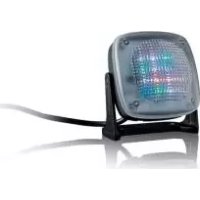
With this TV simulator you can simulate the flicker patterns of a switched-on television and so feign your presence to potential burglars.
For this purpose 5 different settings are available:
ON: the LEDs light up in different colours and combinations.
DUSK+2HRS: the LEDs switch on automatically at dusk and then light up for 2 hours.
DUSK+4HRS: the LEDs switch on automatically at dusk and then light up for 4 hours.
DUSK+6HRS: the LEDs switch on automatically at dusk and then light up for 6 hours.
OFF: the appliance is switched off.
Setup
Select a suitable location for setting up the appliance. This location must fulfil the following criteria:
- The TV Simulator may not be directly visible from outdoors.
- The fl ickering generated by the TV simulator must be visible on the walls and/or ceiling from outdoors.
-A power socket must be easily accessible. - The TV Simulator must be installed such that it can be influenced by the twilight. This means that the fall of light from outside must be given! It should also be borne in mind that, the closer the appliance is to a wall, the less light the twilight sensor will have fallen on it.
- The TV Simulator may not be located near a window which could be well lit from outdoors, such as on a busy street or next to street lights.
- There should be no additional time-controlled light source in the room, e.g. a night light.
GB IE
Place the appliance on a firm and fl at surface so that it is stable and secure. To help prevent it from tipping over, you can secure the stand 5 with the adhesive strips.
CAUTION - PROPERTY DAMAGE
- Do not use the adhesive strips to hang the appliance on a wall! The appliance may fall down and be irreparably damaged!
Align the light surface ① so that the flicker is visible on the walls and/or ceiling
Connect the power adapter 2 with the appliance by inserting the barrel connector 3 into the plug socket 4 at the rear side of the appliance.
Connect the power adapter 2 into a power socket.
NOTE
It is best to check the location and alignment of the appliance in the dark from outdoors and through the window. Only in this way can you assess whether the appliance is aligned so that it appears as if someone is watching television inside. If necessary, realign the appliance.
Wall mounting
RISK OF ELECTRIC SHOCK!
Ensure that there are no power cables or other conduits or pipes in the wall at the location where you intend to bore the holes for the wall holder. It would be a potentially fatal risk to bore into a current carrying electric cable!
Select a suitable mounting location for the appliance:
- The TV Simulator may not be directly visible from outdoors.
- The flickering generated by the TV simulator must be visible on the walls and/or ceiling from outdoors.
-A power socket must be easily accessible. - The TV Simulator must be installed such that it can be influenced by the twilight. This means that the fall of light from outside must be given! Take note that when wall mounted, the twilight sensor is very close to the wall which affects the fall of light.
- The TV Simulator may not be located near a window which could be well lit from outdoors, such as on a busy street or next to street lights.
- There should be no additional time-controlled light source in the room, e.g. a night light.
Remove the stand 5 by bending it slightly apart and then pull the restraints out of the mountings.
Drill two holes with a spacing of about 45~mm . Use the stand ⑤ to mark the holes: the spacing will thus be measured correctly. The boreholes must be suitable for 8mm wall plugs.
Insert the supplied plugs into the holes and screw the stand ⑤ firmly down through the holes for wall mounting ⑦ using the supplied screws.
Push the TV Simulator back onto the stand 5. Ensure that the two cross-shaped restraints engage correctly with the mountings.
GBIE
CAUTION - PROPERTY DAMAGE
Before you connect the appliance to the power supply, check to ensure that the required input voltage as given on the type plate tallies with that for the intended power source.
- Check to ensure that the cable for the power adapter ② is not damaged and that it does not lead over hot surfaces and/or sharp edges, otherwise it could be damaged.
- Ensure that the cable for the power adapter ② is not over-taut or kinked.
Connect the power adapter 2 with the appliance by inserting the barrel connector 3 into the plug socket 4 at the rear side of the appliance.
Align the light surface ① so that the flicker is visible on the walls and/or ceiling.
Connect the power adapter 2 into a power socket.
NOTE
It is best to check the location and alignment of the appliance in the dark from outdoors and through the window. Only in this way can you assess whether the appliance is aligned so that it appears as if someone is watching television inside. If necessary, realign the appliance.
Operation
When it gets dark early, for example, in the winter months, set switch 6 to "DUSK+6HRS". 3 green LEDs light up immediately. The appliance becomes active at dusk and, for 6 hours, simulates the flickering of a television. After 6 hours the appliance switches itself off, except for the 3 green LEDs.
As soon as it is dusk again, the appliance switches back on for 6 hours.
To switch your appliance off again, you need to slide switch ⑥ to the position "OFF".
NOTE
In the case of exposure to light ( > ca. 30 lux) the TV Simulator also switches off before the 6 hours have lapsed.
Set the switch 6 to "DUSK+4HRS", for example, during autumn and spring. 2 blue LEDs light up immediately. The appliance becomes active at dusk and, for 4 hours, simulates the flickering of a television. After 4 hours the appliance switches itself off, except for the 2 blue LEDs.
As soon as it is dusk again, the appliance switches back on for 4 hours.
To switch your appliance off again, you need to slide switch ⑥ to the position "OFF".
NOTE
In the case of exposure to light ( > ca. 30 lux) the TV Simulator also switches off before the 4 hours have lapsed.
When it gets dark late, for example, in the summer months, set switch 6 to "DUSK+2HRS". A red LED lights up immediately. The appliance becomes active at dusk and, for 2 hours, simulates the flickering of a television. After 2 hours the appliance switches itself off, except for the red LED.
As soon as it is dusk again, the appliance switches back on for 2 hours.
To switch your appliance off again, you need to slide switch ⑥ to the position "OFF".
NOTE
In the case of exposure to light ( > ca. 30 lux) the TV Simulator also switches off before the 2 hours have lapsed.
Place switch 6 at "ON" to have the appliance permanently switched on. To switch your appliance off, you need to slide switch 6 to the position "OFF".
NOTE
- Neither this TV Simulator, nor any other simulation systems, can guarantee that you will not be burgled. However, the TV Simulator conveys to potential burglars that someone is at home and watching TV.
In every case, we recommend good door locks and anti-burglar aids, such as security doors and windows, as well as an alarm system, to deter burglars from breaking into your home.
Cleaning
CAUTION - PROPERTY DAMAGE
- Ensure that, when cleaning it, no moisture can penetrate into the appliance, so as to avoid irreparable damage to it.
- Ensure that you remove the power adapter ② from the power socket before cleaning the appliance.
Clean the surfaces of the appliance and the power adapter 2 with a soft, dry cloth.
For stubborn soiling, use a damp cloth and possibly add a mild detergent to it.
Ensure that the appliance and the power adapter 2 are completely dry before using them again.
Storage
Should you decide not use the appliance for an extended period, disconnect it from the power supply and store it in a clean and dry location away from direct sunlight. If the appliance is mounted to the wall, disconnect it from the power socket.
Disposal of the appliance
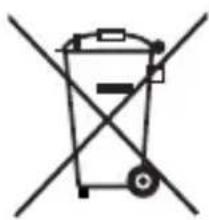
Do not dispose of the appliance in your normal domestic waste. This product is subject to the provisions of European Directive 2012/19/EU-WEEE (Waste Electrical and Electronic Equipment).
Dispose of the appliance through an approved disposal centre or at your community waste facility. Please observe the currently applicable regulations. In case of doubt, please contact your waste disposal centre.
Appendix
Notes on the EC Declaration of Conformity
This appliance, with regard to conformity with essential requirements and other relevant provisions, complies with the guidelines of the Electromagnetic Compatibility Directive 2004/108/EC, the Directive for Low Voltage Appliances 2006/95/EC, the RoHS Directive 2011/65/EU and the ERP Directive 2009/125/EC. The complete original declaration of conformity can be obtained from the importer.

Warranty
The warranty for this appliance is for 3 years from the date of purchase. This appliance has been manufactured with care and meticulously examined before delivery.
Please retain your receipt as proof of purchase. In the event of a warranty claim, please contact our Customer Service department by telephone. Only in this way can a post-free despatch for your goods be assured.
NOTE
The warranty applies to material or manufacturing faults only, not for transport damage, parts subject to wear and tear or for damage to fragile parts.
This appliance is intended solely for private domestic use, not for commercial applications. If this product has been subjected to improper or inappropriate handling, abuse, or modifi cations not carried out by one of our authorised service centres, the warranty will be considered void.
Your statutory rights are not restricted in any way by this warranty. The warranty period is not extended by repairs made under the warranty. This applies also to replaced and repaired parts.
Damages and defects extant at the time of purchase must be reported immediately after unpacking, resp. no later than two days after the date of purchase.
Repairs made after the lapse of the warranty period are subject to charge.
Service
GB Service Great Britain Tel.: 0871 5000 720 (£ 0.10/Min.) E-Mail: kompernass@lidl.co.uk IAN 102656
IE Service Ireland Tel.: 1890 930 034 (0,08 EUR/Min., (peak)) (0,06 EUR/Min., (off peak)) E-Mail: kompernass@lidl.ie IAN 102656
Hotline availability: Monday to Friday 08:00 - 20:00 (CET)
Importer
KOMPERNASS HANDELS GMBH
BURGSTRASSE 21
44867 BOCHUM
GERMANY
www.kompernass.com
KOMPERNASS HANDELS GMBH
BURGSTRASSE 21
44867 BOCHUM
GERMANY
www.kompernass.com
Sommaire
WAARSCHUWING - LETSELGEVAAR!
WAARSCHUWING - LETSELGEVAARI!
KOMPERNASS HANDELS GMBH
BURGSTRASSE 21
44867 BOCHUM
GERMANY
www.kompernass.com
Inhaltsverzeichnis
KOMPERNASS HANDELS GMBH
BURGSTRASSE 21
44867 BOCHUM
GERMANY
www.kompernass.com
KOMPERNASS HANDELS GMBH
BURGSTRASSE 21
44867 BOCHUM
DEUTSCHLAND/GERMANY
www.kompernass.com
Last Information Update · Informationsstatus
Tilstand af information · Version des informations
Stand van de informatie · Stand der Informationen:
06/2014·Ident.-No.: STS12A2-052014-1
- SE
- GB/IE Operating instructions Page 1
- Index
- Introduction
- Copyright
- Intended use
- WARNING
- Risks from unintended use!
- Scope of delivery and transport inspection
- NOTE
- Unpacking
- Disposal of the packaging
- Operating elements
- Technical data
- Safety instructions
- RISK OF ELECTRIC SHOCK!
- WARNING - RISK OF INJURY!
- GB IE
- CAUTION - PROPERTY DAMAGE
- Functions
- Setup
- Wall mounting
- GBIE
- Operation
- Cleaning
- Storage
- Disposal of the appliance
- Appendix
- Notes on the EC Declaration of Conformity
- Warranty
- Service
- Importer
- Sommaire
- WAARSCHUWING - LETSELGEVAAR!
- WAARSCHUWING - LETSELGEVAARI!
- Inhaltsverzeichnis
- KOMPERNASS HANDELS GMBH
Brand : SILVERCREST
Model : STS 12 A2
Category : Light simulator