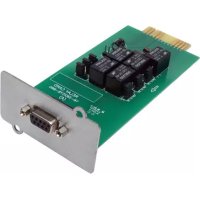
RELAYCARDSV - Electronic board Tripp Lite - Free user manual and instructions
Find the device manual for free RELAYCARDSV Tripp Lite in PDF.


| Product Type | I/O Communication Card |
| Brand | Tripp Lite |
| Model | RELAYCARDSV |
| Main Function | Provides contact closures for remote monitoring of UPS systems |
| Compatibility | Tripp Lite SmartOnline SVTX 400V, SVX 400V, SV 208V modular UPS systems |
| Number of Relays | 5 dry contact relays |
| Contact Configuration | Selectable Normally Open (NO) or Normally Closed (NC) via jumper |
| Connector | 9-pin female DB9 for communication and control |
| Maximum Relay Voltage | 24 V DC |
| Maximum Relay Current | 1 A DC |
| Minimum Switching Current | 1 mA (requires external resistor if >6 mA) |
| Available Signals | UPS failure, audible alarm, bypass active, low battery, UPS on, mains failure, remote shutdown |
| Remote Shutdown | 3-10 V signal on pin 4 (via common pin 3) |
| Installation | In the UPS ACC slot, secured with screws |
| Included Accessories | 9-pin communication cable, user manual |
| Warranty | 2-year limited |
| Estimated Weight | Approximately 100 g |
| Estimated Dimensions | 10 x 5 x 2 cm |
| Power Supply | Powered by the UPS via the ACC slot |
| Maintenance | No specific maintenance required |
| Repairability | Limited warranty, repair or replacement by Tripp Lite |
Frequently Asked Questions - RELAYCARDSV Tripp Lite
User questions about RELAYCARDSV Tripp Lite
0 question about this device. Answer the ones you know or ask your own.
Ask a new question about this device
Download the instructions for your Electronic board in PDF format for free! Find your manual RELAYCARDSV - Tripp Lite and take your electronic device back in hand. On this page are published all the documents necessary for the use of your device. RELAYCARDSV by Tripp Lite.
USER MANUAL RELAYCARDSV Tripp Lite
1.1 Product Features 2
1.2 Package Contents 2
2 Installation and Setup 2
2.1 System Requirements 2
2.2 Installation 2
3 Specifications 3
3.1 Internal Circuit 3
3.2 Electric Specifications 3
3.3 Pin Assignment 3
3.4 Function Description 4
3.5 Application Example 4
4 Internal Logic Connection 5
4.1 Pin Definition and Internal Logic Connection 5
4.2 Connection for Normally Closed 5
4.3 Connection for Normally Open 5
5. Jumper Configuration 6
5.1 Jumper Setup 6
5.2 Jumper Function Description 6
6. Warranty and Product Registration 7
Espanol 8
Français 15
Pycckn 22
PROTECT YOUR INVESTMENT!
Register your product for quicker service and ultimate peace of mind.
You could also win an ISOBAR6ULTRA surge protector—a $100 value!
www.triplite.com/warranty



1111 W. 35th Street, Chicago, IL 60609 USA · www.triplite.com/support
Copyright © 2017 Tripp Lite. All rights reserved. All trademarks are the property of their respective owners.
1. Introduction
1.1 Product Features
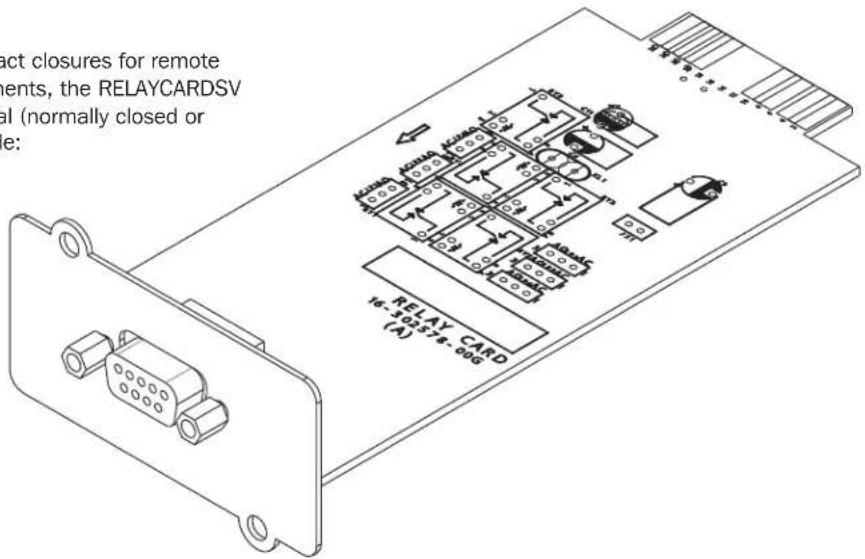
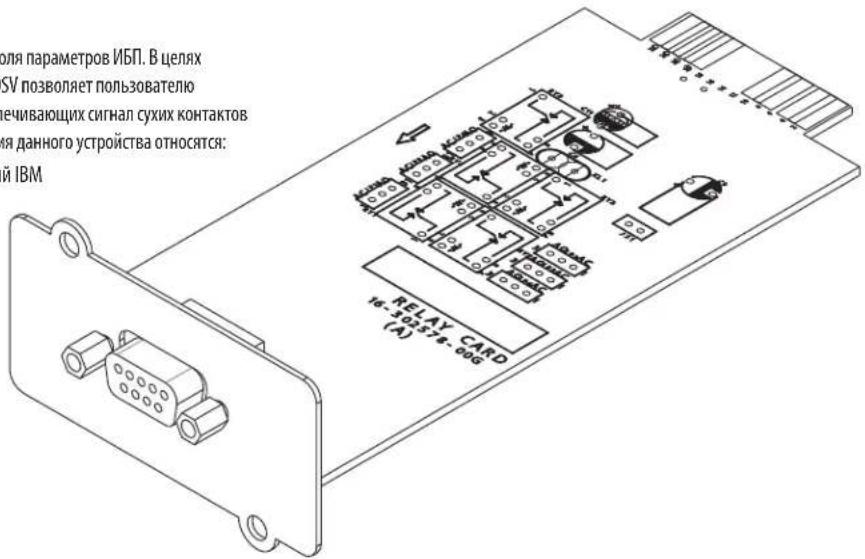
The RELAYCARDSV communication card provides contact closures for remote UPS monitoring. To meet different application requirements, the RELAYCARDSV allows the user to select status of the dry-contact signal (normally closed or open) by setting the jumper. Typical applications include:
- IBM Server, PC and workstation equipment
- Auto-controlled industrial equipment and communication applications
1.2 Package Contents
- RELAYCARDSV
Owner's Manual
9-Pin Communication Cable
2. Installation and Setup
2.1 System Requirements
The RELAYCARDSV supports Tripp Lite SmartOnline SVTX 400V Non-Modular, SVX 400V Modular, and SV 208V Modular UPS systems.
2.2 Installation
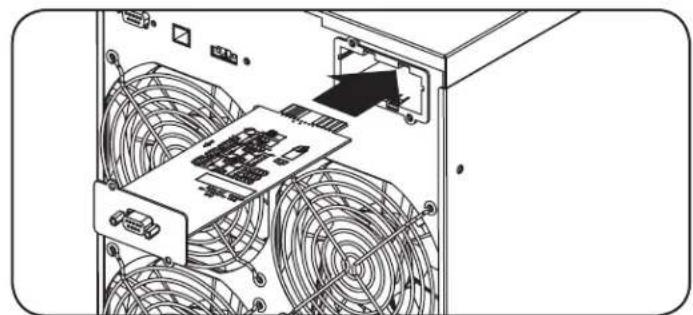
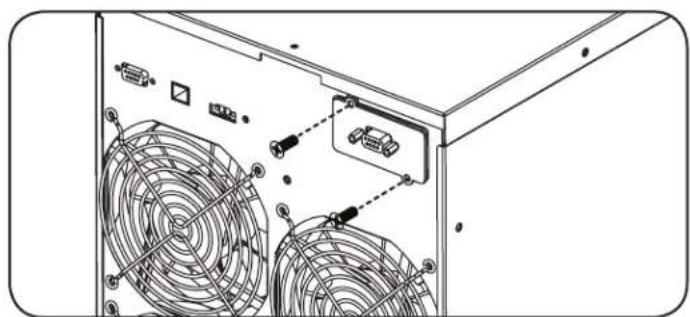
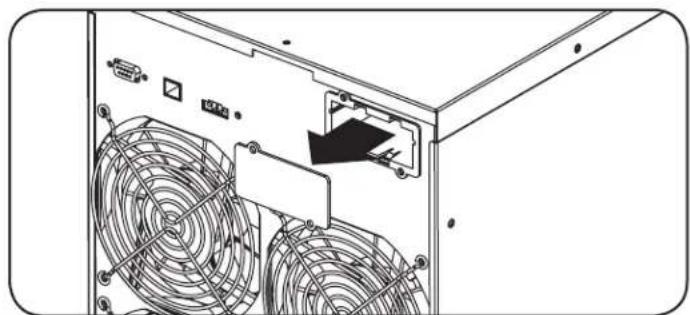
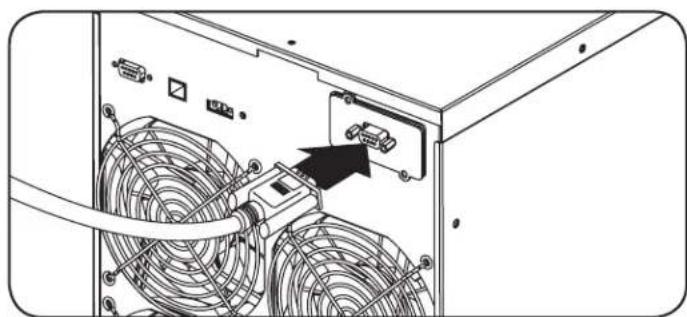
Step 1: Using a screwdriver, remove the ACC Slot cover located on the rear panel (SVTX Series) or front panel for Modular systems (SVX and SV-Series).
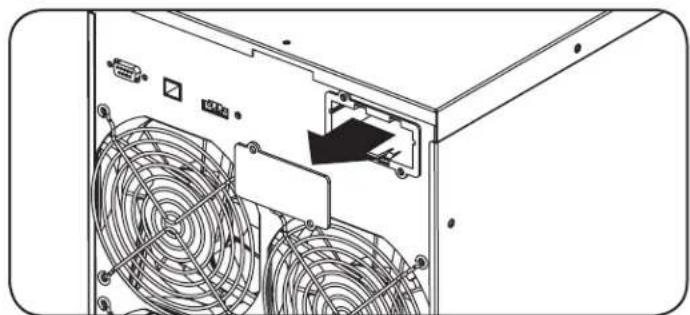
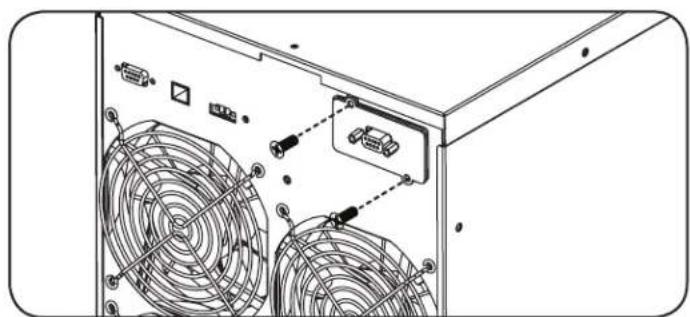
Step 3: Using a screwdriver and screws provided from removing the ACC Slot cover in Step 1, secure the RELAYCARDSV to the UPS chassis.
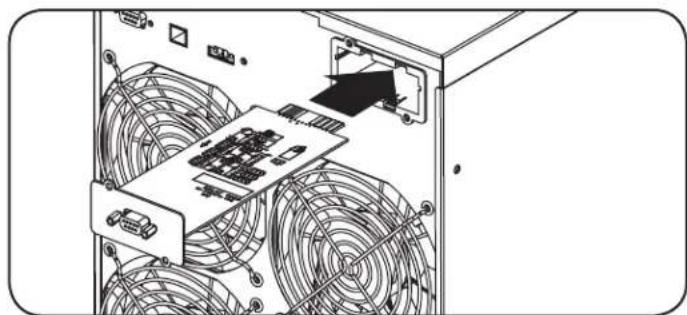
Step 2: Insert RELAYCARDSV into the ACC Slot.
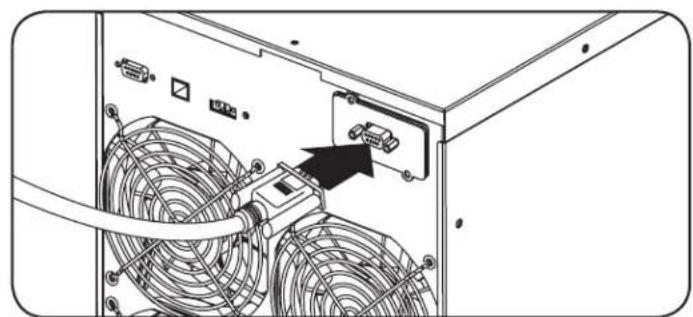
Step 4: Use the 9-pin communication cable to connect UPS and equipment for remote monitoring and control.
3. Specifications
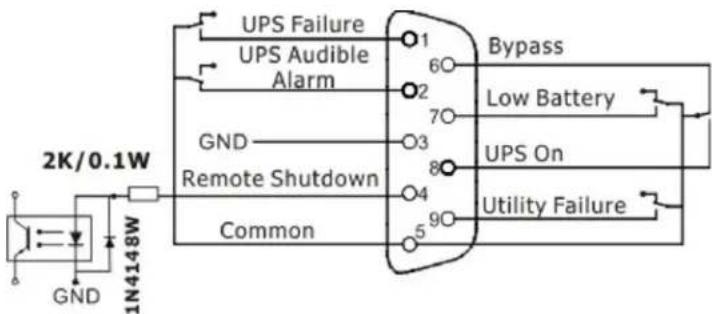
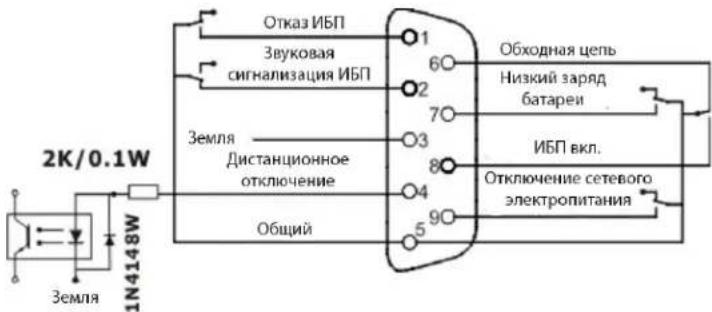
3.1 Internal Circuit
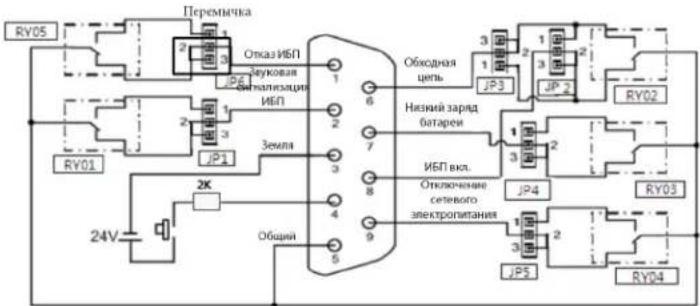
DB9 Internal Circuit Diagram
3.2 Electric Specifications
| DB9 Port Electric Specifications | |||||
| Parameter Symbol Max. Min. Unit | |||||
| Resistor* DC Current | R 6 1 mA | ||||
| Diode Reverse Voltage | VR 6 - V | ||||
| Forward Current IF 50 - mA | |||||
| Peak Forward Current IF (Peak) | 1 - A | ||||
| Relay | DC Voltage | VDC 24 | - V | ||
| DC Current | IDC 1.0 | - A | |||
Note: DC current should be lower than 6mA. When the DC current exceeds 6mA, a resistor within DC current limitation should be added within the Remote Shutdown/Common loop (e.g. a 2K resistor with at least 0.1W rating power). For more information, refer to diagrams A and B in 3.5 Application Example.
3.3 Pin Assignment
| Pin Assignment | Function | I/O |
| Pin 1 | UPS Failure | O/P |
| Pin 2 | UPS Audible Alarm | O/P |
| Pin 3 | GND (Common for Pin 4) | Power Ground |
| Pin 4 | Remote Shutdown | I/P |
| Pin 5 | Common for Relays | Power Supply |
| Pin 6 | Bypass Active | O/P |
| Pin 7 | Low Battery | O/P |
| Pin 8 | UPS On O/P | |
| Pin 9 | Utility Failure O/P |
Note: The shutdown pin (pin 3 and pin 4) only accepts 3-10s high level signal to perform the UPS shutdown.
3. Specifications
3.4 Function Description
| NO Status NC Status Reason | |
| Pin 1 & Pin 5 connected Pin 1 & Pin 5 disconnected UPS failure | |
| Pin 2 & Pin 5 connected Pin 2 & Pin 5 disconnected UPS failure, utility failure, bypass active | |
| Pin 6 & Pin 5 connected Pin 6 & Pin 5 disconnected Bypass active | |
| Pin 7 & Pin 5 connected Pin 7 & Pin 5 disconnected Battery voltage is low | |
| Pin 8 & Pin 5 connected Pin 8 & Pin 5 disconnected UPS Online Mode, ECO Mode, Inverter Mode | |
| Pin 9 & Pin 5 connected Pin 9 & Pin 5 disconnected Utility failure |
3.5 Application Example
The below diagrams show the basic application circuit to implement monitoring and control.
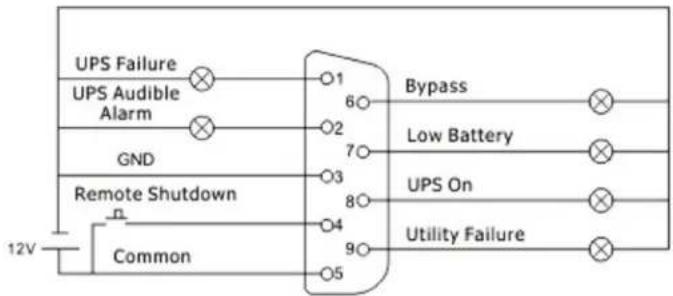
Diagram A User Interface for 12 V
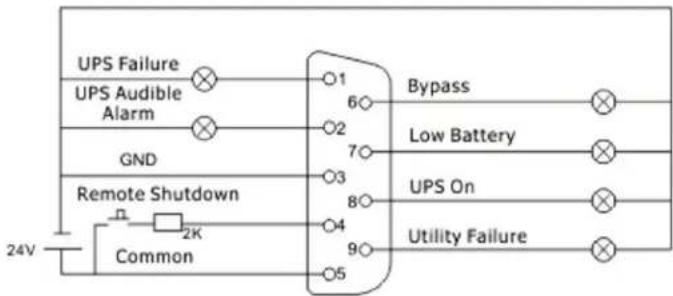
Diagram B User Interface for 24 V
4. Internal Logic Connection
4.1 Pin Definition and Internal Logic Connection
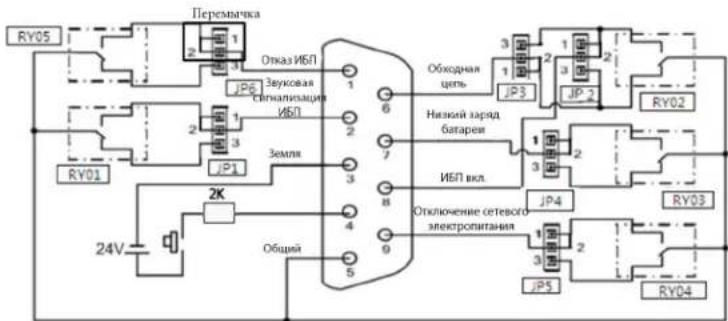
IC controller of the card controls actions of five relays, depending on the UPS status. The Normally Open (NO) and Normally Closed (NC) terminals of each relay connect to pin 1 and pin 3 of a 3-pin connector. Pin 2 of the 3-pin connector connects to the signal pin of the DB9 interface connector. The 2-pin jumper can be plugged in to the 3-pin connector to short-circuit pin 1 and pin 2 (NO), or short-circuit pin 2 and pin 3 (NC).
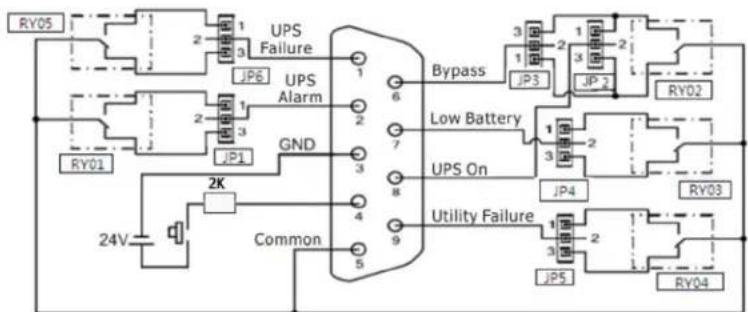
Pin Definition and Internal Logical Connection Diagram
4.2 Connection for Normally Open
If pin 1 short-circuits with pin 2 via the jumper, the dry contact signal status will be Normally Open. When the signal is active, the signal pin on the DB9 connector will connect with the common pin (pin 5) via the relay.
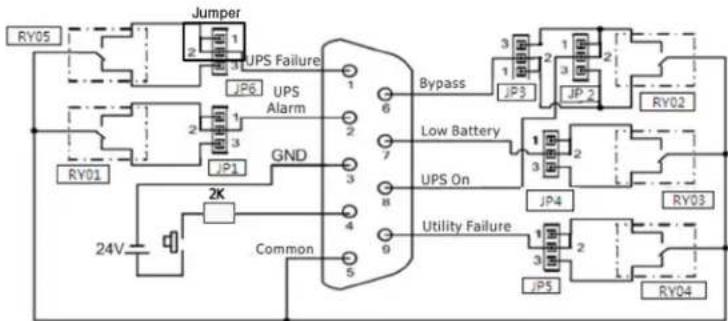
Normally Open (NO) Connection Diagram
4.3 Connection for Normally Closed
If pin 3 short-circuits with pin 2 (NC) via the jumper, the dry contact signal status will be Normally Closed (NC). When the signal is active, the signal pin on the DB9 connector will disconnect with the common pin (pin 5) via the relay.
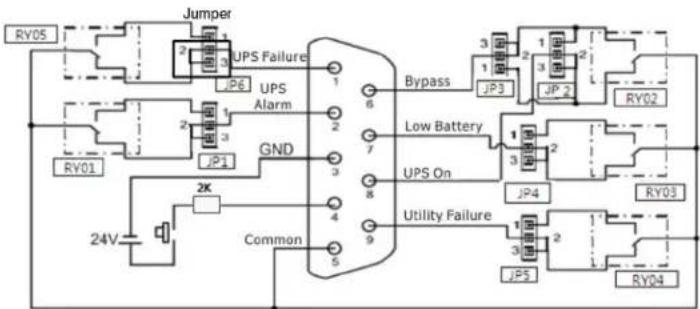
Normally Closed (NC) Connection Diagram
5. Jumper Configuration
5.1 Jumper Setup
The 3-pin connectors can be found near the relays.
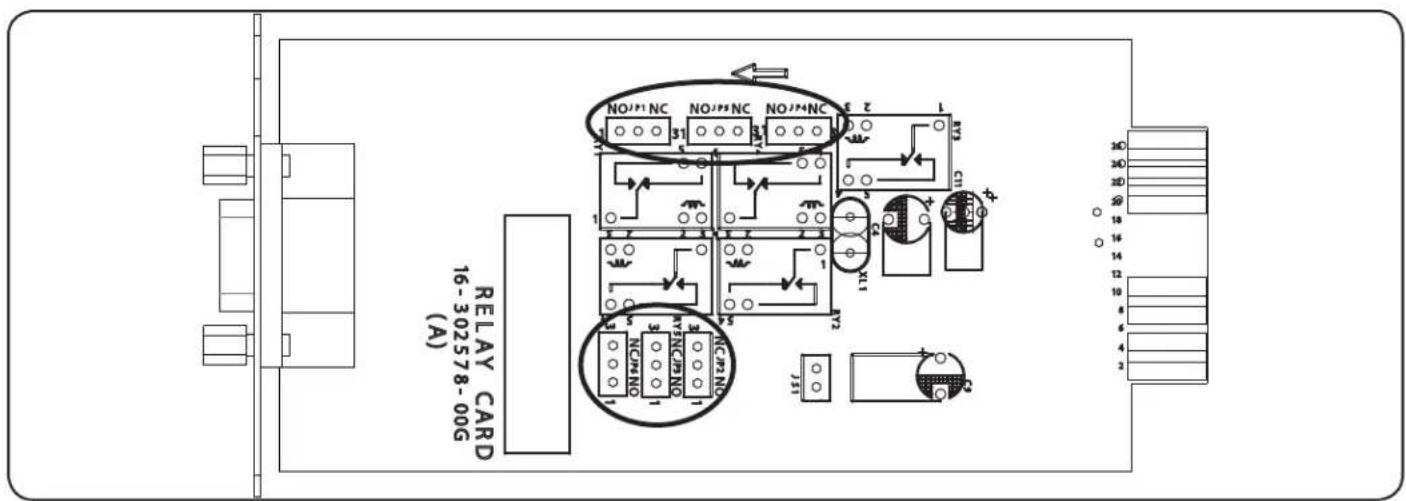
There are white silkscreens on the connector to indicate Normally Open pins 1 and 2, and Normally Closed pins 2 and 3.

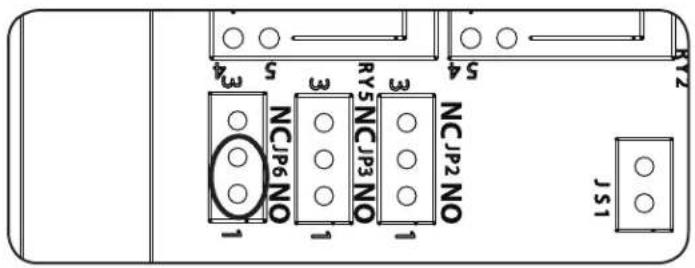
To achieve a Normally Open dry-contact signal, the jumper should connect to pins 1 and 2.
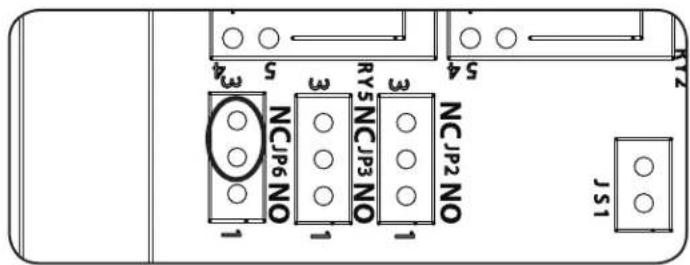
To achieve a Normally Closed dry-contact signal, the jumper should connect the pins 2 and 3.
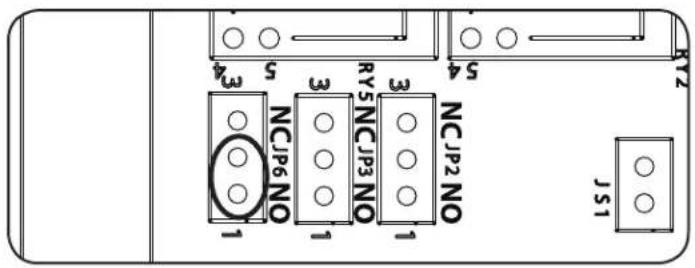
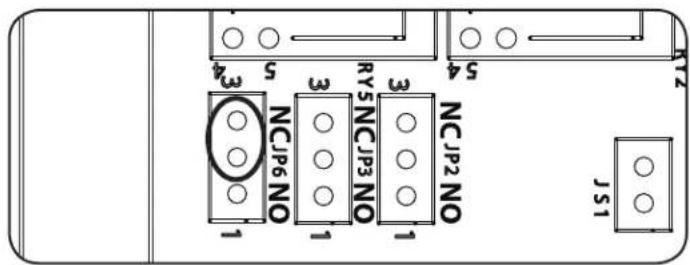
5.2 Jumper Function Description
| Jumper Description | |
| 1 UPS Alarm (DB9.P2) | |
| 2 UPS Online Mode, ECO Mode, Inverter Mode (DB9.P8) | |
| 3 Bypass Mode (DB9.P6) | |
| 4 Low Battery (DB9.P7) | |
| 5 Utility Failure (DB9.P9) | |
| 6 UPS Failure (DB9.P1) |
6. Warranty and Product Registration
LIMITED WARRANTY
w
THIS WARRANTY DOES NOT APPLY TO NORMAL WEAR OR TO DAMAGE RESULTING FROM ACCIDENT, MISUSE, ABUSE OR NEGLECT. SELLER MAKES NO EXPRESS WARRANTYES OTHER THAN THE WARRANTY EXPRESSLY SET FORTH HEREIN. EXCEPT TO THE EXTENT PROHIBITED BY APPLICABLE LAW, ALL IMPLIED WARRANTYES, INCLUDING ALL WARRANTYES OF MERCHANTABILITY OR FITNESS, ARE LIMITED IN DURATION TO THE WARRANTY PERIOD SET FORTH ABOVE; AND THIS WARRANTY EXPRESSLY EXCUSES ALL INCIDENTAL AND CONSEQUENTIAL DAMAGES. (Some states do not allow limitations on how long an implied warranty lasts, and some states do not allow the exclusion or limitation of incidental or consequential damages, so the above limitations or exclusions may not apply to you. This Warranty gives you specific legal rights, and you may have other rights which vary from jurisdiction to jurisdiction.)
WARNING: The individual user should take care to determine prior to use whether this device is suitable, adequate or safe for the use intended. Since individual applications are subject to great variation, the manufacturer makes not representation or warranty as to the suitability or fitness of these devices for any specific application.
PRODUCT REGISTRATION
Visit www.triplite.com/warranty today to register your new Tripp Lite product. You'll be automatically entered into a drawing for a chance to win a FREE Tripp Lite product!*
- No purchase necessary. Void where prohibited. Some restrictions apply. See website for details.
Regulatory Compliance Identification Numbers
For the purpose of regulatory compliance certifications and identification, your Tripp Lite product has been assigned a unique series number. The series number can be found on the product nameplate label, along with all required approval markings and information. When requesting compliance information for this product, always refer to the series number. The series number should not be confused with the marketing name or model number of the product.
Use of this equipment in life support applications where failure of this equipment can reasonably be expected to cause the failure of the life support equipment or to significantly affect its safety or effectiveness is not recommended.
Tripp Lite has a policy of continuous improvement. Product specifications are subject to change without notice.


Manufacturing Excellence:
1111 W. 35th Street, Chicago, IL 60609 USA · www.triplite.com/support
1111 W. 35th Street, Chicago, IL 60609 USA • www.triplite.com/support

Manufacturing Excellence
1111 W. 35th Street, Chicago, IL 60609 USA · www.triplite.com/support
PykoBODCTBO N0Ib30BaTeJia
2 YCTaHOBka NHaCtpoiKa
2.1 CnCTeMHbIe Tpe6oBaHnA 23
2.2 yCTaHOBka
23
3 Texnueckne xapaKtepuCTNK 24
3.1 BnytpenHnaeunb 24
3.2 3neKtpoTeXnHueckne XapaKTePnCTmKn 24
3.3 Pa3Bovka KOnTaKToB 24
3.4 OmmcHne yHKcu 25
3.5Приметпримени 25
4 BHytpenHee norgueckoe coednHenne 26
4.1 PaCnHOBka n BHyTpHeHne Iornueckoe coeunHeHne 26
4.2 Iopraok coeMHHeHnI JIHOHPMaJIbHo 3aMKNyTbIX KOHTaKTOB 26
4.3IopraokcoeunHeHnIJaHOpMaNbHo pa30MKHytbIX KOHTaKToB 26
- PacnoJoxKeHne nepembIueK 27
5.1 Haayabha yctaHOBka nepemblyek 27
5.2 OnncanHe yHKn npembuek 27
- TapaANTHnHbIe 06a3aTeNbCTBa 28
English 1
Espanol 8
Français 15
1. BvendeHne
XapakTepeuCTnKn npOdykTa
Kapra CBA3N RELAYCARDSV o6ceNeWbAet 3aMbKaHMe KOHTAKTOB B CEJHX KOTPONI napMetPOB IV5N. B CEJHX yOBDNEBOpEHn pa3INHbIX EKcPiyatauOHbIX Tpe6oBaHn Kapra RELAYCARDSV no3BOJnEeNt N60BaTeNo Bb6upat CTATYC (HOPMaIbHO 3AMKHyTbIM Hm HopMaIbHO p30AMKHyTbI) o6ceNeWbAOUx CNHAn CYHX KOTAHOBKnyETM yCTaHOBKn COOTBcTBYIOUe NEpembUKN. K TmNOBbIM cIeNMI pnpmeHHeHa DAHHOr OYcTPOCTBA OTHOCRTCA:
CepBepb, npcoHaNbHbIe KOMnblOtebp HOBOpyDobAHne pa6oHx CTaHmIBM
-ПрмьшлелнhoeиКOMMMyнkaцонhoeоборуданe cABTOMaTHNIOPABOHbIM YNPaBJIENHEm
1.2 Copepkmoe ynaKOBkn
- YctpoctBo RELAYCARDSV
PykoB0dCTBO nonb30BaTeTae
-9-KOHTAKTHbI KAbEb CB3N
2.YctaHOBKa NHaCTpOJa
2.1 CnCTeMHbIe Tpe6oBaHna
YCTPOIcTBQ RELAYCARDSV noDepKnBaET nBII Tripp Lite cemeiTbva SmartOnlinc cepm SVTx Ha 400 B (HemOyNbHbe), cepm SVX Ha 400 B (MOynbHbe) n cepm SV Ha 208 B (MOynbHbe).
2.2 yCTaHOBka
War 1.Пи nomoи OTBepTKn BbHbTe 3aIyWky n3 pa3BaMa ACC, paCnoJIOKeHHoro Ha 3aDHei naHEn (ДЯ српн SVTX) nIи nI nepeHnei naHEn (ДЯ моуьн bix CmTcEm cepri SVX n SV).
War 2. BctabBe Kapty RELAYCARDSV B p3bEm ACC.
War 3. npn nmooun OTBepTKN H BNTOB, BbBepHytbx pnp CHATMn 3aynukn pa3bema ACC ha Ware 1, npkpenite KapTy RELAYCARDSV K Kopny Cy IbI.
War 4. CoeINHnTE IVP C o6pOyOBaHMe IMCTAHUHOHHO KOHTPOJ N ynpABEnHn npnNOOu9-KoHTAKTHORO KAbEJI CB3N.
3. Texhnueckne xapaKTepeNtIKn
3.1 BHytpenHnaeNB
PnHmnnnaIbHaXcMa BHytpEnHero KOnhTypa DB9
3.2 ΘeKtpoTeXHnueckne xapaKtepNCtNK
4.1 PaCnHOBKa n BHyTpEHHee Iornueeckoe coeDInHeHne
MC-KoHTponnep KapTbIy npaBnHep a60to ntn pene (B 3abuHcMoCTOn DTatycu N5P). HopMaIbHO pa3OMKHytBe (H.P.) HOpMaIbHO 3AMKHytBe (H.3.) KOHTkTHbe 3aKIMMb KaKJIOrpope coeHNHe b c KOHTAKTOM 1 KOTAKTOM 3 TpexKOHTAKTHORO pa3bema. KOHTAKT2 TpexKOHTAKTHORO pa3bema coeHNHe CINHAJIbHM KOHTAKTM INTEpEChOro pa3bema DB9. 2-KoHTAKTHa nepeMbUka MoKET BCTABITBCB 3-KOHTAKThbI pa3bem C3aKopAuaBaHEm KOHTAKTA 1 N KOHTAKTA 2 (H.P.) INC3aKopauBaHmE KOHTAKTA 2 N KOHTAKTA 3 (H.3.).
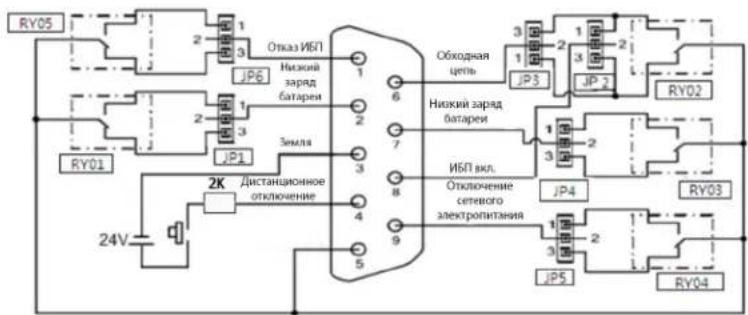
PacnHOBKa n BByTppeHHee NOrmYeCKoe coeHNHeHne
4.2 Nopradk coeHHnHn IJn HopMaIbHo pa30MKHytbIX KOHTAKTOB
Pn3aKopauBaHmN KOHTAKTc 1 cKOHTAKTOM 2 nocpeDCTBOM nepeMbHc HrHan cyHXX KOHTAKTOB HMEET CTATYC "HopMaIbHO pa3OMKHyTbi". PnA kTBAuM CIRHaIa CIRHaJIbHbIK KOHTAK p3bema DB9 coeHHaTcC o6UIM MOKTAM (KOHTAKT5) uee3 pene.
Cxema coeHHeHH dIa HopMaIbHo pa3OMKHyTBIX (H.P.) KOHTAKTOB
4.3 Nopraok coeHHnHn dH HopMaIbHO 3aMKHyTbIX KOHTaKTOB
Pn3aKopauHbAHm KOHTAKT3c KOTAKTOM 2 (H.3.) nocpeDCTBOM nepeMbUKN CTHAN cyHXX KOHTAKTOB MMeET CTATyc "HopMaJIbHO 3AMKHyTB" (H.3.). PnAKTUBaUN CMHNA CMHbHbIKoHTAKT pa3bema DB9 tCOeMDHRA TcO6Iero KOHTAKT (KOHTAK5) uepe3 pene.
Ckema coeHHeHH nHopMaIbHo 3aMKHyTbIX (H.3.) KOHTAKTOB
5. Pacnoioxehne nepemblyek
5.1 HauanbHa yctaHOBka nepembyueK
3-KoHTaKTHbIe pa3BeMbI HaxOJIrTaCpaJOM CpeJe.
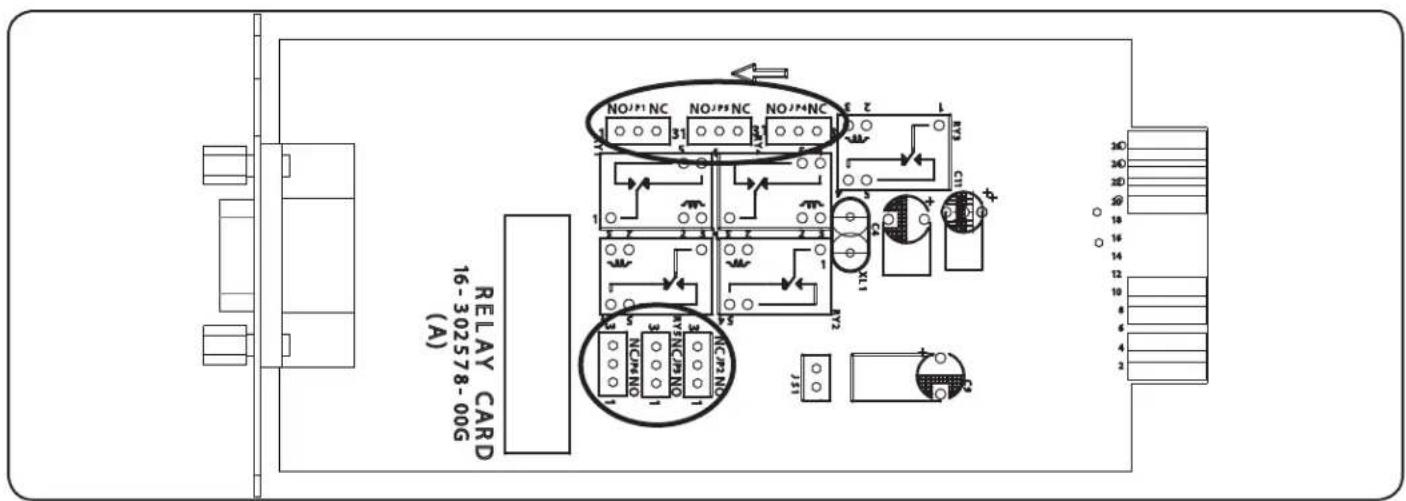
HaheceHHbHe pa3bem WcKorpaWcckme CMBonbl 6enoro 8eBa o6o3haaHOT HopMaNbHO p3OMKHytbe KOHTakTb1 n2, a TAKHe HOpMaNbHO 3AMKHytbe KOHTakTb2 n3.

IINI NIOYENH HCHHAI NOCPeDCTBOM HOPMaJIbHO pa3OMKHyTbIX CyHXX KOHTAKTOB NepeMbUka DOnJHCAoeMnHTb KOHTAKTb1 12.
IINHONYUeHnCnHnA NOcpeCTBOM HOpMaJIbHO 3aMKHyTbIX CyXHX KOHTAKTOB NepemBuHaQ
DOnJHxCoeHNrTaKoHTAKTb2N3.
5.2 Onncahne fynkui nepemblyueK

Manufacturing Excellence
1111 W. 35th Street, Chicago, IL 60609 USA - www.triplite.com/support
- Installation and Setup 2
- Specifications 3
- Internal Logic Connection 5
- Jumper Configuration 6
- Warranty and Product Registration 7
- Espanol 8
- Français 15
- Pycckn 22
- PROTECT YOUR INVESTMENT!
- Introduction
- Product Features
- Package Contents
- Installation and Setup
- System Requirements
- Installation
- Specifications
- Internal Circuit
- Electric Specifications
- Pin Assignment
- Function Description
- Application Example
- Internal Logic Connection
- Pin Definition and Internal Logic Connection
- Connection for Normally Open
- Connection for Normally Closed
- Jumper Configuration
- Jumper Setup
- Jumper Function Description
- Warranty and Product Registration
- LIMITED WARRANTY
- PRODUCT REGISTRATION
- Regulatory Compliance Identification Numbers
- PykoBODCTBO N0Ib30BaTeJia
- yCTaHOBka
- BvendeHne
- XapakTepeuCTnKn npOdykTa
- Copepkmoe ynaKOBkn
- 2.YctaHOBKa NHaCTpOJa
- CnCTeMHbIe Tpe6oBaHna
- Texhnueckne xapaKTepeNtIKn
- BHytpenHnaeNB
- ΘeKtpoTeXHnueckne xapaKtepNCtNK
- PaCnHOBKa n BHyTpEHHee Iornueeckoe coeDInHeHne
- Nopradk coeHHnHn IJn HopMaIbHo pa30MKHytbIX KOHTAKTOB
- Nopraok coeHHnHn dH HopMaIbHO 3aMKHyTbIX KOHTaKTOB
- Pacnoioxehne nepemblyek
- HauanbHa yctaHOBka nepembyueK
- Onncahne fynkui nepemblyueK
Brand : Tripp Lite
Model : RELAYCARDSV
Category : Electronic board