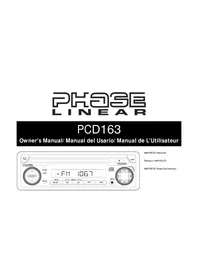
PCD163 - Car stereo JENSEN - Free user manual and instructions
Find the device manual for free PCD163 JENSEN in PDF.



| Product Type | AM/FM Car Stereo with CD Player |
| Dimensions | 178 mm × 178 mm × 51 mm (7" × 7" × 2") |
| Power Supply | 11–16 VDC, negative ground |
| Output Power | 3 W RMS × 4 channels (4 Ω, <1% THD+N) |
| Fuses | Battery: 5 A (AGC), Ignition/Accessory: 0.5 A (AGC) |
| FM Range | 87.5 – 107.9 MHz |
| AM Range | 530 – 1710 kHz |
| Compatible CD Formats | CDDA (CD-R/RW with finalized session); no MP3/WMA/WAV/OGG |
| Signal-to-Noise Ratio (CD) | >85 dBA |
| Frequency Response (CD) | 20 Hz – 18 kHz, -3 dB |
| Frequency Response (FM) | 30 Hz – 12 kHz, -3 dB |
| Frequency Response (AM) | 30 Hz – 2 kHz, -3 dB |
| Audio Functions | Volume, Bass (BAS), Treble (TRE), Balance (BAL), Fader (FAD), Loudness (LOUD) |
| Display | LCD screen with clock, frequency priority or adjustable clock |
| Auxiliary Input | AUX IN jack (3.5 mm mini-jack) on the front panel |
| Station Memory | AM/FM presets (number not specified) |
| Mounting | Mounting sleeve, installation kit, ISO bracket |
| Maintenance | Clean with a soft cloth; avoid water, detergents, and chemicals |
| Safety | Disconnect battery before installation; maximum mounting angle 20° from horizontal |
| Repairability | No user-serviceable parts; do not open the chassis |
Frequently Asked Questions - PCD163 JENSEN
User questions about PCD163 JENSEN
0 question about this device. Answer the ones you know or ask your own.
Ask a new question about this device
Download the instructions for your Car stereo in PDF format for free! Find your manual PCD163 - JENSEN and take your electronic device back in hand. On this page are published all the documents necessary for the use of your device. PCD163 by JENSEN.
USER MANUAL PCD163 JENSEN
It's a good idea to read all of the instructions before beginning the installation.
Contents
Installation Instructions 3
Wiring 5
Operating Instructions 6
CD Player Operating Instructions. 10
Care and Maintenance. 12
Specifications 13
Installation Requirements
This unit is designed for installation in cars, trucks, and vans with an existing radio opening. In many cases, a special installation kit will be required to mount the radio to the dashboard. These kits are available at electronics supply stores and car stereo specialty shops. Always check the kit application before purchasing to make sure the kit works with your vehicle. If you need a kit but cannot locate one, call our customer support line at 1-800-323-4815. (U.S.A. and Canada only.)
Tools and Supplies
The following tools and supplies are needed to install the radio.
- Torx type, flathead and Philips screwdrivers
Wire cutters and strippers - Tools to remove existing radio (screwdriver, socket wrench set or other tools)
- Electrical tape
Crimping tool
Volt meter/test light
Crimp connections - 18 gauge wire for power connections
16-18 gauge speaker wire
Speaker Requirements
Only connect speakers rated with a load impedance of 4 ohms. Speakers with a load impedance of less than 4 ohms could damage the unit.
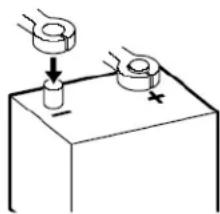
Disconnect Battery
Before you begin, disconnect the battery negative terminal.
Toll-Free Installation Assistance
If you require assistance, contact Technical Support at 1-800-323-4815 from 8:30 a.m. to 7:00 p.m. EST Monday through Friday and from 9:00 a.m. to 5:00 p.m. EST on Saturday. (U.S.A. and Canada only.)
INSTALLATION INSTRUCTIONS
Installation Using the Mounting Sleeve
- Slide the mounting sleeve off the chassis. If it is locked into position, use the removal tools (supplied) to disengage it.
- Check the dashboard opening size by sliding the mounting sleeve into it. If the opening is too small, carefully cut or file as necessary until the sleeve easily slides into the opening. Do not force the sleeve into the opening or cause it to bend or bow. Check for sufficient space behind the dashboard for the radio chassis.
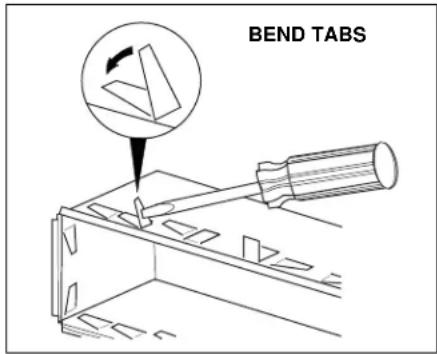
- Locate the series of bend tabs along the top, bottom, and sides of the mounting sleeve. With the sleeve fully inserted into the dashboard opening, bend as many of the tabs outward as necessary to firmly secure the sleeve to the dashboard.
-
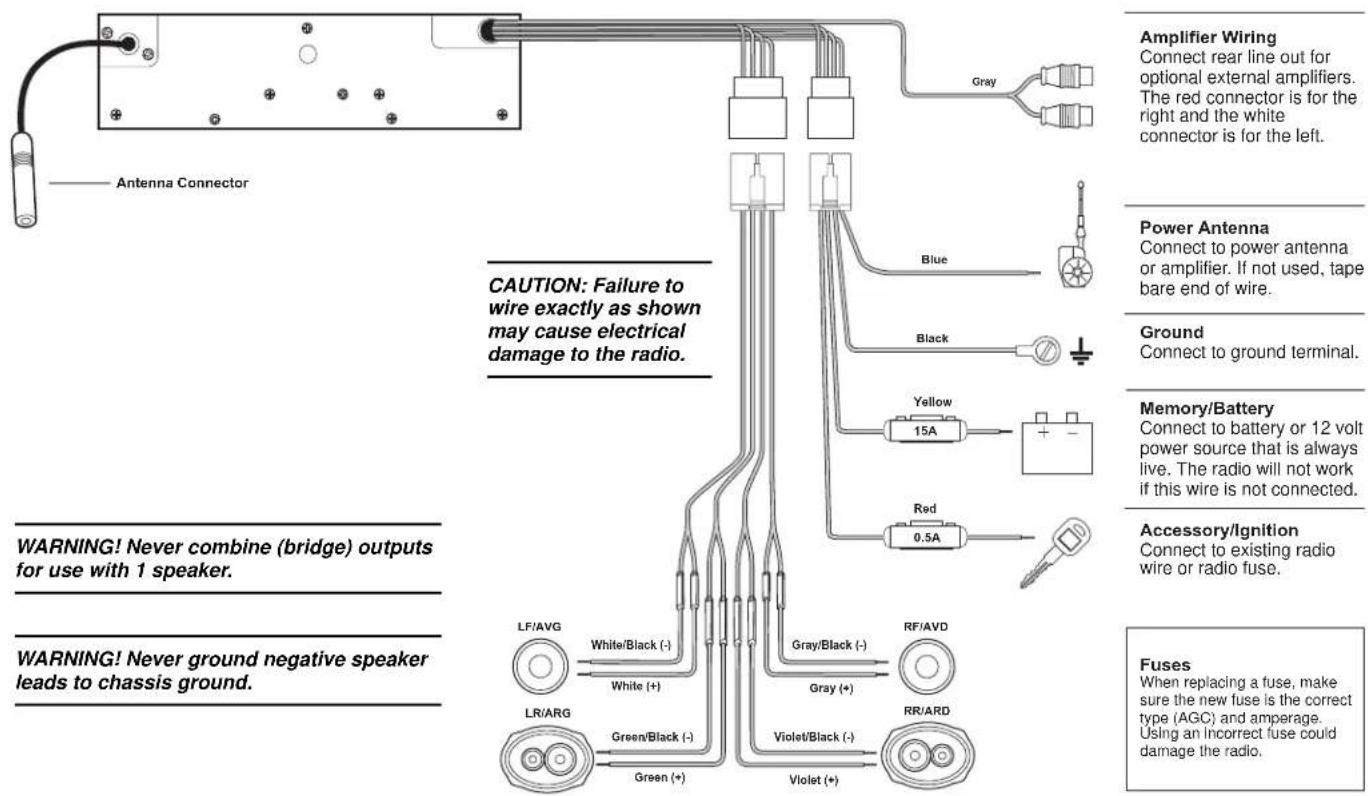
Place the radio in front of the dashboard opening so the wiring can be brought through the mounting sleeve. Follow the wiring diagram carefully and make certain all connections are secure and insulated with wire nuts or electrical tape. After completing the wiring connections, turn the unit on to confirm operation (vehicle ignition must be "on"). If the unit does not operate, re-check all wiring until the problem is corrected.
-
Make sure the radio is right-side up, then carefully slide the radio into the mounting sleeve until it is fully seated and the spring clips lock it into place.
- Attach one end of the perforated support strap (supplied) to the screw stud on the rear of the chassis using the hex nut provided. Fasten the other end of the perforated strap to a secure part of the dashboard either above or below the radio using the screw provided. Bend the strap to position it as necessary.
- Test the radio using the Operating Instructions that follow.
CAUTION: The support strap must be used to prevent damage to the dashboard from the weight of the radio or improper operation due to vibration.
CAUTION: For proper operation of the CD player, the chassis must be mounted within 20^ of horizontal. Make sure the unit is mounted within this limitation.
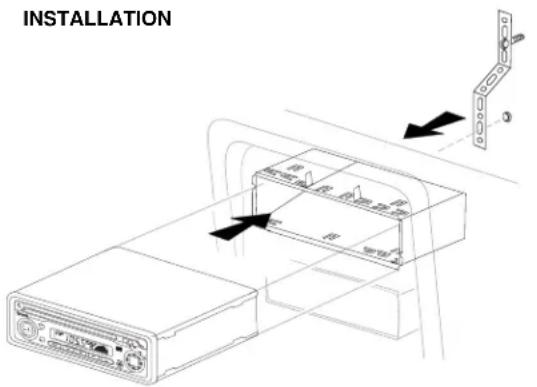
INSTALLATION INSTRUCTIONS
Installation Using a Kit
If your vehicle requires the use of an installation kit to mount this radio, follow the instructions included with the installation kit to attach the radio to the mounting plate supplied with the kit.
- Wire and test the radio as described in step 4 of "Installation Using the Mounting Sleeve" on page 3.
- Install the radio mounting plate assembly to the sub-dashboard according to the instructions of the installation kit.
- Attach the support strap to the radio and dashboard as described in step 6 of "Installation Using the Mounting Sleeve" on page 3.
- Replace the dashboard trim panel.
ISO Installation
This unit has threaded holes in the chassis side panels which may be used with the original factory mounting brackets of some Toyota, Nissan, Mitsubishi, Isuzu, Hyundai and Honda vehicles to mount the radio to the dashboard. Please consult with your local car stereo specialty shop for assistance on this type of installation.
- Remove the existing factory radio from the dashboard or center console mounting. Save all hardware and brackets as they will be used to mount the new radio.
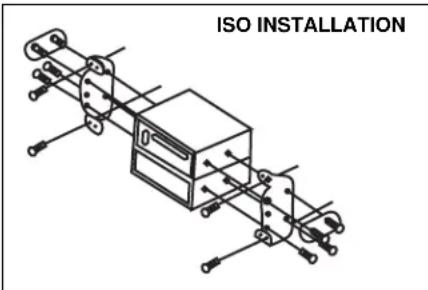
- Carefully un-snap the plastic frame from the front of the new radio chassis. Remove and discard the frame.
- Remove the factory mounting brackets and hardware from the existing radio and attach them to the new radio.
CAUTION: Do not exceed M5 X 6 MM screw size. Longer screws may touch and damage components inside the chassis.
- Wire the new radio to the vehicle as described in step 4 of "Installation Using the Mounting Sleeve" on page 3.
- Mount the new radio assembly to the dashboard or center console using the reverse procedure in step 1 of "Installation Using the Mounting Sleeve" on page 3.
Removing the Radio
To remove the radio after installation, remove the trim ring by lifting in the center and pulling it off from either side. Insert the removal keys straight back until they lock, and pull the radio out. If removal keys are inserted at an angle, they will not lock properly to release the unit.
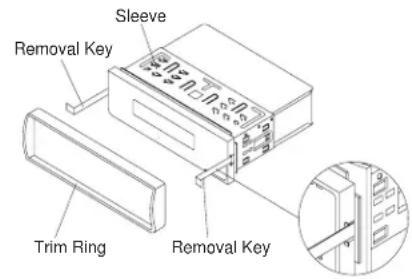
REMOVING THE RADIO
WIRING
OPERATING INSTRUCTIONS
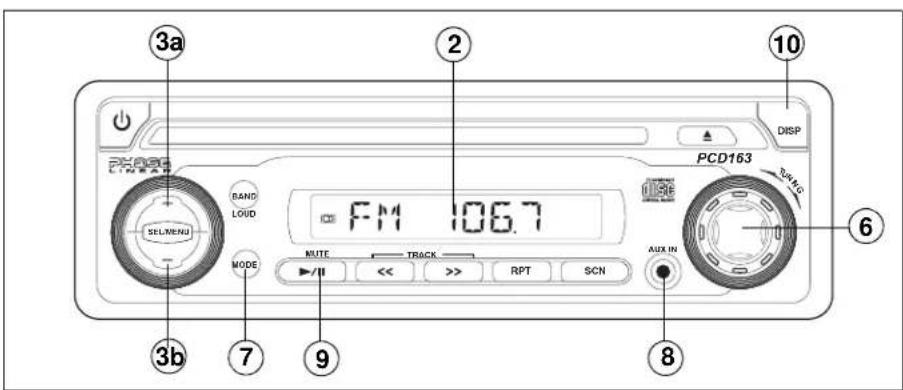
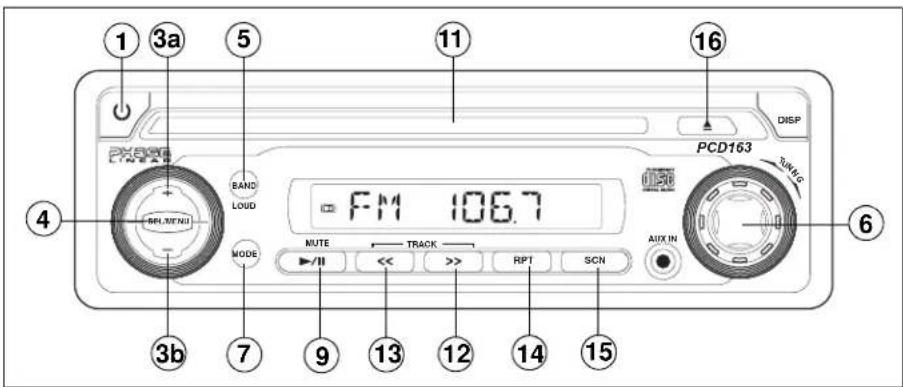
① Power On/ Off Button
Press the power button (1) to turn the unit on and off when the vehicle ignition switch is on. If the radio is off when the ignition switch is turned off, the power button must be pressed to turn on the radio after the ignition switch is turned on. If the ignition switch is turned off while the radio is on, the radio will come on automatically when the ignition switch is again turned on.
Liquid Crystal Display Panel
The Liquid Crystal Display (LCD) panel displays the frequency, time, and all activated functions.
minimum of "VOL 00" to a maximum of "VOL 46". To decrease the volume, press the volume - button (3b). The display will automatically return to the normal indication 5 seconds after the last volume adjustment or when another function is activated. These buttons are also used in conjunction with the SEL/MENU button (4) to adjust the bass, treble, balance and fader levels.
④ Select (SEL/MENU) Button
This SEL/MENU button (4) is used to select the audio function (volume, bass, treble, balance or fade) to be adjusted using the volume buttons
(3). Press the SEL/MENU button once to set the unit for volume adjustment ("VOL" and the setting number will appear on the display panel). Press the button additional times to select bass ("BAS" on display panel), treble (TRE), balance (BAL), fader (FAD), and volume (VOL) again. The display returns to the normal indication 5 seconds after the last adjustment was made or when another function is activated.
NOTE: It is a characteristic of LCD panels that, if subjected to cold temperatures for an extended period of time, they may take longer to illuminate than under normal conditions. In addition, the visibility of the characters on the LCD may slightly decrease. The LCD read-out will return to normal when the temperature inside the vehicle increases to a normal range.
③ Volume Control
To increase the volume level, press the volume + button (3a). The volume will increase and the level will be shown on the display panel from a

OPERATING INSTRUCTIONS
④ Bass Control
To adjust the bass level, press the SEL/MENU button (4) until "BAS" appears on the display panel. Within five seconds, press the volume + / - buttons (3a and 3b) to adjust the bass from "BAS-5" to "BAS +5". "BAS 00" represents a flat response.
④ Treble Control
To adjust the treble level, press the SEL/MENU button (4) until "TRE" appears on the display panel. Within five seconds, press the volume +/- buttons (3a and 3b) to adjust the treble from a minimum of "TRE -5" to a maximum of "TRE +5". "TRE 00" represents a flat response.
4 Left/Right Balance Control
To adjust the left-right speaker balance, press the SEL/MENU button (4) until the "BAL" indication appears on the display panel. Within five seconds, press the volume +/- buttons (3a and 3b) adjust the balance between the left and right speakers from "BAL 12L" (full left) to "BAL 12R" (full right). "BAL L=R" represents an equal balance level between the left and right speakers.
4 Front/ Rear Fader Control
To adjust the front/rear speaker balance, press the SEL/MENU button (4) until "FAD" appears on the display panel. Within five seconds, press the volume +/- buttons (3a and 3b) to adjust the balance between the front and rear speakers from "FAD 12F" (full front) to "FAD 12R" (full rear). "FAD F=R" represents an equal balance level between the front and rear speakers.
④ System Menu
Press and hold the SEL/MENU button (4) to view the system menu. Continue pressing the SEL/MENU button to access the menu options in the following order: BEEP ON/OFF, P--VOL (turn-on volume), CLK ON/OFF, Display Priority, 12/24 HOUR clock setting. Use the volume +/- buttons (3a and 3b) to adjust menu option settings.
- Audible BEEP (ON/OFF): Select ON to hear an audible beep each time a function is activated.
- P--VOL (00-46): Select the desired default turn-on volume.
-
CLK (ON/OFF): Select ON to have the clock appear on the LCD when the radio is turned off. Choose OFF to have the LCD remain dark when the radio is turned off.
-
Display Priority (FREQ PRI, CLK PRI, NO PRI): Select FREQ PRI to revert to the frequency display after a few seconds of inactivity. Select CLK PRI to automatically revert to the clock display after a few seconds of inactivity. Select NO PRI if you do not want the display to automatically change. Use the DISP button to change your display preference.
- (12/24) HOUR: Select 12 or 24 hour display mode for the clock.
5 Loudness Control (BAND/ LOUD)
When listening to music at low volumes, this feature will boost the bass and treble ranges to compensate for the characteristics of human hearing. Press and hold the BAND/LOUD button (5) to activate this feature as indicated by "LOUD ON" on the display panel. Press and hold the BAND/LOUD button again to deactivate the function and "LOUD OFF" will appear on the display.
⑤ AM/ FM Band Selector
During radio play, press the BAND button (5) to change the radio band. The indications "AM" or "FM" appear on the display panel according to your selection.
OPERATING INSTRUCTIONS
⑥ Manual Tuning Control
Turn the manual TUNING control (6) clockwise to tune upward in frequency on the band in use or counter-clockwise to tune downward in frequency. The frequency to which you are tuned will be shown in digital format on the display panel. When tuning in a station, always adjust the control so that the correct broadcast frequency is shown on the display and you are receiving a clear signal. If the radio is tuned off-frequency, you could experience distorted audio, noise and other reception problems.
9 Audio Mute
Press the MUTE ( button (9) to mute the radio volume from the system. "MUTE" will appear on the display panel and the volume will be muted. (If you press this button while a CD is playing, CD play will be paused.) Press MUTE again, or press the volume +/− buttons (3a and 3b) or the SEL/MENU button (4) to return the volume level to the setting in use before the mute function was activated.
⑦ Source Button (MODE)
The MODE button (7) enables selection of radio, disc or auxiliary device playback. When a CD is playing, press the MODE button to revert to radio operation.
⑧ Auxiliary Input
To access an auxiliary device:
1. Connect the portable audio player to the AUX IN interface on the front panel (8).
2. Press the MODE button (7) to select Aux In mode.
3. Press MODE again to cancel Aux In mode and go to the next mode.
OPERATING INSTRUCTIONS
10 Display Selector (DISP)
This unit can display either the clock time or radio frequency/CD player functions.
Depending on your System Menu settings (see "System Menu" on page 7), the radio frequency,
CD player track indication or clock may be displayed. Press the DISP button (10) to change between Frequency/CD information and clock display.
Setting the Clock
To set the clock, perform the following steps:
- Turn the vehicle ignition and radio on.
- Press and hold the DISP button (10) until the time display flashes.
- Within 5 seconds, press the volume + button (3a) to adjust the hour.
- Press the volume - button (3b) to adjust the minutes.
Five seconds after the last hour or minute adjustment has been made, the time will set and normal operation will resume.
CD PLAYER OPERATING INSTRUCTIONS
11 Disc Slot
With the label surface facing up, fully insert a compact disc into the slot (11) until the mechanism engages and pulls the disc in. The disc symbol () and "S--CDP" will appear on the display. Play will begin from the first track on the disc and the track number and elapsed time of track play will appear on the display.
NOTE: The unit is designed for play of standard 5^ (12 cm.) compact discs only. Do not attempt to use 3^ (8 cm.) CD singles in this unit, either with or without an adaptor, as damage to the player and/or the disc may occur. Such damage will not be covered by the warranty on this product.
CD Play/ Pause Selector
During disc play, press the play/pause) button (9) to pause the disc. When paused, "S - PAUSE" appears on the display, the disc symbol flashes, and play is suspended. When pressed again, playback resumes from the point at which disc play was stopped.
12 Forward Track Selector
During disc play, the forward TRACK button (12) is used to quickly select the beginning of a particular track in the forward direction. With each press of the button, the next higher track number will be selected as shown on the display panel.
13 Backward Track Selector
During disc play, the backward TRACK button (13) is used to quickly select the beginning of a particular track in the backward direction. With each press of the button, the
next lower track number will be selected as shown on the display panel.
1213 Cue/Review Functions
High-speed audible search to any section of the disc can be made by the Cue and Review functions. Press and hold the forward TRACK >> button (12) to advance rapidly in the forward direction or the backward TRACK << button (13) to advance rapidly in the backward direction.
CD PLAYER OPERATING INSTRUCTIONS
14 Repeat Play Selector (RPT)
During disc play, press the RPT button (14) to repeat the playback of a desired track ("S --RPT" appears on the display panel, followed by the current track number). Play of the selected track will continue to repeat until the Track Repeat function is cancelled by pressing the RPT button again or by activating the Scan function, causing the "S -- RPT" indication to disappear.
15 Track Scan Select (SCN)
During disc play, press the SCN button (15) to play the first 10 seconds of each track. ("S--SCN" is displayed with the track number). When a desired track is reached, press the SCN button again to cancel the function and play the selected track. Track Scan mode can also be canceled by activating the Repeat Play (14) function.
16 Disc Eject Button
Press the eject button (16) to stop disc play and eject the disc. The unit will revert to radio operation. Disks may be ejected with the vehicle ignition switch on or off. If an ejected disc is not removed from the disc slot within 10 seconds of being ejected, the disc will be re-inserted automatically, and the disc symbol will reappear on the display to show that a disc is still installed in the unit.
NOTE: To prevent a disc from accidentally being damaged, always remove the disc from the unit when disc play is finished.
CARE AND MAINTENANCE
Your new radio/CD player does not require any maintenance. However, proper understanding of its use and handling will help you obtain maximum enjoyment of its capabilities. We recommend that you keep this manual for reference on the many features of this unit as well as how to set the clock. The following points should be observed:
- When cleaning the interior of the vehicle, do not get water or cleaning fluids on the unit.
- The CD player is a precision instrument and will not operate properly in extreme heat or cold. If such conditions occur, wait until the interior of the vehicle reaches a normal temperature before using the player.
- If the temperature inside the player gets too hot, a protective circuit will automatically stop play of the disc. In this case, allow the unit to cool before operating the player again.
- Never insert anything other than a 5^ (12 cm) compact disc into the player as the mechanism can be damaged by foreign objects.
- Do not attempt to use 3^ (8 cm) CD-Single discs in this unit, either with or without an adaptor, as damage to the player and/or
disc may occur. Such damage will not be covered by the Warranty on this product.
- When not using the disc player, always remove the compact disc. Do not leave an ejected disc sitting in the disc slot as this can expose it to sunlight and other causes of damage.
- Do not attempt to open the unit chassis. There are no user-serviceable parts or adjustment points inside.
- When the vehicle warms up during cold weather or under damp conditions, condensation may appear on the lens of the disc player. Should this occur, the player will not operate properly until the moisture has evaporated.
- The unit is designed with a vibration dampening CD mechanism to minimize interruption of disc play due to normal vibration. When driving on rough roads, however, occasional sound skips may occur. This will not scratch or damage the disc and normal play will resume when the rough conditions cease.
Handling Compact Discs
Dirt, dust, scratches and warping can cause skips in the playback and deterioration of sound quality. Please follow these guidelines to take care of your compact discs:
- Carefully wipe fingerprints, dust and dirt from the disc's playing surface with a soft cloth. Wipe in a straight motion from the center to the outside of the disc.
- Never use chemicals such as record sprays or household cleaners to clean CDs, as they can irreparably damage the disc's surface.
- Discs should be kept in their storage cases when not in use.
- Do not expose discs to direct sunlight, high temperatures or high humidity for long periods.
- Do not stick paper, tape or labels on disc surfaces.
RESET BUTTON
A Reset button is located near the bottom right corner on the front of the chassis. The Reset function is provided to protect the microprocessor circuitry and should only be activated under the following circumstances as it will erase the time and pre-set memories: Upon initial installation after all wiring is completed; If there is a malfunction of any of the switches on the unit, pressing the Reset button may clear the system and return to normal operation.
SPECIFICATIONS
CD-R and CD-RW Capability
Depending on media type and method of "recording/burning", some CD-R/RWs may be incompatible with this unit. After "recording/ burning" the session must be closed. Please refer to your software's recommended procedures for closing a disc/session. Review your recording software to familiarize yourself with the correct "recording/burning" procedures. We recommend using the latest versions of ROXIO^TM or NERO™ burning software.
In addition, this unit will only recognize the CDDA (Compact Disc Digital Audio) format "recorded/burned" onto a CD-R/RW. This unit does not support .MP3, .WMA, .WAV, .OGG or other formats. The CDDA format is the standard format of an "original store-bought" CD. When recording/burning a CD-R/RW make sure the CDDA format is selected.
Technical Specifications

CEA Power Ratings
Power Output: 3 watts RMS X 4 channels into 4-ohms @ < 1% THD+N
Signal to Noise Ratio: 70dB below reference. (Reference: 1 watt, 4-ohms)
Frequency Response: 20Hz to 20kHz, -3dB
Reference Supply Voltage: 14.4VDC
CD Player
Signal to Noise Ratio: >85dBA Frequency Response: 20Hz to 20kHz, -3dB Channel Separation: >55dB @ 1kHz D/A converter: 1Bit/Ch
FM Tuner
Mono Sensitivity: 18dBf
50dB Stereo Quieting Sensitivity: 20dBf
Stereo Separation @ 1kHz: >30dB
Frequency Response: 30Hz to 12kHz, -3dB
AM Tuner
Tuning Range: 530kHz - 1710kHz
Sensitivity @ 20dB: 30uV
Signal to Noise @ 1kHz > 50dB
Frequency Response: 30Hz - 2kHz, -3dB
General
Power Supply: 11 to 16VDC, negative ground
Fuses: Battery - 5 amp / AGC, Ignition / Accessory - 0.5 amp / AGC
4 + 9 pin quick-connect harness
Dimensions: 7'' × 7'' × 2'' (178mm x 178mm x 51mm)
Specifications subject to change without notice.
PCD163
Manual del Usario
For instructions in English, refer to page 2.
Para Obtener instrucciones en Frangois, dirjase a la pagina 30.
PREPARACION
Comenzando
For instructions in English, refer to page 2.
Para Obtener instrucciones en Espanol, dirjase a la page 16.
PREPARATION
Mise en Marche
Specifications Techniques

DO NOT RETURN THIS PRODUCT TO THE STORE
Audiovox Electronics Corporation ("the Company") is committed to quality and customer service, and are pleased to offer you this Warranty. Please read it thoroughly and contact the Company at 1-800-323-4815 with any questions.
Who is covered?
The Company extends this warranty to the original retail purchaser of products purchased through an authorized Audiovox retailer in the U.S.A., Puerto Rico or Canada. This warranty is not transferable or assignable. Proof of purchase is required in the form of an original sales receipt.
What Is Covered?
The Company warrants that should this product or any part thereof, under normal use, be proven defective in material or workmanship within 90 days from the date of original purchase, such defect(s) will be repaired or replaced with a new or reconditioned product (at the Company's option) without charge for parts and repair labor.
What is not covered?
This Warranty does not cover the following:
- Damage incurred during shipping or transporting the product to the Company or a service center
- Elimination of car static or motor noise
- Defects in cosmetic, decorative or non-operative structural parts
- Correction of antenna problems
Costs incurred for installation, removal or reinstallation of the product
- Consequential damage to compact discs, USB devices, digital media cards, accessories or vehicle electrical systems
- Damage caused by improper installation, mishandling, misuse, neglect, accident, blown fuse, battery leakage, theft or improper storage
- Products whose factory serial number/bar code label(s) or markings have been removed or defaced
- Damage resulting from moisture, humidity, excessive temperature, extreme environmental conditions or external natural causes
Please review the "Care and Maintenance" section of your Installation and Operation Manual for additional Information regarding the proper use of your product.
Limitations
THE EXTENT OF THE COMPANY'S LIABILITY UNDER THIS WARRANTY IS LIMITED TO THE REPAIR OR REPLACEMENT PROVIDED ABOVE AND, IN NO EVENT, SHALL THE COMPANY'S LIABILITY EXCEED THE PURCHASE PRICE PAID BY PURCHASER FOR THE PRODUCT.
This Warranty is in lieu of all other express warranties or liabilities. ANY IMPLIED WARRANTY, INCLUDING ANY IMPLIED WARRANTY OF MERCHANTABILITY, SHALL BE LIMITED TO THE DURATION OF THIS WRITTEN WARRANTY. ANY ACTION FOR BREACH OF ANY WARRANTY HEREUNDER INCLUDING ANY IMPLIED WARRANTY OF MERCHANTABILITY MUST BE BROUGHT WITHIN A PERIOD OF 24 MONTHS FROM DATE OF ORIGINAL PURCHASE. IN NO CASE SHALL THE COMPANY BE LIABLE FOR ANY CONSEQUENTIAL OR INCIDENTAL DAMAGES FOR BREACH OF THIS OR ANY OTHER WARRANTY, EXPRESS OR IMPLIED, WHATSOEVER. No person or representative is authorized to assume for the Company any liability other than expressed herein in connection with the sale of this product.
Some states do not allow limitations on how long an implied warranty lasts or the exclusion or limitation of incidental or consequential damage so the above limitations or exclusions may not apply to you. This Warranty gives you specific legal rights and you may also have other rights which vary from state to state.
Obtaining Warranty Service
To obtain repair or replacement within the terms of this Warranty, call 1-800-323-4815 for the location of a warranty station serving your area.
- You must prepay the initial shipping charges to the Company. The Company will pay the return shipping charges for all warranted products returned to an address within the U.S.A., Puerto Rico or Canada.
- Please package the product securely to avoid shipping damage. We recommend using a carrier that provides tracking service to prevent lost packages. Lost or damaged packages are not covered by this warranty.
- Provide a detailed description of the problem(s) for which you require service.
NE RENVOYEZ PAS CE PRODUIT AU MAGASIN
Audiovox Electronics Corporation
150 Marcus Boulevard
Hauppauge, NY 11788
1-800-323-4815
www.audiovox.com
©2007 Audiovox
v.070107

- Contents
- Installation Requirements
- Tools and Supplies
- Speaker Requirements
- Disconnect Battery
- Toll-Free Installation Assistance
- INSTALLATION INSTRUCTIONS
- Installation Using the Mounting Sleeve
- Installation Using a Kit
- ISO Installation
- Removing the Radio
- WIRING
- OPERATING INSTRUCTIONS
- ① Power On/ Off Button
- Liquid Crystal Display Panel
- ④ Select (SEL/MENU) Button
- ③ Volume Control
- ④ Bass Control
- ④ Treble Control
- Left/Right Balance Control
- Front/ Rear Fader Control
- ④ System Menu
- Loudness Control (BAND/ LOUD)
- ⑤ AM/ FM Band Selector
- ⑥ Manual Tuning Control
- Audio Mute
- ⑦ Source Button (MODE)
- ⑧ Auxiliary Input
- Display Selector (DISP)
- Setting the Clock
- CD PLAYER OPERATING INSTRUCTIONS
- Disc Slot
- CD Play/ Pause Selector
- Forward Track Selector
- Backward Track Selector
- Cue/Review Functions
- Repeat Play Selector (RPT)
- Track Scan Select (SCN)
- Disc Eject Button
- CARE AND MAINTENANCE
- Handling Compact Discs
- RESET BUTTON
- SPECIFICATIONS
- CD-R and CD-RW Capability
- Technical Specifications
- CEA Power Ratings
- CD Player
- FM Tuner
- AM Tuner
- General
- PCD163
- Manual del Usario
- PREPARACION
- Comenzando
- PREPARATION
- Mise en Marche
- Specifications Techniques
- DO NOT RETURN THIS PRODUCT TO THE STORE
- Who is covered?
- What Is Covered?
- What is not covered?
- Limitations
- Obtaining Warranty Service
- NE RENVOYEZ PAS CE PRODUIT AU MAGASIN
Brand : JENSEN
Model : PCD163
Category : Car stereo