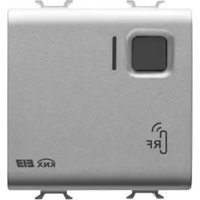
GW14798 - Radio receiver Gewiss - Free user manual and instructions
Find the device manual for free GW14798 Gewiss in PDF.



| Product type | Flush-mounted 8-channel EIB radio receiver |
| Brand | Gewiss |
| Model | GW14798 |
| Power supply | KNX/EIB bus, max consumption 15 mA |
| Number of channels | 8 EIB channels, up to 4 RF sources per channel (32 sources max) |
| Radio frequency | RF (not specified, typically 868 MHz for Chorus) |
| Radio range | Approximately 30 m indoors (depending on obstacles) |
| Configurable functions | Switching, dimming, blinds/curtains, scenes, priority control, sequence, 8/16 bit value, alarms |
| Configuration | ETS software (KNX/EIB) |
| RF learning | Rotary selector positions 1-8, front button, signaling LED |
| LED indicators | Red LED (physical address programming), multi-function red/green/yellow LED (learning, test, reception) |
| Control elements | 1 miniature address programming button, 1 EIB test button, 1 10-position rotary selector |
| Dimensions | 2 Chorus modules (approximately 36 mm width per module) |
| Mounting | Flush-mounted in standard box, on Chorus support |
| Protection rating | IP20 |
| Operating temperature | -5 °C to +45 °C |
| Storage temperature | -25 °C to +70 °C |
| Relative humidity | Max 93% (non-condensing) |
| Bus connection | 2-pin plug terminal Ø 1 mm |
| Standards | Low Voltage Directive 2006/95/EC, EMC 89/336/EEC, R&TTE 99/05/EC, EN50428, EN50090 |
| Maintenance and cleaning | Clean with a dry cloth; no special maintenance required |
| Safety | Installation by qualified personnel according to IEC 64-8; observe separation distances |
| General information | Interface between KNX/EIB system and Chorus radio devices; manages lighting, blinds, scenes, alarms |
Frequently Asked Questions - GW14798 Gewiss
User questions about GW14798 Gewiss
0 question about this device. Answer the ones you know or ask your own.
Ask a new question about this device
Download the instructions for your Radio receiver in PDF format for free! Find your manual GW14798 - Gewiss and take your electronic device back in hand. On this page are published all the documents necessary for the use of your device. GW14798 by Gewiss.
USER MANUAL GW14798 Gewiss
8 channel EIB RF receiver - flush-mounted
Receptor RF 8 canales EIB - empotable
Warning! The safety of this appliance is only guaranteed if all the instructions given here are followed scrupulously. These should be read thoroughly and kept in a safe place. The Chorus products must be installed in compliance with the requisites of standard CEI 64-8 for devices for domestic use and similar, in non-dusty atmospheres and where special protection against water penetration is not required.
The GEWISS sales organisation is at your disposal for clarifications and technical information.
Gewiss SpA reserves the right to make changes to the product described in this manual at any time and without giving any notice.
Pack content
n. 18 channel EIB RF receiver - flush-mounted
n. 1 Bus terminal
n. 1 Cover with screw
n. 1 Installation and user manual
Summary
The EIB 8 channel RF Receiver - flush-mounted, allows the Chorus system RF command and control devices to communicate with a KNX/EIB system, which hence allows the Building Automation EIB system to be extended using RF command devices.
The EIB System receiver is an 8 channel input interface function to all effects. Up to 4 different RF command sources (transmitters) can be connected to each channel which manages a total of 32 channels of the RF remote controls (GW 20 963), RF push-button panels (e.g. GW 14 803), IR with twilight switch RF movement detector (e.g. GW 14 811), 2 RF channel input modules (e.g. GW 14 813), etc.
The receiver is powered by the bus line. The front button is used to test EIB channels identified by the rear rotating switch position (1-8). Turing the rear rotating switch to a position (1-8), the radio receiver is able to learn the connections with the RF command devices. The configuration status is indicated by the front LED.
The receiver is able to send the bus, for each channel, the battery conditions of the last RF source that transmitted so that they can be replaced before they are fully depleted.
The device is fitted inside a standard flush-mounted box, mounted on Chorus supports in the space of two modules.
This device must be configured using the ETS software. Each channel can perform one of the following functions, by choice:
Functions
ON/OFF SWITCHING
This switches the KNX/EIB actuator output.
Two buttons on the RF remote control, a button on the RF push-button panel, a RF timed-thermostat (e.g. GW 14 841) or a RF bidirectional (e.g. GW 14 851), a 2 RF channel input module or an IR with twilight switch RF movement detector can be used for this command.
DIMMING MANAGEMENT
This allows you to manage the lighting fixtures connected to a KNX/EIB dimmer. Each individual dimmer channel can be controlled using one button on the RF push-button panel, two buttons on the RF remote control or a 2 RF channel input module.
- long pressure (>0.5s) : regulation of the light intensity;
- short pressure (≤ 0.5s) : total On or Off option.
AWNING AND SHUTTER MANAGEMENT
This activates motorised awnings or shutters connected to a KNX/EIB actuator motor command.
Each individual awning or shutter function can be controlled using one button on the RF push-button panel, two buttons on the RF remote control or a 2 RF channel input module.
- long pressure (>0.5s) : shutter movement;
- short pressure (≤ 0.5s) : stop, if the shutter is moving; regulation of the laths if the shutter is at a standstill and only if the actuator is set to "blinds" mode.
SCENE MANAGEMENT
This allows you to manage a scene. The scene can be controlled with a button on the RF push-button panel or RF remote control or with an 2 RF channel input module, with the possibility of sending two different values for each channel.
- short pressure (≤ 3s) : activation of the scene;
- long pressure (>3s) : scene saving.
SEND PRIORITY CONTROLS
Using the buttons on the RF push-button panel or RF remote control or a 2 RF channel input module, it is possible to override the status (fixed ON or OFF, regulated at choice) of a KNX/EIB device. This function can be used, for instance to keep lights ON, ignoring other switch-off commands.
SEQUENCE COMMANDS
This permits up to 4 commands to be sent simultaneously with 1bit/1byte format for actuations, to send values, etc. Each command is linked to two different values with the same format which are sent according to the RF command received.
This function can only be set for channels 1 through 4.
8/16 BIT VALUE
This permits a command to be sent with 8/16 bit format to send, for example, a setpoint, etc. Each command is linked to two different values with the same format which are sent according to the RF command received.
This function can only be set for channels 5 through 8.
ALARMS
This function can be used to send the bus sensor commands which have a potential-free contact in output, connected to the 2 RF channel input module. Therefore, shutters can be automatically lowered in the event of rain or awnings closed in the event of wind.
Commands sent to the KNX/EIB bus
According to the type of RF device used, on the action performed on it and the function set on the receiver KNX/EIB channel, the receiver will send the KNX/EIB bus a precise command, as seen in the charts below.
| IR with twilight switch RF movement detector | ||||
| RF device | Function configured on the receiver EIB channel | |||
| sensor action switching dimmer | command sequence / 8/16 bit values1 | |||
| IR activation ON ON - | ||||
| IR + twil. switch | activation ON | ON - | ||
| twilight switch | activation ON | ON value 1 | ||
| deactivation OFF | OFF value 2 | |||
(1) Channels 1 through 4 can be set as a "command sequence" while channels 5 through 8 as "8/16 bit values".
| RF timed-thermostat or RF bi-directional timed-thermostat | |
| RF device action | Function configured on the receiver EIB channel |
| switching | |
| system ON ON | |
| system OFF OFF | |
GENERAL DESCRIPTION
| RF command push-button panel or RF remote control | ||||
| RF device Function | configured on the receiver EIB channel | |||
| button action switching dimmer shutters | ||||
| top or right | short pressure ON | ON / stop increase | stop movement / lath opening regulation | |
| long pressure - | increases light intensity | moves shutter up | ||
| bottom or left | short pressure OFF | OFF / stop decrease | stop movement / lath closing regulation | |
| long pressure - | decreases light intensity | moves shutter down | ||
| channel action | command sequence/ 8/16 bit values 1 | scene priority control | ||
| top or right | top or right value 1 | activates scene A | activates override | |
| long pressure - | learns scene A | - | ||
| bottom or left | short pressure value 2 | activates scene B | deactivates override | |
| long pressure - | learns scene B | - | ||
(1) Channels 1 through 4 can be set as a "command sequence" while channels 5 through 8 as "8/16 bit values".
GENERAL DESCRIPTION
| 2 RF channel input module | ||||
| RF device Function configured on the receiver EIB channel | ||||
| channel action switching dimmer shutters | ||||
| 1 (combined input mode) | short pressure ON | ON / stop increase | stop movement / lath opening regulation | |
| long pressure - | increases light intensity | moves shutter up | ||
| 2 (combined input mode) | short pressure OFF | OFF / stop decrease | stop movement / lath closing regulation | |
| long pressure - | decreases light intensity | moves shutter down | ||
| 1 and 2 (status mode) | contact closes ON ON moves shutter up | |||
| contact opens OFF OFF moves shutter down | ||||
| 1 and 2 (toggle mode) | contact closes ON/OFF ON/OFF - | |||
| contact opens - | - | - | ||
| 1 and 2 (always ON mode) | contact closes ON ON moves shutter up | |||
| contact opens - | - | - | ||
| 1 and 2 (always OFF mode) | contact closes OFF OFF moves shutter down | |||
| contact opens - | - | - | ||
GENERAL DESCRIPTION
| 2 RF channel input module | ||||
| RF device Function configured on the receiver EIB channel | ||||
| channel action | command sequence / 8/16 bit values1 | scene priority control | ||
| 1 (combined input mode) | short pressure value 1 | activates scene A | activates override | |
| long pressure - | learns scene A | - | ||
| 2 (combined input mode) | short pressure value 2 | activates scene B | deactivates override | |
| long pressure - | learns scene B | - | ||
| 1 and 2 (status mode) | contact closes value 1 - activates override | |||
| contact opens value 2 - deactivates override | ||||
| 1 and 2 (toggle mode) | contact closes - - | |||
| contact opens - - | ||||
| 1 and 2 (always ON mode) | contact closes value 1 - activates override | |||
| contact opens - - | ||||
| 1 and 2 (always OFF mode) | contact closes value 2 - deactivates override | |||
| contact opens - - | ||||
(1) Channels 1 through 4 can be set as a "command sequence" while channels 5 through 8 as "8/16 bit values".
continues on the following page
GENERAL DESCRIPTION
| 2 RF channel input module | ||||
| RF device Function | configured on the receiver EIB channel | |||
| channel action | alarm sensors | |||
| 1 (combined input mode) | short pressure - | |||
| long pressure - | ||||
| 2 (combined input mode) | short pressure - | |||
| long pressure - | ||||
| 1 and 2 (status mode)2 | contact closes | ON/OFF3 | ||
| contact opens | ON/OFF3 | |||
| 1 and 2 (toggle mode) | contact closes - | |||
| contact opens - | ||||
| 1 and 2 (always ON mode) | contact closes - | |||
| contact opens - | ||||
| 1 and 2 (always OFF mode) | contact closes - | |||
| contact opens - | ||||
(2) If the function linked to channels 1 and 2 (status mode) is "alarm sensors", the RF message is cyclically sent every 10 minutes while the time for the EIB telegram can be set using ETS.
(3) The ON or OFF value depends on how the sensor alarm status was set (direct or reverse) in the ETS configuration.
KNX/EIB channel test
After the 8 channel EIB RF receiver - flush-mounted is set using ETS software, the front button can be used to test EIB channel operations.
Turn the rotating switch to a value between 1 and 8 on the receiver and press the front button. A command will be sent to the bus that identifies the linked EIB channel as shown in the following charts. This function may be useful in testing correct device operations and to find the EIB channels to be linked to RF commands during their configuration. When the rotating switch is on 0, the front button does not run any function.
| Rotating switch position 1 2 | 3 4 5 | 6 7 8 | |||||||
| Concerned communications object | n. 0 n. | 6 n.1 | 2 n. 18 | n. 24 | n. 30 n. | 36 n. | 42 | ||
| RF-EIB channel configuration | switching | Send "ON" to the concerned communications object | |||||||
| priority control | Send "override on" to the concerned communications object | ||||||||
| dimmer | Send "ON" to the concerned communications object | ||||||||
| shutters | Send "move shutters down" to the concerned communications object | ||||||||
| sensor alarms1 | Send "ON/OFF" to the concerned communications object | ||||||||
| scene | Send "run scene A" to the concerned communications object | ||||||||
| command sequence/8/16 bit values | Send "value 1" to the concerned communications object | ||||||||
(1) The ON or OFF value depends on how the sensor alarm status was set (direct or reverse) in the ETS configuration.

WARNING: the installation of the device must be exclusively done by qualified personnel, following the regulations in force and the guidelines for KNX/EIB installations.
Warnings for KNX/EIB installations
- The length of the bus line between the 8 channel EIB RF Receiver and the power supply unit must not exceed 350 metres.
- The length of the bus line between the 8 channel EIB RF Receiver and the most distant KNX/EIB device must not exceed 700 metres.
- If possible do not create ring circuits so as to prevent undesirable signals and overloads.
- Keep a distance of at least 4mm between the individually insulated cables of the bus line and those of the electric line (figure C).
- Do not damage the electrical continuity conductor of the shielding (figure D).
WARNING: the unused bus signal cables and the electric continuity cable must never touch powered elements or the grounding cable!
Good wireless connection recommendations
- Install the receiver in a "central" position in relation to the various RF devices it must receive commands from.
- Install the receiver as far as possible from all sources of electromagnetic disturbances, such as electrical motors, electricity meters, electrical appliances.
- Do not install the receiver near or behind metal surfaces.
- Do not install the receiver inside metal electrical panels or junction boxes mounted inside reinforced concrete walls.
Electrical connections
Figure B shows the electrical connections diagram.
- Connect the bus cable's red wire to the terminal's red connector (+) and the black wire to the black connector (-). Up to 4 bus lines (wires of the same colour in the same connector) can be connected to the terminal (figure E).
- Insulate the screen, the electrical continuity conductor and the remaining white and yellow wires of the bus cable (should a bus cable with 4 conductors be used), which are not needed (figure D).
- Insert the bus connector into the special feet of the device. The fastener guides determine the direction it should be inserted. Insulate the bus terminal using the relative cover, which must be screwed onto the device. The cover guarantees that the power cables and the bus cables are separated by at least 4mm (figure F).
RF channel learning process
To memorise the combinations between the RF transmitter devices and the receiver, please proceed as follows:
- Turn the rear rotating switch on the receiver to position 1: the front LED will come ON (red) to indicate that the receiver is ready to receive a learning RF message to be memorised.
- Follow the instructions for the device that must be combined to generate the required command message.
The LED will go OFF to indicated that the RF message has been learnt.
- After 5 seconds the LED will come back ON and it is possible to memorise another RF message, repeating the procedure 2 above. If the LED flashes (red), this means that the memory is full (4 transmitters memorised on each channel) and it is therefore necessary to use another channel.
- If necessary, turn the rotating switch to the next position (2, 3 ... 8) and repeat procedure 2 to memorise the other transmitters.
WARNING: do not turn the rotating switch to position 9.
- After memorising all the required transmitters, turn the rotating switch to position 0 for standard functions In this position the receiver LED flashes green briefly each time it receives a message from any of the learnt RF devices.
Cancelling learnt RF channels
To cancel the combinations memorised on the various RF channels, turn the rotating switch to position 9: the front LED will flash for 10 seconds (yellow) and then remain ON (yellow) to indicate that all the channel combinations have been cancelled.
To interrupt the cancellation procedure, turn the selector switch to another position before the LED stops flashing.

WARNING: it is not possible to perform selective cancellations: the cancellation operation requires new learning of all the required RF transmitters.
Completing installation
Insert the device in a Chorus support, making sure the EIB channel test front button is to the left.
Complete the installation with other Chorus devices or hole covers and fix it to the relative container (flush-mounted box, wall-mounted box etc).
Apply the finish plate.
IN SERVICE

Behaviour on the failure and reinstatement of the bus power supply
When the bus power supply fails, the device performs no actions.
The device is in full operating mode after around 60 seconds from reinstatement of the bus power supply.

Maintenance
This device requires no maintenance. Use a dry cloth for possible cleaning.
TECHNICAL DATA
Communication KNX/EIB Bus
RF communication frequency 868 MHz
Power supply By KNX/EIB Bus, 29 V dc SELV
Bus cable KNX/EIB TP1
Bus current consumption 15 mA max
Control elements 1 mini physical address programming key
1 front button for EIB channel test
1 10 position rotating switch:
0 standard operating mode
1 ... 8 RF channel and EIB test channel learning
9 RF channel cancellation
Display elements 1 red physical address programming LED
1 multi-function LED (red-green-yellow).
for learning and localisation processes
Ambit of use Indoors, dry places
Operating temperature -5 ÷ +45 °C
Storage temperature -25 ÷ +70 °C
Relative humidity Max 93% (no condensation)
Bus connection Slot in terminal, 2 pin 1 mm
Protection rating IP20
Dimensions 2 Chorus modules
Reference standards Low Voltage Directive 2006/95/EC
Electromagnetic compatibility directive 89/336 EC
R&TTE 99/05/CEE, EN50428, EN50090
Certification KNX/EIB
SOMMAIRE
page AVERTISSEMENTS GENERAUX 36
DESCRIPTION GENERALE 37
INSTALLATION 45
EN SERVICE 48
DONNEES TECHNIQUES 49
AVERTISSEMENTS GENERAUX
Communication Bus KNX/EIB
Fréquence communication RF 868 MHz
Alimentation Avec bus KNX/EIB, 29 V cc SELV
Cable bus KNX/EIB TP1
Certifications KNX/EIB
INDICE
pag.
ADVERTENCIAS GENERALES 52
DESCRIPCION GENERAL 53
INSTALLACION 61
EN SERVICIO 64
DATOS TECNICOS 65
Cable bus KNX/EIB TP1
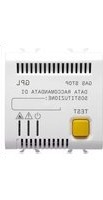
- Pack content
- Summary
- Functions
- ON/OFF SWITCHING
- DIMMING MANAGEMENT
- AWNING AND SHUTTER MANAGEMENT
- SCENE MANAGEMENT
- SEND PRIORITY CONTROLS
- SEQUENCE COMMANDS
- 8/16 BIT VALUE
- ALARMS
- Commands sent to the KNX/EIB bus
- GENERAL DESCRIPTION
- KNX/EIB channel test
- Warnings for KNX/EIB installations
- Good wireless connection recommendations
- Electrical connections
- RF channel learning process
- Cancelling learnt RF channels
- Completing installation
- IN SERVICE
- Behaviour on the failure and reinstatement of the bus power supply
- Maintenance
- TECHNICAL DATA
- SOMMAIRE
- AVERTISSEMENTS GENERAUX
- INDICE
Brand : Gewiss
Model : GW14798
Category : Radio receiver