
CP0116 - Docking station PHILIPS - Free user manual and instructions
Find the device manual for free CP0116 PHILIPS in PDF.
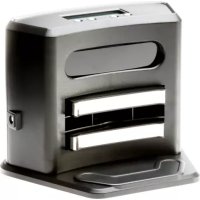



| Product Type | Robot vacuum with docking station |
| Brand | Philips |
| Model | CP0116 |
| Power Supply | Mains adapter (100-240 V, 50-60 Hz) |
| Battery | Built-in rechargeable lithium-ion (professional replacement) |
| Runtime | Approximately 60 minutes |
| Charging Time | Approximately 2 hours |
| Sensors | 3 drop sensors (height detection) |
| Brushes | Rotating side brushes |
| Filter | Removable filter (do not wash in dishwasher) |
| Dustbin | Capacity approx. 0.3 L |
| Weight | Approximately 2.5 kg |
| Dimensions (approx.) | Diameter 30 cm, height 7 cm |
| Usage | Indoor, hard floors mainly |
| Safety | Drop sensors, automatic shutdown in case of issue |
| Maintenance | Regular cleaning of drop sensors and filter |
| Noise level | Approx. 65 dB (estimation) |
| Included accessories | Docking station, adapter, extra filter, brushes |
| Warranty | Philips international warranty |
| Recycling | Do not dispose with household waste; battery must be removed by a professional |
Frequently Asked Questions - CP0116 PHILIPS
User questions about CP0116 PHILIPS
0 question about this device. Answer the ones you know or ask your own.
Ask a new question about this device
Download the instructions for your Docking station in PDF format for free! Find your manual CP0116 - PHILIPS and take your electronic device back in hand. On this page are published all the documents necessary for the use of your device. CP0116 by PHILIPS.
USER MANUAL CP0116 PHILIPS
Important safety information
Read this important information carefully before you use the appliance and save it for future reference.
Danger
- Do not immerse the robot or the adapter in water or any other liquid.
- Do not use the robot on wet floors or in places where there is a risk of contact with water or immersion in water.
- Never let the robot operate on or near flammable substances and do not allow it to pick up ashes until they are cold.
- Do not use the robot in humid surroundings like bathrooms.
- Do not pour any liquid into the openings of the robot.
Warning
- Check if the voltage indicated on the adapter corresponds to the local mains voltage before you connect the adapter.
- The plug must be removed from the socket-outlet before cleaning or maintaining the appliance.
- Do not use the robot if the adapter or the robot itself is damaged, or if the robot is not complete.
- If the mains cord is damaged, you must have it replaced by Philips, a service centre authorised by Philips or similarly qualified persons in order to avoid a hazard.
- This robot is designed for indoor use only. Keep all doors leading outside closed.
- Do not use the robot in hazardous areas such as close to fireplaces, showers or swimming pools.
- This robot is better suited for cleaning hard floors. Its performance on soft floors can be somewhat limited.
- This appliance can be used by children aged from 8 years and above and persons with reduced physical, sensory or mental capabilities or lack of experience and knowledge if they have been given supervision or instruction concerning use of the appliance in a safe way and understand the hazards involved. Children shall not play with the appliance. Cleaning and user maintenance shall not be made by children without supervision.
- Keep the appliance and its cord out of reach of children less than 8 years.
- Keep pets away from the robot. Do not let pets sit or stand on the robot.
- Keep loose clothing, hair and body parts away from the brushes of the robot.
- Remove all fragile and light objects from the floor and make sure the robot does not get entangled in the pull cords of blinds or curtains.
- Do not let the robot move over the mains cords of other appliances or other cables as this may cause a hazard.
- Switch off the robot if a dangerous situation occurs or if the robot behaves abnormally or gives off an abnormal smell.
- To prevent damage, do not use the robot if the filter is not present in the dust container or has not been placed properly in the dust container.
- Do not cover the robot or block the ventilation openings when the robot is cleaning or charging. This may cause the robot to overheat.
- Do not store the robot at a temperature above 60°C or below -10°C.
- Do not use the robot in a room with a temperature above 45°C.
- The rechargeable battery may only be replaced by qualified service engineers. Take the robot to an authorized Philips service center to have the battery replaced when you can no longer recharge it or when it runs out of power quickly.
- Always return the appliance to an authorized Philips service center for examination or repair. Repair by unqualified persons could cause an extremely hazardous situation for the user.
- Do not incinerate, disassemble or expose the robot to temperatures above 60°C. The rechargeable battery may explode if overheated.
Caution
- The robot is fitted with three drop-off sensors in the bottom. These drop-off sensors are used to detect and avoid height differences. In some cases, the drop-off sensors may not detect a staircase or other height difference in time. The circumstances in your home (e.g. the light in the room, the colour or type of your floor) can affect how well or fast the drop-off sensors react. Therefore monitor the robot carefully, especially the first few times you use it and when you operate it near a staircase or another height difference.
- Do not put any tape or stickers over the drop-off sensors and make sure you clean the drop-off sensors regularly. If the drop-off sensors are covered or dirty, the robot is unable to detect a staircase or other height difference.
- When you use the robot to vacuum fine sand, lime, cement dust and similar substances, the pores of the filter become clogged.
- Never use scouring pads, abrasive cleaning agents or aggressive liquids such as petrol or acetone to clean the appliance.
- Do not touch the mains plug with wet hands.
- Only use the adapter supplied to charge the appliance.
- Set the power switch to off and unplug the docking station or the adapter if you are not going to use the robot for some time.
- Do not use the robot on high-pile carpets or on rugs with tassels.
- Do not clean the dust container and the filter with water or in the dishwasher.
Electromagnetic fields (EMF)
- This Philips appliance complies with all applicable standards and regulations regarding exposure to electromagnetic fields.
Recycling
This symbol means that this product shall not be disposed of with normal household waste (2012/19/EU) (Fig. 1). - This symbol means that this product contains a built-in rechargeable battery which shall not be disposed of with normal household waste (Fig. 2) (2006/66/EC). We strongly advise you to take your product to an official collection point or a Philips service centre to have a professional remove the rechargeable battery. - Follow your country's rules for the separate collection of electrical and electronic products and rechargeable batteries. Correct disposal helps prevent negative consequences for the environment and human health.
Removing the rechargeable battery
To remove the rechargeable battery, see the instructions for removing the rechargeable battery in the user manual.
Ordering accessories
To buy accessories or spare parts, visit www.shop.philips.com/service or go to your Philips dealer. You can also contact the Philips Consumer Care Centre in your country (see the worldwide guarantee leaflet for contact details).
Guarantee and support
If you need information or support, please visit www.philips.com/support or read the separate worldwide guarantee leaflet.
Your robot vacuum cleaner has been designed and developed with the greatest possible care. In the unfortunate case that your robot needs repair, the Consumer Care Centre in your country will help you by arranging any necessary repairs in the shortest possible time and with maximum convenience. If there is no Consumer Care Centre in your country, go to your local Philips dealer.
Ordering accessories
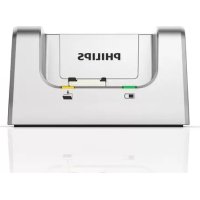
Brand : PHILIPS
Model : CP0116
Category : Docking station