ManualGo.com
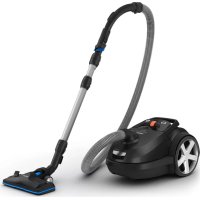
FC9060 - Vacuum Cleaner PHILIPS - Free user manual and instructions
Find the device manual for free FC9060 PHILIPS in PDF.



Download the instructions for your Vacuum Cleaner in PDF format for free! Find your manual FC9060 - PHILIPS and take your electronic device back in hand. On this page are published all the documents necessary for the use of your device. FC9060 by PHILIPS.
USER MANUAL FC9060 PHILIPS
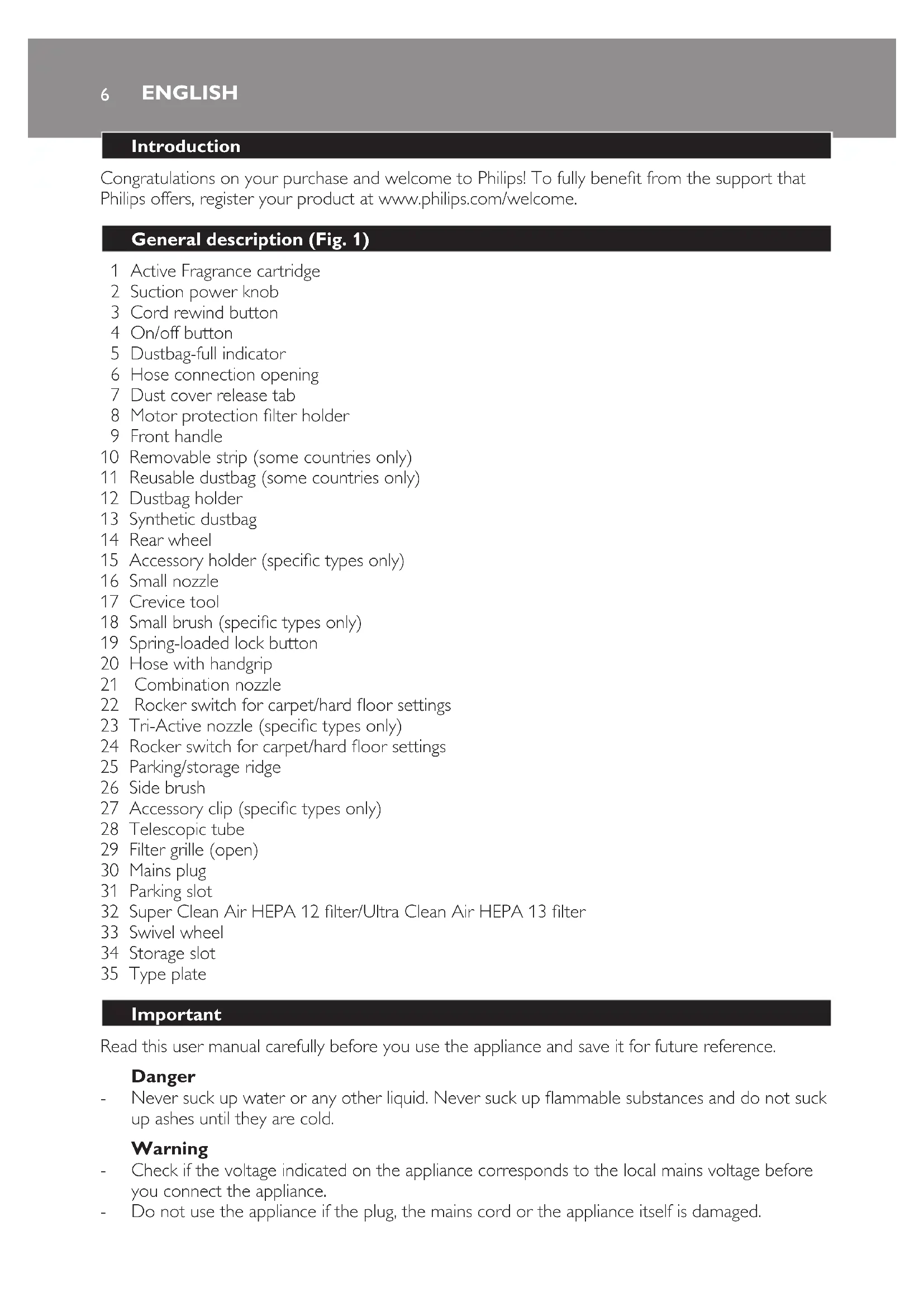
türkçE 926 Introduction Congratulations on your purchase and welcome to Philips! To fully benet from the support that Philips offers, register your product at www.philips.com/welcome. General description (Fig. 1) 1 Active Fragrance cartridge 2 Suction power knob 3 Cord rewind button 4 On/off button 5 Dustbag-full indicator 6 Hose connection opening 7 Dust cover release tab 8 Motor protection lter holder 9 Front handle 10 Removable strip (some countries only) 11 Reusable dustbag (some countries only) 12 Dustbag holder 13 Synthetic dustbag 14 Rear wheel 15 Accessory holder (specic types only) 16 Small nozzle 17 Crevice tool 18 Small brush (specic types only) 19 Spring-loaded lock button 20 Hose with handgrip 21 Combination nozzle 22 Rocker switch for carpet/hard oor settings 23 Tri-Active nozzle (specic types only) 24 Rocker switch for carpet/hard oor settings 25 Parking/storage ridge 26 Side brush 27 Accessory clip (specic types only) 28 Telescopic tube 29 Filter grille (open) 30 Mains plug 31 Parking slot 32 Super Clean Air HEPA 12 lter/Ultra Clean Air HEPA 13 lter 33 Swivel wheel 34 Storage slot 35 Type plate Important Read this user manual carefully before you use the appliance and save it for future reference. Danger Never suck up water or any other liquid. Never suck up ammable substances and do not suck up ashes until they are cold. Warning Check if the voltage indicated on the appliance corresponds to the local mains voltage before you connect the appliance. Do not use the appliance if the plug, the mains cord or the appliance itself is damaged.
ENGLISHIf the mains cord is damaged, you must have it replaced by Philips, a service centre authorised by Philips or similarly qualied persons in order to avoid a hazard. This appliance is not intended for use by persons (including children) with reduced physical, sensory or mental capabilities, or lack of experience and knowledge, unless they have been given supervision or instruction concerning use of the appliance by a person responsible for their safety. Children should be supervised to ensure that they do not play with the appliance. Do not point the hose, the tube or any other accessory at the eyes or ears nor put it in your mouth when it is connected to the vacuum cleaner and the vacuum cleaner is switched on. Caution When you use the vacuum cleaner to vacuum ashes, ne sand, lime, cement dust and similar substances, the pores of the dustbag become clogged. As a result, the dustbag-full indicator will indicate that the dustbag is full. Replace the disposable dustbag and empty the reusable dustbag, even if it is not full yet (see chapter ‘Replacing/emptying the dustbag’). Never use the appliance without the motor protection lter. This could damage the motor and shorten the life of the appliance. Only use Philips s-bag ` synthetic dustbags or the reusable dustbag provided (some countries only). The translucent display panel is made of recyclable polycarbonate (>PC<). Electromagnetic elds (EMF) This Philips appliance complies with all standards regarding electromagnetic elds (EMF). If handled properly and according to the instructions in this user manual, the appliance is safe to use based on scientic evidence available today. Preparing for use Hose 1 Toconnectthehose,pushitrmlyintotheappliance(‘click’)(Fig.2). 2 Todisconnectthehose,pushthebuttons(1)andpullthehoseoutoftheappliance(2) (Fig.3). Tube 1 Toconnectthetubepartstoeachotherandtothehandgripofthehose,pressthespring- loadedlockbutton.Theninsertthepartwiththelockbuttonintothepartwiththeholeand tthelockbuttonintothehole(‘click’)(Fig.4). 2 Todisconnectthetubefromthehandgrip,pressthespring-loadedlockbuttonandpullthe handgripoutofthetube. Note: Use the same method to connect and disconnect the accessories. Telescopic tube (specic types only) 1 Adjustthetubetothelengthyoundmostcomfortableduringvacuumcleaning(Fig.5). Tri-Active nozzle (specic types only) The Tri-Active nozzle is a multi-purpose nozzle for carpets and hard oors. The side brushes catch more dust and dirt at the sides of the nozzle and allow you to clean better along furniture and other obstacles (Fig. 6). The opening at the front of the nozzle allows you to suck up larger particles (Fig. 7). 1 Tocleanhardoors,pushtherockerswitchontopofthenozzlewithyourfoot(Fig.8).
ENGLISH 7Thebrushstripforcleaninghardoorscomesoutofthehousing.Atthesametime,the wheelisliftedtopreventscratchingandtoincreasemanoeuvrability. 2 Tocleancarpets,pushtherockerswitchagain(Fig.9). Thebrushstripdisappearsintothenozzlehousingandthewheelisloweredautomatically. Combination nozzle (specic types only) The combination nozzle can be used on either carpets or hard oors. 1 Tocleanhardoors,pushtherockerswitchontopofthenozzlewithyourfoot(Fig.10). Thebrushstripforcleaninghardoorscomesoutofthenozzlehousing. 2 Tocleancarpets,pushtherockerswitchagain(Fig.11). Thebrushstripdisappearsintothenozzlehousing. Crevice tool, small nozzle and small brush 1 Connectthecrevicetool(1),thesmallnozzle(2)orthesmallbrush(specictypesonly)(3) directlytothehandgriportothetube(Fig.12). Accessory clip (specic types only) 1 Snapthecrevicetoolandthesmallnozzleintotheclip. 2 Snaptheaccessoryclipontothetube(Fig.13). Accessory holder (specic types only) 1 Snaptheaccessoryholderontothehandgrip(Fig.14). 2 Snaptwoaccessoriesintotheaccessoryholder: Crevice tool and small nozzle (Fig. 15). Note: Make sure the suction opening of the small nozzle points away from the holder. Crevice tool and small brush (Fig. 16). Note: Make sure the suction opening of the small brush points towards the holder. Using the appliance
Pullthecordoutoftheapplianceandputthemainspluginthewallsocket. 2 Presstheon/offbuttonontopoftheappliancewithyourfoottoswitchontheappliance (Fig.17). 3 Duringvacuumcleaning,youcanadjustthesuctionpowerwiththeknobontopofthe appliance(Fig.18). Use maximum suction power to vacuum very dirty carpets and hard oors. Use minimum suction power to vacuum curtains, table carpets, etc. 4 Ifyouwanttopauseforamoment,inserttheridgeonthenozzleintotheparkingslotto parkthetubeinaconvenientposition(Fig.19) Active Fragrance Control (specic types only) The scent granules have been specially developed for use in your Philips vacuum cleaner. Only use the Philips s-fresh` scent granules in your vacuum cleaner. IfthevacuumcleanerisequippedwithActiveFragranceControl,keepitoutofthereachof children,bothduringandafteruse.Storethevacuumcleanerinalockedcupboardifthereare smallchildreninthehouse. Thescentgranulesarenotedible.
ENGLISH 9Emptying the reusable dustbag (some countries only) In some countries, this vacuum cleaner also comes with a reusable dustbag that can be used and emptied repeatedly. You can use the reusable dustbag instead of disposable dustbags. To remove and insert the reusable dustbag, simply follow the instructions in ‘Replacing the disposable dustbag’. To empty the reusable dustbag: 1 Slidetheclipoffthedustbagsideways. 2 Shakeoutthecontentsintoadustbin. 3 Toclosethedustbag,slidetheclipbackontothebottomedgeofthedustbag. Cleaning and maintenance of lters Alwaysunplugtheappliancebeforeyoucleanorreplacethelters. Permanent motor protection lter Clean the permanent motor protection lter every time you replace the dustbag. 1 Removethedustbagholderwiththedustbag(Fig.28). 2 Takethemotorprotectionlterholderoutoftheappliance.Takethelteroutoftheholder (Fig.32). 3 Shakethelteroveradustbintocleanit. 4 Putthecleanlterbackintothelterholder.Fitthetwolugsofthelterholderbehindthe ridgeatthebottomtoensurethatittsproperlyatthetop.Thenpressthelterholder home(‘click’)(Fig.33). 5 Placethedustbagholderwiththedustbagbackintotheappliance. Super Clean Air lter (specic types only) The Super Clean Air Filter located in the back of the appliance has electrostatically charged bres. These bres lter a large part of the smaller particles from the exhaust air. Replace the Super Clean Air lter every six months.This lter is not washable. 1 Opentheltergrille(Fig.34). 2 Removetheoldlter(Fig.35). 3 Insertthenewlterintotheappliance. 4 Closetheltergrille(‘click’)(Fig.36). Super Clean Air HEPA 12 lter/Ultra Clean Air HEPA 13 lter This appliance is equipped with either the Super Clean Air HEPA 12 llter or the Ultra Clean Air HEPA 13 lter. These lters are located in the back of the appliance. They are able to remove 99.5% and 99.95% respectively of all particles down to 0.0003mm in size from the outlet air. This not only includes normal house dust, but also harmful microscopic vermin such as dust mites and their excrements, which are well-known causes of respiratory allergies. Note: To guarantee optimal dust retention and performance of the vacuum cleaner, always replace the HEPA lter with an original Philips lter of the correct type (see chapter ‘Ordering accessories’). Super Clean Air HEPA 12 lter Replace the Super Clean Air HEPA 12 lter every six months. This lter is not washable. 1 Opentheltergrille(Fig.34). English102 Removetheoldlter(Fig.35). 3 Insertthenewlterintotheappliance. 4 Closetheltergrilleandpushthebottomcornersuntiltheysnaphome(Fig.36). Washable Ultra Clean Air HEPA 13 lter Clean the washable Ultra Clean Air HEPA 13 lter every 6 months. You can clean the washable Ultra Clean Air HEPA 13 lter max. 4 times. Replace the lter after it has been cleaned 4 times. 1 Opentheltergrille(Fig.34). 2 TakeoutthewashableHEPA13lter(Fig.35). 3 RinsethepleatedsideoftheHEPA13lterunderahotslow-runningtap. Hold the lter in such a way that the pleated side points upwards and the water ows parallel to the pleats. Hold the lter at an angle so that the water washes away the dirt inside the pleats (Fig. 37). Turn the lter 180° and let the water ow along the pleats in opposite direction (Fig. 38). Continue this process until the lter is clean. Nevercleanthewashablelterwithabrush(Fig.39). Note: Cleaning does not restore the original colour of the lter, but does restore its ltration power. 4 Carefullyshakethewaterfromthesurfaceofthelter.Letthelterdryatleast2hours beforeyouputitbackintothevacuumcleaner. 5 Putthelterbackintotheappliance.Closetheltergrilleandpushthebottomcornersuntil theysnaphome(Fig.36). Ordering accessories If you have any difculties obtaining dustbags, lters or other accessories for this appliance, please contact the Philips Customer Care Centre in your country or consult the worldwide guarantee leaet. Ordering dustbags Philips Classic s-bag ` synthetic dustbags are available under type number FC8021. Philips Clinic s-bag ` high ltration synthetic dustbags are available under type number FC8022. Philips Anti-odour s-bag ` synthetic dustbags are available under type number FC8023. Ordering lters Super Clean Air lters are available under type number FC8030. Non-washable Super Clean Air HEPA 12 lters are available under type number FC8031. Washable Ultra Clean Air HEPA 13 lters are available under type number FC8038. Ordering scent granules Replacement kits with 4 packages of scent granules are available under type number FC8025. Environment Do not throw away the appliance with the normal household waste at the end of its life, but hand it in at an ofcial collection point for recycling. By doing this, you help to preserve the environment (Fig. 40).
ENGLISH 11Guarantee & service If you need information or if you have a problem, please visit the Philips website at www.philips.com or contact the Philips Customer Care Centre in your country (you nd its phone number in the worldwide guarantee leaet). If there is no Customer Care Centre in your country, go to your local Philips dealer or contact the Service Department of Philips Domestic Appliances and Personal Care BV. Troubleshooting This chapter summarises the most common problems you could encounter with the appliance. If you are unable to solve the problem with the information below, contact the Customer Care Centre in your country. 1 Thesuctionpowerisinsufcient. A Check if the dustbag is full. If necessary, replace the disposable dustbag or empty the reusable dustbag (some countries only). B Check if the lters need to be cleaned or replaced. If necessary, clean or replace the lters. C Check if the suction power knob is in maximum position. D Check if the nozzle, tube or hose is blocked up. To remove the obstruction, disconnect the blocked-up item and connect it (as far as possible) the other way around. Switch the vacuum cleaner on to force the air through the blocked-up item in opposite direction (Fig. 41).