Megabox 2000 - Karaoke system iDance - Free user manual and instructions
Find the device manual for free Megabox 2000 iDance in PDF.



| Product Type | Karaoke System |
| Brand | iDance |
| Model | Megabox 2000 |
| Output Power | 400 W |
| Power Supply | 15V/3A AC adapter (DC input); built-in rechargeable battery 12V/4.5Ah |
| Battery Life | 7 hours |
| Charging Time | 4 to 8 hours |
| Charging Indicator | Red while charging, green when fully charged |
| Bluetooth Connectivity | Yes, range 10 m |
| Audio Inputs | USB, microSD, AUX, wired microphone (2 inputs) |
| FM Radio | Yes, with automatic station search |
| Display | LED screen (track number, duration, mode) |
| LED Lighting | Yes, switchable (LED on/off button) |
| Controls | Main volume, bass, treble, echo, mic volume, mute, play/pause, previous/next, repeat, mode, mic priority |
| Frequency Response | 80 Hz - 18 kHz |
| Karaoke Function | Mic priority (reduces music volume when microphone is used) |
| Maintenance and Cleaning | Clean with a soft dry cloth. Do not use abrasive products. |
| Safety | Use only the supplied AC adapter. Do not open the device. |
| Low Battery Indicator | Yes, dedicated indicator |
| File Compatibility | MP3 (via USB/microSD) |
Frequently Asked Questions - Megabox 2000 iDance
User questions about Megabox 2000 iDance
0 question about this device. Answer the ones you know or ask your own.
Ask a new question about this device
Download the instructions for your Karaoke system in PDF format for free! Find your manual Megabox 2000 - iDance and take your electronic device back in hand. On this page are published all the documents necessary for the use of your device. Megabox 2000 by iDance.
USER MANUAL Megabox 2000 iDance
Sound and Light Bluetooth PARTY System
USER'S MANUAL
ENGLISH | FRANÇAIS | ESPÁNOL | DEUTSCH | ITALIAN
PORTUGUES | POLSKI | NEDERLANDS | CESKY | EAMHNIKA
www.idanceaudio.com
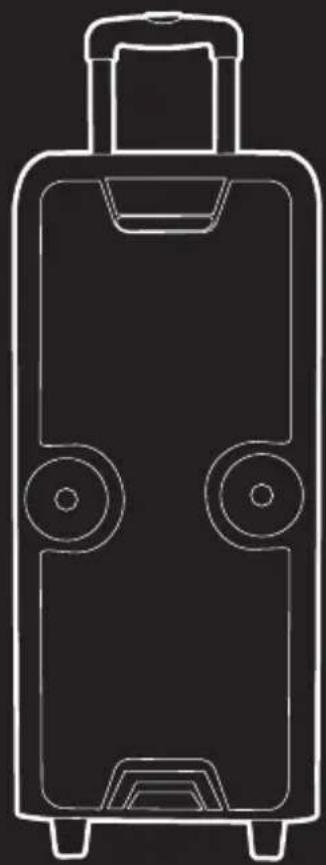
USER'S MANUAL
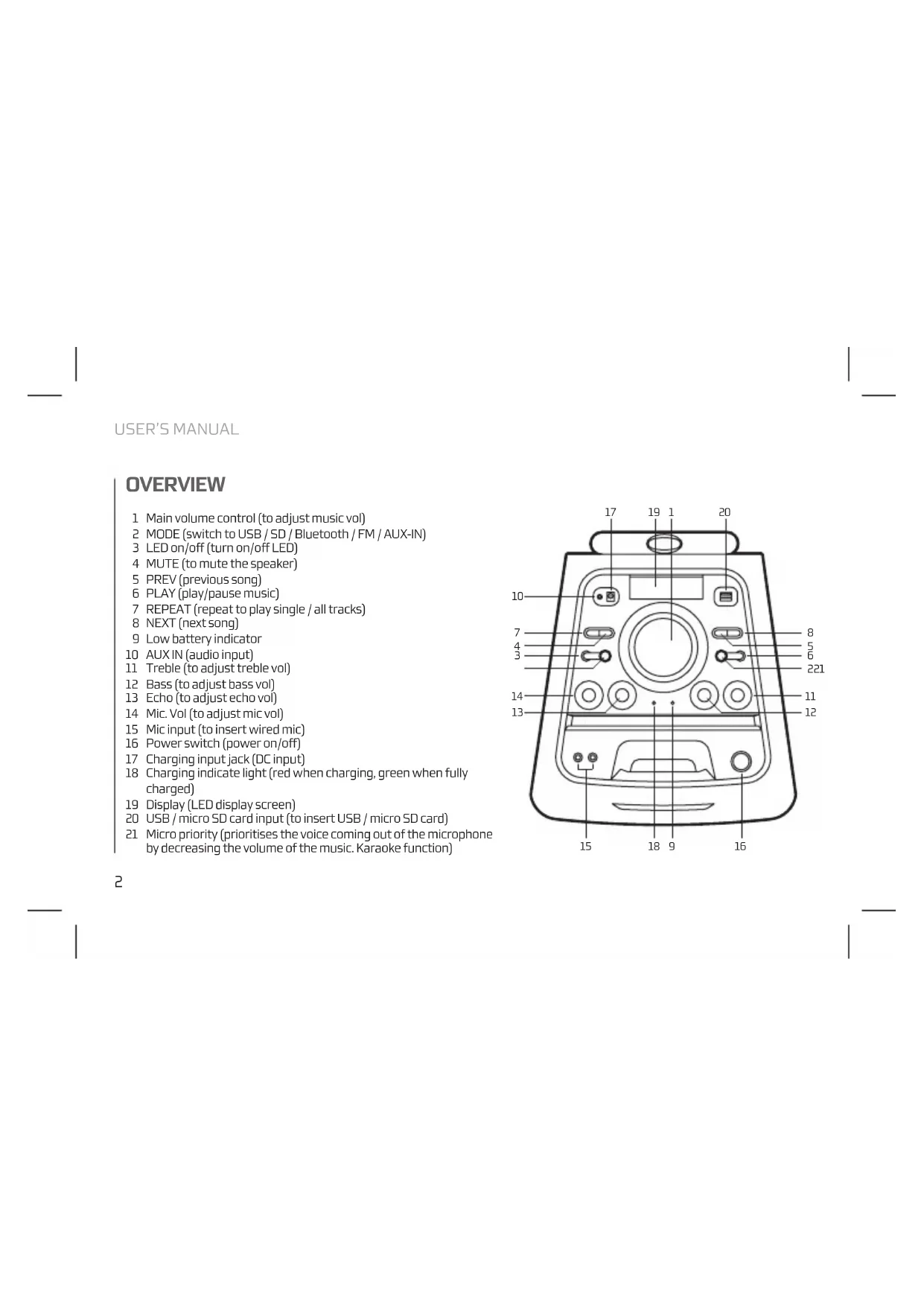
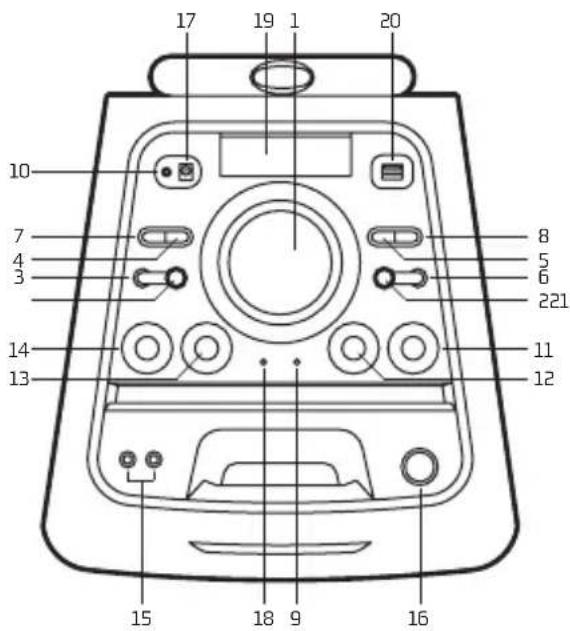
OVERVIEW
1 Main volume control (to adjust music vol)
2 MODE (switch to USB/SD/Bluetooth/FM/AUX-IN)
3 LED on/off (turn on/off LED)
4 MUTE (to mute the speaker)
5 PREV (previous song)
5 PLAY (play/pause music)
7 REPEAT (repeat to play single / all tracks)
8 NEXT (next song)
9 Low battery indicator
10 AUXIN (audio input)
11 Treble (to adjust treble vol)
12 Bass (to adjust bass vol)
13 Echo (to adjust echo vol)
14 Mic.Vol (to adjust mic vol)
15 Mic input (to insert wired mic)
16 Power switch (power on/off)
17 Charging input jack (DC input)
18 Charging indicate light (red when charging, green when fully charged)
19 Display (LED display screen)
20 USB/micro SD card input (to insert USB/micro SD card)
21 Micro priority (prioritises the voice coming out of the microphone by decreasing the volume of the music. Karaoke function)
ENGLISH
AUX IN
You can connect the device with the external multimedia audio sources through the port "AUX". After connection, just set the mode to AUX by pressing the "Mode" button on the device. The device can play the audio files from multimedia sources like PC, mobile phone, MP3 and MP4, etc.
USB CARD/MICRO SD CARD/ BLUETOOTH/FMRADIO
USB CARD PLAYING
When power ON the product, if USB card inserted, it can play the MP3 format music from the USB. Press PREV/NEXT buttons to select the song you want. Press the play/pause button to pause / resume the music.
MICRO SD CARD PLAYING
When the device is turned on it can play music in MP3 format from a micro SD card.
Press the PREV/NEXT buttons to select the song you want. Press the play/pause button to pauses the music.
NOTE In the USB/SD modes you can choose to repeat one or all songs by pressing the REP button.
BLUETOOTH MODE
A. Press the MODE button until the screen displays the word BLUE. In Bluetooth mode the device goes into searching / paring / reconnect mode for pair.
B. Now, turn ON the Bluetooth function on your mobile phone.
C. Search for "MEGABOX 2000" and select it to pair (for first time pairing or pairing a new mobile device).
D. The Bluetooth speaker will be reconnecting automatically if your mobile phone has been paired (depend on the mobile phone's type and configuration, manual reconnection may require on some devices).
USER'S MANUAL
FM RADIO MODE
- Press the MODE button to enter the FM radio mode.
- Then press the play/pause button to carry out an automatic channel search.
- Once the automatic search is completed, you can switch between the saved stations by pressing the PREV/NEXT buttons.
CHARGING INSTRUCTIONS
This speaker has a high capacity 12V/4.5A battery. Please use a 15V/3A power adapter for charging. The charging indicator light will turn red to indicate that it is charging. It takes 4-8 hours for the battery to reach full charge. Disconnect the adaptor as soon as battery is fully charged (green charge light). Battery run time: 7 hours.
TECHNICAL SPECIFICATIONS
Output power:400W
Battery: 12V/4.5A
Bluetooth
Working range: 10m
Frequency response: 80Hz 18kHz
USB port
Aux input
Micro input x2
FM Radio
Micro SD card reader
LED screen
Battery level indicator
LED lights
ENGLISH
If at any time in the future you should need to dispose of this product please note that:
Waste electrical products should not be disposed of with household waste. Please recycle where facilities exist.
Check with your Local Authority or retailer for recycling advice.
(Waste Electrical and Electronic Equipment Directive)
VUE D'ENSEMBLE
Akumulator: 12V/4,5A
Bluetooth
Zaiegpracy:10m
KAPTA USB / KAPTA MICROSD/ BLUETOOTH / PAIOQNO FM
ANATIAPATOTAHITO USB
Otrou otoooyiotaic evai eevpyoantnoevoc, kai exete iioayei USB otn ouokeun, tote autn avanapayei tvnuouakn nou utapxei otn kappa tse npnp MP3. Pntote to kouuni PREV/NEXT ia va emileeetot
tpayoudi nou thee. Patrto kouuni avanapaywn / naon yia tn naon / enavekivnon tnc nuokic.
KAPTA MICROSD
O'Atav O uToAlyoTnic eivai evEpyOniInueVoc, kai exTe Eioayei Otn oukeunia Kapta micro SD, toe autn avanapaye mnu Mauokn Tou unapexI OTN Kapta ae oopnp MP3.
EHMEIOH: TtoucTpontouc aeitoupyiac USB / SD mnpoeite va eIiEeTe Tnv enavalnyn evoc n oawv twv tpayoudiw natwrtac to njktpo REP.
AEIOTOYP1A BLUETOOTH
A. Pntote to nKpto MODE [aouyia] xai va eapavotei otv oovn n EeNB BLUE [mLe].Tn aotouyia Bluetooth nC oukeun civai evpyoiouev k tai avqtnonc /naixvi/ enavaovseanyia va enavapepeTe ouveo.
B. EverpyoTOnjote Tn IeToupyia Bluetooth Tou Kivntou oac TnIePwovu.
C. Kávte avachtnoy ia TMEGABOX 2000" kai επλεΕTE to yia va npayatatoonθειouxpvoiuoc (yia npwtn φopá n yia va to ouyxpvioeTe μiia vεaouokeun).
D.To xieio Bluteotho 8eavauovdeei autouata a vTo kInto oac mepwvo exei ouypwotei (avaloya me tov tio kai pUoiEIC TOKNTO uMepwovu, mopeioe opiovec ouakeuec va npente i va ekteaeete xipokivnta tnv enavaovdeon).
O△HΓIEΣXPH∑H∑
AEIOTOYPIA PAADIOQNOY
- Pntote to nKpo MODEyia va nEitc ot nIeoupya Paiofovo FM.
- MoAicmuoiyia KpaHote pannuEvTo mNkTPOPLAY/ PAUSE wote va ekteaeoBei ndeltaikaia autouatnc aavghnon, Tov kavauiwv.
- Meta TnV oAokAnpwonTNC diaBikaoiaac autouatnc avocntnonc Twv Otauov, Itopeite va metakivneite meta Tuw anoNkeuvewov Otauow natwvtac to Nktpo PREV/NEXT.
OAHIEE ΦOPTIeH
ToxieaoutodeltaTeimuatapia12V/4,5A uynhcxwnpntkotnac,Tia tnφopionxpnoutoeTe tropoodotko 15V/3A.H evdekiknlambda vio φopioncavabekokkvhya unodeEeiOtiveta φopion. Ta nV nnpnpionncmuataipac anaitouvta4-8 wpc.Atoouvdeote tv npaaoyea oicpoptoe nmuatapia (Ppaov qoc φopion).Xpvocλeroupyiacmuatapiac7wpc
TEXNIKEZ IPODAIAIAPAOE
IoXUC EoOou:400W
Mnatapia: 12V/4,5A
Bluetooth
Eupoc εργασιας: 10m
Amokpion ouyovotnac:80Hz-18kHz
Oupa USB
Bongntnck Eioo0oc
EiooocmuKpOpwou
Paioqwvo FM
Avaywotn kaptwmicro SD
ObovLED
EvdeiEg taOunmc natapiac
AUXViEcLED
EAAHNIKA
Avo tioeovnapaotei avaykn anoppiocn Tou npoiovc,aaete unouyn:
PiocTa aIopBAnTa nEaKtpovikuV npoiovTuV SEv EITPepETai va anoppiTovTal paIe Ta oikiaKa atoppmuata. Avakukwote To otic diaBcAuec Eykataotacei.
AnotaBte otic apoiedc Tonikc Apxcn oToV eIupko avtnpoadwio yia npoxpoe c oxetik a Tnv avakukwon.
(Odyia npi anopipnHektpovikwKai HektpikwV uKEuWv)