
400W Trimmer Bump Feed - String Trimmer SILVERLINE - Free user manual and instructions
Find the device manual for free 400W Trimmer Bump Feed SILVERLINE in PDF.


| Product Type | Corded Electric Grass Trimmer |
| Brand | Silverline |
| Model | 400W Trimmer Bump Feed |
| Power Supply | 230 V~ / 50 Hz |
| Power | 400 W |
| No-Load Speed | 10,000 rpm |
| Cutting Diameter | 300 mm |
| Sound Pressure Level (LpA) | 69.1 dB(A) |
| Sound Power Level (LwA) | 89.1 dB(A) |
| Protection Class | II (double insulation) |
| Line Advance Mechanism | Bump Feed (impact on ground) |
| Guide Wheel | Yes |
| Secondary Handle | Adjustable |
| Safety Button | Yes |
| Function Change (Pivoting Head) | Yes, with dedicated button |
| Weight | 2.5 kg (approx) |
| Warranty | 3 years (subject to registration within 30 days) |
| Maintenance | Clean with soft brush and dry cloth; do not use solvents |
| Safety (Required Equipment) | Goggles, gloves, mask, hearing protection, sturdy clothing |
| After-Sales Service | Silverline Tools Authorized Service Center |
Frequently Asked Questions - 400W Trimmer Bump Feed SILVERLINE
User questions about 400W Trimmer Bump Feed SILVERLINE
0 question about this device. Answer the ones you know or ask your own.
Ask a new question about this device
Download the instructions for your String Trimmer in PDF format for free! Find your manual 400W Trimmer Bump Feed - SILVERLINE and take your electronic device back in hand. On this page are published all the documents necessary for the use of your device. 400W Trimmer Bump Feed by SILVERLINE.
USER MANUAL 400W Trimmer Bump Feed SILVERLINE
*Register online within 30 days. Terms & Conditions apply

Garantie de 3 ans
Description of Symbols
The rating plate on your tool may show symbols. These represent important information about the product or instructions on its use.

Wear hearing protection
Wear eye protection
Wear breathing protection
Wear head protection

Wear hand protection

Read instruction manual

Double insulated for additional protection

Conforms to relevant legislation and safety standards

Environmental Protection
Waste electrical products should not be disposed of with household waste. Please recycle where facilities exist. Check with your local authority or retailer for recycling advice
Specification
Voltage: 230V~
Frequency: .50Hz
Power: 400W
No load speed: 10000min
Cutting diameter: 300mm
Sound pressure: .96dB(A)
Sound power: 69dB(A)
Protection class:
The sound intensity level for the operator may exceed 85dB(A) and sound protection measures are necessary.
As part of our ongoing product development, specifications of Silverline products may alter without notice.
General Safety
Carefully read and understand this manual and any label attached to the tool before use. Keep these instructions with the product for future reference. Ensure all persons who use this product are fully acquainted with this manual.
Even when used as prescribed it is not possible to eliminate all residual risk factors. Use with caution. If you are at all unsure of the correct and safe manner in which to use this tool, do not attempt to use it.
Keep guards in position
correctly adjusted and aligned. Never attempt to use a tool if any of the supplied guards are missing. If any guards are damaged, replace before use
Remove adjusting keys
tool. Always check to see that keys and adjusting devices are removed from the tool before use
Clean the work area
dirty. Keep floors clear and avoid working where the floor is slippery. If working outdoors, be aware of all potential slip and trip hazards before using this tool
Trained, competent persons
Children and pets
away where children cannot gain access
Use the correct tool
designed. This tool is not intended for industrial use
Wear suitable clothing and footwear
items which may become caught. Wear non-slip footwear or, where appropriate, footwear with protective toe caps. Long hair should be covered or tied back
Keep your balance
when standing on an unstable surface
Accessories
this manual, could be dangerous and result in damage or injury, and may invalidate your warranty
Never stand on your tool
is tipped or collapses. Do not store materials above or close to the tool in such a way that a person might stand on the tool to reach the stored items
Secure work
so that both hands are free to operate the tool
Check for damaged or missing parts
Carefully check that it will operate properly and perform its intended function. Check alignment of moving parts for binding. Any guard or other part that is damaged should be immediately repaired or replaced by an authorised service centre. DO NOT USE IF DEFECTIVE
Electrical Safety
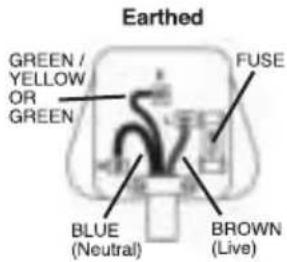
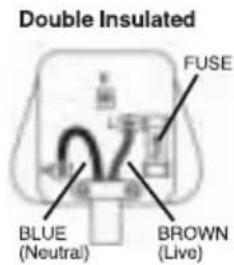
The wires in this product are coloured:
Blue Neutral
Brown Live
Green & Yellow Earth
or moisture
this manual
part of the casing unless qualified to do so; this unit contains dangerous voltages
NEVER CONNECT THE BROWN OR BLUE WIRE TO THE EARTH PIN OF A 13A PLUG. IF IN DOUBT CONSULT A QUALIFIED ELECTRICIAN
Dangerous environment
rain. Provide adequate surrounding work space and keep the area well lit. Do not use power tools where there is a risk of explosion or fire from combustible material, flammable liquids, flammable gases, or dust of an explosive nature. When using power tools, avoid contact with any earthed items such as pipes, radiators, cookers, refrigerators, metal baths and taps
Protect yourself from vibration
disease. Gloves may help to maintain good blood circulation in the fingers. Hand-held tools should not be used for long periods without a break
Maintain your power tool
overheating and fire may occur
Always disconnect
the power source
Switch off before connecting
source. If the power tool stops unexpectedly, turn the power switch to OFF
Do not abuse the power cable
a damaged cable / extension cable replaced at an authorised service centre before using. Never pull the cable to disconnect it from the power socket. Never carry the tool by its cable. Keep the cable away from damp, heat, oil, solvents, and sharp edges
Do not modify the power tool
injury and may invalidate its guarantee
Do not leave the tool running unattended
been unplugged before leaving it unattended
Bump Feed Trimmer Safety
debris that may jam the trimmer
or face protection, and sturdy clothing
power supply before attempting to clear jammed objects
starting work
power lead may cause an electric shock
Product Familiarisation
1 Function Change Button
2 $haft Adjustment Switch
3 Adjustable Secondary Handle
4 On/Off Switch
5 handle
6 Jimmer Guard
7 Holler Guide
8 Safety Switch
9 Pool Housing
Unpacking Your Tool
its features and functions
parts are missing or damaged, have such parts replaced
Assembling Your Bump Feed Trimmer
- Attach the Trimmer Guard (6) using the fixings included. Ensure that the fixings are holding the guard securely in position
- Attach the Roller Guide (7) using the fixings included
- Attach the Adjustable Secondary Handle (3) using the fixings included
NOTE: The secondary handle is fully adjustable and must be positioned each time to ensure that the user is comfortable using the trimmer.
Before Use
shaft length, slide the Shaft Adjustment Switch (2) downwards and slide the shaft to the required setting
NOTE: Make sure the shaft has completely engaged into a locating notch prior to use.
Using Your Trimmer
Power supply
shock when using an outdoor power tool
specifically intended for outdoor use
Switching on
- Ensure the trimmer head is in the correct position
- Place the trimmer down, and connect the mains power supply
- Pick up the trimmer; hold the machine with one hand on the Handle (5), and the other on the Adjustable Secondary Handle (3). The handle is equipped with an integrated Safety Switch (8)
- To start the machine, squeeze the Safety Switch (8), and then the On/Off Switch (4). The machine will run until the on/off switch is released
Function change
- Ensure that the trimmer is unplugged from its power source
- Press and hold the Function Change Button (1), and rotate the end of the trimmer
- When the trimmer has successfully located, release the function change button. To check the head is secure, attempt to rotate the head without using the function change button. The head should not move
Cutting
- Always keep the machine at arms length, with the trimmer head pointed away from your body
- Move the trimmer head across the area to be trimmed using a smooth sweeping motion
- When approaching an edge or wall, use the roller guide to prevent cutting or damaging other surfaces in the garden
- Always be aware of the position of the power cord. Keep the power cord well away from the cutting area at all times
Feeding the trimmer line
- Turn the trimmer on
- Press the Spool Housing (9) gently against the ground and the spool will release trimmer line
- The guard has a cutting edge which will cut off any excess line released by the spool
Maintenance
WARNING: Always remove the plug from the mains power supply before carrying out any maintenance/cleaning.
Spool maintenance
Cleaning
parts to wear quickly, and shorten the machine's service life. Clean the body of your machine with a soft brush, or dry cloth. If available, use clean, dry, compressed air to blow through the ventilation holes
Disposal
equipment, with household waste
way to dispose of tools
Silverline Tools Guarantee
This Silverline product comes with a 3 year guarantee
Register this product at www.silverlinetools.com within 30 days of purchase in order to qualify for the 3 year guarantee. Guarantee period begins according to the date of purchase on your sales receipt.
Registering your purchase
Registration is made at silverlinetools.com by selecting the Guarantee Registration button. You will need to enter:-
Once this information is entered your guarantee certificate will be created in PDF format for you to print out and keep with your purchase.
Terms & Conditions
Guarantee period becomes effective from the date of retail purchase as detailed on your sales receipt.
PLEASE KEEP YOUR SALES RECEIPT
If this product develops a fault within 30 days of purchase, return it to the stockist where it was purchased, with your receipt, stating details of the fault. You will receive a replacement or refund.
If this product develops a fault after the 30 day period, return it to:
Silverline Tools Service Centre
PO Box 2988
Yeovil
BA21 1WU, UK
The guarantee claim must be submitted during the guarantee period.
You must provide the original sales receipt indicating the purchase date, your name, address and place of purchase before any work can be carried out.
You must provide precise details of the fault requiring correction.
Claims made within the guarantee period will be verified by Silverline Tools to establish if the deficiencies are related to material or manufacturing of the product.
Carriage will not be refunded. Items for return must be in a suitably clean and safe state for repair, and should be packaged carefully to prevent damage or injury during transportation. We may reject unsuitable or unsafe deliveries.
All work will be carried out by Silverline Tools or its authorized repair agents.
The repair or replacement of the product will not extend the period of guarantee
Defects recognised by us as being covered by the guarantee shall be corrected by means of repair of the tool, free of charge (excluding carriage charges) or by replacement with a tool in perfect working order.
Retained tools, or parts, for which a replacement has been issued, will become the property of Silverline Tools.
The repair or replacement of your product under guarantee provides benefits which are additional to and do not affect your statutory rights as a consumer.
What is covered:
The repair of the product, if it can be verified to the satisfaction of Silverline Tools that the deficiencies were due to faulty materials or workmanship within the guarantee period.
If any part is no longer available or out of manufacture, Silverline Tools will replace it with a functional replacement part.
Use of this product in the EU.
What is not covered:
Silverline Tools does not guarantee repairs required as a result of:
Normal wear and tear caused by use in accordance with the operating instructions eg blades, brushes, belts, bulbs, batteries etc.
The replacement of any provided accessories drill bits, blades, sanding sheets, cutting discs and other related items.
Accidental damage, faults caused by negligent use or care, misuse, neglect, careless operation or handling of the product.
Use of the product for anything other than normal domestic purposes.
Change or modification of the product in any way.
Use of parts and accessories which are not genuine Silverline Tools components.
Faulty installation (except installed by Silverline Tools).
Repairs or alterations carried out by parties other than Silverline Tools or its authorized repair agents.
Claims other than the right to correction of faults on the tool named in these guarantee conditions are not covered by the guarantee.
EC Declaration of Conformity
The undersigned: Mr Darrell Morris
as authorised by: Silverline Tools
Declaresthatthe
Name/ model: 400W Trimmer Bump Feed
Type/ serial no: 267213
Conforms to the following Directives:
2000/14/EC & 2005/88/EC
EN60335-1/A2:2006
The technical documentation is kept by: Silverline Tools
Notified body: Jiangsu TUV Product Service Ltd
Place of declaration: Wuxi, Jiangsu, China
Date: 27/09/11
Signed by:
Name and address of Manufacturer or Authorised representative:
Silverline Tools, Boundary Way, Lufton Trading Estate, Yeovil, Somerset,
BA22 8HZ United Kingdom
Organisme notified: Jiangsu TUV Product Service Ltd
Silverline Tools Service Centre
PO Box 2988
Yeovil
BA21 1WU, GroBbritannien
- Garantie de 3 ans
- Description of Symbols
- Environmental Protection
- Specification
- General Safety
- Keep guards in position
- Remove adjusting keys
- Clean the work area
- Trained, competent persons
- Children and pets
- Use the correct tool
- Wear suitable clothing and footwear
- Keep your balance
- Accessories
- Never stand on your tool
- Secure work
- Check for damaged or missing parts
- Electrical Safety
- The wires in this product are coloured:
- Dangerous environment
- Protect yourself from vibration
- Maintain your power tool
- Always disconnect
- Switch off before connecting
- Do not abuse the power cable
- Do not modify the power tool
- Do not leave the tool running unattended
- Bump Feed Trimmer Safety
- Product Familiarisation
- Unpacking Your Tool
- Assembling Your Bump Feed Trimmer
- Before Use
- Using Your Trimmer
- Power supply
- Switching on
- Function change
- Cutting
- Feeding the trimmer line
- Maintenance
- Spool maintenance
- Cleaning
- Disposal
- Silverline Tools Guarantee
- This Silverline product comes with a 3 year guarantee
- Registering your purchase
- Terms & Conditions
- PLEASE KEEP YOUR SALES RECEIPT
- Silverline Tools Service Centre
- What is covered:
- What is not covered:
- EC Declaration of Conformity
- Signed by:
Brand : SILVERLINE
Model : 400W Trimmer Bump Feed
Category : String Trimmer