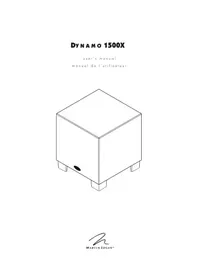
Dynamo 1500X - Subwoofer Martin Logan - Free user manual and instructions
Find the device manual for free Dynamo 1500X Martin Logan in PDF.


| Product Type | Sealed Active Subwoofer |
| Brand | Martin Logan |
| Model | Dynamo 1500X |
| Speaker | 15-inch (38.1 cm) with high-excursion polypropylene cone |
| Amplifier | Class D, max power 600 W |
| Frequency Response | 22–200 Hz ±3 dB (LFE mode, anechoic) |
| Low-Pass Filter | 35–150 Hz variable or Bypass |
| Phase | 0°–180° variable |
| Signal Inputs | Left/Right RCA line level, LFE RCA, LFE XLR, trigger input 6–24 V DC |
| PBK Input | Mini USB jack for Perfect Bass Kit (optional) |
| Wireless Connectivity | Optional via optical transmitter/receiver |
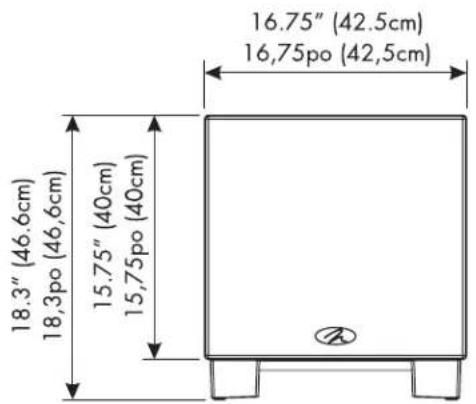
| Dimensions (front-firing orientation) | 49.1 x 42.5 x 45.9 cm (H x W x D) |
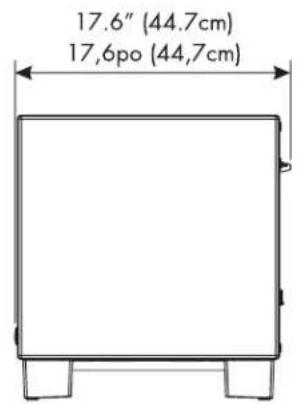
| Dimensions (down-firing orientation) | 46.6 x 42.5 x 44.7 cm (H x W x D) |
| Weight | 23.6 kg (52 lb) |
| Power Supply | 120 V AC, 60 Hz (adapted to country of purchase) |
| Power Consumption | Standby 10 W, idle 15 W, max 600 W |
| Power Modes | Auto, Trigger, On (via master switch) |
| Orientation | Reversible: speaker forward or downward |
| Warranty | 90 days automatic, 3 years upon registration within 30 days |
| Care and Cleaning | Clean cloth or soft brush; specialized cloth available |
| Safety | Do not expose to moisture; unplug before handling; use a grounded outlet |
| Spare Parts and Repairability | Contact dealer or Martin Logan for after-sales service |
Frequently Asked Questions - Dynamo 1500X Martin Logan
User questions about Dynamo 1500X Martin Logan
0 question about this device. Answer the ones you know or ask your own.
Ask a new question about this device
Download the instructions for your Subwoofer in PDF format for free! Find your manual Dynamo 1500X - Martin Logan and take your electronic device back in hand. On this page are published all the documents necessary for the use of your device. Dynamo 1500X by Martin Logan.
USER MANUAL Dynamo 1500X Martin Logan
IMPORTANT SAFETY INSTRUCTIONS
1 Read these instructions.
2 Keep these instructions.
3 Heed all warnings.
4. Follow all instructions.
5 Do not use this apparatus near water.
6 Clean only with dry cloth.
7 Do not block any ventilation openings. Install in accordance with the manufacturer's instructions.
8 Do not install near any heat sources such as radiators, heat registers, stoves, or other apparatus (including amplifiers) that produce heat.
9 Do not defeat the safety purpose of the polarized or grounding-type plug. A polarized plug has two blades with one wider than the other. A grounding type plug has two blades and a third grounding prong. The wide blade or the third prong are provided for your safety. If the provided plug does not fit into your outlet, consult an electrician for replacement of the obsolete outlet.

- Protect the power cord from being walked on or pinched particularly at plugs, convenience receptacles, and the point where they exit from the apparatus.
11 Only use attachments/accessories specified by the manufacturer.
12 Use only with the cart, stand, tripod, bracket, or table specified by the manufacturer, or sold with the apparatus. When a cart is used, use caution when moving the cart/apparatus combination to avoid injury from tip-over. - Unplug this apparatus during lightning storms or when unused for long periods of time.
14 Refer all servicing to qualified service personnel. Servicing is required when the apparatus has been damaged in any way, such as power-supply cord or plug is damaged, liquid has been spilled or objects have fallen into the apparatus, the apparatus has been exposed to rain or moisture, does not operate normally, or has been dropped.

Dynamo 1500X
Tested to Comply with FCC Standards
FOR HOME OR OFFICE USE

Dynamo 1500X
This device complies with part 15 of the FCC Rules. Operation is subject to the following two conditions: (1) This device may not cause harmful interference, and (2) this device must accept any interference received, including interference that may cause undesired operation.
NOTE: This equipment has been tested and found to comply with the limits for a Class B digital device, pursuant to part 15 of the FCC Rules. These limits are designed to provide reasonable protection against harmful interference in a residential installation. This equipment generates uses and can radiate radio frequency energy and, if not installed and used in accordance with the instructions, may cause harmful interference to radio communications. However, there is no guarantee that interference will not occur in a particular installation. If this equipment does cause harmful interference to radio or television reception, which can be determined by turning the equipment off and on, the user is encouraged to try to correct the interference by one or more of the following measures:
Reorient or relocate the receiving antenna.
Increase the separation between the equipment and receiver.
Connect the equipment into an outlet on a circuit different from that to which the receiver is connected.
Consult the dealer or an experienced radio/TV technician for help.
Thank you to you the MartinLogan owner, for loving what we do, and for making it possible for us to do what we love.
Record your serial numbers here for easy reference. You will need this information when filling out your warranty registration. Your serial number is located near the bottom of the backplate and on the shipping container.
Numérodeséries:
IMPORTANT SAFETY INSTRUCTIONS

In accordance with the European Union WEEE (Waste Electrical and Electronic Equipment) directive effective August 13, 2005, we would like to notify you that this product may contain regulated materials which upon
disposal, according to the WEEE directive, require special reuse and recycling processing.
For this reason MartinLogan has arranged with our distributors in European Union member nations to collect and recycle this product at no cost to you. To find your local distributor please contact the dealer from whom you purchased this product, email info@martinlogan.com or visit the distributor locator at www.martinlogan.com.
Please note, only this product itself falls under the WEEE directive. When disposing of packaging and other related shipping materials we encourage you to recycle these items through the normal channels.

The exclamation point within an equilateral triangle is intended to alert the user to the presence of important operating and maintenance (servicing) instructions in the literature accompanying the appliance.

The lightning bolt flash with arrowhead symbol, within an equilateral triangle, is intended to alert the user to the presence of uninsulated "dangerous voltage" within the product's enclosure that may be of sufficient magnitude to constitute a risk of electric shock.

WARNING: TO REDUCE THE RISK OF FIRE OR ELECTRIC SHOCK, DO NOT EXPOSE THIS APPARATUS TO RAIN OR MOISTURE AND OBJECTS Filled With LIQUIDS, SUCH AS VASES, SHOULD NOT BE PLACED ON THIS APPARATUS. TO COMPLETELY DISCONNECT THIS APPARATUS
FROM THE AC MAINS, DISCONNECT THE POWER SUPPLY CORD PLUG FROM THE AC RECEPTACLE. • THE MAINS PLUG OF THE POWER SUPPLY CORD SHALL REMAIN READILY ACCESSIBLE.

WARNING! Do not use your Dynamo 1500X subwoofer outside of the country of original sale—voltage requirements vary by country. Improper voltage can cause damage that will be potentially expensive to repair. The Dynamo 1500X subwoofer is shipped to authorized Martinlogan distributors with the correct power supply for use in the country of intended sale. A list of authorized distributors can be accessed at www.martinlogan.com or by emailing info@martinlogan.martinlogan.com.

SafetyWarnings and Installation in Brief (English)

WARNING!
- Hazardous voltages exist inside—do not remove cover.
Refer servicing to a qualified technician.
To prevent fire or shock hazard, do not expose this module to moisture. - Unplug subwoofer should any abnormal conditions occur.
- Turn amplifier off and unplug subwoofer should any abnormal conditions occur.
- The power cord should not be installed, removed, or left detached from the speaker while the other end is connected to an AC power source.
- Use only with a grounded electrical outlet.
No candles or other sources of open flame should be placed on the speaker. - No liquids either in glasses or vases should be placed on speaker.
- Speaker should not be exposed to dripping or splashing liquids.
- The terminals marked with the lightning bolt symbol should be connected by an instructed person or by way of ready made terminals
We know you are eager to hear your new MartinLogan subwoofer, so this section is provided to allow fast and easy set up. Once you have your subwoofer operational, please take the time to read, in depth, the rest of the information in the enclosed manual. It will give you perspective on how to attain the greatest possible performance from this most exacting woofer system.
If you should experience any difficulties in the setup or operation of your MartinLogan subwoofer, please refer to the Room Acoustics, Placement or Operation sections of the enclosed owner's manual. Should you encounter a persistent problem that cannot be resolved, please contact your authorized MartinLogan dealer. They will provide you with the appropriate technical analysis to alleviate the situation.
Step 1: Unpacking
Remove your new subwoofer from its packing.
Step 2: Placement
Place the subwoofer in a corner near the front of the room. Please see the Placement section of the enclosed manual for more details.
Step 3: Signal Connection
Use the best interconnect cables you can. High quality cable, available from your specialty dealer, is recommended and will give you superior performance.
Attach your preamplifier/processor outputs through cables to the signal input area located on the subwoofer. Please see the Connections and Control Settings section of the enclosed manual for more details.
Step 4: Power Connection (AC) (see warning)
Set the level knob to 0. Plug the subwoofer into a wall outlet. Please see the Connections and Control Settings section of the enclosed manual for more details.
Step 5: Setting the Controls
Set the level knob to a medium volume position. Set the power switch to 'Auto'. If your subwoofer is equipped with a 25Hz level knob set it to 0.
Step 6: Listen and Enjoy.
Step 4: Power Connection (AC) (see warning)

20-200Hz ±3dB 650 watts (1300 watts peak) 52 lbs. (23.6kg)
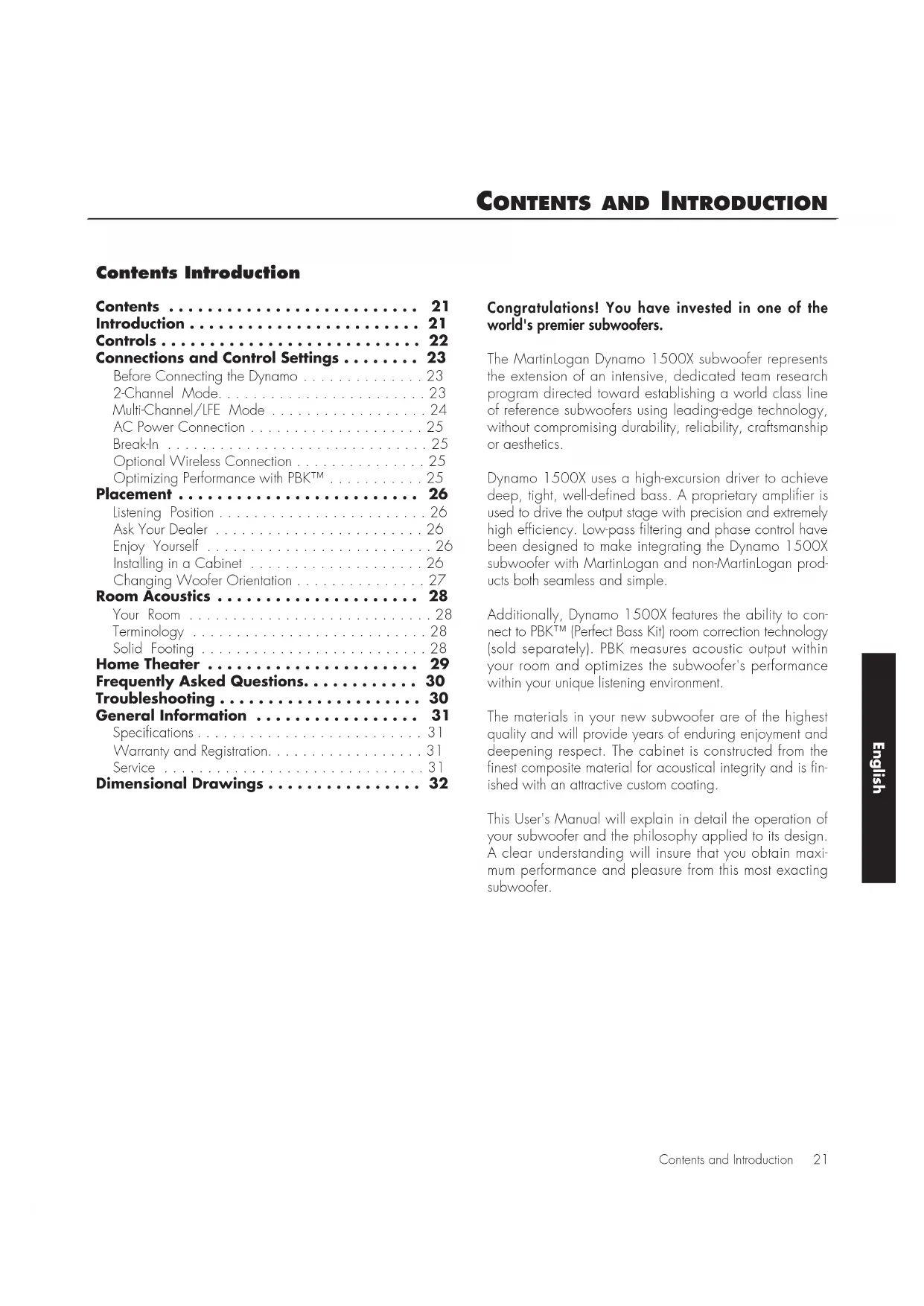
Contents Introduction
Contents 21
Introduction 21
Controls 22
Connections and Control Settings 23
Before Connecting the Dynamo 23
2-Channel Mode. 23
Multi-Channel/LFE Mode 24
AC Power Connection 25
Break-In 25
Optional Wireless Connection 25
Optimizing Performance with PBK^TM 25
Placement 26
Listening Position 26
Ask Your Dealer 26
Enjoy Yourself 26
Installing in a Cabinet 26
Changing Woofer Orientation 27
Room Acoustics 28
Your Room 28
Terminology 28
Solid Footing 28
Home Theater 29
Frequently Asked Questions. 30
Troubleshooting 30
General Information 31
Specifications 31
Warranty and Registration. 31
Service 31
Dimensional Drawings 32
Congratulations! You have invested in one of the world's premier subwoofoers.
The MartinLogan Dynamo 1500X subwoofer represents the extension of an intensive, dedicated team research program directed toward establishing a world class line of reference subwoofoers using leading-edge technology, without compromising durability, reliability, craftsmanship or aesthetics.
Dynamo 1500X uses a high-excursion driver to achieve deep, tight, well-defined bass. A proprietary amplifier is used to drive the output stage with precision and extremely high efficiency. Low-pass filtering and phase control have been designed to make integrating the Dynamo 1500X subwoofer with MartinLogan and non-MartinLogan products both seamless and simple.
Additionally, Dynamo 1500X features the ability to connect to PBK™ (Perfect Bass Kit) room correction technology (sold separately). PBK measures acoustic output within your room and optimizes the subwoofer's performance within your unique listening environment.
The materials in your new subwoofer are of the highest quality and will provide years of enduring enjoyment and deepening respect. The cabinet is constructed from the finest composite material for acoustical integrity and is finished with an attractive custom coating.
This User's Manual will explain in detail the operation of your subwoofer and the philosophy applied to its design. A clear understanding will insure that you obtain maximum performance and pleasure from this most exacting subwoofer.
Status
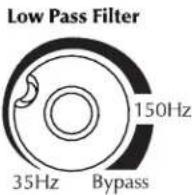
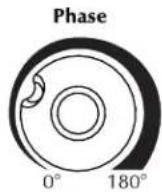
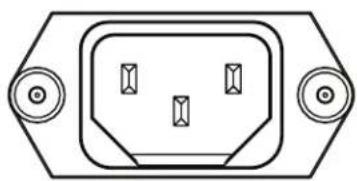
Figure 1. Dynamo 1500X controls.

PBK Input
Power Mode

Auto
Trigger

Trigger Input 1-24V DC
Balanced XLR Input LFE In

Line Level Input Left In

Figure 2. Dynamo 1500X controls and connections.
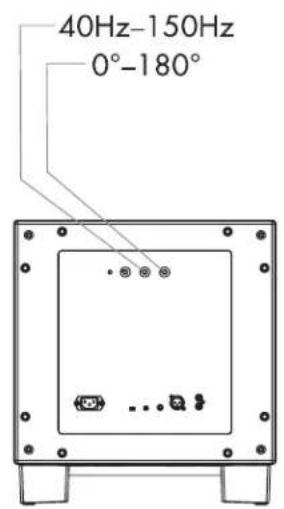
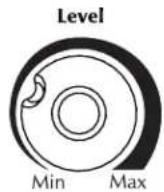
Level Knob (fig. 1)
Setting the level too high will cause the bass to seem bloated and is the single most common cause of bad sounding subwoofoers. A rule of thumb is that the subwoofer should not draw attention to itself, but should simply make the systems low end seem more extended and accurate.
Low Pass Filter Knob (fig. 1)
When the subwoofer is connected in multi-channel mode (via LFE), the crossover switch should be set to 'Bypass' so that the low pass filter is not active and your processor handles the bass management.
When connected in 2-channel mode (via left/right input), as a general rule the low pass filter should be set equal to approximately 70% of your speaker's lowest frequency response. Remember, this is a general rule. We advise that once you try the recommended setting using the formula above, you should try the surrounding settings to see which sounds best.
Phase Control Knob (fig. 1)
The phase control is entirely dependent on the size and configuration of your listening environment, the placement
of the unit, and your seating arrangement. Due to the way bass sound waves develop in different rooms, there is no rule of thumb for setting phase. For instance, if your room has a peak at the subwoofer crossover area, you may wish to set the phase so the actual acoustic outputs of the subwoofer and main speakers are out of phase. Experiment, try different settings and be patient.
Status LED (fig. 1)
When the status LED is blue, the subwoofer is on. The LED will be off when in standby or unplugged.
Power Mode and Trigger Input (fig. 2)
When set to 'Auto' the subwoofer will turn itself on when detecting an audio signal. After several minutes of inactivity the subwoofer will put itself in standby mode.
If you have an external source component (such as a receiver) with built in trigger controls, you may wish to turn the subwoofer on and off with this source. Connect a cable from the control component to your subwoofer and set this switch to 'Trigger'. Although this technology is commonly referred to as a 12V trigger, the Dynamo 1500X will respond to any signal between 5-24V DC.
Before Connecting the Dynamo
MartinLogan's engineering and design team developed the Dynamo 1500X subwoofer for easy setup and system integration. Before beginning to connect your subwoofer, please review the controls discussed in the last section. An understanding of these will help speed you along as you connect and integrate your subwoofer with your system. All signal connections are done on the rear connections panel of the subwoofer. Make certain that all of your connections are tight.

WARNING! Unplug your subwoofer before making or breaking any signal connections!
2-Channel Mode
This setup is recommended if your subwoofer will be used in a 2-channel system with main speakers playing full range.
If you will be using your system for both 2-channel and multi-channel listening we recommend connecting the subwoofer as recommended in 'Multi-Channel/LFE Mode' on the next page. Some modern receivers and processors allow users to route left and right channel low-frequency information, in addition to discrete LFE information, through the LFE output.
Signal Connection (see figure 3):
1 Connect the left and right outputs of your preamplifier to the left and right inputs using quality RCA interconnects. If your preamplifier only has one set of outputs you may need to obtain Y adapters from your dealer.
Recommended Control Settings (see figure 4):
1 Set the 'Low Pass Filter' knob to approximately 70% of your loudspeakers lowest frequency response.
2 While playing music with bass content, turn the level control up until the music has deep extended bass, being careful to avoid levels that become overwhelming.
3 Try the phase control in different settings until the best blending is obtained. If you are augmenting MartinLogan loudspeakers, we suggest you start with the phase set at 90^ .
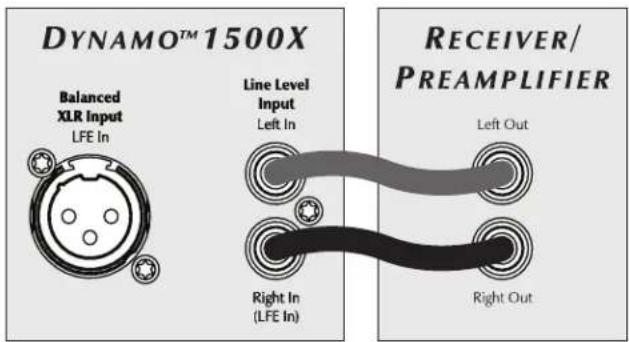
Figure 3. Signal connection for 2-channel mode.
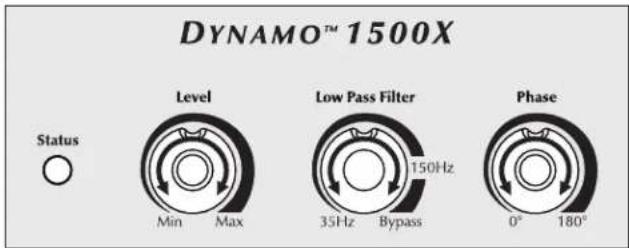
Figure 4. Control settings for 2-channel mode.
Multi-Channel/LFE Mode
This setup is recommended if your subwoofer will be used in a dedicated home theater or multi-channel system. When a signal is connected to the subwoofer's LFE input, and the Low Pass Filter is set to 'Bypass' the internal low pass filter is not active. By following this setup, you will allow your processor to handle most of the bass management.
If you will be using your system for both 2-channel and multi-channel listening we recommend using this setup and connection method. Some modern receivers and processors allow users to route left and right channel low-frequency information, in addition to discrete LFE information, through the LFE output.
Signal Connection (see figure 5 & 6):
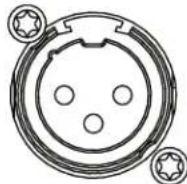
1 Connect the LFE output of the processor to the LFE input using a quality RCA or XLR interconnect.

WARNING!
Based on the performance of most processors, it is recommended that MartinLogan center and effects type speakers not be run in large, wide, or full range mode. Doing so may potentially damage the speaker if the processor attempts to drive the speaker beyond its rated frequency range. This warning also applies to products from other manufacturers.
It is recommended to run center and effects type speakers in limited or narrow mode. Some processors have an option to route the LIFE channel to your main and/or surround speakers. We recommend that you do not use this option.
Recommended Control Settings (see figure 7):
1 Set the 'Low Pass Filter' to 'Bypass'.
2 Use the bass management section of your processor's speaker level setup option to set the subwoofer level at an appropriate level. Follow the instructions in your processor manual to fine-tune the subwoofer level.
3 If your processor offers the option to setup crossovers for a subwoofer, we recommend that you start with the following settings—Crossover: 70Hz, High-pass: 12dB, and Low
Pass: 24dB. The optimal setting for these options may vary depending on your room and listening preferences.
4 Adjust the phase control until ideal blending is obtained. If you hear no discernible difference leave the phase at 0^
5 Follow the instructions in your processor manual to finetune the subwoofer level
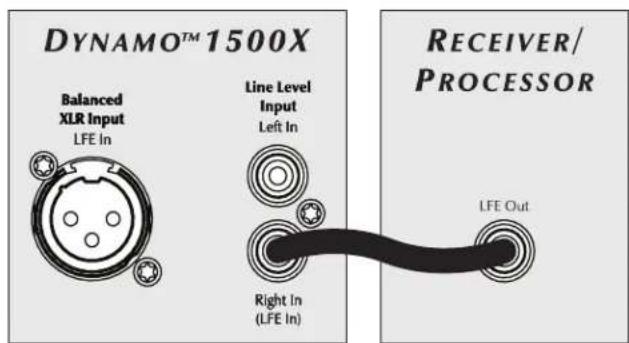
Figure 5. RCA signal connection for multi-channel mode.
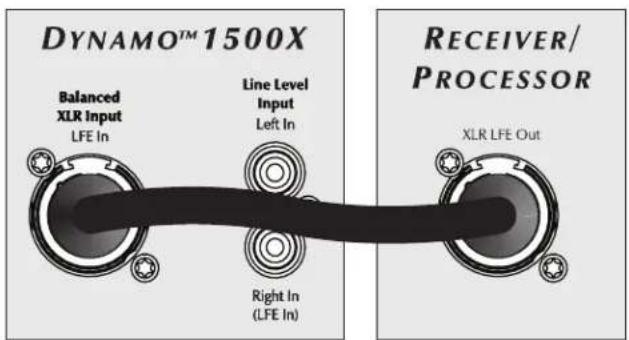
Figure 6. XLR signal connection for multi-channel mode.
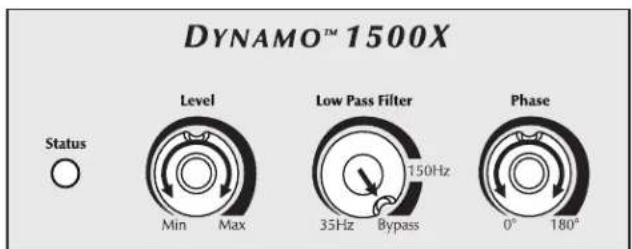
Figure 7. Control settings for multi-channel mode.
AC Power Connection

WARNING! The power cord should not be installed, removed, or left detached from the subwoofer while the other end is connected to an AC power source.
The IEC power cord should be firmly inserted into the AC power receptacle on the rear connection panel of the subwoofer, then to any convenient AC wall outlet. The sub also integrates a signal sensing power supply that automatically switches off after sensing no music signal for several minutes (this will occur when the power switch is set to 'Auto').
Your subwoofer is wired for the power service supplied in the country of original consumer sale. The AC power rating applicable to a particular unit is specified both on the packing carton and on the serial number plate attached to the subwoofer.
If you remove your subwoofer from the country of original sale, be certain that AC power supplied in any subsequent location is suitable before connecting and operating the subwoofer. Substantially impaired performance or severe damage may occur to the subwoofer if operation is attempted from an incorrect AC power source.
Break-In
Our custom made woofers require approximately 50 hours of break-in at moderate listening levels before their optimal performance occurs. This will factor in on any critical listening and judgment.
Optional Wireless Connection
An optional wireless transmitter/receiver system manufactured by MartinLogan may be available from your local dealer. Please check with them for availability.
Optimizing Performance With PBK™
On the rear panel of your subwoofer (fig. 2) is a mini-USB input labeled "PBK Input". This port allows for connection of MartinLogan's Perfect Bass Kit (PBK™).
Even when a subwoofer is perfectly positioned, the room can have a dramatic impact on bass performance. Room dimensions, dead spots, archways, furniture, and countless other factors can turn a room into an additional instrument playing alongside musicians or movie scores with unwanted contributions of coloration and resonance.
Although the controls on your subwoofer allow you to fine tune and optimize bass performance in your room, PBK™ (sold separately, see your dealer) allows you to also correct for the effects of your rooms boundaries.
Listening Position
Generally, subwoofoers have the most output when placed in the corner of a room. However, this can also exaggerate the subwoofoers output making blending difficult. We recommend starting by placing the subwoofer in a corner. If, after the full range of tuning techniques have been employed, the subwoofer sounds like it has too much upper bass energy trying pulling it away from the wall, toward the listening position. This will lessen the reinforcement of these problematic frequencies from the wall and likely smooth out the response. Repeat the tuning techniques with the woofer controls after you move it (see figure 8).
Ask Your Dealer
Your MartinLogan dealer can suggest many options for optimal subwoofer placement. They also have many tools at their disposal, such as experience, familiarity with the associated equipment, and even sound analysis equipment which may make the task of determining optimal subwoofer placement easier.
Enjoy Yourself
MartinLogan subwooers are very refined subwoofer and will benefit from care in setup. With the above placement tips in mind you will find, over months of listening, that small changes can result in measurable differences. As you live with your subwoofer, do not be afraid to experiment with positioning until you find the optimal relationship between your room, settings and subwoofer that gives you the best results. Your efforts will be rewarded.
Installing in a Cabinet
When placing the subwoofer inside of a cabinet it is recommended that there be a minimum of three inches of open space between the cabinet and the front and back sides (see figure 9).
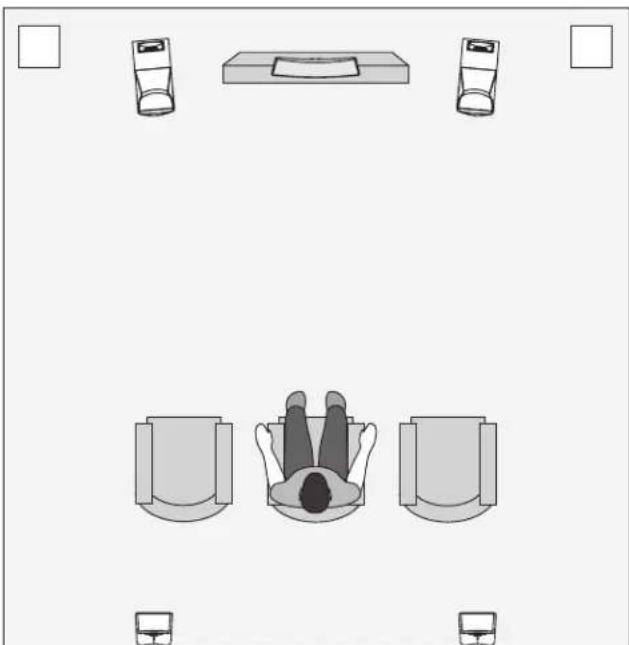
Figure 8. MartinLogan subwooers as the LFE channels, MartinLogan speakers as front, center, and surround (effects) channels. Note the corner placement of the subwooers at the front of the listening room.
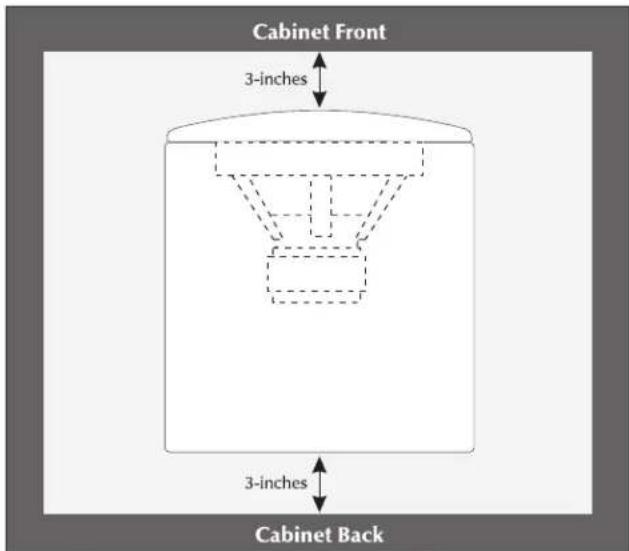
Figure 9. Placing the subwoofer in a cabinet requires a minimum of three inches of open space on the front and back.
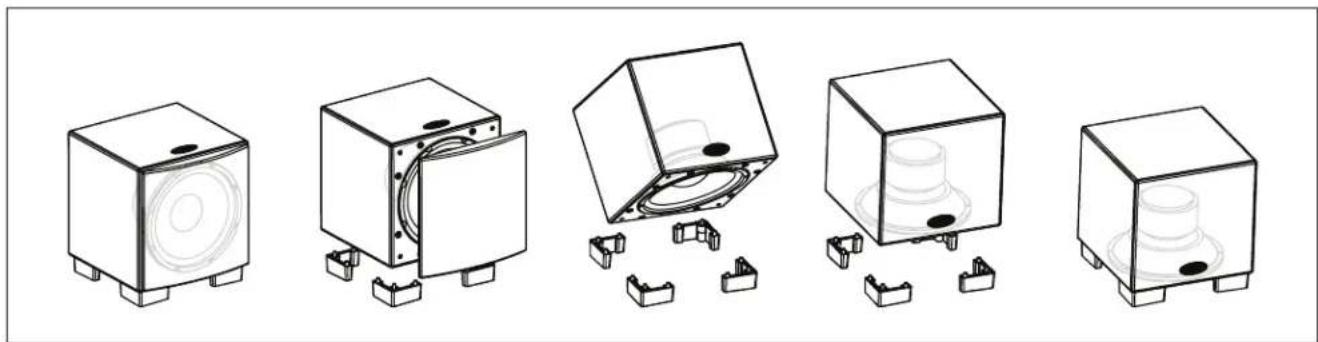
Figure 10. The Dynamo 1500X is capable of both frontfiring and down-firing woofer orientations.
Changing Woofer Orientation
When installing the subwoofer in a cabinet it is recommended that the subwoofer be converted to a front firing configuration (see figure 10).
1 Prepare a flat surface with a blanket to protect the finish. Unplug signal and power connections. Remove the grill cloth.
2 Carefully lay the subwoofer on its side. Using a coin, unscrew the attached feet (see figure 11).
3 Change the location of the four feet.
4 Using a coin, reinstall the feet (see figure 11).
Please note, 90^ RCA adaptors may be required to make signal connections. Two 90^ RCA adaptors are included with the subwoofer.
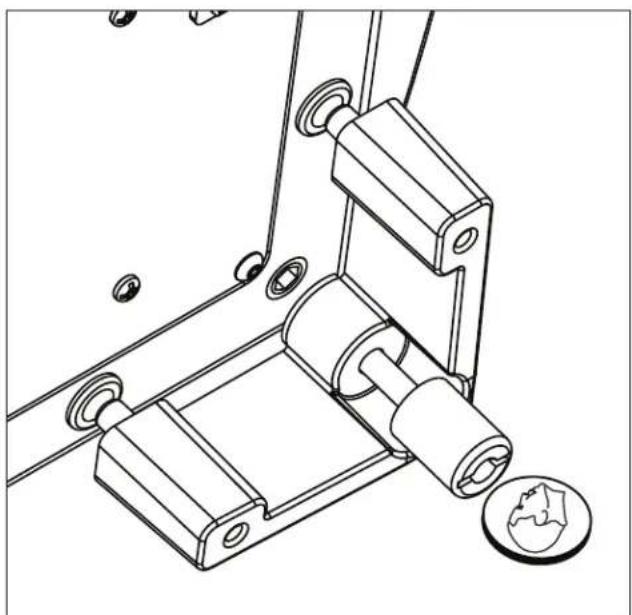
Figure 11. To change wooler orientation, use a coin to unscrew the attached feet, change location, and reinstall.
Your Room
This is an area that requires both a little background to understand and some time and experimentation to attain the best performance from your system. Your room is actually a component and an important part of your system. This component is a large variable and can dramatically add to or subtract from a great sonic experience.
All sound is composed of waves. Each frequency has its own wave size, with the lower, or bass frequencies literally encompassing from 10 feet to as much as 40 feet. Your room participates in this wave experience like a swimming pool with waves reflecting and becoming enhanced depending on the size and shape of the room and the types of surfaces in the room.
Remember that your audio system can actually generate all of the information required to recreate a sonic event in time, space, and tonal balance. Acoustically, the role of an ideal room would be to neither delete nor contribute to that information. However, nearly every room does to some degree.
Terminology
Standing Waves
Sound coming from a speaker bounces around in a room until a pattern emerges—this is called a standing wave. Typically, this is only a problem with frequencies below 100Hz. When this happens different parts of your room experience either an excess or a lack of bass.
Some people believe that having a room without parallel walls will eliminate this effect. The truth is that non-parallel walls only generate different standing wave patterns than those that occur in rectangular rooms.
Usually, you can excite most of the standing waves in a room by putting the subwoofer in a corner. Listening position determines which standing waves you will experience. For instance, if you sit in a corner you will hear most of the standing waves. This can be an overpowering experience. Sitting next to a wall can also intensify the levels of the standing waves that are experienced.
Resonant Surfaces and Objects
All of the surfaces and objects in your room are subject to the frequencies generated by your system. Much like an instrument, they will vibrate and "carry on" in syncopation
with the music, and may contribute in a negative way to the sound. Ringing, boominess, and even brightness can occur simply because surfaces and objects are "singing along" with your speakers.
Resonant Cavities
Small alcoves or closet type areas in your room can be chambers that create their own "standing waves" and can drum their own "one note" sounds.
Solid Footing
After living and experimenting with your subwoofer, you may want to use ETC™ (Energy Transfer Coupler) Spikes (see figure 12). With the use of these spikes, the subwoofer will become more firmly planted on the floor and, consequently, bass will tighten. It is best not to implement the spikes, however, until you are secure in the positioning, as the spikes can damage the floor if the subwoofer is moved.
Spike Installation Instructions:
1 Carefully lay the subwoofer on its side to gain access to the bottom of the feet.
2 Firmly press the spikes into the feet.
Caution: Make sure your hands and any cabling are clear of the spikes. Do not slide the subwoofer as spikes are sharp and can damage your floor or carpet.
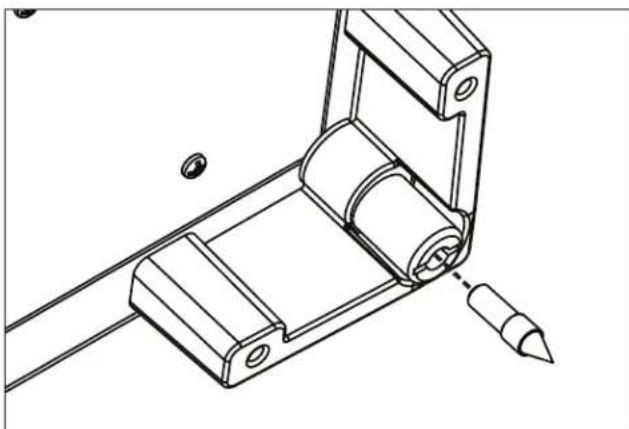
Figure 12. To install the spikes, press them into the feet.
It had long been the practice of stereo buffers to connect their television to a stereo system. The advantage was the use of the larger speakers and more powerful amplifier of the stereo system. Even though the sound was greatly improved, it was still mono and limited by the broadcast signal.
In the late 1970's and early 1980's two new home movie formats became widely available to the public: VCR and laser disc.
By 1985, both formats had developed into very high quality audio/video sources. In fact, the sonic performance of some video formats exceeded audio-only formats. Now, with theater-quality sound available at home, the only element missing was the "surround sound" presentation found in movie houses.
Fortunately, Dolby and DTS encoded DVD's emerged with the same surround sound information encoded on home releases as the theatrical release. Additionally, new high-resolution home-viewing formats such as Bluray as well as high-definition content provided via cable or satellite have evolved which include multi-channel encoded audio that is virtually master tape quality. All that is required to retrieve this information is a decoder and additional speakers and amps to reproduce it.
Home theater is a complex purchase and we recommend that you consult your local MartinLogan dealer, as they are well versed in this subject.
Each piece of a surround system can be purchased separately. Take your time and buy quality. No one has ever complained that the movie was too real. The following list and descriptions will give you only a brief outline of the responsibilities and demands placed on each speaker.
Front Left and Front Right
If these speakers will be the same two used for your stereo playback, they should be of very high quality and able to play loudly (over 102 dB) and reproduce bass below 80Hz .
Center Channel
This is the most important speaker in a home theater system, as almost all of the dialogue and a large portion of the front speaker information is reproduced by the center channel. It is important that the center speaker be extremely accurate and mate well with the front
speaker, and that it is recommended for use as a center speaker. This is not the place to cut corners.
Surround Speakers
We recommend (along with the film industry) that the surround speakers play down to at least 80Hz . Surround speakers contain the information that makes it appear that planes are flying over your head. Some may suggest that this is the place to save money and purchase small, inexpensive speakers. If you choose to do so, be prepared to upgrade in the future as discrete multi-channel digital encoding is proliferating rapidly and the demands on surround speakers have increased.
Subwoofer
With any good surround system you will need one or more high-quality subwoofoers (the .1 in a 5.1, 6.1, or 7.1 channel surround system). Most movie soundtracks contain large amounts of bass information as part of the special effects. Good subwoofoers will provide a foundation for the rest of the system.
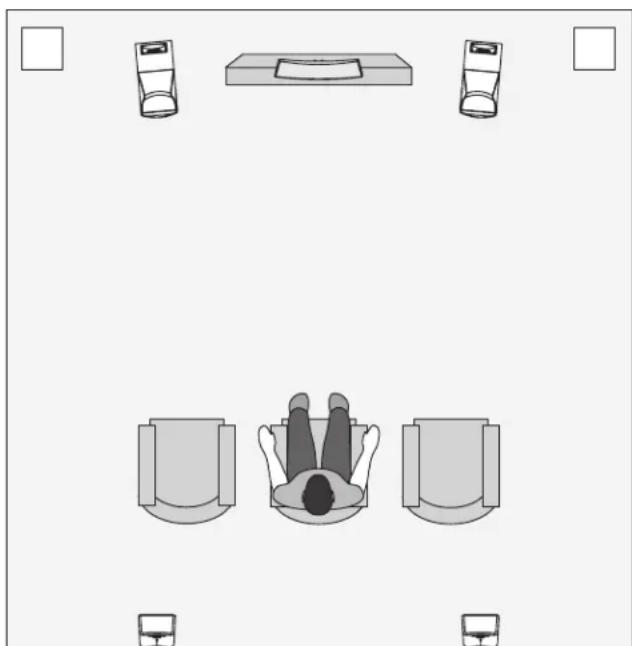
Figure 13. Dynamo subwoofer as the LFE (effects) channels, MartinLogan speakers as front, center, and surround (effects) channels.
Frequently Asked Questions
How do I clean my subwoofer?
Use a dust free cloth or a soft brush to clean your subwoofer. We recommend a specialty cloth (available through the Xtatic shop at www.martinlogan.com) that cleans better than anything else we have tried.
Is it safe to set things on my subwoofer?
While your subwoofer is designed with a durable, stainresistant surface, we advise you not to set anything on your subwoofer—especially containers holding liquids.
Is there likely to be any interaction between my subwoofer and the television in my Audio/ Video system?
Yes. The subwoofer doesn't use a shielded driver. We recommend 3 feet between the subwoofer and video components that are susceptible to magnetic fields. Plasma, LCD, and LED television are not susceptible to magnetic interference.
Will my electric bill go 'sky high' by leaving my subwoofer plugged in all the time?
No. When the power switch is set to 'Auto' the subwoofer will draw about 15 watts when idle and only 10 watts in standby mode.
Should I unplug my subwoofer during a thunderstorm?
Yes, or before. It's a good idea to disconnect all of your audio/video components during stormy weather.
Troubleshooting
No Output
- Check that all your system components are turned on.
- Check your wires and connections.
- Check all interconnecting cables.
- Make sure the level control is not turned down.
- If the problem persists, contact your dealer.
Muddy Bass
- Check placement. Try moving the subwoofer closer to the front and side walls.
- Check the type of feet that are being used. Try installing the ETC spikes.
Decrease the level. - Check your processor setup.
- If the problem persists, contact your dealer.
Hums or Unusual Sounds
- Turn the subwoofer off, unplug all signal inputs, turn the subwoofer back on and turn up the level. If the problem disappears, the hum is originating elsewhere in your system.
- Connect the subwoofer's AC connection to the same AC circuit as the pre amp.
- If operating in wireless mode, move the subwoofer away from microwave ovens and/or any devices that use wireless technology.
- If the problem persists, contact your dealer.
Specifications Warranty and Registration
The Dynamo 1500X subwoofer system consists of a single woofer for high SPL output with minimal distortion. The equalization used is specifically designed to counteract the response of the woofer's sealed box response. This equalization leads to minimal group delay and proper transient response.
System Frequency Response
20-200 Hz ± 3 dB. Anechoic in LFE mode.
Low Pass Filter Frequencies
40Hz-150Hz / bypass
Phase
0-180° (variable)
Components
15^ (38.1cm) high-excursion, polypropylene cone in a cast aluminum basket with extended throw driver assembly; sealed non-resonant cabinet design. Thermal sensor protection.
Amplifier
650 watts RMS [1300 watts peak]
Impedance
Left & Right/LFE RCA: 20,000 Ohms
Inputs
Left & Right/LFE RCA Line Level, LFE XLR, 12V Trigger
Weight
52 lbs. each (23.6 kg)
Mains Power Draw
Standby: 1OW
Idle: 15W
Max:600W
Size (Front-Firing Orientation)
19.3 inches H × 16.75 inches W × 18 inches D
49.1cm H × 42.5cm W × 45.9cm D)
Size (Down-Firing Orientation)
18.3 inches H x 16.75 inches W x 17.6 inches D
46.6cm H x 42.5cm W x 44.7cm D)
Your Dynamo subwoofer is provided with an automatic Limited 90 Day Warranty coverage.
You have the option, at no additional charge, to receive Limited 3-Year Warranty coverage. To obtain the Limited 3-Year Warranty coverage you need to complete and return the Certificate of Registration, included with your subwoofer, and provide a copy of your dealer receipt, to MartinLogan within 30 days of purchase.
For your convenience MartinLogan also offers online warranty registration at www.martinlogan.com.
MartinLogan may not honor warranty service claims unless we have a completed Warranty Registration card on file!
If you did not receive a Certificate of Registration with your new subwoofer you cannot be assured of having received a new unit. If this is the case, please contact your authorized MartinLogan dealer.
Service
Should you be using your MartinLogan product in a country other than the one in which it was originally purchased, we ask that you note the following:
1 The appointed MartinLogan distributor for any given country is responsible for warranty servicing only on units distributed by or through it in that country in accordance with its applicable warranty.
2 Should a MartinLogan product require servicing in a country other than the one in which it was originally purchased, the end user may seek to have repairs performed by the nearest MartinLogan distributor, subject to that distributor's local servicing policies, but all cost of repairs (parts, labor, transportation) must be born by the owner of the MartinLogan product.
3 If, after owning your subwoofer for six months, you relocate to a country other than the one in which you purchased your subwoofer, your warranty may be transferable. Contact MartinLogan for details.
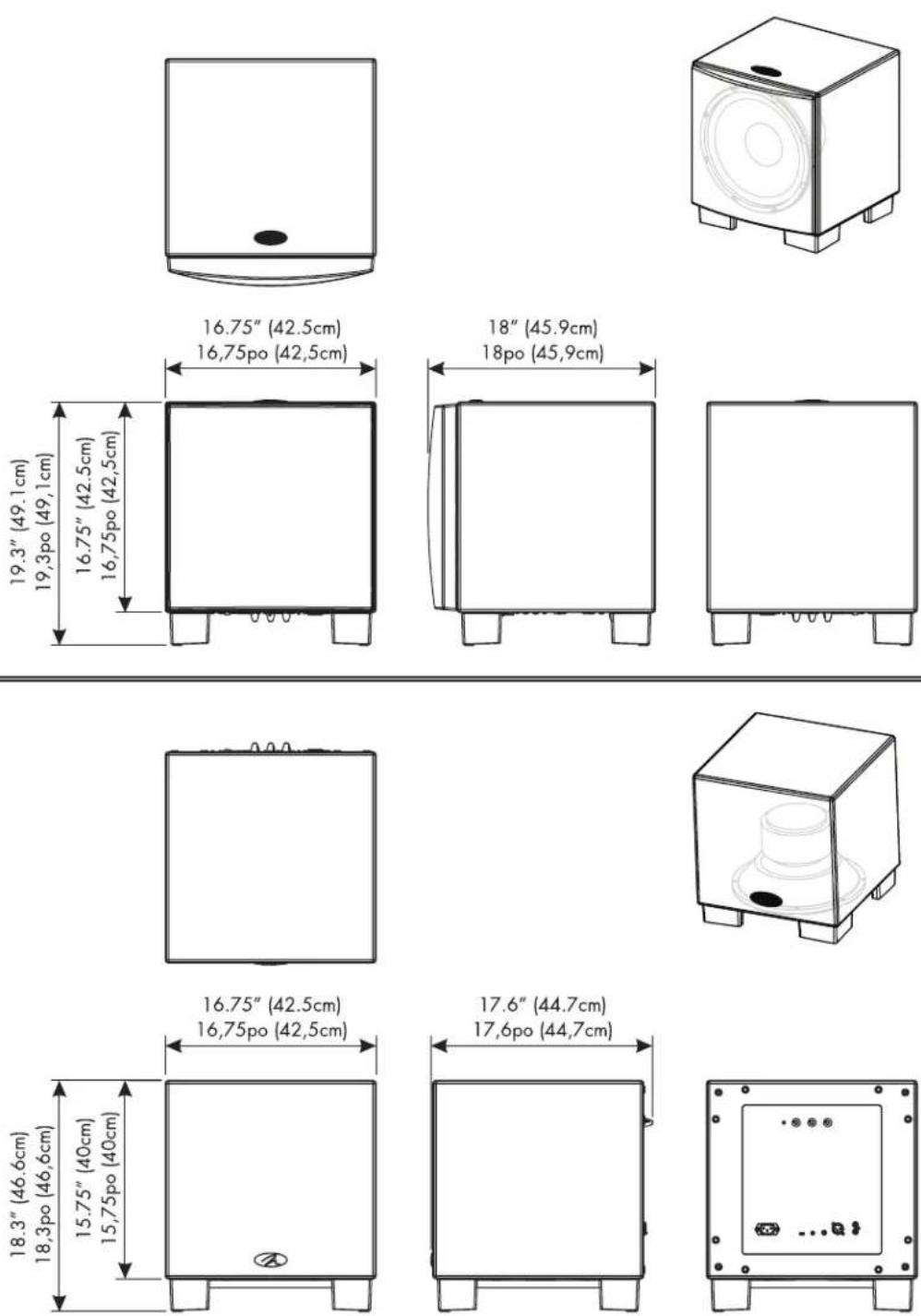
Table des matieres
650 watts RMS (crete 1300 watts)
Impedance
Gauche et droit/LFE RCA - 20 000 Ohms
Entrées
WARNING! Do not use your Dynamo 1500X subwoofer outside of the country of original sale—voltage requirements vary by country. Improper voltage can cause damage that will be potentially expensive to repair. The Dynamo 1500X subwoofer is shipped to authorized Martinlogan distributors with the correct power supply for use in the country of intended sale. A list of authorized distributors can be accessed at www.martinlogan.com or by emailing info@martinlogan.martinlogan.com.


- IMPORTANT SAFETY INSTRUCTIONS
- Dynamo 1500X
- Numérodeséries:
- SafetyWarnings and Installation in Brief (English)
- WARNING!
- Step 1: Unpacking
- Step 2: Placement
- Step 3: Signal Connection
- Step 4: Power Connection (AC) (see warning)
- Step 5: Setting the Controls
- Step 6: Listen and Enjoy.
- Contents Introduction
- Level Knob (fig. 1)
- Low Pass Filter Knob (fig. 1)
- Phase Control Knob (fig. 1)
- Status LED (fig. 1)
- Power Mode and Trigger Input (fig. 2)
- Before Connecting the Dynamo
- 2-Channel Mode
- Signal Connection (see figure 3):
- Recommended Control Settings (see figure 4):
- Multi-Channel/LFE Mode
- Signal Connection (see figure 5 & 6):
- Recommended Control Settings (see figure 7):
- AC Power Connection
- Break-In
- Optional Wireless Connection
- Optimizing Performance With PBK™
- Listening Position
- Ask Your Dealer
- Enjoy Yourself
- Installing in a Cabinet
- Changing Woofer Orientation
- Your Room
- Terminology
- Standing Waves
- Resonant Surfaces and Objects
- Resonant Cavities
- Solid Footing
- Spike Installation Instructions:
- Front Left and Front Right
- Center Channel
- Surround Speakers
- Subwoofer
- Frequently Asked Questions
- How do I clean my subwoofer?
- Is it safe to set things on my subwoofer?
- Is there likely to be any interaction between my subwoofer and the television in my Audio/ Video system?
- Will my electric bill go 'sky high' by leaving my subwoofer plugged in all the time?
- Should I unplug my subwoofer during a thunderstorm?
- Troubleshooting
- No Output
- Muddy Bass
- Hums or Unusual Sounds
- Specifications Warranty and Registration
- System Frequency Response
- Low Pass Filter Frequencies
- Phase
- Components
- Amplifier
- Impedance
- Inputs
- Weight
- Mains Power Draw
- Size (Front-Firing Orientation)
- Size (Down-Firing Orientation)
- Service
- Table des matieres
- Entrées
Brand : Martin Logan
Model : Dynamo 1500X
Category : Subwoofer