ST0566 - Flow detector IFM - Free user manual and instructions
Find the device manual for free ST0566 IFM in PDF.


| Product type | Flow controller (flow detector) |
| Brand | IFM |
| Model | ST0566 |
| Range | efector300 |
| Dimensions (approx.) | Length 83 mm (depending on thread version) |
| Available threads | M12x1, G1/4", G1/2", 1/2" NPT |
| Power supply | Up to 60 V DC (SELV/PELV according to EN50178) |
| Main function | Flow monitoring of fluids (liquids) |
| Response time | Short (approx. 1 to 2 seconds) |
| Switching indication | Yellow LED (output) and green/red LED bar |
| Output type | Normally open or normally closed (depending on setting) |
| Fluid velocity range | Greater than 100 cm/s |
| Sensitivity adjustment | Potentiometer with LED bar |
| Maintenance and cleaning | Periodically clean the probe tip with a soft cloth; for stubborn deposits, use an acetic acid cleaner |
| Safety instructions | Installation by an electrician; comply with national standards; disconnect power before connection |
| Immunity to interference | Compliant with IEC/EN 61000-4-2/3/4/6 (severity levels indicated in the manual) |
| Fluid temperature | Not specified in the excerpt, but typical for industrial use |
| Probe material | Stainless steel (likely) |
| Maximum pressure | Not specified, but suitable for standard applications |
Frequently Asked Questions - ST0566 IFM
User questions about ST0566 IFM
0 question about this device. Answer the ones you know or ask your own.
Ask a new question about this device
Download the instructions for your Flow detector in PDF format for free! Find your manual ST0566 - IFM and take your electronic device back in hand. On this page are published all the documents necessary for the use of your device. ST0566 by IFM.
USER MANUAL ST0566 IFM
Flow monitor ST (short response time)
natural_image
Technical line drawing of a mechanical component with no visible text or symbolsFunction and features
The flow monitor monitors liquid media. It makes quick detection of flow or no flow at high flow rates possible (> 100 cm/s).
The flow signal is always near the switch point (2nd red to 2nd green LED). As a consequence the unit cannot be set with a higher excess gain in order to compensate for flow or temperature fluctuations.
The flow is to be switched on and off as quickly as possible, i.e. when the flow is switched on the maximum flow rate, when the flow is switched off the state “no flow” is to be reached as quickly as possible.
Installation
The sensor tip must be completely immersed in the medium.
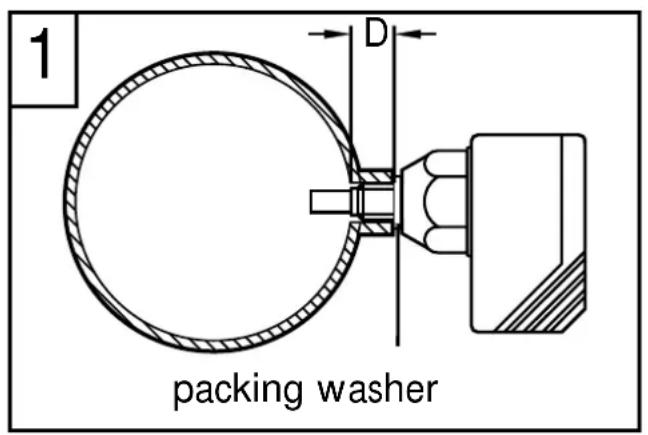
In the case of horizontal pipes mount the unit from the side, if possible (fig. 1). Do not mount it directly from the top or bottom.
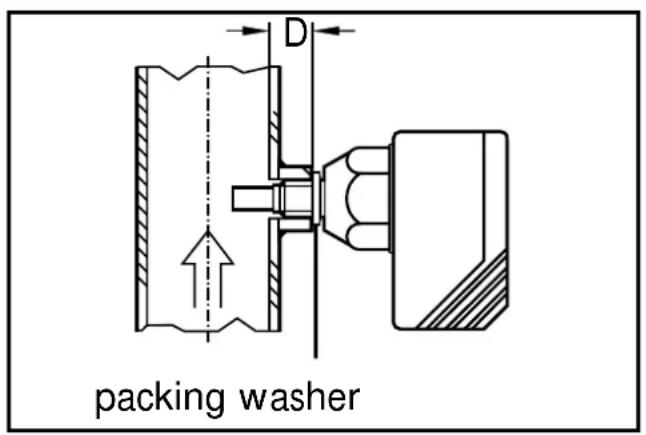
In the case of vertical pipes mount in a place where the medium flows upwards (fig. 2).
D = 15mm for units with M12 x 1 and 1/4" thread
D = 23mm for units with 1/2" thread.
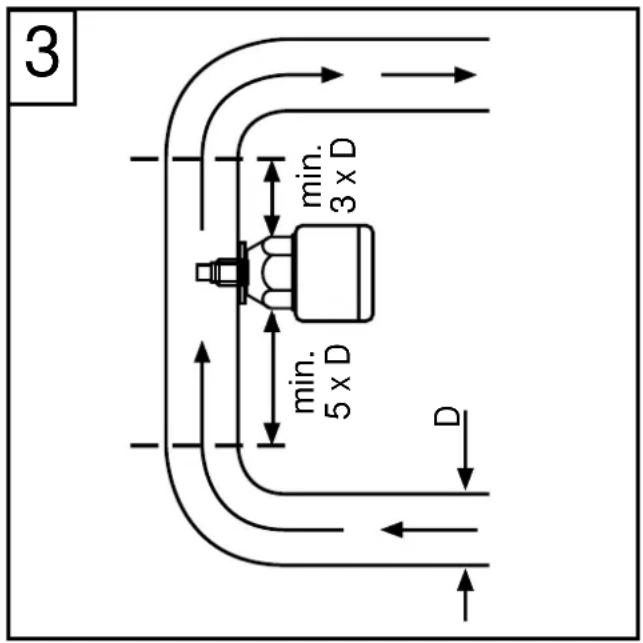
To avoid malfunction a minimum distance between the flow monitor and bends, valves or such like must be observed (fig. 3).
- Min. 5 x pipe diameter upstream,
- Min. 3 x pipe diameter downstream.
Electrical connection

The unit must only be mounted by an electrician.
The national and international regulations for the installation of electrical equipment must be observed.
Voltage supply for units up to 60 V to EN50178, SELV, PELV.
Disconnect power before connecting the unit.
Wiring diagramm:
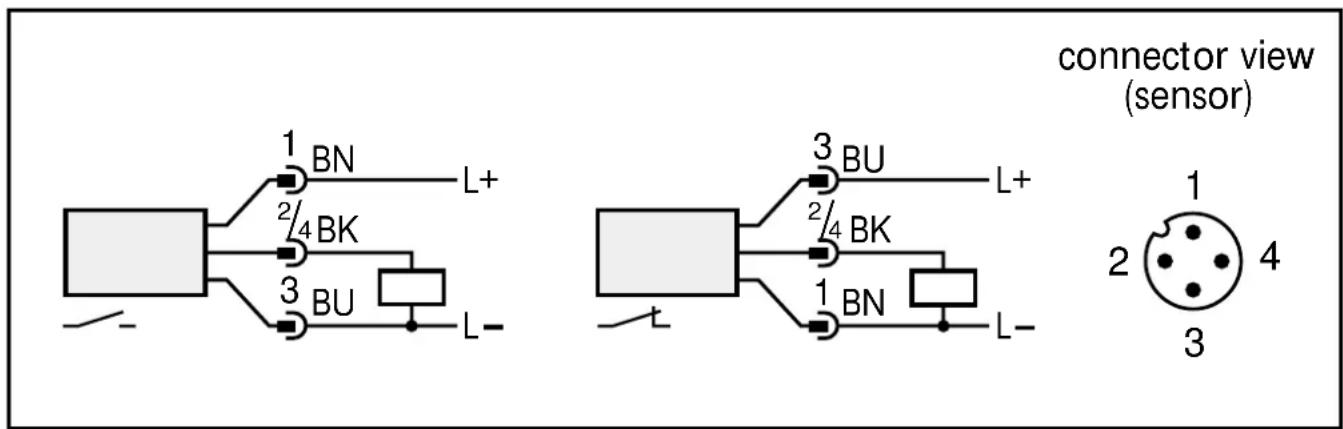
Core colours of ifm sockets:
1 = BN (brown), 2 = WH (white), 3 = BU (blue), 4 = BK (black).
Adjustment
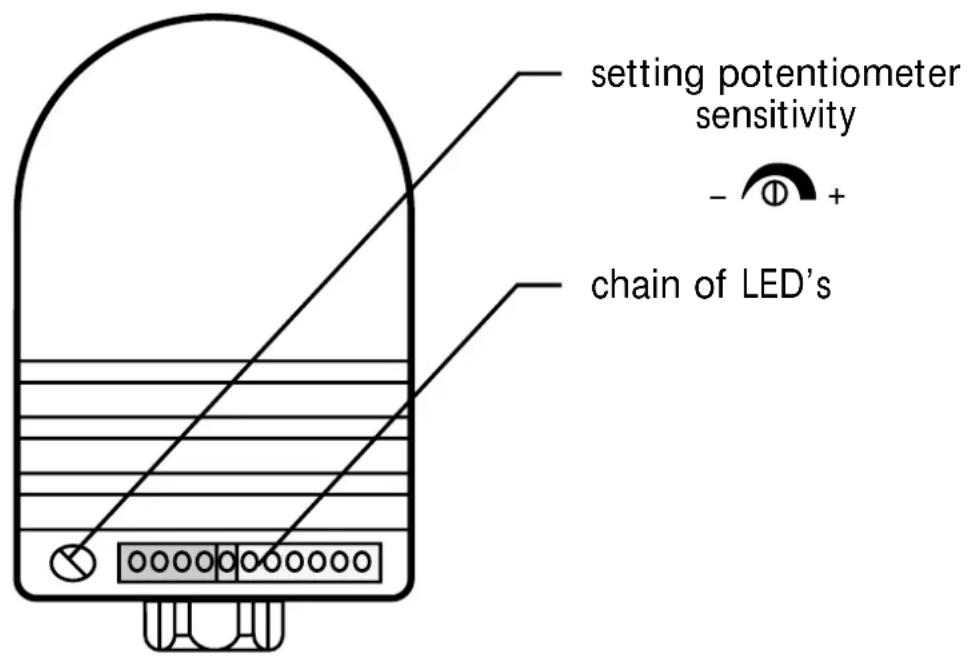
- Insert the unit into the flow and apply operating voltage.
- Set requested flow (valve "OPEN") and keep it constant.
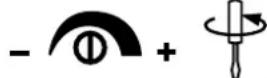
- Set unit to 6th green LED by turning the potentiometer clockwise.


- When power-on delay time has elapsed (ca. 20s), set display to 1st/2nd green LED by turning the potentiometer anticlockwise.

- Switch off flow (valve “CLOSED”). The flow monitor indicates “no flow” after approx. 1 to 2s: the yellow LED goes off (if unit is normally open) or comes on (if unit is normally closed).
- Switch on flow again. The flow monitor indicates “flow o.k.” after 1 - 2 seconds (yellow LED comes on/goes off again).
Now the flow monitor is ready for use.
Operation
After mounting, wiring and setting check whether the unit operates correctly.
The flow monitor indicates errors by 2 signals:
a) outputs alternative: on, off, on, off,
b) the LED fluctuate from red to green and back.
The following errors are indicated in this way:
- When flow is switched on, the maximum flow rate is not reached.
- When flow is switched off, flow is not completely stopped (low flow rate remains).
- Faulty setting of the unit.
Recommended maintenance
Check the sensor tip for build-up from time to time. Clean it with a soft cloth. If necessary, build-up which adheres firmly (e.g. lime) can be removed with a common vinegar cleansing agent.
The units are suitable for use in moderate electromagnetic fields (see table). When operating ISM equipment or powerful walkie-talkies in the vicinity of the units additional measures to avoid malfunction can be required.
| Noise immunity Standard Severity level | ||
| ESD | IEC 1000-4-2 / EN 61000-4-2 | 4 kV CD / 8 kV AD |
| HF radiated | IEC 1000-4-3 / EN 61000-4-3 | 3 V/m; 80 ... 1000 MHz |
| Burst | IEC 1000-4-4 / EN 61000-4-4 | 2 kV coupling pliers |
| HF conducted | IEC 1000-4-6 / EN 61000-4-6 | 3 V; 0.15 ... 80 MHz |
Brand : IFM
Model : ST0566
Category : Flow detector