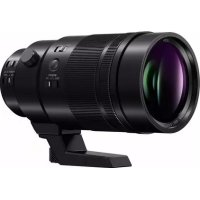
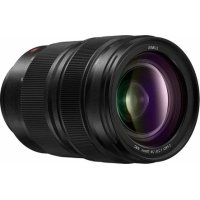
Leica DG Elmarit 200mm f2.8 - Camera lens PANASONIC - Free user manual and instructions
Find the device manual for free Leica DG Elmarit 200mm f2.8 PANASONIC in PDF.


| Product type | Interchangeable photo lens for Micro Four Thirds digital camera |
| Brand | Panasonic / Leica |
| Model | LEICA DG ELMARIT 200 mm/F2.8/POWER O.I.S. |
| Focal length | 200 mm (35 mm equivalent: 400 mm) |
| Maximum aperture | F2.8 (F4.0 with 1.4× teleconverter) |
| Minimum aperture | F22 |
| Optical composition | 15 elements in 13 groups (2 ED lenses) |
| Nano coating | Yes |
| Optical image stabilizer | POWER O.I.S. (ON/OFF switch) |
| Minimum focusing distance | 1.15 m (FULL) / 3.0 m (3m-∞) |
| Maximum magnification | 0.2× (35 mm equivalent: 0.4×) |
| Mount | Micro Four Thirds |
| Angle of view | 6.2° (4.4° with 1.4× teleconverter) |
| Filter diameter | 77 mm |
| Maximum diameter | 87.5 mm |
| Total length | Approx. 174 mm |
| Weight (without tripod collar) | Approx. 1245 g |
| Operating temperature | -10 °C to 40 °C |
| Dust and splash proof | Yes |
| 1.4× teleconverter | Optional (DMW-TC14) |
| Supplied accessories | Case, lens hood, front/rear cap, external tripod collar |
| Maintenance and cleaning | Wipe with a soft dry cloth. Do not use solvents. |
| Safety | Do not point at the sun. Avoid magnetic fields. |
| Spare parts and repairability | Optional teleconverter. Contact customer service. |
Frequently Asked Questions - Leica DG Elmarit 200mm f2.8 PANASONIC
User questions about Leica DG Elmarit 200mm f2.8 PANASONIC
0 question about this device. Answer the ones you know or ask your own.
Ask a new question about this device
Download the instructions for your Camera lens in PDF format for free! Find your manual Leica DG Elmarit 200mm f2.8 - PANASONIC and take your electronic device back in hand. On this page are published all the documents necessary for the use of your device. Leica DG Elmarit 200mm f2.8 by PANASONIC.
USER MANUAL Leica DG Elmarit 200mm f2.8 PANASONIC
Operating Instructions
INTERCHANGEABLE LENS FOR DIGITAL CAMERA
Model No. H-ES200
Lumix
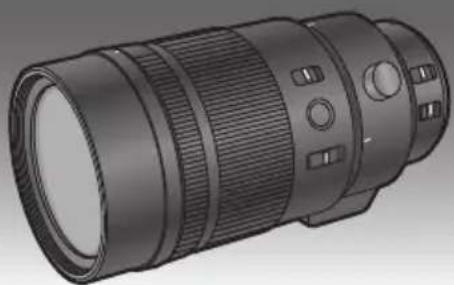
Please read these instructions carefully before using this product, and save this manual for future use.

MICRO FOURTHRDS
POWER
0.I.S.

LEICA
OGELMARIT

NANO
SURFACE COATING

SPLASH/DUST PROOF
E G C
DVQX1304ZA
F1017KD0
Contents
Information for Your Safety 2
Precautions. 3
Supplied Accessories 4
Names and Functions of Components 5
Attaching/Detaching the Lens 6
Attaching/Removing the 1.4× Teleconverter 7
Focus Preset Function 8
Using the Tripod Mount 9
Cautions for Use. 10
Troubleshooting 10
Specifications 11
Limited Warranty (ONLY FOR AUSTRALIA)... 12
Information for Your Safety
Keep the unit as far away as possible from electromagnetic equipment (such as microwave ovens, TVs, video games, radio transmitters, high-voltage lines etc.).
- Do not use the camera near cell phones because doing so may result in noise adversely affecting the pictures and sound.
- If the camera is adversely affected by electromagnetic equipment and stops functioning properly, turn the camera off and remove the battery and/or the connected AC adaptor. Then reinsert the battery and/or reconnect the AC adaptor and turn the camera on.
DVQX1304
The lens can be used with a digital camera compatible with the lens mount standard for the "Micro Four Thirds™ System".
- It cannot be mounted on the Four Thirds™ mount specification camera.
- The digital camera illustrations in these operating instructions show DC-G9 as an example.
- The appearance and specifications of products described in this manual may differ from the actual products you have purchased due to later enhancements.
- Micro Four Thirds™ and Micro Four Thirds Logo marks are trademarks or registered trademarks of Olympus Corporation, in Japan, the United States, the European Union and other countries.
- Four Thirds™ and Four Thirds Logo marks are trademarks or registered trademarks of Olympus Corporation, in Japan, the United States, the European Union and other countries.
- G MICRO SYSTEM is an interchangeable lens type digital camera system of LUMIX based on a Micro Four Thirds System standard.
- LEICA is a registered trademark of Leica Microsystems IR GmbH. ELMARIT is a registered trademark of Leica Camera AG. The LEICA DG lenses are manufactured using measurement instruments and quality assurance systems that have been certified by Leica Camera AG based on the company's quality standards.
- Other names of systems and products mentioned in these instructions are usually the registered trademarks or trademarks of the manufacturers who developed the system or product concerned.
-If you see this symbol
Disposal of Old Equipment
Only for European Union and countries with recycling systems

This symbol on the products, packaging, and/or accompanying documents means that used electrical and electronic products must not be mixed with general household waste.
For proper treatment, recovery and recycling of old products, please take them to applicable collection points in accordance with your national legislation. By disposing of them correctly, you will help to save valuable resources and prevent any potential negative effects on human health and the environment. For more information about collection and recycling, please contact your local municipality. Penalties may be applicable for incorrect disposal of this waste, in accordance with national legislation.
Precautions
Lens Care
-
This lens has a dust-proof and splash-proof construction. When using it, please be careful of the following. If the lens is not working properly, consult the dealer or your nearest Service Centre.
-
Please attach the lens to a dust-proof and splash-proof digital camera. The lens is not designed to be dust-proof
ENGLISH
and splash-proof when attached to a digital camera without dust-proofing and splash-proofing.
- When attaching or removing the lens, be careful so that foreign materials such as sand, dust, and water droplets do not adhere to or enter the lens mount rubber, contact points, digital camera and lens.
- This lens is not waterproof and cannot be used to record underwater. For splash-proofing, the lens is constructed to resist the entry of water. If splashes of water etc. do adhere to the lens, wipe after use with a soft dry cloth.
- To improve the dust-proofing and splash-proofing of this lens, a lens mount rubber is used in the mounting portion. After changing the lens a number of times, you may find that the lens mount rubber has marked the mount portion of the digital camera body, which does not affect its performance.
For information on changing the lens mount rubber, contact your nearest Service Centre. - Do not press the lens with excessive force.
-
When there is dirt (water, oil, and fingerprints, etc.) on the surface of the lens, the picture may be affected. Lightly wipe the surface of the lens with a soft, dry cloth before and after taking pictures.
-
To prevent dust and other particles from accumulating on or entering the lens, attach the lens rear cap when the lens is not in use.
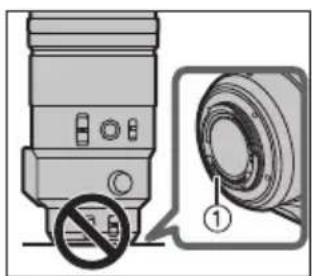
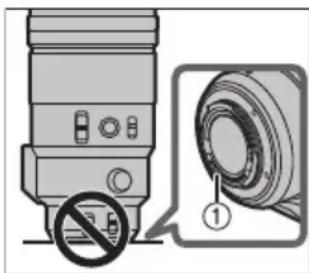
- To protect the lens contact points ①, do not place the lens with its mount surface facing down. In addition, do not allow the lens contact points to become dirty.
About Condensation (Fogging of the Lens)
- Condensation occurs when the ambient temperature or humidity changes. Please be careful, as it may cause the lens to become dirty and lead to mould and malfunctioning.
- If condensation occurs, turn the power off and leave it for about two hours. Once the camera acclimatizes to the surrounding temperature the condensation will go away naturally.
Supplied Accessories
Product numbers correct as of November 2017. These may be subject to change.
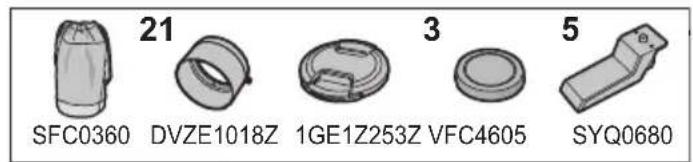
DMW-TC14*1
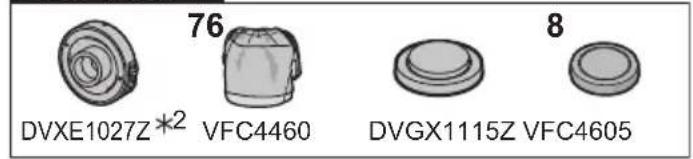
1 Lens Pouch
6 1.4× Teleconverter
2 Lens Hood
7 Lens Pouch
3 Lens Cap
8 Lens Cap
4 Lens Rear Cap
9 Lens Rear Cap
5 External tripod mount
1 The 1.4 × Teleconverter (DMW-TC14) is scheduled to be sold as an optional accessory.
2 It is available for purchase as a package that includes a lens cap and a lens rear cap.
- The lens rear cap and lens cap are attached to the interchangeable lens and 1.4 × Teleconverter at the time of purchase.
Names and Functions of Components
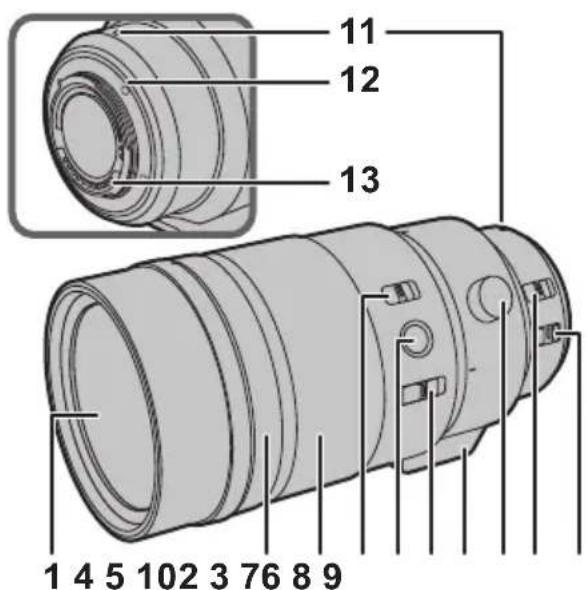
1 Lens surface
2 Aperture ring
Rotate this to adjust the aperture value.
- If you set the camera to Aperture-Priority AE Mode or Manual Exposure Mode, the aperture value of the ring will be enabled.
- If you set the position of the aperture ring to [A], the aperture value of the camera will be enabled.
3 Focus ring
Rotate to focus when taking pictures with manual focus (MF).
4 Focusing distance range selector switch
[FULL]: It can focus between the ranges of 1.15 m (3.8 feet) to .
[3m-∞]: It can focus between the ranges of 3.0 m (9.8 feet) to . The speed of focusing with auto focus will be faster.
5 Focus button (P8)
6 Focus selector switch (P8)
7 Tripod mount (P9)
8 Orientation locking knob (P9)
9 [AF/MF] switch
This allows you to switch between Auto Focus (AF) and Manual Focus (MF).
- When either the [AF/MF] switch of the lens or the setting of the camera is set to [MF], Manual Focus (MF) is enabled.
10 O.I.S. switch
When the lens is attached to the camera the stabiliser function is set to activate if the O.I.S. switch is set to [ON].
- We recommend setting the O.I.S. switch to [OFF] when using a tripod.
11 Lens fitting mark
12 Lens mount rubber
13 Contact points

Note
- Operational sound may be recorded when Auto Focus is operated while recording a motion picture. If the sound bothers you, we recommend performing recording with a function such as Manual Focus (MF) to lock the focus.
- If you set the O.I.S. to [ON] when recording a motion picture, operating sounds may be recorded. If they become bothersome, we recommend setting the O.I.S. switch to [OFF] and mounting the camera on a tripod.
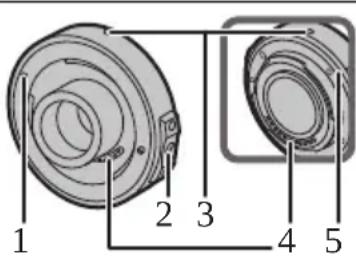
1.4×Teleconverter
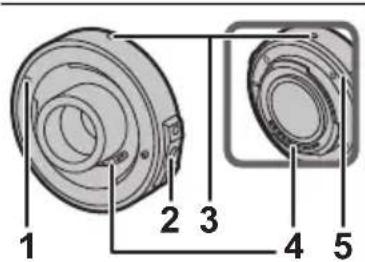
1 Fitting mark
2 Lens release button
3 Lens fitting mark
4 Contact points
5 Lens mount rubber
Attaching/Detaching the Lens
For information on how to attach and remove the lens, refer to the operating instructions for your digital camera.
- Before attaching or detaching the lens, check that the digital camera is turned off.
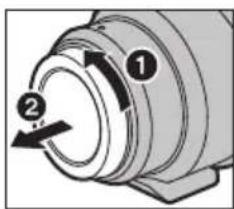
Before attaching the lens to the digital camera, remove the lens rear cap. (1, 2)
- To prevent dust and other particles from accumulating on or entering the lens, be sure to attach the lens cap/lens rear cap after detaching the lens from the digital camera.
Attaching Filters
- If you use two or more filters at the same time, part of a recorded image may darken.
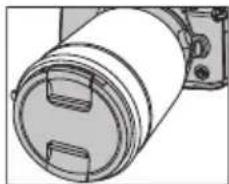
- It is possible to attach the lens cap or the lens hood with the filter already attached.
- It is not possible to attach a conversion lens or adaptor to the lens surface and use it in combination with this lens. Do not attach any items other than filters. Doing so may result in lens damage.
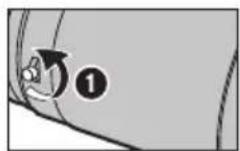
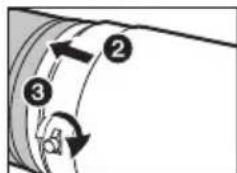
Attaching the Lens Hood
1 Rotate the lens hood screw in the direction of the arrow to loosen it ( ①).
2 Insert the lens hood until it stops (2).
3 Rotate the lens hood screw in the direction of the arrow to fasten the lens hood securely (3).
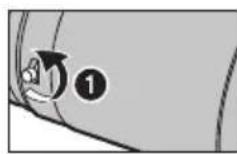
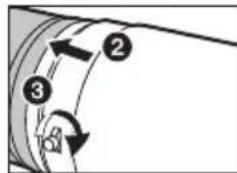

Note
- When using the lens with the lens hood, check if the lens hood screw has become loose.
- When taking pictures with the flash with the lens hood attached, the lower portion of the screen may turn dark and the control of the flash may be disabled because the photo flash may be obscured by the lens hood. We recommend detaching the lens hood.
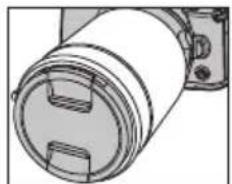
- When carrying, the lens hood can be temporarily attached in the reverse direction.
- Do not carry the lens by holding only the lens hood.
Attaching/Removing the 1.4 × Teleconverter
The teleconverter can be used in combination with this lens (H-ES200). (As of November 2017)
- For the most up-to-date information on compatible lenses, other than this lens, check the Panasonic website.
- Do not attach any parts other than a compatible lens. Doing so may damage the lens or teleconverter or adversely affect its performance.
- Before attaching or removing the teleconverter, verify that the digital camera is turned off.
- Remove the lens cap and the lens rear cap.
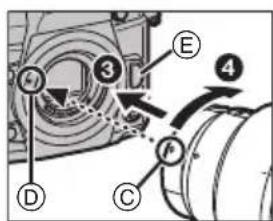
To attach the teleconverter
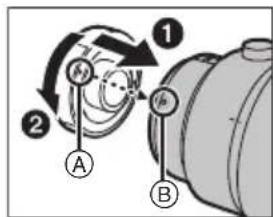
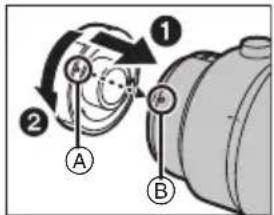
1 Align the fitting mark A on the teleconverter with the lens fitting mark B on the lens 1), and rotate the teleconverter in the arrow direction until a clicking sound is heard.2
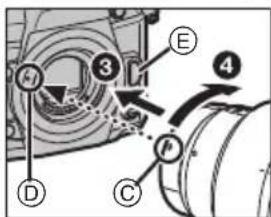
2 Align the lens fitting mark ⑤ on the teleconverter with the lens fitting mark ① on the digital camera (3) , and rotate the lens in the arrow direction until a clicking sound is heard.
- When attaching the lens to the digital camera, do not press the lens release button (E) and the lens release button on the teleconverter.
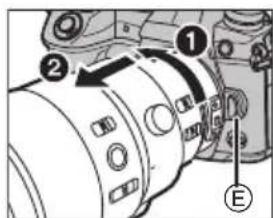
To remove the teleconverter
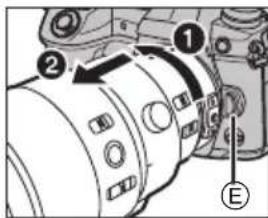
1 While pressing and holding the lens release button ⑥ on the digital camera, rotate the lens fitted with the teleconverter in the arrow direction until it stops and remove it (1, 2).
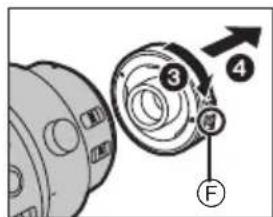
2 While pressing and holding the lens release button on the teleconverter, rotate the teleconverter in the arrow direction until it stops and remove it (3, 4).
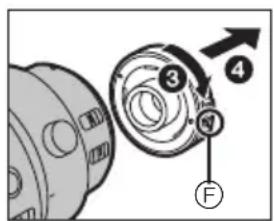

Note
- When the teleconverter is mounted, the aperture will be set to a value one step greater than the index value on the aperture ring.
- When updating the lens firmware to the latest version, remove the teleconverter before performing the update.
Focus Preset Function
You can call up a focus position stored in the memory of the lens. In addition, the focus can be locked.
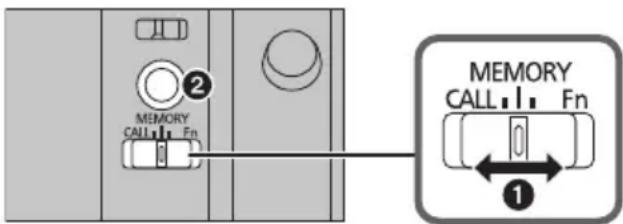
(To store a focus position in the lens memory)
1 Set the focus selector switch to [MEMORY] (1).
2 Adjust the focus to the position you want to store in the memory.
3 Press the focus button (2) to store the focus position in the memory.
- The focus position stored in the memory will remain in effect until you store a new position in the memory.
(To call up the focus position stored in the memory)
4 Set the focus selector switch to [CALL] (0).
5 Press the focus button (2) to call up the focus position stored in the memory.
- [MF] is temporarily enabled while the focus button is pressed and held.
- Even when the focusing distance range selector switch is set to [3m - ] , a focus position within the 3.0m range can be called up. If you release the focus button, however, the focus position will move to the limit position (3.0m) .
- We recommend setting the focusing distance range selector switch to [FULL] when using the focus preset function.
Locking the focus
1 Set the focus selector switch to [Fn] (0).
2 Press the focus button (2).
- The focus is locked while the focus button is pressed and held.
- You can also call up a function set on a digital camera that supports the [Fn] function.

Note
- Before removing the lens, verify that the digital camera is turned off. If the lens is removed while the digital camera is turned on, the focus position will not be stored in the memory.
Using the Tripod Mount
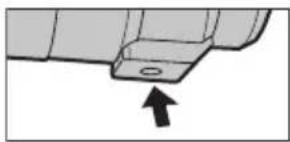
When using a tripod, attach it to the tripod mount of the lens.
We recommend that you avoid attaching the tripod to the tripod mount of the digital camera to prevent lens
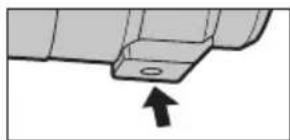
damage that may occur when carrying the lens.
-
In the following cases, before attaching a tripod, attach the supplied external tripod mount to the lens:
-
When the lens or digital camera comes in contact with the tripod
-
When a battery grip that comes in contact with the tripod is used
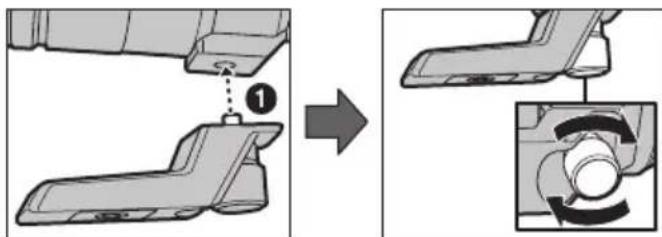
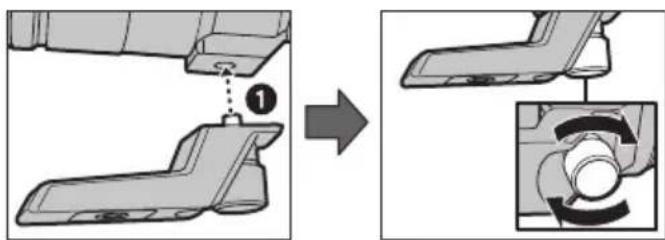
Attaching the external tripod mount (supplied)
1 Insert the external tripod mount attachment screw into the tripod mount of the lens. (1)
2 Rotate the external tripod mount attachment screw in the direction of the arrows to fasten it firmly.
-
Check that the external tripod mount attachment screw is not loose before use.
-
Do not strike or apply strong pressure to the external tripod mount.
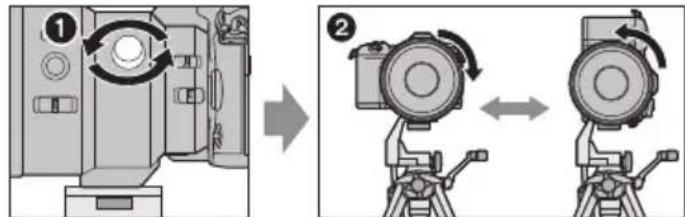
Changing the vertical/horizontal orientation
You can loosen the orientation locking knob (1) to rotate the lens together with the digital camera (2).
This way, you can quickly switch between the vertical and horizontal orientation while the tripod is in use.
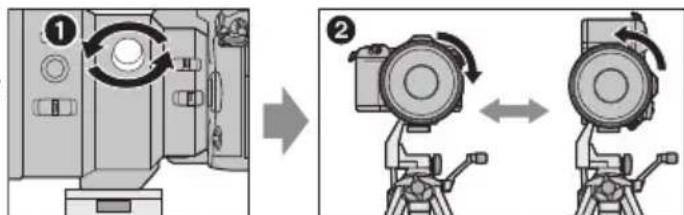
After changing the orientation, tighten the orientation locking knob firmly and check that it is not loose.
Cautions for Use
Take care not to drop or knock the lens. Also take care not to put a lot of pressure on the lens.
- Take care not to drop the bag that you inserted the lens in as it may strongly shock the lens. The camera may stop operating normally and pictures may no longer be recorded. Also, the lens may be damaged.
- When carrying the digital camera with the lens attached, hold both the digital camera and the lens.
When using pesticides and other volatile substances around the camera make sure that they do not get onto the lens.
- If such substances get onto the lens they can damage the exterior case or cause the paint to peel.
Do not point the lens at the sun or other strong light sources.
- This could cause the lens to collect an excessive amount of light, resulting in fire and malfunction.
-
Avoid using or storing the lens in any of the following locations as this may cause problems in operation or malfunctioning:
-
In direct sunlight or on a beach in summer
- In locations with high temperatures and humidity levels or where the changes in temperature and humidity are acute
- In locations with high concentrations of sand, dust or dirt
-Where there is fire - Near heaters, air conditioners or humidifiers
-Where water may make the unit wet
-Where there is vibration - Inside a vehicle
Refer also to the operating instructions of the digital camera.
- When the unit is not going to be used for a prolonged period, we recommend storing with a desiccant (silica gel). Failure to do so may result in performance failure caused by mold, etc. It is recommended that you check the unit's operation prior to use.
- Do not leave the lens in contact with rubber or plastic products for extended periods of time.
- Do not touch the lens contact point. Doing so can cause failure of the unit.
- Do not disassemble or alter the unit.
Do not use benzine, thinner, alcohol or other similar cleaning agents to clean the lens glass or exterior cabinet.
- Using solvents can damage the lens or cause the paint to peel.
- Wipe off any dust or fingerprints with a soft, dry cloth.
- Use a dry, dust cloth to remove dirt and dust on the lens mount rubber, focus ring, or aperture ring.
- Do not use a household detergent or a chemically treated cloth.
Troubleshooting
When I turn on or off the camera or when I shake the lens, I hear a sound, for example a rattling sound. When I take pictures of a bright subject, such as a subject outside, or when I take pictures with a large aperture value, the lens makes a sound.
- This is the sound of lens or aperture movement and is not a malfunction.
Specifications
Specifications are subject to change without notice.
| INTERCHANGEABLE LENS FOR DIGITAL CAMERA "LEICA DG ELMARIT 200 mm/F2.8/POWER O.I.S." | 1.4× Teleconverter | |
| Focal length | f=200 mm (35 mm film camera equivalent: 400 mm) | 1.4× that of the attached lens. |
| Aperture type | 9 diaphragm blades/circular aperture diaphragm | - |
| Maximum aperture | F2.8 (When the 1.4× Teleconverter is attached: F4.0) | - |
| Minimum aperture value | F22 (When the 1.4× Teleconverter is attached: F22) | - |
| Lens construction | 15 elements in 13 groups (2 ED lenses) | 6 elements in 4 groups |
| Nano surface coating Yes - | ||
| In focus distance | [FULL]: 1.15 m (3.8 feet) to ∞ / [3 m-∞]: 3.0 m (9.8 feet) to ∞ (from the focus distance reference line) | - |
| Maximum image magnification | 0.2× (35 mm film camera equivalent: 0.4×) | - |
| Optical image stabilizer | Available | - |
| O.I.S. switch | Available (Switching ON/OFF) | - |
| [AF/MF] switch | Available (Switching AF/MF) | - |
| Mount | "Micro Four Thirds Mount" | - |
| Angle of view | 6.2° (When the 1.4× Teleconverter is attached: 4.4°) | - |
| Filter diameter | 77 mm | - |
| Max. diameter | Ø87.5 mm (3.4 inch) | Ø58 mm (2.3 inch) |
| Overall length | Approx. 174 mm (6.9 inch) (from the tip of the lens to the base side of the lens mount) | Approx. 22 mm (0.87 inch) (from the tip of the lens to the base side of the lens mount) |
| Mass | Approx. 1245g (2.74 lb) (excluding the external tripod mount) | Approx. 120 g (0.26 lb) |
| Operating temperature | -10 °C to 40 °C (14 °F to 104 °F) | -10 °C to 40 °C (14 °F to 104 °F) |
| Dust-proof and splash-proof | Available | Available |
Panasonic Warranty
The product is warranted for 12 months from the date of purchase. Subject to the conditions of this warranty Panasonic or its Authorised Service Centre will perform necessary service on the product without charge for parts or labour, if in the opinion of Panasonic, the product is found to be faulty within the warranty period. This warranty only applies to Panasonic products purchased in Australia and sold by Panasonic Australia or its Authorised Distributors or Dealers and only where the products are used and serviced within Australia or it's territories. Warranty cover only applies to service carried out by a Panasonic Authorised Service Centre and only if valid proof of purchase is presented when warranty service is requested. This warranty only applies if the product has been installed and used in accordance with the manufacturer's recommendations (as noted in the operating instructions) under normal use and reasonable care (in the opinion of Panasonic). The warranty covers normal domestic use only and does not cover damage, malfunction or failure resulting from use of incorrect voltages, incorrect installation, accident, misuse, neglect, build-up of dirt or dust, abuse, maladjustment of customer controls, mains supply problems, thunderstorm activity, infestation by insects or vermin, tampering or repair by unauthorised persons (including unauthorised alterations), introduction of sand, humidity or liquids, commercial use such as hotel, office, restaurant, or other business or rental use of the product, exposure to abnormally corrosive conditions or any foreign object or matter having entered the product.
-
This warranty does not cover the following items unless the fault or defect existed at the time of purchase: (a) Cabinet Part(s) (e) DVD, Blu-ray or Recordable Discs (b) Video or Audio Tapes (f) Video / Audio Heads from wear and tear in normal use (c) SD cards or USB devices (g) Information stored on Hard Disk Drive, USB stick or SD card (d) User replaceable Battenes (h) DTV reception issues caused by TV Aerial / Cabling / Wall socke etc
-
Some products may be supplied with Ethernet connection hardware. The warranty is limited on such products and will not cover (a) Internet and or DLNA connection / setup related problems (b) Access fees and or charges incurred for internet connection (c) The use of incompatible software or software not specifically stipulated in the product operations manual; and (d) Any indirect or consequential costs associated with the incorrect use or misuse of the hardware, its connection to the Internet or any other device.
-
To claim warranty service, when required, you should: Telephone Panasonic's Customer Care Centre on 132600 or visit our website referred to below and use the Service Centre Locator for the name/address of the nearest Authorised Service Centre. Send or take the product to a Panasonic Authorised Service Centre together with your proof of purchase receipt as a proof of purchase date. Please note that freight and insurance to and /or from your nearest Authorised Service Centre must be arranged by you. Note that home or pick-up/delivery service is available for the following products in the major metropolitan areas of Australia or the normal operating areas of the nearest Authorised Service Centres: Plasma/LCD televisions / displays (screen size greater than 103 cm)
-
The warranties hereby conferred do not extend to, and exclude, any costs associated with the installation, deinstallation or re-installation of a product, including costs related to the mounting, de-mounting or remounting of any screen, (and any other ancillary activities), delivery, handling, freightiing, transportation or insurance of the product or any part thereof or replacement of and do not extend to, and exclude, any damage or loss occurring by reason of, during, associated with, or related to such installation, de-installation, re-installation or transit.
Panasonic Authorised Service Centres are located in major metropolitan areas and most regional centres of Australia, however, coverage will vary dependant on product. For advice on exact Authorised Service Centre locations for your product, please telephone our Customer Care Centre on 132600 or visit our website and use the Service Centre Locator. In addition to your rights under this warranty, Panasonic products come with consumer guarantees that cannot be excluded under the Australian Consumer Law. If there is a major failure with the product, you can reject the product and elect to have a refund or to have the product replaced or if you wish you may elect to keep the goods and be compensated for the drop in value of the goods. You are also entitled to have the product repaired or replaced if the product fails to be of acceptable quality and the failure does not amount to a major failure. If there is a major failure in regard to the product which cannot be remedied then you must notify us within a reasonable period by contacting the Panasonic Customer Care Centre. If the failure in the product is not a major failure then Panasonic may choose to repair or replace the product and will do so in a reasonable period of time from receiving notice from you.
THIS WARRANTY CARD AND THE PURCHASE DOCKET (OR SIMILAR PROOF OF PURCHASE) SHOULD BE RETAINED BY THE CUSTOMER AT ALL TIMES
If you require assistance regarding warranty conditions or any other enquiries, please visit the
Panasonic Australia website www.panasonic.com.au or contact by phone on 1. If phoning in, please ensure you have your operating instructions available.
Panasonic Australia Pty. Limited
ACN 001 592 167 ABN 83 001 592 187
Innovation Road, Matquand Park NSW 2113
PRO-031-F11 Issue: 4.0
Inhalt
10 Interruptor O.I.S.
XpaHnte np60bop BdaJOn OT nCTOCHNKOB 3JIeKTPOMarHTHO rN3JIyueHn (HaNPmep, MKNPOBOJHOBbIX Neey, TeJeBn3OpOB, O6OpyDOBaHn dIy BnDeoHrp,
paDnonepeDaTmKOB, BBICOKOBOJbTHbIX JHHN N T.D.).
- He noIb3yItecb foToKaMepoB 65Jn3n COTOBbIX TeJefoHOB, TaK KaK TeJeOhoHb MOrT Bbl3BaTb NOMEXN, OTPUaTeJIbHO Cka3bIbAIOuNEcRa Ha KaYeCTBe CHIMKOB u 3Byka.
- EcInKaMepa IOnDBepraetcH eratubHomy BInnaHIO 3JIeKTPomarHHTHO n3JlyeHn INpecTaET pa60TaTb HOpMaIbHo, BBIKNoUHTe KaMepy, n3BNeKeNTe 6aTapeo N/ ININ NOkKnUOeHHbI CEteBOI aDANTep nepemeHHoro Toka.
3aTeM CHOBA BCTaBbTe 6aTapeH W/IN CHOBA NOKIOHNTe ceTeBOI aAnTep nepemEHORo TOKa N BKIOHNTe Kamepy.
ObekTNMOKETNCIOB3OBAbCcUΦpOBOKaMepo, COBmecTUMO Co cTaHApTOM KpeJIeHnIg ObekTNOB "Micro Four ThirdsTM System".
He npedycmTopeHa erO yctaHOBKa Ha foTOkAmepbI co CneuФkaunen KpEnnEnn Four Thirds TM.
Ha nIJIIOCTpaunx LcnpoBoi KaMepb I DaHbIX INHCTpyKuynx no 3KcNpyataun B KaueeTbe npimepa nokaah DC-G9.
BHeuHn BnCn CneunKauin npOyKTOB, OINcaHHbE BDaHHOM pyKOBOCTBE, MOrY OTJInuHaTbcraOT cKaTtuecknx npNo6peTeHHbIX npOyKTOB BBnDy 60nee No3DHnx yJyUeHn.
- Micro Four Thirds™ n 3HaKn IoroTnna Micro Four Thirds
- YBJIaIOTcY TOBapHbIMN 3HaKaAMN INN
- 3apeRicCTpnpoBaHHbIMN TOBapHbIMN 3HaKaAMN Olympus
Corporation B JAnOHIN, CoeDInHeHHbIX UItatax,
Ebponeckom CoO3e n dpynx cTpaHax.
Four Thirds n 3hakn norotuna Four Thirds ABnHOTc TOBapHBIM 3hakamn HnN 3aperncTpnpoBaHHbIMTOBapHBIM 3hakamn Olympus Corporation B JnoHm, CoedInHeHHbIX UtaTax, Ebponeckom CoO3e n npynx cTpaHax.
G MICROSYSTEM ABnreTc CnCTeMoN OBeKTHOB CMeHHOro Tnna Dnra Unpobbix Kamep LUMIX,pa3pa6OtaHHoHa OCHObe cTaNapTa Micro Four Thirds System.
- LEICA Альперсларпоровим Товарпим 3нakOM
Leica Microsystems IR GmbH. ELMARIT Альперс
3арпсгларовим Товарпим 3нakOM Leica Camera
AG.Оьектны LEICA DG npoиьогдясс
И споньзовим Им Мерпеловх пиборов И сntem
Контponя кауесъ, captnфцроровим Leica Camera
AG ha ochobe kopnpopatubhix Tpe6obahn K kauechby.
Дугпе Ha3BaHnI CnCTeM n npOdyKTOB, yNOMaHTbIe B daHHo INHcTpykUIM NO 3KcNlYaTaUIM, O6bIuHO RAJIaHTcR 3apeINCTpnpOBaHHbIMN TOBapHbIMN 3HaKaAMn INI IN TOBapHbIMN 3HaKaAMn pOnI3BoDInTeJei, KOTOpbIe pa3pa6OtaIIyNOMaHyTuO CnCTeM y INI npOdyKT.
Ppabnna 3Kcnnyataun
YXo3a06bekTNBOM
YdaHHoro obBeKtNbA nbJIeHepnoHaemoe 6pb3ro3aunuHHeO HcNOnHHeHne. Pn NcNoB3oBaHN oBeKtNbCaobJIOaIte ONNCaHHbIe daane peKOMeHdaCIN. EcIn ObBeKtNB pa6oTaET HENpABNbHO, O6paTNTecb B NyHKT npodaxn nn 6JnxKaun CepBnchbl ueHtp.
- PnKpeTnTe oBeKTNB K nbIeHepOnHuaemO n 6pb3ro3aunuueHHo uΦpOBou foTOkamepe. Ecnn 6bekTNB PnKpeNTb K uΦpOBou foTOkamepe 6ez XapaKTEpcNTNK nbIeHepOnHuaeMOCTn N 6pb3ro3aunuueHHocTn, OH nepecTaHeT 6bITb nbIeHepOnHuaeMbIM n 6pb3ro3aunuueHHbIM.
-Пикpenля ИИн CHIMMA OБьektNB, cneДITE 3a TeM, YTO6bl INHOPOHBIe YAcTNUB, HAnPIMep NecOK, nbJIb I KaJIIN BOJBI, He NonaJIH Ha NOBepxHOCTb IIN IPOHNI BHYtpb pe3INHOBOrO yNIOHTHNeJIbHOrO KOJIbca OБьektNBa, KOHTaKToB, UΦpOBoI ΦOTOKaMepbIu OБьektNBa.
-Даньи obekTNB HeЯBJIeTcB OBOHepOnHuaembIM. 4TO kacaetc6pb3ro3aunuieHHoCTN,KOHCTpykua OBekTnBa HeDonyckaet npOHKnHOBeHnBHyTp bOdbI. Ecnn Ha obekTNB nonaayT KaNN BObi nT..nocne nCNoJb3OBaHn npOTpntEero cyxoi MmKoTKaHbIO.
-ДяушенипilehenpoHuaeMoCTnI 6pb3ro3aunuueHHocT DaHHoroObekTuBaMeCTe npKpenHeHnICNoJIb3yETcpe3HOBoe yNJOTHTeJIbHOe
KoJIbO oBekTnBa. Iocne HeoDHOKpaTHo CMeHbI
06BeKTnBa MoXHO 3aMeTtB NOBJIeHne OTNeuATka OT
pe3INHOBO rYPiOTHTeJIbHOrO KOJIbua O6BeKTnBA B MecTe
PpIKpeJIeHnRA O6BeKTnBA Ha KOpNcE ZnΦpOBoi KaMepbl.
3To He BInraet Ha ee pa6Ot.
3a INΦopMaunE O CmHe pe3INHOBO rYPiOTHTeJIbHOrO KOJIbua
06BeKTnBa 06paAaTEcB B 6nKaaMn CepBnCHbI cEHTp.
-HeJIb3a CNJIbHO HAXIMaTb Ha 06BeKTHB.
B cnuyae nonaahan Ha nobepxhoctb obbeKTHBa rpa3n (BOdbi, Macna, OTneauTkoanbuceB nT. d.) KaueCTBO CHIMKA MOXET yxydunbcra. Cneyet octopoxHo BitepeTb NOBepxHOCTb obeKTHBa mRKO cyxO TkaHbIO nepec cEmkO.
KoIaObKeTnB He IcNoJIb3yETcR,HaJeHbTe Ha Hero 3aDHIIO KpbIiKy OBeKTnBa,YTO6bI PbIINHKn IN DpyrIe YACTuBi He CKaIIINBaNNCb Ha OBeKTnBe H He NonaJaIN BHyTpB.
-TO6bI 3aUNITb KOHTaKtbl 06bEKnBa ① ,He CTaBBTe 06bEKNB MOHTaXHoi NOBepxHOCTbIO BHN3.Kpome
Toro, He DonnyckaIte 3aRpa3HeHnKOHTaKToB O6bekTInBa.
I03B0JraT nepeKIOUaTbcMexdy peXIMOM aTOΦOKcnpOBKn (AF) n puHoi φokcnpOBKn (MF).
- Ecni yctaHOBt b nepeKIOUaTeJIb [AF/MF] obBeKTnBa Hn HacTpoN Ky KaMepbHa [MF], BkIOUaETcpeKIM pyHoi oKycuPobKn (MF).
10 PpeeknouateIb O.I.S.
EcIn o6bekTNb npKpeNnEHN K KaMepe, yHKnna cTaNn3aTopa ycTaHOBneHa Ha aKTNaCnIO, ecIn nepeKnIOyateIb O.I.S. ycTaHOBneHn [ON].
- Ppi nCnOJb3OBAHmN U7TaTnBa peKOMeHdyeTCaYcTaHaBnBaTb nepeKnIouaTeNb O.I.S. B noNoKeHne [OFF].
11 MoHTaXHa nOBepxHOCTb
12 Pe3nHOBoe yIIOHTeJIbHoe KOJIbIoo 06BeKTHBa
13 MeTka yCTaHOBKn 06bekTnBa

PpmeaHne
-Пи ИСПОЛБЗОВАнИ АВTOФOKYCINPOВКИ BO ВЕмЯ BИДEOCSБЕМКИ может 3апсьIBaTBС рабочи 3ByK.Еспг 3ТOT 3ВYК BAC 6eCnOKoNT,pekOMeHДуETСВ БИПОЛНЯТь 3aПИСь C ПOMOцьЮ ФУнкUП рунOHФOKYCINPOВКИ (MF) ДЯ ПИКСАЦ NФOKYCINPOВКИ.
- Ecnn yctaHOBnTb O.I.S. Na [ON] BO BpeM BnDeocBeMKn, MoryT 3anncatbcra pa6OHe 3ByKn. Ecnn pa6OHe 3ByKn Me7aHOT, peKomeHnyETcra YCTaHOBnTb NepeKInOHTeNb O.I.S. Na [OFF] n yctaHOBnTb Kamepy Ha U7TaTnB.

1.4× TeJekOHBepTeP
1 MeTka KpenJIeHnIa
2 KhoNka 6JIOKINPOBKN 06bekTNBa
3 MoHTaXHa nOBepxHOCTb
4 MeTka yCTaHOBKN oBeKtNa
5 Pe3nHOBoe yIIOTHHTeJIbHoe KOJIbUO O6BeKtINBa
YctaHOBka/ChrTne o6bekTNBa
HOpmauO npKpenHeHH n ChrTHn oBeKTNa CB. B Hctpyauu No 3Knnyataaunu ufopoBoo foTOkamepbI.
- Ppexde yem npkpenTb nnn CHMaTb o6bektB, y6eHntecb, yTO uΦpoBa foToKaMePa BbIKNoyeHa.
- PpexJe yem npKpePnTb obBeKTHB K cHΦpOBoI ΦOTOKaMepe, CHMnte 3aHIOKpbIuKy oBeKTHBa. (1,2)
YTO6bI NblINHKN INpyrHe qacTnBHeCKaJIINBaJIncb HaOBekTnBE HENONaJANBHTpb, NOcNE CHRTNAOBekTnBa CnpboBoiΦOTOKamepblO83aTeJbHOHaedeHbTe KpbIuKy OBekTbBA.
YcTaHOBkaΦnJIbTpOBo
Bcnyae OndHOBpeMeHHoro NcNoJIb3ObaHnIyBxNII60neeΦnbTPOB Yactb 3aNcAHHOro N3OpaXeHnMOKeT 3aTeMHnTbcra.
BMeCTc yctaHOJIeHHbIM cHbTpOM MOKHO npKpeNTb KpbIuKy oBeKTnBa HIN 6JIeHdy ObEeKtNa.
Ipeo6pa30BaTeJbHbI O6BeKTHB INa aanTep HeBO3MOXHO npIKpeNTb K NOBepxHOCTn O6BeKTHBa INcNoJIb3OBAbTB BmecTe C Hm. He npIKpeNJIaTe HnKaKnx DpyrNX pINHaJNeXHOCTe, KpOMEΦnIBTpOB, TaK KaK 3TO MOKeT npNBecTn K NOBpeKeHIO O6BeKTHBa.
PnpncoeHHeHne 6JeHdbI o6bekTnBa
1 NOBePHnTe BnHT 6JIeHdbl 06BeKTHBa B HApPaBHeHnn, yKa3aHHOM CTrpeJKNo, YTO6bI erO ocna6nTb (O).
2 BcTaBbTe 6IeHny o6BeKtNBA Do KOHua (2).
3 NOBepHnTe 6JeHdy 06bekTnBa B HappaBHeHH, yKa3aHHOM cTpeJkoI, 4TO6bl ee HaJeXHo 3aKpeNtB (③).
Приимechаиме
BoBpemnObn30BaHnnaObbektnBa c 6JeHdoi oBbektnBa npOBepaTe, He ocna6 JIn BnHT 6JHeHdbI obBeKTnBa.
- Pn cBeMke C npKpeHHeH0 6JeHdoo oBekTbA nCNOJb3OBAHm BCnbIuKn HxNHa qAcTb 3KpaHa MoKeT NOtemHeT, a ynpabLeHne BCnbIuKoM MoKeT OTKIOUHTbcra, nockOJIbky 6JeHda MoKeT 3aTeHrTa BCNbIuKy. PeKomeHdyETc CHrTb 6JeHdy oBekTbA.
-Пипенихке 6лену obьektuBA mOKHOBpeMeHHO npIKpeNtB O6paTHOM HapabNeHH.
- He nepehocnte obBeKTnB, DepeXacb ToIbKO 3a 6neHdy ObBeKTNa.
Прикpenлени/сятын 1.4× Телеговертep
TeJeKoHBePtep MoXHO NcNoB3OBaTb BMeCTe C o6bekTNbOM (H-ES200). (No coctOHHIO Ha Ho86pb 2017 r.)
- Camyu akTyalbHyu INHΦopMaζuO o COBmecTmblx 06bektnbax cm. Ha Be6-caTe Panasonic.
He npnKpennIte HnKaKnx dpynx KOMNoHETOB, KpOme COBMeCTUMORO 06BeKTHBa, TAK KA3 3TO MOxET pNBEcTN K NOBpeXdEHNO 06BeKTHBa UIN TeKeOHBeptepa IIn6o OTPucaTeJbHO NOBnIaTb Ha IN pa6Oty.
- PpexKe Yem npKpeTb Hn CHMaTb TeneKOHBepTep, y6eHntecb, YTO uΦpOBA φOTOKaMepa BblKnIOueHa.
- CHHMMTE KpbIbIKy 06bEeKTHBa n 3aAnHO KpbIbIKy 06bEeKTHBa. KaK npnKpeNtB TeJeKOHBepTep
1 CoBmecHTe MeTKy KpeJIeHnna AHa TeIeKoHBeTpEpe C MeTKoI KpeJIeHnOobekTnBa BHa oBekTnBE (1) n NOBepHnTe TeIeKoHBeTpEpoIeYKa B HappaBHeHH, yKa3aHHOM CTpeIKo. (2)
2 CoBmecHTe MeTKy KpenJIeHnna 06BeKTHBa CHa TEJIeKOHBePtepe C METKO KnpeJIeHnna 06BeKTHBa D Ha UINpOBOI FOToKAMpeE), INOBepHnTe 06BeKTHB DO UeJUka B HAnpaBNeHN, yKa3aHHOM CTpeIKoN. (4)
- PnKpeTnra obekTNB K uΦpOBo ΦoTKaMepe, He HaxHMaIte KhoNky 6NoKuPOBKn ObekTNBa (E) n KhoNky 6NoKuPOBKn Ha TeNeKoHBepTepe.
Kak Chrtb TeJeKOBBepTep
1 HaKIma n ydepXnBa KhoNky 6IoknpoBKn 06BeKTNa B H a uΦpOBoi FOToKampe, NOBepHNTe 06BeKTNB C yCTaHOBJIeHHbIM TeNeKoHBepTePOM Do yNopa B HappaBHeHn, Yka3aHHOM CTpeIkoI, N CHmnte erO (1,2).
2 Haxmamnyepxmba KHONky 6nOKnpOBKn F Ha TelekeOHBepTepe, NOBepHnTe TelekeOHBepTepe Do ynpa B HnPaBJIeHHu Yka3aHHOM CTpeIKoN, n CHIMnTe erO (3,4).
Приимецане
C npKpeHnEHHbIM TeNEKOBepTePOM NOKa3aTeNb DnaaparMbI yCTaHOBNTcra Ha OndHy CTyPeHb Bblwe, YEM INHeKCHoe 3HaueHne Ha KOJIe dnaoparMbI.
- PpexKe Yem O6HOBnTb BCTpoEHoe I0 Do NocJeHHe BepcM, CHIMITE TeneKoHBePTe.
(KaK BbI3BaTb COxpaHeHHoe B NaMrtn NOJoxKeHne fokycnpOBKn)
4 YcTaHOBnTe NepeKNIouaTeIb Bbl6opa OKycuPoBKn Ha [CALL] (1).
5 HaxmTe KhoNky fokycnpoBkn (2),YTo6bl BbI3BaTb COxpaHeHHoe B nAmrtn NIOJoxeHne fokycnpOBkn.
- Пин Нжати и удөрхьангн кногк Фокусювки врemeнно ВКлочаertс [MF].
-Дажевсунуаусетанови похлочаелдиana30haФokychoro pacctoHnHa [3m-∞],MOXHO BbI3BaTbNOJIOxHneФokycuPobKNBпpeJeaxДиana30Ha3,0M.OdHako,ecINOTnyCTnTBKHONKYФokycuPobKN,NIOJOxHneФokycuPobKNпepemecntcRВпpeJIbHOe NOJIOxHne(3,0M). - Ppi nCnObl3OBaHmI ΦyHKUIN NpeBapnteJbHO 3aDaHHoI ΦokycnpOBKn peKomeHdyeTcra YCTaHOBuTb nepeKluOaTeNb Dnana30Ha φokychoro pacctOraHna Ha [FULL].
He pekomehdyetc npkpenlraTb UTaTnB K KpEnIeHnIO nIa UTaTnBa Ha uDpOBoi
ΦOTOKaMEpe BO N36eKaHne NOBpeKdEHHa OBekTnBa, KOtOpoe MOKeT Ipon3OHTN BO BpEm NapeHoCKn OBekTnBa.
BcneDyUOxn CnyaX, npExJe qem npKpeJIpyb WtATNB, npKpeNITe K obBeKTbBy BHeWHee KpeIeHne DnA WtATNa, KOtOpoe NoCTabNReTcB KOMnKeTc:
-ECINNObeKTHB NnIuCpPobar foTOkamepa COpnKaCaETcR CO uTaNBOM
- Ecnn nCnoB3yETc6bTapeHna pyka, KOTOPa cOpnkacaetc co wTaTNBOM
PpKpenHeBHeHrO KpenHeNnA JnA WtATnBa (NoCTaBnEeTcB KOMnneKeTe)
1 BcTaBbTe BnHT BHeUHrero KpenJeHnA DnA WtATnBa B KpenNeHne DnA WtATnBa Ha OBeKtNBe. 0)
2 NObepHnTe BnHT BHeuHero KpeJIeHnJaI JIaTbBa B HApPaBLeHn, Noka3aHHOM CTpeJkAmn, YTO6bl Tyro erO 3aTHyTb.
-ДоИспользоваяnpоверTe,Heocna6нeнЛиВиТВHEsheroKpenJIeHnДЯшТиBa.
He yapnTe Hne noBepraTe BO3eCTBnIO CNbHOrO daBHeHn BHeUHee KpennHeNeI nIaTnBa.
■ N3MeHeHne BepTnKaIbHOJ/ROPnOHTaJIbHOJ opNeHTaUIN
Ecni ocIa6nIb pyKy 6JOKIpOBKn opNeHTaCmN (1),MOxHO NOBepHyTb 6ObEeKTHB BMeCTe C uHΦpOBo NΦOTOKAmepoN (2). TaKIM O6pa3OM, pRi NCIOJIb3OBAHN IITaTNBa MOXHO 6bICTpo nepeKJIHOaTBc MExdY BePTrKaJIbHOI rOpIN3OHTaJIbHOI opNEHTaCneN.
-3MeHnB opneHTaun, Tyro 3aTAHTE pyky 6IOKpOBKn opneHTaun n y6eDntecb, YTO OHa He ocna6NeHa.
IpeodoctopoxKHOCTn npnncnoB3OBaHn φOTOKaMepbl
CTapaTecb He poHrTa H He ydaprtb o6bektNB. TaKKe CTapaTecb He noDBepratb 6bektNB Ype3MepHomy daBJIeHHIO.
CJIeIte 3a TEM, YTO6bI He yPOHNb B CyMKy, B KOTOPYHO Bbl NOIOXIMIN oBBeKTHB, NCKOJIbKy 3TO MOKeT pINBECTN K NOBPExDeHHO oBBeKTHBa. KaMepa MoKeT nepeCTaTB HopMaJIbHo pa60TaTB, n DaJIbHeHJwA 3aINCb CHIMKOB MOKeT OKa3aTbCER HeBO3MOxHON.
-Пи посяноке сфpondов сотokampeьспкрпенhhim obkeTNBOM Depknte OndOBpeMeHNO cphipoByIO foTOkamepy n obeketNB.
Pn nCnoJb3OBAHnn neCTNuIDOB n dpynx neTyuNX BeueCTB B6NJ3N KamepbI y6eINTEcb, YTO OH He NONaADOT Ha 06bektNB.
- PnI NpAnaHn Ha oBeKtNB TaKHe BeUeCTBa MOrYT NOBpeDntb OBeKeTNB UIN pNBEcTN KOTcJaNBaHNIO KpackN.
He HanpaBnTe 06bekTnB Ha coHnue nn npyrne nCTOCHNKn CNlbHOro CBeta.
3TO MOKETIINBECTN KIOCTYIIENHIO Ype3MepHORO KOJINUcEcbTa CBETA N BbI3BaTb BO3rOpahne ININ HEnCnPaBHOCTb.
- Ⅲ6eraIte IcnoJIb3OBAHnI INxpaHeHnI O6beKTHBa B KAKOM-JIN60 N3 nepeUncJIeHHbIX MeCT, T. K. 3TO MOXET npNBecTn K npo6Iemam B pa6Ote INJ HenCnpaBHOCTN:
-IOB03dEeCTBnEMnpMbIX COJIHeHbIX JyueHnHa nIeKeJeTOM
-B MeCTHOCTx C BbICOKO BnaxHoCTbHO Bo3DyA N BblcOKIMN TEMnepaTpaMn, INI C pe3KIMN nepenadaMn TEMnpaTpby INBnaXHOCTN
-BMEcTHOCTX C BbICOKIMM KOHcHTpaCnIaMNIpeCKA,IIIN ININ Tp3N
-Прсра6аТыВани BCпьИшкIN
-Bo3ne o6orpeBaTeNei, KOHnIuHOHePoB uJIn yBnaXnHTeNei
-Γ De BO3MOXHO HAOKaHne yCTPOJCTBa
-Γde npncyTcBye TBn6paun
-BaTOMo6nne
Cm. TaKke HnCTpykunno 3KcNpyataunu nDpOBOKaMepbl.
- Ecni KaMepa He 6ydt NcNtB3OBAbTcB TteHHe dNITeJIbHO BpemHe, peKOMeHdyETcXpaHnTb ee BmEcTe C BnAroNOrIOTnTeEM (CNIkareNm). HeBbINOJIHHe NdHHoN peKOMeHdaun MOnKet pINBecTN K HApUWeHNIO TexHnuecknx XapakTepncTKn BBNu obpa3ObaHn PnCeHN nT.Д. IpeXde Yem NcNtB3OBAbT, peKOMeHdyETcN pOBepaTb pa60tococ6hOCTb yctpoiCTBa nocne Takoro dNITeJIbHO rXpaHEHn.
He octabnIte 06beKTINB KHOHTaKTe Cpe3HOBbIMN INI INACTIKOBbIM npOyKtAMn Ha npOdoJIKKTeJIbHbI nepNOd BpemeHN.
He npkacntecb k 3neKtpnueckm KOHTaTam yctpoCTBa. 3TO MOKeT Bbl3BaTb c6oB b er o pa6ote.
- 3anpeaaetcpa36npaTb nIN BHCNTb N3MeHeHb Aannapat.
He nCnoB3yIte 6eH3nH, pactBOpHTeJIb, cInpT n DpyrIe noo6HbIe MOIOUne CpeCDtBA dIra OUnCTKn annapata.
- IcnoIb3OBAHHe pacTBOpuTeNe MoKTe NOBpeDITb 06BeKTHB INI pINBEcT K OTCJIAnBaHNIO KpaKn.
BbItnpaIte nbIb nCnebl nIbueB MrgKo cyXO TkaHbIO. - YdaIaIe rpa3b n Iblcpe3nHOBOrO yNIOHTHHeIbHOKoJIbca O6BeKTINBa, KOJIbcaΦOKycuPObKN KOnJIbcaDnaΦparMbI C NOMOUBO cyXoC anΦETKn DnA nbIn.
3aIpeaaetcNcnoB3OBaTbMOIOuNe cpeCTBa IIN XmMueckn 6bapOtaHHyTO TkaHb.
YcTpaHHeH HeNCnPaBHOCTe
PnBkIIOUeHnn Nn BbIKIOUeHnn KAmepbl N6o COTpcHnn 06BeKTHBa pa3daetcraTakOn 3ByK, KaK dpe6e3XaHne. Pn CbeMke npKO rnpdMeTa, HAnpImep BHe NOMeueHHN, Nn PnCbEmKe C 6OJIbWIM NOKa3aTeJEM DnaΦparMbI O6BeKTHB N3daET 3ByK.
3ByK Bo3HnKaeT B pe3yNbTaTe DnBKeHn DnaΦpaarmbl 06bektuBa H He AJIaETC HeNCnpaBHOCTbI.
TexHnueckne xapaKTepeNCTnKN
Texnueckne xapaKTePncTnKMOrYt 6bITb n3MeHeHbI 6e3 yBeDoMJIeHnA.
Manufactured by: Panasonic Corporation
Kadoma, Osaka, Japan
Importer for Europe: Panasonic Marketing Europe GmbH
Panasonic Testing Centre
Winsbergring 15, 22525 Hamburg, Germany
Panasonic Corporation
Web Site: http://www.panasonic.com
© Panasonic Corporation 2017
- Operating Instructions
- INTERCHANGEABLE LENS FOR DIGITAL CAMERA
- Model No. H-ES200
- Contents
- Information for Your Safety
- -If you see this symbol
- Disposal of Old Equipment
- Only for European Union and countries with recycling systems
- Precautions
- Lens Care
- ENGLISH
- About Condensation (Fogging of the Lens)
- Supplied Accessories
- DMW-TC14*1
- Names and Functions of Components
- Note
- 1.4×Teleconverter
- Attaching/Detaching the Lens
- Attaching Filters
- Attaching the Lens Hood
- Attaching/Removing the 1.4 × Teleconverter
- To attach the teleconverter
- To remove the teleconverter
- Focus Preset Function
- Locking the focus
- Using the Tripod Mount
- Cautions for Use
- Take care not to drop or knock the lens. Also take care not to put a lot of pressure on the lens.
- When using pesticides and other volatile substances around the camera make sure that they do not get onto the lens.
- Do not point the lens at the sun or other strong light sources.
- Do not use benzine, thinner, alcohol or other similar cleaning agents to clean the lens glass or exterior cabinet.
- Troubleshooting
- Specifications
- Panasonic Warranty
- Panasonic Australia Pty. Limited
- Inhalt
- Interruptor O.I.S.
- Ppabnna 3Kcnnyataun
- YXo3a06bekTNBOM
- PpeeknouateIb O.I.S.
- PpmeaHne
- 1.4× TeJekOHBepTeP
- YctaHOBka/ChrTne o6bekTNBa
- YcTaHOBkaΦnJIbTpOBo
- PnpncoeHHeHne 6JeHdbI o6bekTnBa
- Приимechаиме
- Прикpenлени/сятын 1.4× Телеговертep
- Kak Chrtb TeJeKOBBepTep
- Приимецане
- ■ N3MeHeHne BepTnKaIbHOJ/ROPnOHTaJIbHOJ opNeHTaUIN
- IpeodoctopoxKHOCTn npnncnoB3OBaHn φOTOKaMepbl
- -BaTOMo6nne
- YcTpaHHeH HeNCnPaBHOCTe
- TexHnueckne xapaKTepeNCTnKN
Brand : PANASONIC
Model : Leica DG Elmarit 200mm f2.8
Category : Camera lens