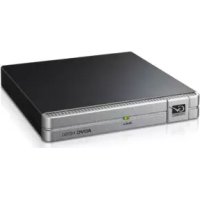
ADVCHD50 - Audio/video converter GRASS VALLEY - Free user manual and instructions
Find the device manual for free ADVCHD50 GRASS VALLEY in PDF.


Frequently Asked Questions - ADVCHD50 GRASS VALLEY
User questions about ADVCHD50 GRASS VALLEY
0 question about this device. Answer the ones you know or ask your own.
Ask a new question about this device
Download the instructions for your Audio/video converter in PDF format for free! Find your manual ADVCHD50 - GRASS VALLEY and take your electronic device back in hand. On this page are published all the documents necessary for the use of your device. ADVCHD50 by GRASS VALLEY.
USER MANUAL ADVCHD50 GRASS VALLEY
Copyright Regulations
It is illegal for anyone to violate any of the rights provided by the copyright laws to the owner of copyright, except for fair use (mainly private noncommercial use). Also, in certain cases copying is prohibited with no exceptions. In no event shall Grass Valley be liable for any direct or indirect damages whatsoever arising from the use of both converted and captured materials.
Warranty
Your ADVC-HD50 options are covered by a limited warranty when you register your Grass Valley unit. This warranty is for a period of one year (or two years in European Union countries) from the date of purchase from Grass Valley or an authorized Grass Valley agent. This warranty applies only to the original purchaser of the Grass Valley unit and is not transferable. Grass Valley warrants that for this period the unit will be in good working order. Should our unit fail to be in good working order, Grass Valley will, at its option, repair or replace it at no additional charge, provided that the unit has not been subjected to misuse, abuse or non-Grass Valley authorized alterations, modifications and/or repair. Proof of purchase is required to validate your warranty.
Grass Valley is not responsible for any lost profits, lost savings or other incidental or consequential damages arising out of the use of, or inability to use, this unit. This includes damage to property and, to the extent permitted by law, damages for personal injury. This warranty is in lieu of all other warranties of merchantability and fitness for a particular purpose.
REMOVAL OF COATING, SCRATCHES, DAMAGES OF CONNECTORS ARE NOT COVERED BY THIS WARRANTY.
REPLACEMENT OF DAMAGED PARTS (NOT THOSE DUE TO MANUFACTURING DEFECTS) WILL BE CHARGED AT ACTUAL COST PLUS HANDLING FEES.
Safety and Regulatory Notice
Please observe the followings when using this unit. If you have any questions regarding the descriptions herein, or any other concerns, please contact your local Grass Valley office or distributor.
WARNING
The following conditions indicate the potential for serious bodily injury or loss of life.
Do not disassemble
Do not remove the cover or modify this unit. Fire, electric shock or malfunction may result. For internal inspection or repair, please contact your local Grass Valley office or distributor.
Do not use in a dusty or wet environment
It may cause a short-circuit or a build-up of heat, resulting in fire or electric shock.
Do not use in environments requiring a high degree of reliability and safety
This unit is not to be used in medical devices or life support systems. The characteristics of this unit are not suited for use with such systems.
Do not place the unit close to heat sources
Do not place in an area exposed to direct sunlight or near a heating apparatus. The heat can accumulate, causing burns, fire or damage. Also, the unit may become deformed or change color.
Stop using when the unit is smoking
Do not use this unit in an abnormal condition like when it is smoking or emitting an odor. It may result in fire or malfunction. If any anomaly is found, turn off the power of computer and disconnect the cable from the unit.
Do not drop this unit or use this unit in a damaged condition
Do not drop this unit or use this unit with its cover broken. It may result in fire or malfunction. In case this unit is damaged, turn off the power of computer, disconnect the cable from the unit, and contact your local Grass Valley office or distributor.
Health precautions
In rare cases, flashing lights or stimulation from the bright light of a computer monitor display may trigger temporary epileptic seizures or loss of consciousness. It is believed that even individuals who have never experienced such symptoms may be susceptible. If you or your close relatives have experienced any of these symptoms, consult a doctor before using this unit.
CAUTION
The following conditions indicate the potential for bodily harm, damage to hardware or loss of data.
Do not place on an uneven surface
Do not place this unit on an uneven or slanted surface. This may result in injury or malfunction.
Do not use other than the described method
Do not use in a manner other than described. Do not use while wrapped in cloth or plastic. Heat can accumulate, causing burns, fire or damage.
FCC Notice
This unit has been tested and found to comply with the limits for the class B digital device, pursuant to part 15 of the FCC Rules. These limits are designed to provide reasonable protection against interference in a residential installation.
This unit generates, uses, and can radiate radio frequency energy and if not installed and used in accordance with the instructions, may cause harmful interference to radio communications. However, there is no guarantee that interference will not occur in a particular installation. If this equipment does cause harmful interference to radio or television reception, which can be determined by turning the equipment off and on, the user is encouraged to try and correct the interference by one or more of the following measures:
- Reorient or relocate the receiving antenna.
- Increase the separation between the equipment and receiver.
- Connect the equipment into an outlet on a circuit different from that to which the receiver is connected.
- Consult the dealer or an experienced radio/TV technician for help.
Declaration of conformity
According to FCC Part 15
Responsible Party Name: Grass Valley Inc.
Address: 711 Charcot Avenue, San Jose, CA 95131
Telephone: 408-954-4500
Declarethatunitmodel:ADVC-HD50
complies with Part 15 of the FCC Rules.
Product Notes
(1) Unauthorized copying of a portion or the entirety of this unit is prohibited.
(2) The description and specifications of this unit are subject to future change without notice.
(3) The description of this unit has been prepared to be as complete as possible. If the purchaser is aware of any questionable points, errors or omissions, please contact Grass Valley.
(4) Grass Valley assumes no liability for the results of practical application, regardless of item (3) above.
(5) Regardless of whether negligence occurs during usage, Grass Valley assumes no liability, even if there is a claim for extraordinary, incidental or derivative loss, including the loss of profits, that arise during practical application of this unit.
(6) The analysis, reverse engineering, recompiling and disassembling of the software, hardware or manuals that accompany this unit, and all other related units including miscellaneous supplemental items, are prohibited.
(7) Canopus, as written in both English and Japanese, and its logo are registered trademarks of Canopus Co., Ltd.
(8) ADVC is a trademark of Canopus Co., Ltd.
(9) i.LINK is a trademark of Sony Corporation, and FireWire is a trademark of Apple Computer Inc. In this document, both i.LINK and FireWire are referred to as "IEEE1394".
(10) HDV is a trademark of Sony Corporation and Victor Company of Japan, Limited (JVC).
(11) HDMI, HDMI logo and High Definition Multimedia Interface are trademarks or registered trademarks of HDMI Licensing LLC. Other product names and related items are trademarks or registered trademarks of their respective companies.
About the Documentation
This document is ADVC-HD50 User Guide. Information not listed in this document may be listed elsewhere. In cases where there is a difference between a description in this document and an actual operation method, the actual operation method takes precedence.
To simplify the descriptions, the actual unit may differ from the illustrations.
ADVC-HD50
User Guide
February 29,2008
Copyright © 2008 Thomson.
All rights reserved.
1 Introduction
1-1 Verifying package contents
Please verify that the following components are included in the ADVC-HD50 package.
Package Contents
□ADVC-HD50
□ IEEE1394 Firewire cable(6pin-6pin)
□ Manual
- ADVC-HD50 User Guide
1-2 Website
The latest company information is announced at our website.
http://www.canopus.com/
Visit our site to access to the latest drivers, utilities, product manuals (.pdf format), and FAQs provided there.
1-3 Operating suggestions
The following suggestions apply to ADVC-HD50 usage.
ADVC-HD50 Connections
If the device (PC) connected to your ADVC-HD50 has multiple IEEE1394
ports, it is recommended that only the port connected to the ADVC-HD50 is
used. Populating the other ports may result in a power shortage, causing the ADVC-HD50 to fail.
In the event that the ADVC-HD50 does not operate due to a power shortage, use the approved AC adapter (optional).
1-4 Notes regarding usage
Regardless of whether negligence occurs during usage, the company assumes no liability, even if there is a claim, for extraordinary, incidental or derivative loss, including the loss of profits, that arise during practical application of this product.
Operation of this product is not guaranteed for any specific use, on any specific platform, nor is operation guaranteed in any specific environment.
Please note the following points when using this product to record the copyrighted works of others (e.g. video and audio recorded in media such as CD, DVD and videogram, or acquired through radio/TV broadcast or Internet transmission).
Subject to copyright, reproduction or editing of the copyrighted work may infringe copyright except as such reproduction is intended for personal or home use. Reproduction and editing requires permission from the author or the copyright holder through the right holder, broadcaster, sender, seller or the group of right holders which is indicated on the recording media or otherwise.
- Transfer or transmission, via the Internet or otherwise (inclusive of incorporation into the user's own web page), of media in which copyrighted works of others are reproduced or edited and then fixed without permission, regardless of whether or not compensation is received, constitutes an infringement of copyright.
Please note that Thomson is not liable for the copyrighted works or their reproductions, which are created, reproduced or edited by use of this product.
2 Part Names and Functions
2-1 ADVC-HD50 Front Panel
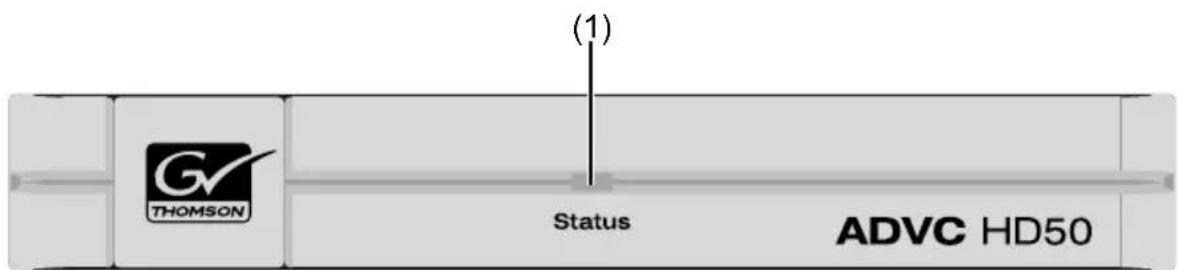
(1) Status LED
Indicates the operation status and the input signal.
| Unlit No power. | |
| Red (Bright) | Initializing. |
| Red (Bright, Blinking) | Hardware error is detected. Please contact your local Grass Valley office or distributor. |
| Red (Dark) | No HDMI signal detected, or the format is not supported. Outputting HDV is stopped. |
| Green (Bright) | Outputting HDV in 1440x1080/59.94i. |
| Green (Bright, Blinking) | Outputting HDV in 1280x720/59.94p. |
| Orange (Bright) | Outputting HDV in 1440x1080/50i. |
| Orange (Bright, Blinking) | Outputting HDV in 1280x720/50p. |
2-2 ADVC-HD50 Rear Panel
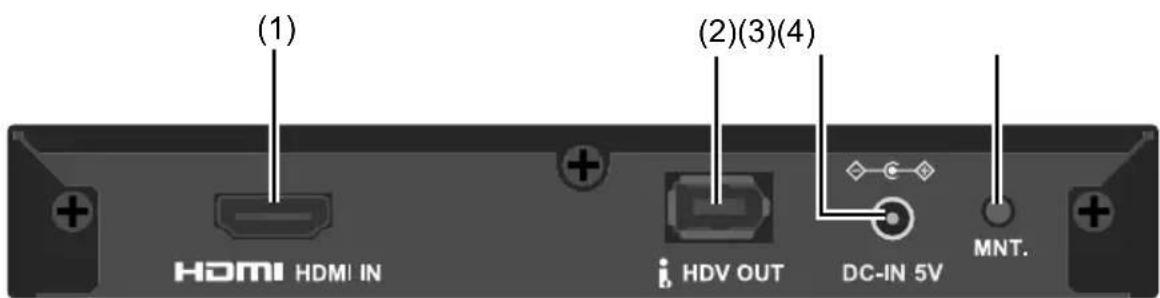
(1) HDMI port
HDMI input port.
(2) IEEE1394 6pin port
IEEE1394 6pin port. Used to output HDV signal. ADVC-HD50 can operate with bus power supplied from the device, such as a PC, connected with the supplied IEEE1394 Firewire cable(6pin-6pin).
(3) Power terminal
Connect the approved AC adapter (optional), if necessary.
*Never connect anything other than an approved AC adapter (optional).
(4) MNT. switch
Used for maintenance only.
3 ADVC-HD50 Connections
3-1 Connections and Preparations
Refer to the diagram below to connect your ADVC-HD50 to each device.
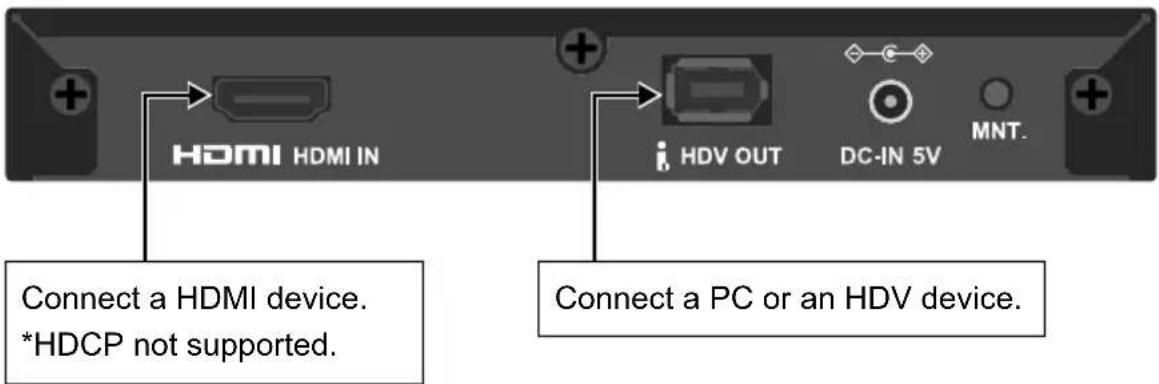
Bus power
If you connect the ADVC-HD50 unit to an IEEE1394 port of your PC with the supplied IEEE1394 Firewire cable(6pin-6pin), it doesn't need the approved AC adapter.
If the ADVC-HD50 unit is always connected to your system, it will automatically be turned on or off, whenever you start up or shut down your PC.
Power to the ADVC-HD50 must be supplied through an approved AC adapter (optional) if the ADVC-HD50 is connected to the PC or other devices with a IEEE1394 Firewire cable(6pin-4pin).

NOTE
ADVC-HD50 does not encode video/audio protected with HDCP into HDV.

NOTE
Do not connect anything other than an approved AC adapter (optional).
4 Specifications
4-1 ADVC-HD50 Hardware Specifications
| Video | HDMI input format | 1920x1080/59.94i 1280x720/59.94p 1920x1080/50i 1280x720/50p *1 (720x480/59.94p, 640x480/60p, 720x576/50p) *2 |
| HDMI input H | HDMI ™ Connector x 1(HDCP not supported) *3 | |
| HDV output | IEEE1394 6pin x 1 (Bus power supported) *4 IEC61883-4 (MPEG-TS) | |
| Audio | HDMI input LPCM, 16 - 24bit, 32 - 192kHz, Stereo *5 | |
| HDV output $tereo MPEG1 Audio Layer2 384kbps | ||
| Video encode | ||
| HDV encode | HDV encode | 720p...1280x720/59.94p,1280x720/50p 1080i...1440x1080/59.94i,1440x1080/50i *6 |
| AC adapter (optional) AC | 100-240V (50/60Hz) DC 5V 3A | |
| Power Usage 8W | ||
| Operating Temperature 5-40°C *7 | ||
| Dimensions | 153(W)x153(D)x23(H) mm approximately (projecting parts not included) | |
| Weight 400g approximately | ||
| Classifications CE, FCC | ClassB, C-Tick, RoHS(EU,China,Korea) | |
1 The accuracy of the video signal encoded to HDV is 8bit.
2 Encoded HDV video will be: 720x480/59.94p,640x480/60p will be placed at the center of 1280x720/59.94p, and 720x576/50p will be placed at the center of 1280x720/50p, surrounded by black bars.
3 HDCP video/audio can not be encoded into HDV.
4 If multiple devices are connected and used which operate with bus power on a PC, use an approved AC adapter (optional). Otherwise ADVC-HD50 may not operate properly.
5 Only ch1/ch2 will be encoded into HDV. ADVC-HD50 does not have the function to select audio signal channels. While the interface supports the signal between 16 and 24 bit, the accuracy of the encoded HDV audio signal is 16 bit.
6 Specified automatically by the HDMI input. ADVC-HD50 does NOT cross-convert between 1080i and 720p.
*7 No condensation.
ADVC HD50
HDMI to HDV Converter
一
ご使用的前に
■経表示にて
Copyright © 2008 Canopus Co., Ltd.
All rights reserved.
1はじてに
1-1 ロックーダ内容の確認
Copyright © 2008 Thomson.
Copyright © 2008 Thomson.
Anschlüssde ADVC-HD50
3 Anschlusive ADVC-HD50
有毒有害物质含表This information is applicable for People's Republic of China only.)
有
产品中毒有害物质或元素的名称及含量