
Da Vinci Chronograph 3764 - Wristwatch IWC - Free user manual and instructions
Find the device manual for free Da Vinci Chronograph 3764 IWC in PDF.


| Product type | Wristwatch |
| Brand | IWC |
| Model | Da Vinci Chronograph 3764 |
| Movement | Mechanical self-winding |
| Jewels | 40 |
| Power reserve | ~68 hours |
| Crystal | Domed sapphire (hardness 9 Mohs) |
| Water resistance | 3 bar |
| Functions | Hours, minutes, seconds, date, flyback chronograph (60-minute and 12-hour counters) |
| Crown | Screw-down, positions X, 0, 1, 2 |
| Bracelet | Adjustable metal with links |
| Clasp | Deployant buckle with IWC push-button |
| Maintenance | Service recommended every 5 years |
| Service | Authorized IWC dealer or IWC service center in Schaffhausen |
| Manual winding | Possible, about 40 turns for full winding |
Frequently Asked Questions - Da Vinci Chronograph 3764 IWC
User questions about Da Vinci Chronograph 3764 IWC
0 question about this device. Answer the ones you know or ask your own.
Ask a new question about this device
Download the instructions for your Wristwatch in PDF format for free! Find your manual Da Vinci Chronograph 3764 - IWC and take your electronic device back in hand. On this page are published all the documents necessary for the use of your device. Da Vinci Chronograph 3764 by IWC.
USER MANUAL Da Vinci Chronograph 3764 IWC
15 Operating instructions
English
27 Mode d'emploi
Français
Welcome to the small circle of individuals who, if we are to be absolutely precise, demand slightly more of a watch than absolute precision. Appreciation of a watch is more than mere appreciation of the correct time. It is enthusiasm for an ingenious idea. For the interplay between precision and imagination. Between time and timelessness. Between boundaries and infinity. Between laws to which the entire world is subject, and taste, which cannot be dictated to anyone. That is why, since 1868, we have been devoting rather more of our time to watches that must not only run with absolute precision but which also, with every passing second, exert a fascination with the great achievements of master craftsmanship: a fascination with new inventions of a technical, material or formal nature, even if they are con sealed in minute details that are perhaps not even visible. You are now the owner of a beautiful new example of this IWC tradition. We would like to congratulate you on your choice and send you our best wishes for the time you will spend with your watch, which perhaps cannot be described with any greater accuracy than it is here.
IWC Management
The technical refinements of the Da Vinci Chronograph
Your IWC watch shows you the time in hours, minutes and seconds, together with the date. You can use the integrated flyback chronograph to measure any period in seconds, minutes and hours. Stop times can be added together. The mechanical movement with automatic winding has 40 jewels (synthetic rubies) and a power reserve of approximately 68 hours when fully wound. Your Da Vinci Chronograph is protected by sapphire glass, convex on one side, of hardness grade 9 on the Mohs' scale. Your watch is water-resistant 3 bar. To ensure that this extraordinary watch continues to perform faultlessly in the future, it is essential to observe a few important operating instructions.
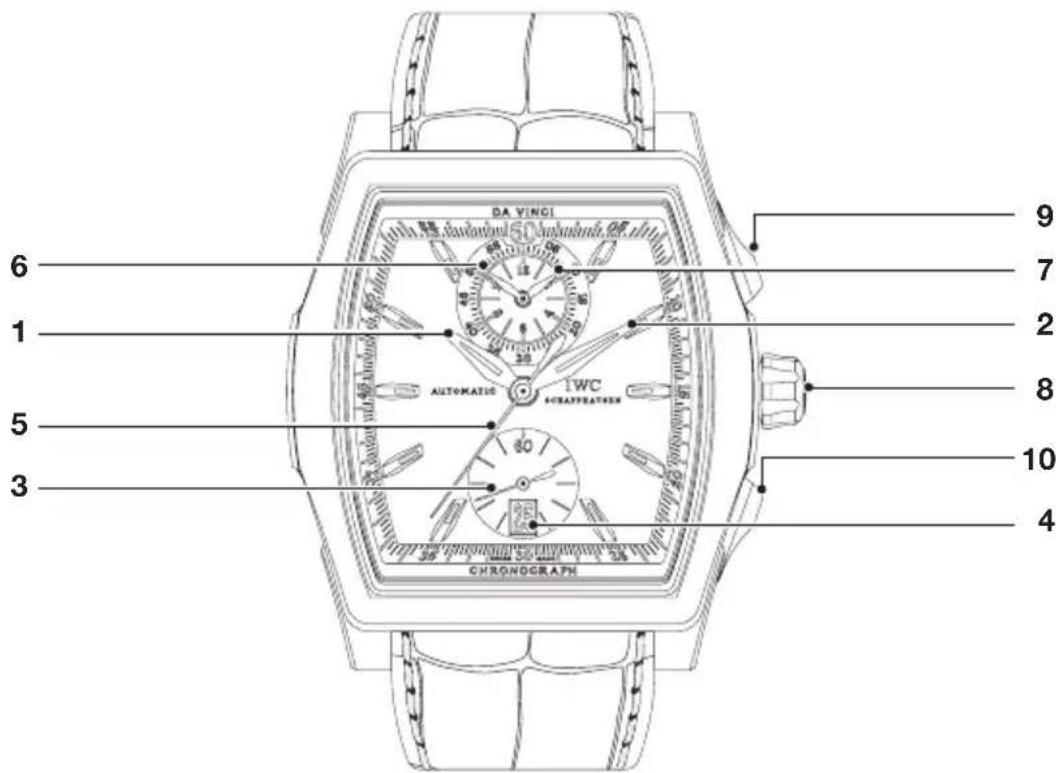
1 Hour hand
6 Minute counter
2 Minute hand
7 Hour counter
3 Small seconds hand
8 Screw-in crown
4 Date display
9 Start/stop button
5 Chronograph seconds hand
10 Reset/flyback button
Functions of the crown
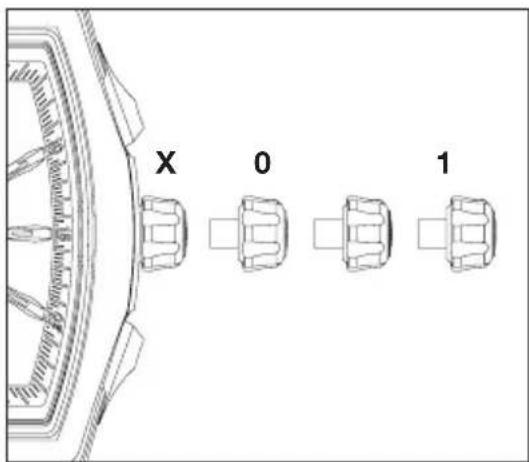
X Normal position (screwed in)
0 Winding position
1 Date setting
2 Time setting
Normal position
This watch has a screw-in crown. Screwing the crown in to its normal position (X) prevents inadvertent adjustment of the time or date and also acts as a seal against ingress of water into the case. To release the crown, unscrew it by turning it to the left, where it automatically assumes position 0, the winding position. By depressing the crown in position X and turning it to the right at the same time, it is screwed down firmly again and secured.
Winding position
With the crown in the winding position (0), you can also wind the automatic movement by hand. A few revolutions of the crown are enough to start the movement. However, it is better to wind the movement fully by turning the crown through about 40 revolutions. This will ensure maximum accuracy and a power reserve of about 68 hours, even if you are not wearing the watch.
Date setting
If a month has fewer than 31 days, you will need to set the date manually to the first day of the following month. Pull the crown out to position 1. You can now set the date by turning the crown to the right (rapid advance). You should not use the rapid advance function between 8 pm and 2 am because the movement automatically advances the date during this period.
Time setting
Pull the crown out to position 2. This will stop the movement. To set the time accurately to the second, it is best to stop the movement as the seconds hand passes over 60. You can now set the time by turning the crown and positioning the minute hand exactly above the minute stroke. To start the seconds hand, push in the crown to position 0. When setting the time, please be aware of the date change, which always takes place at 12 midnight. If this change has already taken place at 12 noon, you must move the hands forward by 12 hours.
Setting your watch correctly
To set your watch correctly, proceed as follows:
- Release the crown by turning it to the left.
- Wind the movement until it is fully wound (about 40 revolutions of the crown).
- Pull the crown out to position 1.
- Turn the crown to the right to advance the date display a day at a time. Set the display to yesterday's date.
- Pull the crown out to position 2. This will stop the movement. To set the time accurately to the second, it is best to stop the movement as the seconds hand passes over 60.
- Turn the hands forward until the date display changes to today's date. The hands will now be positioned between 12 midnight and 1 am.
- Now turn the hands forward to the correct time. If you are setting the watch in the afternoon, you must turn the hands past 12 noon again.
- Push the crown back to position 0 to start the watch movement.
- Now push the crown to position X and secure it by simultaneously turning it to the right.
Important: Although the watch is water-resistant in positions 0, 1 and 2, the crown should always be screwed in again for normal use (position X).
Reading the time in the dark
Both the dial and the hour and minute hands of your watch have lumi - nescent elements that allow you to read the time effortlessly even in total darkness.
Reading the chronograph
Chronograph seconds hand: The scale for the central chronograph seconds hand runs around the edge of the dial.
Minute and hour counters: The subdial at 12 o'clock has two hands, which run continuously and show the elapsed time on a 12-hour and a 60-minute scale. The hour and minute counters can be read like a stand ard analogue time display. In other words, one revolution of the minute counter is equal to 60 minutes, and one revolution of the hour counter is equal to 12 hours.
Using the chronograph
Start: To start the chronograph, press the start/stop button.
Flyback: You can start recording a new time immediately, even when the chronograph is running. With the chronograph running, simply depress the reset/flyback button fully as far as it will go. All three chronograph hands are reset to zero, and a new measurement is started as soon as the button is released.
Stop: To stop the running chronograph, press the start/stop button.
Reset: Depress the reset/flyback button fully as far as it will go. This will reset all the chronograph hands to zero.
Aggregate time recording: You can add stop times together by pressing the start/stop button again after the first measurement instead of the reset/flyback button.
Water-resistance
The water-resistance of IwC watches is stated in bar and not in metres. Metres, which are often used elsewhere in the watch industry to indicate water-resistance, cannot be equated with dive depth because of the test procedures that are frequently used. Water-resistance shown in metres provides no indication as to actual use of the watch in the presence of moisture and wetness, and in or under water. Recommendations for use in connection with the water-resistance of your watch can be found on the Internet at www.iwc.com/water-resistance. Your authorised IwC Official Agent will also be pleased to provide you with information.
To ensure that your watch continues to function perfectly, you should have it checked by an IWC service centre at least once a year. Your watch should also be tested after exposure to unusually harsh conditions. If the tests are not carried out as stipulated, or if the watch is opened by unauthorised persons, IWC will accept no warranty or liability claims.
Recommendation: Your authorised IwC Official Agent must carry out a water-resistance test whenever your IwC watch is opened and serviced.
Adjusting the metal bracelet
If you have chosen a metal bracelet, you can easily adjust it to the size of your wrist. You can make this adjustment yourself by removing or adding individual bracelet links.
Taking the bracelet apart and removing individual links
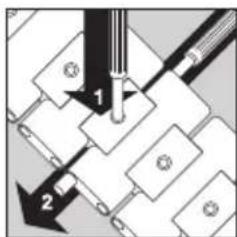
Open the clasp by pressing the button on the side. Lay the bracelet with its top surface on a firm base. Using the special tools provided, you can now push down the securing pin (1) at the desired point of separation and, at the same time, displace the pivot pin laterally by
about 3 millimetres (2) with the second special tool.
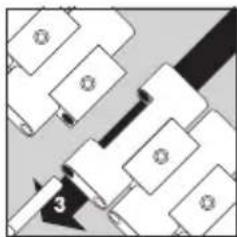
Now pull the protruding pivot pin from the bracelet (3). The metal brace let is now separated, and you can adjust the length of the bracelet by removing or adding individual links.
Determining bracelet length
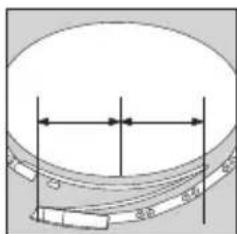
Place the watch with the bracelet open around your wrist and estimate the number of surplus bracelet links that you can now remove from the bracelet (as described above). If you need to shorten the bracelet by several links, you should remove the same number of
links from each half of the bracelet, if possible, to ensure that the clasp can be worn more or less at the centre of the wrist.
Keep the surplus links and the separating tools in a safe place for use in any adjustment at another time.
Attaching the bracelet
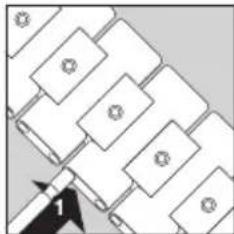
Attach the component parts of the bracelet link to the connection point and push the pivot pin into the bracelet from the side (1).
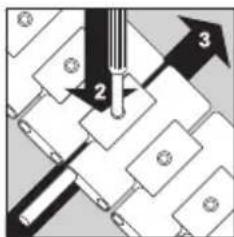
Using the special tool provided, now press the securing pin downwards (2) and, at the same time, slide the pivot pin back into the bracelet until it lies flush (3). The securing pin must be brought up flush with the upper edge of the securing link. Please be sure to check that
the pivot pin is correctly seated.
Finely adjusting of the bracelet length
Your metal bracelet is equipped with a special mechanism for making fine adjustments that allows you to make minor modifications to the length of your bracelet.
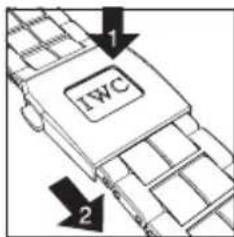
To make the bracelet longer, push the button labelled "IWC", which is in the middle of the cover of the bracelet clasp, and continue to hold it down. Carefully pull the bracelet out from underneath the small end of the clasp cover. As soon as you let go of the button,
the bracelet locks into place in this new position.
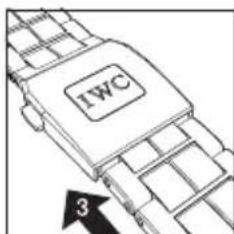
To make the bracelet shorter, simply push it back under the small end of the clasp cover. The bracelet locks into place automatically in this new position.
Servicing your Da Vinci Chronograph
Although the parts in this watch are all manufactured from top-quality materials, a number of components are subject to natural wear and tear. It is particularly important to ensure that the points at which wear occurs are always well-lubricated and that oil contaminated by metal abrasion is regularly removed. For this reason, we recommend that you have your watch serviced approximately every five years. Please contact an authorised IWC Official Agent or send your watch directly to the IWC Customer Service Department in Schaffhausen.
Branch of Richemont International SA
Baumgartenstrasse 15
CH-8201 Schaffhausen
Switzerland
Phone +41 (0)52 635 65 65
Fax +41 (0)52 635 65 01
info@iwc.com
www.iwc.com
Copyright 2009
IWC Schaffhausen, Branch of Richemont International S.A.




- THE TECHNICAL REFINEMENTS OF THE DA VINCI CHRONOGRAPH
- FUNCTIONS OF THE CROWN
- NORMAL POSITION
- WINDING POSITION
- DATE SETTING
- TIME SETTING
- SETTING YOUR WATCH CORRECTLY
- READING THE TIME IN THE DARK
- READING THE CHRONOGRAPH
- USING THE CHRONOGRAPH
- WATER-RESISTANCE
- ADJUSTING THE METAL BRACELET
- TAKING THE BRACELET APART AND REMOVING INDIVIDUAL LINKS
- DETERMINING BRACELET LENGTH
- ATTACHING THE BRACELET
- FINELY ADJUSTING OF THE BRACELET LENGTH
- SERVICING YOUR DA VINCI CHRONOGRAPH
Brand : IWC
Model : Da Vinci Chronograph 3764
Category : Wristwatch