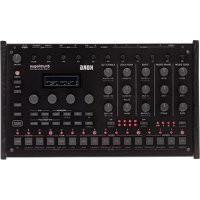
Drumlogue - DJ Equipment KORG - Free user manual and instructions
Find the device manual for free Drumlogue KORG in PDF.


| Product type | Hybrid rhythm box (drum machine) |
| Brand | Korg |
| Model | Drumlogue |
| Polyphony | 11 voices (user synthesizers can be played polyphonically via MIDI) |
| Sound source system | Analog sound source × 4, digital sound source × 6 (PCM × 4, user sample sound source × 2), multi sound source (VPM, NOISE, user oscillator) |
| Number of programs | 128 (including 64 factory presets) |
| Number of drum kits | 128 (including 64 factory presets) |
| Sequencer | 64 steps × 11 parts |
| Display | Organic EL (electroluminescent) display |
| Control | Fifteen dedicated potentiometers for instant access to parameters |
| Mixing section | Individual volume controls for each drum element |
| Built-in effects | Delay, Reverb, Master effect (Compressor, Filter, Boost, EQ Three, etc.) |
| Connectors | Headphone output (6.3 mm stereo), OUTPUT L/MONO, R outputs (TRS 6.3 mm balanced), AUDIO OUT 1 to 4 outputs (independent), AUDIO IN input (6.3 mm), MIDI IN/OUT connectors, USB A port (TO DEVICE), USB B port (TO HOST), SYNC IN/OUT jacks (stereo mini jack) |
| Power supply | DC 9 V AC adapter (included), power consumption 9 W |
| Dimensions (W × D × H) | 317 × 189 × 73 mm |
| Weight | 1.4 kg |
| Included accessories | AC adapter, precautions, getting started guide |
| Auto power-off function | Yes (after 4 hours of inactivity, can be disabled) |
| Operating temperature | 0 °C to 40 °C (without condensation) |
Frequently Asked Questions - Drumlogue KORG
User questions about Drumlogue KORG
0 question about this device. Answer the ones you know or ask your own.
Ask a new question about this device
Download the instructions for your DJ Equipment in PDF format for free! Find your manual Drumlogue - KORG and take your electronic device back in hand. On this page are published all the documents necessary for the use of your device. Drumlogue by KORG.
USER MANUAL Drumlogue KORG
Effects (DELAY, REVERB, MASTER) 39
7. Prises SYNC IN, SYNC OUT
RATCHET [OFF, 2, 3, 4]
PLAY [FORWARD, RAND]
RESUME [SYNCED, FREE]
LEVEL [-48.0dB...6.0dB]
ROUTE (ROUTING) [NONE, DELAY, REVERB, MASTER, SIDECH, OUTPUT]
RAND.PART (KIT) (Bouton 3)
CLEAR PART (KIT) (Bouton 4)
CLEAR ALL (KIT) (Bouton 5)
CLEAR STEP (Bouton 7)
CLEAR PART (MOTION) (Bouton 8)
CLEAR ALL (MOTION) (Bouton 9)
CLEAR PART (PATTERN) (Bouton 14)
CLEAR ALL (PATTERN) (Bouton 15)
SWEEP [0.0%...100.0%]
SW TIME [0.0%...100.0%]
CUTOFF [L0.0%...L99.5%, THRU, H0.5%...H100.0%]
PAN [L100%...L1%, C, R1%...R100%]
DELAY [0.0%...100.0%]
SNAPPY TYPE [01..09]
TONE [0.0%...100.0%]
CUTOFF [L0.0%...L99.5%, THRU, H0.5%...H100.0%]
RESON (CUTOFF RESONANCE) [0.0%...100.0%]
PAN [L100%...L1%, C, R1%...R100%]
DELAY [0.0%...100.0%]
SWEEP [0.0%...100.0%]
CUTOFF [L0.0%...L99.5%, THRU, H0.5%...H100.0%]
RESON (CUTOFF RESONANCE) [0.0%...100.0%]
DRIVE [OFF, LOW, HIGH]
PAN [L100%...L1%, C, R1%...R100%]
DELAY [0.0%...100.0%]
BANK [CH, OH, RS, CP, MISC, USER, EXP]
SAMPLE [01..16/64/128]
TUNE [-24.00...0...+24.00]
START [0.0%...100.0%]
CUTOFF [L0.0%...L99.5%, THRU, H0.5%...H100.0%]
RESON (CUTOFF RESONANCE) [0.0%...100.0%]
REMUX [0.0%...100.0%]
DRIVE [0.0%...100.0%]
PAN [L100%...L1%, C, R1%...R100%]
DELAY [0.0%...100.0%]
BANK [CH, OH, RS, CP, MISC, USER, EXP]
SAMPLE [01..16/64/128]
START [0.0%...100.0%]
CUTOFF [L0.0%...L99.5%, THRU, H0.5%...H100.0%]
RESON (CUTOFF RESONANCE) [0.0%...100.0%]
REMUX [0.0%...100.0%]
DRIVE [0.0%...100.0%]
PAN [L100%...L1%, C, R1%...R100%]
DELAY [0.0%...100.0%]
PRESET [Default, Oct., Half, Fourth, Air, Creep, Throat, Harsh]
INDEX [0.0%...100.0%]
RATIO [1/4, 1/2, 3/4, 1x, 2x...16x]
NOISE [0.0%...100.0%]
RELEASE [0.0%...100.0%]
IDX MOD [ -100%...0%...100%]
PAN [L100%...L1%, C, R1%...R100%]
DELAY [0.0%...100.0%]
ALGO [LPF 2, LPF 4, BPF 2, BPF 4, HPF 2, HPF 4, DECIM]
COLOR [0.0%...100.0%]
RELEASE [0.0%...100.0%]
PAN [L100%...L1%, C, R1%...R100%]
DELAY [0.0%...100.0%]
WAVE [2x Saw, 2x Sqr, 2x Tri, Saw+Sqr, Saw+Tri, Sqr+Tri, Ring 1..3]
FILTER [LP, HP, BP, BR]
RESON (RESONANCE) [0%...100%]
CUT.EG [ -100%...100%]
LFO TYPE [Tri, Saw, Sqr, Trap, Peak, S&H, Random]
LFO FREQ [0%...100%]
PITCH LFO [ -100%...100%]
CUT.LFO [ -100%...100%]
AMP TYPE [SR, SR, DSR, DR]
DRIVE [Soft, Diode, Hard, Crush, Shred]
PAN [L100%...L1%, C, R1%...R100%]
DELAY [0.0%...100.0%]
Effects (DELAY, REVERB, MASTER)
TIME [0.0%...100.0%]/[1/64, 1/48, ... 3/4, 1]
FB (FEEDBACK) [0.0%...100.0%]
SPREAD [L100%...L1%, C, R1%...R100%]
CUTOFF [0.0%...100.0%]
SAT. (SATURATION) [0.0%...100.0%]
TIME [0.0%...100.0%]/[1/64, 1/48, ...3/4, 1]
FB (FEEDBACK) [0.0%...100.0%]
CUTOFF [0.0%...100.0%]
SAT. (SATURATION) [0.0%...100.0%]
TIME [0.0%...100.0%]/[1/64, 1/48, ... 3/4, 1]
FB (FEEDBACK) [0.0%...100.0%]
MOD (MODULATION) [0%...100%]
TRACKING [0.0%...100.0%]
TONE [0.0%...100.0%]
SAT. (SATURATION) [0.0%...100.0%]
LEVEL [0.0%...100.0%]
INPUT [0.0%...100.0%]
DIVE (Submarine unquipment) [0,0%...100,0%]
LEVEL [0.0%...100.0%]
THRESH (THRESHOLD) [-64.0dB...0.0dB]
KNEE [0.00dB...8.00dB]
MODE [THRU, LPF 2, LPF 4, BPF 2, BPF 4, HPF 2, HPF 4]
SATURATE [0.0%...100.0%]
RESON (RESONANCE) [0.0%...100.0%]
CUTOFF [0.0%...100.0%]
CENTER [0.0%...100.0%]
WIDTH [0.0%...100.0%]
SATURATE [0.0%...100.0%]
LOW [-64.0dB...6.0dB]
MID [-64.0dB...6.0dB]
HIGH [-64.0dB...6.0dB]
GAIN [-6.0dB...6.0dB]
LOW/MID [0.0%...100.0%]
MID/HIGH [0.0%...100.0%]
OPÉRATIONS (Bouton 1)
QUEUE (QUEUE MODE) [BAR, SEQ]
SAVE KIT (SAVE KIT WITH PROGRAM) [OFF, ON]
QUANT (QUANTIZE) [NONE, 32ND, 16TH, 8TH]
KNOB MODE [JUMP, CATCH]
SOUND [OFF,CLICK,BLEEP]
OUTPUT [MAIN+HP, HP]
OUT 1 [BD, SD, LT, HT, CH, OH, RS, CP, SP1, SP2, MULTI]
OUT 2 [BD, SD, LT, HT, CH, OH, RS, CP, SP1, SP2, MULTI]
OUT 3 [BD, SD, LT, HT, CH, OH, RS, CP, SP1, SP2, MULTI]
OUT 4 [BD, SD, LT, HT, CH, OH, RS, CP, SP1, SP2, MULTI]
CH [1...16, 1-12, 2-13...5-16, 6-1..16-11]
PRG CHG (PROGRAM CHANGE) [OFF, ON]
TRANSP (MIDI TRANSPORT) [OFF, ON]
PRG CHG (PROGRAM CHANGE) [OFF, ON]
TRANSP (MIDI TRANSPORT) [OFF, ON]
SYNC OUT (Bouton 11)
UNIT (SYNC OUT UNIT) [8TH, 16TH]
All Programs and Drum Kits were made by SEKITOVA, Herculot and KORG Inc.
For more information about the authors please visit:
-SEKITOVA
https://sekitova.net/
-Hercelot
https://www.hercelot.com/
Effets: REVERB, DELAY, MASTER
| Function... | Transmitted Recognized Remarks | ||
| Basic Channel | Default | 1-16 | 1-16 |
| Changed | 1-16 | 1-16 | |
| Mode | Default | X | 3 |
| Messages | X | X | |
| Altered | ********** | ||
| Note Number | True voice | 36-55 | 36-55 |
| ********** | 36-55 | ||
| Velocity | Note On | X 9n, V=64 | O 9n, V=1-127 |
| Note Off | X 8n, V=64 | X | |
| After Touch | Key's | X | X |
| Channel | X | X | |
| Pitch Bend | X | X | |
| Control Change | 7, 39 | O | O |
| 12, 13, 14 | O | O | |
| 16, 17, 18, 19 | O | O | |
| 20, 21, 22, 23, 24 | O | O | |
| 25, 26, 27, 28, 29 | O | O | |
| 44, 45 | O | O | |
| 46, 47, 48, 49 | O | O | |
| 50, 51, 52, 53 | O | O | |
| 54 | O | O | |
| 55, 56, 57 | O | O | |
| 58, 59, 60 | O | O | |
| 61, 62, 63 | O | O | |
| 80, 81, 82 | O | O | |
| 83 | O | O | |
| 85, 86, 87, 89 | O | O | |
| 91 | O | O | |
| 92 | O | O | |
| 102, 103, 104, 105 | O | O | |
| 106, 107, 108, 109 | O | O | |
| 110, 111, 112, 113, 114, 115 | O | O | |
| 116, 117, 118, 119 | O | O | |
| 120, 121 | X | O | |
| Program Change | True Number | O (0-127) | O (0-127) |
| ********** | 0-127 | ||
| System Exclusive | O | O | |
| System Common | Song Position | X | |
| Song Select | X | ||
| Tune Request | X | ||
| System Real Time | Clock | O | |
| Commands | O | ||
| Aux Messages | Local On/Off | X | |
| All Notes Off | X | ||
| Active Sensing | O | ||
| System Reset | X | ||
| Notes *1: Note numbers correspond to the following parts, 36: BD, 37: RS, 39: CP, 40: SD, 42: CH, 45: LT, 46: OH, 50: HT, 52: SP1, 53: SP2, 55: MULTI*2: When the GLOBAL setting MIDI RX CC is ON, the drumlogue will receive signals; and when the GLOBAL setting MIDI TX CC is ON, the drumlogue will transmit signals.*3: When the GLOBAL setting MIDI RX PRG CHG is ON, the drumlogue will receive signals; and when the GLOBAL setting MIDI TX PRG CHG is ON, the drumlogue will transmit signals.*4: In addition to Korg exclusive messages, Inquiry is supported.*5: When the GLOBAL setting CLOCK SOURCE is INT, the drumlogue will not receive signals. The drumlogue will receive signals when set to AUTO. This is the factory default implementation. An alternate multi channel implementation is selectable via the MIDI Global settings, refer to the multi channel implementation chart for details. | |||
Mode 1: Omni On, Poly
Mode 3: Omni Off, Poly
Mode 2: Omni On, Mono
Mode 4: Omni Off, Mono
O:Yes
X:No
MULTI Ch.
[HYBRID DRUM MACHINE]
Model: DRUMLOGUE
Date: 2022.5.16
Version: 1.01
MIDI Implementation Chart
| Function... | Transmitted Recognized Remarks | ||
| Basic Channel | Default | 1-12 | 1-12 |
| Changed | 1-16 | 1-16 | |
| Mode | Default | X | 3 |
| Messages | X | X | |
| Altered | ********** | ||
| Note Number | True voice | 0-127 | 0-127 |
| ********** | 0-127 | ||
| Velocity | Note On | X 9n, V=64 | O 9n, V=1-127 |
| Note Off | X 8n, V=64 | X | |
| After Touch | Key's | X | X |
| Channel | X | X | |
| Pitch Bend | X | X | |
| Control Change | 7, 39 | O | O |
| 10 | O | O | |
| 91 | O | O | |
| 92 | O | O | |
| 20, 21, 22, 23, 24, 25, 26 | O | O | |
| 25, 26, 27, 28, 29 | O | O | |
| 46, 47, 48, 49, 50, 51 | O | O | |
| 50, 51, 52, 53, 54, 55 | O | O | |
| 61, 62, 63, 64, 80, 81 | O | O | |
| 80, 81, 82, 83, 85 | O | O | |
| 85, 86, 57, 58 | O | O | |
| 58, 59, 60, 61, 62 | O | O | |
| 102, 103, 104, 105, 106 | O | O | |
| 106, 107, 108, 109, 110 | O | O | |
| 108, 109, 110, 111, 112, 113, 114, 115 | O | O | |
| 116, 117, 118, 119 | O | O | |
| 16, 17, 18, 19, 20, 21, 22, 23 | O | O | |
| 24, 25, 26, 27, 28, 29, 30, 31 | O | O | |
| 12, 13, 14, 15, 16, 17, 18, 19 | O | O | |
| 20, 21, 22, 23, 24, 25, 26, 27 | O | O | |
| 44, 45 | O | O | |
| 46, 47, 48, 49, 50, 51, 52, 53 | O | O | |
| 54, 55, 56, 57, 58, 59, 60, 61 | O | O | |
| 83 | O | O | |
| 85, 86, 87, 89, 90, 102, 103, 104 | O | O | |
| 105, 106, 107, 108, 109, 110, 111, 112 | O | O | |
| 120, 121 | X | O | |
| Program Change | True Number | O (0-127) | O (0-127) |
| ********** | 0-127 | ||
| System Exclusive | O | O | |
| O | *3 | ||
| System Common | X | O | |
| X | X | ||
| X | X | ||
| System Real Time | O | O | |
| O | *4 | ||
| O | *4 | ||
| Aux Messages | X | X | |
| X | O (123-127) | ||
| O | O | ||
| X | X | ||
| Notes *1: When the GLOBAL setting MIDI RX CC is ON, the drumlogue will receive signals; and when the GLOBAL setting MIDI TX CC is ON, the drumlogue will transmit signals. Signals are transmitted on the channel corresponding to the part. *2: When the GLOBAL setting MIDI RX PRG CHG is ON, the drumlogue will receive signals; and when the GLOBAL setting MIDI TX PRG CHG is ON, the drumlogue will transmit signals. *3: In addition to Korg exclusive messages, Inquiry is supported. *4: When the GLOBAL setting CLOCK SOURCE is INT, the drumlogue will not receive signals. The drumlogue will receive signals when set to AUTO. This is an alternate implementation selectable via MIDI Global settings. For the default single channel implementation refer to the single channel implementation chart. | |||
Mode 1: Omni On, Poly
Mode 3: Omni Off, Poly
Mode 2: Omni On, Mono
Mode 4: Omni Off, Mono
O:Yes
X: No

- PRISES SYNC IN, SYNC OUT
- RATCHET [OFF, 2, 3, 4]
- PLAY [FORWARD, RAND]
- RESUME [SYNCED, FREE]
- RAND.PART (KIT) (BOUTON 3)
- CLEAR PART (KIT) (BOUTON 4)
- CLEAR ALL (KIT) (BOUTON 5)
- CLEAR STEP (BOUTON 7)
- CLEAR PART (MOTION) (BOUTON 8)
- CLEAR ALL (MOTION) (BOUTON 9)
- CLEAR PART (PATTERN) (BOUTON 14)
- CLEAR ALL (PATTERN) (BOUTON 15)
- PAN [L100%...L1%, C, R1%...R100%]
- DELAY [0.0%...100.0%]
- SNAPPY TYPE [01..09]
- TONE [0.0%...100.0%]
- BANK [CH, OH, RS, CP, MISC, USER, EXP]
- SAMPLE [01..16/64/128]
- TUNE [-24.00...0...+24.00]
- START [0.0%...100.0%]
- CUTOFF [L0.0%...L99.5%, THRU, H0.5%...H100.0%]
- RESON (CUTOFF RESONANCE) [0.0%...100.0%]
- REMUX [0.0%...100.0%]
- DRIVE [0.0%...100.0%]
- RELEASE [0.0%...100.0%]
- IDX MOD [ -100%...0%...100%]
- ALGO [LPF 2, LPF 4, BPF 2, BPF 4, HPF 2, HPF 4, DECIM]
- WAVE [2X SAW, 2X SQR, 2X TRI, SAW+SQR, SAW+TRI, SQR+TRI, RING 1..3]
- FILTER [LP, HP, BP, BR]
- RESON (RESONANCE) [0%...100%]
- CUT.EG [ -100%...100%]
- LFO TYPE [TRI, SAW, SQR, TRAP, PEAK, S&H, RANDOM]
- LFO FREQ [0%...100%]
- PITCH LFO [ -100%...100%]
- CUT.LFO [ -100%...100%]
- AMP TYPE [SR, SR, DSR, DR]
- DRIVE [SOFT, DIODE, HARD, CRUSH, SHRED]
- EFFECTS (DELAY, REVERB, MASTER)
- OPÉRATIONS (BOUTON 1)
- KNOB MODE [JUMP, CATCH]
- SOUND [OFF,CLICK,BLEEP]
- OUTPUT [MAIN+HP, HP]
- CH [1...16, 1-12, 2-13...5-16, 6-1..16-11]
- PRG CHG (PROGRAM CHANGE) [OFF, ON]
- TRANSP (MIDI TRANSPORT) [OFF, ON]
- SYNC OUT (BOUTON 11)
- UNIT (SYNC OUT UNIT) [8TH, 16TH]
Brand : KORG
Model : Drumlogue
Category : DJ Equipment