KHC92650XA - Range hood ZANKER - Free user manual and instructions
Find the device manual for free KHC92650XA ZANKER in PDF.



| Product Type | Extractor hood |
| Brand | ZANKER |
| Model | KHC92650XA |
| Minimum safety distance between hob and hood | 650 mm (some models can be installed at a lower height, see installation paragraph) |
| Minimum diameter of exhaust duct | 120 mm |
| Grease filter | Clean every 2 months (dishwasher safe) |
| Activated carbon filter | Replace every 4 months (not washable) |
| Motor controls | 3 speeds: V1 (minimum), V2 (medium), V3 (maximum) |
| Lighting | Contact after-sales service for replacement |
| Power supply | 220-240 V (check the rating plate) |
| Use | Domestic, kitchen odor removal |
| Material | Not specified (steel or glass depending on version) |
| Dimensions (W x D x H) | Not specified |
| Weight | Not specified |
Frequently Asked Questions - KHC92650XA ZANKER
User questions about KHC92650XA ZANKER
0 question about this device. Answer the ones you know or ask your own.
Ask a new question about this device
Download the instructions for your Range hood in PDF format for free! Find your manual KHC92650XA - ZANKER and take your electronic device back in hand. On this page are published all the documents necessary for the use of your device. KHC92650XA by ZANKER.
USER MANUAL KHC92650XA ZANKER
EN Cooker Hood User manual 2
Recommendations and suggestions
- The Instructions for Use a several versions of this appliance. Accordingly, you may find descriptions of individual features that do not apply to your specific appliance.
- The manufacturer will not be held liable for any damages re from incorrect or improper installation.
- The minimum safety distance between the cooker top and the extractor hood is 650 mm (some models can be installed at a lower height, please refer to the agraphs on working dimensions and installation).
- Check that the mains voltage corresponds to that indicated on the rating plate fixed to the inside of the hood.
- For Class I appliances, check that the domestic power supply antees adequate earthing. Connect the extractor to the exhaust through a pipe of minimum diameter 120 mm. The route of the flue must be as short as possible.
- Do not connect the extractor hood to exhaust ducts carrying combustion fumes (boilers, fireplaces, etc.).
- If the extractor is used in conjunction with non-electrical appliances (e.g. gas burning appliances sufficient degree of aeration must be guaranteed in the room in order to prevent the backflow of exhaust gas. The kitchen must have an opening communicating direct with the open air in order to guarantee the entry of clean air. When
the cooker hood is used in conjunction with appliances supplied with energy other than electric, the
apply negative pressure in the room must not exceed 0,04 mbar to pre-fumes being drawn back into the room by the cooker hood.
• In the event of damage to power cable, it must be replacing the manufacturer or by the technical service department, in order to prevent any risks.
celf the instructions for installation for the gas hob specify a greater distance specified above, this has to be taken into account. Regulations concerning the discharge of air have to be fulfilled.
- Use only screws and small p in support of the hood.
Warning: Failure to install the screws or fixing device in accordance with these instructions result in electrical hazards.
- Connect the hood to the mains through a two-pole switch having at a contact gap of at least 3 mm.
Use
- The extractor hood has been designed exclusively for domestic use to eliminate kitchen smells.
- Never use the hood for purposes other than for which it has been designed.
• Never leave high naked flames under the hood when it is in operation. - Adjust the flame intensity to direct it onto the bottom of the pan only, y making sure that it does not engulf the sides.
- Deep fat fryers must be conti
ously monitored during use: overheated oil can burst into
- Do not flambè under the hood; risk of fire.
- This appliance can be used by children aged from 8 years and above and persons with reduced physical, sensory or mental capabilities lack of experience and knowledge if they have been given supervision or instruction concerning use of the appliance in a safe understand the hazards involved. Children shall not play with appliance. Cleaning and user maintenance shall not be made by children without supervis
- This appliance is not intended for use by persons (including children) with reduced physical, sensory or mental capabilities, or experience and knowledge, unless they have been given supervision or instruction concerning use of the appliance by a person responsible for their safety.
- "CAUTION: Accessible parts may become hot when used with cooking appliances."
Maintenance
- The symbol on the product or on its packaging indicates that this product may not be treated household waste. Instead it be handed over to the applicable collection point for the recycle of electrical and electronic equipment. By ensuring this product is disposed of correctly, you will help prevent potential negative consequences for the environment and human health, which could other-
wise be caused by inappropria waste handling of this product. For rangee detailed information about recycling of this product, please contact your local city office, your household waste disposal service or the shop where you purchased their product.
- Switch off or unplug the appliance from the mains supply before carrying out any maintenance work. Clean and/or replace the Filters after the specified time period (Fire hazard).
- “Failure to carry out cleaning indicated will result in a fire hazard”.
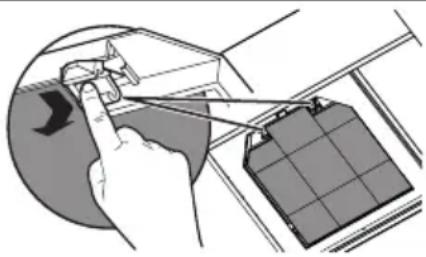
on.- The Activated charcoal filter is not washable and cannot be regenerated, and must be replaced by approximately every 4 months of stock operation, or more frequently for particularly heavy usage (W).

W
- The Grease filters must be cleaned every 2 months of operation, or more frequently for particularly heavy usage, and can be washed in a dishwasher (Z).
as shall

Z
- Clean the hood using a damp cloth and a neutral liquid detergent.
Controls
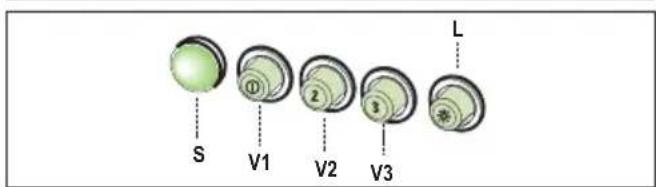
L Light Switches the lighting system on and off.
S Led Motor running led.
V1 Motor Switches the extractor motor on and off at low speed. Used to provide a continuous and silent air change in the presence of light cooking vapours.
V2 Speed Medium speed, suitable for most operating conditions given the optimum treated air flow/noise level ratio.
V3 Speed Maximum speed, used for eliminating the highest cooking vapour emission, including long periods.
Lighting
- For replacement contact technical support ("To purchase contact technical support").
W
W
W
Z
L Osvetlenie Zapína a vypína zariadenie osvetlenia.
S Svetelná kontrolka Svetelná kontrolka zapnutia motora.
Z usual,

L Žarnice Prižgite in ugasnite osvetljavo.
L Dritat Ndez e fik Impiantin e Ndriçimit.
- Филтери за маст морају да се чисте свака 2 месеца рада

Brand : ZANKER
Model : KHC92650XA
Category : Range hood