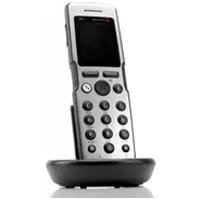
POLYCOM KIRK 5040 - Phone

KIRK 5040 - Phone POLYCOM - Free user manual and instructions

Find the device manual for free KIRK 5040 POLYCOM in PDF.

English EN Download 💬 AI Question 10 questions ⚙️ Specs
📄

Document temporarily unavailable

The manual is currently being transferred to our new server. It will be accessible again in a few hours. Thank you for your patience.

View the manual : Français FR Deutsch DE English EN Español ES Italiano IT
Pick your language and provide your email: we'll send you a specifically translated version.
Product Type DECT Phone
Brand Polycom
Model KIRK 5040
Dimensions 146 × 48 × 19 mm
Weight 110 g ± 10 g (with battery)
Battery Rechargeable Li-Ion, initial charge 14-16 h
Talk time 15 hours
Standby time 100 hours
Operating temperature 0 °C to 40 °C
Bluetooth Yes (5040 model only)
Speakerphone Yes, can be turned on/off during a call
Vibrator Yes, adjustable
Mute key Yes, allows muting the microphone
Call log Yes, accessible via navigation key
Phonebook Yes, add and search contacts
Speed dial Yes, keys 0 to 9 (programming required)
Call forwarding Yes, via R key
Keypad lock Yes, via menu
Display LCD screen with menus
Standards CE, EMC Class B, safety EN 60950
Care and cleaning Clean with a soft, dry cloth. Do not use abrasive products.
Safety Complies with European directives. Use only the supplied adapter.
Spare parts and repairability Removable battery, replaceable back cover.

Frequently Asked Questions - KIRK 5040 POLYCOM

How to install the battery of the KIRK 5040?
Press the back cover and slide it downwards on the handset. Lift the cover, insert the battery ensuring the label is readable, then close the cover until you hear a click.
How to turn the handset on or off?
To turn on, press the Programmable key. To turn off, press the left programmable key until you see 'Turn off?', then confirm by pressing Yes.
How to adjust the ring volume?
Go to Menu > Settings > Ring volume. Use the left/right navigation keys to adjust the volume, then press Change and Back.
How to activate the vibrator?
Go to Menu > Settings > Vibrator. Select On or Off with the Change key, then press Back.
How to add a contact to the phonebook?
Go to Menu > Phonebook > Add name/number. Enter the name (keys 2 to 9) then the number (max 24 digits) and press Save.
How to make a call using pre-dial?
First dial the number, then press the Answer key (green key) to initiate the call. To hang up, press the Hang up key (red key).
How to activate Bluetooth on the KIRK 5040?
Go to Menu > Settings > Bluetooth > Active > On. Confirm with Select. Bluetooth is then activated.
How to connect a Bluetooth headset?
Activate Bluetooth, then go to Menu > Settings > Bluetooth > Search. Select the headset from the list, enter the PIN code (see headset manual), then press Options > Connect.
How to lock the keypad?
Press Menu, then press the # key to lock. To unlock, press Unlock then *.
How to answer a call?
When the handset rings, press the Answer key (green key) to answer. To reject, press Reject. To mute, press Silence.

User questions about KIRK 5040 POLYCOM

0 question about this device. Answer the ones you know or ask your own.

Ask a new question about this device

The email remains private: it is only used to notify you if someone responds to your question.

No questions yet. Be the first to ask one.

Download the instructions for your Phone in PDF format for free! Find your manual KIRK 5040 - POLYCOM and take your electronic device back in hand. On this page are published all the documents necessary for the use of your device. KIRK 5040 by POLYCOM.

USER MANUAL KIRK 5040 POLYCOM

Manual assistant
Powered by Anthropic
Waiting for your message
Product information

Brand : POLYCOM

Model : KIRK 5040

Category : Phone