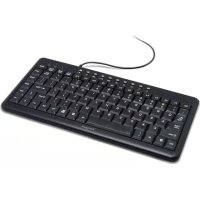
AKB05UK - Keyboard TARGUS - Free user manual and instructions
Find the device manual for free AKB05UK TARGUS in PDF.


| Product Type | Compact USB Keyboard |
| Brand | Targus |
| Model | AKB05UK |
| Interface | USB 1.1 or 2.0 |
| Dimensions (approx.) | 450 x 150 x 20 mm |
| Weight (approx.) | 500 g |
| Power | USB bus-powered |
| Compatible operating systems | Windows 2000, Windows XP, Windows Vista |
| Main features | Internet shortcut keys (back, forward, browser, email, sleep) and multimedia keys (play/pause, previous/next track, stop, volume +/-, mute) |
| Maintenance and cleaning | Disconnect the keyboard before cleaning. Use a soft, slightly damp cloth. Do not use solvents or abrasive products. |
| Safety | Do not expose to moisture or liquids. Avoid shocks. Do not open the device. |
| Spare parts and repairability | Standard keyboard without spare parts. In case of failure, replace the device. |
| Package contents | Compact USB keyboard, user manual |
Frequently Asked Questions - AKB05UK TARGUS
User questions about AKB05UK TARGUS
0 question about this device. Answer the ones you know or ask your own.
Ask a new question about this device
Download the instructions for your Keyboard in PDF format for free! Find your manual AKB05UK - TARGUS and take your electronic device back in hand. On this page are published all the documents necessary for the use of your device. AKB05UK by TARGUS.
USER MANUAL AKB05UK TARGUS
Visit our Website at www.targus.com/cmc
Features and specifications subject to change without notice.
2007 Tarus Group International, Inc. and Tarus Group (UK) Ltd.
AKB05EU/410-1224-C003A

C
Compact USB Keyboard

USERGUIDE
PMS Black 30%

PMS Black 100%
TARGUS COMPACT USB KEYBOARD
Introduction
Congratulations on your purchase of the Targus Compact USB Keyboard. This keyboard features the latest in keycap technology, which reduces the key travel distance to provide more comfort.
Package Contents
- Targus Compact USB Keyboard
- User Guide
System Requirements
Hardware
PC or notebook
- USB 1.1 or 2.0 interface
Operating System
- Windows®2000/XP
- Windows Vista™
Installing the Keyboard and Drivers
To connect the keyboard, plug the standard USB end into an available USB port on your PC or laptop.

NOTE: FOR WINDOWS VISTA, XP AND 2000, ALL KEYS WILL FUNCTION WITHOUT THE SOFTWARE DRIVER.
Internet Hot Keys
| Key | Function |
| ← | Backward |
| → | Forward |
| Internet Browser | |
| Sleep mode |
Media Hot Keys
| Key | Function |
| ▲/ll | Play/Pause |
| ▲ | Previous Track |
| ▲ | Next Track |
| ■ | Stop |
| ▷+ | Volume up |
| ▷- | Volume down |
| Mute |
TARGUS COMPACT
USB-TASTATUR
Einführung
pc of laptop
- USB 1.1 of 2.0 interface
Besturingsystem
- Windows® 2000/XP
- Windows Vista™

Brand : TARGUS
Model : AKB05UK
Category : Keyboard