Puma Form - Wristwatch

Form - Wristwatch Puma - Free user manual and instructions

Find the device manual for free Form Puma in PDF.

📄 47 pages English EN Download 💬 AI Question 11 questions ⚙️ Specs
Notice Puma Form - page 3
Pick your language and provide your email: we'll send you a specifically translated version.
Product type Digital sport watch
Brand Puma
Model Form
Power supply CR2016 button cell battery (replacement at authorized service center)
Modes Time (dual time zone), Chronograph, Data, Timer, Alarm
Main functions Dual time zone, chronograph with 9 lap times, timer (CD-S/CD-U/CD-R), dual daily alarm with chime, illumination, split time display
Buttons S1 (Start/Lap/+), S2 (Stop/Reset), S3 (Mode), S4 (Setting/Light)
Display Digital with icons (alarm, chime, time zone)
Maintenance Battery replacement by an authorized professional; clean with a soft, dry cloth
Repairability Replaceable battery; for any repairs, contact an authorized service center
General information Manual available in multiple languages; 47 pages; sports use

Frequently Asked Questions - Form Puma

How do I set the time on my Puma Form watch?
Press and hold S4 until the seconds flash. Use S1 to change the flashing digit and S2 to move to the next setting (hours, minutes, etc.). Press S3 or S4 to exit.
How do I switch between the two time zones?
In Time mode, press S2 until the T1 or T2 icon stops flashing. Then release the button to display the selected time zone.
How do I use the chronograph?
In CHRO mode, press S1 to start. Press S1 again to record a lap or split time. Press S2 to stop, then press S2 again to reset.
How do I view recorded times in Chrono mode?
Switch to Data mode (DATA) by pressing S3. Use S1 to scroll through laps (LAP) and S4 to display split times (SPL).
How do I set the timer?
In Tmr mode, press S4 until the digits flash. Use S1 to change the value and S2 to choose hours, minutes, then timer type (CD-S, CD-U, CD-R). Press S3 or S4 to exit.
What are the different timer types?
CD-S: simple countdown that stops at zero. CD-U: countdown then positive counting after zero. CD-R: repeated countdown up to 30 cycles.
How do I set the alarm?
In AL mode, press S2 to select alarm 1 or 2. Press S1 to activate/deactivate. To set the time, press S4 until the hours flash, then adjust with S1 and S2.
How do I change the watch battery?
When the display dims, replace the CR2016 battery. We recommend having this done at an authorized service center.
What do the icons on the screen mean?
Active alarm icon (bell), chime active (music note), T1/T2 for the displayed time zone. These icons help identify active settings.
How do I use the light?
Press S4 (Setting/Light button) to turn on the display light. The light duration is brief.

User questions about Form Puma

1 question about this device. Answer the ones you know or ask your own.

Ask a new question about this device

The email remains private: it is only used to notify you if someone responds to your question.

How to activate the hourly beep on the Puma Form watch?
Frequently Asked Questions - 12/06/2026
Response Notice-Facile

The Puma Form watch does not have an hourly beep function. However, this digital sports watch offers a dual daily alarm with an activatable chime, as well as sound signals on the timer.

The chime (sound signal) activates at the same time as the alarm. To use the available alarms:

  • Press S3 from any mode to access Alarm mode (AL)
  • Press S2 to select between Alarm 1 and Alarm 2
  • Press S1 to turn the selected alarm on or off (the chime automatically activates with the alarm)
  • Press and hold S4 to set the alarm time (the hour blinks, then the minutes)

You can set two independent alarms that will sound at the programmed time each day. A bell icon appears on the screen when an alarm is active. When triggered, the alarm emits a chime for about 20 seconds.

If you are looking for other sound signals, the watch also provides beeps on the timer: 5 beeps at 5 minutes before the countdown ends, 2 beeps at 2 minutes, 1 beep at 1 minute, and then a signal 10 seconds before the countdown reaches zero.

Respond (be the first)

Download the instructions for your Wristwatch in PDF format for free! Find your manual Form - Puma and take your electronic device back in hand. On this page are published all the documents necessary for the use of your device. Form by Puma.

USER MANUAL Form Puma

natural_image White Puma logo on red background, no text or symbols present

P.4 ENGLISH
P.12 ČESKY
P.20 HUNGARIAN
P.28 DEUTSCH
P.36 ESPAÑOL
P.44 PORTUGUÊS
P.52 ITALIANO
P.60 FRANÇAIS
P.68 DUTCH
P.76 中文
P.84 日本語

FASS200-250 SS12

APU00586

11/11-HW-20K

ENGLISH

This watch is a dual time sports watch with a unique count down timer. This watch also allows you to view your individual lap times for the duration of your exercise.

Push button Location:
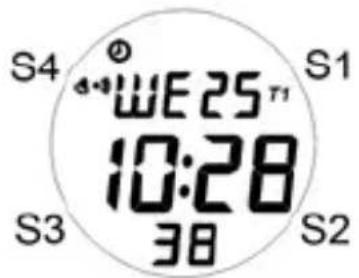
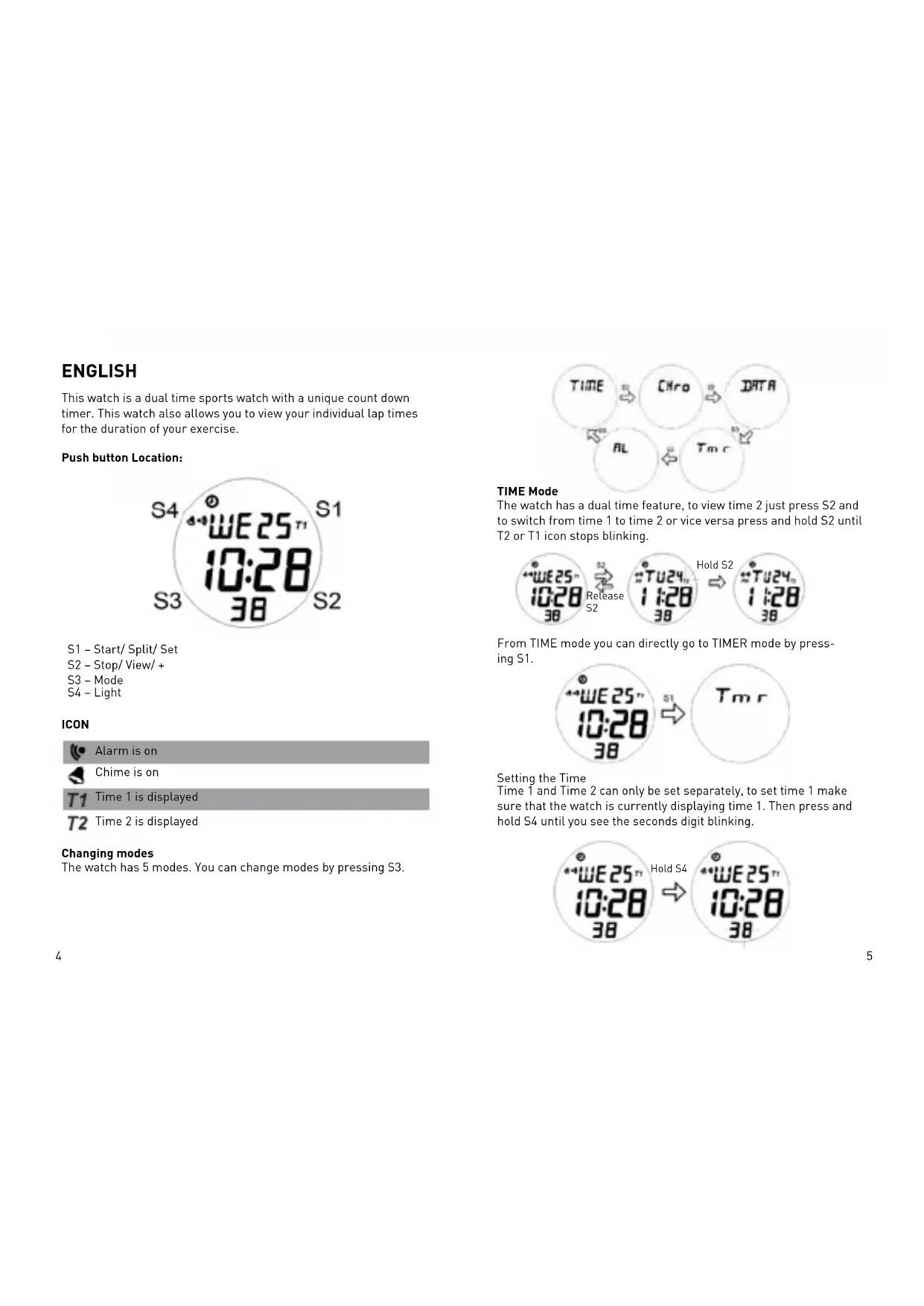
S4 WE25T1 10:28 38 S1 S3 S2

S1 - Start/ Split/ Set

S2 - Stop/ View/ +

S3 - Mode

S4 - Light

ICON

Puma Form - ICON - 1

Alarm is on

Puma Form - ICON - 2

Chime is on

Puma Form - ICON - 3

Time 1 is displayed

Puma Form - ICON - 4

Time 2 is displayed

Changing modes

The watch has 5 modes. You can change modes by pressing S3.
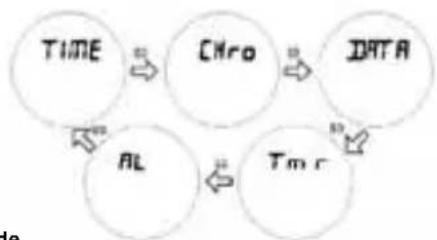
Puma Form - Changing modes - 1

flowchart
graph TD
    A["TIME"] --> B["CHro"]
    B --> C["DATA"]
    C --> D["AL"]
    D --> E["Tm r"]
    E --> A

TIME Mode

The watch has a dual time feature, to view time 2 just press S2 and to switch from time 1 to time 2 or vice versa press and hold S2 until T2 or T1 icon stops blinking.
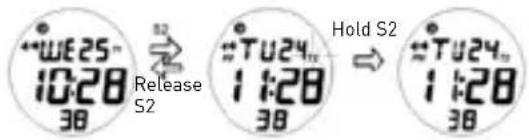
WE25 10:28 38 Release S2 #TU24 1:28 38 Hold S2 #TU24 1:28 38

From TIME mode you can directly go to TIMER mode by pressing S1.
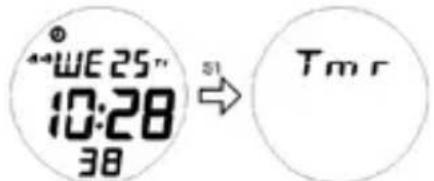
WE25" 10:28 38 → Tmr

Setting the Time

Time 1 and Time 2 can only be set separately, to set time 1 make sure that the watch is currently displaying time 1. Then press and hold S4 until you see the seconds digit blinking.
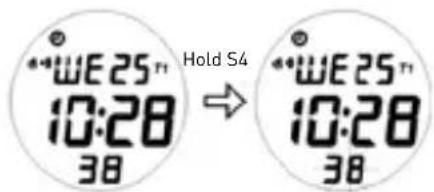
WE25" 10:28 38 Hold S4 WE25" 10:28 38

Press S1 to change the current value of the blinking digit.
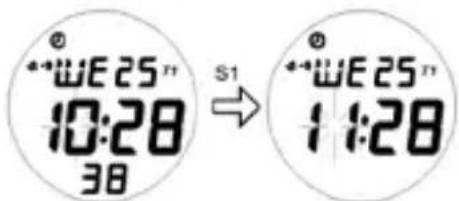
WE25" 10:28 38 S1 WE25" 11:28

Press S2 to move on to the next option and press S3 or S4 to exit time settings.
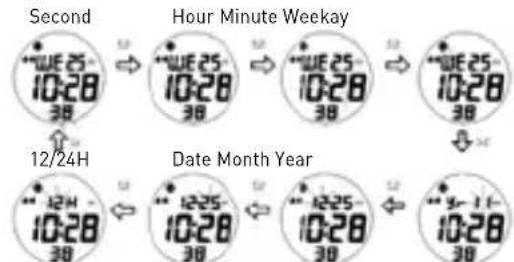
Second Hour Minute Weekday 12/24H Date Month Year

To set Time 2 just follow the same steps in setting Time 1 but this time make sure Time 2 is displayed on the watch.

CHRONO Mode

The Chrono mode for this watch can take up to 9 laps. The time for each lap can be viewed in DATA mode.

Press S1 to start the Chrono timer.
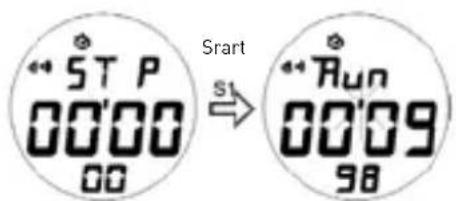
5T P 00'00 00 Sstart Run 00'09 98

Press S1 again to take a lap or split time.
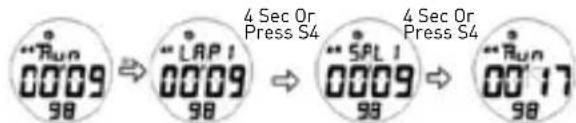
"Run 00'09 98" ⇒ "'LAP1' 00'09 98" ⇒ "'SPL1' 00'09 98" ⇒ "'Run' 00'17 98" 4 Sec Or Press S4 4 Sec Or Press S4

Press S2 to stop the Chrono timer. Press S2 again while Chrono timer isn't running to reset the timer.

Please take note, once timer has been reset all data for that run can no longer be viewed in DATA mode.

Run 00'17 98 ST P 00'17 98 ST P 00'00 00

DATA Mode

In this mode you can view the individual lap/ split time for you exercise as long as chrono timer has not been reset to zero.

To view the different laps, press S1.
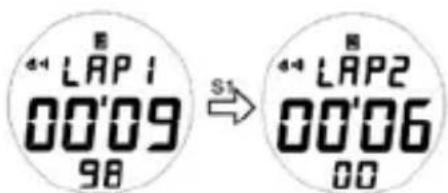
4.4 LAP1 00'09 98 S1 4.4 LAP2 00'06 00

To view the split time of the different laps, press S4 or wait for 4 seconds.
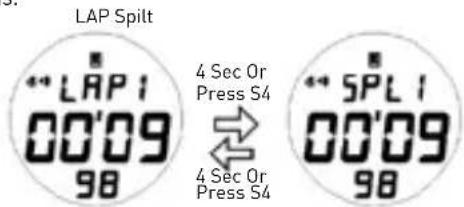
LAP Spilt ** LAP I 00'09 98 4 Sec Or Press S4 ↔ 4 Sec Or Press S4 ** SPL I 00'09 98

TIMER Mode

The watch has 3 types of timers in this mode CD-S (Count Down Stop), CD-U (Count Down Up) and CD-R (Count Down Repeat).
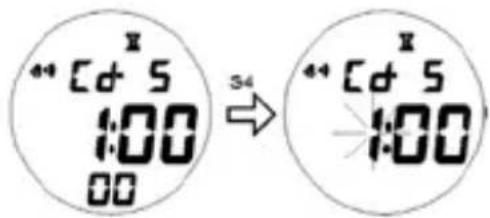
The watch has 3 types of timers in this mode CD-S (Count Down Stop), CD-U (Count Down Up) and CD-R (Count Down Repeat).

Cd 5 1:00 00 S4 Cd 5 1:00

Press S1 to change the value of the blinking digit.
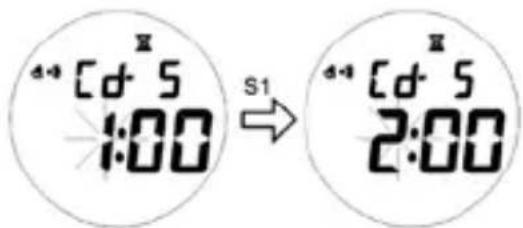
d-4 Cd-5 1:00 S1 d-4 Cd-5 2:00

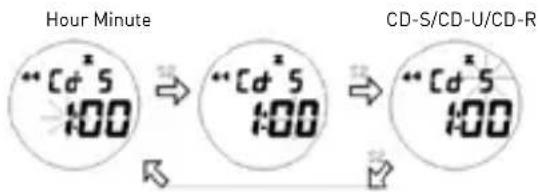
Press S2 to go to the next option.

Hour Minute **Cd*5 1:00 → **Cd*5 1:00 → **Cd*5 1:00 CD-S/CD-U/CD-R

Press S3 or S4 to exit timer settings.

The CD-S timer or count down stop timer function just like a regular count down timer, once it reaches zero, it stops. While the CD-U or count down up timer, counts down using the set count down time and then when it reaches zero will start to count up until timer is stopped or reaches 99:59'59. The CD-R or count down repeat will continually repeat the set count down time for 30 cycles or until timer is stopped.

All the 3 timers count down timers will start giving out a 5 beep alert sound at 5 minutes, 2 beeps at 2 minutes, 1 beep at 1 minute and a 10 seconds beep just before reaching zero.

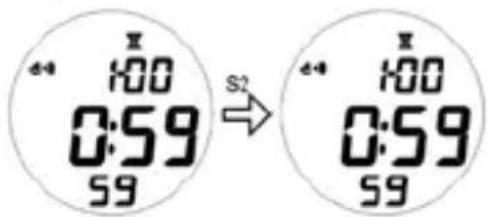
Press S1 to start the timer.
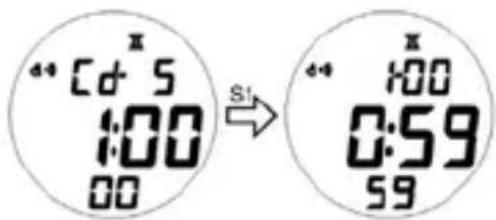
44 Cd 5 1:00 00 S1 44 1:00 0:59 59

Press S4 to view the type of timer selected.
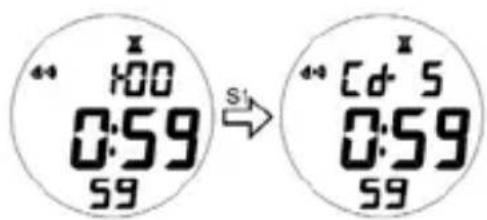
X 1:00 0:59 S1 X Cd 5 0:59 S9

Press S2 to stop the timer.

d-4 100 0:59 S9 S2 d-4 100 0:59 S9

Press S4 to reset timer to set value while timer is not running.
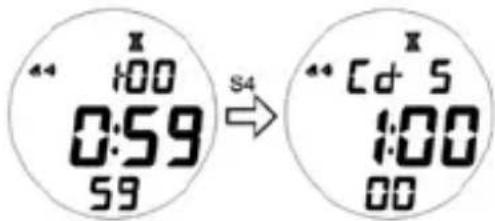
X 1:00 0:59 59 S4 X Cd 5 1:00 00

ALARM Mode

This watch has 2 daily alarms, which can be set for T1 or T2.

Press S2 to select Alarm 1 or 2.
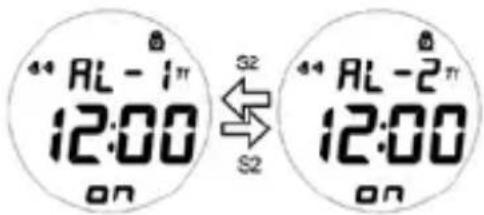
44 AL - 1" 12:00 ON S2 44 AL - 2" 12:00 ON

Press S1 to turn on or off the selected alarm or chime.
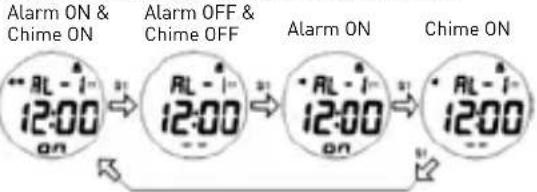
Alarm ON & Chime ON 12:00 AL - 1 12:00 Alarm OFF & Chime OFF AL - 1 12:00 AL - 1 12:00 Alarm ON Chime ON AL - 1 12:00

Press and hold S4 until the hour digits start to blink, to set the selected alarm.
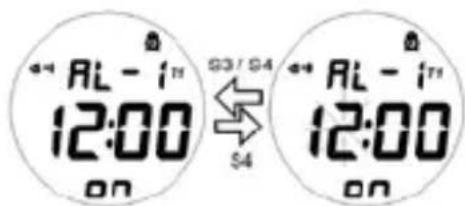
AL - 17 12:00 ON 3 /4 $4 AL - 17 12:00 ON

Press S1 to change the value of the blinking digit.
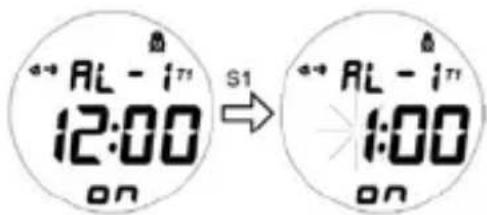
AL - 171 12:00 S1 AL - 171 1:00

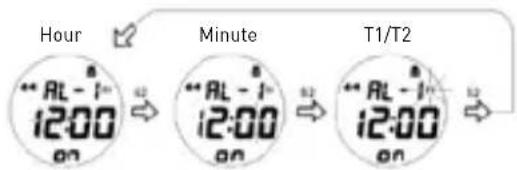
Press S2 to go to the next option.

Hour ** AL - 1 12:00 on Minute ** AL - 1 12:00 on T1/T2 ** AL - 1 12:00 on

Press S3 or S4 to exit alarm settings.

Battery Replacement:

If the display goes dim or goes totally blank, it is time to replace the battery. The user is recommended to go to authorized service center for correct battery replacement (CR2016).

Česky

ÉBRESZTŐÓRA üzemmód

Modo de ALARME

Manual assistant
Powered by Anthropic
Waiting for your message
Product information

Brand : Puma

Model : Form

Category : Wristwatch