Slide - Wristwatch Puma - Free user manual and instructions
Find the device manual for free Slide Puma in PDF.


| Brand | Puma |
| Model | Slide |
| Product Type | Watch |
| Display Type | Digital |
| Case Diameter | Approx. 45 mm |
| Case Thickness | Approx. 12 mm |
| Weight | Approx. 50 g |
| Power Source | Battery (CR2032 or similar) |
| Battery Life | Approx. 2 years |
| Water Resistance | 3 ATM (splash resistant) |
| Time Display | 12/24 hour format |
| Date Display | Day and date |
| Stopwatch | Yes |
| Alarm | Yes, with snooze |
| Backlight | LED |
| Band Material | Plastic or resin |
| Clasp Type | Buckle |
| Cleaning Instructions | Wipe with a soft, dry cloth |
| Battery Replacement | By authorized service center or qualified person |
| Warranty | 2 years (manufacturer warranty) |
Frequently Asked Questions - Slide Puma
User questions about Slide Puma
0 question about this device. Answer the ones you know or ask your own.
Ask a new question about this device
Download the instructions for your Wristwatch in PDF format for free! Find your manual Slide - Puma and take your electronic device back in hand. On this page are published all the documents necessary for the use of your device. Slide by Puma.
USER MANUAL Slide Puma
HOW TO DISPLAY CALENDAR

HOW TO SET NORMAL TIME HOW TO SET NORMAL TIME

flowchart
graph LR
    A["NORMAL TIME"] --> B["12:58 48"]
    B --> C["12:58 4E"]
    C --> D["12:58 4B"]
    D --> E["12:58 48"]
    E --> F["12:25"]
    F --> G["12:25"]
    G --> H["12:25"]
    H --> I["12"]
    I --> J["B"]
    J --> K["12"]
    K --> L["RESET SECONDS SET SECONDS"]
    L --> M["C C C"]
    M --> N["11 HOUR SET HOURS"]
    N --> O["11 MINUTES SET MINUTES"]
    O --> P["12:59 48"]
    P --> Q["12:59"]
    Q --> R["12:59 SET MONTHS"]
    R --> S["C C C"]
    S --> T["12:26 SET DATE"]
    T --> U["12:25 SET DAY OF THE WEEK"]
    U --> V["12:25 SET 12/24 FORMAT"]
    V --> W["HR"]
HOW TO SET ALARM TIME

flowchart
graph TD
    A["12:50 48 NORMAL TIME"] --> B["12:00 11 ALARM"]
    B --> C["32:00 11 ALARM TIME SETTING DISPLAY"]
    C --> D["+1 HOUR"]
    D --> E["SET MINUTES"]
    F["SECOND TIME ZONE ALARM"] --> G["1:01 12"]
    G --> H["+1 MINUTES"]
    I["NORMAL TIME AMARM"] --> J["1:01 12"]
    J --> K["+1 MINUTES"]
    L["HOLD FOR 2 SECONDS"] -.-> C
    M["A"] --> N["B"]
    N --> O["C"]
HOW TO SET ALARM AND CHIME DISPLAY

flowchart
graph TD
    A["NORMAL TIME"] --> B["X2 ALARM"]
    B --> C["ALARM ON"]
    C --> D["ALARM ON/CHIME ON"]
    B --> E["ALARM OFF/CHIME OFF"]
    C --> F["ALARM OFF/CHIME ON"]
    style A fill:#f9f,stroke:#333
    style B fill:#ccf,stroke:#333
    style C fill:#cfc,stroke:#333
    style D fill:#fcc,stroke:#333
    style E fill:#ffc,stroke:#333
    style F fill:#fcc,stroke:#333
HOW TO USE THE CHRONOGRAPH HOW TO USE THE CHRONOGRAPH

flowchart
graph LR
    A["NORMAL TIME CHRONOGRAPH"] --> B["5P 0°"]
    B --> C["START RUNNING"]
    C --> D["STOP"]
    D --> E["A RESET"]
    E --> F["NORMAL TIME"]

    subgraph Before 30 MINUTES
        G["5P 29.59 99°"] --> H["HOURS 1:29 SECONDS 17/00 SECONDS 17/00 SECONDS"]
    end

    subgraph After 30 MINUTES
        I["5P 1:29 SECONDS 59°"] --> J["MINUTES"]
    end

    G --> H
    I --> J
    H --> K["FIRST LAP READ"]
    J --> L["SECOND LAP COUNTING"]
    K --> M["SECOND LAP READ"]
    L --> N["LAST LAP COUNTING"]
    M --> O["LAST LAP READ"]
    N --> P["LAST LAP COUNTING"]
    O --> Q["LAST LAP READ"]
    P --> R["LAST LAP COUNTING"]
    Q --> S["LAST LAP READ"]
    R --> T["LAST LAP COUNTING"]
    S --> U["LAST LAP READ"]
    T --> V["LAST LAP COUNTING"]
    U --> W["LAST LAP READ"]
    V --> X["LAST LAP COUNTING"]
    W --> Y["LAST LAP READ"]
    X --> Z["LAST LAP COUNTING"]
    Y --> AA["LAST LAP READ"]
    Z --> AB["LAST LAP COUNTING"]
    AA --> AC["LAST LAP READ"]
    AB --> AD["LAST LAP COUNTING"]
    AC --> AE["LAST LAP READ"]
    AD --> AF["LAST LAP COUNTING"]
    AE --> AG["LAST LAP READ"]
    AF --> AH["LAST LAP COUNTING"]
    AG --> AI["LAST LAP READ"]
    AH --> AJ["LAST LAP COUNTING"]
    AI --> AK["LAST LAP READ"]
    AJ --> AL["LAST LAP COUNTING"]
    AK --> AM["LAST LAP READ"]
    AL --> AN["LAST LAP COUNTING"]
    AM --> AO["LAST LAP READ"]
    AN --> AP["LAST LAP COUNTING"]
    AO --> AQ["LAST LAP READ"]
    AP --> AR["LAST LAP COUNTING"]
    AQ --> AS["LAST LAP READ"]
    AR --> AT["LAST LAP COUNTING"]
    AS --> AU["LAST LAP READ"]
    AT --> AV["LAST LAP COUNTING"]
    AU --> AW["LAST LAP READ"]
    AV --> AX["LAST LAP COUNTING"]
    AW --> AY["LAST LAP READ"]
    AX --> AZ["LAST LAP COUNTING"]
    AY --> BA["LAST LAP READ"]
    AZ --> BB["LAST LAP COUNTING"]
HOW TO USE THE CHRONOGRAPH HOW TO USE THE CHRONOGRAPH

flowchart
graph LR
    A["NORMAL TIME 12:58 48"] --> B["X3 TIMER"]
    B --> C["SET HOURS"]
    C --> D["+1 HOUR"]
    D --> E["SET MINUTES +1 MINUTES SET SECONDS -1 SECONDS"]
    E --> F["START TIMER"]

    subgraph SET TIMER
        G["TR 0:00 00."]
        H["TR 0:00 00."]
        I["TR 1:00 00."]
        J["TR 1:00 00."]
        K["TR 1:00 00."]
        L["TR 1:00 00."]
    end

    subgraph BI-BI_BI
        M["TR 0:00 00."]
        N["TR 0:00 00."]
        O["TR 0:00 00."]
        P["TR 0:00 00."]
        Q["TR 1:00 00."]
        R["TR 1:00 00."]
    end

    subgraph BI_BI_BI
        S["TR 0:00 00."]
        T["TR 0:00 00."]
        U["TR 0:00 00."]
        V["TR 1:00 00."]
        W["TR 1:00 00."]
        X["TR 1:00 00."]
    end

    subgraph START_TIMER
        Y["TR 1:01 01."]
    end

    G --> H
    H --> I
    I --> J
    J --> K
    K --> L
    L --> M
    M --> N
    N --> O
    O --> P
    P --> Q
    Q --> R
    R --> S
    S --> T
    T --> U
    U --> V
    V --> W
    W --> X
HOW TO SET SECOND TIME ZONE HOW TO USE EL LIGHT
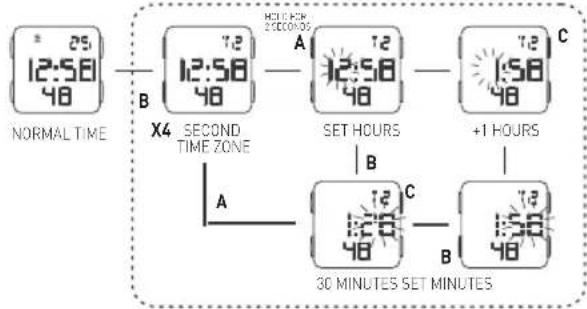
flowchart
graph TD
    A["NORMAL TIME"] --> B["X4 SECOND TIME ZONE"]
    B --> C["SET HOURS"]
    C --> D["+1 HOURS"]
    D --> E["30 MINUTES SET MINUTES"]
    style A fill:#f9f,stroke:#333
    style B fill:#ccf,stroke:#333
    style C fill:#cfc,stroke:#333
    style D fill:#fcc,stroke:#333
    style E fill:#ffc,stroke:#333

NOTE:
1. This watch features an electro-luminescent (EL) backlight, which tends to lose illuminating power after very long use.
2. The illumination provided by backlight mat hard to see under direct sunlight.
CARE OF YOUR WATCH
- This watch contains precise electronic components. Never attempt to open the case or remove the back cover.
- Do not operate buttons while underwater, or while swimming or diving.
- Should water or condensation appear in the watch, immediately have the watch checked. Water can corrode electronic parts inside the case.
- Avoid severe impact: The watch is designed to withstand impact under normal use. Do not subject it to severe impacts or rough usage, and do not drop it into hard surfaces.
- avoid exposing the watch to temperature extremes.
- Clean the watch with a soft cloth and clean water only. Avoid using chemicals, especially soap.
- Keep your watch away from strong electric fields and static electricity.
FEATURES AND SPECIFICATIONS
- Standard display mode: Hour, Minutes, Seconds, Monthm Day of the week.
- Function:
*Month, Date AM/PM and Electro-Luminescent light.
*Alarm function with buzzer signal output.
*Chronograph function with lap opertation.
*Hourly chime.
*12/24 hour format switch option.
*Timer. - cccuracy at normal temperature | 25°C: 30 seconds a month.
- Normal operating temperature range: 10^ C \~ 40^ C.
REGULAR DISPLAY AND BUTTON OPERATION
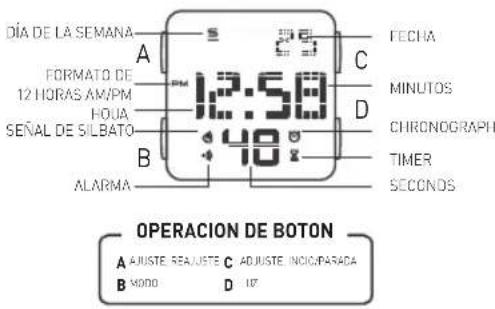
CERTIFICADO DE GARANTÍA
MODELO: ____
FECHA DE COMPRA: ____
SELLO OFICIAL DEL VENDEDOR:
flowchart
graph LR
    A["NORMALE TIJD 25"] --> B["X2"]
    B --> C["WEKKER AAN 12:00"]
    B --> D["WEKKER UIT/BEL AAN 12:00"]
    C --> E["WEKKER AAN 12:00"]
    D --> F["WEKKER UIT/BEL AAN 12:00"]
    G["B"] --> B
    H["B"] --> C
    I["C"] --> D
DE CHRONOMETER GEBRUIKEN DE CHRONOMETER GEBRUIKEN
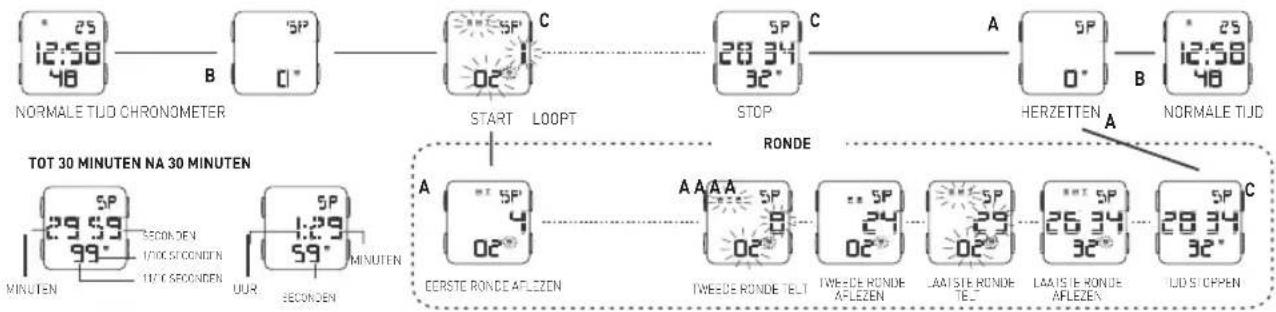
flowchart
graph LR
    A["12:58 48"] --> B["NORMALE TUD CHRONOMETER"]
    B --> C["START LOOPT"]
    C --> D["STOP"]
    D --> E["HERZETTEN"]
    E --> F["NORMALE TUD"]

    subgraph TOT 30 MINUTEN NA 30 MINUTEN
        G["MINUTEN"] --> H["SECOND DEN 1700S SECONDEN 1700 SECONDEN"]
        I["OUR"] --> J["SECOND DEN 1700 SECONDEN"]
        K["MINUTEN"] --> L["SECOND DEN 1700 SECONDEN"]
        M["SP 29.59 99°"] --> N["SECOND DEN 1700 SECONDEN"]
        O["SP 1.29 59°"] --> P["SECOND DEN 1700 SECONDEN"]
    end

    subgraph RONDE
        Q["A CEERSTE RONDE AFLEZEN"] --> R["AAAA SP 8"]
        S["A TWEEDE RONDE TELT"] --> T["SP 24 02°"]
        U["A TWIEEDE RONDE AFLEZEN"] --> V["SP 29"]
        W["A LAATIE RONDE TEL"] --> X["SP 26"]
        Y["A LAATIE RONDE AFLEZEN"] --> Z["SP 28"]
        AA["LID STOPPEN"] --> AB["SP 32°"]
    end
DE TIMER GEBRUIKEN DE TIMER GEBRUIKEN
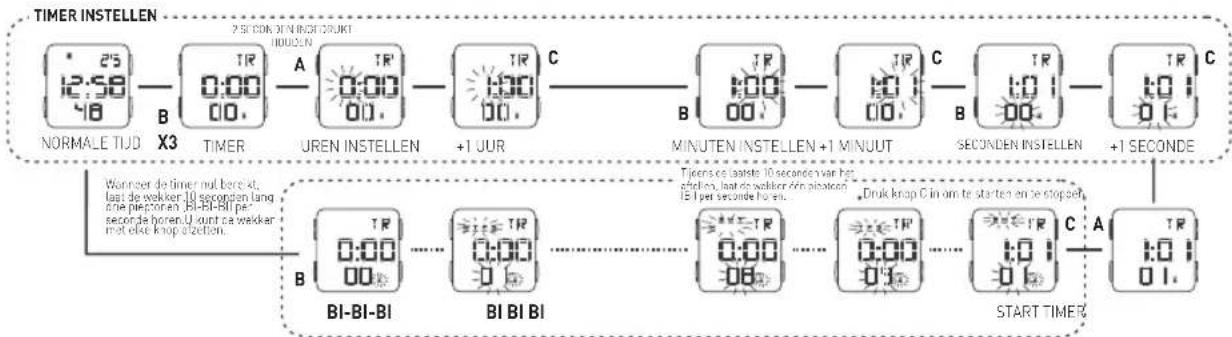
flowchart
graph LR
    A["NORMALE TUD X3"] --> B["TR 0:00 00."]
    B --> C["A UREN INSTELLEN"]
    C --> D["TR 1:00 00."]
    D --> E["C +1 JUR"]
    E --> F["B MINUTEN INSTELLEN +1 MINUUT"]
    F --> G["C SECONDEN INSTELLEN"]
    G --> H["B +1 SECONDE"]
    H --> I["C"]

    subgraph Timer instellen
        J["Wonner de timer mal berekt, last de waker 10 seconden lang oste piepoten BI-BI-BI per seconde horen. U want ca waker met else knop dizetten."]
    end

    subgraph BI-BI_BI
        J1["TR 0:00 00."]
        J2["TR 0:00 00."]
    end

    subgraph BI BI BI
        J3["TR 0:00 00."]
        J4["TR 0:00 00."]
    end

    subgraph START TIMER
        K["Tijens ce lasteer 10 seconde var het afzallen, laat de waker een plicemen 15 per seconde het en."]
        L["Druk knap C in om te starten en be stoppen"]
        M["TR 1:0 01."]
    end

    J --> J1
    J --> J2
    J --> J3
    J --> J4
    J --> J5
    J --> J6
    J --> J7
    J --> J8
    J --> J9
    J --> J10
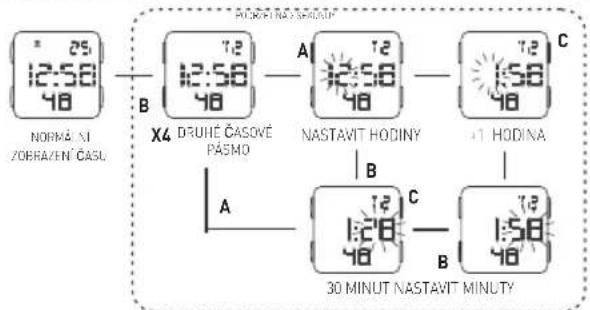
DE TWEEDE TIJDZONE INSTELLEN

flowchart
graph LR
    A["12:58/48"] --> B["X4 TWEEDE TIJDZONE"]
    B --> C["UREN INSTELLEN"]
    C --> D["+1 OUR"]
    D --> E["30 MINUTEN"]
    E --> F["MINUTEN INSTELLEN"]
    G["NORMALE TIJD"] --> H["B"]
    H --> I["A"]
    I --> J["C"]
    J --> K["B"]
    K --> L["150/48"]
ONDERHOUD VAN HET HORLOGE
NOTE:
1. This watch features an electro-luminescent (EL) backlight, which tends to lose illuminating power after very long use.
2. The illumination provided by backlight mat hard to see under direct sunlight.
CARE OF YOUR WATCH FEATURES AND SPECIFICATIONS
NOTE:
- This watch contains precise electronic components. Never attempt to open the case or remove the back cover.
- Do not operate buttons while underwater, or while swimming or diving.
- Should water or condensation appear in the watch, immediately have the watch checked. Water can corrode electronic parts inside the case.
- Avoid severe impact: The watch is designed to withstand impact under normal use. Do not subject it to severe impacts or rough usage, and do not drop it into hard surfaces.
- avoid exposing the watch to temperature extremes.
- Clean the watch with a soft cloth and clean water only. Avoid using chemicals, especially soap.
- Keep your watch away from strong electric fields and static electricity.
NOTE:
- Standard display mode: Hour, Minutes, Seconds, Monthm Day of the week.
- Function:
*Month, Date AM/PM and Electro-Luminescent light.
*Alarm function with buzzer signal output.
*Chronograph function with lap opertation.
*Hourly chime.
*12/24 hour format switch option.
*Timer. - ccuracy at normal temperature | 25°C: 30 seconds a month.
- Normal operating temperature range: 10°C \~ 40°C.
HUNGARIAN
NORMÁL KIJELZŐ ÉS GOMBHASZNÁLAT

GARANCIA
TÍPUS:
NASTAVENÍ ČASU ALARMU

flowchart
graph LR
    A["12:58 48"] --> B["ALARM"]
    B --> C["12:00 E1"]
    C --> D["ALARM"]
    D --> E["12:00 E1"]
    E --> F["+1 HODINA"]
    F --> G["ALARM"]
    G --> H["+1 MINUTA"]
    H --> I["ALARM DRUJEDHO CASOVÉHO PASMA"]
    I --> J["ALARM NORMÁLNÍHOS ZOBRAZENÍ CASU"]
    J --> K["+1 NASTAVÍT MINUTY"]
    K --> L["ALARM"]
    L --> M["+1 HODINA"]
    M --> N["ALARM"]
    N --> O["+1 MINUTA"]
POUŽITÍ ALARMU A HODINOVÉHO SIGNÁLU

flowchart
graph TD
    A["NORMÁL NÍ ZOBRAZENÍ CASU"] -->|B| B["X2 ALARM"]
    B --> C["ALARM ZAPNUTÝ"]
    C --> D["ALARM ZAPNUTÝ HODINOVÝ SIGNAL ZAPNUTÝ"]
    D --> E["ALARM VKNUTÝ HODINOVÝ SIGNAL VKNUTÝ"]
    E --> F["ALARM VKNUTÝ HODINOVÝ SIGNAL ZAPNUTÝ"]
    F --> G["ALARM ZAPNUTÝ HODINOVÝ SIGNAL ZAPNUTÝ"]
    G --> H["ALARM ZAPNUTÝ HODINOVÝ SIGNAL ZAPNUTÝ"]
    H --> I["ALARM ZAPNUTÝ HODINOVÝ SIGNAL ZAPNUTÝ"]
POUŽÍVÁNÍ STOPEK POUŽÍVÁNÍ STOPEK

flowchart
graph LR
    A["25/12:50/48"] --> B["STOPKY"]
    B --> C["SPUSTIT SPUST"]
    C --> D["ZASTAVIT"]
    D --> E["RESETOVAT"]
    E --> F["NORMÁLNÍ ZOBRAZENÍ CASU"]
    G["PŘED 30 MINUTAMI PO 30 MINUTÁCH"] --> H["MINJY SEKUNDY 100 SEKUND 70 SEKUND HODINY SEKUNDY MINUTY"]
    H --> I["HODNOTA PO PRVNÍM KOLE"]
    I --> J["A A A A MĚREŇI DRUHEHO KOLA"]
    J --> K["HODNOTA PO DRUHEM KOLE"]
    K --> L["MĚŘALNÍ POSLEDNÍHO KOLA"]
    L --> M["HODNOTA PO POSLEDNÍM KOLEC"]
    M --> N["ČAS ZASTAVENÍ"]
POUŽIVÁNÍ ODPOČTU ČASU
POUŽÍVÁNÍ ODPOČTU ČASU

flowchart
graph LR
    A["NASTAVIT ODPOČET CASU"] --> B["X3 ODPOČET CASU"]
    B --> C["NASTAVIT HODINY"]
    C --> D["+1 HODINA"]
    D --> E["NASTAVIT MINUTY +1 MINUTA"]
    E --> F["NASTAVIT SEKUNDY"]
    F --> G["+1 SEKUNDA"]

    subgraph Time_Steps
        H["0:00"] --> I["0:00"]
        J["0:00"] --> K["0:00"]
        L["0:00"] --> M["0:00"]
    end

    subgraph Conditions
        N["Tr = 25, 12:50, 48"] --> O["B"]
        P["Tr = 0.00, 0.00"] --> Q["A"]
        R["Tr = 0.00, 0.00"] --> S["C"]
        T["Tr = 1.00, 0.00"] --> U["B"]
        V["Tr = 3.00, 0.00"] --> W["D"]
        X["Tr = 6.00, 0.00"] --> Y["E"]
        Z["Tr = 9.00, 0.00"] --> AA["C"]
        AB["Tr = 12.00, 0.00"] --> AC["D"]
        AD["Tr = 15.00, 0.00"] --> AE["C"]
    end

    subgraph Time_Steps
        AF["Pí-Pí-Pí"] --> AG["Tr = 0.00, 0.00"]
        AH["Pí Pí Pí"] --> AI["Tr = 0.00, 0.00"]
        AJ["Pí Pí Pí"] --> AK["Tr = 1.00, 0.00"]
        AL["Pí Pí Pí"] --> AM["Tr = 3.00, 0.00"]
        AN["Pí Pí Pí"] --> AO["Tr = 6.00, 0.00"]
        AP["Pí Pí Pí"] --> AQ["Tr = 9.00, 0.00"]
        AR["Pí Pí Pí"] --> AS["Tr = 12.00, 0.00"]
    end

    subgraph Conditions
        AT["Úděřím podčelních 12 sekund odpěční učím při zámůu kády jedno přínut’říň za sekuňu"]
        AU["Síděřím a sceňit – siskuční účetka C"]
        AV["Síděřím a sceňit – siskuční účetka C"]
        AW["SPUSTIT"]
        AX["SPUSTIT"]
        AY["ODPOČET CASU"]
    end
NASTAVENÍ DRUHÉHO ČASOVÉHO PÁSMA POUŽÍVÁNÍ PODSVÍCENÍ



Brand : Puma
Model : Slide
Category : Wristwatch