USER MANUAL CV9605P BLACK & DECKER

English 5
Deutsch 9
Français 14
Italiano 19
Nederlands 24
Español 29
Português 34
Svenska 39
Norsk 43
Dansk 47
Suomi 51
Ελληνικα 55
Türkçe 60


natural_image
Illustration showing two hand positions: one of a device with internal components, the other of a tool or probe (no text or symbols present)


natural_image
Line drawing of a hand pouring granular material into a petri dish (no text or symbols)




ENGLISH
Intended use
Your Black & Decker Dustbuster® hand held vacuum cleaner has been designed for light dry vacuum cleaning purposes. This product is intended for household use only.
Safety instructions
◆Warning! When using battery-powered appliances, basic safety precautions, including the following, should always be followed to reduce the risk of fire, leaking batteries, personal injury and material damage.
◆Read this manual carefully before using the appliance.
◆The intended use is described in this manual. The use of any accessory or attachment or the performance of any operation with this appliance other than those recommended in this instruction manual may present a risk of personal injury.
◆Retain this manual for future reference.
Using your appliance
◆Do not use the appliance to pick up liquids or any materials that could catch fire.
◆Do not use the appliance near water. Do not immerse the appliance in water.
◆Never pull the charger lead to disconnect the charger from the socket. Keep the charger lead away from heat, oil and sharp edges.
After use
◆Unplug the charger before cleaning the charger or charging base.
When not in use, the appliance should be stored in a dry place. Children should not have access to stored appliances.
Inspection and repairs
Before use, check the appliance for damaged or defective parts. Check for breakage of parts, damage to switches and any other conditions that may affect its operation.
◆Do not use the appliance if any part is damaged or defective.
◆Have any damaged or defective parts repaired or replaced by an authorised repair agent.
◆Regularly check the charger lead for damage. Replace the charger if the lead is damaged or defective.
◆Never attempt to remove or replace any parts other than those specified in this manual.
Battery and charger
◆Never attempt to open the battery.
◆Do not expose the battery to water.
◆Do not incinerate the battery.
◆Do not expose the charger to water.
◆Do not open the charger.
Electrical safety
Your charger has been designed for a specific voltage. Always check that the mains voltage corresponds to the voltage on the rating plate. Never attempt to replace the charger unit with a regular mains plug.
Symbols on the charger

Your charger is double insulated; therefore no earth wire is required.

Fail safe isolating transformer. The mains supply is electrically separated from the transformer output.

The charger automatically shuts off if the ambient temperature becomes too high. As a consequence the charger will be inoperable. The unit must be disconnected from the mains supply and taken to an authorised service centre for repair.

The charger is intended for indoor use only.
Features
- On/off switch
- Two-speed on/off switch (CV1205)
ENGLISH
- Release button
- Dust bowl
- Charging base
- Filter cleaning wheel (CV9605/CV1205)
- Charging indicator
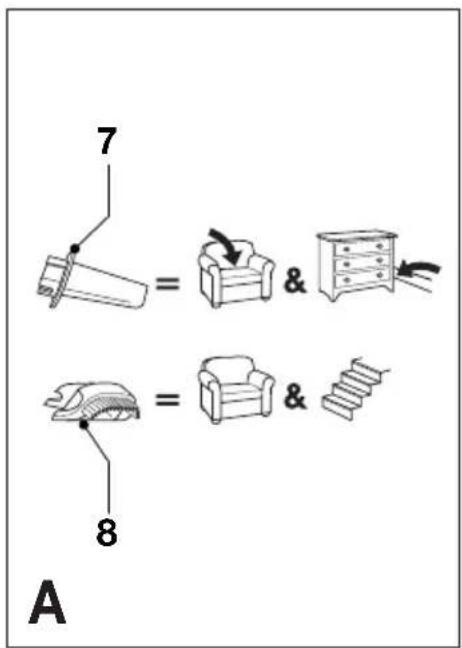
Fig. A
- Crevice tool
- Brush tool
Installation
Fitting the charging base to the wall (fig. B)
The charging base can be placed on a worktop or fitted to the wall to provide a convenient storage and charging point for the appliance.
Assembly
Fitting the accessories (fig. A & C)
These models are supplied with the following accessories:
- a crevice tool (7) for confined spaces
- a brush tool (8) for furniture and stairs
To fit an accessory, proceed as follows:
◆Take the accessories from the appliance.
◆Insert the appropriate accessory into the front of the appliance.
Use
◆Before first use, the battery must be charged for at least 16 hours.
◆Place the appliance on the charging base whenever it is not in use.
Charging the battery (fig. B)
◆Make sure that the appliance is switched off. The battery will not be charged with the on/off switch in the on position.
◆Place the appliance on the charging base as shown.
◆ Plug in the charger. Switch on at the mains.
The charging indicator (6) will be lit.
Leave the appliance to charge for at least 16 hours.
Whilst charging, the charger may become warm. This is normal and does not indicate a problem. The appliance can be left connected to the charger indefinitely. The charging indicator will be lit as long as the appliance is connected to the plugged-in charger.
Warning! Do not charge the battery at ambient temperatures below 4 °C or above 40 °C.
Switching on and off (fig. D)
◆To switch the appliance on, slide the on/off switch (1) forward.
◆To switch the appliance off, slide the on/off switch back.
CV9605/CV1205 - Optimising the suction force (fig. E)
In order to keep the suction force optimised, the filter must be cleared regularly during use.
◆Rotate the wheel (5) a few turns to shake out dust clogging the filter (9).
Cleaning and maintenance
Warning! Regularly clean the filters.
Cleaning the dust bowl and filters (fig. F - I)
The filters are re-usable and should be cleaned regularly.
◆Press the release button (2) and remove the dust bowl (3) (fig. F).
◆Empty the dust bowl (fig. G).
◆Remove the filters (9 & 10) by twisting them clockwise (fig. H).
◆Brush any loose dust off the filters.
◆Wash the filters in warm, soapy water (fig. I). The bowl can also be washed if necessary. Do not immerse the appliance in water (fig. J).
◆Make sure the dust bowl and filters are dry.
◆Refit the filters (9 & 10) onto the appliance, twisting them counterclockwise until they lock into place.
◆Refit the dust bowl onto the appliance. Make sure the dust bowl clicks into place.
ENGLISH
Warning! Never use the appliance without the filters. Optimum dust collection will only be achieved with clean filters and an empty dust bowl.
CV7205/CV9605/CV1205 - Cleaning the exhaust filter (fig. K)
◆Open the lid (11).
◆Remove the filter (12) from the recess.
◆Wash the filter in warm, soapy water.
◆Make sure the filter is dry.
◆Refit the filter (12).
◆Close the lid.
Replacing the filters
The filters should be replaced every 6 to 9 months and whenever worn or damaged. Replacement filters are available from your Black & Decker dealer (cat. no. VF45 for CV9605H; cat. no. VF40 for all other models).
◆Remove the old filters as described above.
◆Fit the new filters as described above.
Protecting the environment

Separate collection. This product must not be disposed of with normal household waste.
Should you find one day that your Black & Decker product needs replacement, or if it is of no further use to you, do not dispose of it with household waste. Make this product available for separate collection.

Separate collection of used products and packaging allows materials to be recycled and used again. Re-use of recycled materials helps prevent environmental pollution and reduces the demand for raw materials.
Local regulations may provide for separate collection of electrical products from the household, at municipal waste sites or by the retailer when you purchase a new product.
Black & Decker provides a facility for the collection and recycling of Black & Decker products once they have reached the end of their working life. To take advantage of this service please return your product to any authorised repair agent who will collect them on our behalf.
You can check the location of your nearest authorised repair agent by contacting your local Black & Decker office at the address indicated in this manual. Alternatively, a list of authorised Black & Decker repair agents and full details of our after-sales service and contacts are available on the Internet at:
www.2helpU.com
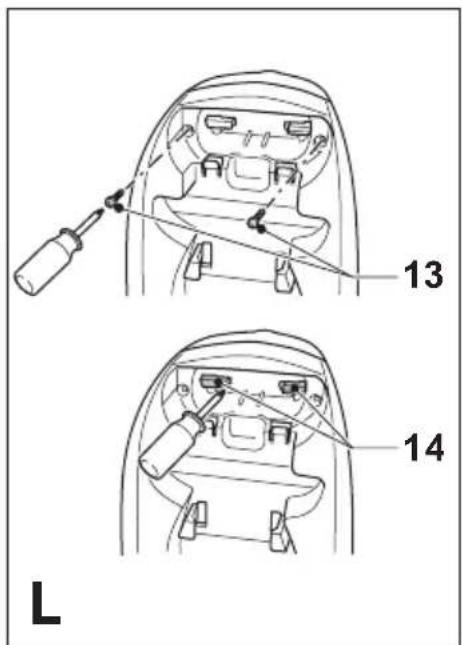
Battery (fig. L - N)

If you want to dispose of the product yourself, the battery must be removed as described below and disposed of in accordance with local regulations.
◆Preferably discharge the battery by operating the appliance until the motor stops.
The battery is located under the back end of the appliance.
◆Take the accessories from the appliance.
◆Remove the screws (13).
◆Unlock the tabs (14) holding the accessory holder in place.
◆Remove the accessory holder (15).
◆Remove the screws (16) holding the battery in place.
◆Slide the battery (17) backward as shown.
◆Remove the battery.
◆Place the battery in a suitable packaging to ensure that the terminals cannot be short-circuited.
◆Take the battery to your service agent or a local recycling station.
Warning! Once removed, the battery cannot be refitted.
Technical data
| V4805 V6005 |
| V4805Y |
| V4806 |
| V4807 |
Voltage V 4.8 6.0
Weight kg 0.9 1.0
CV7205 CV9605 CV1205
CV7205B CV9605G
CV9605H
CV9605P
Voltage V 7.2 9.6 12
Weight kg 1.1 1.3 1.4
Charger
Input voltage V AC 230
Approx. charging time h 16
V4805/VB4805Y/V4806/V4807/V6005/
CV7205/CV7205B/CV9605/CV9605G/
CV9605H/CV9605P/CV1205
Black & Decker declares that these products conform to:
89/336/EEC, 73/23/EEC, EN 55014,
EN 60335, EN 61000
Level of sound pressure, measured
according to EN 60704-1: < 70 dB(A)

Kevin Hewitt
Director of Consumer Engineering
Spennymoor, County Durham DL16 6JG,
United Kingdom
1-9-2005
Guarantee
Black & Decker is confident of the quality of its products and offers an outstanding guarantee. This guarantee statement is in addition to and in no way prejudices your statutory rights. The guarantee is valid within the territories of the Member States of the European Union and the European Free Trade Area.
If a Black & Decker product becomes defective due to faulty materials, workmanship or lack of conformity, within 24 months from the date of purchase, Black & Decker guarantees to replace defective parts, repair products subjected to fair wear and tear or replace such products to ensure minimum inconvenience to the customer unless:
◆The product has been used for trade, professional or hire purposes;
◆The product has been subjected to misuse or neglect;
◆The product has sustained damage through foreign objects, substances or accidents;
◆Repairs have been attempted by persons other than authorised repair agents or Black & Decker service staff.
To claim on the guarantee, you will need to submit proof of purchase to the seller or an authorised repair agent. You can check the location of your nearest authorised repair agent by contacting your local Black & Decker office at the address indicated in this manual. Alternatively, a list of authorised Black & Decker repair agents and full details of our after-sales service and contacts are available on the Internet at:
www.2helpU.com
Please visit our website
www.blackanddecker.co.uk to
register your new Black & Decker product and to be kept up to date on new products and special offers.
Further information on the Black & Decker brand and our range of products is available at
www.blackanddecker.co.uk
CV7205/CV7205B/CV9605/CV9605G/CV9605H/CV9605P/CV1205
Director of Consumer Engineering
CV7205/CV7205B/CV9605/CV9605G/
CV9605H/CV9605P/CV1205
CV7205/CV7205B/CV9605/CV9605G/
CV9605H/CV9605P/CV1205
89/336/CEE, 73/23/CEE, EN 55014,
EN 60335, EN 61000
CV7205/CV7205B/CV9605/CV9605G/
CV9605H/CV9605P/CV1205
Director of Consumer Engineering
CV7205/CV7205B/CV9605/CV9605G/CV9605H/CV9605P/CV1205
CV7205/CV7205B/CV9605/CV9605G/CV9605H/CV9605P/CV1205
Director de Engenharia do Consumo
Spennymoor, County Durham DL16 6JG,
Reino Unido
1-9-2005
Garantia
CV7205/CV7205B/CV9605/CV9605G/
CV9605H/CV9605P/CV1205
Director of Consumer Engineering
Spennymoor, County Durham DL16 6JG,
Storbrittannien
1-9-2005
Reservdelar / reparationer
CV7205/CV7205B/CV9605/CV9605G/
CV9605H/CV9605P/CV1205
89/336/EØF, 73/23/EØF, EN 55014,
EN 60335, EN 61000
Spennymoor, County Durham DL16 6JG,
Storbritannia
1-9-2005
V4805/VB4805Y/V4806/V4807/V6005/CV7205/CV7205B/CV9605/CV9605G/CV9605H/CV9605P/CV1205
Director of Consumer Engineering
Spennymoor, County Durham DL16 6JG,
Storbritannien
1-9-2005
Reservedele / reparationer
CV7205/CV7205B/CV9605/CV9605G/
CV9605H/CV9605P/CV1205
Director of Consumer Engineering
Spennymoor, County Durham DL16 6JG,
Iso-Britannia
1-9-2005
CV7205/CV7205B/CV9605/CV9605G/
CV9605H/CV9605P/CV1205
CV7205/CV7205B/CV9605/CV9605G/CV9605H/CV9605P/CV1205
Director of Consumer Engineering
Spennymoor, County Durham DL16 6JG,
Ingiltere
1-9-2005
Garanti
The image contains a single, solid horizontal line, which is a stylistic or background element (like a rule line on paper). According to Rule 2, such lines must be ignored by the OCR result. Therefore, the corrected OCR text is: [Empty]
◆ Data protection act: Tick the box if you prefer not to receive further information. ◆ Bitte
ankreuzen, falls Sie keine weiteren Informationen erhalten möchten. ◆ Si vous ne souhaitez pas
recevoir d'informations, cochez cette case. ♦ Barrate la casella se non desiderate ricevere
informazioni.
◆ A.u.b. dit vakje aankruisen indien u geen
informatie wenst te ontvangen.
◆ Señale en la casilla sino quiere recibir
información. ◆ Por favor, assinale com uma cruz se não desejar receber informação. ◆ Vänligen kryssa för i rutan om Ni inte vill ha information.
◆ Vennligst kryss av dersom du ikke ønsker informasjon. ◆ Venligst sæt kryds i ruden såfremt De ikke måtte ønske at modtage information.
◆ Merkitkää rasti ruutuun, mikäli ette halua vastaanottaa informaatiota.
◆ Παρακαλείστε να σημειώσετε εάν δεν θέλετε να πάρετε πληροφορίες.