
Z350 Fazer - Effect machine Antari - Free user manual and instructions
Find the device manual for free Z350 Fazer Antari in PDF.
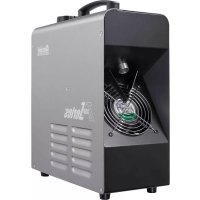


| Product Type | Fog Machine |
| Brand | Antari |
| Model | Z350 Fazer |
| Power Supply | AC 100-120V / 220-240V, 50/60 Hz |
| Power Consumption | 730 W |
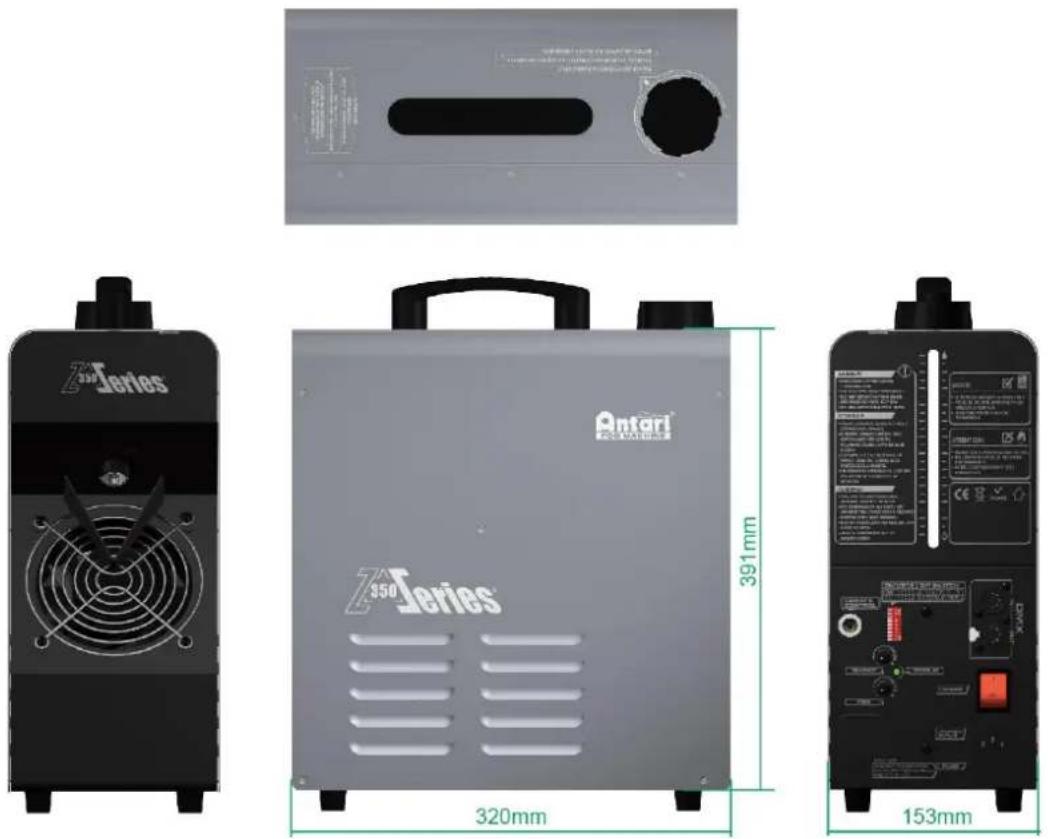
| Dimensions (L x W x H) | 320 x 153 x 391 mm |
| Weight | 8.5 kg |
| Heat-up Time | Approximately 4 minutes |
| Max Output Volume | 85 m³/min (3000 ft³/min) |
| Control | Manual, DMX512 (2 channels), optional wired remote control |
| Tank Capacity | 1.3 L |
| Fluid Consumption | 3 ml/min |
| Max Run Time | 7 hours at maximum output |
| Compatible Fluid | Antari FLG Heavy Fog Fluid |
| Fuse | T8A 250V (110-120V) / T4A 250V (220-240V) |
| Maintenance | Clean the vents with compressed air or a soft brush; purge with distilled water before storage |
| Safety | Safety distance 50 cm; use only water-based fluid; do not block ventilation |
| Included Accessories | Power cord, user manual |
| Optional Accessories | Z-3 remote control, FX-4 flight case |
Frequently Asked Questions - Z350 Fazer Antari
User questions about Z350 Fazer Antari
0 question about this device. Answer the ones you know or ask your own.
Ask a new question about this device
Download the instructions for your Effect machine in PDF format for free! Find your manual Z350 Fazer - Antari and take your electronic device back in hand. On this page are published all the documents necessary for the use of your device. Z350 Fazer by Antari.
USER MANUAL Z350 Fazer Antari
Please read the following safety information carefully before operating the machine. Information includes important safety information about installation, usage, and maintenance. Pay attention to all warning labels and instructions in this manual and printed on the machine.
If you have questions about how to operate the machine safely, please contact your local Antari dealer for help.
- Keep this device dry. • Always connect to a grounded circuit to avoid risk of electrocution.
- Before connecting the machine to power, always check the voltage indicated on the machine matches to your local AC voltage. Do not use the machine if the AC power voltage does not match.
- Disconnect the machine from AC power before servicing and when not in use.
- This product is for indoor use only! Do not expose to rain or moisture. If fluid is spilled, disconnect AC power and clean with a damp cloth. If fluid is spilled onto electronic parts, immediately unplug the machine and contact your local Antari dealer for advice.
- No user serviceable and modifiable parts inside. Never try to repair this product, unauthorized technician may lead the machine to damage or malfunction. • For adult use only. Never leave the machine running unattended. • Install in a well ventilated area. Provide at least 50 cm of space around the machine.
- Never add flammable liquid of any kind to the machine. • Make sure there are no flammable materials close to the machine while operating. • Only use Antari fluid. Other fluid may lead to heater clog and malfunction.
- If the machine fails to work, unplug the machine and stop operation immediately. Contact your local Antari dealer for advice.
• Before transporting the machine, make sure the fluid tank is completely drained. - Smoke fluid may present health risks if swallowed. Do not drink smoke fluid. Store it securely. In case of eye contact or if fluid is swallowed immediately seek medical advice.
Unpacking and Inspection
Immediately upon receiving the machine, carefully unpack the carton, check all content to ensure that all parts are present and have been received in good condition. If any parts appear damaged or mishandled from shipping, notify the shipper immediately and retain the packing material for inspection.
What is included: 1 x Z-350 Fazer
1 x Power Cord
1 x User Manual
Product Dimension
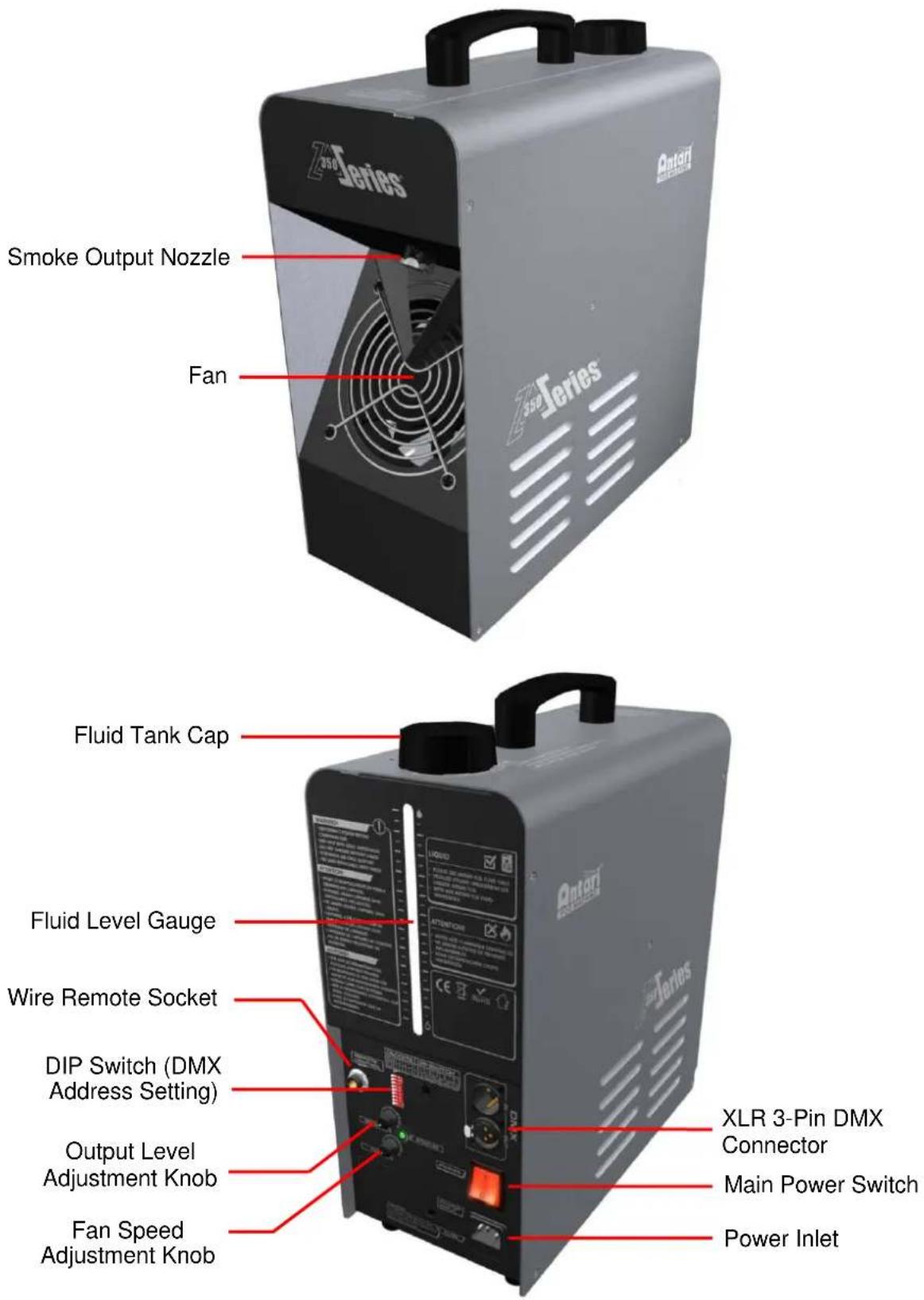
Product Overview
Setting Up
Step 1: Place the machine on a flat surface and in a suitably large area with at least 50 cm of open space around the machine.
Step 2: Fill the fluid tank with Antari approved fluid.
Step 3: Connect the machine to a suitably rated power supply. To determine the power requirement for the machine, refer to the label on the back of the machine.

Always connect the machine to a protected circuit and ensure it is properly grounded to avoid risk of electrocution.
Step 4: Turn on the machine and allow it to heat up. Heat up takes approximately 4 minutes. Once the machine has reached operating temperature, the status LED will light "Solid Green". Now the machine is ready for operation.
Step 5: To start making haze, locate the SMOKE rotary knob on the back side of the machine, and simply turn it clockwise to start.
Step 6: To turn off the machine, put the power switch to the OFF position.
Operation
Control Panel Operation
The machine can be operated with the two rotary knobs located on the rear.
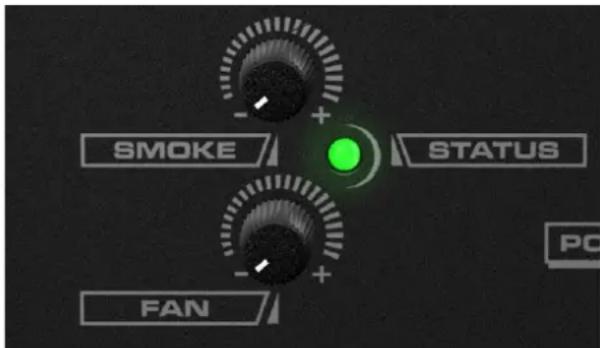
| Rotary Knob | Function |
| SMOKE | Turn haze on/off, adjust output volume from 0~100% |
| FAN | Adjust fan speed from 20%~100% |
Remote Control Operation (Optional)
To operate the machine by remote control, connect the remote to the microphone jack located on the rear of the machine. Use the switch to turn haze on/off, and use the rotary knob to adjust the output volume from 0 to 100%.
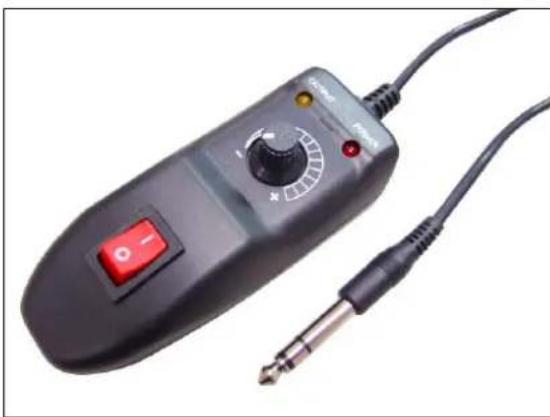
DMX Connector Pin Assignment
The machine provides a 3 or 5 pin XLR connector for DMX connection. The diagram below indicates pin assignment information.
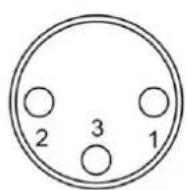
3 Pin XLR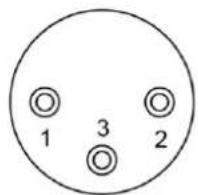

5 Pin XLR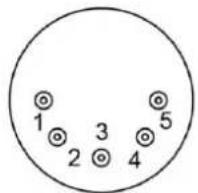
| Pin | Function |
| 1 | Ground |
| 2 | Data- |
| 3 | Data+ |
| 4 | N/A |
| 5 | N/A |
DMX Operation
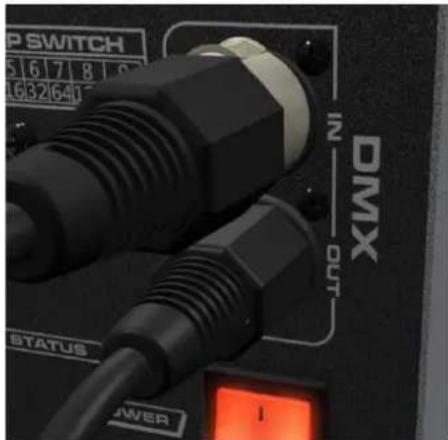
Making the DMX Connection – Connect the machine to a DMX controller or to one of the machines in the DMX chain. The machine uses a 3-pin XLR connector for DMX connection, the connector is located on the rear of the machine.
Address Setup – Use the DIP switch located on the rear of the machine to set the DMX address. The machine occupies 2 control channels. The starting address is defined as the first channel from which the machine will respond to the controller. Always double check to make sure there are no overlapping channels in order to control the machine correctly.
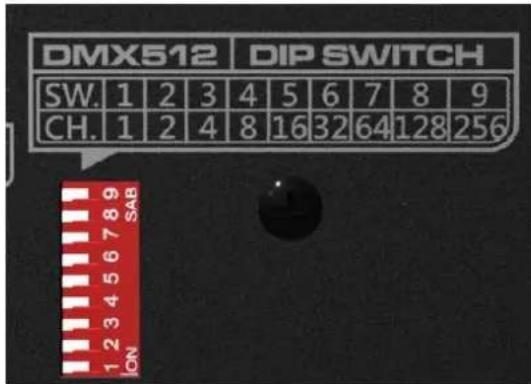
DMX Channel Function
| Channel 1 | DMX Value Range | Function |
| Haze Output Level | 0 – 4 | Haze Off |
| 5 – 255 | Haze Output 1 – 100% | |
| Channel 2 | DMX Value Range | Function |
| Fan Output Level | 0 – 4 | Fan 20% |
| 5 – 255 | Fan 21 – 100% | |
Fluid
Only use Antari FLG water-based liquid for the Z-350 Fazer. The machine is tested and calibrated with this liquid to get the best output performance. Warranty will be voided if any other type of liquid is used, improper use of liquid may lead to machine failure and malfunction.
Service and Maintenance
- Do not allow the machine to become contaminated.
- Remove dust from air vents with an air compressor, vacuum or a soft brush.
- Only use a damp cloth to clean the casing.
- Before storing run distilled water through the system to help avoid condensing the pump or heater.
- It is recommended to run the machine on a monthly basis in order to achieve best performance and output condition. Excessive dust, liquid and dirt built up will degrade performance and cause overheating.
Fuse Replacing

Disconnect AC power before replacing fuse. Only replace fuse with same type and rating.
Step 1: Disconnect power cord from supply.
Step 2: Use a flat-head screwdriver to release fuse holder.
Step 3: Replace fuse with exact same type and rating as indicated below.
Step 4: Reinsert fuse holder.
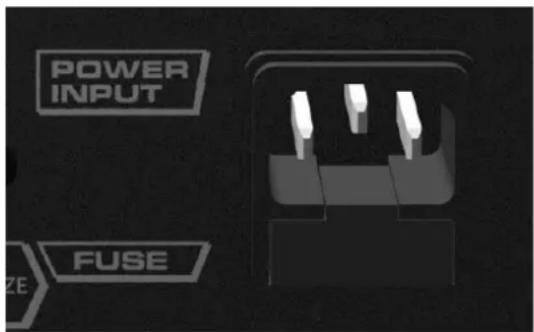
Fuse
100V = T6.3A 250V
110 - 120V = T7A 250V
220 - 240V = T4A 250V
Status Messages
| Status LED | Indication |
| Flashing Green | Machine is heating up |
| Flashing Green (3 seconds) | Self Cleaning |
| Solid Green | Machine ready for operation |
| Flashing Amber | Producing haze |
| Solid Amber | DMX signal received |
| Solid Red | Heater is overheating, machine can not be operated |
| Flashing Red | Liquid detected backflow to air pump |
| Flashing Red/Green | Machine cannot heat up |
Technical Specifications
| - Input voltage | AC 100-120V, 50 / 60Hz 6.3A |
| AC 220-240V, 50 / 60Hz 3.15A | |
| - Rated power | 730W |
| - Warm-up time | 4.5 minutes (approx.) |
| - Fluid consumption | 3 ml/min |
| - Fluid tank capacity | 1.3l (0.34gal) |
| - Compatible fluid | Antari FLG Heavy Fog Fluid |
| - Operating time | 7 hrs at max. output |
| - Ambient temp. range | 0 °C - 40 °C (32 °F-104 °F) |
| - Output | 3000 ft 3 /min (85 m 3 /min) |
| - Control | DMX512, Manual, |
| - DMX channels | 2 channels |
- Connection IEC (Power)
- Optional accessories XLR 3-pin (DMX) Z-3 Cable Remote FX-4 Flightcase
- Dimensions L320 W153 H391 mm (L12.60 W6.02 H15.39 inch)
- Weight 8.5 kg (18.74 lbs)
350 Series®
User Manual
Safety Notices

DMX Connection Setup
DMX Connection Pin Assignment Description
For current product information visit Antari at: www.antari.com For information requests please contact us at: sales@antari.com


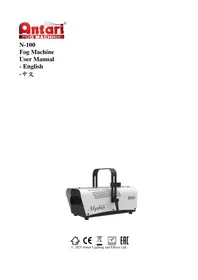
- UNPACKING AND INSPECTION
- PRODUCT DIMENSION
- PRODUCT OVERVIEW
- SETTING UP
- OPERATION
- CONTROL PANEL OPERATION
- REMOTE CONTROL OPERATION (OPTIONAL)
- DMX CONNECTOR PIN ASSIGNMENT
- DMX OPERATION
- FLUID
- SERVICE AND MAINTENANCE
- FUSE REPLACING
- FUSE
- SERIES®
- USER MANUAL
- SAFETY NOTICES
- DMX CONNECTION SETUP
- DMX CONNECTION PIN ASSIGNMENT DESCRIPTION
Brand : Antari
Model : Z350 Fazer
Category : Effect machine